
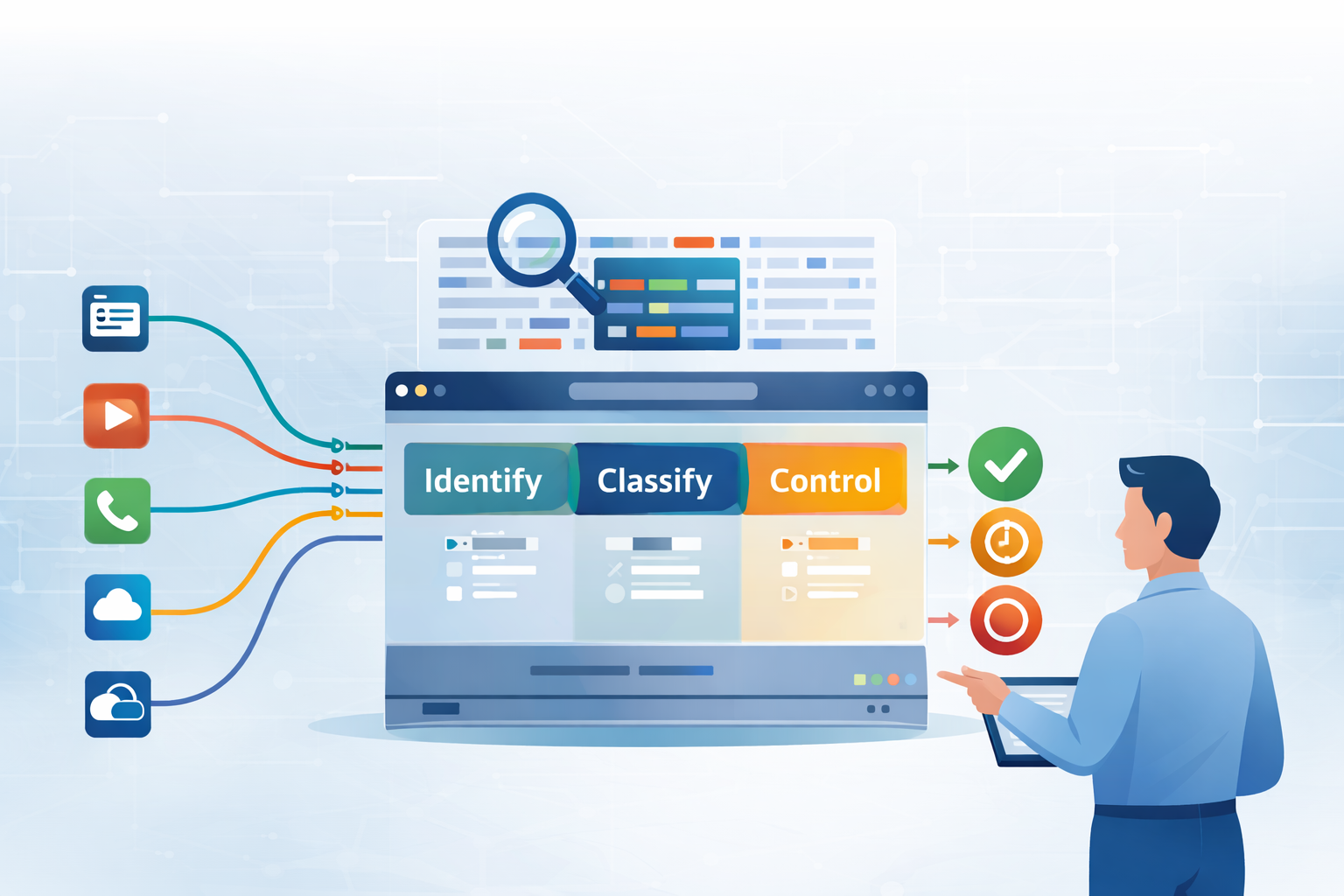
Deep Packet Inspection (DPI) for application identification lets you see what’s really happening inside your network traffic, beyond ports and simple headers.
Traditional firewalls still matter, but applications now jump ports, hide inside TLS, and ride on top of “safe” protocols like HTTPS or DNS.
So instead of just checking who’s at the door, DPI is like checking what they’re carrying, what they’re saying, and what they’re actually trying to do.
It inspects packet payloads, context, and behavior so you can identify, allow, or block apps with precision. Keep reading to see how this works and why it’s become essential.
Key Takeaways
- DPI identifies applications by analyzing the actual content of data packets, not just their headers.
- It enables precise control policies, from blocking threats to prioritizing critical business traffic.
- This technology is a cornerstone of zero-trust security, providing visibility into even encrypted flows.
The Shortcomings of Shallow Inspection
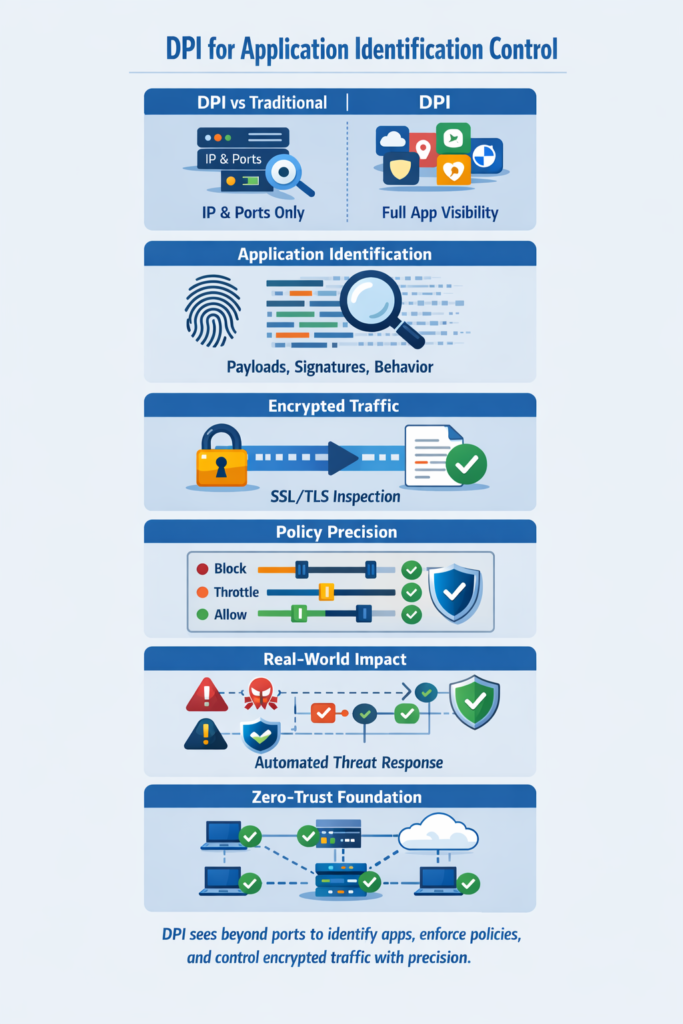
The older style of network control felt almost comforting. You opened port 80 for web traffic, port 21 for FTP, maybe a few more for mail or DNS, and everything had its place. Each service had its own door, clearly labeled, easy to track. Then the way applications behaved changed.
Modern apps stopped respecting those neat boundaries. They started to use whatever door was already open. A video streaming service might ride on port 80, right alongside your public website [1].
A file-sharing tool might slide its packets through an HTTPS session, where everything looks encrypted and “normal” on port 443. A traditional, header-only firewall will see:
- IP addresses
- Port numbers
- Basic protocol information
But it will miss what matters:
- Which application is actually generating the traffic
- Whether that application matches your policies
- Whether that traffic is risky, or just ordinary business use
So the firewall isn’t really protecting based on behavior. It’s guarding doorways, while the real activity happens out of sight. The traffic passes, but its purpose stays hidden.
That’s the gap deep packet inspection is meant to close. Instead of stopping at the outer wrapper, DPI looks at the contents of the communication itself, the equivalent of reading the letter, not just checking the address on the envelope.
It brings back context, intent, and identity, where shallow inspection only sees a stream of packets moving through numbered doors.
| Aspect | Traditional Port-Based Inspection | DPI for Application Identification Control |
| Traffic visibility | Limited to IP addresses and ports | Full application layer visibility |
| Application awareness | Cannot reliably identify applications | Accurately identifies applications regardless of port |
| Encrypted traffic handling | Sees encrypted tunnels only | Uses SSL inspection and behavioral analysis |
| Policy precision | Coarse and protocol-based | Fine-grained, application-aware control |
| Risk detection | Misses disguised or tunneled apps | Detects risky behavior and hidden applications |
What Deep Packet Inspection Actually Does
Credits: Waqas Tech Videos
Deep Packet Inspection primarily at Layers 4-7 (transport to application). This is where the actual content of communication lives, the HTTP requests for a specific website, the commands in a VoIP call, the data pattern of a video stream.
A DPI engine doesn’t just note that a packet is going to a certain IP on port 443. It decodes the packet’s payload, looking for specific signatures and behavioral patterns that uniquely identify an application.
This is how it can tell the difference between a legitimate Salesforce session and unauthorized Dropbox upload happening over the same encrypted channel. This capability is the essence of deep packet inspection technology that elevates network security beyond basic port analysis.
The process is methodical. It involves comparing the packet’s contents against a massive database of known application signatures. Think of it as a barcode scanner for network traffic.
- Signature matching for common services like Microsoft Teams or Netflix.
- Heuristic analysis to spot anomalies in traffic flow.
- Behavioral profiling to identify suspicious patterns.
- SSL/TLS inspection to analyze encrypted traffic after decryption.
This ability to peer into the substance of the traffic is what grants administrators real control. You’re no longer managing doors, you’re managing behaviors.
The Mechanics of Identification
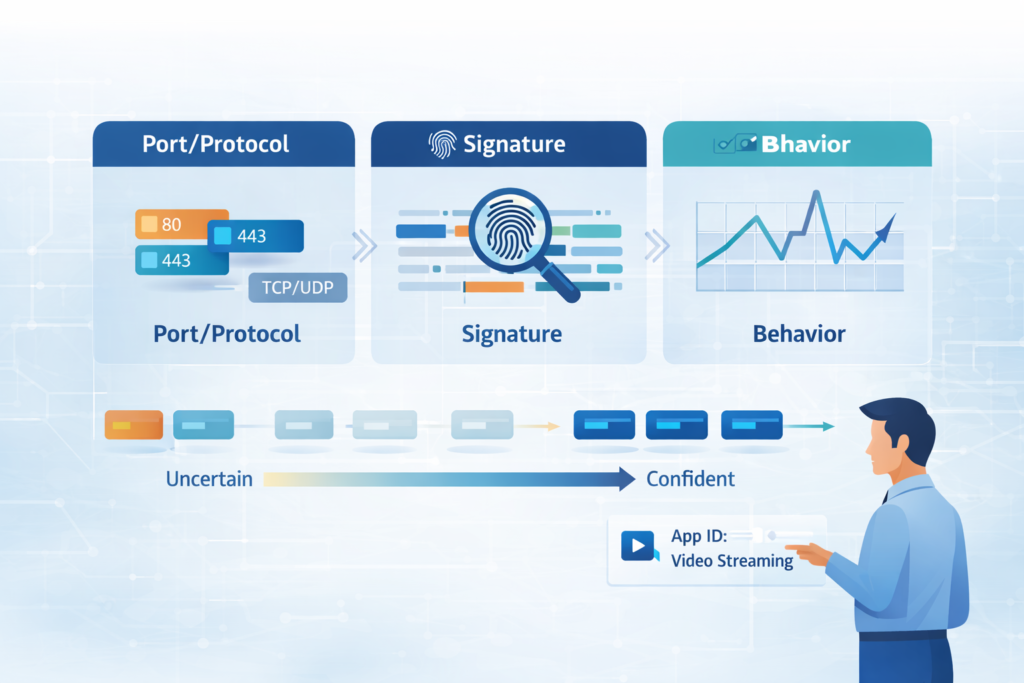
The first step is always that signature matching often starts with” before “signature matching. Every application, in its communication, leaves a unique fingerprint.
It might be a specific string of text in an HTTP header, a particular sequence of packets at the start of a session, or a known protocol handshake [2].
The DPI system maintains a library of these fingerprints. When a data packet arrives, the engine scans its payload for a match. If it finds one, it can immediately classify the traffic.
This is highly effective for identifying thousands of common applications, from social media platforms to enterprise software like SAP.
But what about new, unknown, or deliberately obfuscated applications? This is where heuristic and behavioral analysis takes over. Instead of looking for a perfect match, the system analyzes the traffic’s characteristics.
How often are packets sent? How large are they? What is the typical flow of a conversation? An application like a video stream will have a steady flow of large packets, while a chat application will have sporadic, small packets.
By understanding these behaviors, DPI can make educated guesses about the application’s identity, flagging anything that deviates from established norms.
This is crucial for early threat detection. Many cyberattacks have unique behavioral signatures that can be spotted before any malicious payload is even delivered.
Applying Control with Precision

Once an application is identified, the real power of DPI is unleashed. You can move from simple observation to active enforcement. The control mechanisms are granular and policy-driven. It’s not a blunt instrument.
For example, you probably don’t want to block YouTube entirely, it might be used for training videos. But you might want to throttle its bandwidth during peak business hours to ensure your VoIP system has priority.
DPI allows you to create a policy that does exactly that: identify YouTube traffic and apply a specific quality of service (QoS) rule to it. This level of application identification control provides the precision needed for modern enterprise networks to balance productivity with security.
The actions available are straightforward but powerful. A network administrator can set policies to permit, drop, or reset connections for any identified application. They can also choose to simply log the activity for auditing and analysis.
This application-aware control is the defining feature of next-generation firewalls. It’s the difference between saying “no traffic on port 1234” and saying “block BitTorrent, but allow the legitimate backup software that also uses port 1234.”
This precision dramatically reduces false positives and enables a more sophisticated security posture. You’re not just blocking protocols, you’re managing business risk.
DPI in the Real World

In a Security Operations Center, alerts don’t trickle in, they arrive in waves. A behavioral analytics platform might flag a server for unusual outbound connections, and that’s where the guessing starts.
Is this a data exfiltration attempt, or just a newly deployed cloud backup tool doing its job? Without deep packet inspection, a SOC analyst has to:
- Pull logs from multiple systems
- Correlate IPs, ports, and timestamps
- Manually dig into what application might be behind the traffic
That can take a while, and during that time, real threats can hide in the noise. With DPI built into the network fabric, the system can immediately tie those outbound connections to a specific application. For example:
- If the traffic is tied to a sanctioned service like AWS S3 or an approved backup agent, the alert can be auto-closed or downgraded in severity.
- If the traffic maps to an unknown, unsanctioned, or clearly malicious app, the system can trigger an automated response through a SOAR playbook.
That response might:
- Block the traffic at the firewall
- Isolate the host on a quarantine VLAN
- Open an incident with full context for the analyst
This kind of automation doesn’t replace analysts, it amplifies them. It clears out noise so they can focus on complex, high-risk cases instead of chasing every odd connection by hand.
DPI also shows its value when you’re dealing with zero-day exploits. You might not recognize the exact malware strain, but you can still recognize bad behavior. If an application on a user’s laptop suddenly starts:
- Scanning internal IP ranges
- Probing multiple ports across many hosts
- Initiating rapid, lateral connection attempts
DPI can flag that worm-like pattern and take action, even without a known virus signature. The device can be:
- Quarantined from the rest of the network
- Throttled or blocked at the application level
- Marked for follow-up investigation with rich telemetry
Signature-based tools tend to wait for someone to name the threat. Intent-aware DPI looks at how the traffic behaves and what it’s trying to do.
That shift changes the role of the network itself. It stops being just a neutral pathway for packets and becomes an active defensive layer, seeing, interpreting, and responding to behavior in real time, not just after the fact.
The Foundation for a Zero-Trust Model
Deep packet inspection doesn’t just sharpen visibility, it gives zero-trust something to stand on. The whole idea of zero-trust rests on a simple rule: “never trust, always verify.” But you can’t verify traffic you can’t actually read or interpret.
Most modern traffic is encrypted. That’s good for privacy, but it turns older tools into bystanders. Traditional inspection sees the tunnel, not what’s inside it.
DPI, especially when paired with SSL inspection, changes that. It lets you check whether the encrypted flow between a user’s laptop and a cloud service is:
- A sanctioned business app
- A personal tool that skirts policy
- Or a deliberate exfiltration path to a hostile destination. This ability makes DPI the cornerstone of a deep packet inspection benefit strategy that supports zero-trust architectures in complex environments.
Once the network can see the real application at the other end, zero-trust becomes practical, not just a slogan on a slide. With DPI as the engine, you can:
- Block uploads of sensitive documents to personal cloud storage
- Enforce rules around which apps can move what types of data
- Tie user identity to specific application actions, not just raw traffic
On the threat side, deeper inspection lets you:
- Spot DDoS patterns buried inside normal-looking flows
- Throttle or block abusive traffic at the application layer
- Distinguish malicious automation from legitimate high-volume use
By confirming what the application is actually trying to do, DPI gives your policies a firmer grip on reality. The network stops acting like an open plaza where almost anything is allowed, as long as it fits the right port number. Instead, it becomes a governed environment, where:
- Every connection has to prove its purpose
- Every action can be traced to an identified app and user
- Every flow is subject to verification, not blind trust
That shift, from permissive to inspected, from assumed-safe to proven-safe—is where zero-trust stops being theory and starts becoming everyday practice.
Your Path to Application Command
Deep packet inspection isn’t just for giant enterprises anymore. If you care about how your network behaves under pressure, both for security and performance, you need to see beyond ports and protocols.
The real question is simple: what is this traffic actually doing? When you can identify applications with certainty, you stop guessing. You can:
- Enforce policies based on real applications, not just ports
- Match controls to how your business actually works
- Cut off risky behavior without blocking legitimate work
That kind of visibility lets you tighten security without turning your network into a roadblock. You can keep critical services flowing, keep users moving, and still keep threats on a short leash. With deep packet inspection:
- You protect your environment without strangling productivity
- You prioritize bandwidth for key business apps
- You automate responses to suspicious or known-bad traffic
- You gain control that’s granular, context-aware, and actually useful
The starting point is an honest check of your current firewall:
- Ensure it performs full payload DPI beyond ports/protocols?
- Can it reliably identify modern applications, including those that hide inside common ports?
- Does it tie application awareness to policy and automation?
If the answer is no, then you’re running with a serious blind spot. Closing that gap is one of the most impactful upgrades you can make to how your network is protected and how it performs day to day.
FAQ
How does DPI identify applications within encrypted traffic?
DPI for application identification control analyzes encrypted traffic by combining deep packet inspection with encrypted traffic inspection methods such as SSL inspection and TLS decryption.
Once traffic is decrypted, the DPI engine performs packet payload inspection, header and payload analysis, and application fingerprinting. This process enables accurate application recognition and application layer visibility, even when applications use encrypted protocols.
What is the difference between application identification and protocol detection?
Protocol detection identifies the communication method, such as HTTP or DNS. Application identification determines the specific application generating the traffic.
It uses layer 7 inspection, application fingerprinting, and network behavior analysis to provide accurate traffic classification. This allows stronger application-aware security and network application control than protocol analysis alone.
How does DPI support application control policies in enterprise networks?
DPI for application identification control supports application control policies through real-time traffic analysis, application flow analysis, and policy-based enforcement.
Administrators can apply application policy enforcement actions such as traffic prioritization, QoS enforcement, or application-level filtering. This approach improves enterprise network control by managing traffic based on application behavior rather than ports.
Can DPI help manage bandwidth usage and application performance?
DPI helps manage bandwidth and application performance by enabling traffic shaping and bandwidth management based on accurate application identification.
With application traffic visibility and application usage control, organizations can prioritize critical applications, optimize traffic flows, and reduce congestion. This results in more consistent performance through application traffic optimization and traffic governance.
How does DPI improve network security monitoring and risk control?
DPI improves network security monitoring by enabling deep traffic inspection, protocol anomaly detection, and application behavior profiling.
Through application session tracking and content inspection, it supports intrusion detection systems and intrusion prevention systems. This allows teams to identify abnormal activity, manage application risk, and enforce network security policies more effectively.
Taking Command with DPI-Driven Application Control
DPI for application identification control restores clarity and authority to modern network security. By looking beyond ports and protocols, it reveals what traffic is truly doing, even when hidden inside encryption.
This visibility enables precise, application-aware policies that balance protection, performance, and productivity.
As networks grow more complex and threats more subtle, DPI becomes less a luxury and more a foundation, turning the network from a passive pipe into an active, intelligent security layer.
Ready to take control? Join now to elevate your network security with DPI-powered application awareness.
References
- https://blogs.cisco.com/industrial-iot/the-bridge-to-secure-modern-port-operations
- https://zyingp.github.io/files/dpi_fastpath.pdf
