

Your sandbox fails because malware can tell it isn’t real. Modern threats detect virtual hardware, unnatural timing, and predictable system behavior, then shut down before revealing anything useful. What looks like safe, controlled analysis is often a performance designed to fool defenders.
The core limitation of any sandbox environment is its artificiality: it cannot fully reproduce the messiness of real machines, real users, and real networks. Attackers know this and build evasive logic around it, creating blind spots that quietly weaken your security posture. If you rely on sandbox results alone, you’re likely missing the most dangerous behavior.
Keep reading to see where sandboxes fall short and what you can do instead.
Key Takeaways
- Malware uses sophisticated evasion techniques to detect and bypass sandbox analysis, often rendering it inert during observation.
- Performance overhead and environmental mismatches make sandboxes poor predictors of real-world software behavior and strain resources.
- Effective security requires augmenting sandboxing with continuous, real-time monitoring that sees the full picture.
Why Malware Successfully Evades Sandbox Detection
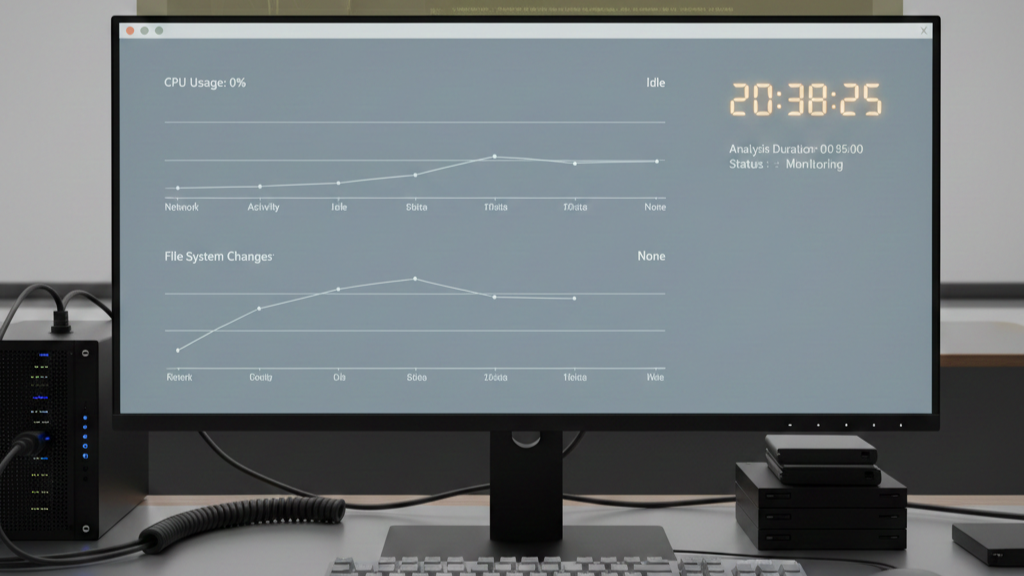
The malware we analyze often starts with a quiet question: “Am I in a cage?”, a behavior that exposes the core weaknesses of sandboxing for malware analysis when adversaries know they’re being observed. Is the motherboard from “VMware”? Are there specific registry keys from VirtualBox? It can even sense the tiny lag in the CPU clock that virtualization creates.
| Evasion Technique | How Malware Detects the Sandbox | Why Sandboxes Miss the Threat |
| Virtual hardware fingerprinting | Checks for VMware, VirtualBox drivers, or virtual GPUs | Sandboxes rely on identifiable virtualization artifacts |
| Timing and sleep delays | Uses long sleep() calls or execution delays | Analysis timeouts expire before malicious behavior appears |
| Human interaction checks | Waits for mouse movement or keyboard input | Automated sandboxes lack realistic user behavior |
| Debugger and tool detection | Scans for debuggers, hooks, or monitoring processes | Analysis tools expose their own presence |
| Network dependency checks | Attempts to contact C2 servers or real APIs | Isolated or simulated networks block real callbacks |
If the answer is yes, it goes quiet. It might delay its real work for a day, or until it senses a mouse moving, a sign of a real person, not an automated sandbox.
From our perspective, this is the core problem. Our sandboxes become exhibits. We’re analyzing a patient who knows they’re being observed, so they don’t show their real symptoms. The sample we capture is often a decoy, a placeholder. The real payload remains hidden, waiting for a real network.
We see this constantly in our threat models. The malware checks for virtual GPUs, looks for debuggers, uses simple sleep() commands. This cat-and-mouse game means our analysis often captures evasion, not exploitation. We learn how it hides, but the dangerous part, what it actually does, remains a gap in our intelligence. That’s the risk we’re helping clients close.
“If the malware detects a sandbox, it will not execute its true malicious behavior and, therefore, appears to be another benign file.” – Clemens Kolbitsch, Evasive Malware Tricks: How Malware Evades Detection by Sandboxes, ISACA Journal (2017) [1]
How Performance Overhead Restricts Large-Scale Testing
When you’re dealing with sandboxes, the physics are simple. The virtualization layer isn’t free. It’s a tax, one that can drag down application execution by 15% or more.For one file, who cares? But when you’re processing thousands daily, the limits of dynamic malware analysis techniques become painfully clear, as virtualization overhead quietly dictates how much behavior you’re actually able to observe.
That overhead becomes the bottleneck. A server that handles a hundred real processes might choke on thirty virtualized ones.
| Constraint Area | Sandbox Limitation | Real-World Malware Impact |
| CPU availability | Virtualization overhead reduces execution speed | Malware fails to unpack or execute fully |
| Memory limits | Artificial RAM caps in analysis environments | Payloads remain dormant or incomplete |
| Execution time | Short analysis windows | Delayed malware appears benign |
| Scalability | Limited concurrent samples | Teams choose coverage over depth |
| Infrastructure cost | High compute requirements | Analysis depth decreases to control spend |
This strain creates its own blind spots. We’ve seen it. A payload needs memory to unpack, but the sandbox hits an artificial limit. The analysis says “benign,” but the truth is, the malware just didn’t have the room to breathe. You’re not testing the threat; you’re testing the sandbox’s budget.
That CPU and memory consumption adds up fast. It becomes a scalability wall. To keep pace with network traffic, you need exponentially more hardware. It forces a brutal choice: depth of analysis or breadth of coverage. In security, narrowing your view is a gamble you can’t afford to make.
Why Environmental Mismatches Lead to Inaccurate Results
Think of testing malware in a sandbox like testing a race car in a showroom. The engine might start, but you learn nothing about its real performance. We see this constantly in our threat modeling. The network is usually fake. Malware that needs to call home just gets an error and shuts down. Your report says “no malicious activity,” but that’s only because the activity was impossible.
The data inside is wrong, too. Real systems have complex records; sandboxes use generic data. An app might be fine with test data, then crash with real profiles. It’s the dependencies that really break things.
- An old app needs a specific Java version the sandbox lacks.
- A script searches for a network drive that isn’t there.
- A cloud function calls an API that’s blocked.
These mismatches create false negatives and false positives. We’ve seen benign admin tools flagged as threats because the sandbox misread their normal behavior. You waste time investigating problems that wouldn’t exist outside the artificial test. The result is alert fatigue and a growing distrust in your own security tools.
The Hidden Management Burden and Security Risks
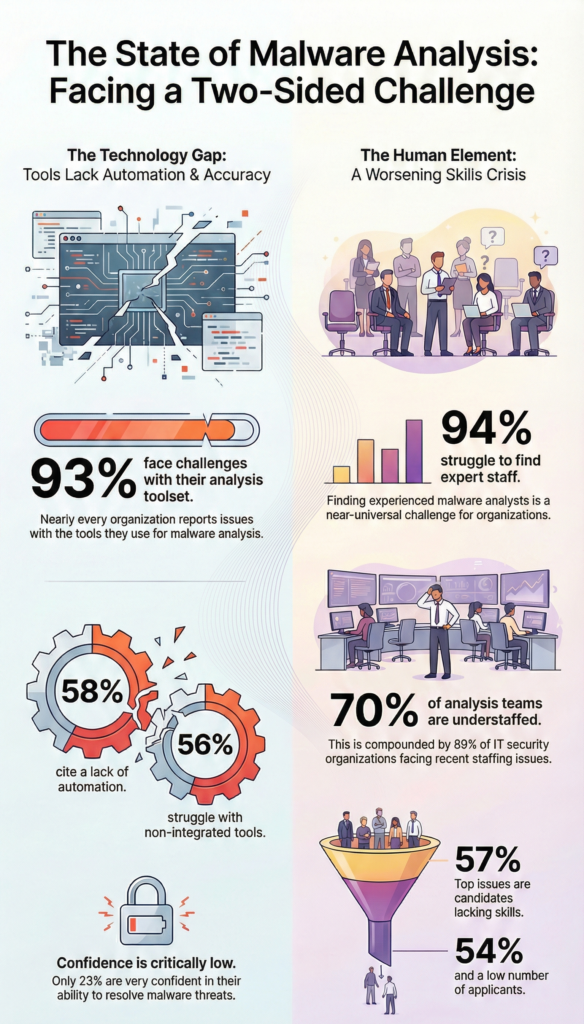
Ever wonder why that sandbox project keeps getting pushed back? The cost isn’t just the license. It’s the constant upkeep. We’ve watched teams burn hours just keeping the environment current, Patch Tuesday hits, the template’s obsolete.
Production jumps to a new Windows build, and suddenly your sandbox is a version behind. That mismatch creates blind spots. It’s manual, tedious work that always seems to slide down the to-do list.
And the output? It’s not an answer, it’s a puzzle, automated malware analysis reports often deliver raw artifacts instead of the context teams need to spot subtle persistence or lateral movement. Without the right skills to interpret it, you’ll miss the subtle signs. A stealthy persistence mechanism can hide in plain sight. The tool gives you data, not insight.
Frankly, a bad setup can make things worse. We’ve seen the risks:
- Isolation failures: If it’s not fully segmented from your core network, it becomes a bridge.
- Sandbox escapes: Malware can exploit virtualization flaws to break out of its cage and infect the host.
You bring the threat inside to watch it, and it might just escape. Managing that complexity, VLANs, constant software patches, turns a defensive tool into a potential liability.
Where Browser Sandboxes and Specialized Testing Fall Short

The limitations extend to more common tools. Browser-based sandboxes, like those used to test web applications or isolate browsing sessions, hit a wall with modern security. They often fail to handle advanced authentication.
Need to test an application that uses mutual TLS (mTLS) with client certificates? A browser sandbox might not be able to present the correct cert. Trying to integrate a hardware security key like a YubiKey? The virtualized environment can’t access the physical USB port.
This makes browser sandboxes ineffective for testing secure banking portals, government applications, or any internal tool that relies on hardware tokens. The test fails not because the code is broken, but because the testing environment is incapable of replicating a fundamental real-world condition.[2]
Similarly, in development, a partial-copy sandbox in a platform like Salesforce might have storage caps or lack real transaction history, preventing accurate performance testing or load testing. The message rate is throttled, sessions expire artificially fast, and you’re left with a shaky understanding of how your code will perform under true load.
Building a Strategy That Sees Beyond the Sandbox

Sandboxes are useful, we rely on them for a first look. They let you poke at a threat in a safe, isolated space. But they’re just a starting point. The real strategy begins after the sandbox report is filed.
You have to watch what happens next, in the real network. It’s the difference between studying a single, captured bee and having sensors across the entire hive. The sandbox gives you the bee. A live monitoring system shows you the swarm’s activity, the strange traffic between servers, the unexpected calls to new domains, the malware that finally wakes up and tries to phone home.
Our approach ties these two views together. The sandbox provides a theory about a threat’s potential. Your network detection confirms it, or doesn’t, based on actual evidence. This creates a learning loop static tools can’t match.
We build tools for this gap. To catch what sleeps through the sandbox, to see the lateral movement it can’t simulate. It’s about connecting the lab finding to the live event, making your security posture adaptive, not just reactive.
FAQ
What are the biggest sandbox environment limitations teams face in real testing?
Sandbox environment limitations include sandbox drawbacks and sandbox disadvantages such as resource constraints, virtualization overhead, CPU overhead, and memory consumption. These factors cause performance degradation and scalability issues.
Environmental mismatches, configuration discrepancies, and dependency mismatches prevent accurate production replication. These production replication challenges create test environment contrasts that hide real risks during secure experimentation and isolated testing.
Why do sandboxes fail to catch real malware behavior?
Cybersecurity sandboxes struggle due to dynamic analysis limits and static analysis gaps. Malware sandbox detection often triggers sandbox evasion techniques such as virtual environment checks, debugger detection, hardware fingerprinting, and time-delayed malware execution.
Polymorphic malware further changes behavior to avoid detection. These issues cause false negatives, detection inaccuracies, and real-world simulation failures during sandbox execution.
How do sandbox setups impact performance and reliability?
Software development sandboxes face instability risks caused by VM restrictions, database limits, load testing limits, and message rate throttling. VM reset times, session expiration, and code flux issues interrupt testing workflows.
Infrastructure constraints, spend limits, and AWS spend policies restrict scale. Stability differences between partial copy sandboxes and full sandbox replication reduce confidence in performance results.
What data and network limits affect sandbox accuracy?
Network isolation limits, VLAN configuration challenges, VPN setup limits, and QoS testing issues block realistic traffic behavior. Testing data restrictions include metadata only copies, partial data copies, transaction history limits, and custom input restrictions.
GeoIP sandbox quirks, license key differences, and browser sandbox limits introduce environmental mismatches and reduce accuracy during application sandboxing tests.
What operational, legal, and ethical risks come with sandboxing?
Enterprise sandboxing increases management complexity through maintenance overhead, frequent updates, and reset costs. Poor implementation risks expand the attack surface and increase data leakage risks.
Access control policies, storage allocations, and refresh intervals require strict governance. Legal concerns and ethical issues arise from live malware handling, minFraud testing limits, and SAP data guidelines without clear fail-forward guidance.
Moving Past the Illusion of Safety
The limitations of sandbox environments aren’t bugs, they’re design features. Sandboxes are isolated, controlled, and artificial. The modern threat landscape is none of those things. It’s interconnected, messy, and unforgiving. Relying on sandboxes alone is like training for a street fight in a fencing gym: useful basics, wrong setting.
The goal isn’t perfect simulation; it’s continuous, real-world visibility. Use sandboxes for safe analysis, then monitor real networks, servers, and users. Stop polishing the fake world. Start seeing the real one. Turn visibility into defense, join here.
References
- https://www.isaca.org/resources/isaca-journal/issues/2017/volume-6/evasive-malware-tricks-how-malware-evades-detection-by-sandboxes
- https://www.forbes.com/councils/forbestechcouncil/2023/08/17/importance-and-limitations-of-sandboxing-in-malware-analysis/
