
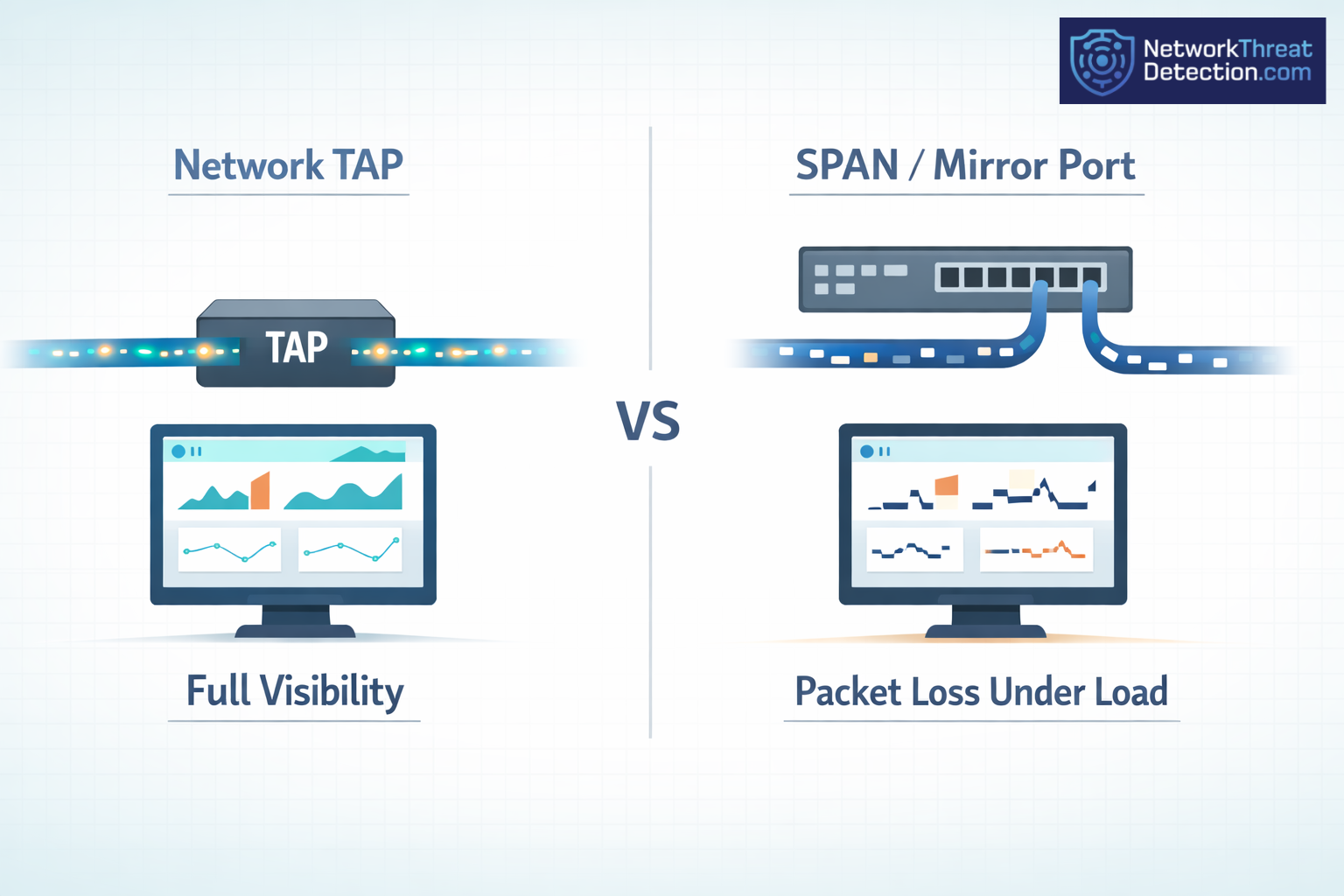
Network taps see every packet. SPAN ports can miss some when traffic spikes. That gap shows up fast in real networks, especially with tools like Gigamon and Keysight. Teams notice it during audits or when chasing odd issues.
With higher speeds and tighter rules, missing data becomes a problem. It helps to know what each option does before you pick. Keep reading to see how each works in real use.
Quick Breakdown: Taps Vs. SPAN Ports
- Network taps capture all packets and don’t touch live traffic
- SPAN ports can drop packets and strain the switch under load
- Choice depends on size, cost, and what you need to monitor
Network Taps Vs. SPAN/Mirror Ports: Core Differences
We run into this choice a lot. A tap copies traffic straight off the cable. A SPAN port asks the switch to make a copy, and that copy is not always complete. This gap often shows up when comparing network taps vs SPAN behavior in real traffic conditions.
With taps, we see every packet, even the broken ones. That has helped us more than once when digging through odd traffic or failed sessions. Vendors like Garland Technology, Profitap, and Keysight Technologies say the same, but this is also what shows up in day-to-day use.
As highlighted by Corning
“Port mirroring can be successfully used as an access technology for low-bandwidth, application layer events like conversation analysis. but port mirroring is not a good solution for Traffic Security Compliance monitoring or Lawful Intercept due to a lack of absolute fidelity. If you are running a high-data-rate system and want to ensure optimum infrastructure performance while conducting Traffic Security Compliance monitoring. You must monitor at the physical level. A network tap, versus port mirroring, allows you to do that.” – Corning
SPAN ports depend on the switch doing extra work. When traffic is low, it can look fine. When things pick up, we start seeing gaps. That gets worse if several ports feed one mirror.
Taps also read both directions at once. SPAN can fall behind there.
- Network taps: direct copy, no packet loss
- SPAN ports: switch-based copy, drops can happen
- Taps include error frames, SPAN does not
We keep this in mind when checking risk and visibility.
Network Tap Deployment Advantages Visibility
From what we’ve seen, taps give a clean and steady view. Once installed, they just sit there and copy traffic, which is why tap deployment visibility becomes critical in long-term monitoring setups.
We’ve used them on live links where any delay would be a problem. Traffic keeps moving, and the tap doesn’t get in the way. Even during outages, the link stays up.
Teams running Gigamon, Keysight, or Network Critical taps tend to get more complete data. That matters when we review incidents or test our threat models.
With SPAN, we’ve seen packets drop when usage climbs. It doesn’t take much for gaps to appear.
- Full packet capture, including errors
- No added load on the switch
- Works on high-speed links
For us, taps are the safer option when we need a full picture.
SPAN Port Limitations Oversubscription Issues
We still use SPAN at times, but we know where it falls short, especially when SPAN oversubscription starts affecting mirrored traffic under load.
Oversubscription shows up fast. Too much mirrored traffic goes to one port, and the switch can’t send it all. We’ve seen this during busy periods, where some traffic never makes it to the tool.
The switch always favors real traffic first. So the mirrored copy gets trimmed when there’s pressure.
SPAN also skips error frames. That leaves out data we often need when something goes wrong.
- Packet loss under load
- No error frame visibility
- Hard to scale at higher speeds
We treat SPAN as a quick check, not something to rely on for full analysis or audits.
Configuring SPAN Mirror Ports Switch
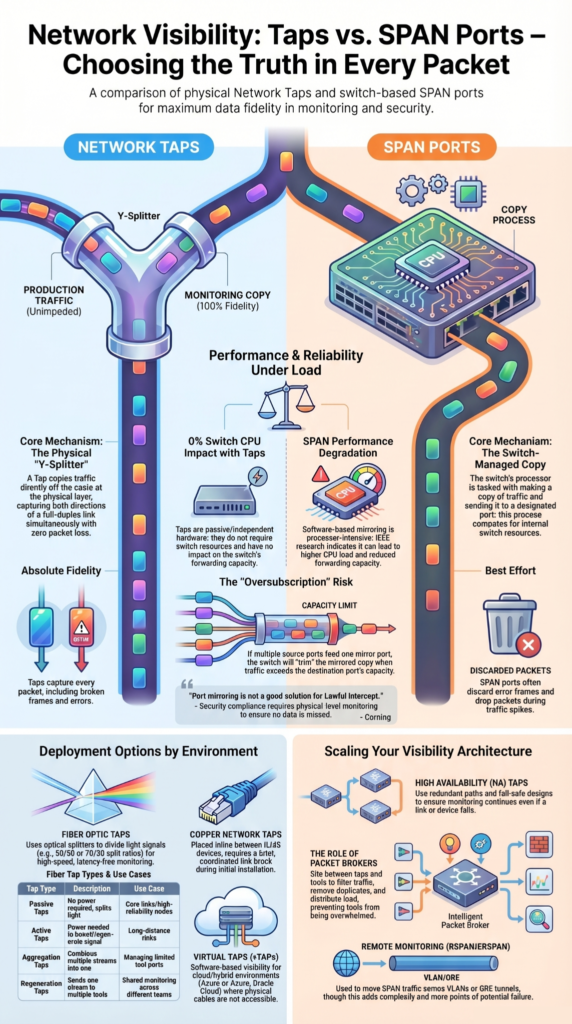
We’ve set up SPAN ports enough times to know the process looks simple but hides a few traps, especially when configuring SPAN ports across multiple interfaces and sessions. You choose what to copy on the switch, then point it to a destination port.
On Cisco switches, that usually means picking a source interface and a mirror port. We’ve seen configs that look correct still miss traffic under load, which lines up with what Layer23 Systems reports.
RSPAN and ERSPAN come up when monitoring needs to move beyond one switch. They use VLANs or GRE tunnels. We use them when needed, but they add extra points where things can break or be misread.
Each SPAN session uses switch resources. That builds up in larger networks.
- Set a monitoring session
- Select source interface (in, out, or both)
- Assign destination port
We keep SPAN for quick checks, not long runs.
Impact On Switch Performance SPAN
SPAN adds work to the switch, and we’ve seen that show up during busy hours, which aligns with real-world SPAN performance impact under high traffic conditions.
Mirrored traffic is handled inside the switch, which raises CPU use. Network Critical notes this, and in practice it shows as slower response or missing packets when traffic spikes.
Research from IEEE shows
“As network bandwidth consumption continues to grow exponentially, real-time traffic data analysis becomes increasingly challenging and expensive. In many cases, monitoring can only be achieved via hardware Test Access Point (TAP) devices [because] software-based mirroring technologies [SPAN] are processor-intensive and can have a negative performance impact on the switch itself.” – IEEE
At first, everything looks fine. Under load, delays or drops start to appear. We’ve even seen situations where production traffic felt the strain.
Taps avoid this because they don’t rely on the switch at all.
- Higher CPU load
- Less forwarding capacity
- Risk of delay during peaks
We treat this as a real limit when planning visibility.
Fiber optic network taps types
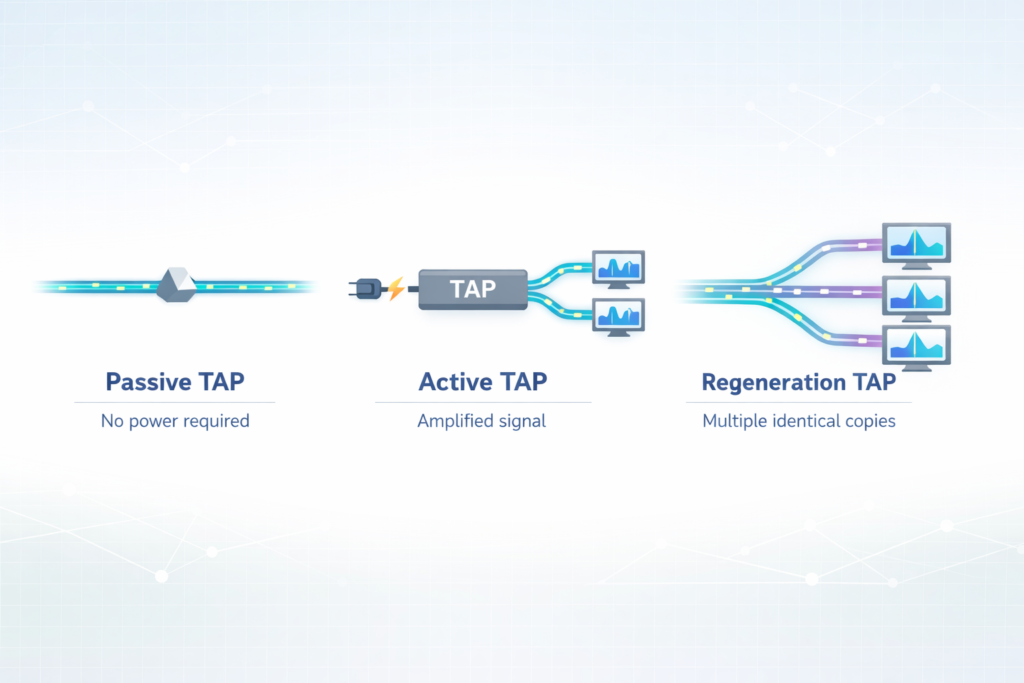
Fiber taps work by splitting light directly from the cable. We use them when traffic speed leaves no room for guessing, especially when working with different fiber tap types across core links.
Inside, optical splitters or couplers divide the signal so a copy can be monitored. Corning notes split ratios like 50/50 or 70/30, and in real setups those choices affect signal strength.
They work on single mode and multimode fiber. BiDi taps show up when both directions share one fiber.
Common fiber tap types
| Type | Description | Use Case |
| Passive taps | No power needed | Core links |
| Active taps | Boost signal | Long distance links |
| Aggregation taps | Combine traffic streams | Tool limits |
| Regeneration taps | Send to multiple tools | Shared monitoring |
In our work with threat models and network visibility, fiber taps are what we lean on when SPAN can’t keep up.
Copper Network Tap Considerations Install
We’ve put copper taps in networks where fiber wasn’t an option, and proper copper tap install planning helps avoid disruption during deployment. It’s a hands-on job and usually means a short break in the link.
A copper tap goes inline between two RJ45 devices. We pull the cable, insert the tap, then plug everything back in. That brief downtime is expected, but it still needs coordination so it doesn’t hit production traffic at the wrong time. Heynen notes that proper installation helps avoid bad captures, and we’ve seen messy installs lead to noisy data later.
They work with PoE and common 1G links, sometimes 10G depending on the setup. In practice, we also check tool ports early so we don’t overload them during capture.
- Match speed and duplex on both ends
- Keep tool ports within safe load
- Plan rack space and cable routing first
We still see copper taps in enterprise IT where fiber isn’t present.
Virtual Network Taps vTAPs Cloud
Credits: LookingPoint, Inc.
Cloud environments don’t give us cables to split, so we rely on vTAPs to see traffic, especially when extending visibility using virtual taps cloud across hybrid systems.
We’ve used them in hybrid setups where visibility drops between on-prem systems and cloud workloads. Azure and Oracle Cloud both support virtual mirroring, and tools like nGenius vTAP extend that reach. Oracle documentation also mentions filtering before sending traffic out, which helps reduce noise.
Traffic is copied inside the virtual network and sent to monitoring tools, often using GRE or similar encapsulation.
- No physical hardware
- Works across cloud and hybrid setups
- Can filter traffic before export
We use vTAPs when we’re building visibility into cloud environments tied to our threat models and monitoring work.
High Availability Tap Configurations
We’ve learned that a single point of failure in visibility is a problem during incidents, which is why High availability tap configurations are often built into critical monitoring paths.
HA tap setups use backup paths so monitoring doesn’t stop if something breaks. Garland Technology describes fail-safe and bypass designs, and we’ve seen them keep traffic flowing when a device or link fails.
If one path goes down, traffic shifts to the backup automatically. Monitoring stays active without manual work.
- Redundant monitoring paths
- No single point of failure
- Capture continues during failures
We use these setups in critical systems where steady traffic data matters for security and threat analysis.
Network Packet Broker Benefits
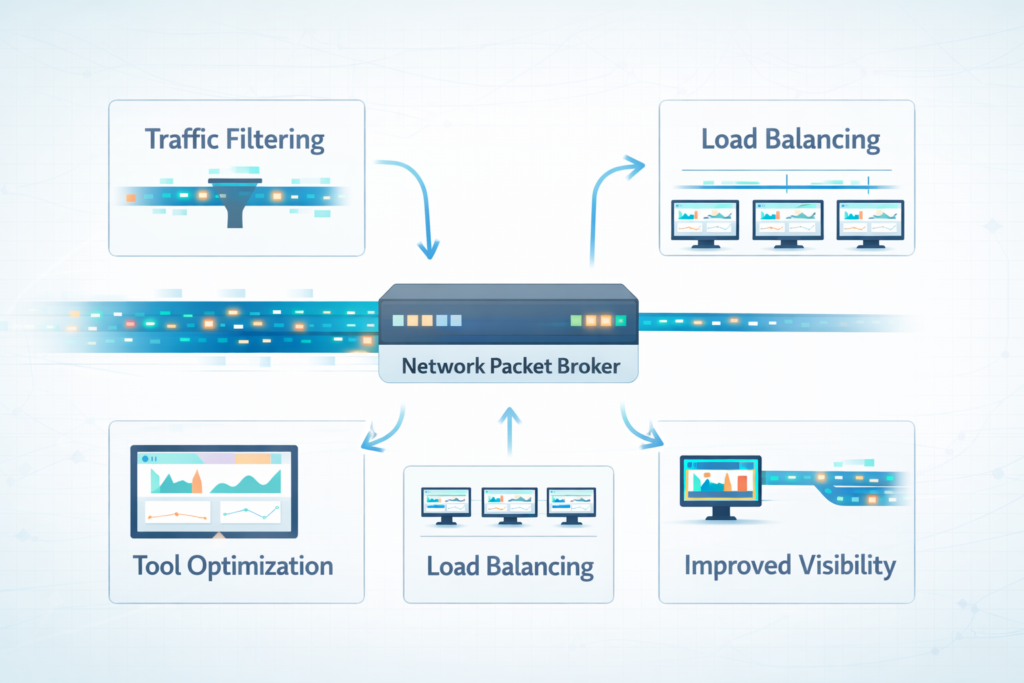
We tend to sit packet brokers between raw traffic and the tools that need it, where packet broker benefits become clear in filtering and load distribution. Traffic comes in from taps or SPAN, and the broker cleans it up before anything else sees it.
In day-to-day use, platforms like Gigamon and Keysight show how much “extra” traffic can build up. We’ve seen duplicate packets and irrelevant flows get stripped out early, which makes analysis less noisy and easier to trust.
A packet broker also spreads traffic across tools and filters what each one receives. That matters when several systems depend on the same feed.
- Takes load off monitoring tools
- Sends traffic to multiple tools at once
- Removes duplicates and filters traffic
We use this layer when building threat models and scaling visibility across larger environments, where raw feeds would overwhelm the tools.
Choosing Between Taps Span Ports
We’ve had to make this call often, and it usually comes down to how exact the data needs to be when choosing taps vs span for different monitoring scenarios.
Taps give a full copy of traffic. That matters when we’re reviewing incidents or checking security events where missing packets would change the story. SPAN ports are faster to deploy, but they don’t always hold up when traffic increases.
In real environments, SPAN works for quick checks or short troubleshooting windows. Once traffic builds, gaps can appear, and that limits what we can trust.
What we look at:
- Traffic level on the network
- Whether missing packets are acceptable
- Cost versus long-term reliability
In most setups we’ve worked on, both end up being used: taps for critical links, SPAN for short-term visibility.
FAQ
What makes network taps better for accurate packet capture and network visibility?
Network taps provide true network visibility because they copy traffic directly from the wire. This supports full duplex monitoring, full packet fidelity, and error frame capture.
SPAN ports, also called mirror ports or port mirroring, depend on switch resources. During peak traffic, oversubscription issues can cause packet loss, frame loss, and reduced accuracy for security analysis and compliance monitoring tasks.
How do I plan tap deployment without causing link downtime or issues?
Tap deployment is simple, but it requires careful planning. Passive tapping is latency free and avoids switch performance impact. Active taps support traffic aggregation and load balancing.
You must consider link downtime during installation, especially with copper taps and RJ45 installation. Fiber optic taps using an optical splitter or fiber coupler reduce risk in multimode fiber or single mode fiber links.
Why do SPAN ports have limitations during heavy traffic monitoring?
SPAN ports are flexible, but they have clear span limitations. They rely on software mirroring inside the switch, which adds CPU overhead and increases memory usage.
Traffic increases switch CPU load and reduces forwarding capacity, which can cause peak traffic drops and packet loss. Features like RSPAN configuration, ERSPAN tunneling, and VLAN mirroring help, but they can still risk tool port overload.
When should I choose tap vs span for monitoring needs?
You should choose tap vs span based on your monitoring goals. Network taps provide permanent monitoring, full packet fidelity, and avoid a single point failure when using high availability taps, failover taps, or redundant links.
SPAN ports work better for temporary span setups or quick troubleshooting. Data center taps and enterprise IT taps improve network observability and support intrusion detection and forensic analysis.
How do virtual taps and vTAPS help with cloud monitoring setups?
Virtual taps, also called vTAPS, extend monitoring into cloud monitoring environments. A virtual network tap captures traffic using GRE encapsulation, remote SPAN, or software mirroring.
Options like Azure vTAP or Oracle VTAP send data to a network packet broker for packet filtering, packet deduplication, and traffic slicing. This setup supports compliance monitoring, security analysis, and scalable out-of-band monitoring.
Final thoughts on network taps vs. SPAN/mirror ports
When pressure hits and every packet matters, what will you trust, the tool that shows all, or one that misses some? This choice is not small. It is the line between truth and guess. SPAN can feel easy. But easy can fail when traffic grows and you need clear answers fast.
Picture missing the one sign that warned you. No redo. Make the call now. Choose what you can trust every time. Take the next step with Network Threat Detection and build a network you can rely on.
References
- https://www.corning.com/data-center/worldwide/en/home/knowledge-center/do-you-control-your-network.html
- https://ieeexplore.ieee.org/document/9463967/
