

Authentication logs user activity tracking records who signs in, when the login happens, and where the request comes from. In most environments, systems capture both successful and failed login attempts, along with session IDs, IP addresses, device details, and whether multi-factor authentication was used.
When these records are combined with actions after login, such as commands run or files accessed, the timeline becomes clearer. In our work building security monitoring tools, we start with network visibility and layer identity activity on top. Keep reading to see how these logs work and how teams use them in practice.
Login Visibility at a Glance
These quick points highlight why authentication logs and user activity tracking matter for security monitoring and investigations.
- Authentication logs create an identity timeline, showing logins and session details for audits and threat hunting.
- Tracking user activity reveals actions after login, such as privilege changes or sensitive file access.
- Combining these logs with network threat data improves anomaly detection and speeds up investigations.
What Are Authentication Logs and What Data Do They Record?
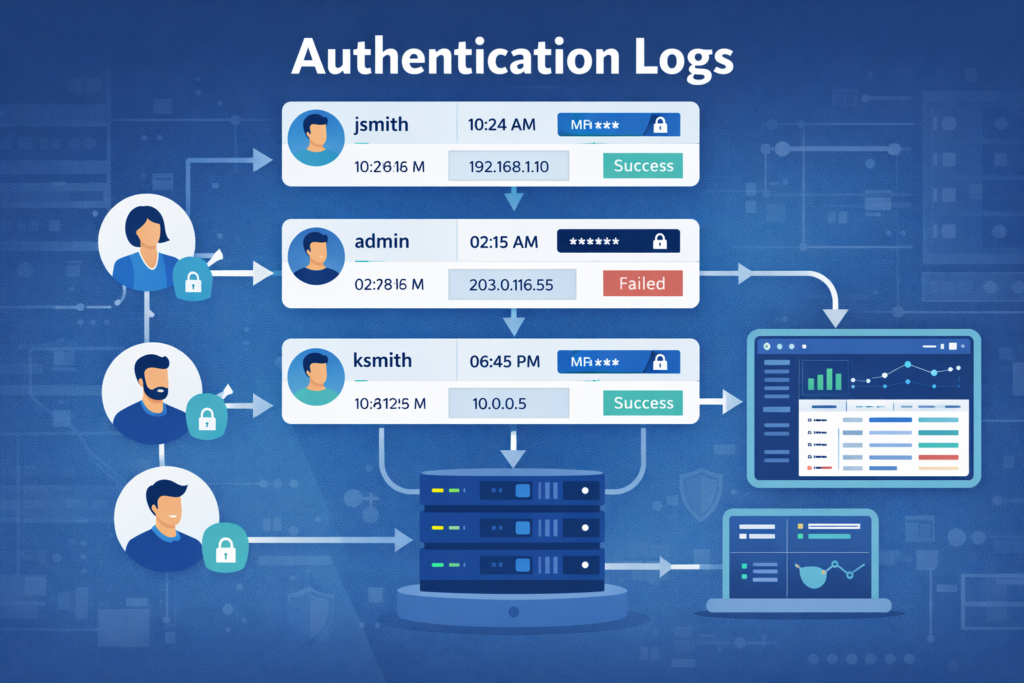
An authentication log is a record of someone proving their identity to a system. It captures every login attempt, successful or not, along with key details like the exact time, the source IP address, and the method used. Companies often keep these logs for months to help with investigations later.
Systems like Linux and Windows Server generate these events automatically. You’ll find them in files like /var/log/auth.log or as Windows Event ID 4624. Each entry tries to answer the basic investigative questions: who, what, when, where, and how.
Insights from CISA indicate
“Enable logging of critical events such as authentication attempts, command-line executions with command arguments (Event ID 4688), and network connections.” – CISA
A standard log entry will include:
- The username or user ID.
- A precise timestamp.
- The source IP address.
- The authentication method (password, MFA token, etc.).
- The outcome: pass or fail.
A simple example from a Linux log looks like this: Failed password for root from 192.168.1.12.
On their own, these entries are just facts. You can start to see patterns, like a single IP trying to access multiple accounts, which signals a broader attack.
How Authentication Logs Track User Activity Across Systems
Authentication logs record each step when someone accesses a system. They capture the login attempt, the session start, and the logout. In large organizations, this activity adds up quickly.
From our experience working with security teams, visibility improves when identity logs are reviewed alongside network activity. That broader view helps analysts understand what really happened during an event. Our threat modeling and risk analysis tools help teams map those patterns and identify emerging risks earlier.
In practice, identity logs work best when they are combined with other telemetry. Especially the essential log sources for NTD that give analysts context across endpoints, networks, and cloud systems.
Common events teams usually monitor include:
- Successful and failed login attempts
- Multi-factor authentication prompts and responses
- New session creation with unique session IDs
- Account lockouts after repeated failures
A typical SOC workflow often follows a clear sequence:
- A system records an authentication event.
- The event is sent to a central log platform, often a SIEM.
- The log is parsed and standardized.
- Analysts correlate it with network or endpoint activity.
- Alerts appear if patterns look suspicious.
Security teams watch for warning signs like unfamiliar locations, multiple devices using one account, or sessions attempting privilege escalation.
What Security Threats Can Authentication Logs Reveal?

Authentication logs often show the first signs of trouble. They record login attempts, devices, and session activity. When teams review them regularly, patterns start to appear. A spike in failed logins from one address, for example, can signal a brute-force attack.
From our experience working with security teams, these patterns rarely appear alone. We often see them alongside unusual network behavior. That is why we pair authentication logs with network detection and our threat modeling tools.
Analysts also frequently correlate login activity with perimeter telemetry using established firewall log analysis best practices. It helps determine whether suspicious authentication attempts originated from known scanning infrastructure or automated attack tools.
Common threats show up in logs in predictable ways:
| Threat | What the Logs Show | What to Investigate Next |
| Brute-force attack | Hundreds of failed logins from one IP address | Review firewall rules and account lockout settings |
| Credential stuffing | Many usernames tested with the same password | Check network traffic for bot or proxy activity |
| Insider misuse | Logins at odd hours, such as late night weekends | Review file access and privilege changes |
| Account takeover | Login from a new device or unfamiliar country | Look for token theft or unusual post-login actions |
Security guidance from the CISA also stresses centralizing logs. When authentication, network, and system logs are viewed together, analysts can detect threats faster and respond before real damage occurs.
Authentication Logs vs Security Logs: What’s the Difference?
People often mix these two up. Authentication logs are actually just one part of a much bigger picture. They focus on identity events like logins, MFA checks, or token validation. Security logs cover a wider range of activity across the system.
From what we see during threat modeling and risk analysis work, authentication logs usually answer a simple question: who accessed the system and when. Security logs answer a different one: what happened across the environment after that access occurred.
An authentication log might show that someone logged in as “admin” from Tokyo at 2 PM. Later, the firewall records a blocked connection attempt from that same IP address. That second event appears in security logs. When our analysts review incidents, we often start with the login event and then move outward to see what the system recorded next.
| Aspect | Authentication Logs | Security Logs |
| Main purpose | Track identity verification events | Track overall security activity and threats |
| Common sources | Windows login events, VPN authentication, SaaS platforms | Firewalls, IDS/IPS systems, endpoint protection |
| Example record | “User jsmith logged in with MFA.” | “Malicious signature detected in file X.” |
| Typical SOC use | Detect possible account compromise | Investigate active incidents or suspicious behavior |
How Network Threat Detection Enhances Authentication Log Analysis

Network data adds crucial context that auth logs lack. It can show you what happened around the login event. This correlation often uncovers threats that would otherwise be invisible.
We usually start with network threat detection because it sees everything, even traffic that doesn’t result in a login. When you line up these network events with your login logs, the story becomes clear.
For instance, network logs might show a device making repeated, failed TLS connections to your login portal. Your authentication logs will confirm those were failed login attempts.
Teams also benefit from monitoring supporting signals such as DNS lookups. Since dns query log monitoring security often reveals early command-and-control activity tied to compromised credentials.
Two real examples from our experience:
- Network detection spotted beaconing traffic to a known malicious domain. Checking the auth logs for the source device showed several failed service account logins.
- Authentication logs showed a successful login from a user’s account in two different countries within an hour (impossible travel). The network logs confirmed the second session originated from a VPN service often used by attackers.
When these data sources agree, SOC teams can act with much more confidence and waste less time on false alarms.
What Vendor Log Quirks Affect Authentication Tracking?
Credits: WP Themes
A major headache in log management is that every system logs things a bit differently. One application might log a full session ID and device fingerprint, while another server only records an IP and username. These inconsistencies make it hard to correlate events across your environment.
We’ve seen teams drown in “log bloat”, so much raw data that the important signals get lost.
As noted by SANS Institute
“Most SaaS platforms provide terrible logging, either nonexistent, incomplete, or locked behind premium pricing. This isn’t acceptable when we lack the visibility to identify these active attacks.” – SANS Institute
Common issues include:
- Timestamps in local time vs. UTC without clear labels.
- Missing user agent strings that help with device fingerprinting.
- Helpful data buried in unstructured message fields.
- Load balancers or proxies that change source IPs, breaking the trail.
To fix this, you need to normalize the data. This usually means:
- Writing custom parsing rules for each major log source.
- Converting all timestamps to a single standard (like UTC).
- Filtering out repetitive, noisy events that aren’t useful.
- Mapping all logs to a common schema before they hit your SIEM.
Taking these steps turns a chaotic pile of logs into a clean, searchable dataset that analysts can actually use during an incident.
Best Practices for Authentication Log Management
Good log management isn’t just about collecting data; it’s about making it usable and secure. The core goals are centralization, protection from tampering, and setting up smart alerts. From our work, a practical approach is to first get network threat data flowing, then build your authentication logging on top of that pipeline.
You should:
- Send logs from all systems (servers, cloud apps, network gear) to a central SIEM or log manager.
- Normalize the key fields (usernames, IPs, timestamps) so you can search across everything.
- Implement log rotation and retention policies (often 90 days to a year, depending on regulations).
- Protect the logs themselves. Write them to a write-once medium or use file integrity monitoring so an attacker can’t cover their tracks.
Your alerting should watch for:
- Multiple failed logins from a single IP in a short window.
- Privilege escalation attempts right after a login.
- Authentication failures for service accounts (which shouldn’t fail often).
- VPN logins from unusual geographic locations.
Compliance also drives these practices. Standards like NIST 800-53, PCI DSS, and HIPAA all require detailed audit trails. Proper log management isn’t just good security; it’s often a legal or contractual requirement.
FAQ
How do authentication logs help detect brute force attacks and credential stuffing?
Authentication logs record every login attempt, including failed logins, successful authentication, and IP address logging. Security teams review these event logs to identify repeated login attempts from the same source. These patterns often indicate brute force attacks or credential stuffing campaigns.
Analysts also examine MFA events, account lockout triggers, and user agent strings for supporting evidence. When combined with anomaly detection and SIEM integration, authentication logs help teams identify suspicious activity and respond before accounts become compromised.
What details inside authentication logs help track user activity across sessions?
Authentication logs contain several fields that support accurate user activity tracking. These fields include the session ID, IP address logging, logout events, and total session duration. Security logs may also capture device fingerprinting details, geolocation data, and user agent strings.
Together, these records create clear audit trails that show how a session started, what activity occurred, and when it ended. Investigators rely on this information to reconstruct user behavior during security reviews or incident investigations.
How do SIEM platforms use authentication logs during security investigations?
Security teams send authentication logs, access control logs, and event logs into SIEM platforms for centralized analysis. Log parsing standardizes fields such as login attempts, session ID values, and MFA events so analysts can search and correlate data easily.
Analysts also connect Windows event ID 4624, Linux auth.log records, and RADIUS logs with other network authentication flows. This correlation supports anomaly detection, speeds up investigations, and provides clear audit trails across multiple systems.
Why do compliance frameworks require authentication logs and audit trails?
Compliance frameworks require authentication logs because organizations must prove that they monitor and control system access. Regulations such as PCI DSS logs, HIPAA authentication logs, GDPR logging requirements, and NIST 800-53 controls require detailed records of login attempts and successful authentication events.
These audit trails document who accessed systems, when events occurred, and whether security policies were enforced. Log retention policies also ensure investigators can review historical activity when security incidents occur.
What signs in authentication logs may indicate insider threats or lateral movement?
Authentication logs can reveal patterns that suggest insider threats or lateral movement inside a network. Analysts often review unusual login attempts, unexpected privilege escalation logs, or repeated access across multiple systems.
Security teams also analyze sudo logs, service account logs, and PAM authentication records to identify suspicious activity. When these logs are combined with behavioral analytics and UEBA signals, analysts can detect abnormal user behavior that may indicate misuse of legitimate credentials.
See the Full Story Behind Every Login
You know how frustrating it is when login alerts show up but the story stops at authentication. You still need to figure out what the user actually did inside the network, and that slows investigations when time matters.
That’s where Network Threat Detection helps. When authentication logs and user activity tracking come together, you quickly see the full picture and respond with confidence. Join Network Threat Detection today and see how the platform helps you investigate faster.
References
- https://www.cisa.gov/news-events/cybersecurity-advisories/aa25-212a
- https://www.sans.org/blog/authorization-sprawl-hidden-vulnerability-reshaping-modern-cyberattacks/
