

Compensating controls for signatures are your backup plan when you can’t use the best security method. They are different safety steps you take to make sure a signature is still safe and legal. You might need them because your computer system is old, or because a business needs to work fast.
These controls help stop people from faking signatures or saying they never signed something. They keep your business moving while protecting important papers. Read on to see how you can build a strong safety net for your signatures.
Key Takeaways
- Compensating controls fill security gaps when ideal methods fail.
- Good controls include watching for strange activity and checking signatures by hand.
- You must keep testing your controls to make sure they still work.
When Perfect Security Isn’t Possible

The Reality of Business Limitations
Sometimes you cannot use the best signature security. Your software might be too old for new digital signatures. Or you might need to sign hundreds of papers very quickly. We have seen this happen many times. A company has a critical system that was built years ago.
This is where compensating controls become your best friend. They are not a sign of failure. They are a sign of smart planning. Businesses face real-world constraints that make perfect security difficult. Budget limitations often prevent system upgrades. Tight deadlines force teams to choose speed over ideal security practices.
Legacy systems that handle core business functions cannot be easily replaced. These are not excuses, they are realities. Compensating controls acknowledge these realities while still providing protection.
Common situations requiring backup controls:
- Old software that cannot be updated right away
- Situations where speed is more important than perfect security
- When switching from an old system to a new one
- Budget constraints preventing technology upgrades
- Regulatory requirements that conflict with business needs
The goal is to achieve the same level of safety, just in a different way. It is about being smart with the tools you have rather than wishing for tools you don’t.
Resources on signature-based detection explained break down how known patterns are identified in large data streams.
Understanding the Security Gap
A compensating control fixes a specific problem. For a signature, the main problem is often proof. You need to prove who signed a paper and when they signed it. If you cannot use a strong digital signature, you lose that easy proof.
So your control must create proof in another way. This usually means using more than one smaller control together. They work as a team to protect your signature.
Think about what could go wrong without proper controls. Someone might deny signing a document. A signature could be forged. The document might be changed after signing. These are the risks you need to address.
Building Your Security Toolkit

Monitoring and Detection Controls
From our work, we know that mixing different types of controls works best. One of the most powerful things you can do is keep a detailed log. Write down every time someone looks at or signs a document. Write down who did it and when.
This log is like a detective’s notebook. It creates a story that is hard to argue with. Good logs track user actions, timestamps, and system changes.
Activity monitoring goes beyond basic logging. It involves watching for unusual patterns that might indicate a problem and detecting known malware signatures. For example, if someone typically signs three documents per day but suddenly signs thirty, that might warrant investigation.
These patterns can reveal potential security issues before they become major problems. We find Network Threat Detection particularly valuable for this monitoring role. It watches network traffic for suspicious behavior related to signature activities.
Verification and Authentication Methods
Manual verification procedures add a human layer of security. This involves having a second person review signatures for important documents. The reviewer checks that the signature matches known samples and that the signing process followed proper procedures. While this takes more time, it provides protection that automated systems might miss.
Multi-factor authentication adds another protection layer. Even if you cannot implement it directly in your signature system, you can require it for system access.
For example, employees might need to use two forms of identification before they can even reach the document signing application. This reduces the risk of unauthorized access. Access control determines who can do what with your documents. Role-based access ensures people only have the permissions they need for their job.
Implementing Your Control Framework
The Step-by-Step Process
Using these controls is a process that requires careful planning. First, you have to be honest about what is missing. What is the perfect security you cannot use? What bad thing could happen because it is missing? This risk assessment forms the foundation of your control selection. You must identify specific vulnerabilities rather than general concerns.
Once you know the dangers, you can pick controls that fight those specific problems. The controls should directly address the identified risks. If the risk is signature forgery, your controls should focus on verification and detection.
Implementation checklist:
- Identify the specific security gap you need to address
- Document why the ideal control cannot be used
- Select controls that directly counter the identified risks
- Create clear procedures for each control
- Train your team on the new requirements
- Set up monitoring to track control effectiveness
- Schedule regular reviews of your control framework
Making Controls Work in Practice
Implementation requires more than just writing policies. You need to make the controls part of your daily operations. This means integrating them into existing workflows rather than creating separate processes. Controls that disrupt work are more likely to be bypassed or ignored.
Training is essential for successful implementation. People need to understand not just what to do, but why they are doing it. When team members understand the security risks, they become active participants in protection rather than just following rules. Regular training sessions help maintain awareness and address questions.
Testing your controls ensures they work as intended. You should periodically verify that logging systems are capturing the right information. Check that access controls are properly configured. Test your incident response procedures. These tests help identify weaknesses before attackers find them.
Maintaining and Improving Your Controls
Source: ACI Learning
The Importance of Continuous Monitoring
Signature security is not something you do once. The world changes. New tricks for faking signatures appear. Your business changes. Your controls need to change with them.
Continuous monitoring involves regularly checking that your controls are functioning properly. This includes reviewing logs, analyzing access patterns, and verifying that procedures are being followed.
Monitoring helps you spot trends and identify potential issues early. It turns your controls from static rules into dynamic protections. Research on signature evasion techniques explores the methods attackers use to avoid detection.
Adapting to Changes
Business needs evolve over time. New regulations may require additional controls. Technology upgrades might make better security possible. Your control framework should adapt to these changes. Regular reviews ensure your controls remain relevant and effective.
When we review controls with clients, we often find opportunities for improvement. Sometimes a control that worked well initially becomes less effective as processes change. Other times, new technology makes better controls possible (1). The review process helps identify these opportunities.
Common Challenges and Solutions
Balancing Security and Efficiency
One challenge organizations face is finding the right balance between security and efficiency. Controls that are too strict can slow down business processes. Controls that are too loose provide inadequate protection. The right balance depends on your specific risks and business needs.
We often see organizations struggle with this balance. Some implement controls so restrictive that employees look for ways around them. Others have controls so minimal they provide little real protection. The best approach is to match control strength to risk level. High-risk activities need stronger controls. Lower-risk activities can use simpler approaches.
Dealing with Legacy Systems
Legacy systems present particular challenges for signature security. These systems often lack modern security features. They may not support encryption or detailed logging. Yet they frequently handle critical business functions that cannot be easily moved to new platforms.
When working with legacy systems, focus on controls you can implement around the system rather than within it. Enhanced monitoring of system access can compensate for weak internal security. Manual verification procedures can provide assurance where automated checks are impossible. External logging systems can track activities that the legacy system cannot record itself.
Migration planning is important for legacy environments. While compensating controls provide protection during transition, they should not become permanent solutions. Develop a roadmap for eventually moving to more secure systems. Use your experience with compensating controls to inform requirements for new systems.
Measuring Success
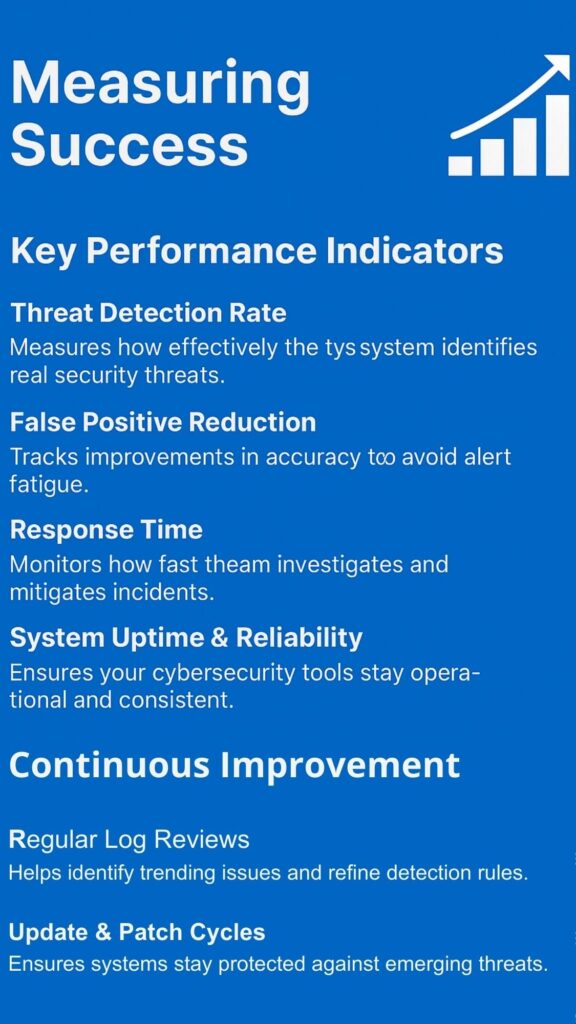
Key Performance Indicators
You need ways to measure whether your controls are working. Simple metrics can provide valuable insights. Track the number of security incidents related to signatures. Monitor how quickly you detect and respond to problems. Measure compliance with control procedures across your organization.
These metrics help you understand control effectiveness (2). If incidents decrease after implementing controls, they are probably working. If detection times improve, your monitoring is effective. If compliance rates are high, your procedures are practical and well-understood.
Regular reporting keeps security visible to management. Simple reports showing trends in incidents, detection times, and compliance help demonstrate the value of your controls. They also identify areas needing improvement.
Continuous Improvement
Security is never finished. There is always room for improvement. The best organizations treat security as an ongoing process rather than a project with an end date. They regularly look for ways to enhance their protections.
Learn from both successes and failures. When controls work well, understand why and apply those lessons elsewhere. When controls fail, investigate thoroughly and implement improvements. This learning mindset turns every experience into an opportunity for growth.
FAQs
What is the difference between a compensating control and a regular security control?
A regular security control is the best and strongest way to protect something. It’s like having a brand new lock on your door. A compensating control is a backup plan you use when you can’t have that best option. It’s like using a security camera and an alarm system when your lock is broken.
How much does it cost to set up compensating controls for signatures?
The cost depends on what controls you choose. Some controls like keeping detailed logs or having someone check signatures by hand don’t cost much money. They mostly take time. Other controls like special monitoring software can cost thousands of dollars. Most small businesses spend between $500 to $5,000 to start.
Can compensating controls meet legal requirements for electronic signatures?
Yes, compensating controls can meet legal requirements if they’re done correctly. Laws like the E-SIGN Act care about proving who signed something and keeping documents safe. If your compensating controls create good proof and protect documents from changes, they can work legally.
How long should we keep logs and records for signature activities?
Most experts recommend keeping signature logs for at least seven years. This matches many business record requirements. Some industries like healthcare or finance need to keep records even longer, sometimes forever. Check your specific industry rules to be sure.
What happens if our compensating controls fail during an audit?
If your controls fail an audit, you’ll need to fix the problems quickly. The auditor will usually give you a list of what’s wrong. You might need to add stronger controls or fix ones that aren’t working right. Sometimes you just need better documentation showing what you’re doing.
Do we need compensating controls if we only handle a few signatures per month?
Even if you don’t sign many documents, you might still need compensating controls. It’s not about how many signatures you have but how important those signatures are. Signing a contract for $1 million needs good protection even if it only happens once a year.
Can artificial intelligence help with signature verification as a compensating control?
Yes, AI can be a helpful compensating control for checking signatures. AI programs can compare a new signature to old ones and spot differences that humans might miss. They can check thousands of signatures quickly without getting tired. Some AI systems can even detect if someone traced a signature or used a stamp.
How do we train employees to follow compensating control procedures correctly?
Start with simple, clear training that explains why the controls matter. Show employees real examples of what can go wrong without good security. Give them step-by-step instructions they can follow easily. Practice with fake scenarios so they can learn without pressure. Check in regularly to answer questions and remind people of the rules.
What’s the biggest mistake companies make with compensating controls?
The biggest mistake is setting up controls and then forgetting about them. Companies create rules, train people once, and assume everything will keep working forever. But controls need regular checking to make sure they still work. Software updates can break things. People forget steps over time. New security threats appear.
Can we use compensating controls permanently or should they be temporary?
Compensating controls work best as temporary solutions while you work toward better security. Think of them like using crutches when your leg is broken. The crutches help you walk, but healing your leg is the real goal. However, some situations might need compensating controls for a long time.
Making Signature Safety Work for You
Compensating controls for signatures are about being practical. They admit that sometimes the perfect solution is out of reach. But they prove that a good backup plan can be just as strong. The key is to be thoughtful. Choose controls that directly fix your problem.
Use a mix of people and technology. And never stop watching and improving. Your signatures are too important to leave unprotected. Start building your safety net today by assessing your biggest risks and implementing targeted controls that provide real protection.
When you’re ready to strengthen your defenses with deeper visibility and proactive threat modeling, explore Network Threat Detection take the next step toward a more resilient security posture.
References
- https://medium.com/@jeff_bredy/how-technology-saves-time-for-real-e3df0f6eb893
- https://userpilot.medium.com/10-key-quantitative-metrics-that-are-essential-for-measuring-success-how-to-optimize-them-c2ebbea976bf
