
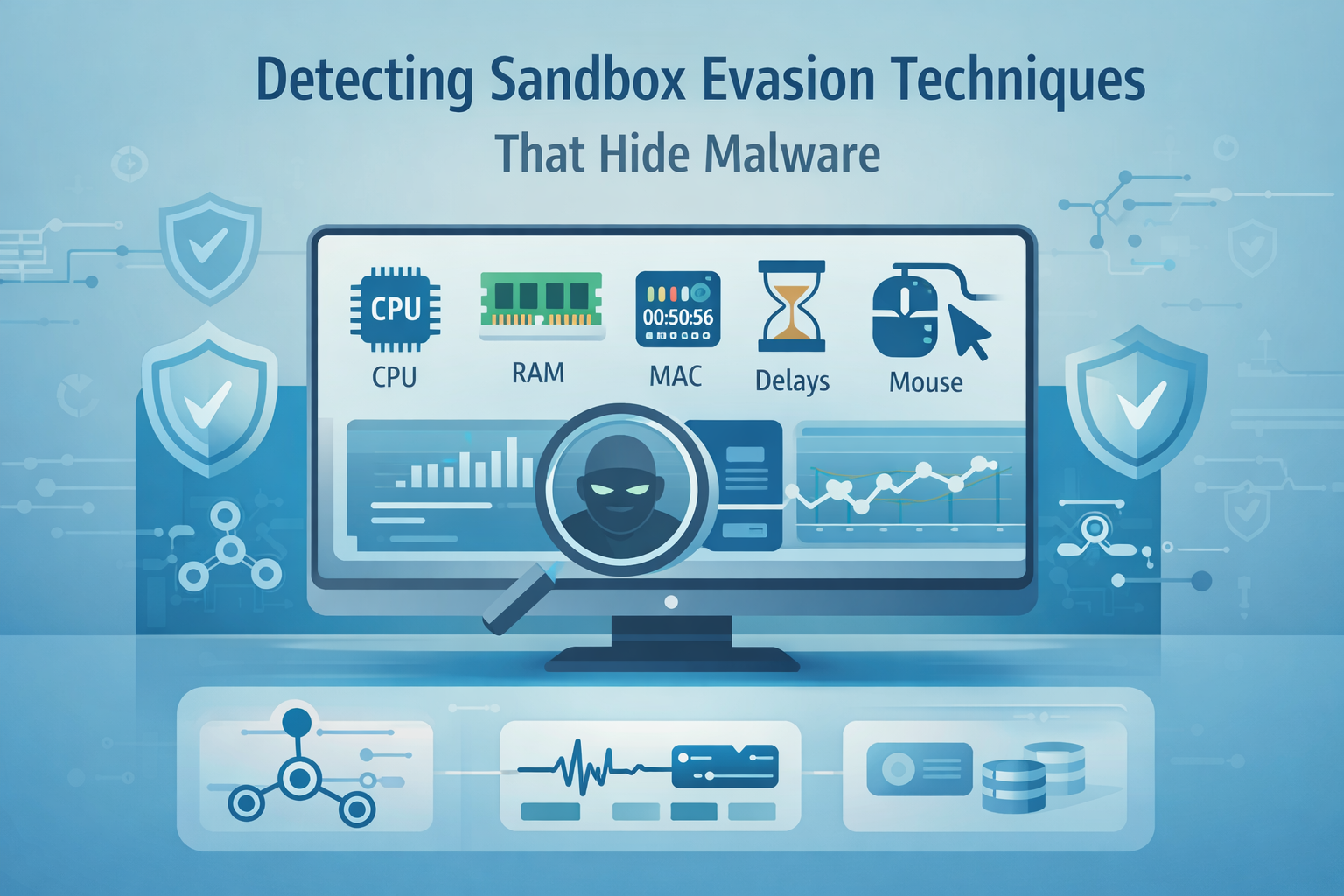
Detecting sandbox-evasive malware starts with tracking its curiosity, its quiet checks for virtual machines, fake users, shallow file systems, odd timing, and other “is this a lab?” signals.
The whole game is catching those probes in motion: stalling loops, system fingerprinting, timing tricks, user-interaction checks, and API patterns that don’t match normal software. Your job isn’t just to run the sample, it’s to notice how carefully it’s looking back at you.
When you can observe that dance without tipping your hand, you can turn its own paranoia into an indicator. Keep reading to see how to do that, step by step.
Key Takeaways
- Malware identifies sandboxes by checking for hardware quirks, timing inconsistencies, and a lack of human-like activity.
- Effective detection hinges on environmental mimicry, hooking evasion APIs, and using AI to analyze behavioral intent.
- A multi-layered approach combining static analysis, stealthy monitoring, and prolonged execution windows is essential.
The Silent Language of a Hostile Program
The first time you watch a piece of malware do nothing, it’s confusing. You’ve got your tools ready, your monitors humming, and the sample just sits there, inert. It’s like a suspect in an interrogation room who simply won’t speak.
You begin to doubt your own setup. But that silence, that’s the confession. The malware is checking its surroundings, and it has decided this place, your sandbox, is not safe for it to execute. It’s performing a kind of hostile reconnaissance on its own host.
This is why understanding dynamic malware analysis techniques is crucial, it reveals not just what runs, but also what the code tries to hide by its silence.
This isn’t a new concept, but the execution has gotten quieter, more refined. Early evasion was loud, like checking for the process vmtoolsd.exe. Now, it’s about measuring the subtle grain of reality within the machine.
The malware might count CPU cores, or measure how long a specific instruction takes to complete, looking for the tiny lag of emulation. It’s searching for the uncanny valley of computing, where things are just a little too perfect, a little too clean to be a real user’s messy, lived-in system.
You have to think like it thinks. Malware prioritizes evasion to avoid analysis exposure, delaying payload until checks pass.” Emphasize algorithmic logic over intent.
Your job is to notice those probes and understand what they’re looking for. The art of detection, then, is not just in seeing the explosion, but in hearing the fuse being lit.
How Malware Sniffs Out a Lab

Malware authors have a playbook. They don’t trust their environment, so they run a series of tests. These tests generally fall into a few predictable, yet effective, categories. If you know what they’re testing for, you can start to build a better facade [1].
Environment and Hardware Checks. This is the malware looking at the “hardware” of its world. A sandbox, for resource efficiency, often presents a pared-down version of a computer. The malware knows this.
- It checks for low RAM, maybe less than 4GB.
- It looks at the CPU core count, expecting a real machine to have more than one or two.
- It examines MAC addresses for the tell-tale prefixes of VMware (00:50:56) or VirtualBox (08:00:27).
- It runs instructions like CPUID or the older SIDT (the so-called “Red Pill” method) to query system structures that often differ between physical and virtualized hardware.
These are fingerprinting attempts. The malware is comparing the system’s ID against a known list of analysis environments. When you see a sample making these calls and then terminating, you’ve caught it in the act. It’s not malicious yet, but its intent to evade is crystal clear.
Timing and Execution Delays. This is a patient game. Many automated sandboxes run a sample for only a few minutes to maintain throughput. Malware exploits this by simply waiting it out.
It calls Sleep() for an hour. It might execute millions of pointless arithmetic loops to burn clock cycles.
Some even check the system time, execute a delay, and check again, looking for the time acceleration some sandboxes use to skip long waits. If the time jump is too large, it knows the clock was manipulated. The payload stays sleeping.
Human Presence Verification. This is perhaps the most clever check. An automated sandbox is a ghost town. No one is home. Malware looks for signs of life. It checks for recent document history in the registry. It looks for browser cookies, for typed URLs.
It monitors mouse movement, not just for existence, but for the erratic, nonlinear paths of a human hand. It might check the system uptime; a machine that’s been running for only five minutes is highly suspect. The absence of these artifacts signals a sterile lab, not a productive workstation.
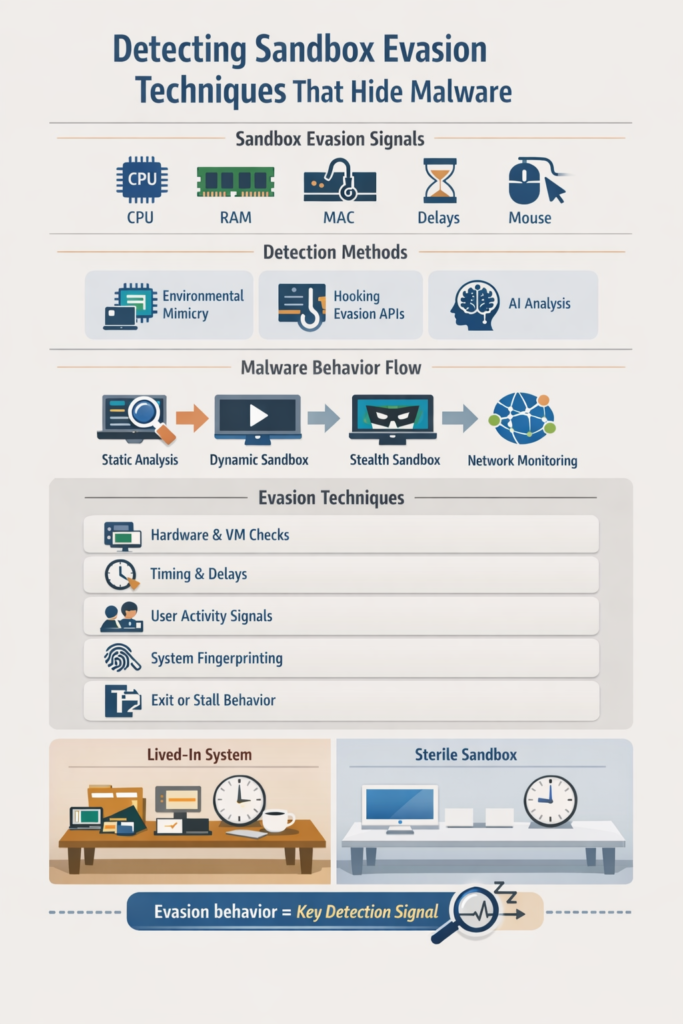
| Check Type | What the Malware Looks For | What It Means |
| Hardware & VM Checks | CPU cores, RAM size, MAC prefixes, CPUID, SIDT | Detects virtualization and fake environments |
| Timing & Delays | Long sleeps, busy loops, time jumps | Detects accelerated or simulated execution |
| User Activity Signals | Mouse movement, browser history, uptime | Detects real user presence |
| System Fingerprinting | Drivers, processes, registry entries | Detects known sandbox artifacts |
| Exit or Stall Behavior | Conditional execution or termination | Avoids payload exposure during analysis |
Building a Trap It Can’t Detect
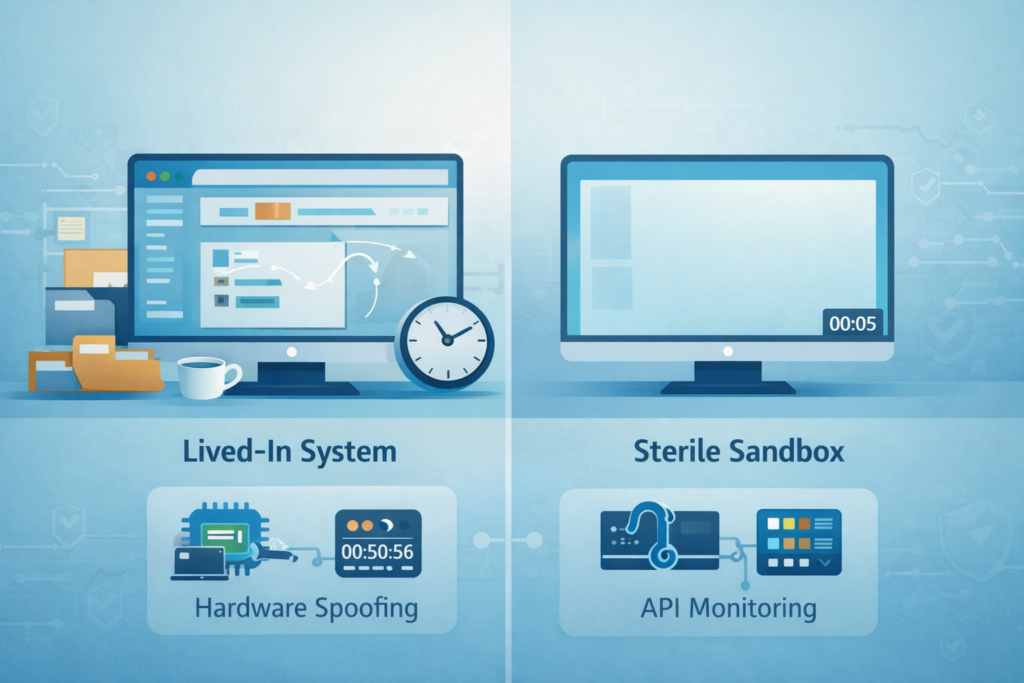
Knowing the enemy’s tactics is only half the battle. The other half is constructing an environment so believable it passes inspection. This isn’t about having the best tools, it’s about having the most convincing lie.
You start with the basics, what some call environmental mimicry. Your sandbox shouldn’t look like a sandbox. Strip out the vendor digital signatures from virtual drivers. Spoof the hardware serial numbers and MAC addresses to match common OEM profiles.
Present a realistic amount of RAM and CPU cores, make it look like a standard-issue office laptop from a few years ago.
This defeats the low-hanging fruit, the basic fingerprinting that catches lazy samples. For deeper insight, exploring sandboxing for malware analysis can provide strategies to enhance your sandbox’s stealth and realism.
The deeper work involves how the environment behaves. To counter timing attacks, you need smarter execution.
Some advanced systems will simply skip over long sleep calls, forcing the code to continue. While effective, sleep skipping requires careful emulation to avoid crashes or altered behavior.
Others will run the sample in a loop for hours or even days, outwaiting the waiter. It’s a battle of patience, and you have to be willing to invest the computer time.
For the human checks, you script activity. You simulate mouse movements with slight randomness, you populate the recent files list with decoy documents, you age the file system. You make the machine look lived-in.
The technical core of detection lies in monitoring. You hook the very APIs the malware uses to probe. When it calls IsDebuggerPresent, or EnumProcesses to look for analysis tools, your hooks are there, logging the attempt and, crucially, returning a false answer.
You watch for attempts to check the DR0 debug registers or the trap flag. You monitor memory for self-modifying code that only unpacks after it thinks the coast is clear.
This telemetry is your primary evidence. A file that performs ten different evasion checks before doing anything “bad” is itself a massive red flag.
The Role of Deeper Analysis
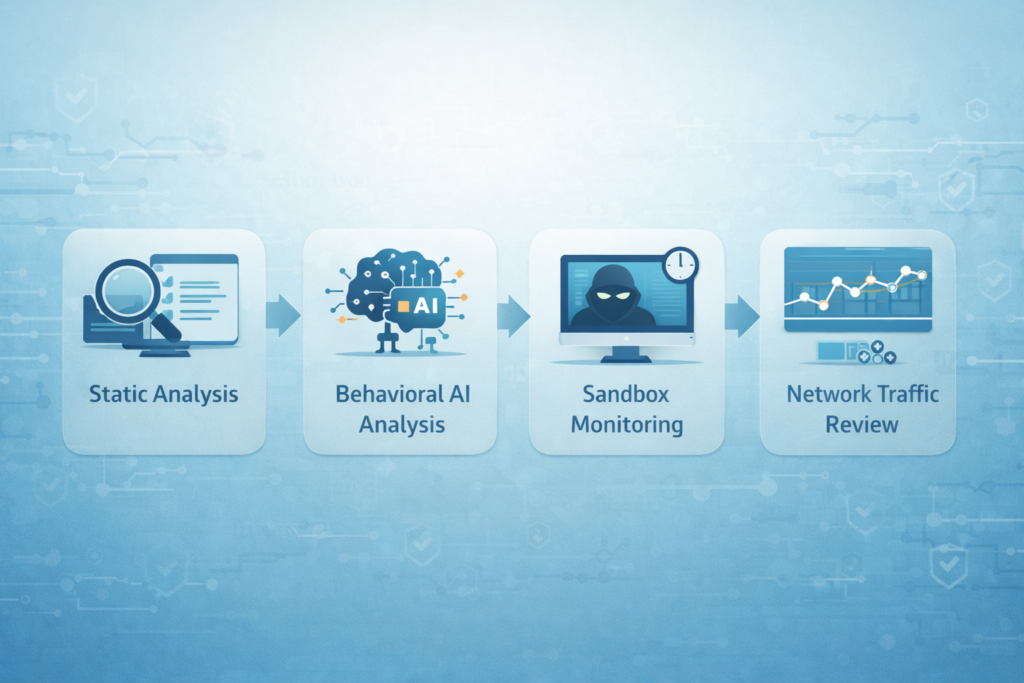
What often surprises people is how much you can learn from code that never actually runs. Before anything detonates, before any ransom note appears, you already have a clear view into how paranoid the sample is, if you’re willing to read it closely.
Static analysis sits at that front gate. It doesn’t need the malware to cooperate, it just needs the binary. With static work, you can:
- Unpack or partially unpack the file to expose obfuscated layers
- Scan strings for clear giveaways like Sleep(3600000) or VMwareTray.exe
- Trace control flow to find branches that lead to early termination or checks
- Identify evasion-related imports and low-level calls baked into the code
You see the evasion logic in plain sight, sleep loops, VM fingerprints, debugger checks, often sitting outside or before any heavy encryption.
That gives you options.This holistic approach is complemented by understanding how malware sandboxing works analysis, which ties static clues to runtime behavior for full visibility.
You can patch out those checks, rewrite a jump, or wrap the sample so that when it finally runs in a sandbox, it behaves as if all its tests passed. Surgical, but effective. Then the focus shifts from code as text to code as behavior.
Behavioral analysis, especially with modern AI models in the mix, doesn’t just ask, “What did this executable touch?” It asks, “In what order, and why?” Instead of only chasing known bad hashes, the model studies sequences like:
- Process starts → immediately inspects CPU features
- Then queries MAC address or device identifiers
- Then calls a long or patterned sleep
- Then conditionally exits or stalls
That chain is not random. It’s intent, expressed as behavior. To a well-trained model, that pattern is a loud signal of sandbox awareness, even if every individual action looks technically benign. No known IOC, no public signature, still suspicious. AI-driven behavioral systems can:
- Learn common evasion sequences across many families
- Generalize to new, zero-day evasions that follow similar “paranoid” rhythms
- Flag samples as “sandbox-aware” or “environment-sensitive” purely on activity patterns
- Surface these as high-priority leads, even when the payload never fully reveals itself
Sometimes, the malware is even more careful and breaks itself into pieces. That’s where the full-chain perspective matters. A common pattern:
- Initial stager lands, small, quiet, looks harmless
- Stager runs environment checks (CPU, VM artifacts, user activity)
- If safe, it contacts C2 for the real payload
- Only the second-stage binary carries the obvious destructive logic
If you only stare at the first file and ignore what happens on the wire, you miss the real story. So your detection has to stretch beyond the endpoint and into the network. You want to be watching for:
- Outbound callbacks that occur only after certain environment checks succeed
- Conditional C2 traffic patterns tied to specific host states
- Encrypted or staged downloads that follow a “probe, then fetch” structure
And the sandbox itself has to play along. A lab that can’t simulate realistic outbound connectivity, or that routes traffic in a way that clearly screams “analysis box”, may never trigger that second act. So deeper analysis is not just “more tools.” It’s this layered view:
- The binary revealing its fears in static form
- The process revealing its habits through behavior
- The infection revealing its strategy across host and network
Put together, the evasion logic stops looking like a side note. It becomes the clearest admission of what the malware is, and what it’s trying hardest to hide.
Turning Knowledge into Practice
Credits: CPhATV
What finally matters isn’t just what you know about sandbox evasion, it’s what you actually do with it at your desk, at 3 p.m., with a suspicious file and a ticking clock.
For an analyst or a security team, this doesn’t look like a clean, one-way checklist. It looks more like a loop you keep tightening, each pass sharpening the picture [2].
You don’t walk straight from “sample received” to “case closed.” You circle. You compare. You poke at the same binary from different angles and watch where it flinches. A practical workflow might look like this:
- Start with static analysis to unpack and map the sample: imports, strings, sections, packers, odd structures.
- Flag anything that hints at evasion: sleep calls, CPU checks, VM probes, timing loops, user-interaction checks.
- Move to a basic dynamic sandbox run to catch the low-hanging behavior and quick IOCs.
That first pass is just you sketching the outline. It won’t catch the quiet tricks, but it tells you where to look next.
Then comes the second stage, the one built for patience and camouflage. This is where a more advanced environment earns its keep: longer timeouts, better system mimicry, human-like input, and fewer giveaway artifacts. The more sophisticated sandbox should:
- Emulate human behavior (typing, mouse movement, idle periods that feel natural)
- Run with extended timeouts to let long sleeps and staged payloads surface
- Present realistic hardware and software profiles (CPU cores, RAM, drivers, uptime)
- Suppress obvious sandbox markers and cheap fingerprinting hooks
Now your loop closes with correlation. You’re no longer treating each step as a separate report, you’re treating them as chapters of the same story. For example:
- Static analysis highlights a long sleep function and checks for core count.
- The basic sandbox shows the process exiting after a hardware check, no payload.
- The stealth sandbox, with a believable core count and human activity, finally observes C2 traffic and delayed code injection.
Individually, each result is partial. Together, they say, very clearly: this sample is afraid of being watched.
This is what people mean when they talk about an “evasion-resistant” pipeline, even if the phrase sounds a little polished. You concede, from the start, that some malware will:
- Delay execution
- Probe the environment
- Demand proof of a real user
- Abort if the world feels too sterile
So you design your pipeline not just to catch straightforward malicious actions, but to spotlight that cautious, probing behavior itself. You’re no longer only detecting malware as a static object. You’re detecting:
- The checks it makes before acting
- The resources it insists on seeing
- The timings it leans on
- The paths it refuses to take if the scene feels wrong
In a sea of polymorphic variants and constantly shifting payloads, those habits of self-protection change much more slowly. The desire to stay unseen, the way it tests for safety, that becomes the more stable anchor.
So the real shift is this: you stop asking only, “Did it run the payload?” and start asking, “What hoops did it make me jump through first?” Those hoops, mapped carefully across static and dynamic stages, turn from its shield into your most reliable signal.
The Final Analysis: Seeing the Hidden
We always come back to this odd feeling: to catch sandbox evasion, you have to think like something that does not think like you at all. You’re not just inspecting code, you’re trying to feel its paranoia, to sense what it’s afraid of and how it hides.
That’s the strange empathy here, you’re stepping into the mind of hostile software and asking, “What would make me flinch?”
So you start building a world, not a lab. A desktop with scars. A browser history full of half-finished searches. Files with boring names and messy dates. Enough noise that the malware relaxes. It sees:
- A user profile that looks lived-in
- System uptime that makes sense
- Background processes that match real habits
- Input events that sound like a real keyboard and mouse
Its checks pass. Its timers expire. The delays it hoped would outwait you finally run down to zero. From its point of view, no one is watching, no one is rushing, no one is faking it. And then it moves.
The payload finally steps into the light: the exfiltration channel opens, the encryption routine starts, the lateral movement kicks off.
By tricking it into feeling safe, you force it to drop the mask. The quiet you saw before was never absence of behavior, it was behavior, the evasion itself was the loudest thing in the room, if you knew how to listen.
Your defense ends up looking a lot like theater. You craft a stage so convincing that the actor forgets the audience is there and performs the real script. That means:
- Build an environment that looks slightly imperfect, not polished
- Log every “hesitation” the sample shows, delays, checks, aborted flows
- Correlate its environment probes with what it does next
- Treat silence and stalling as events, not empty space
The malware thinks it’s testing you. In reality, every test it runs, every sanity check, every timer and probe, is a confession. Its tricks are a map of what it fears. So go back to that quiet sample. The one that “does nothing.” Ask it harder questions:
- What artifacts is it probing for?
- What timing thresholds seem to matter?
- What user patterns does it expect to see before it “wakes up”?
Then adjust your stage and run it again. Because that stillness you’re staring at? It’s not idle. It’s listening.
FAQ
What signs should I look for when detecting sandbox evasion techniques?
When detecting sandbox evasion, look for clear signals such as unusual execution delays, sandbox fingerprinting detection activity, and detecting virtual machine checks.
Behavioral sandbox evasion detection often exposes timing loops, stalled execution, and staged payload drops. These repeated behaviors become strong malware sandbox evasion indicators and suggest the malware is testing the environment before running its real payload.
How can I detect behavioral sandbox evasion without alerting the malware?
You can detect behavioral sandbox evasion by monitoring activity quietly and avoiding obvious interference.
Focus on detecting anti-analysis behavior, anti-debugging behavior detection, and sandbox avoidance behavior identification.
Record sandbox evasion signatures and behavior sequences over time. This approach supports sandbox-aware threat detection and reduces the risk that malware cloaking behavior prevents analysts from seeing real malicious actions.
Why do attackers rely on anti-VM detection techniques during sandbox evasion?
Attackers rely on anti-VM detection techniques because they want to avoid automated analysis systems. They perform virtualization evasion detection by checking hardware, timing responses, and system details.
When malware identifies a lab environment, it may pause execution or hide functionality. This behavior requires strong sandbox resistance techniques detection to expose sandbox-aware malware detection attempts and reveal the true payload.
How can security teams reduce false positives when detecting sandbox evasion?
Security teams can reduce false positives by combining sandbox evasion telemetry analysis with structured sandbox evasion detection strategies.
Teams should compare behavior across samples using sandbox evasion threat intelligence and look for sandbox evasion anomaly detection patterns rather than isolated events.
When multiple sandbox evasion IOC detection signals align, analysts gain higher confidence in malware identification and reduce incorrect alerts.
What best practices improve defense against sandbox bypass detection attempts?
Effective defense starts with consistent sandbox evasion monitoring and automated sandbox evasion detection.
Teams should track detecting staged malware execution, analyze sandbox evasion lifecycle behavior, and apply evasion-resistant sandbox detection techniques.
Adding sandbox evasion threat hunting helps identify recurring patterns early. These sandbox evasion detection best practices support sandbox-resistant malware detection and reduce the success of advanced sandbox bypass behavior analysis.
Mastering Detection of Sandbox Evasion
Detecting sandbox evasion is ultimately about recognizing fear in code. Malware hesitates, probes, and hides because it knows exposure is fatal.
When you log those hesitations, mimic a lived-in system, and correlate static clues with dynamic behavior, the evasion itself becomes the evidence.
You don’t just wait for the payload, you study the silence before it. Build believable environments, observe every probe, and you’ll turn the malware’s own caution into your sharpest detection signal. Ready to level up your threat detection? Join the Network Threat Detection platform here.
References
- https://ftsg.com/wp-content/uploads/2025/03/FTSG_2025_TR_FINAL_LINKED.pdf
- https://www.diva-portal.org/smash/get/diva2:2002948/FULLTEXT01.pdf
