

DHCP server log monitoring devices tracks which device used a specific IP address and when it happened. It records every lease assignment, renewal, and release, creating a timeline teams can use to investigate network activity. In Windows Server environments, events such as ID 10 for a new lease or ID 15 for a renewal quickly reveal patterns.
Many organizations treat DHCP logs as routine operational data, but they also provide context that security tools need. When combined with other telemetry, these logs help teams trace activity back to real devices. Keep reading to see how monitoring devices turn DHCP logs into real network visibility.
DHCP Log Monitoring: What Matters Most
Before diving deeper, here are the key ideas that explain how DHCP server log monitoring devices improve network visibility and security.
- DHCP logs create a reliable map linking every IP address to a specific device’s MAC address, which speeds up incident response.
- Your threat detection gets sharper when these logs are fed into a SIEM. Correlating a new lease with a failed login attempt tells a much clearer story.
- Centralized collectors save time. Manually parsing daily log files doesn’t scale. A good platform automates the hunt for rogue devices, pool exhaustion, and starvation attacks.
What Is DHCP Server Log Monitoring and Why Does It Matter?
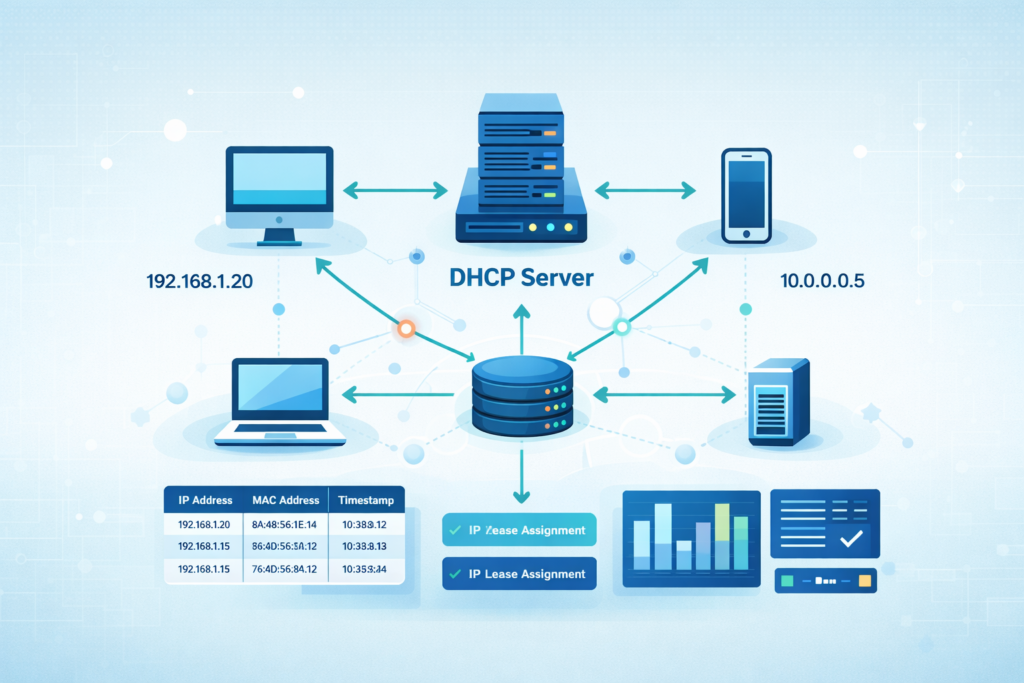
Simply put, DHCP log monitoring follows the life cycle of every IP address on a network. It records when an address is assigned, renewed, denied, or released. These events might look routine, but they often reveal the first signs of network problems or unauthorized devices.
We saw this during an outage affecting one VLAN. Users kept losing connectivity even though the infrastructure appeared stable. When we reviewed the DhcpSrvLog-Tue.log files, a pattern started to appear. Lease renewal failures were spiking at regular intervals. A misconfigured relay agent was flooding the DHCP server with requests.
Even a modest network produces a surprising amount of DHCP data. In environments with several hundred endpoints, daily logs can easily reach tens of thousands of entries.
The challenge isn’t collecting the logs. Most servers already generate them. The real challenge is knowing which events actually matter and what they reveal about device behavior.
Key DHCP Log Events and Fields
Certain events and fields appear repeatedly in DHCP logs. These entries help administrators understand how devices interact with the network and provide the clues needed during troubleshooting or investigations.
| DHCP Log Component | Description | Security or Operational Insight |
| Lease Grant | The server assigns an IP address to a device. | Shows when a device first joins the network. |
| Lease Renewal | The device requests to extend its current lease. | Frequent renewals may signal automated or abnormal activity. |
| Lease Release | The device gives up its IP address. | Helps track when devices disconnect from the network. |
| DHCP NAK | The server denies a requested address. | Often linked to configuration errors or rogue DHCP behavior. |
| MAC Address | Hardware identifier of the requesting device. | Allows investigators to tie activity to a specific device. |
| Timestamp | Exact time when the event occurred. | Essential for building an accurate incident timeline. |
When these fields are combined, they form a clear activity trail. That trail helps turn a simple IP address into a real device that can be traced during an investigation.
Which Devices and Platforms Monitor DHCP Server Logs?
In small setups, an admin might use native tools, checking the DhcpSrvLog files on Windows or syslog on Linux. But this gets unwieldy fast. For networks with more than 100 endpoints, you need a centralized system.
Our own approach evolved. We started with PowerShell scripts to parse logs, which worked fine for a single server. As the environment grew, DHCP data became more valuable when it was combined with other telemetry.
In practice, DHCP activity is only one piece of the puzzle. Security teams usually combine it with authentication logs, network traffic, and other essential log sources for NTD. Those understand what a device actually does after receiving an IP address.
Here are the common types of platforms that handle this well:
- Log Management Systems: These are workhorses for centralized parsing, storage, and generating compliance reports from DHCP logs.
- Security Analytics Platforms: Their strength is correlation. They’ll link a DHCP event with authentication logs from your Active Directory.
- Network Security Appliances: Many next-gen firewalls can ingest DHCP logs to build their own internal MAC-to-IP binding tables.
- Endpoint Visibility Tools: These use machine learning to baseline normal device behavior; a new, unseen device grabbing an IP triggers an alert.
The typical architecture is straightforward: Your DHCP servers generate logs, a collector (like an NXLog agent) forwards them, and a central platform analyzes them.
How Do DHCP Monitoring Systems Detect Network Threats?
These systems find threats by looking for patterns that break the norm. A sudden spike, say, 50 failed lease requests in a minute, is a classic sign of a DHCP starvation attack, where an attacker tries to exhaust all available IPs.
We’ve seen more subtle cases as well. In one investigation, our Network Threat Detection layer flagged a device whose MAC address kept receiving different IPs within short intervals.
When that behavior was correlated with traffic patterns and security telemetry, the system also surfaced suspicious outbound connections identified through firewall log analysis best practices. Together, those signals clearly pointed to an endpoint hopping attack.
Here’s what monitored anomalies often look like:
- Rogue DHCP Servers: A device on your network handing out IP addresses, which can redirect traffic.
- Duplicate IP Conflicts: Two devices fighting over one address, causing connectivity drops.
- Anomalous Lease Patterns: A device requesting new leases far more often than its peers, suggesting it might be a virtual machine spun up for malicious tasks.
Security teams don’t rely on DHCP data alone. As highlighted in resources like the NIST Cybersecurity Framework, combining different telemetry sources is key for accurate attribution. A new DHCP lease plus a simultaneous firewall block event creates a much more compelling alert than either piece of data on its own.
How Are DHCP Logs Collected and Parsed in Monitoring Systems?
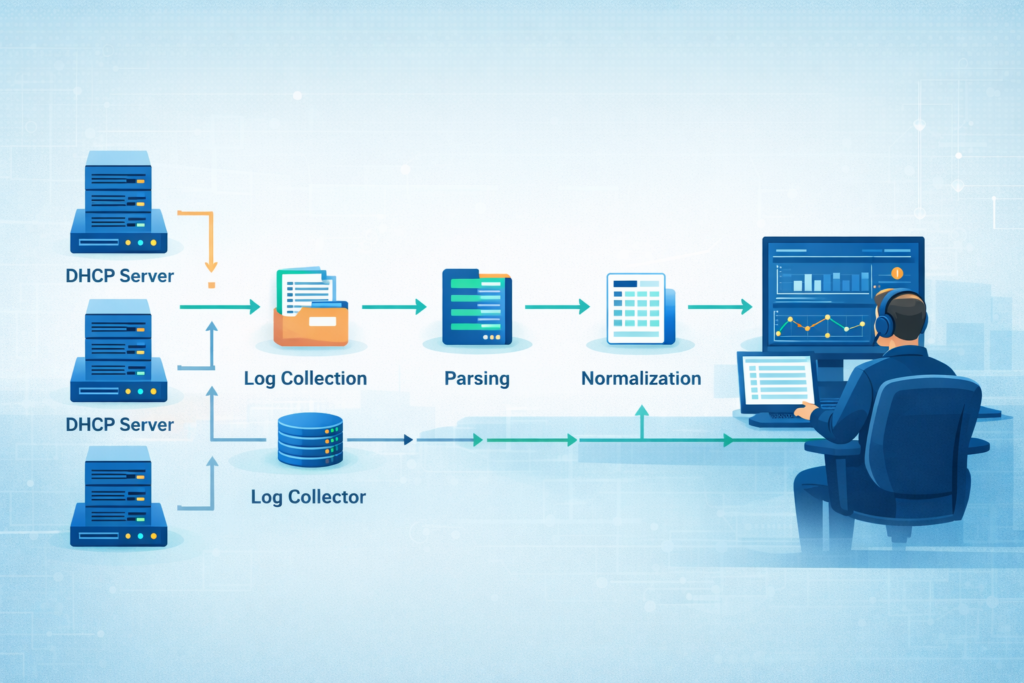
A Windows DHCP server writes daily log files like DhcpSrvLog-Mon.log. Linux servers using ISC DHCP send events to syslog. The raw log is just text, so the next step is critical: collection and parsing.
Early on, we’d use tail -f on the log file to watch events in real-time during crises. For ongoing monitoring, that’s not sustainable. You need automation.
A standard deployment workflow looks like this:
- Enable Auditing: Turn on verbose logging on your DHCP servers.
- Collect Logs: Deploy a lightweight agent (like NXLog or a syslog forwarder) on each server to send logs to a central point.
- Parse and Normalize: The central system breaks each log line into structured fields, MAC address, IP, hostname, timestamp, lease action.
- Analyze and Alert: The parsed data fuels dashboards and alert rules, showing live lease counts or flagging duplicate IPs.
Once structured, DHCP data becomes far more useful. It can be correlated with authentication events, VPN sessions, and especially DNS activity. In practice, many detection pipelines also combine DHCP telemetry with dns query log monitoring for security. It is to reveal suspicious host behavior or early signs of lateral movement.
What Operational Problems Can DHCP Log Monitoring Solve?
Credits: David Bombal
Beyond security, this monitoring solves daily headaches for network ops teams. The core goal is to prevent outages. Many teams set an alert for when IP pool utilization hits about 85%, giving them time to expand the scope before users are affected.
We once used it to solve a maddeningly intermittent problem. A specific group of users had drops in connectivity every afternoon. The DHCP logs were the clue. They showed a surge of lease release events from those users’ subnet right before the drops. The culprit was a power-saving setting on their specific brand of VoIP phones that was too aggressive.
Common problems DHCP monitoring can pinpoint include:
- IP Pool Exhaustion: Watching utilization trends tells you when to add more addresses.
- Rogue DHCP Servers: Spotting lease offers from an unauthorized server IP.
- Compliance Gaps: Providing an audit trail that shows which device had which IP at any given time, often needed for regulations.
The benefits are direct: faster diagnosis of network issues, accurate attribution of devices, and a solid paper trail for audits. It turns reactive firefighting into proactive maintenance.
When Should Organizations Use Dedicated DHCP Monitoring Devices Instead of Scripts?
It’s a question of scale. For a small office with one server and 50 devices, a well-written PowerShell script that emails you about critical events might be perfect. It’s low-cost and does the job.
We used scripts in our early days. But as we added more servers, VLANs, and remote sites, maintaining those scripts became a part-time job. They couldn’t correlate data across sources, and we were always playing catch-up with new log formats.
As noted by NIST Special Publication 800-137
“Organization-wide monitoring cannot be efficiently achieved through manual processes alone or through automated processes alone… Automated processes, including the use of automated support tools (e.g., vulnerability scanning tools, network scanning devices), can make the process of continuous monitoring more cost-effective, consistent, and efficient.” – NIST
The breakpoint often comes around 500 endpoints or multiple DHCP servers. At that scale, the limitations are clear:
- Script Maintenance: Any change to the server or log format can break your script.
- Lack of Correlation: A script can’t easily match a DHCP lease with a SIEM alert.
- Alert Fatigue: Without intelligent filtering, you get flooded with data, not insights.
Dedicated platforms, while a bigger investment, automate the heavy lifting. They parse logs consistently, correlate across data sources, and provide a single pane of glass for visibility. They free your team to analyze threats instead of managing log collectors.
How DHCP Log Monitoring Integrates With Security Operations
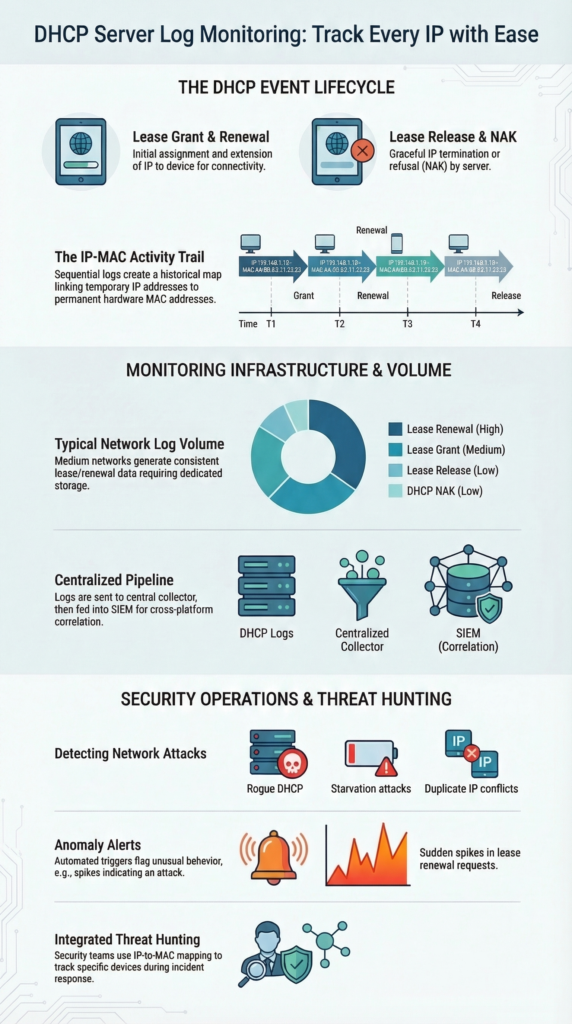
For a Security Operations Center (SOC), DHCP data is the glue that connects network activity to a physical device. An alert about malicious traffic from IP 10.0.1.45 is useful. Knowing that IP was leased to the MAC address of Jane Doe’s company laptop 10 minutes ago is actionable.
In a recent analysis by Fortifying Network Security: A Machine Learning-Based Approach to Improving DHCP Snooping
“The results confirm the effectiveness of behavioral analysis of DHCP sessions combined with machine learning techniques for anomaly detection, opening up new possibilities for integration into practical traffic monitoring and network security systems.” – DergiPark
In our SOC workflows, we’ve integrated DHCP logs into our primary Network Threat Detection platform. This means every IP-centric alert automatically comes with device identity context.
A typical investigation flow is now much faster:
- Alert triggers on suspicious outbound traffic from an IP.
- Analyst queries the integrated platform for that IP.
- The platform instantly returns the MAC address, hostname, and user associated with the active DHCP lease for that IP.
- Investigation focuses immediately on that specific endpoint, saving hours of manual log searching.
This integration enables proactive threat hunting. Analysts can search for patterns like devices with unstable IP leases or unknown MAC addresses successfully acquiring IPs. It transforms DHCP from an operational log into a core security telemetry source.
FAQ
How does DHCP log analysis help track suspicious network devices?
DHCP log analysis helps teams track IP address assignment tracking across the network. Each log entry records the device MAC address, hostname, timestamp, and lease action. Investigators review these records to connect network activity to a specific device.
This process also supports rogue DHCP detection and threat hunting DHCP workflows when unknown or unauthorized endpoints request IP addresses unexpectedly.
What signals indicate a DHCP starvation attack in server lease monitoring?
A DHCP starvation attack occurs when attackers flood a DHCP server with repeated lease requests to exhaust the available IP pool. During server lease monitoring, logs often show hundreds of discover offer ack flow attempts within seconds.
Analysts also watch NAK response monitoring, unusual lease duration anomalies, and frequent scope exhaustion alerts to confirm that a starvation attack is in progress.
How can administrators enable audit log enabling for DHCP servers?
Administrators enable audit log enabling in the DHCP server settings so the system records every lease event. In Microsoft DHCP auditing, the server writes entries such as Event ID 10 grants and Event ID 15 renewals.
These records help security teams maintain compliance lease trails and support forensic IP trails during investigations. Administrators usually review these logs through Windows Event Viewer DHCP.
What methods help collect DHCP logs from Linux or Windows servers?
Administrators collect DHCP logs by forwarding them to a central logging system. Windows servers usually require DhcpSrvLog parsing, while Linux ISC DHCP logs typically use syslog forwarding DHCP to send events.
Many teams deploy an NXLog DHCP collector or similar agent to centralize the logs. After collection, platforms perform SIEM DHCP correlation or ELK stack DHCP ingestion for analysis.
Why is MAC address mapping important for network investigations?
MAC address mapping links each IP address lease to the physical device that requested it. This mapping helps analysts identify unauthorized device alerts, detect duplicate IP conflicts, and investigate endpoint hopping issues across VLANs.
When teams review DHCP data alongside firewall DHCP snooping and DNS update failures, they can reconstruct forensic IP trails and understand the full sequence of network activity.
Turn DHCP Logs Into Clear Network Visibility
You know how frustrating it is when a suspicious IP shows up but no one can quickly confirm which device used it. Security teams end up digging through scattered records just to piece together what happened. That delay can slow investigations when quick answers matter most.
That’s where NetworkThreatDetection.com helps. By combining DHCP server log monitoring with automated analysis, teams get clearer visibility into device activity and suspicious behavior. Explore Network Threat Detection today to detect threats earlier and respond faster.
References
- https://nvlpubs.nist.gov/nistpubs/legacy/sp/nistspecialpublication800-137.pdf
- https://dergipark.org.tr/en/download/article-file/4886334
