

EDR agent deployment management is the structured process of installing, validating, updating, and governing endpoint detection and response agents across laptops, servers, and cloud workloads to maintain consistent, real-time threat visibility.
In our experience, most detection gaps come from deployment mistakes rather than tool limitations. Gartner reports that over 70% of organizations are consolidating endpoint security into EDR or XDR-driven programs, making disciplined agent rollout a critical security priority.
Proper management ensures that agents remain healthy, up to date, and capable of providing full telemetry coverage. Keep reading to learn how to plan and operationalize EDR agent deployment management effectively.
Quick Wins – EDR Deployment Done Right
- EDR agent deployment management succeeds or fails on automation, validation, and policy standardization.
- A 5% pilot rollout reduces disruption and uncovers conflicts before full production deployment.
- Hybrid and multi platform environments demand identity alignment, lifecycle hooks, and continuous testing.
What Is EDR Agent Deployment Management?
EDR agent deployment management is the end-to-end governance of endpoint security agent installation, policy enforcement, lifecycle updates, and validation across physical, virtual, and cloud assets. From our experience, proper management ensures agents remain persistent, healthy, and capable of providing the telemetry needed for accurate detection and response.
As highlighted by Microsoft Learn
“…Deploy preconfigured policy to onboard devices through Intune, or Onboard devices to Defender for Endpoint…” – Microsoft Learn
At its core, deployment management includes installation, enrollment, health monitoring, policy hierarchy design, and decommissioning. Tools like CrowdStrike Falcon, SentinelOne, and Cortex XDR rely on continuous agent telemetry to maintain detection fidelity.
We’ve seen organizations focus on alert tuning before verifying agent persistence, creating blind spots that compromise visibility. That’s why we position Network Threat Detection as a first layer, it validates traffic patterns independently of host agents. Even if endpoints fail silently, network telemetry provides actionable insight.
Core components we emphasize include:
- Selecting a deployment strategy, automated versus manual
- Standardizing EDR policies across departments
- Validating agent persistence with post-boot checks
- Ongoing monitoring of EDR sensor health
Without structured oversight, scaling EDR beyond 100 endpoints often exposes gaps and operational friction.
Automate or Fail: Scaling Beyond 100 Endpoints

Manual EDR agent installation becomes impractical beyond 100 endpoints, while automation ensures consistent rollout across thousands of systems.
In a recent analysis by Palo Alto Networks
“…Deploying an EDR solution means implementing a system that constantly gathers… from these devices.” – Palo Alto Networks
Key automation approaches we use include:
- Microsoft Intune for Windows EDR deployment
- Jamf Pro for macOS agent rollout
- Cloud image baking for golden images
- CI/CD lifecycle hooks for AWS EDR agent management
A comparison of approaches illustrates the difference:
| Criteria | Manual Install | Automated Deployment |
| Speed | Slow and device dependent | Scales to 1,000+ endpoints |
| Consistency | Variable configuration | Standardized policies |
| Cloud workloads | Error prone | Boot-time validation |
| Drift control | High risk | Lifecycle hooks and compliance checks |
| Scalability | Limited by staff | Designed for high-volume rollout |
We’ve found that combining automated deployment with Network Threat Detection provides independent verification that endpoints actually generate traffic. Scaling EDR isn’t just about speed, it’s about maintaining verifiable control and coverage across all endpoints, no matter how large or dynamic the environment.
What Is the 5% Pilot Testing Blueprint?

A 5% pilot rollout helps reduce disruption by validating policies, performance impact, and detection logic before applying EDR configurations to the full organization. In our experience, testing a small, representative portion of endpoints ensures that issues are caught early and mitigated without affecting production systems.
We typically structure pilot testing in four phases:
- Select representative groups: IT administrators, security engineers, and high-value servers, including Linux systems that are critical targets for EDR
- Create EDR test policies: Separate from production policies, with elevated logging to evaluate behavioral detection
- Monitor for 2 to 4 weeks: Measure CPU and memory impact, track false positives, and refine alert tuning
- Simulate adversary activity: Run MITRE ATT&CK-aligned Atomic Red Team simulations and validate cross-platform detection rules
We always correlate endpoint telemetry with Network Threat Detection during pilots. For example, if a simulated credential dump appears in host logs but not in network telemetry, that discrepancy signals configuration drift. This layered validation builds confidence in EDR deployment before scaling to the broader environment.
Following this blueprint, organizations can ensure that agent performance, detection accuracy, and policy alignment are optimized, reducing risk while maintaining visibility across endpoints as deployments scale.
Hybrid Environments and Identity Alignment
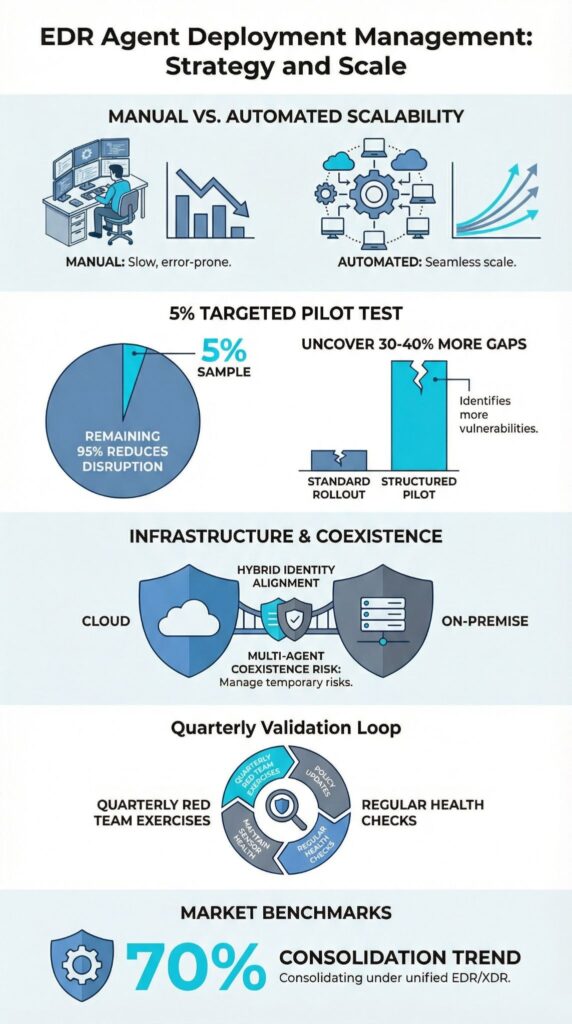
Hybrid EDR environments add complexity because identity mismatches between on-prem systems and cloud assets can fragment detection coverage.
In our experience, cloud platforms like AWS, Microsoft Azure, and Google Cloud Platform assign instance IDs that differ from traditional hostnames and GUIDs. Without an asset graph linking instance IDs, GUIDs, and identity metadata, detection events scatter across consoles, reducing visibility.
Hybrid deployments introduce challenges such as:
- Ephemeral nodes terminating before EDR compliance checks complete
- Cloud API-based models for serverless EDR coverage
- GCP sensor health inconsistencies
- Azure endpoint agents experiencing identity drift
We’ve seen AWS auto scaling groups launch hundreds of instances per hour. Without lifecycle hooks, up to 20% of instances may terminate before telemetry is fully reported. To address this, we implement:
- Repo-based EDR configurations for “detection as code”
- MITRE-tagged detections across cloud and on-prem platforms
- Agent update management synchronized across regions
- Continuous endpoint inventory synchronization
Even when cloud nodes fail to report telemetry, east-west traffic patterns still reveal anomalous behavior. In our experience, maintaining identity consistency is the backbone of scalable EDR architectures, enabling reliable coverage across hybrid environments and reducing blind spots as deployments expand.
Running Multiple EDR Agents Without Conflict
Credits : Stripe OLT
Running multiple EDR agents at the same time can introduce driver conflicts, duplicate alerts, and performance degradation, but temporary coexistence is feasible during a controlled migration. In our experience, careful planning and validation are essential to avoid creating operational blind spots or overwhelming analysts with noise.
Migration scenarios, such as overlapping deployments of Carbon Black and CrowdStrike Falcon, highlight the risks of kernel-level monitoring conflicts.
Without mitigation, duplicated telemetry can inflate dashboards and troubleshooting becomes more complex. Practitioner communities often recommend enabling a “detect only” mode on the secondary agent during transitions to minimize interference.
Common risks we’ve observed include:
- Performance degradation on critical servers
- Duplicate telemetry inflating alert dashboards
- Increased complexity in agent failure troubleshooting
Mitigation strategies that we rely on include:
- Enabling detect-only mode on the secondary agent
- Using EDR whitelisting to suppress competing processes
- Limiting coexistence to 30–60 days
We always validate coexistence through MITRE ATT&CK-aligned testing and red team EDR exercises before completing a full cutover. In our experience, short-term dual deployments work reliably, but permanent overlap rarely succeeds without causing persistent alert noise and operational friction.
FAQ
What should I prepare before starting EDR agent deployment?
Before starting EDR agent deployment, create a detailed EDR onboarding checklist that clearly defines scope, timeline, and ownership.
Conduct a full endpoint inventory sync to confirm every device is accounted for. Define EDR policy standardization rules and separate EDR test policies from production EDR policies. Plan pilot testing EDR with a controlled endpoint pilot rollout to validate configuration and minimize deployment disruption.
How do I manage multi-platform EDR deployment at scale?
Managing multi-platform EDR deployment requires structured endpoint detection response management across Windows, macOS, and Linux systems. Establish cross-platform detection rules and consistent EDR identity management to prevent configuration drift.
Design scalable EDR architectures that support high-volume endpoint rollout and multi-site EDR setups. Proactively address EDR scalability challenges, including worker node scaling and potential deployment bottlenecks.
How can I validate agents after installation?
You should perform agent persistence validation and structured post-boot agent checks immediately after installation. Implement formal EDR validation workflows to confirm that policies apply correctly and telemetry flows as expected.
Conduct MITRE ATT&CK testing and Atomic Red Team simulations to verify detection coverage. Use EDR sensor health monitoring dashboards to confirm stable agent telemetry routing and continuous endpoint threat monitoring.
What causes EDR rollout failures or coverage gaps?
EDR rollout failures often result from multi-EDR conflicts, unstandardized policy issues, and improperly configured detect-only EDR mode. Offline endpoint deployment, PTO machine EDR failures, and segregated network installs frequently create endpoint coverage gaps.
Weak agent update management and inconsistent agent failure troubleshooting processes increase operational risk and limit EDR scalability during high-volume deployments.
How do I reduce noise without weakening detection?
To reduce EDR noise reduction issues without weakening detection, apply structured EDR alert tuning based on real operational data. Implement targeted EDR whitelisting techniques aligned with business-critical processes.
Use behavioral detection deployment mapped to MITRE tagged detections instead of relying solely on static signatures. Maintain repo-based EDR configs and detection-as-code repositories to ensure consistent, measurable improvements across environments.
Sustain EDR Deployment as a Living Discipline
EDR effectiveness extends far beyond rollout. Continuous validation, sensor health monitoring, and structured policy refinement turn deployment into ongoing visibility and control, reducing blind spots and operational gaps.
Teams that combine automated compliance, MITRE-tagged detection exercises, and Network Threat Detection gain confidence in endpoint coverage, quickly surface discrepancies, and adapt to evolving cloud and identity landscapes.
Treat EDR management as a living discipline, align automation, layered telemetry, and proactive validation to strengthen detection, minimize alert fatigue, and maintain resilient security posture over the long term.
References
- https://learn.microsoft.com/en-us/intune/intune-service/protect/endpoint-security
- https://www.paloaltonetworks.com/cyberpedia/what-is-edr-deployment
