
Extracting files from network captures means rebuilding transferred files from PCAP traffic by reassembling sessions and spotting file signatures. The technique has been central to forensics since the PCAP format’s introduction in 2004. Analysts rely on it to recover images, scripts, and malware from raw traffic.
We’ve worked through messy captures where files were hidden and protocols were broken. This guide explains what actually works in real investigations, what fails, and how teams approach extraction when accuracy matters most. Read on to understand the reliable workflows that hold up under real pressure.
Quick Wins – Smarter File Extraction from PCAP
- File extraction from network captures depends on protocol clarity, session reconstruction, and correct carving techniques.
- GUI and command-line tools solve different problems and often work best together.
- Automation platforms like Network Threat Detection, which we use in our own workflows, reduce manual effort during large-scale investigations.
What Does Extracting Files From Network Captures Mean in Practice?
In practice, extracting files from a network capture means rebuilding transferred files from PCAP traffic. You reassemble sessions and identify file signatures to turn fragmented packets into usable artifacts like documents or executables.
A key point is that a packet capture records individual packets, not whole files. A single file can be split across thousands of packets and multiple TCP streams. The forensic work involves correctly reconstructing those conversations.
This reconstruction process is consistent with how enterprise forensic systems operate. As described in the IBM QRadar Incident Forensics documentation:
“When QRadar Incident Forensics receives a search request, it … extracts and rebuilds documents, and then adds the results to the forensics repository.” – IBM QRadar
The process generally involves:
- Understanding the differences between PCAP and PCAPNG formats, including any decompression needed.
- Reconstructing artifacts like images, ZIP files, or executables from the raw packets.
- Applying it to use cases like analyzing data exfiltration, solving CTF challenges, or reverse-engineering malware behavior.
While Wireshark, first released in 1998, is the most common tool, extraction is rarely a one-tool job. Success depends on knowing when to switch techniques and when to automate parts of the workflow.
Which Network Protocols Allow Reliable File Extraction?
File extraction works best on clear-text protocols like HTTP and FTP. Encrypted or fragmented protocols make it much harder without the right keys or advanced tools.
Protocols generally fall into a few categories:
- HTTP and FTP allow straightforward extraction by following TCP streams.
- SMTP and POP3 can expose email attachments and other artifacts.
- Custom TCP protocols require specific parsers or manual hex editing.
- UDP-based transfers complicate reassembly and often break automated file carving.
| Protocol Type | Extraction Reliability | Why It Works or Fails | Typical Challenges |
| HTTP (Unencrypted) | High | Clear-text payloads and structured responses | Large objects may span multiple streams |
| FTP | High | Dedicated file transfer protocol over TCP | Passive vs active mode complexity |
| SMTP / POP3 | Moderate to High | Attachments embedded in structured email sessions | MIME decoding required |
| Custom TCP Protocols | Variable | Depends on parser availability | Requires manual reconstruction or hex editing |
| UDP-Based Transfers | Low | No guaranteed session reconstruction | Fragmentation and packet loss |
In our work, non-HTTP protocols are where automation becomes essential, especially when correlating multiple data collection sources before starting detailed manual analysis.
How Does Wireshark Extract Files From PCAP Traffic?

Wireshark extracts files by following TCP streams or exporting detected HTTP objects, letting analysts save reconstructed payloads directly when leveraging network traffic PCAP as structured forensic evidence. It’s often the quickest way to start hands-on analysis.
The workflow usually begins with filtering. You apply a display filter, like http.request.method == “GET”, to narrow down the traffic. From there, you generally have two main options.
The first is to use Follow TCP Stream:
- Right-click a packet and select “Follow” > “TCP Stream”.
- Set the view to “Raw”.
- Save the stream and manually trim any protocol headers using a hex editor if needed.
- Validate the file by checking its magic bytes (like %PDF for a PDF).
The second method is Export Objects:
- Go to File > Export Objects > HTTP.
- Review the list of detected files and save the ones you need.
- Verify the file’s integrity, for example, by opening a recovered image.
While Wireshark (first released in 1998) is highly effective, it struggles with scale. Large captures, encrypted streams, or mixed protocols can make manual review slow. That’s where we usually switch to automation or command-line tools to maintain efficiency.
How Do Command Line Tools Like tcpflow and Foremost Work Together?
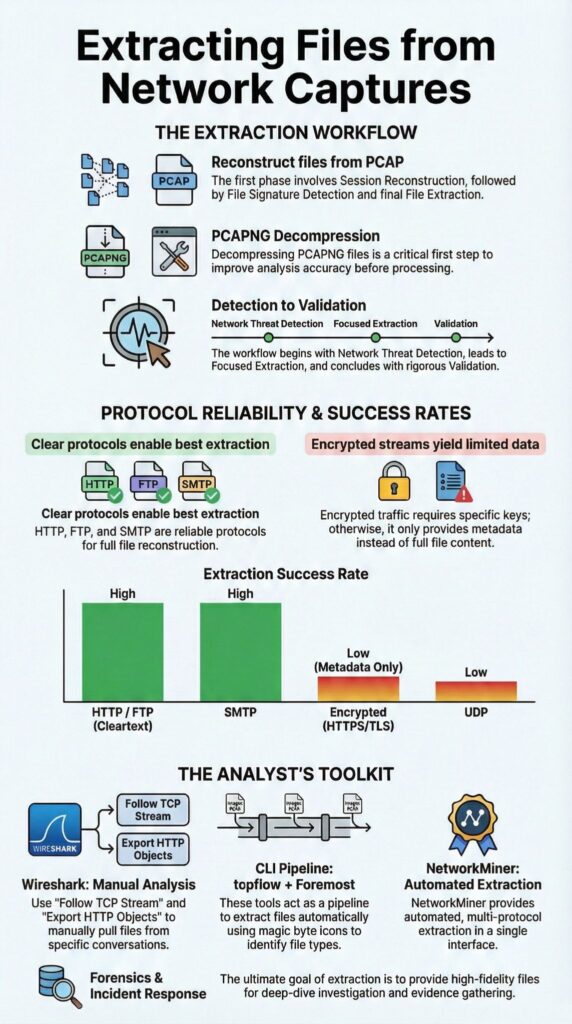
Command-line tools like tcpflow and Foremost work in sequence. tcpflow reconstructs the sessions, and then Foremost or Binwalk carves out files from those raw streams using file signatures.
The process starts with session reconstruction. tcpflow reads a PCAP file and dumps each TCP conversation into its own file. These output files are messy but contain the continuous payloads you need.
The next step is carving. This involves a few key actions:
- Concatenating the raw session dumps from tcpflow.
- Running foremost or a similar tool to scan for file signatures and magic bytes.
- Manually validating the results or integrating them into a malware analysis workflow.
We’ve used this combination during reverse engineering and CTF challenges where the protocols are deliberately obscure.
The main downside is noise. Command-line carving generates a lot of false positives, which becomes more pronounced when storing large PCAP files and processing them at enterprise scale. That’s why we often use our Network Threat Detection tools first to filter the traffic and narrow the scope before we start the intensive carving process.
Why Is NetworkMiner Effective for Automated File Extraction?
NetworkMiner is effective for automated file extraction because it automatically parses multiple protocols and reconstructs files with very few manual steps. Its strength comes from understanding protocols, not just blindly carving data.
This approach mirrors how other reconstruction-focused tools operate. As noted on the Wikipedia entry for Xplico:
“Using raw data from Ethernet or PPP … Xplico extracts application data … In the case of HTTP protocol: images, files, or cookies would be extracted.” – Wikipedia
Its key advantages are:
- Automatic session reconstruction across many different protocols.
- Artifact correlation by host IP and timeline.
- Reduced need for manual hex editing to clean up files.
Our typical practice is to pair it with Network Threat Detection. We use the threat detection first to flag suspicious transfers across a large volume of traffic, and then use NetworkMiner for the detailed extraction and validation of those specific findings. This workflow aligns with our broader approach of using threat models to focus investigative effort.
How Are Encrypted or Compressed Captures Handled?
Encrypted traffic blocks file extraction unless you have the decryption keys, while compressed or odd formats usually need preprocessing first. These scenarios set the hard limits for what you can recover.
TLS encryption hides the payloads completely. TLS 1.3, which became standard in 2018, encrypts even more of the handshake than older versions. This makes retroactive file recovery nearly impossible without the right keys.
Common strategies for handling these cases include:
- Using available session keys to decrypt TLS traffic.
- Preprocessing compressed captures with a tool like editcap to convert them.
- Accepting that extraction will fail with end-to-end encryption and focusing elsewhere.
PCAPNG decompression is often a necessary first step before other tools like chaosreader or tcpflow will work. We’ve seen analysts waste hours simply because they didn’t convert a compressed capture properly first.
This is another reason we use our Network Threat Detection early; it can spot suspicious encrypted sessions based on behavior, even when the content is hidden.
How Should Analysts Choose the Right Extraction Tool?
Credits : Ducky
Choosing the right extraction tool depends on the protocol, the size of the capture, and how much automation you need. GUI tools are often faster for one-off tasks, while CLI tools offer more flexibility for scripting and scale.
In practice, analysts think in categories:
- GUI tools like Wireshark or NetworkMiner for quick visual work and validation.
- CLI tools like tcpflow and foremost for automation, scripting, and handling large datasets.
- Hybrid platforms that combine detection with extraction for better correlation.
Switching between these tools is normal. Something like chaosreader can generate useful HTML summaries, but it needs clean, preprocessed input to work well.
From our experience, the most efficient workflow starts with our Network Threat Detection. We use it to flag suspicious sessions from a large volume of traffic, which helps us prioritize where to focus. After that, targeted extraction with Wireshark, tcpflow, or a carving tool becomes much faster and more reliable.
FAQ
What is pcap file extraction and when should investigators use it?
PCAP file extraction is the process of rebuilding transferred files from captured network traffic. Analysts use protocol parsing tools, TCP stream follow, and session reconstruction to recover content.
This method is useful in packet capture forensics, incident response PCAP investigations, and ethical hacking captures when files were transmitted over the network but never saved on disk systems.
How does network traffic carving recover files from incomplete captures?
Network traffic carving scans raw packets for file carving signatures and magic byte detection instead of relying on full sessions. It reconstructs data using dump concatenation and protocol awareness.
This technique supports malware sample recovery, picture carving, and ZIP from PCAP scenarios when packet loss, truncation, or broken sessions prevent standard TCP stream follow reconstruction.
Can files be extracted from encrypted streams or non-HTTP protocols?
Files cannot be directly extracted from encrypted streams without decryption keys because payloads remain unreadable. However, analysts can extract metadata using DNS query details, session timing, and protocol parsing tools.
For non-HTTP protocols, packet capture forensics focuses on session reconstruction patterns, transfer sizes, and behavioral indicators during data exfiltration analysis and incident response PCAP reviews.
Why are PCAPNG decompression and trimming important before analysis?
PCAPNG decompression and trimming improve accuracy during pcap file extraction. Large captures often include server massive packets, irrelevant traffic, or multiple sessions.
Using hex editor trimming, dump concatenation, and format conversion isolates meaningful data. Clean captures improve TCP stream follow results and reduce errors during packet capture forensics and digital forensics tools workflows.
Why recover ZIP files from PCAP during malware investigations?
Recovering ZIP from PCAP helps analysts access malware payloads, scripts, and stolen data transferred over the network. Attackers often compress files to evade detection.
Using file carving signatures and magic byte detection allows firmware image grab, javascript recovery, or data inspection. This technique supports reverse engineering network behavior and data exfiltration analysis in incident response PCAP cases.
Extracting Files From Network Captures in Real Investigations
Extracting files from network captures depends on judgment and workflow, not just tools. Clear-text protocols help, but encryption shifts the focus to detection and context.
Combining reconstruction, carving, and automated visibility recovers better artifacts with less effort. Starting with Network Threat Detection provides early clarity, cuts noise, and focuses your tools. As traffic and protocols evolve, disciplined workflows matter most.
See how to integrate this approach on our platform.
References
- https://www.ibm.com/docs/en/qsip/7.4.0?topic=forensics-getting-started-investigations
- https://en.wikipedia.org/wiki/Xplico
