
You can’t judge malware by how it looks, you have to judge it by what it does. Sandboxing for malware analysis means running suspicious code in a safe, isolated environment and watching its every move, like setting up a controlled stage and seeing the full script play out.
Instead of trusting static file signatures, you see registry changes, network calls, persistence tricks, and data theft attempts in real time.
This shift from appearances to behavior is where real detection begins, and where blind spots start to close, so keep reading to see why sandboxing now sits at the core of modern defense.
Key Takeaways
- Sandboxing captures the real-time actions of malware, revealing hidden behaviors like data theft or system corruption.
- It’s your best defense against sophisticated, zero-day threats that easily evade traditional signature-based detection.
- A successful sandbox setup requires careful evasion countermeasures and seamless integration into your existing security workflow.
Dynamic Malware Analysis Techniques
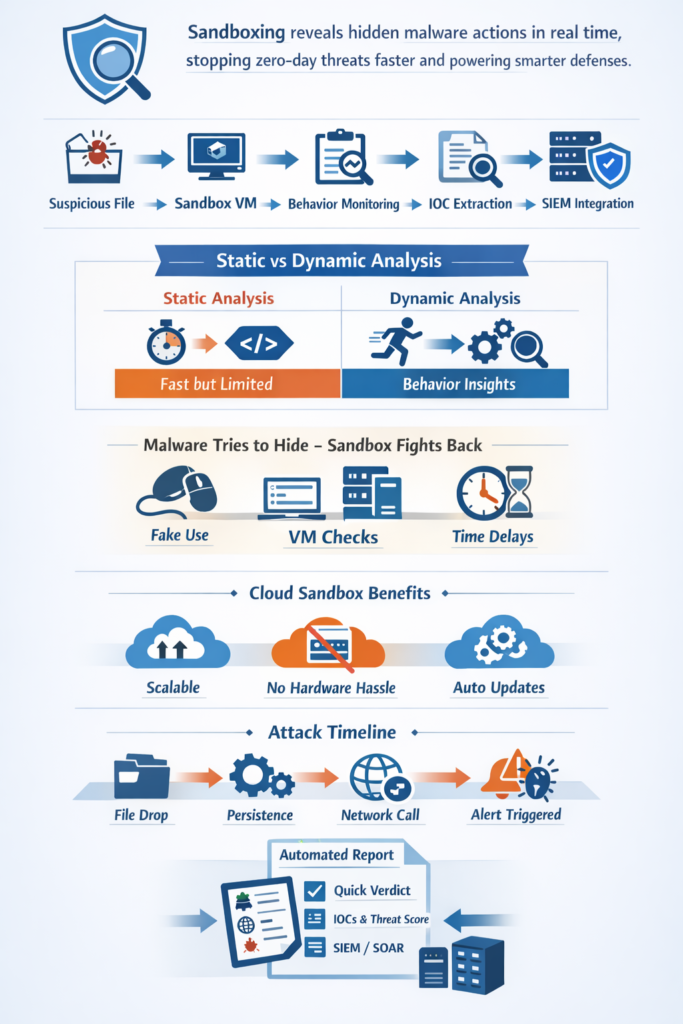
Static analysis is archaeology. You brush the dust off an executable, examine its markings, its strings, its structure. It’s useful, it’s fast. But dynamic analysis is anthropology. You live with the subject. You observe its rituals.
In a sandbox, the malware is executed. It thinks it’s on a real machine, maybe a user’s laptop. It begins its work. Analysts watch this through a one-way mirror, logging every move [1].
They see it inject code into a legitimate process, a common trick to hide. They record the specific Windows API functions it calls, trying to touch the file system or the network.
They map its attempts to communicate with a command-and-control server, the lifeline for many threats. This isn’t about what the file is, it’s about what it wants to do.
- Process injection into svchost.exe or explorer.exe
- Unusual API calls for keylogging or screenshot capture
- Outbound connections to suspicious IPs on non-standard ports
- Attempts to disable security software or Windows Defender
This live observation generates what’s called Indicators of Compromise, or IOCs. These are the fingerprints and footprints. An IP address, a mutated file name, a specific registry path.
This is the intelligence that gets fed back into the security system, making the whole network smarter and more resistant to the next attack.
How Malware Sandboxing Works Analysis
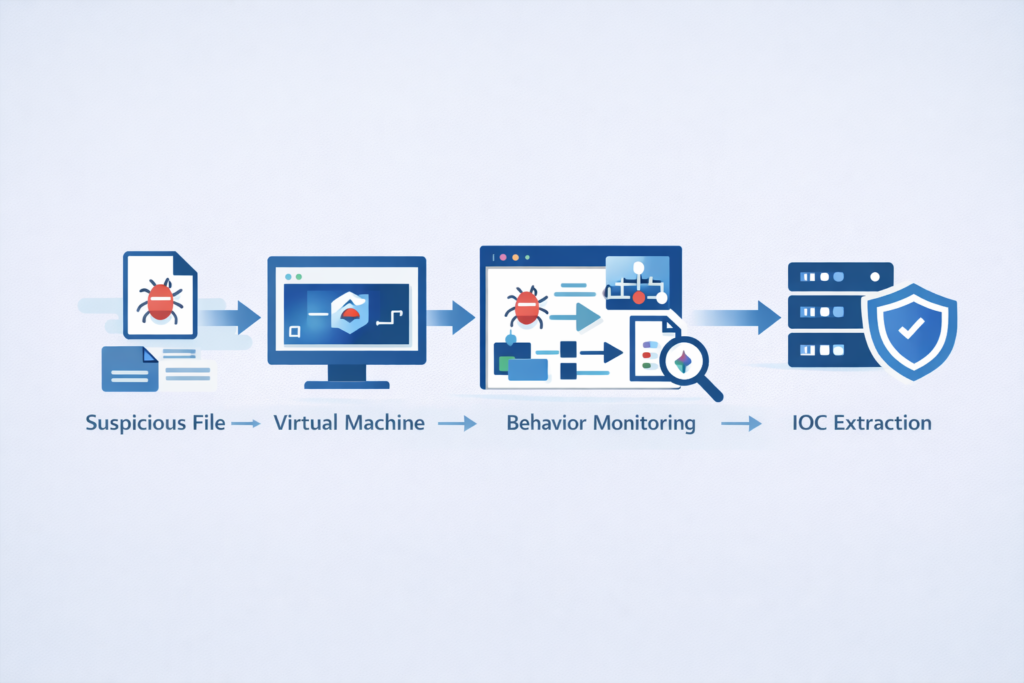
Picture a small theater with one hostile actor on stage and every spotlight aimed at them. The sandbox is that stage.
Underneath sits a virtual machine that looks like a normal Windows 10 desktop or Ubuntu server. On the surface it feels real, but a hypervisor keeps it isolated from your actual network. A suspicious file arrives through a submission portal, whether from:
- Drag-and-drop by an analyst
- Automatic forwarding from an email gateway
- A handoff from an endpoint or SIEM rule
The sandbox powers up the VM and runs the sample. Monitoring agents sit low in the stack, logging whenever the malware:
- Modifies files or registry keys
- Spawns or injects into processes
- Sends or receives network traffic
After a fixed runtime, the VM resets to a clean snapshot. Nothing remains except the logs and the report. Analysis means piecing together a timeline, such as:
- File dropped
- Persistence set
- Outbound connection made
From there, you build the narrative of infection and command-and-control, the story that helps you tune detections and close the doors it used.
Static Malware Analysis Methods Comparison
Credits: PBER ACADEMY
So why not just do both. You should. But you need to know what each one gives you, and where each one falls short.
Static analysis is your first, fast filter. You hash the file, get a fingerprint like MD5: a1b2c3… . You check that hash against massive databases like VirusTotal. A match means it’s known, and you can block it instantly.
You can also pull out human-readable strings, look at the portable executable (PE) header to see how it’s built. It’s cheap, it’s quick. But it’s easily fooled.
A malware author can change one byte in the code, resulting in a completely different hash. They can obfuscate strings, pack the code, making static analysis see only gibberish.
Dynamic analysis, the sandbox, doesn’t care about the costume. It watches the behavior. That polymorphic malware, the kind that changes its signature every time, might look different staticall, but in the sandbox it will still try to connect to the same server, drop files in the same folder.
That’s its unchanging habit. The sandbox reveals the actions that static inspection is blind to, especially for zero-day threats that have never been seen before.
The trade-off is time and resources. It takes minutes to run a sample, not seconds, and it requires the computing power to host these virtual environments.
| Aspect | Static Analysis | Dynamic Analysis (Sandboxing) |
| Primary Focus | Code structure and PE header analysis | Runtime behaviors and system interactions |
| Key Methods | String extraction, hash fingerprinting, signature matching | Behavioral analysis, IOC extraction, memory forensics |
| Strengths | Fast, lightweight, good for malware triage | Detects zero-day threats and polymorphic malware |
| Limitations | Easily bypassed by obfuscated code | Requires virtual machines and detonation timelines |
| Typical Outputs | Hash values, code indicators | Sandbox reports, automated verdict generation |
Cloud Based Sandbox Services Benefits

Building your own sandbox sounds simple until you’re maintaining VMs, snapshots, network isolation, and golden images. What begins as a project turns into a permanent tax on time and budget. Cloud-based sandboxes move that burden elsewhere.
Instead of running your own lab, you submit a suspicious file to a provider’s API and let their infrastructure do the work. Key advantages include:
- No hypervisors or snapshots to manage
- Surges in phishing traffic don’t overwhelm you
- Hardware planning disappears
Scalability is the real win. When campaigns hit, a local lab may stall. A cloud service simply spins up more analysis nodes. Many providers also offer:
- Realistic OS builds and software stacks
- Evasion-aware detection
- SSL/TLS inspection inside controlled environments
Costs shift from capital expense to usage-based spending. For smaller teams, this means deep behavioral insight without running a malware lab. Files route automatically to the sandbox, results feed back into your SIEM, and you still get the story, just without touching a hypervisor.
Detecting Sandbox Evasion Techniques
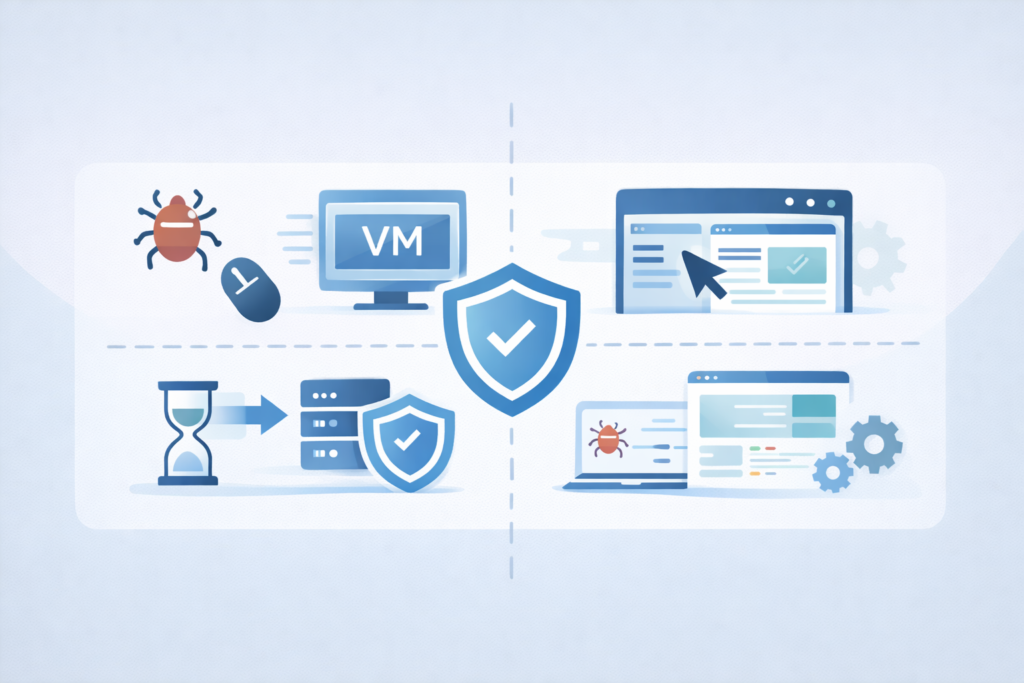
Some malware doesn’t just attack, it inspects its environment first. If it suspects a lab, it stays quiet to avoid detection. One tactic is hardware probing. Virtual machines often show neat, round memory sizes like:
- 2048 MB
- 4096 MB
- 8192 MB
Real systems look messier. Malware may also check for virtualization drivers, VM-related services, or MAC address ranges. User-interaction checks are common too. It may watch for:
- Mouse movement
- Keystrokes
- Active window changes
If nothing looks human, the malware plays dead and you get a false negative. Beating this requires making the sandbox feel real. That means:
- Randomized hardware and disk values
- Hidden or renamed VM markers
- Human-like mouse and typing activity
You can also preload a believable digital life with browser history, documents, and common software. The goal is to convince the malware it has landed on a real user’s machine, so it stops acting and shows its true behavior.
Analyzing Malware Behavior Sandbox
Sometimes analyzing malware feels like watching a slow-motion crime scene built from process IDs and logs. The goal is to read the behavior like a story, not just isolated events.
Network activity is one of the richest data sources. You look for patterns such as beaconing frequency, interval changes, payload size, and destination variety. On the host, persistence is another key signal. Malware may:
- Create new services or scheduled tasks
- Add Run or RunOnce registry keys
- Hijack legitimate processes
File drops matter too. A sample may:
- Download a second-stage payload
- Unpack hidden components
- Deploy tools for credentials or lateral movement
Sometimes it even rehearses ransomware encryption inside the sandbox. From these actions, a profile emerges:
- Data stealer
- Botnet agent
- Destructive wiper
This behavioral narrative guides your response, from new rules to tighter controls, and helps identify which endpoints face the greatest risk.
Automated Malware Analysis Reports
Nobody has time to read a thousand-line log file for every suspicious .exe. The sandbox’s value is distilled into its automated report.
This is the translation layer between raw behavior and actionable intelligence. A good report gives you a verdict immediately: malicious, suspicious, or clean. It provides a timeline of events, so you can see the sequence of the attack [2].
It lists the critical IOCs in a clean, digestible format: the bad IPs, the malicious domains, the file hashes of any dropped payloads. It might even score the threat, or classify it into a family like “Emotet” or “TrickBot.” These reports are designed to feed machines as much as people.
They can be automatically ingested by your Security Information and Event Management (SIEM) system or a Security Orchestration, Automation, and Response (SOAR) platform, triggering immediate blocks or investigation tickets. The sandbox does the deep, tedious work, and presents the results on a silver platter.
Limitations of Sandbox Environments
For all its power, the sandbox is not a magic box. It has blind spots. The most significant is the environmental gap. Your sandbox is a clean, default installation of Windows 10. Your production environment is a patched, customized, complex ecosystem with specific applications.
Malware that triggers only when it sees “Adobe Photoshop CS6” installed will sleep in your sandbox, but wake up on a designer’s computer.
Then there’s time. Sandboxes typically run a sample for three to five minutes. Malware with a long-delayed fuse, something that waits for days or for a specific system event, will again appear benign.
There’s also the risk of highly sophisticated, “hand-crafted” malware that uses novel evasion techniques your particular sandbox hasn’t been trained to counter.
The sandbox is an invaluable tool, but it’s one tool. It can’t replace a layered defense, endpoint detection, network monitoring, and skilled analysts.
Integrating Sandbox Alerts SIEM
The sandbox shouldn’t be an island. Its intelligence is useless if it stays in a PDF report on an analyst’s desktop. Integration is key. This is where the SOC earns its keep.
The IOCs from the sandbox report, those IPs and file hashes, are pumped directly into the SIEM. Now, the SIEM is watching all network traffic, all endpoint logs, for matches.
If a workstation suddenly tries to call out to that malicious IP address flagged by the sandbox two hours ago, the SIEM creates a high-priority alert. This is how a isolated analysis becomes active defense. Further down the chain, a SOAR platform can take that alert and act on it automatically.
This integration is essential, just as combining multiple detection methods improves the overall network threat detection posture and response times.
It could quarantine the infected machine, block the malicious IP at the firewall, and create an incident ticket, all before a human gets their second cup of coffee. The sandbox finds the needle, but the integrated security stack uses it to find the whole haystack of related activity.
Choosing Malware Sandbox Solution
Picking a tool is about fitting your reality. You start with evasion resistance. Ask the vendor, how do you counter fingerprinting. Demand a demo with known evasive malware. See if it triggers.
Then, consider integration. Does it plug easily into your SIEM. Can it export reports in a format your tools understand. Scalability matters. Can it handle your peak volume without a queue. For some, the control of a local, hypervisor-based sandbox is critical.
For others, the simplicity and updated threat intelligence of a cloud service wins. You must also think about the analysts using it. Is the interface clear. Are the reports actionable. Don’t get lost in feature checklists.
Focus on the core job: will this tool reliably show me what malware does, and can we use that information to stop it faster.
The Final Detonation
Sandboxing doesn’t hand you certainty on a silver plate. It hands you better questions. It shifts the focus from, “Is this file bad?” to, “What does this file do when it turns bad?” That change in viewpoint is the real break point. It trades a tired race against signatures for a sharper look at behavior.
When threats keep changing shape from one moment to the next, the only edge that lasts is knowing intent through what the file actually does. You stop chasing shadows on the wall, and you start studying the play. Here’s what that looks like in practice:
- You take a file that’s been bothering you, the one that never quite felt right.
- You drop it into a sandbox, a controlled space where it can run without hurting anything that matters.
- You let it think it’s alone, unobserved.
- You watch the network calls, the process tree, the file system changes, the registry hits.
- You trace how it moves, what it touches, what it tries to hide.
That’s where the real defense starts. Not in a static label, but in a watched performance. So pick up that suspicious file you’ve been circling around. Throw it into a sandbox. Let it run. Let it show you what it wants when it thinks no one’s watching.
FAQ
What is malware sandboxing and how is it different from static analysis?
Malware sandboxing runs suspicious files inside isolated sandbox environments and virtual machines to observe real runtime behaviors safely. Static analysis only examines code structure or performs PE header analysis and string extraction.
Dynamic analysis inside a sandbox records system calls, process injection, API hooking, registry modifications, and outbound connections during malware detonation. This allows accurate IOC extraction and supports behavioral analysis and malware classification.
How does sandboxing improve zero-day detection and reduce false positives?
Sandboxing supports zero-day detection by analyzing runtime behaviors instead of relying only on signature databases or hash fingerprinting.
Malware sandboxing records command-and-control traffic, encrypted payloads, file drops, persistence mechanisms, and anomaly detection signals during behavioral analysis.
Automated reports provide IOC extraction and verdict generation for SIEM integration and alert correlation. This reduces false positives and false negatives compared with static-only malware triage.
Can malware evade sandbox environments, and how do analysts detect it anyway?
Some malware attempts sandbox evasion using CPU checks, debugger detection, environment scanners, user inactivity detection, or searching for VM artifacts.
Analysts counter these evasion techniques with user behavior emulation, reboot emulation, hybrid analysis, and memory forensics.
Runtime behaviors such as system calls, outbound connections, registry modifications, and stealthy persistence mechanisms still expose malicious intent, allowing accurate sandbox reports and threat intel enrichment.
When should teams consider cloud sandboxing instead of local environments?
Teams often choose cloud sandboxing when they need scalability benefits, resource isolation, and easier maintenance than local virtual machines.
Cloud sandbox environments support SIEM integration, SOAR platforms, IP blocking, threat response automation, and automated reports for SOC operations.
They also simplify compliance support, cost analysis, update frequency, handling custom samples, and large-scale malware triage while maintaining strong hypervisor isolation.
What are the limits of malware sandboxing, and how do analysts reduce risk?
Sandboxing has limits, including delayed execution payloads, stealthy configurations, sandbox evasion, and occasional false positives or false negatives. Analysts reduce risk using hybrid analysis, static analysis, flow data analysis, network telemetry, rule tuning, log correlation, and explainable AI.
Threat hunting teams also combine memory forensics, threat intelligence, runtime behaviors, and forensic artifact collection to improve verdict generation and strengthen zero-day focus.
The Real Power of Malware Sandboxing
Sandboxing turns malware from a mystery into a performance you can study safely. By observing real behavior instead of guessing from code alone, you uncover intent, persistence, and impact before the threat spreads.
It strengthens detection, fuels response, and exposes what signatures miss. In a world of shape-shifting attacks, runtime truth is the advantage. Watch the act. Learn the story. Then close the doors it tried to slip through. Ready to strengthen your defenses? Join the future of threat detection
References
- https://www.aquasec.com/cloud-native-academy/cloud-attacks/malware-analysis/
- https://github.com/arjunraj79/AutoMalwareSandbox
