

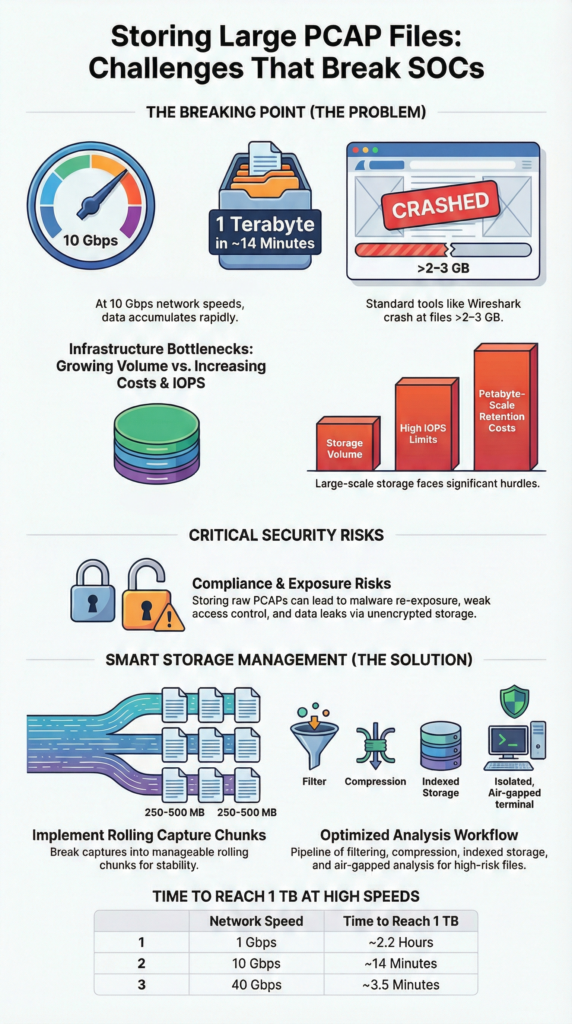
Storing Large PCAP Files Challenges start with scale. High-speed links generate data faster than most infrastructure and analysts can handle. On a 10 Gbps link, about 1 TB can appear in under 14 minutes, a number many SOC teams recognize from real deployments. Traditional tools like Wireshark were never built for long-term, petabyte-scale retention.
We’ve seen “capture everything” plans collapse into full disks, slow analysis, and sudden retention cuts. The issue isn’t just volume, it’s the operational drag that follows. Understanding where things break helps teams avoid painful mistakes. Keep reading to see the limits and practical ways to handle them.
What Breaks First at PCAP Scale
- 10 Gbps traffic can generate 1 TB in ~14 minutes, forcing aggressive retention or petabyte storage.
- GUI tools often fail beyond 2–3 GB PCAP files, requiring CLI or indexed workflows.
- A 250 MB rolling capture strategy balances usability, performance, and storage control.
Why Storage Infrastructure Can’t Keep Up

Fast network links create data faster than most storage can handle. In many SOC environments, storage becomes the first real breaking point in packet capture. We’ve watched teams invest heavily in capture hardware, only to realize later that the disks simply couldn’t keep pace with the incoming traffic.
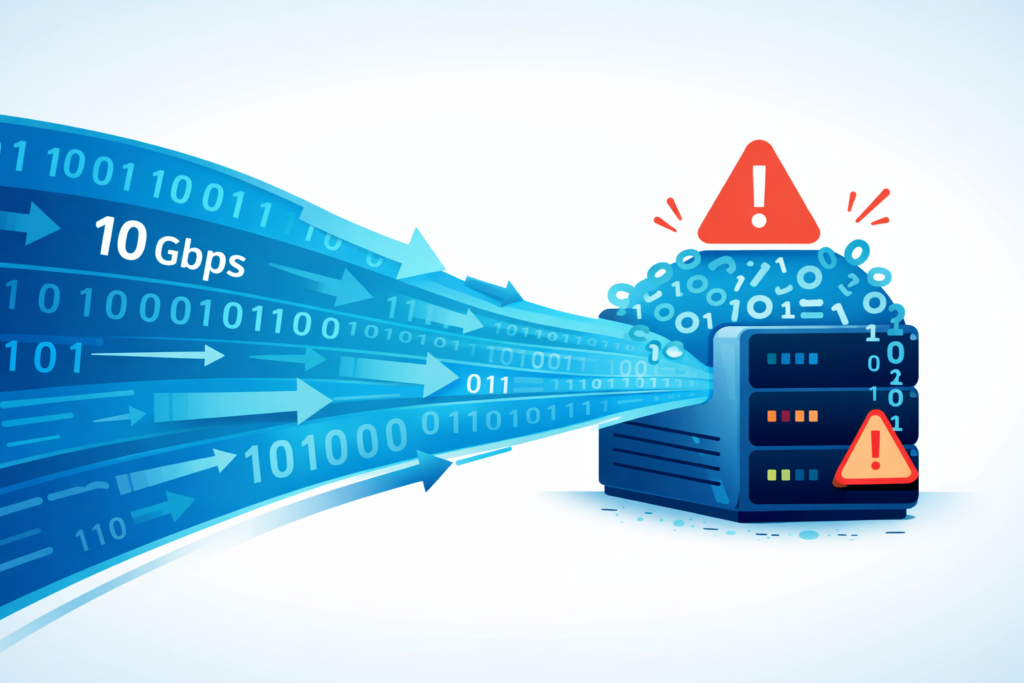
Put the numbers into perspective. A steady 10 Gbps stream can generate about 1 TB every 14 minutes. Even a 100 Mbps link can quietly stack up terabytes during peak hours.
Teams often push for full packet capture to support compliance, investigations, and response timelines. But without smart filtering or rotation, storage fills fast. Older NAS or SAN setups struggle the most.
Guidance from NIST stresses balancing retention with risk and cost. That balance gets fragile when data grows hourly. In real deployments, we’ve seen a few patterns repeat:
- IOPS limits hit before capacity does
- Cost climbs quickly at scale
- Petabyte storage becomes a real discussion
- Retention windows shrink under pressure
From our work building threat models and risk analysis tools, one thing stands out. Storage planning often lags behind detection goals. When that happens, the bottleneck appears long before analysts even touch the packets, especially in environments relying on outdated tools for capturing network packets without scalable storage strategies.
When Wireshark Gives Up on Huge Files
Credits: Siwaporn Boonkan
GUI tools like Wireshark often hit a wall with very large captures. Many analysts run into the same moment: the file opens halfway, then everything freezes. It’s the familiar “file too big” problem that shows up sooner than most expect. According to the research,
“If Wireshark runs out of memory it will crash. … Busy networks mean large captures. A busy network can produce huge capture files. Capturing on even a 100 megabit network can produce hundreds of megabytes of capture data in a short time. A computer with a fast processor, and lots of memory and disk space is always a good idea.” – Wireshark User’s Guide.
On a typical workstation, the limit comes fast. Even a machine with 16 GB of RAM can stall when opening a 40 GB capture. The tool reads packets in order, memory fills up, and the system slows to a crawl. We’ve seen this happen during real investigations, especially with VoIP traffic where a single session balloons into gigabytes.
Across field work and community feedback, the same patterns show up:
- Crashes often start around 2–3 GB
- Sequential loading slows packet access
- Legacy file limits add instability
- CPU spikes during initial parsing
Because of this, many teams shift tactics. Command-line tools avoid loading everything at once. In our own workflows, shaped by building threat models and risk analysis tools, we learned to extract metadata first, filter next, then open smaller slices. That simple discipline saves hours and keeps analysis moving.
The File Management Headaches at Scale
Once a PCAP grows into tens of gigabytes, simple tasks turn complicated fast. Moving, backing up, or scanning the file becomes a project of its own. Many teams don’t expect file handling to become this painful until they’re already deep into an investigation.
Transfers are usually the first pain point. Sending a huge capture into an air-gapped lab can take hours. Security tools may also quarantine the file because it contains real malware. We’ve seen backup jobs fail halfway through, leaving teams unsure which copy is safe to trust.
At scale, two realities show up again and again. A damaged header can make the whole file unreadable. And one giant file creates a single point of failure.
Common problems we see in the field:
- Slow transfers into isolated environments
- Malware scans blocking full files
- Header errors that break parsing
- Emergency use of repair tools
In one case, we handled a 30 GB forensic capture with a broken header. Repair tools recovered fragments, but critical traffic was gone. That moment reshaped our process. Now we recommend smaller segments, backed by threat modeling and risk analysis, so one failure doesn’t wipe out the whole story.
Finding the Sweet Spot: The 250–500 MB Rolling Capture
Through real-world use, many teams land on a simple rule: smaller chunks make life easier. Splitting captures into files around 250 MB keeps analysis fast without creating chaos. We’ve seen this size hold up across different SOC setups and hardware types.
Larger chunks sound efficient at first. But once files pass 500 MB, performance drops during search and decompression. Mechanical drives feel it the most, though even SSD systems see slower workflows. In our own projects, shaped by threat modeling and risk analysis work, bigger files usually meant more waiting and more friction.
A common setup uses rolling captures with size limits and compression. After capture, teams often:
- Split files around 250 MB
- Compress using gzip or 7z
- Rotate files on a schedule
- Delete old data automatically
As noted in a Medium,
“This single command starts a capture that will rotate between ten 500 MB files… and will continue running uninterrupted… This simple technique transforms dumpcap into a server-grade monitoring tool capable of running for days or weeks.” – Gba
There are trade-offs with each method. Huge files reduce file count but crash tools. Time-based splits keep order but break conversations. Smaller chunks increase file numbers, yet stay stable. From experience, once teams standardize chunk sizes, investigations feel calmer and far more predictable.
How to Analyze Huge PCAPs Without Crashing Your System
Handling a 40 GB capture doesn’t mean you need a 40 GB machine. The trick is changing how you approach analysis. Instead of loading everything, experienced teams focus on pulling only the data that matters.
Start with one core idea: filter early, inspect later. Command-line workflows are far more forgiving than GUI tools. In practice, analysts often:
- Apply filters before opening data
- Generate conversation stats first
- Preview small packet samples
- Use indexed access methods
This approach keeps memory use low and reduces wasted effort. In our own field work, shaped by building threat models and risk analysis tools, filtering upfront has saved countless hours.
Modern platforms push this idea further with metadata-first workflows. Instead of reading full captures, they index who talked, when, and how. That model aligns closely with how we think about network threat detection and real time network traffic analysis. We focus on fast retrieval, not blind digging.
In deployments where indexed capture connects to SIEM pipelines, the shift is obvious. Analysts pull only the packets tied to an alert, leaving the rest archived. Systems stay stable, and investigations move faster without overwhelming memory or storage.
The Hidden Security and Compliance Risks in Your PCAP Archive
An archive of raw PCAP files isn’t just a forensic resource; it’s a major security and compliance liability.
These files often contain live malware payloads, credentials, internal emails, and sensitive application data. Strong governance requires more than storage controls, especially when leveraging network traffic (PCAP) for investigations or retrospective analysis.
Key risk factors we assess include:
- The potential for embedded malware to be accidentally replayed.
- Lack of encryption on NAS or SAN storage holding the PCAPs.
- Weak, role-based access controls allowing too many people access.
- Cloud upload limits and egress costs in regulated sectors.
- Missing provenance and metadata tracking for audit trails.
Compression helps reduce the storage footprint, but a 70% size reduction from gzip doesn’t make the sensitive data inside any less sensitive.
We’ve found that using air-gapped analysis environments reduces cloud-related risks but introduces operational friction. Transfers take longer, retrieval becomes more manual, and maintaining automated audit trails is harder. That’s why we integrate our capture workflows directly with our SOAR platform.
When an alert triggers a PCAP retrieval, that access is automatically logged and controlled. Paired with strong network threat detection, indexed storage supports secure, selective retrieval instead of blanket, unfettered access to everything.
The compliance pressure is real, and it directly influences your architecture choices.
Full PCAP vs. Flow Data: Choosing the Right Tool
Not every investigation needs full packet capture. Keeping raw packets forever sounds ideal, but in real environments it rarely works. Most teams find that full PCAP makes sense only for short windows where deep inspection truly matters.
| Factor | Full PCAP | Flow Data (NetFlow/IPFIX) |
| Storage Cost | Very high | Low |
| Forensic Depth | Packet-level detail | Metadata-level visibility |
| Retention Feasibility | Days to weeks | Months to years |
| Storage Growth Rate | Extremely fast | Moderate |
| Typical Use Case | Incident response, malware analysis | Trend analysis, baselining |
| Tooling | Wireshark, tshark | Flow analyzers, NDR platforms |
Storage becomes the biggest pressure point. A busy 10 Gbps link can explode into massive storage demands if packets are kept long term. Flow data reduces that burden while preserving the overall story.
In practice, many teams split the roles clearly:
- Full PCAP for deep, short-term forensics
- Flow data for long-term visibility
- Packets for proof, flows for patterns
From our experience building threat models and risk analysis tools, layered visibility works best. We prioritize detection first, then pull packets when needed. Teams that balance both avoid storage overload while keeping strong investigative depth.
FAQ
How do IoT environments change pcap storage challenges?
IoT networks increase pcap storage challenges because many small devices send constant traffic. Storing gigabyte pcaps becomes common, even on smaller networks. The real issue is cumulative scale, not raw bandwidth.
Terabyte pcap retention can grow quickly when thousands of devices communicate nonstop. Teams should plan large pcap file management early and use rotation or compression to prevent pcap disk space exhaustion later.
What’s the safest way to handle airgapped pcap analysis?
Airgapped pcap analysis requires careful handling to avoid data loss. Large pcap file management becomes harder when files move through manual transfers. Splitting large pcap files into smaller segments reduces corruption risk and failed copies.
Many teams apply pcap file compression techniques and verify checksums after transfer. This approach lowers the need for pcap corruption repair and keeps investigations dependable.
Are SSDs really better than HDDs for massive pcap storage?
SSD vs HDD pcap IO depends on workload and budget. SSDs improve indexing speed and help with massive pcap memory management during analysis. However, long-term pcap archival often favors HDDs due to lower cost per terabyte.
Many teams use hybrid storage, with SSDs for active searches and HDD or tape archival pcap data for retention. This balance supports performance without overspending.
How do you plan long-term pcap archival without losing access?
Long-term pcap archival needs structure and indexing. Petabyte scale pcap storage becomes difficult to search without proper organization. Strong pcap indexing solutions store metadata so analysts avoid reopening entire captures.
Pair archival tiers with clear retention policies and provenance pcap metadata tracking. This method preserves accessibility while reducing problems caused by pcap file format limitations over time.
What limits uploads when sending large pcaps to cloud platforms?
Cloud pcap upload limits usually come from file size restrictions and processing constraints. Many systems struggle when tshark large capture limits or wireshark too big to open scenarios apply.
Splitting large pcap files and applying compression reduces upload failures. Smaller segments also avoid libpcap file pointers issues and prevent pcap dump header fail errors during remote analysis.
Surviving Large PCAP Storage at Scale
Storing large PCAP files pushes every layer of infrastructure to its limits, from disks to workflows. Sustainable capture isn’t about bigger storage, but smarter discipline, splitting files, indexing data, compressing wisely, and enforcing retention. That balance keeps packet capture useful instead of overwhelming.
If you want a clearer, proactive way to manage risk and visibility, explore Network Threat Detection, built to help teams model threats, prioritize exposure, and respond faster without drowning in data.
References
- https://www.wireshark.org/download/docs/Wireshark%20User%27s%20Guide.pdf
- https://medium.com/@gbahenrijoel/mastering-network-packet-capture-with-dumpcap-965b3a13d133
