

Understanding network metadata analysis is the best way to spot intruders first. You examine the basic facts of your traffic, the source, destination, time, and volume, without digging into the packets themselves. It gives you a real-time, high-level view across your whole network.
Full packet capture can’t do that at scale. If you’re overwhelmed by alerts or can’t see lateral movement, this approach is the answer. Keep reading to see how it works and why it should be your foundation.
What You’ll Learn
- Why metadata provides immediate, network-wide visibility that full packet capture cannot match.
- How to use flow records and logs to hunt for threats like beaconing and data exfiltration.
- The practical workflow to implement metadata analysis, from collection to actionable insight.
What This Data Actually Is

Imagine walking into a crowded room. You can’t hear every conversation, but you see who’s talking to whom, how animated they are, and who’s just standing in the corner. That’s network metadata. It’s the log of who connected to what, not the content of the chat.
Technically, it’s the structured summary of every connection: source and destination IPs, port numbers, protocols like TCP or UDP, precise timestamps, byte counts, and how long the session lasted. In our work, we pull this data from layers 3 through 7 of the OSI model, but we strip out the actual payload.
Tools like Zeek or flow exporters (NetFlow, IPFIX) create these logs, lines of JSON or key-value pairs. The storage needed is tiny, often less than 1% of a full packet capture. That efficiency is its real strength.
These are the core attributes we use every day for threat modeling:
- Identifiers: Source and destination IPs, port numbers.
- The Session: Protocol, TCP flags, connection state, duration.
- The Volume: Packet and byte counts, bits per second.
- The Context: Timestamps, geolocation, ASN, and TLS details like JA3 fingerprints.
Why It Beats Full Packet Capture
Credits: Meta-Analysis Academy
Relying only on full packet capture for threat detection is a major problem. It’s like trying to find a needle in a haystack by weighing every single straw. The process is slow, creates massive data storage issues, and often runs into serious privacy concerns. We’ve watched teams get completely stuck, buried under petabytes of data they can’t effectively search.
“Network metadata provides much needed context about the network communications that also includes nested value structures and optional field characteristics, providing more information than legacy network telemetry and a valuable resource for network detection and response.” – MantisNet Blog
The metadata approach is different. It lets you watch your entire network continuously because you’re only saving the connection essentials, the who, when, and how much. You can search through months of traffic history in seconds.
When you spot something odd, like a sudden connection to a suspicious port or traffic to a known malicious IP, that’s your trigger. You can then start a targeted packet capture just for that specific event. This method is about focused investigation, not hoarding every packet.
| Aspect | Network Metadata Analysis | Full Packet Capture (PCAP) |
| Primary Goal | Broad, continuous monitoring | Targeted, deep inspection |
| Storage Need | Minimal (key attributes) | Massive (full payloads) |
| Analysis Speed | Real-time, at wire speed | Post-capture, slow processing |
| Privacy Risk | Low (no content accessed) | High (contains all data) |
Finding the Hidden Attacks
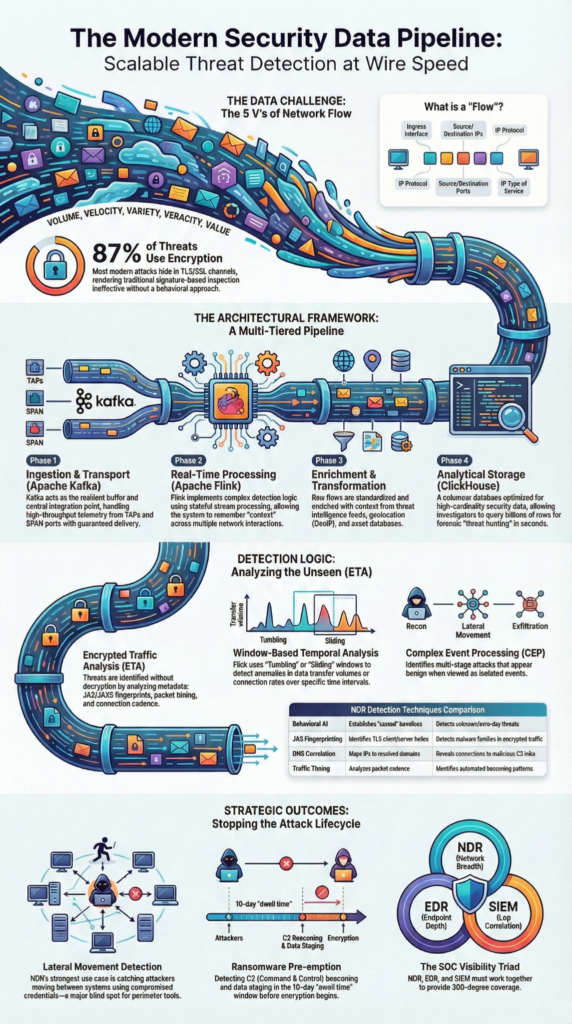
So how do you hunt with this? You look for deviations from the known good. First, you establish a baseline, what does normal HTTP traffic volume look like at 2 a.m.? What servers usually talk to each other?
Then, you go looking for the weird. A sudden, consistent flow of data from an internal server to an external IP in a country you don’t operate in? That’s a potential data exfiltration signature.
A host sending small, regular packets to a new domain every 10 minutes? That’s classic command-and-control (C2) beaconing. Lateral movement often shows up as unusual protocol flows (like RDP or SMB) between machines that normally wouldn’t communicate.
Tools like the one from Red Siege’s blog, Just-Metadata, exemplify this. You feed it a list of IPs, and it gathers intelligence, drawing links between them. It’s about connecting dots across your flow records, Zeek logs, and Suricata events to see the attacker’s path before they complete their mission.
Building Your Analysis Workflow
Implementing this isn’t magic, it’s a process. It starts with collection. You need flow data from your routers (NetFlow/IPFIX) or deeper telemetry from sensors (Zeek, sFlow). This data gets sent to a collector.
Next is normalization and enrichment. The raw data gets formatted, timestamps aligned, and then enriched with threat intelligence feeds, geolocation data, ASN lookups. Is this IP on a blocklist? Is this domain newly registered?
Finally, analysis and integration. The normalized, enriched data feeds into your SIEM, a time-series database like Elasticsearch, or a dedicated NDR platform. Here, you run your queries, build dashboards in Kibana or Grafana, and set alerts for the anomalies that matter. The key is turning raw telemetry into a prioritized list of incidents for your team.
Seeing Through Encryption
“But everything’s encrypted now,” they say. “Doesn’t that make metadata useless?” Not even close. While you can’t see the plaintext, the metadata around an encrypted session is incredibly revealing.
“By utilizing metadata for analysis, network communications can be observed at any collection point and be enriched by information providing insights about encrypted communication. … Metadata analysis offers a more scalable and efficient alternative, addressing the challenges DPI [Deep Packet Inspection] struggles to overcome.” – Exeon Analytics
You see the TLS handshake itself, the version, the cipher suites offered. You see the server certificate details, its validity, and who issued it. You can calculate the entropy of the data flow; encrypted traffic has high, random entropy, while compressed or plaintext data looks different. You see the timing, the size, and the rhythm of the packets.
A consistent, small TLS session every five minutes from a workstation is still a beacon, even if you can’t read its message. This contextual insight is often enough to flag a session for deeper inspection or endpoint correlation.
The Privacy Paradox Going Forward
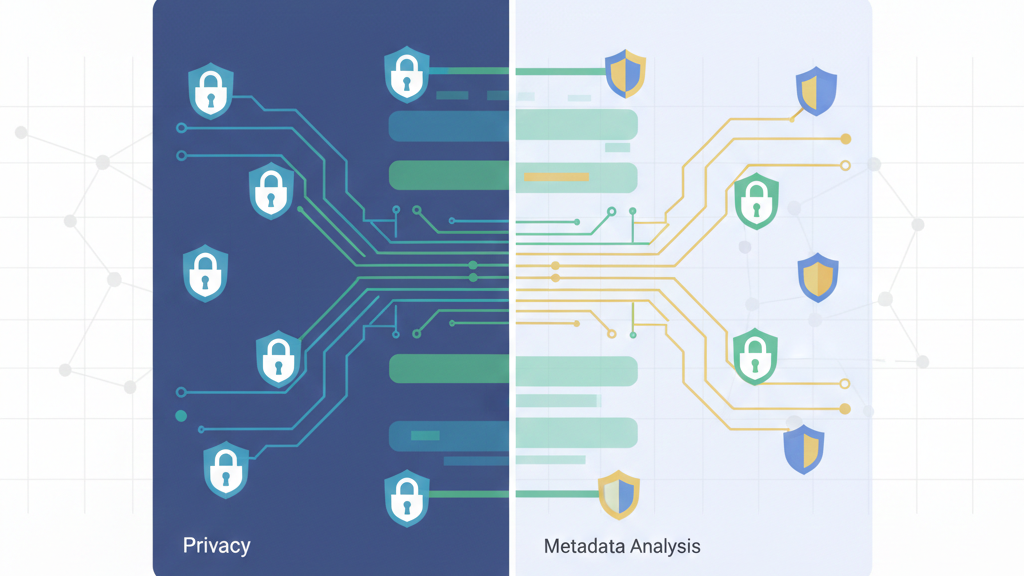
Here’s the uncomfortable truth the industry is grappling with: metadata is sensitive data. A list of who you communicate with and when can reveal your associations, your habits, your health. It’s a rich target. This isn’t just a compliance issue under laws like GDPR; it’s an ethical one.
Research, like the work presented at the NDSS symposium, is pushing for Privacy Enhancing Technologies (PETs) in this space. Can we analyze traffic patterns without knowing the exact IPs? Can we detect anomalies while preserving anonymity? It’s a hard problem.
For now, the best practice is strict governance: collect only what you need for security, restrict access, and have clear retention policies. The goal is to protect the network without becoming a surveillance apparatus.
FAQ
How does understanding network metadata analysis help detect threats without full packet inspection?
Understanding network metadata analysis focuses on packet headers, flow records, and session flows instead of payloads. It examines source destination IP, port numbers, protocol types, byte counts, packet counts, and connection duration.
This approach reveals behavioral patterns, supports anomaly detection, and enables encrypted traffic analysis. Security teams gain fast visibility into suspicious activity without the storage and privacy challenges of full packet inspection vs metadata.
What types of network traffic metadata matter most for accurate behavioral analytics?
The most valuable network traffic metadata includes timestamp data, bidirectional traffic flows, TCP flags, UDP packets, DNS metadata, HTTP request headers, and TLS handshake data.
Combined with network telemetry and baseline profiling, these attributes show normal versus risky behavior. This foundation supports statistical modeling, machine learning flows, and graph analysis networks for stronger detection of hidden attack patterns.
How do flow records like NetFlow analysis improve threat hunting workflows?
Flow records summarize conversations between systems using session flows instead of raw packets. NetFlow analysis tracks top talkers, bandwidth utilization, jitter latency metrics, and protocol usage over time.
This helps hunters quickly identify beaconing intervals, lateral movement detection, and unusual data exfiltration signatures. Flow exporters send this data to collectors analyzers, creating fast searchable visibility across the network.
Can understanding network metadata analysis work on encrypted traffic?
Yes, understanding network metadata analysis excels with encrypted traffic analysis by examining entropy calculation, encrypted SNI patterns, JA3 fingerprints, and C2 communication patterns. Even when payloads are hidden, metadata reveals suspicious timing, abnormal destinations, and unusual session behaviors.
These signals expose malware communication, VPN tunnel detection, proxy chaining indicators, and stealthy intrusions without breaking encryption.
Making It Your First Option
The idea that you need to collect everything to see anything is wrong. It just creates piles of useless data where attacks can hide. Network metadata analysis is a better start. It gives you a map of your whole network, showing normal traffic and strange new paths. You can find an intruder long before they cause damage.
Start with your network flows. Learn what normal looks like, then watch for odd connections. Use tools that connect the dots. It’s a faster, lighter way to know what’s happening on your network. This knowledge lets you act before an attack happens, not after.
Ready to begin? See how our platform does this.
References
- https://www.mantisnet.com/blog/the-value-of-network-metadata
- https://exeon.com/blog/deep-packet-inspection/
