

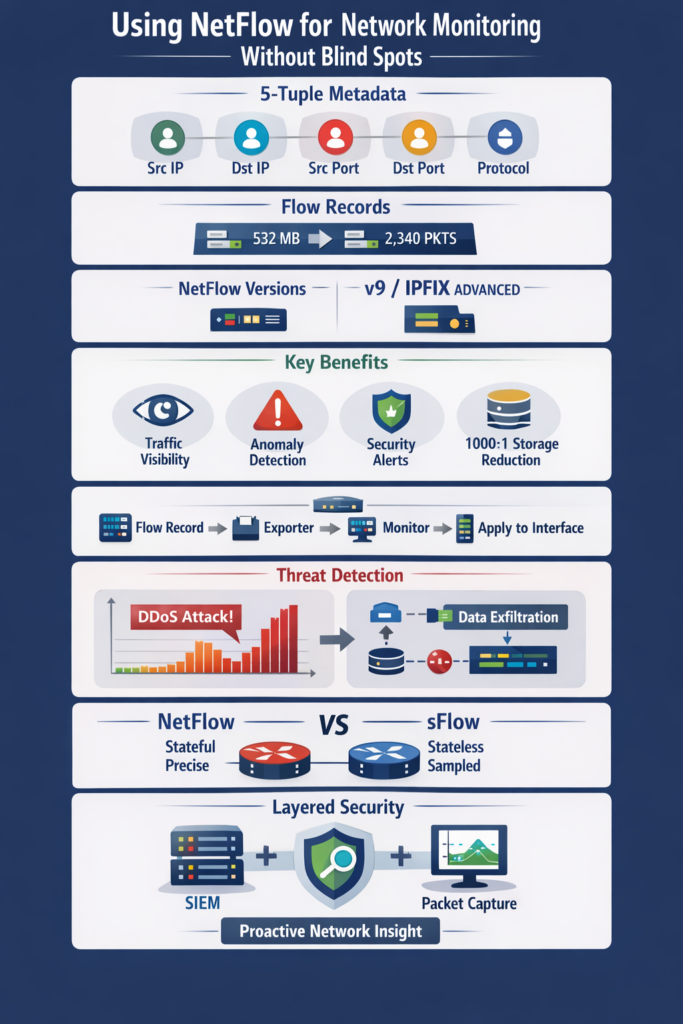
Network visibility isn’t about hearing every word, but understanding the conversation. NetFlow captures the metadata, the “who,” “how long,” and “how much” of data exchanges, giving you a clear picture without drowning in packets.
This insight stops slowdowns and unseen threats before they spiral. You don’t need every detail, just the right summary to spot trouble early.
In the sections ahead, you’ll see how to set up NetFlow on your router, analyze its data to catch attacks or leaks, and pick tools that fit your needs. Keep reading to bring clarity to your network’s hidden chatter.
Key Takeaways
- NetFlow provides traffic metadata, not full packets, for efficient network visibility.
- It enables proactive security through anomaly detection and forensic analysis.
- Proper configuration and the right analyzer tools are critical for success.
The Quiet Problem of Network Blind Spots
You can’t fix what you can’t see. That old adage rings painfully true in network management. Modern networks are complex, with traffic moving not just to and from the internet but between servers and applications within the data center.
This east-west traffic is often a black hole. Without visibility, a minor performance issue can slowly cascade into a full-blown outage. A security threat, like a slow data exfiltration, can operate for months undetected [1].
The consequences are real. Unplanned downtime costs businesses thousands of dollars per minute. A security breach’s financial and reputational damage can be catastrophic.
Compliance requirements demand that you know where your data is going. Relying solely on basic SNMP metrics for interface up/down status and utilization is like trying to understand a novel by only reading the chapter titles.
You know something is happening, but you have no idea what the story is. NetFlow gives you the narrative.
- Performance Degradation: Slow applications frustrate users and hurt productivity.
- Security Breaches: Undetected malware or data theft can operate in the dark.
- Compliance Failures: Inability to prove data handling practices can lead to fines.
This lack of insight creates a reactive cycle. You’re always putting out fires instead of preventing them. NetFlow is the tool that shifts you from reactive to proactive, giving you the data to understand normal behavior so you can instantly spot what is abnormal.
What NetFlow Is and How It Works
Credits: CBT Nuggets
Think of NetFlow as a census for your network traffic instead of a detailed biography of every citizen. Developed by Cisco, it’s a protocol that collects metadata about IP traffic flows.
A flow is a uni-directional sequence of packets that share a common set of characteristics. NetFlow doesn’t capture the actual payload of the packets, which keeps storage requirements manageable and privacy concerns lower [2].
The magic happens through what’s known as the 5-tuple. This is the set of five key attributes that define a unique flow:
- Source IP Address
- Destination IP Address
- Source Port
- Destination Port
- IP Protocol
When a router or switch with NetFlow enabled processes a packet, it checks these attributes. If an existing flow in its cache matches, it updates the counters for that flow, adding the byte and packet count. If it’s a new conversation, it creates a new flow record.
After the flow ends, either due to a timeout or a TCP FIN packet, the device exports this record to a central server called a NetFlow collector.
The collector’s job is to receive, store, and aggregate these records from all your network devices. This is where the data becomes useful.
A NetFlow analyzer application then connects to the collector, presenting the data through dashboards, charts, and reports.
You can see top talkers, application usage, and traffic patterns over time. It’s a simple but profoundly effective system for turning raw network data into actionable intelligence.
Choosing Your NetFlow Version
Not all NetFlow is created equal. There are several versions, and choosing the right one depends on your network’s needs.
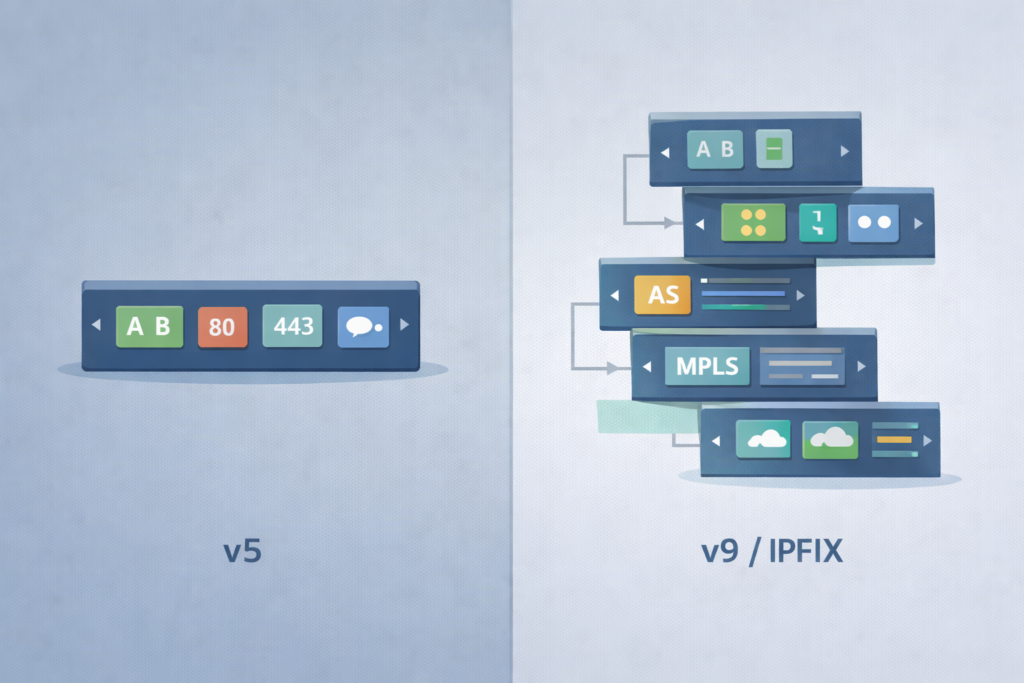
NetFlow version 5 is the most common. It’s a fixed format, which means it’s simple and supported by a wide range of vendors beyond just Cisco. For most basic monitoring tasks, v5 is perfectly adequate. It gives you the core 5-tuple information plus interface data and byte/packet counts.
The limitations of v5 become apparent when you need more detailed information. That’s where NetFlow version 9 comes in. It introduced a template-based, flexible format.
This means it can export a much wider variety of data fields. You can get information about BGP routing (like Autonomous System numbers), IPv6 addresses, multicast traffic, and even specific fields from the packet header like MPLS labels. This flexibility is powerful for advanced traffic analysis.
IPFIX, or Internet Protocol Flow Information Export, is essentially NetFlow v10. It’s an IETF standard that builds on the v9 template idea.
IPFIX is vendor-neutral and offers even more extensibility. If you’re building a new monitoring infrastructure or have a multi-vendor environment, aiming for IPFIX support is a smart future-proofing move.
The earlier versions, like v1 and v7, are largely obsolete and not worth considering for new deployments.
- v5: Best for simplicity and broad compatibility.
- v9/IPFIX: Essential for advanced data collection and multi-vendor environments.
Your choice might be dictated by your hardware. Older devices may only support v5, while newer ones will handle v9 or IPFIX. The good news is that most modern NetFlow collectors can understand and process all these versions simultaneously.
The Tangible Benefits of Flow Visibility
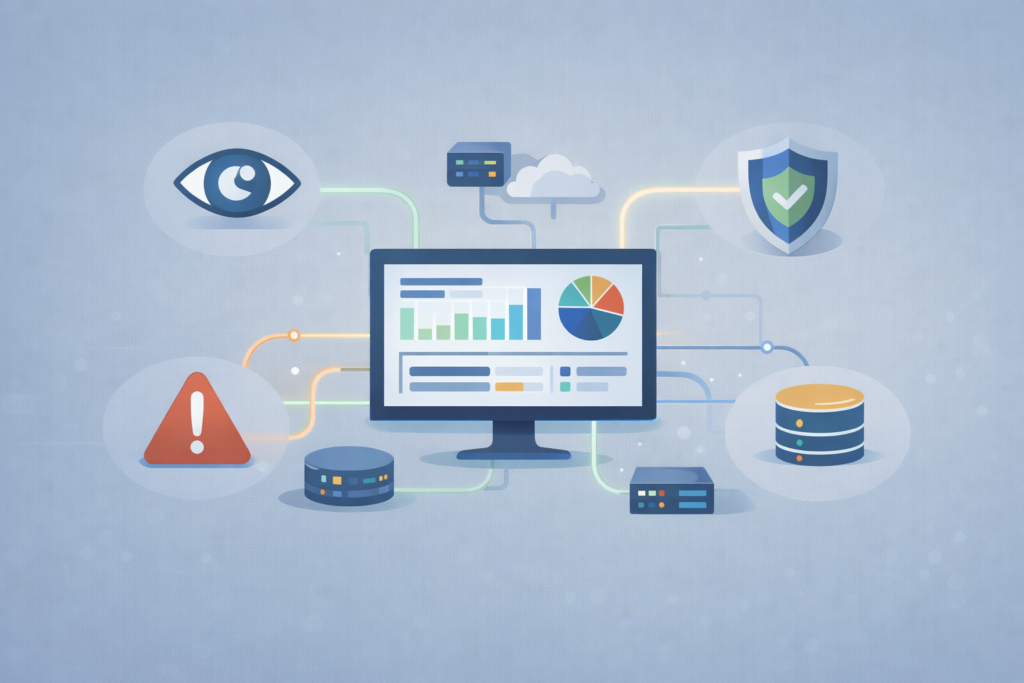
The value of NetFlow isn’t theoretical, it’s practical. It translates directly into operational benefits that make your network more secure, performant, and manageable.
The first and most obvious benefit is comprehensive traffic visibility. You move from knowing that an interface is 80% utilized to knowing why.
Is it a video conference, a backup job, or something malicious? NetFlow enables effective network flow analysis that combines data from various protocols like sFlow and IPFIX, providing a richer understanding of traffic behavior and potential threats.
This insight is crucial to spotting hidden risks that traditional monitoring might miss. This leads directly to performance optimization.
By identifying the applications and hosts that consume the most bandwidth, you can make informed decisions about quality of service (QoS) policies or capacity upgrades.
You can quickly troubleshoot a slow application by tracing its traffic flows and identifying any bottlenecks or misconfigurations along the path. It turns guessing into knowing.
Perhaps the most critical benefit is in security. NetFlow is excellent for anomaly detection. By establishing a baseline of normal traffic patterns, you can set up alerts for deviations.
A sudden, massive flow of data to an unknown external IP could indicate data exfiltration. A flood of requests from thousands of sources to a single server is a classic sign of a DDoS attack.
NetFlow provides the evidence for forensic investigations after an incident, allowing you to reconstruct the attack timeline and understand its scope.
Finally, there’s storage efficiency. Full packet capture (PCAP) is invaluable for deep analysis, but storing every packet from a high-speed network is prohibitively expensive.
NetFlow provides a highly condensed summary, often reducing data volume by 1000:1 or more. This makes it feasible to retain traffic data for weeks or months, enabling long-term trend analysis and historical investigation without breaking the bank on storage hardware.
Getting Started: A Basic Configuration Guide
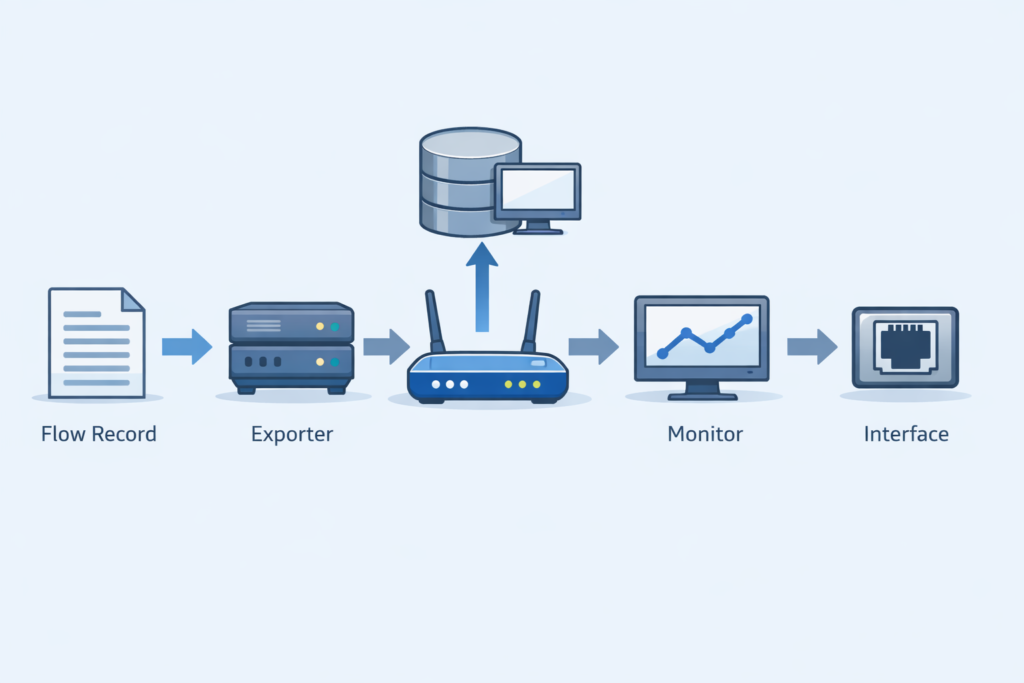
Enabling NetFlow on a Cisco IOS device is straightforward, especially if you stick to the basics. The modern method uses Flexible NetFlow, which is based on the v9 template system.
It involves three main components: a Flow Record, a Flow Exporter, and a Flow Monitor. You create these pieces and then apply the monitor to your interfaces. First, define what you want to track. A simple Flow Record for IPv4 traffic would look like this:
- flow record BASIC-IPV4 match ipv4 source address match ipv4 destination address match transport source-port match transport destination-port match ipv4 protocol collect counter bytes collect counter packets
This record tells the router to use the 5-tuple to identify a flow and to collect the total bytes and packets. Next, you need to tell the router where to send the data. That’s the Flow Exporter:
- flow exporter MAIN-COLLECTOR destination 10.1.1.100 source GigabitEthernet0/0 transport udp 2055
This points the exports to your collector’s IP address using the common UDP port 2055. Now, bind the record and exporter together into a Flow Monitor:
- flow monitor BASIC-MONITOR record BASIC-IPV4 exporter MAIN-COLLECTOR
Finally, apply this monitor to the interfaces you want to monitor, both inbound and outbound:
- interface GigabitEthernet0/1 ip flow monitor BASIC-MONITOR input ip flow monitor BASIC-MONITOR output
You can verify your configuration with commands like show flow monitor BASIC-MONITOR cache to see active flows and show flow exporter MAIN-COLLECTOR statistics to confirm data is being sent to the collector. This basic setup will immediately start providing valuable data.
Turning Data into Action: Analysis and Threat Detection
Collecting NetFlow data is only half the battle. The real value is in the analysis. A good NetFlow analyzer tool will present the data in intuitive dashboards.
You’ll quickly see your top talkers, the hosts sending and receiving the most traffic. You can drill down to see which applications are using the most bandwidth, often identified by their destination port numbers.
However, be aware of certain limitations of network flow data such as missing payload content or sampling inaccuracies, which require complementary tools and cautious interpretation to avoid blind spots in your threat detection strategy.
This is where you move from monitoring to detection. Security threats often manifest as anomalies in the flow data.
A DDoS attack will appear as a massive spike in traffic from many sources to a single destination. Data exfiltration might show up as a consistent, large flow of data from an internal server to an external IP address in a foreign country, especially during off-hours.
Internal lateral movement, a key tactic in cyberattacks, can be spotted. If a user’s desktop suddenly starts sending significant traffic to multiple servers it doesn’t normally communicate with, that’s a red flag.
NetFlow allows you to correlate these unusual flows with alerts from other security tools like your SIEM (Security Information and Event Manager). This correlation turns individual data points into a high-fidelity security incident.
The process is continuous. You use NetFlow to establish a baseline of what “normal” looks like for your network, traffic volumes, communication patterns, and peak times.
Once that baseline is set, the analyzer can automatically alert you to significant deviations. This proactive approach means you’re often aware of a problem, whether it’s performance or security-related, before your users are.
NetFlow in the Real World
NetFlow shows its real value once it’s running in a live network with real pressure and real risk. One of its clearest strengths is real-time anomaly detection.
Imagine a financial company monitoring its trading servers. Under normal conditions, those systems talk to a small, predictable set of peers.
Yet, sophisticated attackers may attempt bypassing DPI techniques and detection by using encrypted or obfuscated traffic flows.
NetFlow’s metadata-focused approach helps identify these evasive tactics by analyzing flow patterns rather than content, providing a critical edge in spotting stealthy data exfiltration or lateral movements.
When a database server suddenly starts sending a steady, high-volume flow to an unfamiliar external IP, it immediately stands out. With the right logic, that behavior becomes an alert:
- Detect a large, sustained outbound flow from a sensitive host
- Confirm the destination is external and unusual
- Flag the activity as potential data exfiltration
- Trigger a high-priority security alert
The team can block the connection, isolate the host, and investigate while the incident is still unfolding.
NetFlow is just as valuable after a breach. A retailer discovering a compromised POS system weeks later can rely on historical NetFlow to reconstruct events:
- Identify the first suspicious outbound connection
- Locate command-and-control infrastructure
- Trace lateral movement inside the network
- Spot large outbound transfers tied to data theft
That flow history becomes the backbone of the incident timeline and supports both remediation and compliance work.
NetFlow and sFlow: Understanding the Difference
NetFlow and sFlow observe the same traffic, but in fundamentally different ways. NetFlow is stateful. It tracks each conversation from start to finish and records it as a complete flow. This provides:
- Exact packet and byte counts
- Accurate traffic volumes
- Reliable long-term trends
The tradeoff is device load. Routers and firewalls must maintain flow state, which consumes CPU and memory on busy links. sFlow is stateless. It samples packets at fixed intervals (for example, 1 in 1,000). For each sample, it:
- Captures packet headers
- Includes a small payload slice
- Sends the sample to a collector
This approach is lightweight and scales well on very high-speed links, but the data is statistical. In practice:
- NetFlow delivers precise accounting and per-flow accuracy
- sFlow provides broad visibility with minimal overhead
Most networks use both. NetFlow acts as the accurate ledger at chokepoints, while sFlow provides a wide-angle view across fast switching fabrics.
Making NetFlow Part of a Bigger Picture
On its own, NetFlow shows traffic shape and movement. It becomes far more powerful when integrated with other tools.
A common pairing is NetFlow and a SIEM. The SIEM correlates logs and alerts, while NetFlow adds network context. Together, they support layered detection:
- A vulnerability scanner flags a host
- NetFlow shows that host initiating new internal connections
- The SIEM correlates both into a high-priority alert
This turns isolated signals into actionable incidents. NetFlow also pairs well with packet capture. NetFlow acts as the early warning system; packet capture becomes the microscope:
- NetFlow detects a suspicious flow
- A targeted packet capture is triggered
- Payload data is collected briefly and selectively
This avoids the cost of full-time packet capture while preserving deep visibility when needed. In a modern observability stack, NetFlow’s role is consistent:
- Identify who talked to whom
- Show ports, protocols, timing, and direction
- Quantify how much data moved
It doesn’t answer every question, but it draws the map that every investigation starts with.
A Final Look at Your Network
NetFlow is more than a feature, it’s a philosophy. It’s the belief that understanding your network’s behavior is the foundation of stability and security.
By implementing it, you replace uncertainty with clarity. The blinking lights on a switch become meaningful conversations. A spike in bandwidth usage becomes a identifiable application. A security alert gains the context of actual network movement.
Start small. Enable NetFlow on a critical internet-facing router or a key server segment. Point it to a free collector tool and just watch the data for a week.
You will be surprised by what you learn. You’ll see traffic you didn’t know existed, patterns that reveal how your business truly operates. From that starting point, you can expand, integrating the data into your security operations and performance management routines.
The goal is a network you don’t just manage, but one you truly understand. Take that first step and configure NetFlow on a single device today. The visibility you gain will change how you see your network forever.
FAQ
How does NetFlow analysis help with encrypted traffic visibility?
NetFlow analysis works with traffic metadata instead of packet payloads, which makes it effective for encrypted traffic analysis.
Even when content is encrypted, network flow records show which systems communicated, how long sessions lasted, and how much data was transferred. This flow-level visibility helps teams detect abnormal behavior, suspicious destinations, and unexpected data volumes without decrypting traffic.
What data does a NetFlow collector store and why does it matter?
A NetFlow collector stores network flow records exported by network devices. These records include source and destination addresses, ports, timestamps, and traffic volume.
This information supports historical traffic analysis, traffic trend analysis, and network usage reporting. Retained flow data allows teams to investigate incidents, validate assumptions, and perform network forensics without relying on full packet capture.
How is NetFlow useful for east-west and north-south traffic monitoring?
Using NetFlow for network monitoring provides visibility into both east-west traffic inside data centers and north-south traffic entering or leaving the network.
This view helps detect lateral movement, internal misuse, and external attack paths. It enables accurate network behavior analysis that edge-only monitoring approaches cannot provide.
Can NetFlow support capacity planning and performance monitoring?
NetFlow supports capacity planning by using traffic volume analysis, bandwidth usage monitoring, and traffic pattern detection over time.
Flow analytics and router flow statistics reveal usage growth, congestion points, and peak demand periods. This data enables informed network performance monitoring and reduces the risk of overprovisioning or delayed upgrades.
How does NetFlow differ from sampling-based flow monitoring?
The difference between NetFlow and sampling-based flow monitoring lies in data completeness. NetFlow uses flow-based monitoring with full flow aggregation methods, while sampling approaches estimate traffic using flow sampling techniques.
For network anomaly detection, DDoS detection with NetFlow, and traffic baseline modeling, complete flow data provides more reliable and repeatable results.
Turning Network Blindness into Visibility
NetFlow turns invisible traffic into clear, actionable insight. By focusing on flow metadata instead of raw packets, it delivers the visibility needed to secure, optimize, and understand modern networks without overwhelming storage or teams.
Whether you’re detecting threats, troubleshooting performance, or planning capacity, NetFlow provides the factual record behind every decision. Start with one device, observe real behavior, and build from there.
Once you see your network clearly, managing it becomes calmer, faster, and far more intentional. Start illuminating your network traffic
References
- https://en.wikipedia.org/wiki/East-west_traffic
- https://www.ibm.com/think/topics/netflow
