

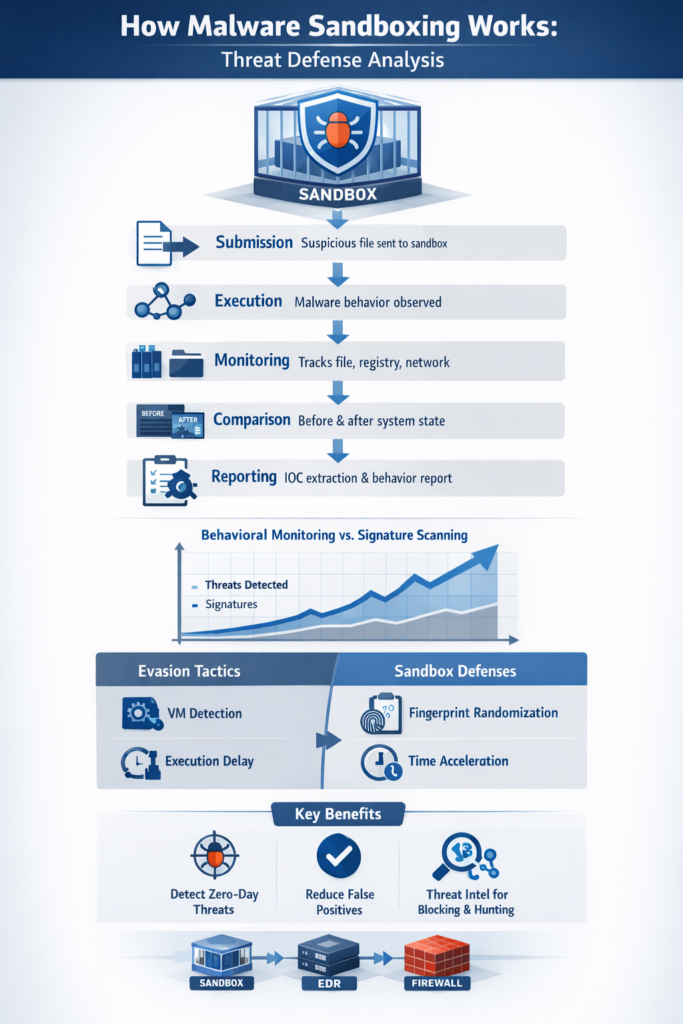
Malware sandboxing works by running suspicious files in a secure, isolated “fake” environment so they can be watched closely without putting real systems in danger.
Think of it as a safe test chamber where harmful code is allowed to act freely, while every move is captured and logged. The sandbox tracks file changes, system tweaks, network requests, and attempts to hide or persist.
This dynamic view exposes behavior that simple signature scans often miss, turning mystery code into clear, documented risk. Keep reading to see how this process actually works under the hood and why defenders rely on it.
Key Takeaways
- Sandboxing relies on behavioral monitoring in an isolated environment, not just file signatures.
- It actively counters evasion tactics like VM detection and execution delays.
- The output provides critical threat intelligence for blocking future attacks.
The Quiet Drama of the Digital Cage
It was a Tuesday, maybe a Wednesday, when the analyst next to you let out a low whistle. On his screen, a seemingly benign PDF from a vendor’s email was, in the sterile world of the sandbox, methodically dropping a payload, calling home to a server in a country with lax cyber laws, and attempting to encrypt dummy files [1].
The sandbox saw what the email gateway missed. It provided a window into intent, a slow-motion replay of a crime that never had the chance to be committed. This is the quiet, essential drama of malware sandboxing.
The principle is deceptively simple. You build a cage that looks like a real room, put the suspect inside, and watch what it does. The cage is everything.
It’s a virtual machine, often, a perfect software replica of a computer with its own fake CPU, memory, and operating system. Or it might be a lighter-weight container, or a full hardware emulator. The goal is total isolation. Whatever happens in the cage stays in the cage.
The malware can wriggle, it can scream, it can try to break the walls, but its infection chain is severed at the virtual network adapter.
The Core Process of Isolated Analysis
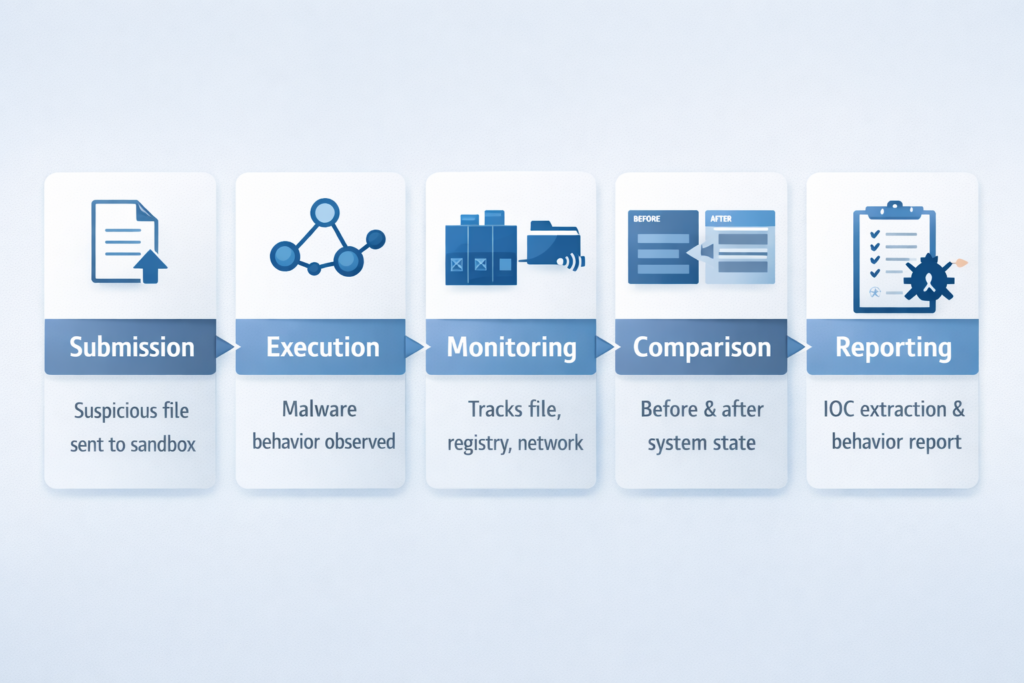
The workflow begins with submission. A file arrives at the perimeter, maybe from a web download or an email attachment. Security tools, using heuristics or simple suspicion, flag it. Instead of blocking it outright, which might let a novel threat slip by, they shunt it into the sandbox.
This is where the observation starts. The sandbox isn’t just a container, it’s a panopticon. As the file executes, as it detonates, a suite of monitors springs to life. They log every system call, every attempt to write to the registry, every process it spawns like a digital mitosis.
It watches the file system for changes, the memory for injections, the network stack for any attempt to phone home. This is dynamic malware analysis, a powerful technique that doesn’t just ask what the file is, it demands to know what it does.
The environment itself is a careful fiction. A good sandbox doesn’t just provide a clean OS. It simulates a real user. It might simulate mouse movements, random keystrokes, the presence of documents in a “My Documents” folder.
It simulates an internet connection, with web servers that respond, to lure out command-and-control communications.
This simulation is crucial. Modern malware is shy, it often looks for signs of life before revealing itself. A sandbox’s monitoring focuses on key system areas:
- Process activity: What new executables are launched.
- File system changes: What files are created, modified, or deleted.
- Registry modifications: What system settings are altered for persistence.
- Network traffic: What external IP addresses or domains are contacted.
After a predetermined runtime, or when the malware terminates, the sandbox stops the world. It takes a snapshot of the entire altered state and compares it to the pristine starting point.
Then it generates a report. This report is the intelligence payoff. It lists the malware’s behaviors in a structured way, often mapping them to frameworks like MITRE ATT&CK.
It extracts Indicators of Compromise (IOCs), those IP addresses, file hashes, and registry keys, that can be fed back into firewalls and endpoint tools to hunt for the same threat elsewhere.
| Workflow Stage | What the Sandbox Observes | Security Value |
| Submission | Suspicious file or URL is sent to the malware sandbox environment | Prevents execution on production systems |
| Execution | Process creation, registry writes, memory injections, network calls | Reveals true malware behavior |
| Monitoring | System changes, persistence attempts, API activity | Builds behavior-based detection evidence |
| Comparison | System state before vs after execution | Identifies malicious modifications |
| Reporting | IOC extraction, behavior mapping, analytics output | Enables detection, blocking, and response |
Overcoming Advanced Evasion Tactics
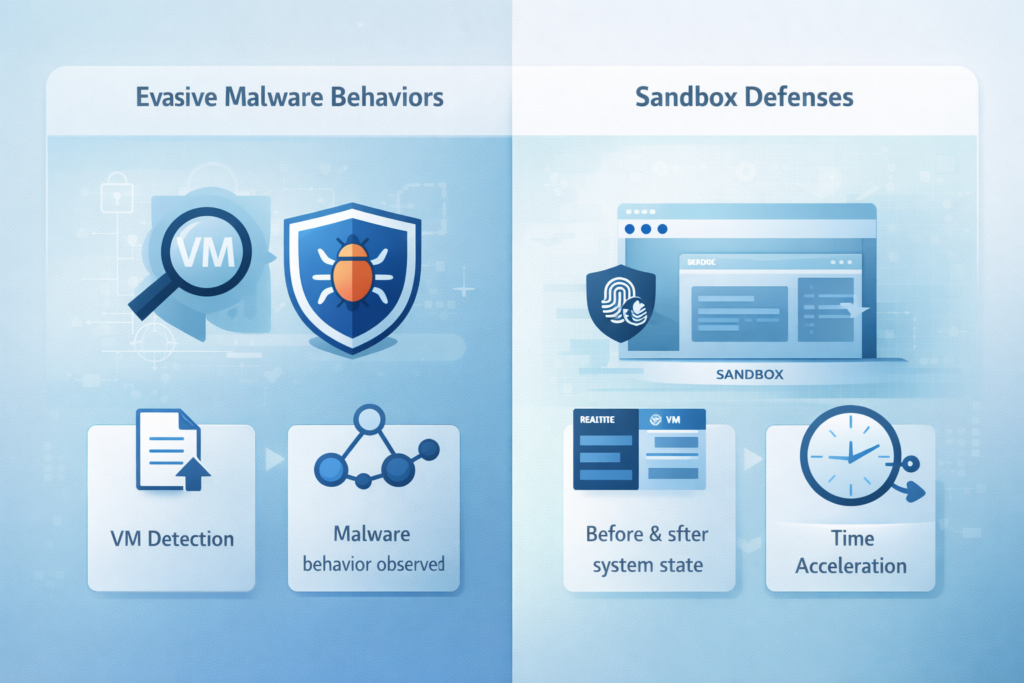
This is where the cat-and-mouse game gets intricate. Malware authors know about sandboxes. They write their code to detect them, to lie dormant, to evade analysis. This arms race defines modern sandboxing. One common tactic is environmental sensing.
The malware checks for artifacts of a virtual machine: specific driver names, manufacturer strings in the BIOS, a small hard disk size common to VMs. If it finds these clues, it simply goes to sleep, behaving like a harmless file.
Advanced sandboxes fight back with cloaking and deception. They randomize these fingerprints. A sandbox might report a hard disk size of 1TB instead of 64GB.
It might spoof different network adapter names. Some use bare-metal hypervisors that are harder to detect than common virtualization software. The goal is to make the cage look so much like a real, valuable target that the malware can’t resist attacking.
Another evasion method is the execution delay. Malware might contain a “sleep” command for days, or wait for a specific future date, hoping the sandbox session will have ended long before it activates.
Sandboxes counter this with sandboxing techniques such as time acceleration and environment simulation, fast-forwarding the system clock internally or leveraging hybrid approaches to outmaneuver evasive malware.
Then there’s the problem of stalling. Some malware will check for human interaction, a mouse click on its window, specific user input, before proceeding.
Without it, the code does nothing. That’s why user simulation isn’t a nice-to-have, it’s a core defensive technique. The sandbox must be a convincing actor.
Strategic Value for Security Operations
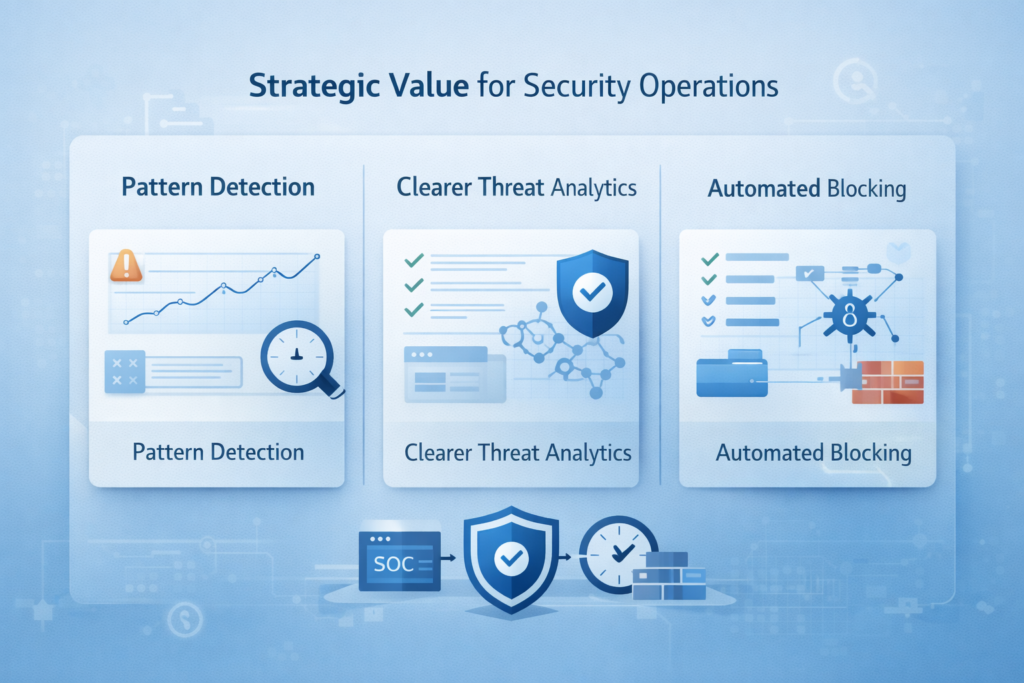
So why go through all this trouble? The value isn’t just technical, it changes strategy. A well-used sandbox becomes one of the main weapons against the kinds of threats that don’t have a name yet.
Zero-day attacks are the clearest example. These are the ones that use vulnerabilities nobody has published or patched. There’s no signature, no known pattern, so traditional antivirus is basically blind.
A sandbox doesn’t wait for a name or a rule. It watches behavior. If a zero-day sample tries to escalate privileges, inject into another process, or quietly move data out of the environment, the sandbox can see those actions in motion.
It doesn’t have to know what the malware is called, it only has to notice what it tries to do. This kind of behavioral view also deepens threat intelligence in a way logs alone can’t.
A single sandbox run usually produces a detailed report and a set of Indicators of Compromise (IOCs) that a Security Operations Center (SOC) can work with right away. Those IOCs don’t stay trapped in the report, they can be pushed back into the wider security stack. Some common uses:
- Block malicious IP addresses and domains directly at the firewall or proxy by visualizing network communication patterns to catch suspicious traffic early.
- Ban file hashes in EDR or endpoint protection so they can’t run again.
- Hunt for registry keys, mutex names, or process chains across the environment.
One good sandbox analysis can end up immunizing the whole enterprise against that specific threat family, turning a single suspicious file into a source of protection for thousands of endpoints.
There’s also a quieter, but very real, benefit: less noise. Not every odd-looking attachment or binary is actually harmful.
Sandboxing gives analysts a safe place to answer that question instead of arguing with a static score or a gut feeling.
If a file just opens a normal document, doesn’t spawn strange processes, and doesn’t touch sensitive areas, it can be cleared with more confidence. That saves hours that would have gone into chasing ghosts. You can think about the operational impact like this:
- Reduce false positives: suspicious-but-benign files get cleared faster.
- Prioritize real threats: confirmed malicious behavior jumps to the front of the queue.
- Refocus human effort: analysts spend more time on complex intrusions, less time on borderline alerts.
When a sandbox is tied into detection, intelligence, and response, it stops being just a tool for curiosity. It becomes a strategic filter that separates real danger from background noise, while catching the attacks nobody has written a rule for yet.
Implementation and Best Practices
A sandbox isn’t a magic box you plug in once and forget. For it to actually help, it has to sit inside the daily flow of security operations, not off to the side. That means it should talk to other tools and feed them decisions.
Think of it as one stage in an automated pipeline: an Endpoint Detection and Response (EDR) system flags a strange process, ships the related file straight to the sandbox, the sandbox detonates it, and the verdict goes back to the EDR.
From there, the EDR can quarantine the host or block the file without waiting for a human. That kind of loop is what lets you respond at machine speed instead of human speed.
The environment itself has to stay fresh. Malware doesn’t just change payloads, it also sharpens its detection tricks. If the sandbox runs on old operating system images, outdated apps, or unpatched services, it slowly turns into low-hanging fruit.
So OS images need regular patching and version updates. The simulation scripts, the fake user clicks, document opens, network calls, need to be tuned as real user behavior shifts.
A sandbox that never changes is easier for malware authors to fingerprint and avoid. Some practices that usually help:
- Keep OS templates and application stacks on a set update schedule.
- Rotate browser and document viewer versions to match what users actually run.
- Review sandbox evasion reports and feed them back into configuration changes.
It also pays to lean on different layers of analysis instead of just one heavy run for every file. A hybrid approach might send a sample first to a light, fast sandbox to catch obvious threats and weed out the noise.
If a file stays suspicious, maybe based on static analysis or reputation, but doesn’t show much behavior, it can then move to a deeper environment with stronger anti-evasion and longer execution windows.
This kind of diversity makes it harder for malware to script its way around your view of it. You can think of the pipeline like this:
- Step 1: Initial triage with a lightweight sandbox and static analysis.
- Step 2: Escalation of “gray” samples to a more advanced sandbox profile.
- Step 3: Feed verdicts back into EDR, SIEM, and threat intel for correlation.
When a sandbox is tuned, updated, and connected this way, it stops being just a lab tool and starts acting like a decision engine that quietly shapes how the rest of the security stack reacts.
The Sandbox Verdict
Malware sandboxing is not just a single product you bolt on, it’s a way of working. At its core, it’s about controlled observation: giving an adversary just enough room to operate, but only inside a cage where it can’t hurt anything that matters. Inside that cage, every move is logged [2].
The technical output, a long ledger of system calls, process trees, file writes, registry changes, and network traffic, takes a fuzzy, unknown threat and turns it into something you can describe, block, and track. That transformation matters. A sandbox run doesn’t only say “bad” or “good.” It can:
- Map which domains and IPs the sample tries to reach.
- Extract file hashes, dropped payloads, and persistence mechanisms.
- Highlight lateral movement attempts or credential-stealing behavior.
Those details turn fear of the unknown into a concrete defense plan. Suddenly you have firewall rules to push, detection signatures to write, and hunting queries to run. The threat stops being a shadow and becomes an entry in your playbook.
The hard truth is that the work never really stops. Each time attackers discover a new evasion trick, checking for virtual machines, waiting for user input, sleeping longer than the analysis window, defenders have to answer with new countermeasures.
Longer runs, smarter user simulation, more realistic environments, better correlations. That back-and-forth is not a glitch in cybersecurity, it is the core of it: a steady, careful effort to understand what’s hiding in the dark so you can keep it out of your systems.
So the next time a file looks suspicious in your environment, it helps to remember the sandbox as more than a checkbox. It’s the quiet lab where threats are forced to show their hand and where analysts find the clarity they need to act.
A practical step is to look at your own security stack and ask a simple question: what actually happens to unknown files? You can review it in a few angles:
- Ingress points: email, web downloads, USB, APIs, where do unknowns enter?
- Triage flow: which tools decide what gets sent to the sandbox, and when?
- Containment: once the sandbox calls a file malicious, who or what reacts?
If there’s no clear “cage” for suspicious files yet, that’s the gap. Filling it is how a sandbox stops being just an idea on a slide and becomes part of how you stay ahead of what you don’t see coming.
FAQ
How does malware sandboxing help detect real threats safely?
Malware sandboxing helps you detect real threats by running suspicious files inside a secure malware sandbox environment.
During malware sandbox analysis, the system observes behavior such as file changes, process creation, and network traffic.
This behavior-based sandboxing approach allows sandbox malware detection to identify harmful activity before it reaches production systems, keeping your devices protected while revealing exactly how the malware operates.
What happens inside a malware sandbox during analysis?
Inside a malware execution sandbox, the suspicious file runs inside an isolated virtual machine sandboxing setup. During runtime malware sandboxing, tools perform sandbox malware inspection by monitoring registry edits, process spawning, and network calls.
This structured malware sandbox workflow produces sandbox security analysis reports. These reports help analysts understand true intent without risking real systems, which makes malware detonation sandbox testing both safe and effective.
Why is dynamic malware sandboxing better than traditional scanning alone?
Dynamic malware sandboxing is effective because it observes live malware behavior instead of relying only on file signatures.
Through malware behavior sandbox monitoring, sandbox malware profiling, and sandbox IOC extraction, analysts gain deep sandbox threat intelligence.
This process reduces false positives and improves accuracy. Traditional scanning may miss new or modified malware, but sandbox-based malware analysis exposes malicious actions as they happen.
Can malware try to avoid detection inside a sandbox?
Some malware attempts to avoid detection using anti-sandbox behavior and sandbox evasion detection techniques.
It may delay execution, search for virtual machine sandboxing signs, or use stealth malware sandboxing tactics. Modern malware sandbox architecture includes cloaking, sandbox resilience testing, and hybrid malware analysis sandbox workflows.
These defenses help identify sandbox bypass techniques while maintaining sandboxed malware isolation so attacks cannot spread to production systems.
How does sandbox threat hunting improve overall cybersecurity?
Sandbox threat hunting improves security by analyzing data from sandbox dynamic analysis, sandbox malware classification, and sandbox IOC extraction. The results support sandbox incident response, sandbox malware remediation, and ongoing malware sandbox evaluation.
Security teams use this sandbox threat intelligence to detect patterns, refine sandbox malware heuristics, and strengthen defenses. Over time, sandbox automated reporting and sandbox malware best practices reduce overall organizational risk.
Final Thoughts on Malware Sandboxing for Threat Detection
Malware sandboxing works because it turns uncertainty into evidence. By isolating suspicious code in a realistic but sealed environment, it reveals intent through observable behavior rather than assumptions.
This visibility fuels faster detection, richer intelligence, and better prevention across the environment. As attackers adapt with new evasion tricks, sandboxes evolve too, continually refining deception, realism, and automation.
In the SOC, the sandbox isn’t a lab experiment, it’s a frontline tool for understanding and stopping emerging threats. Explore advanced threat detection now.
References
- https://ceur-ws.org/Vol-3962/paper1.pdf
- https://www.paloaltonetworks.com/cyberpedia/sandboxing
