
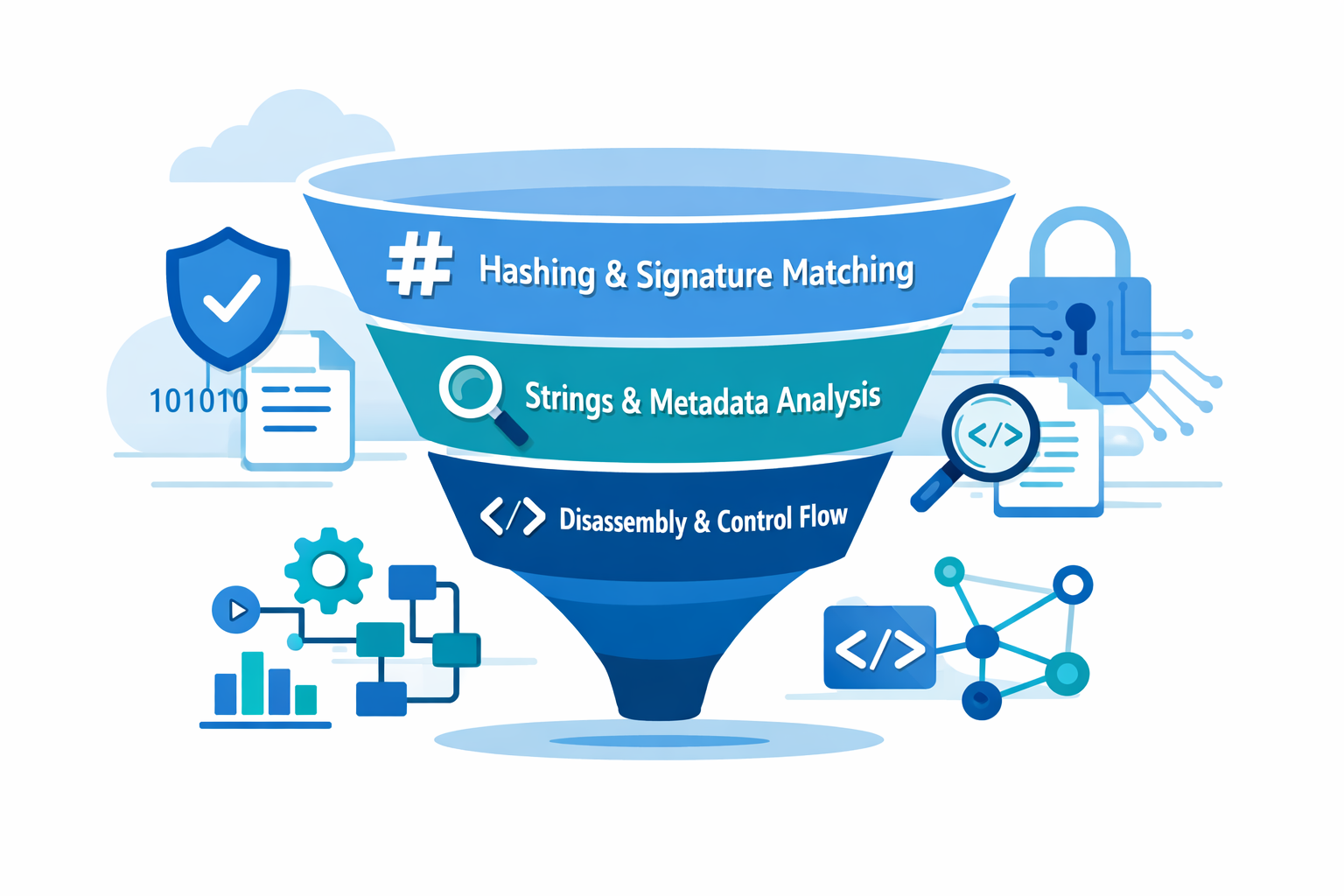
Static analysis lets you study malware without ever running it, like holding a live wire with insulated gloves instead of your bare hands. You’re reading the code, structure, and metadata of a file, treating it more like a forensic artifact than a program.
From quick hash checks and string scans to unpacking layers and stepping through disassembly, each technique reveals a different angle on the same sample.
Used together, they help you spot reuse, evasion tricks, and likely behavior before damage happens. Keep reading to learn how to turn these methods into a repeatable, reliable workflow.
Key Takeaways
- Signature and hash checks are your frontline speed, perfect for filtering out known threats in seconds.
- String and metadata inspection offers a middle ground, revealing intent and anomalies without deep code knowledge.
- Disassembly and control flow analysis provides the deepest truth, uncovering hidden logic at the cost of time and expertise.
The Quiet Examination
The analyst’s office was quiet, just the hum of servers and the soft glow of monitors. On one screen sat a file, a simple executable pulled from a phishing email.
Running it was out of the question, a potential disaster. So the work began not with execution, but with observation. This is the domain of static malware analysis, a discipline of patience and deduction. It is the art of learning everything you can from an enemy while it sleeps [1].
You are not just looking for a label. You are looking for a story. The story is in the strings of text left behind, in the unique fingerprint of its bytes, in the architectural blueprint of its code.
Each method of static analysis gives you a different chapter. Some methods are quick, giving you answers in a heartbeat. Others are slow, deliberate, demanding your full attention to reveal the malware’s true purpose. The trick, and the craft, is knowing which tool to pick up first.
The Fast Filter: Hashing and Signature Matching

You need a starting point. Something fast. Hashing is often it. You run a file through an algorithm like SHA-256, and it spits out a long string of letters and numbers, a digital fingerprint. This hash is unique to that exact file.
You then check this fingerprint against a database, like VirusTotal. If there is a match, you know what you have. It is a known entity. This process takes seconds. It is the equivalent of checking a license plate against a stolen vehicle database.
Signature matching works on a similar principle but is more nuanced. Instead of a full-file fingerprint, it looks for specific patterns, byte sequences that are known to belong to a particular malware family. Antivirus engines are built on libraries of these signatures.
The strength here is speed and a low rate of false alarms for known threats. The weakness is glaring. Anything new, anything modified slightly, slips right through. A zero-day exploit is invisible to a signature check. It is a powerful first filter, but you cannot rely on it as your only wall.
- Create an MD5 or SHA-256 hash of any suspicious file.
- Query threat intelligence platforms with the hash.
- Use YARA rules to scan for specific code patterns.
- Integrate hash checks into automated ingestion pipelines.
The value is in the triage. When hundreds of files land on your virtual desk, this method lets you instantly sort the known bad from the unknown.
It clears the clutter so you can focus your deeper attention where it is needed most. You would not use a microscope to sort mail, you use a sorter. Hashing and signatures are that sorter for your malware lab.
This initial filtering is a critical step before moving to more detailed sandboxing for malware analysis, ensuring only unknown or suspicious files proceed to execution testing.
Reading Between the Bytes: String and Metadata Analysis
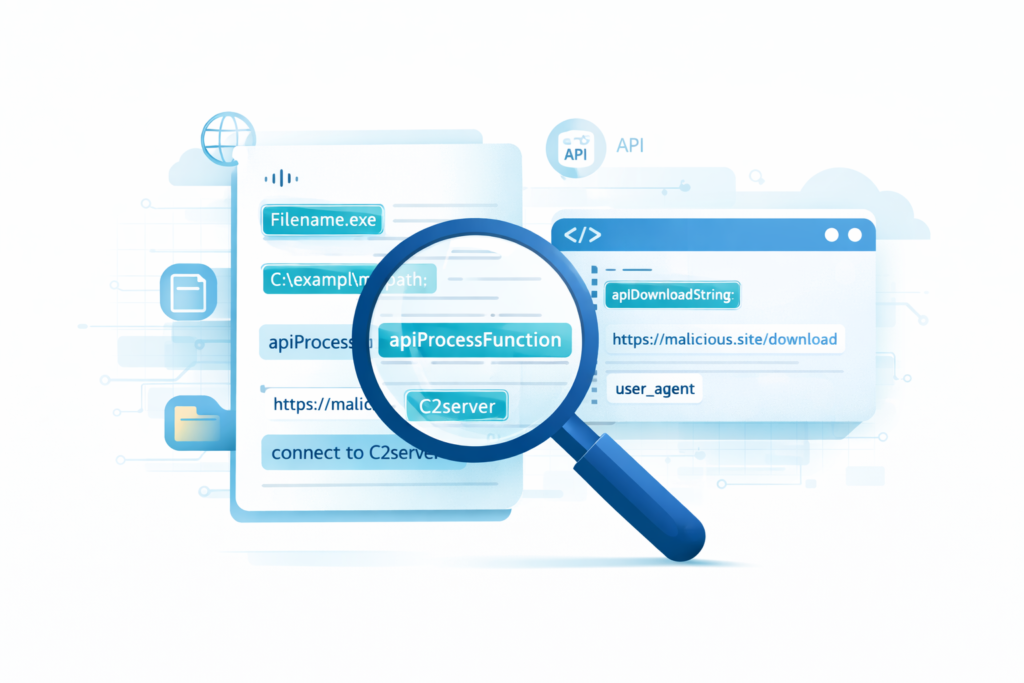
If hashing tells you what something is, string analysis hints at what it might do. When a program is compiled, pieces of readable text often get left behind.
URLs for command-and-control servers, file paths for payload drops, fragments of error messages, and names of Windows API functions [2].
Running a tool like strings on a binary can spill these secrets. Finding a string like “http://malicious-domain.com/update” is a strong indicator of compromise, an IOC you can block at the firewall before the malware ever tries to call home.
The catch is that malware authors know this too. They obfuscate. They encrypt these strings, or split them apart, making them unreadable to a simple scan.
A file with very few readable strings, or strings that look like gibberish, is itself a sign that the code is packed or obfuscated. So while string analysis is a fantastic source of quick leads, its absence of findings is also a piece of data, a red flag waving you toward deeper inspection.
Metadata inspection lives in the same pragmatic space. For a Windows PE file, this means examining the headers.
The import address table lists the system functions the program intends to call. A simple text editor asking to “CreateRemoteThread” or “VirtualAllocEx” is immediately suspect.
The section headers can show anomalies, like a section named .text (usually for code) that has write permissions, which is unusual. This method gives you structural clues. It is like checking a building’s permits and blueprints before walking inside. You can spot glaring violations from the sidewalk.
The Deep Dive: Disassembly and Control Flow
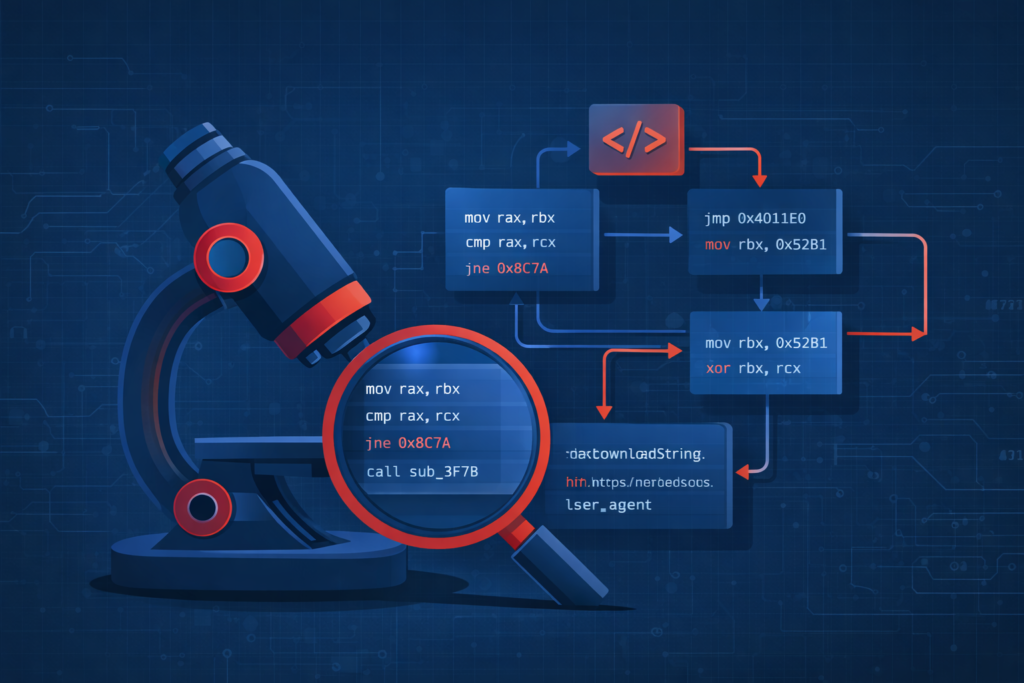
When the surface-level checks are inconclusive, you must go deeper. This is where disassembly begins.
Tools like Ghidra, IDA Pro, or Radare2 take the raw machine code, the binary 1s and 0s, and translate it back into assembly language. It is not the original source code, but it is the map of all the instructions the CPU will follow. Here, you move from inference to direct observation.
You start to see the logic. You can trace the control flow graph, which maps how execution jumps from one block of instructions to another.
You analyze the call graph to see how functions relate to each other. This is how you find the decryption routine for a packed malware, or spot the condition that triggers a ransomware’s file encryption. It is painstaking work.
It requires skill and patience. A single analyst might spend hours or days on one complex binary. Decompilation attempts to go a step further, trying to reconstruct a higher-level, pseudo-C code from the assembly.
Tools like Hex-Rays are brilliant at this, but it is an imperfect science. The result is often more readable than pure assembly, giving you a better sense of the program’s structure and algorithms. Yet, for heavily obfuscated code, the decompiled output can be confusing.
The deep dive methods offer the highest depth of insight. They are also the most easily disrupted by anti-analysis techniques like control flow flattening or junk code insertion. They are your microscope, powerful but useless if the sample is hidden in a locked box.
Mastering this level of analysis is essential before employing how malware sandboxing works analysis, as it provides a context-rich map for sandbox behavior interpretation.
Choosing Your Method: A Practical Comparison
Credits: Scribbr
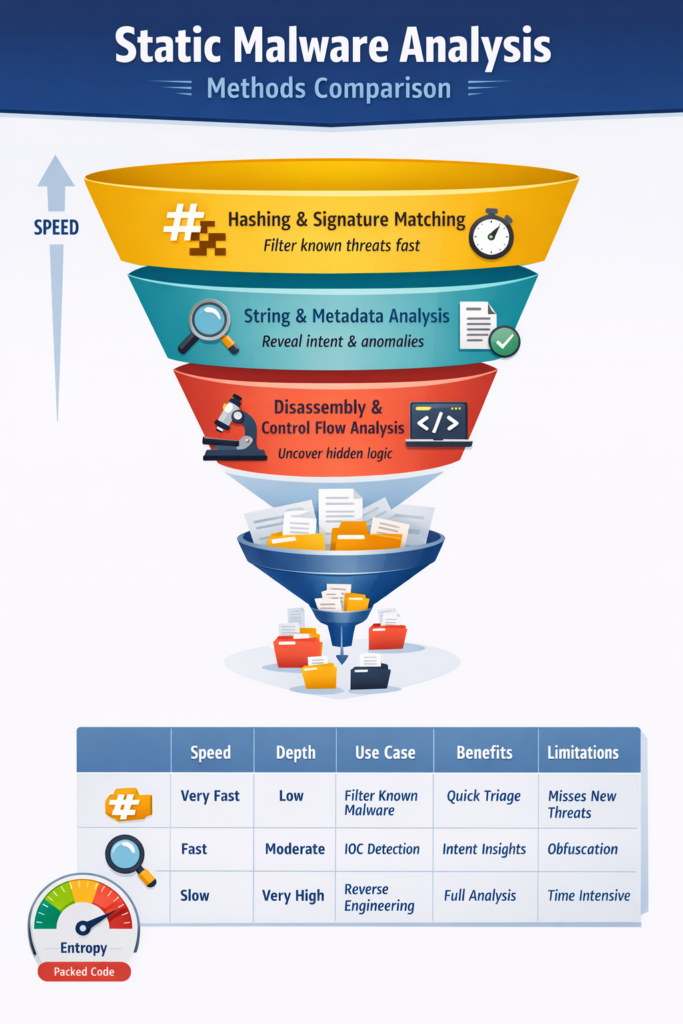
So how do you choose? You build a workflow. You think in terms of a funnel. At the wide top, you need speed and automation to handle volume. At the narrow bottom, you need depth and expertise to crack the tough cases.
Start with hashing and signature checks. Let this automated process filter out the known threats. What remains are the unknowns.
Feed those into string and metadata analysis. Look for IOCs, anomalous headers, suspicious imports. This will categorize many of the remaining files, providing actionable intelligence for your security systems.
The stubborn few that remain, the ones that are packed or show signs of novel behavior, get sent for manual disassembly. Each method has its place in this chain.
- Hashing/Signatures: Maximum speed, minimum depth. Ideal for known-malware filtering.
- Strings/Metadata: Good speed, moderate depth. Perfect for IOC extraction and initial triage.
- Disassembly/Decompilation: Slow speed, maximum depth. Reserved for deep investigation and reverse engineering.
The challenges are real. Packing and obfuscation are the primary foes of static analysis. A packed file’s real code is compressed and encrypted, hidden behind a small unpacking stub.
Your strings are gone, your signatures do not match, and the disassembled code you see first is just the decryption routine. You have to identify the packer, sometimes unpack it, and then analyze the true payload. This is a cat-and-mouse game that never ends.
| Method | Speed | Depth of Insight | Typical Use Case | Key Benefits | Key Limitations |
| Hashing & Signature Matching | Very Fast | Low | Filtering known malware | Quick triage, low resource use | Misses zero-day and modified samples |
| String & Metadata Analysis | Fast | Moderate | IOC discovery and classification | Reveals intent indicators | Obfuscation reduces visibility |
| Disassembly & Control Flow Analysis | Slow | Very High | Reverse engineering & payload discovery | Full behavioral understanding | Requires skill and time |
Building a Resilient Analysis Workflow
The goal is not to chase one “perfect” method. It is to learn how to stitch different methods together into a workflow that actually holds up under pressure.
You usually start with static analysis, because it is safe, quiet, and controlled. You collect as much information as possible without ever running the sample.
Fast techniques help you make early calls, while deeper techniques help you understand the rare, weird threats that do not fit old patterns. All that early static work becomes the backbone for everything that follows.
Static analysis also answers a blunt question: is it even safe to run this in a sandbox? If the answer is yes, static clues help you shape that sandbox so it mirrors what the malware expects. Maybe you preload it with the domains, IPs, or file paths you pulled from strings.
Those indicators and guesses formed during static analysis turn into hypotheses for dynamic analysis to test.
This is the hybrid style most modern security teams rely on: static for broad detection and an initial mental model, dynamic for behavioral proof and fine-grained detail. Your toolkit and habits should mirror that blended workflow.
- Use automated scripts for hashing (MD5, SHA-1, SHA-256) and string extraction.
- Get comfortable with at least one disassembler (IDA, Ghidra, Radare2, etc.).
- Learn to spot packers using entropy analysis.
- Track indicators of compromise (IOCs) as you go, not at the end.
High, uniform entropy across large regions of a file is a strong hint that you are looking at encryption or packing, not plain code or data.
Being able to see that, and then adjust your approach, is where you shift from just following recipes to actually running an investigation. Over time, that’s what makes your workflow resilient: you are not just clicking tools, you are asking why each result matters and where it should lead you next.
This integrated approach aligns with dynamic malware analysis techniques, where static findings inform runtime behavior observation.
Final Thoughts on Static Methods
Static malware analysis is the groundwork we stand on. It is the careful, almost patient kind of examination that lets you stay safe while you study something dangerous.
You walked through the range of methods, from the lightning-fast certainty of a hash check to the slow, detailed work of stepping through assembly.
Each one has its own job. The hash check works like a guard at the gate, the string analysis wanders ahead like a scout, and the disassembler cuts in deep, like a surgeon’s scalpel.
Static methods might look quiet, but the thinking behind them cannot be. Skilled analysts do not treat these techniques like separate tools in separate boxes. They use them like parts of a single conversation:
- The hash comes back unknown.
- The strings suggest exfiltration or command-and-control.
- The disassembly shows a keylogger routine or credential theft.
- The imports hint at network use or file manipulation.
- The control flow outlines where the real payload wakes up.
Piece by piece, the model of the malware comes into focus. So you start with the static view, because it is safer, and honestly, more controlled.
Then you let that view shape what you do next, maybe a sandbox run, maybe deeper reverse engineering, maybe threat hunting across the network.
That is how a suspicious file turns into a clearly understood threat, and how you slowly build a defense strategy that is both smart and hard to shake. Static methods are only “static” on disk. In your head, they should stay very, very active.
FAQ
What does static malware analysis mean in real investigations?
Static malware analysis means examining a file without executing it. Analysts inspect code structure, metadata, and strings to understand intent and risk.
This process may include PE file analysis, ELF malware analysis, and static code analysis malware techniques. It helps with static malware triage and creates early insight before deeper malware reverse engineering or dynamic testing happens.
How is static malware analysis different from dynamic analysis?
Static analysis reviews a file as data, while dynamic analysis observes it during execution. Static vs dynamic malware analysis matters because each method exposes different behaviors.
Static methods rely on malware string analysis, malware entropy analysis, and malware hash comparison. When analysts combine both types, static malware detection accuracy and overall malware detection method comparison quality improve significantly.
How do analysts identify packed or obfuscated malware using static techniques?
Analysts detect packing or obfuscation by checking entropy levels and content layout. Malware entropy analysis helps identify compressed or encrypted sections.
Packed malware identification often uses malware deobfuscation techniques, opcode review, and section header analysis. These patterns reveal when code is hidden, which is one of the most common static malware analysis challenges during real-world investigations.
What role do hashes and signatures play in static malware detection?
Hashes and signatures help group and detect malicious files without execution. Malware hash comparison, including MD5 hash malware detection and SHA256 malware hashing, supports signature based malware detection.
These methods identify reused components and assist with malicious code pattern matching. They also strengthen IOC extraction static analysis and static threat intelligence enrichment within security workflows.
Can machine learning improve static malware analysis accuracy?
Yes. Machine learning static malware models analyze static feature extraction malware data such as imports, metadata, and binary characteristics.
These models are evaluated through malware detection benchmarking and static malware feature benchmarking. They can increase static analysis detection rate across ransomware static analysis, spyware static analysis methods, rootkit static analysis methods, and trojan static analysis techniques.
Choosing the Right Static Malware Analysis Method
Static malware analysis excels because it lets you learn without lighting the fuse. By layering fast filtering, rich context gathering, and deep reverse engineering, you turn a suspicious binary into a clearly mapped threat.
No single method wins alone; the strength is in the workflow that moves from breadth to depth. As attackers change tactics, disciplined static analysis keeps you steady, equipping you to prioritize risk, shape dynamic testing, and respond confidently before harm ever begins.
Ready to strengthen your detection strategy? Explore modern network threat detection capabilities here.
References
- https://fiveable.me/network-security-and-forensics/unit-4/static-malware-analysis/study-guide/mdle07h2ePOM7Ki7
- https://www.geeksforgeeks.org/ethical-hacking/hashing-and-signatures-in-static-malware-analysis/
