

Log collection agent deployment is the process of installing and managing lightweight tools that send logs from servers, containers, and workloads into one central platform. In 2026, growing hybrid environments generate more data than older manual syslog methods can handle well.
We often see teams begin with Network Threat Detection because network telemetry can reveal gaps before host logging is fully in place. From there, many expand into endpoint and application logs for broader visibility. Good planning helps improve coverage, control costs, and reduce downtime during rollout. Keep reading to see what works best today.
Log Collection Agent Deployment Quick Wins
Strong deployment is not only about installing agents. It is about building reliable telemetry, reducing noise, and keeping visibility strong as environments grow.
- Using one main log collection agent often reduces complexity.
- Early filtering and buffering help lower cost and protect delivery.
- We often see better results when Network Threat Detection is combined with host and cloud telemetry.
What Is Log Collection Agent Deployment and Why Does It Matter?
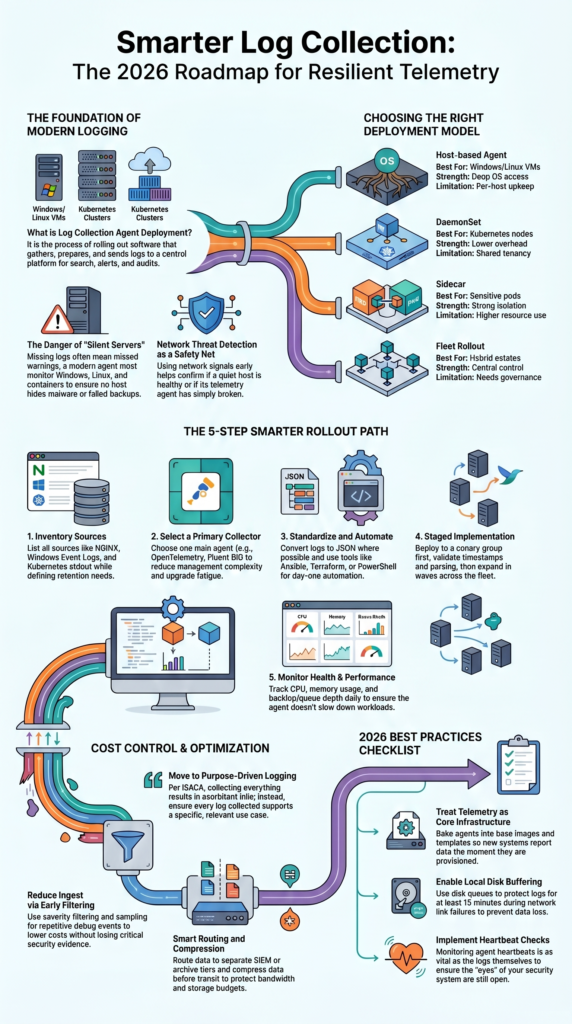
Log collection agent deployment is the process of rolling out software that gathers logs, prepares them, and sends them to a central platform for search, alerts, and audits. It matters because missing logs often mean missed warnings.
A modern log agent can run on Windows, Linux, containers, and cloud systems. It reads files, system events, or app streams, then forwards them to a SIEM or analytics tool. We have worked with teams that thought logging was complete, yet key servers were silent for months.
That gap becomes dangerous during incidents. One unseen host can hide malware, misuse, or failed backups. We often use Network Threat Detection early because network traffic still speaks when endpoints do not. It helps confirm whether a host is quiet because it is healthy or because telemetry is broken.
Older methods still appear in many environments:
- Manual syslog forwarding
- Custom scripts no one owns
- Different retention rules by team
- No health checks on collectors
Once logs are centralized, response work gets faster and evidence is easier to trust.
Key Facts Before You Deploy

Before rollout starts, a few simple facts save time and money. Most stable deployments use one lightweight primary agent, strong automation, and health checks for the agent itself. We have seen teams run three or four collectors at once, and most of their time went into upgrades instead of investigations.
Local buffering matters more than many expect. If a link fails for fifteen minutes, a good disk queue can keep logs safe until the path returns. Without it, events disappear.
Transport security also matters. Use TLS logging or mTLS logging when sensitive data crosses internal or public networks. Attackers often look for weak internal paths.
Keep these points in mind:
- Kubernetes DaemonSet logging is often leaner than sidecars
- Large server fleets need automation from day one
- Early filtering can cut ingest costs fast
- Heartbeat checks are as useful as app logs
- Queue depth should be watched daily
Our threat models often show one pattern: unmanaged telemetry grows expensive, noisy, and hard to trust.
Which Deployment Models Work Best?
The best choice depends on where workloads run and how much control the team needs. In our experience, mixed estates usually need more than one method, but they should still be managed under one policy plan. Many teams improve consistency by applying clear centralized log management strategies across every deployment type.
| Model | Best For | Strength | Limitation |
| Host-based agent | Windows/Linux VMs | Deep OS access | Per-host upkeep |
| DaemonSet | Kubernetes nodes | Lower overhead | Shared tenancy |
| Sidecar | Sensitive pods | Strong isolation | Higher resource use |
| Fleet rollout | Hybrid estates | Central control | Needs governance |
Tools such as Fluent Bit, Vector, NXLog, Azure Monitor Agent, and OpenTelemetry Collector are common choices. We normally choose based on outputs, parsing needs, and operating effort, not hype.
A practical design often looks like this:
- Host agents for servers
- DaemonSets for clusters
- Central upgrade policy
- Separate path for security logs
We also pair this with Network Threat Detection. If host logs vanish, network signals often reveal whether traffic still continues.
How Do You Deploy Log Agents Step by Step?
Credits: NXLog
Good deployment starts with inventory, not installers. Teams should first know what systems exist, what logs matter, and how long records must be kept. We have seen rushed projects install agents everywhere, then realize they forgot domain controllers and key apps. A structured rollout often depends on strong EDR agent deployment management practices.
Start by listing sources such as NGINX, IIS, Windows Event Logs, cloud audit logs, Kubernetes stdout, and security tools. Then choose an agent that supports Linux, Windows, containers, and multiple outputs.
Next, build layered settings:
- Global defaults
- Environment tags
- Role-based overrides
- Secure credentials handling
A rollout path that works well:
- Inventory sources and retention needs
- Select one main log collector
- Standardize JSON logs where possible
- Automate install with Ansible, Terraform, MSI, or PowerShell
- Canary to a small group first
- Validate parsing and timestamps
- Expand in waves
- Track CPU, memory, backlog, and failures
Before full release, we compare host logs with Network Threat Detection data. If traffic exists but logs do not, something still needs fixing.
Agents vs Syslog vs Agentless Collection: Which Wins?
Each method has a place, but they do not deliver the same results. Agents usually win when reliability, metadata, and stronger controls matter. We often recommend them for security programs that need full context during incidents. Some teams also review network tap deployment advantages visibility when they need traffic insight.
| Approach | Best Use | Advantage | Tradeoff |
| Agent-based logging | Security + operations | Rich detail | More upkeep |
| Syslog-only | Network devices | Simple setup | Less context |
| Agentless logging | Fast onboarding | Low footprint | Less control |
Research from SynthChain shows
“In real environments, defenders seldom have ‘full fidelity’ visibility: telemetry is constrained by access boundaries, cost and performance budgets… Cost-effective telemetry requires selecting complementary sources rather than maximizing collection.” – arXiv Research Journal
Windows log agent deployments are common because native syslog support is limited compared with many Unix systems. For short-term projects, agentless methods can help. During mergers, for example, we have used temporary pulls while long-term tooling was planned.
We also see teams begin with Network Threat Detection because it needs no endpoint install on day one. That gives quick visibility while agents are being rolled out.
Our own risk reviews show layered telemetry works best:
- Network signals confirm traffic behavior
- Host logs confirm user and process actions
- Cloud logs confirm control-plane changes
One source alone rarely tells the whole story.
What Problems Break Deployments at Scale?
Many deployments fail for the same reasons: drift, noise, broken parsers, and unhealthy agents. We have inherited environments with over one hundred configs, and nobody knew which one was active. That problem is more common than most admit.
Applications also change fast. A small update can alter log format and suddenly fields stop parsing. Security teams then search incomplete data without knowing it.
Air-gapped or restricted systems add more trouble. Proxies, gateways, and certificate chains need real testing before launch. If not, rollout slows to a crawl.
Watch for these common failure patterns:
- High CPU usage logging overhead
- Missing heartbeats from stopped services
- Broken silent installers on Windows
- Huge log volume raising license cost
- Wrong file permissions
- Full queues after outages
We monitor collectors as closely as business apps. If the agent is unhealthy, every dashboard can look normal while evidence is missing.
Our threat modeling work also checks blind spots. Attackers often hide where telemetry is weak, stale, or ignored.
How Do You Reduce Cost Without Losing Visibility?

Cutting costs should not mean losing useful evidence. The smarter path is to remove low-value noise, improve schemas, and route important data to the right storage tier. We have helped teams lower ingest sharply without harming detection quality.
Repeated messages, duplicate infrastructure logs, and unused traces often consume large budgets. Keep auth, audit, error, and security logs at high priority.
As noted by ISACA
“Historically, logging was rooted in the idea of collecting as much as possible in the hope of meeting future needs… This is not financially feasible and will, at some point, result in an exorbitant bill. A purpose-driven logging approach ensures that all logs being collected support a specific use case that is relevant to the organization [improving visibility while managing cost].” – ISACA Journal
Useful fields make searches faster:
- service
- user_id
- request_id
- host tags
- environment labels
Use controls like these:
- Log filtering by severity
- Log sampling for repetitive debug events
- Separate SIEM and archive routes
- Log compression before transit
- Shorter retention for low-value data
We often pair this with Network Threat Detection. If network context already explains traffic flow, teams may not need every duplicate endpoint event. Cheap data can still become expensive if nobody uses it.
What Are the Best Practices for 2026?
In 2026, teams should treat log agents as core platform tools, not side projects. Ownership, updates, and health checks need clear responsibility. When no team owns telemetry, problems stay hidden too long.
We prefer agents baked into base images, templates, and autoscaling builds. New systems should arrive ready to report on day one. Manual installs rarely scale well.
Strong rollout habits include:
- Signed configs
- Staged release rings
- Version pinning
- Fast rollback plans
- Canary testing first
Collectors also need their own dashboards. We track queue depth, retry counts, memory use, dropped events, and version spread across the fleet.
Our best practice list:
- Quarterly source reviews
- Policy-based logging by environment
- Host tagging for routing logic
- Log failover during outages
- Agent versioning with canaries
- Prefer OpenTelemetry Collector for future multi-signal use
We also keep Network Threat Detection beside host telemetry. That wider view often finds gaps early and reduces overreliance on any single source.
FAQ
How do I choose between agentless logging and a log collection agent?
Agentless logging can work for simple environments, but a log collection agent often provides better control, buffering, and filtering. It also improves centralized logging, secure log forwarding, and stable delivery during network outages. We usually recommend agents for teams that manage many hosts or need deeper visibility across changing systems and workloads.
What should I check before starting agent deployment?
Before agent deployment, review each log source, expected log volume, network path, and final log destination. Confirm user permissions, supported operating systems, and retention needs. Teams should also plan log agent configuration, tagging rules, and rollback steps. Good preparation helps prevent missed data, duplicate events, and delays during production rollout.
How can I lower log agent performance impact?
To reduce log agent performance impact, adjust collection intervals, apply log filtering, and use log sampling when full capture is not needed. Monitor CPU usage logging and memory use during testing. Compress large data streams and avoid collecting low-value events. A well-tuned log agent should run smoothly without slowing workloads.
What helps prevent log agent failure during outages?
Strong log reliability begins with buffering and failover settings. Use disk buffer features so logs can queue locally when connections fail. Add log failover routes to a backup destination and monitor log agent health with heartbeat checks. These steps improve log resilience and reduce data loss during planned or unexpected outages.
How do teams manage upgrades across many hosts?
For large fleets, use agent management with staged rollouts and clear version tracking. Automate installs through configuration management, PowerShell deployment, or infrastructure tools. Review agent versioning, test upgrades in smaller groups, and watch for configuration drift. This method makes multi-host deployment safer and easier to maintain over time.
Treat Telemetry Like Core Infrastructure
Installing agents is only the start. What matters is a pipeline that stays reliable, cuts noise early, and gives your team clear data when pressure hits. Many teams get faster wins by improving visibility first, then rolling out agents with control.
Network Threat Detection helps uncover blind spots while deployment is still underway, so progress starts sooner. Ready to turn log collection into a stronger security advantage? Connect with our team and build a rollout plan that scales with confidence.
References
- https://arxiv.org/html/2603.16694v1
- https://www.isaca.org/resources/isaca-journal/issues/2023/volume-4/log-management-as-an-enabler-for-data-protection-and-automated-threat-detection
