
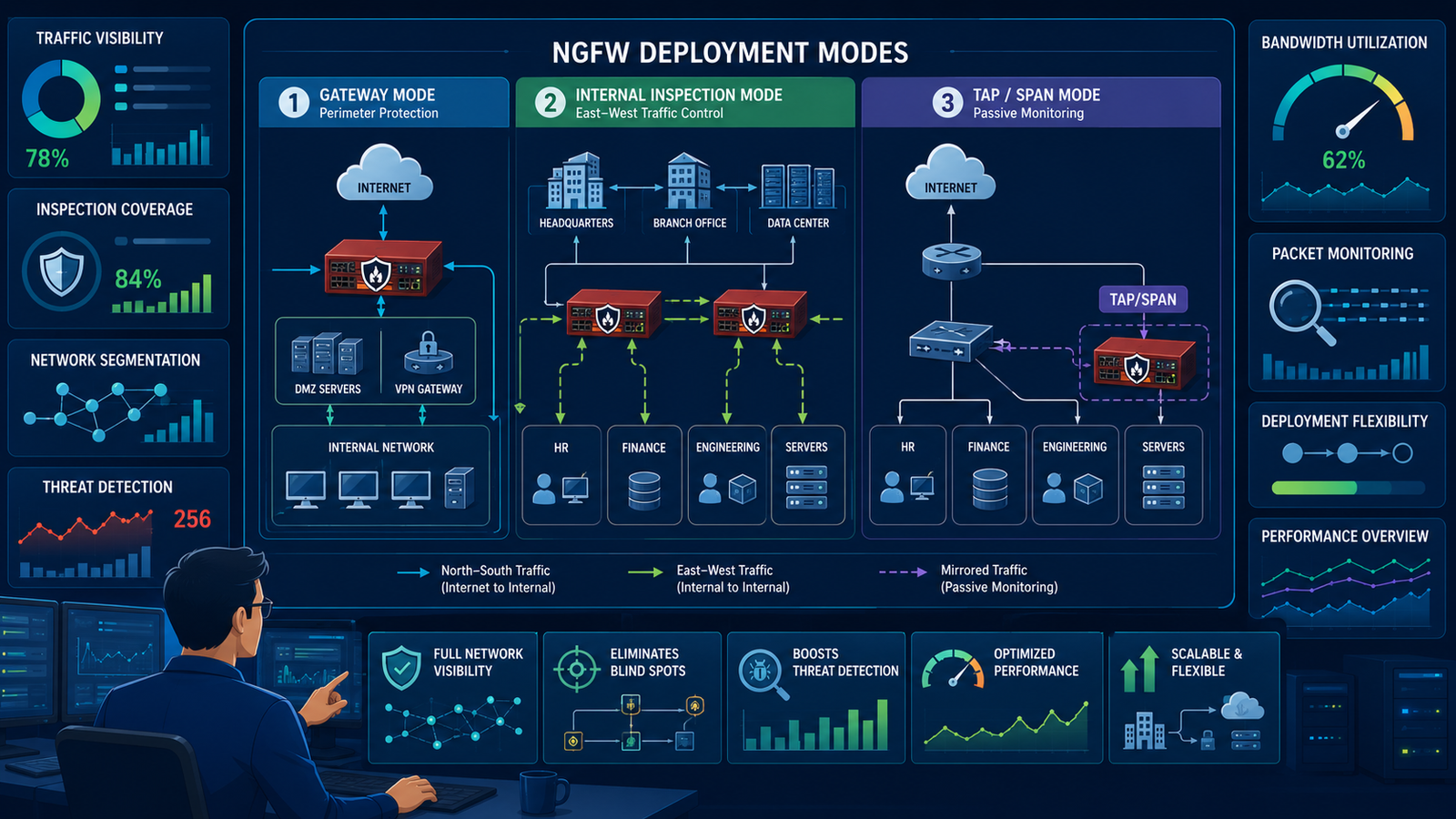
Most organizations rely on default firewall setups, missing out on crucial security benefits. Exploring advanced ngfw deployment modes configuration options allows you to move beyond basic perimeter control.
At Network Threat Detection, we’ve seen how traditional gateway setups leave critical blind spots exposed to stealthy attacks. Upgrading your configuration changes how your firewall sees and analyzes traffic. Keep reading to discover how the right deployment strategy transforms your overall security posture.
NGFW Deployment Modes Configuration Options: Beyond Gateway Mode
Before determining the right configuration for your infrastructure, understand the key points regarding the role of deployment modes in network security:
- Beyond Basic Filtering: Gateway mode acts as a simple checkpoint, whereas advanced deployment modes function as comprehensive network interrogators.
- Tailored Security: The optimal deployment mode depends directly on your network’s unique traffic flows, architecture, and threat profile.
- Actionable Intelligence: Strategic configuration transforms raw network data into real-time threat intelligence, moving your strategy from passive logging to active prevention.
Why Your Firewall’s Placement Dictates Its Power?
Think of your network like a city. The gateway firewall is the border checkpoint. It looks at passports, checks the manifest. It’s vital, but it only sees what’s coming in and out.
It misses everything happening inside the city streets, the whispered conversations, the handoffs in alleyways. That’s exactly what happens in gateway mode. It’s perimeter-focused.Internal threats, lateral movement, east-west traffic. These are the dangers that flourish inside your network once something gets past the front door.
A gateway NGFW is blind to most of this. It sees traffic between internal servers as “trusted,” letting it flow unimpeded. This is the fundamental limitation. You’re secured at the edges, but the interior is a free-for-all.
To see everything, you need a firewall positioned like a neighborhood watch, observing all the local traffic. That requires a different deployment mode.
- Gateway Mode: Filters traffic at network boundaries. Simple, but limited visibility.
- Internal Inspection Mode: Analyzes traffic between internal network segments. Sees lateral movement.
- Tap or Span Port Mode: Passively monitors a copy of all traffic for analysis without blocking.
We once assumed our gateway setup was enough. Then we saw the logs, the odd internal connections that shouldn’t have existed. The gateway had passed them all. That was the moment we realized placement is everything.
Which Deployment Mode Solves Your Specific Security Blind Spot?
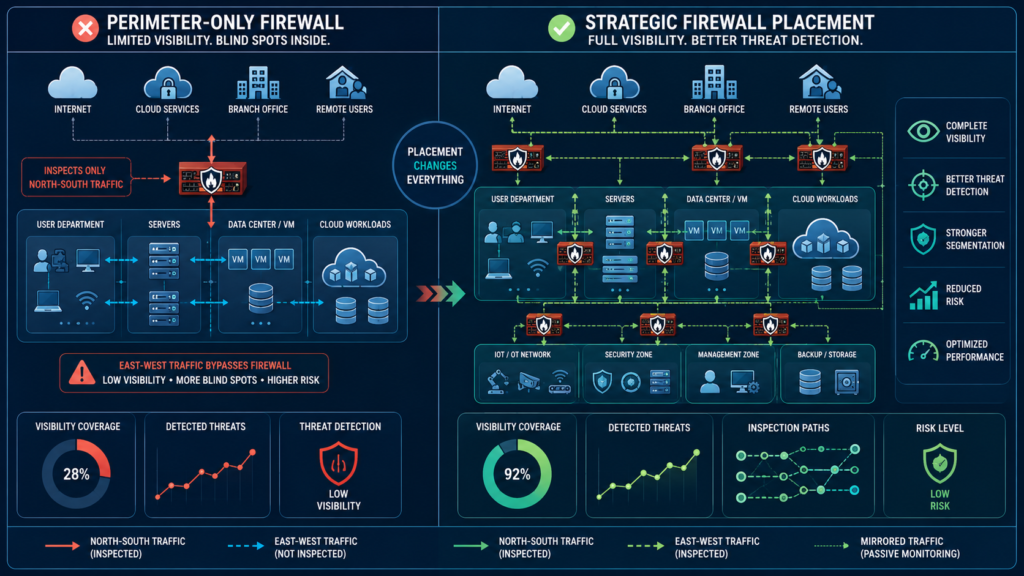
So, gateway mode has a visibility problem. The solution isn’t one-size-fits-all. It depends entirely on what you’re trying to protect and where your traffic flows. You need to match the mode to the mission.
Ask yourself: what’s my primary concern? Is it stopping data from leaving? Is it catching infected devices talking to each other inside? Your answer points the way.
If your biggest fear is data exfiltration or a compromised cloud service, gateway mode paired with user identity awareness and deep packet inspection is your frontline.
It scrutinizes everything crossing your network border while mapping activity to specific accounts. But if you’re more worried about an attacker who’s already inside, moving from one server to another, you need internal segmentation.
This uses your NGFW in a routed or transparent mode inside your data center to control east-west traffic.For organizations that can’t risk any impact on network performance or need ultimate flexibility for investigation, passive monitoring via tap mode is a powerful choice. It doesn’t block a single packet, which sounds counterintuitive.
But its value is in providing a complete, unobstructed view for analysis and forensics, feeding data to a dedicated network threat detection system.
We often start audits in this mode, precisely because it shows us the raw, unfiltered truth of network activity without any device knowing it’s being watched. The choice hinges on your priority: enforcement at the edge, control inside, or unrestricted visibility.
How Do You Actually Configure These Modes Without Breaking the Network?
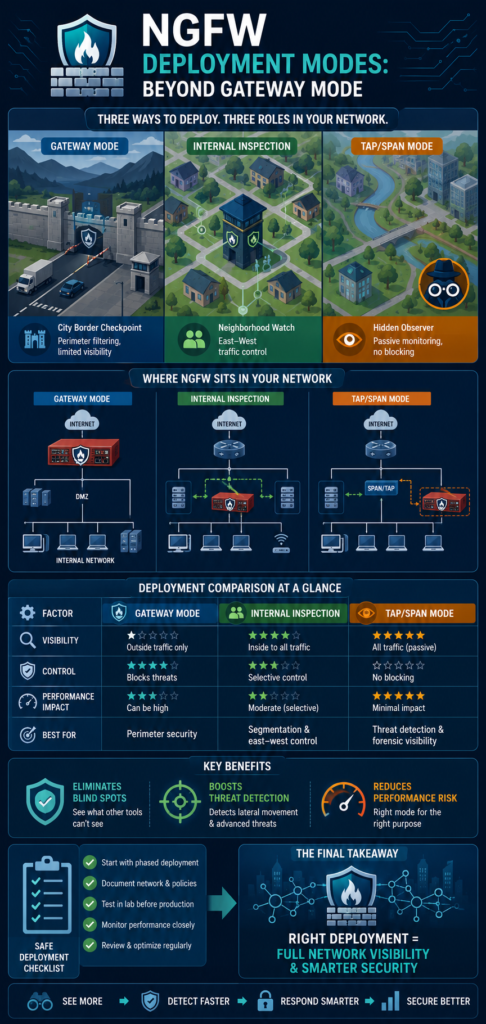
Choosing the mode is one thing. Implementing it without causing an outage is another. It feels like performing heart surgery on a moving patient. The key is planning and phased changes. You don’t just flip a switch.
For gateway mode, the configuration is often straightforward, defining inside and outside interfaces, setting default routes. The complexity comes with structuring an effective firewall rule base: what gets allowed, what gets inspected, in what order do the rules apply.
Internal segmentation modes are trickier. In transparent mode, the firewall is an invisible bump in the wire. You have to carefully define the bridge group and assign interfaces, ensuring no IP address changes are needed on adjacent devices.
It’s elegant but requires precise knowledge of the traffic flow. Routed mode turns the firewall into a layer 3 hop. You’re re-addressing subnets, adjusting routing tables. This is where change windows and detailed network diagrams become non-negotiable.
Passive tap mode configuration is deceptively simple on the firewall side, just assign a monitoring interface. The real work is on the network switch, where you configure a span port or network tap to duplicate traffic.
The critical step is ensuring your network threat detection system is correctly linked to receive this stream. We’ve learned to always verify the tap before deploying the firewall, using a packet analyzer to confirm we’re seeing the expected traffic. A misconfigured tap gives you a false sense of security.
- Document every IP, VLAN, and route.
- Implement changes during approved maintenance windows.
- Test failover and bypass capabilities.
- Start with low-impact policies and tighten gradually.
What Happens When You Pair Mode With Advanced Threat Detection?
Credits: Network Shield
A correctly deployed setup leveraging key ngfw features gives you visibility. But visibility without intelligence is just a flood of log data. This is where the configuration moves beyond simple access control. The real transformation occurs when you leverage that visibility for deep analysis.
You’re not just seeing packets, you’re understanding behaviors. This is the shift from a simple gatekeeper to a security analyst.
“Network behavior anomaly detection improves visibility into user, device, and application activity, helping organizations identify unknown threats, insider risks, and advanced attacks earlier” –Fidelissecurity
Network threat detection works by establishing a baseline of normal activity. It learns what typical DNS queries look like, standard work hours for server communication, regular data transfer sizes. When your NGFW, positioned in the right spot, feeds it traffic, it can spot the anomalies.
A server suddenly talking to a new country in the middle of the night. An internal workstation sending encrypted bursts of data to an external IP. These are the signals gateway mode often misses.
We configure our systems to look for specific patterns. For example, by inspecting SSL/TLS handshakes (even if the payload is encrypted), you can detect malware using non-standard ciphers or communicating with known bad certificates.
By analyzing DNS traffic from an internal monitoring point, you can catch beaconing from compromised hosts. The firewall’s job is to provide the raw material, the full stream of network conversations. The threat detection engine’s job is to find the whispered plots within them. It turns your network into a source of truth.
Can the Right Mode Improve Performance, Not Hurt It?
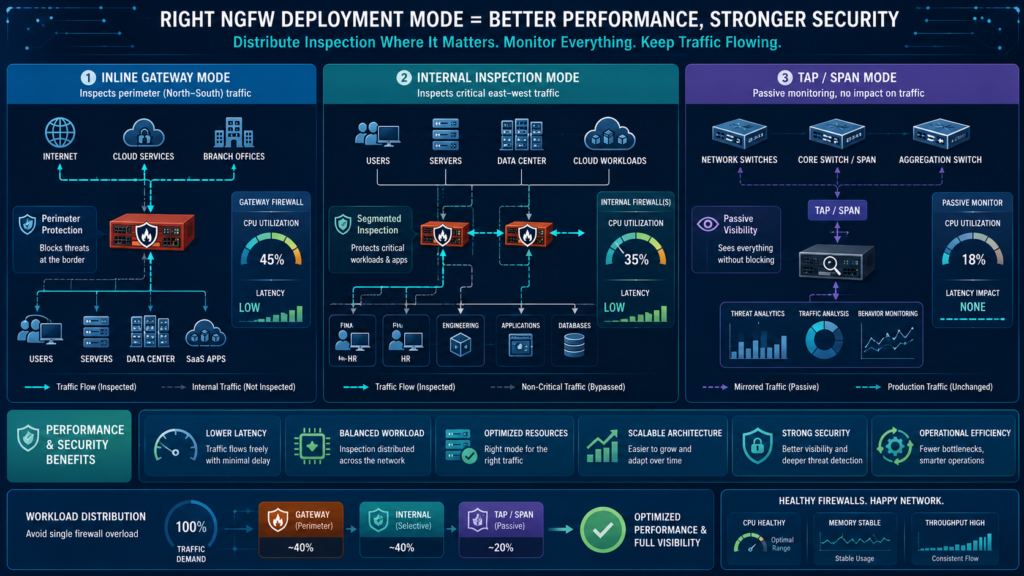
There’s a persistent myth that advanced security deployments cripple network speed. It’s a fair concern. More inspection means more work. But the reality is more nuanced. Yes, a poorly configured firewall in the wrong spot can become a bottleneck.
But a correctly chosen and tuned deployment can have minimal impact, and can even improve perceived performance by blocking resource-sapping malicious traffic.
Gateway mode with all services enabled on high-throughput links can strain resources. The trick is selective inspection. You don’t need deep packet inspection on your VoIP traffic or your encrypted backup stream to known destinations.
You create policies that apply CPU-intensive analysis only to risky traffic categories. Internal segmentation firewalls often handle less raw throughput than internet-facing ones, so hardware sizing is easier. Their policies can be tighter, focusing on specific application control between segments.
“A passive network discovery and monitoring system has zero impact on the performance of the monitored network” – USENIX
Passive tap mode has zero performance impact on the production network by design. The duplication happens on the switch or tap device. The analysis appliance does all the heavy lifting separately. This is why it’s so valuable for high-speed environments. You get full visibility without adding latency.
We’ve deployed this in financial trading networks where a millisecond matters. The performance gain comes from the intelligence gained, you can then create precise, targeted blocking rules on your enforcement devices, making them more efficient, not less.
FAQ
What’s the main downside of using only gateway mode?
Its primary weakness is blindness to internal, east-west traffic. It cannot see or stop lateral movement once a threat is inside your network perimeter, missing a major phase of modern attacks.
Is transparent mode really “invisible” to the network?
From a layer 3 (IP addressing) perspective, yes. Devices don’t need their gateway changed. However, it is a physical hop, so it can introduce minimal layer 2 latency and needs to be considered in network topology.
Can I use multiple deployment modes with one NGFW?
Typically, no. A physical NGFW unit is configured for a single primary mode (gateway, transparent, routed). However, virtual firewalls or multiple physical units can be deployed in different modes throughout your network.
How does passive monitoring actually help if it doesn’t block?
It provides unimpeded visibility for detection, investigation, and forensics. You can identify threats with 100% certainty, then use that intelligence to craft precise blocking rules on your enforcement points, making your entire security posture more accurate and effective.
Making Your NGFW Deployment Mode Decision
Choosing an NGFW deployment mode isn’t simply a technical checkbox, it’s a strategic decision that determines how much visibility your security team has across the network. Relying only on gateway mode is like securing the front entrance while leaving internal pathways largely unmonitored.
See how we help security teams uncover blind spots, prioritize risks, and improve network threat detection by requesting a personalized demonstration: Join Network Threat Detection.
References
- https://fidelissecurity.com/threatgeek/network-security/network-behavior-anomaly-detection-at-scale/
- https://www.usenix.org/system/files/login/issues/login_june_2005.pdf#15#6
