

Firewall log analysis best practices start with a simple truth: logs only matter if you learn from them. The real goal isn’t collecting data, it’s turning raw events into signals you can act on. Security groups have long stressed that regular log review helps catch breaches early.
In our work building detection and risk analysis systems, we’ve seen a clear divide, teams that only store logs fall behind, while teams that study them move faster and respond smarter. That difference often decides how long an attack lives in a network. If you want a process that actually holds up, keep reading.
Firewall Log Analysis Best Practices at a Glance
- Centralized logging and structured log parsing reduce blind spots and improve incident response speed.
- Filtering high-value firewall logs prevents SIEM overload and lowers false positives.
- Correlation, anomaly detection, and automation turn firewall logs into proactive threat intelligence.
What is Firewall Log Analysis and Why Does It Matter?
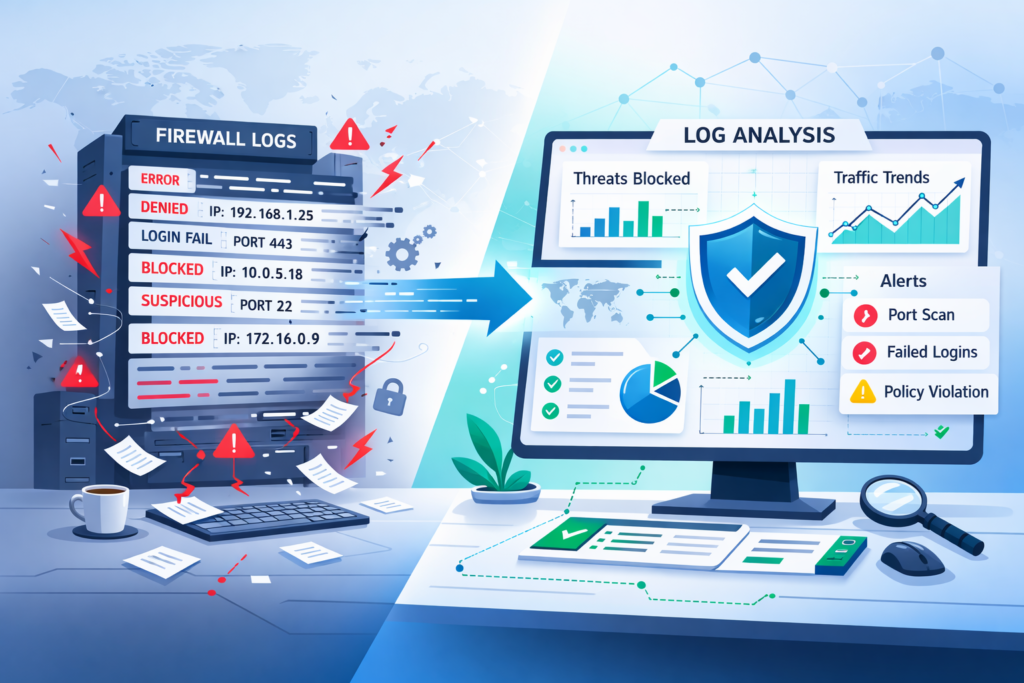
Firewall log analysis means systematically checking your firewall records to find security problems, fix network issues, and pass audits. These logs note every connection, what was allowed, what was blocked, configuration changes, and login tries. Each one leaves a trail of evidence.
NIST includes log monitoring as a core part of its Cybersecurity Framework for a reason. Networks generate millions of events daily. On their own, raw logs are impossible to read at scale. We’ve watched teams turn on full logging and immediately drown in denial alerts, missing the real signal. The value isn’t in collecting logs; it’s in making sense of them.
As noted by the SANS Institute,
“Reviewing your logs is legally required under several regulatory frameworks, and just plain makes sense. Reviewing inbound and outbound traffic is an excellent way to find stuff being sent or received that shouldn’t be happening, finding malware or finding violations of corporate policies.” – Rob VandenBrink
Analysis helps with:
- Finding threats like port scans or DDoS attacks.
- Troubleshooting weird bandwidth usage or finding top talkers.
- Proving compliance for standards like PCI DSS or HIPAA.
Without context, logs are just storage costs. With analysis, they become a working record of how a network behaves under pressure.
How Should You Configure Firewall Logging for Actionable Data?
The goal is simple: capture what matters without drowning in noise. Firewalls can log almost everything. Allowed traffic, blocked attempts, VPN sessions, but more data doesn’t always mean better insight. We’ve seen teams enable full logging and regret it within days. The signal gets buried, storage fills up, and analysis slows to a crawl.
Focus on denied traffic, repeated login failures, config changes, and policy violations. In our work building threat models and risk analysis tools, we’ve found that tight, intentional logging produces cleaner baselines and faster investigations. Logging normal internal chatter rarely adds value and often hides early warning signs.
Centralization also makes a difference. Whether using a SIEM, an open-source stack, or a basic syslog collector, pulling logs into one place creates context across devices. That shared view helps analysts connect dots they would otherwise miss and aligns with the operational benefits of centralized log management.
A practical rollout approach:
- Start with blocked connections and implicit denials.
- Track repeated authentication failures.
- Monitor admin-level configuration changes.
- Watch for unusual protocol behavior.
Common pitfalls still show up:
- Logging every “allow” event.
- No retention strategy.
- Sending raw, unparsed logs into analysis tools.
What are the Most Effective Firewall Log Analysis Techniques?
Credits: Mike Chapple
Good analysis focuses on finding anomalies, connecting events, and using visuals to spot trends. This helps identify things like port scans, brute force attacks, or DDoS campaigns.
We lean heavily on anomaly detection. If outbound traffic suddenly jumps 40% above its normal baseline, it could mean data is being stolen. Behavioral analytics help figure out if it’s just busy season or something malicious.
Visualization is key. A slow port scan might slip past a simple threshold alert, but it’s obvious when you see it on a timeline graph.
In our experience, the real power comes from combining data sources. We often correlate firewall logs with deeper packet inspection data and apply patterns drawn from analyzing connection logs insights. This is especially important for understanding encrypted traffic when TLS inspection is enabled.
Core techniques we use:
- Spotting repeated failed logins from one IP.
- Identifying port scanning patterns across multiple destinations.
- Checking source IPs against threat intelligence feeds.
- Applying risk scores based on an IP’s reputation.
Firewall log analysis gets powerful when paired with broader network threat detection, where machine learning can flag subtle anomalies long before old-school thresholds would notice.
How Do You Handle Log Volume Without Overloading Your SIEM?
We reduce the noise by filtering out redundant data, sampling routine traffic, and applying filters before the logs ever hit your SIEM.
Many teams send everything in and then hit their SIEM’s data caps. Research from the Ponemon Institute shows companies waste a lot of money and time managing log volume that doesn’t help them. We’ve seen analysts burn out reviewing endless blocks that were just background noise.
Two principles guide how we manage volume:
- Prioritize security events, things like logins, config changes, and weird outbound traffic.
- Sample high-frequency deny logs once you understand the normal pattern.
| Approach | Benefit | Risk |
| Ingest Denies Only | Much lower volume | Might miss risky traffic that was allowed |
| Ingest Allows Only | See what services are exposed | Lose visibility into brute force attempts |
| Balanced Filtering | Keeps context under control | Requires careful tuning |
We prefer balanced filtering. In our deployments, we normalize logs early and only enrich the high-risk flows with extra data like IP reputation. Prioritizing telemetry based on the essential log sources for NTD helps teams retain visibility without overwhelming analysis pipelines.
What Security and Retention Policies Should You Apply?
Firewall logs are sensitive evidence. You must encrypt them, control who can access them, monitor for tampering, and keep them for the right amount of time.
Logs contain metadata about your network, source IPs, VPN users, admin actions. They need protection. NIST guidelines state you should protect log integrity to support investigations and legal requirements.
A typical retention setup we recommend:
- 90 days of hot storage for active searching and analysis.
- Long-term cold archive (1+ years) to meet compliance audit needs.
- Automated log rotation to prevent storage from filling up.
Your retention policy should match your compliance needs:
- PCI DSS requires logs for transaction monitoring.
- HIPAA needs them for auditing healthcare network access.
- SOX demands them for financial controls reporting.
We also run automated checks for unused firewall rules or rule conflicts. This data helps with both compliance reviews and optimizing your security policy. Treat your logs like the evidence they are.
How Can Automation Improve Incident Response?
Automation handles real-time alerts, connects related events, and cuts down on manual work, which speeds up your response.
Mature teams can cut their response time in half with good automation. Simple threshold alerts can notify you instantly of a spike in denials or a suspicious config change. According to ISACA,
“Cybersecurity teams are often burdened with repetitive and time-consuming tasks while security incident response teams are overburdened with manual eyeballing on potential alerts. AI can automate these routine security tasks, such as vulnerability scanning, log analysis, and incident response, freeing up valuable time for cybersecurity professionals to focus on more strategic initiatives.” – Goh Ser Yoong
A basic automated workflow looks like this:
- An alert triggers from the firewall logs.
- The system correlates it with data from endpoints or intrusion detection.
- A quick check rules out false positives.
- The system suggests blocking a source IP or adjusting a rule.
For smaller setups, Python scripts with regex can parse logs. Larger environments use normalized logs and pre-built SIEM queries.
In our threat detection work, we use automation to apply behavioral analytics and risk scoring. This prioritizes alerts so analysts focus on the most serious issues first. Automation doesn’t replace skilled people; it makes them more effective.
Which Tools are Best for Firewall Log Analysis Without Overkill?
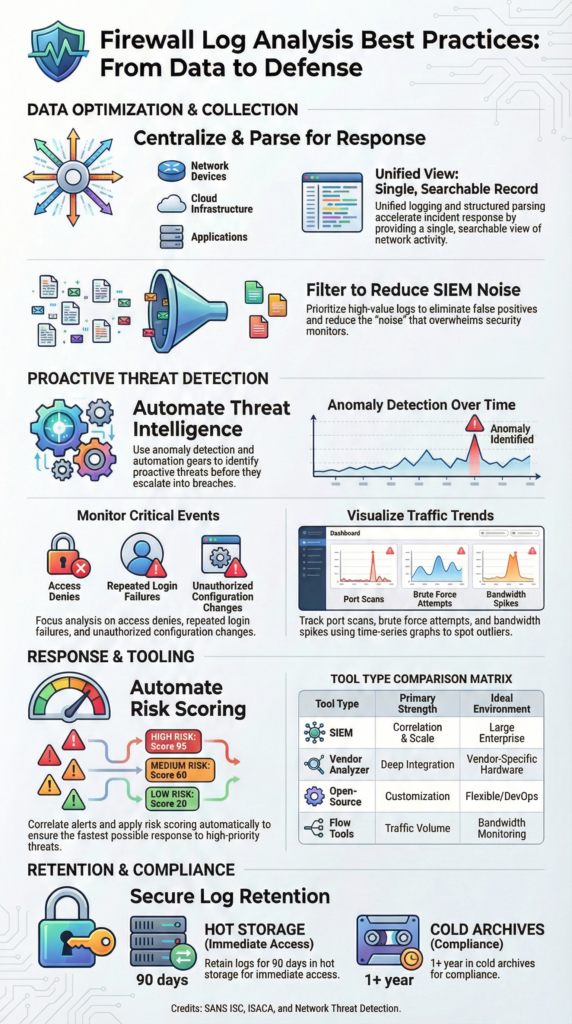
Choosing the right tool depends on scale, compliance pressure, and how much complexity a team can realistically manage. There’s no universal answer. Larger environments usually need stronger correlation and reporting, while smaller networks benefit from simpler setups.
In practice, big organizations lean toward full SIEM platforms because they need cross-source visibility. Smaller teams often succeed with lighter pipelines, central logging, custom parsing, and clear dashboards. We’ve worked with both ends of that spectrum, and the biggest lesson is this: operational fit matters more than feature lists.
Here’s a simplified view of common tool types:
| Tool Type | Best For | Strength | Limitation |
| Vendor log analyzers | Single-vendor firewalls | Tight device visibility | Limited cross-platform insight |
| Enterprise SIEM | Large SOC environments | Deep correlation and reporting | High cost and complexity |
| Open-source log stacks | Custom pipelines | Flexible and scalable | Requires ongoing tuning |
| Flow monitoring tools | Traffic visibility | Clear, intuitive dashboards | Weak event correlation |
| CLI utilities | Quick triage | Minimal overhead | Manual and hard to scale |
We’ve built lean stacks using centralized logging and open pipelines for mid-sized networks. As environments grow, layering firewall data into broader threat detection and risk modeling platforms unlocks deeper insight. The best stack is the one your team can run consistently under pressure.
FAQ
How do firewall logs support threat hunting and anomaly detection?
Firewall logs provide direct visibility into network activity and security events. When teams perform consistent log analysis, they can spot unusual patterns that signal early threats.
Anomaly detection works best when analysts compare baseline traffic against current behavior. Tracking source IPs, destination ports, and repeated deny logs helps identify port scanning, brute-force attempts, and other signs tied to intrusion detection.
What’s the best way to handle log aggregation and centralized logging?
The most effective approach is centralized logging, where all firewall logs flow into a single system. Log aggregation tools combine allow logs, deny logs, and VPN logs into one searchable dataset.
This setup supports SIEM integration and event correlation. Using structured formats like CEF or LEEF improves parsing accuracy and makes cross-device analysis easier and more reliable.
How can teams reduce false positives during log analysis?
Teams reduce false positives by understanding baseline traffic and normal network behavior. Log filtering helps remove low-risk noise, while anomaly detection highlights meaningful security events.
Event correlation adds context by linking related alerts. Analysts also use IP reputation data and threat intelligence feeds to validate suspicious activity and avoid wasting time on harmless alerts.
Why does log retention matter for compliance and forensics?
Log retention is critical for compliance and investigations. Keeping logs based on defined retention policies helps meet requirements such as PCI-DSS, HIPAA, or GDPR. Long-term storage supports forensic timelines, audit trails, and incident response.
Proper log rotation prevents storage overflow while preserving evidence integrity and maintaining a clear chain of custody during investigations.
What tools or techniques help analyze firewall logs faster?
Faster analysis comes from structured workflows and light automation. Log parsing scripts, Python-based analysis, and regex patterns help process large log volumes. Dashboard visualization and real-time alerts highlight trends quickly.
Techniques like timestamp analysis, source IP tracking, and protocol breakdown improve clarity and help analysts respond faster to potential threats.
Putting Firewall Log Analysis Best Practices into Practice
Firewall log analysis works best when teams stay focused: selective logging, centralized collection, anomaly detection, automation, and secure retention tied to compliance. Treat logs as structured intelligence, not raw exhaust. We’ve seen how disciplined filtering paired turns messy streams into clear signals, baselines, context-rich alerts, measurable gains.
To build a scalable approach tailored to your environment. Explore Network Threat Detection, real-time threat modeling, automated risk analysis, and continuously updated intelligence built for modern SOCs.
References
- https://isc.sans.edu/diary/8395
- https://www.isaca.org/resources/news-and-trends/newsletters/atisaca/2025/volume-1/securing-artificial-intelligence-opportunities-and-challenges
