

Tools for capturing network packets record raw traffic so teams can see what moves across the wire. That visibility lets security analysts spot threats, troubleshoot performance problems, and understand protocol behavior without guessing. NIST has argued that packet-level data remains central to incident response, and practice confirms that view.
In our own work, when we build threat models or review incidents, we rely on packet data daily. Flow logs help, but they smooth over details that matter. Engineers and defenders face different networks, yet the need is shared. If you want to see which tools hold up in environments, keep reading.
Why Packet Capture Still Matters in Modern Networks
- Packet-level visibility is critical for threat detection, DDoS forensics, and deep troubleshooting.
- Open-source tools are great for quick captures, while enterprise systems handle traffic over 10 Gbps.
- Real-world failures often come from VLAN blind spots, TLS 1.3 encryption, or incorrect span port setups.
What Are Network Packet Capture Tools and Why Are They Essential?

Network packet capture tools record traffic at the packet level and let teams inspect what actually travels across the network. Instead of summaries, they collect the raw conversation between systems. That detail matters when something breaks or when an alert does not make sense.
Most packet sniffers rely on libraries like libpcap to grab traffic and store it in capture files. Tools such as Wireshark can then decode thousands of protocols, showing headers, flags, and payload data in plain view.
Guidance from CISA highlights packet capture as a key method for threat hunting during complex investigations. Many teams are now leveraging Network Traffic (PCAP) data not just for troubleshooting, but to strengthen detection engineering and validate security controls with packet-level evidence.
In practice, teams often follow a simple workflow:
- Capture traffic from an interface or tap
- Filter out noise to focus on relevant sessions
- Analyze packets for errors, anomalies, or policy gaps
- Export findings for reporting or deeper review
We treat packet data as ground truth in our security work. Flow logs help with trends, but only full packets reveal handshake issues, malformed traffic, or hidden misconfigurations that other tools tend to miss.
Which Open-Source Packet Capture Tools Are Most Widely Used?
Credits: Halil Deniz
Three open-source names come up again and again: Wireshark, tcpdump, and TShark. They are widely used because they run on many systems and give teams direct access to packet data without licensing barriers.
Wireshark is known for its graphical interface. It breaks down traffic into readable fields and can decode thousands of protocols, including VLAN tags. With the right keys, it can even decrypt TLS sessions for inspection. It is powerful, though it can consume significant memory on large captures.
Tcpdump works in the command line. Many engineers prefer it for:
- Quick captures on remote servers
- Cloud workloads and Kubernetes pods
- Low-resource environments
TShark brings Wireshark’s decoding engine to the command line. It fits well into scripts and automation pipelines, though its syntax can take time to learn.
In practice, many teams capture traffic with tcpdump first, then open the saved file in Wireshark for deeper analysis. That approach keeps production systems stable while still allowing detailed review later.
What Tools Are Best for Wireless and Forensic Packet Analysis?

Wireless and forensic packet analysis call for different tools than standard network monitoring. For Wi-Fi environments, teams often turn to Kismet. It listens to wireless traffic, detects rogue access points, and uncovers hidden networks that do not show up in normal scans.
Wireless capture can be fragile. On some enterprise access points, turning on capture features may disrupt connected clients. Because of that risk, we usually suggest deploying a separate sensor or using a properly configured span port instead of touching production radios.
For forensic review, NetworkMiner takes a different path. It works offline. Rather than capturing live traffic, it parses saved packet files and pulls out useful artifacts like transferred files, credentials, images, and session details. This approach protects production systems from extra load.
A common forensic workflow looks like this:
- Capture traffic through a switch mirror port or network TAP
- Save and export the packet file
- Open the file in a forensic tool offline
- Extract and document relevant evidence
This process keeps investigations controlled and repeatable.
Which Enterprise Packet Capture Tools Scale for High-Volume Networks?
Large networks push huge amounts of traffic every second. Standard desktop tools often cannot keep up. Enterprise teams usually look at platforms such as Colasoft Capsa, Savvius Omnipeek, and ManageEngine NetFlow Analyzer when they need steady, multi-gigabit capture.
Colasoft Capsa supports more than 1,800 protocols and provides dashboards. Its track bandwidth use and flag unusual behavior.
Omnipeek focuses on deep protocol analysis and rich visual views. In many deployments, teams pair it with fast SSD storage so it can handle continuous 10 Gbps capture.
ManageEngine takes a hybrid approach. It combines flow data with packet visibility, which helps during investigations such as large DDoS events or strange latency spikes. At this scale, organizations often evaluate the full packet capture advantages carefully, especially when balancing storage cost, retention policies, and forensic reliability.
As noted in the MDPI journal study,
“A capturing tool should have zero (or very low) packet loss rate while capturing packets in a multi-Gbps rate network… at certain rates in high speed network, packets will be lost” – Rafael Oliveira, et al.
This reflects a real-world problem: when tools cannot scale, blind spots appear.
At a glance, these tools differ in focus:
- Capsa: broad protocol coverage, strong for monitoring
- Omnipeek: detailed analysis, suited for enterprise forensics
- ManageEngine: mixes flow and packet data for wider context
Some organizations also deploy dedicated capture appliances to reduce packet loss and protect performance under heavy load.
Why Does Packet Capture Fail in Real-World Deployments?
It usually fails because of VLAN issues, encrypted traffic, hardware limits, or simple blind spots in the network architecture.
A firewall can’t see traffic between two devices on the same VLAN, switching happens at a lower layer. You need to configure a span port or switch mirror. The NSA’s cybersecurity team has noted that attackers often exploit these internal blind spots. We see this constantly in our threat modeling.
Wireless capture has its own problems. Capturing directly on a high-volume access point radio can sometimes reset it or drop clients.
Then there’s TLS 1.3 encryption. Without the specific decryption keys, packet analyzers just see encrypted gibberish. The IETF’s TLS 1.3 standard is designed this way for forward secrecy, which is good for privacy but hard for inspection.
This is why many teams pair stored packet evidence with real time network traffic analysis to confirm behavior patterns even when payload visibility is limited.
Common failures and fixes:
| Problem | Root Cause | Fix |
| No LAN visibility | Switching bypasses the firewall | Configure a span port |
| Analyzer crashes | Traffic volume is too high | Use CLI tools and SSD storage |
| Can’t read TLS | Missing handshake secrets | Enable proper key logging |
In our deployments, we fix this by checking placement first, testing remote capture paths, and validating our filters before starting long-term recording.
How Do Practitioners Choose the Right Tools?
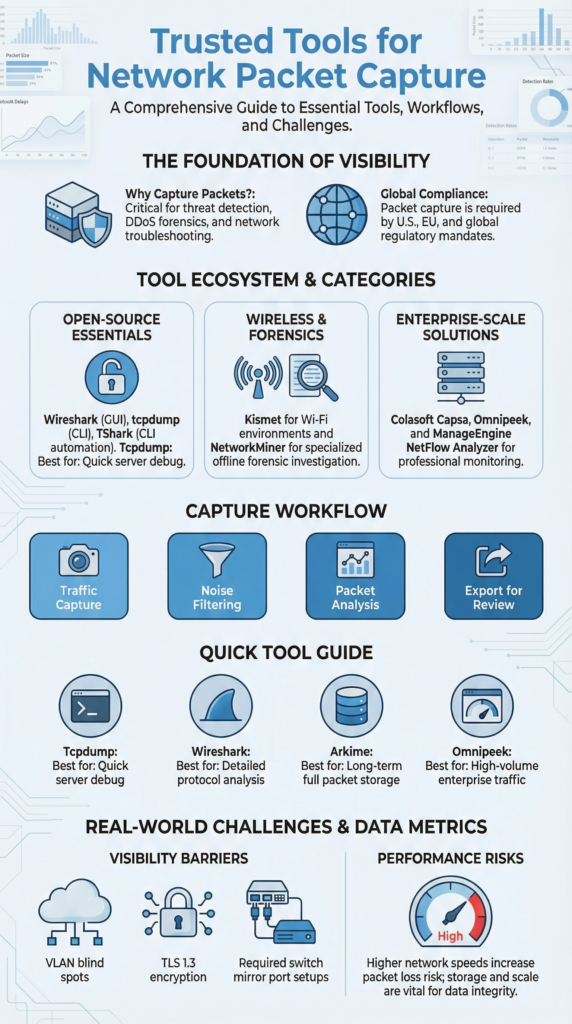
We choose based on traffic volume, your environment, and what you need to do. Most teams mix command-line capture, graphical inspection, and long-term storage systems.
For quick debugging on a server, engineers use Tcpdump. For deep protocol analysis, everyone opens Wireshark. When you need to keep packets for a long time and search them, a system like Arkime for full-packet indexing is key. Very big networks use dedicated capture hardware to avoid losing data.
Strategic decisions are also shaped by legal and compliance pressure. As explained in the SANS whitepaper, Full Packet Capture:
“is rapidly emerging as a foundational requirement, not only for real-time visibility and forensic analysis, but as a direct response to regulatory mandates in the U.S., EU, and beyond” – Matt Bromiley.
In many organizations, regulatory standards influence tool selection as much as performance metrics.
Here’s a simple decision guide:
- Quick server debug: Tcpdump
- GUI protocol inspection: Wireshark
- Long-term full packet capture: Arkime
- High-volume enterprise traffic: Omnipeek or similar
The main things to consider are your traffic speed, need for automation, encryption visibility, and of course, your budget and storage. We usually tell teams to start with a stable command-line tool, get their filters right, and only move to bigger systems when their scale or rules require it.
FAQ
What features matter most in packet capture software?
Good packet capture software must give you clear visibility, stable performance, and wide compatibility. It should support the pcap file format and work with the libpcap library so you can move files between systems easily.
The tool must allow promiscuous mode sniffing to see all traffic on a segment. Helpful features include deep packet inspection, built-in protocol decoding, real-time packet filters, and simple capture file export. Ring buffer storage is also important because it prevents data loss during long captures.
How do I capture VLAN tagged packets correctly?
To capture VLAN tagged packets, you need proper placement. Connect your analyzer to a span port or configure a managed switch mirror so the traffic is copied correctly. Some environments use ERSPAN for remote packet forwarding.
Your tool should support multi-interface capture and accurate header decoding. If you skip proper setup, internal LAN traffic may never reach your analyzer.
Can I analyze encrypted traffic during full packet capture?
Full packet capture records encrypted traffic, but you cannot read it without TLS decryption keys or SSL handshake secrets. Without those keys, the traffic appears unreadable. If keys are available, analysts can review HTTP sessions or extract voice traffic details.
Always protect encryption keys and follow security policies. Packet inspection must respect privacy rules and compliance requirements.
What causes packet loss in high-volume capture setups?
Packet loss often happens when hardware cannot keep up with traffic volume. Slow disk performance, limited memory, or poor tuning can all cause dropped packets. High-speed SSD storage helps improve reliability.
Multi-interface capture setups also need correct load balancing. Some teams use dedicated capture appliances to reduce loss. Monitoring storage and bandwidth levels helps prevent missing important data.
How do I perform offline traffic analysis safely?
To analyze traffic safely offline, export the data in pcap format and move it to a separate system. Use a forensic parser to review sessions without affecting live operations. This approach protects production networks and supports deeper investigations such as DDoS analysis. Before starting, confirm your packet filters are correct so you do not miss important traffic inside large files
Building a Practical Packet Capture Strategy That Scales
These tools form the backbone of troubleshooting, compliance, and advanced threat detection across on-prem and cloud networks. Open-source options provide flexibility, while enterprise systems handle heavy traffic. Success depends on placement, storage design, and encryption handling.
When packet capture is done correctly, vague alerts turn into clear protocol evidence. Want structured visibility with real-time threat modeling and risk analysis? Explore Network Threat Detection here and see how stronger insight supports faster decisions.
References
- https://www.mdpi.com/2079-8954/12/4/126
- https://www.sans.org/white-papers/full-packet-capture-strategic-regulatory-imperative
