

The main advantage of full packet capture is simple: recording every packet with its header and payload gives you the exact, replayable truth of what happened on your network. This level of detail often decides whether an investigation succeeds or fails, especially with encrypted traffic and brief attacks.
From our work with threat detection, packet data consistently settles debates between different tools and teams. This piece explains why PCAP matters, where it beats flow data, and how to use it effectively without overcommitting. Read on to see when the cost of packets is truly worth the investment.
Quick Wins – Full Packet Capture in Practice
- Full packet capture provides complete packet visibility that enables precise forensic reconstruction and confident root cause analysis.
- Packet data strengthens network threat detection, incident response, and compliance by preserving unaltered evidence.
- Used selectively, packet capture improves performance tuning and threat hunting without replacing higher level telemetry.
What is full packet capture and what visibility does it provide?
Full packet capture (PCAP) records every network packet, including all headers and payloads, so analysts can reconstruct exact sessions and inspect the raw data exchanged.
It stores raw packets from Layers 2 through 7, Ethernet headers, IP/TCP fields, and full application data, making it one of the most reliable NTD data sources within a structured packet collection strategy.
Unlike summarized flow data, nothing is aggregated. This creates a ground-truth record of network activity. In our threat detection work, this packet-level view removes guesswork; we see what actually happened, not what a device logged.
PCAP also preserves precise timing. Microsecond timestamps reveal retransmissions, jitter, and race conditions that get lost in other metrics.
The visibility it provides is specific:
- Complete evidence: Captures full headers and payloads without any aggregation.
- Replayable truth: Preserves raw data for exact verification and session replay.
- Deep application insight: Exposes Layer 7 behavior that flow records completely miss.
While flow data is useful for scale, PCAP answers the critical how and why during an investigation. That difference is everything when the stakes are high.
Why does full packet capture enable deeper forensic investigations?

Full packet capture enables deeper forensics because it stores every packet intact. This provides exact timelines, payload inspection, and the ability to reconstruct an incident in a way that tools using only metadata can’t.
Forensic work relies on sequence and detail. With packet data, analysts can rebuild TCP streams, decode protocols, and replay sessions exactly. This lets an investigator confirm an exploitation happened, rather than just suspecting it.
As noted on the Wikipedia page for Packet Capture Appliances:
“Particularly when using a packet capture for network forensics or cybersecurity purposes, it is paramount to capture everything because any packet not captured on the spot is a packet that is gone forever. It is impossible to know ahead of time the specific characteristics of the packets or transmissions needed, especially in the case of an advanced persistent threat (APT).” – Wikipedia
The key forensic capabilities it unlocks are:
- Accurate session reconstruction and detailed timelines.
- Payload analysis for identifying malware and exploits.
- Retrospective threat hunting across stored historical traffic.
Our tools are built to support this detailed work, aligning captured data with the specific risks in our threat models.
How does full packet capture improve security, compliance, and audit readiness?

Full packet capture strengthens security and compliance by preserving unaltered network evidence. It shows exactly what data moved, when it happened, and how it was accessed.
Security teams now face audit questions that logs alone can’t answer, which is why many organizations rely on real-time network traffic analysis alongside stored packet evidence. Packet data serves as a trusted audit trail because it’s raw and unabstracted, which is what regulators and responders look for.
In our work with threat detection, packet evidence has repeatedly settled disputes during breach investigations. When there’s disagreement about an incident’s scope, the packets provide clear answers. They also help analyze encrypted traffic by revealing metadata, timing, and handshake details even when the payload itself is unreadable.
Packet capture directly meets these requirements by providing:
- Verifiable evidence for incident response and formal audits.
- Reduced dependence on incomplete logs or ambiguous alerts.
- A stronger chain of custody for forensic investigations.
While storing full payloads forever isn’t practical for everyone, even capturing headers significantly boosts a compliance posture. Our tools help implement this by aligning capture policies with the specific risks and compliance needs identified in our threat models.
How can full packet capture optimize network and application performance?
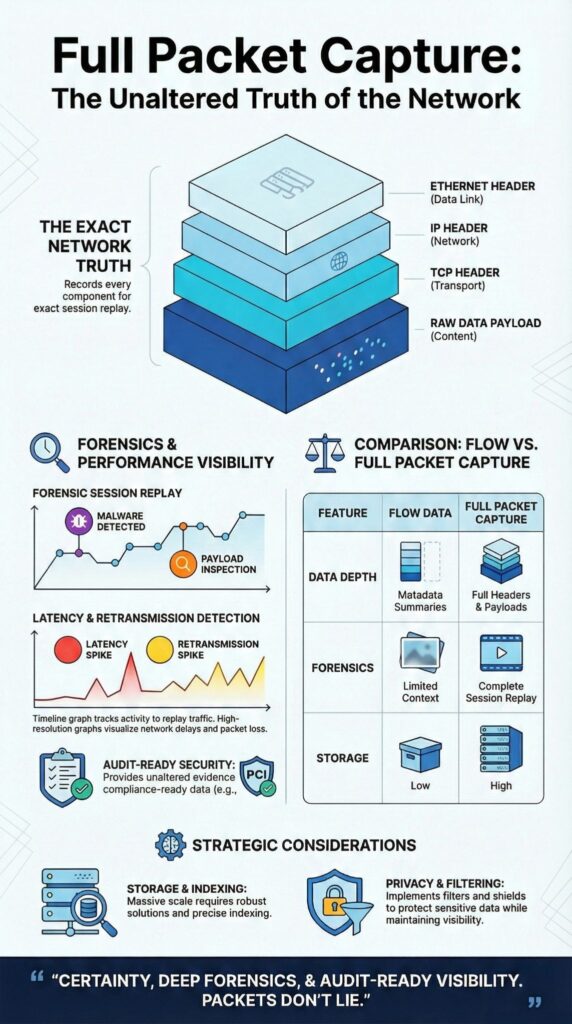
Full packet capture optimizes performance by revealing the real sources of latency, retransmissions, and protocol problems through complete traffic inspection, particularly when teams are leveraging network traffic PCAP for protocol-level validation.
Performance issues are often reported after they’ve already happened. Users complain once the problem is gone. With packet data, engineers can go back in time and see exactly how TCP behaved during the incident.
We’ve worked on cases where all the standard metrics showed normal utilization, but packet analysis uncovered microbursts, TCP window size problems, or excessive application retries. These details only appear at the packet level. This kind of network performance capture also pinpoints bandwidth hogs and unexpected application chatter that other tools miss.
Packet capture enables detailed application layer analysis. It lets teams examine:
- TCP handshake failures and retransmission patterns.
- Bandwidth-heavy flows and network bottlenecks.
- Decoded HTTP, JSON, and custom protocols.
Our tools are designed to support this, using captured data to inform performance tuning within the context of our overall threat and risk analysis.
When is full packet capture more effective than flow-based monitoring?
Credits : Cisco Secure Network Analytics
Full packet capture is more effective than flow monitoring when an investigation needs payload visibility, session replay, or precise evidence. Flow data is great for scale and spotting trends, but packets answer the detailed questions. This difference is most obvious during actual incidents and complex troubleshooting.
A practical comparison shows the trade-offs:
- Data depth: PCAP provides full headers and payloads, while flows offer metadata summaries only.
- Forensics: PCAP enables session replay and reconstruction, whereas flows give limited context.
- Threat hunting: PCAP allows retrospective payload searches, while flows are limited to indicator matching.
- Storage needs: PCAP requires high storage, while flow data needs much less.
Below is a practical comparison used by many network teams.
| Aspect | Full Packet Capture | Flow-Based Monitoring |
| Data depth | Full headers and payloads | Metadata summaries |
| Forensics | Session replay and reconstruction | Limited context |
| Threat hunting | Retrospective payload search | Indicator matching only |
| Storage needs | High | Low |
From our role in threat detection, packets become the final authority when alerts conflict or when you need undeniable evidence to support a finding. Our tools are built to prioritize packet capture for these high-stakes scenarios, guided by our threat models.
What limitations affect full packet capture deployment?
Continuous full packet capture faces clear limitations: storage scale, processing overhead, and the expertise required to manage it, especially on high-throughput links.
High-volume links produce massive amounts of data. Storing weeks of traffic can demand petabytes of storage, which is why industry studies referenced by NIST show organizations often settle for selective capture instead.
Research reinforces both the value and the risk of incomplete capture. As explained in the ResearchGate study on packet capture mechanisms in real-time network traffic:
“Full packet capture provides useful information as it is the most detailed form of network information as well as historical information about attacks and malicious activity for as long as there is enough storage for the data… [It] is very important for developing an efficient packet engines as packet drop will lead to possibilities of threats as the packet might contains useful information in detecting any threats in the network.” – ResearchGate
The common constraints are:
- High storage and retention costs.
- Complex indexing and slow search performance.
- Strict privacy and data handling requirements.
Many teams we work with mitigate these by using selective capture, packet slicing (keeping only headers), or shorter retention windows.
FAQ
What practical advantages does full packet capture provide over flow-based network data?
Full packet capture records every packet with headers and payloads, not summaries or samples. This complete packet visibility allows detailed network packet analysis and accurate root cause analysis PCAP.
Flow data drawbacks include missing payload context and timing precision. PCAP advantages support protocol decoding, session reconstruction, and investigation of short-lived events that flow records often miss.
How does full packet capture improve threat hunting and incident response accuracy?
Security packet capture preserves unaltered packet evidence for threat hunting packets and incident response packets. Analysts can inspect payloads, reconstruct TCP streams, and confirm attacker actions.
Forensic packet capture strengthens breach investigation PCAP by enabling precise timelines, verified indicators of compromise, and reliable network forensics benefits during security investigations.
Why is full packet capture essential for deep troubleshooting and performance tuning?
Troubleshooting with PCAP shows exactly how traffic behaves on the network. Network performance capture supports latency analysis capture, bandwidth optimization packets, and bandwidth hog identification.
Header inspection benefits and application layer analysis expose retransmissions, protocol errors, and misconfigured services that aggregated metrics cannot accurately explain.
Can full packet capture support compliance, audits, and long-term investigations?
Compliance packet capture creates a verifiable audit trail PCAP by storing raw traffic records. This allows teams to prove what data moved, when it moved, and how systems responded. Unaltered packet evidence supports regulatory reviews, internal audits, and long-term investigations where accuracy and traceability are required.
When is full packet capture better than metadata or sampled traffic monitoring?
Metadata vs full capture becomes critical during complex failures or security incidents. Continuous packet capture enables anomaly detection packets, encrypted traffic analysis context, and precise event reconstruction.
Sampled monitoring often misses brief or low-volume events, while full capture supports proactive monitoring PCAP, network baselining, and reliable performance tuning packets.
Full packet capture advantages in real operations
The advantages of full packet capture are practical, proving critical during breaches and audits. It answers questions other data can’t.
As part of a layered strategy with flows and logs, packets provide definitive truth. Using them as your source of evidence builds confidence and reduces risk. While storage and skill are real constraints, selective deployment makes it powerful. For reliable investigations, packets are the most trustworthy evidence available.
See how to integrate this with proactive threat intelligence on our platform.
References
- https://en.wikipedia.org/wiki/Packet_capture_appliance
- https://www.researchgate.net/publication/269300331_A_Study_on_Packet_Capture_Mechanisms_in_Real_Time_Network_Traffic
