

Windows event log analysis security starts with reading structured .evtx records to spot threats early and support investigations. Windows still dominates the desktop space, so its telemetry often becomes the first line of defense. Teams that skip these logs tend to miss subtle signs of credential misuse or quiet persistence.
In our work, we treat Windows event logs as core telemetry, not an afterthought. They reveal authentication trails, process behavior, and system changes that shape real detections. The challenge is knowing which signals matter without creating noise. Keep reading to see what to focus on and how to tune it right.
Windows Event Log Analysis Security at a Glance
A quick summary of how Windows event logs strengthen detection, investigations, and layered security visibility.
- Security logs drive early detection of brute force attempts, privilege escalation, and lateral movement.
- Targeted audit policy configuration prevents log overload while preserving forensic depth.
- Network Threat Detection works best when correlated with endpoint event telemetry, forming a layered defense.
What is Windows Event Log Analysis in Cybersecurity?
In practice, Windows event log analysis is less glamorous than it sounds. It usually means opening .evtx files and scanning for patterns that feel off. Our team often starts with the Security log, looking for Event IDs tied to logins, privilege changes, or policy edits.
Each entry tells a small story: timestamp, event source, user, sometimes an IP. On real engagements, those tiny details often become the first reliable signal that something moved when it shouldn’t have.
By default, these logs live in C:\Windows\System32\winevt\Logs. In many environments we assess, they’re the first stop after a suspected incident. They capture the fundamentals, who signed in, what services appeared, whether registry keys shifted. But logging isn’t automatic.
If auditing isn’t enabled through Group Policy or tools like auditpol.exe, visibility drops fast. That’s why we pair log reviews with threat models and risk analysis tools, so gaps become obvious early.
Across most networks, three channels matter most:
- Security: tracks access and authentication activity.
- System: shows service and driver behavior.
- Application: reveals software faults and instability.
- Audit configuration: ensures the right telemetry exists.
Once those basics are solid, deeper threat hunting starts to make sense.
Which Windows Event Logs Matter Most for Threat Detection?
Credits: MyDFIR
The Security log is usually where investigations begin, especially when tracking suspicious logins or privilege spikes. Still, relying on one source rarely works in real environments.
The System and Application logs fill in the gaps, and adding Sysmon makes the timeline far clearer. From experience, incidents rarely show up cleanly in one place; context across logs is what turns scattered signals into a usable story.
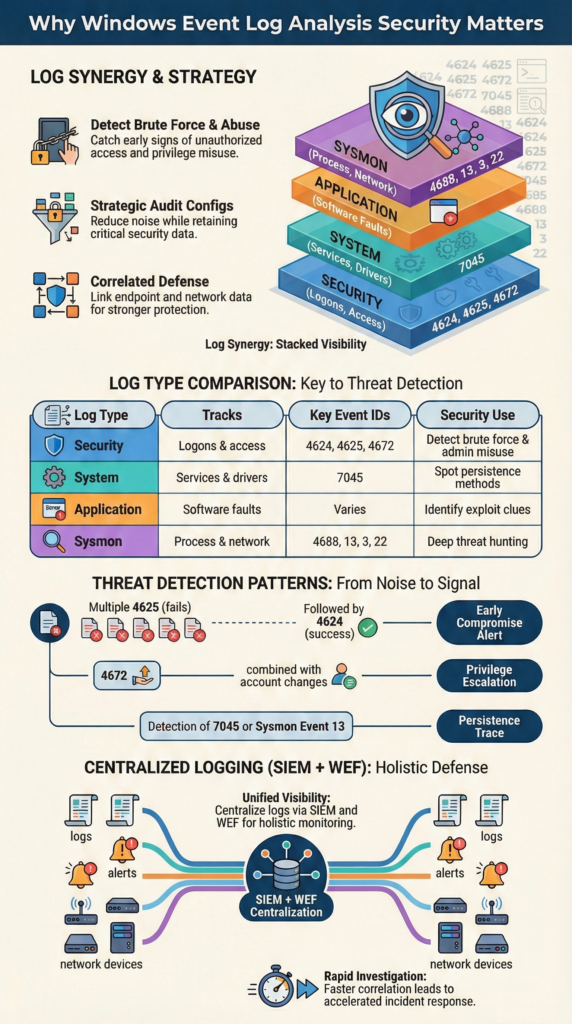
Most teams recognize common patterns quickly. A spike in failed logins, like repeated 4625 events, often points to brute force attempts. System logs can reveal persistence tricks, such as new services appearing out of nowhere.
Application logs are less predictable, but strange crashes sometimes hint at exploitation. When we layer these findings into our threat models and risk analysis workflows, the behavior becomes easier to interpret.
We still recommend Sysmon in nearly every assessment. It adds depth without replacing native logs, especially for process and network visibility. In fact, according to research,
“To detect most malicious activity, administrators should prioritize Event ID 4688 (Process Creation) with Command Line auditing enabled, as it provides the most granular view of attacker intent and the specific commands being executed.” – CISA guidance
A Quick Comparison of Log Sources
| Log Type | What It Tracks | Key Event IDs to Watch | Main Use for Security |
| Security | Logons and access | 4624, 4625, 4672, 4720 | Spotting brute force & admin misuse |
| System | Services and drivers | 7045 | Finding persistence mechanisms |
| Application | Software behavior | Varies by app | Seeing signs of an exploit |
| Sysmon | Processes & network activity | 1, 3, 13, 22 | Deep-dive threat hunting |
PowerShell logging (like event 4104) and Defender telemetry add even more context. Teams building stronger detection coverage often start by identifying the critical security logs to collect so visibility gaps do not emerge later.
But turning on everything blindly creates noise fast. We’ve seen teams overwhelm themselves with data. A focused audit policy always works better than logging everything.
Which Event IDs are Critical for Threat Hunting?

Most investigations begin with authentication patterns. A burst of failed logons, especially repeated 4625 events from one source, usually raises the first red flag.
When that noise is followed by a successful 4624 from the same host, it often means the attacker finally guessed right. In several engagements, that simple sequence has been the clearest early indicator of compromise, even before endpoint alerts fired.
Event 4672 signals elevated rights, often tied to admin sessions. If that’s quickly followed by account creation or group changes, the intent becomes clearer.
We’ve seen attackers move fast here, using new accounts to avoid detection while blending into normal activity. Feeding those signals into our threat models helps teams see escalation paths sooner.
Persistence checks come next, since attackers rarely leave quietly. Common traces include:
- 7045: new service installations.
- 4698: scheduled task creation.
- Sysmon 13: registry run key changes.
To understand behavior, process creation logs matter most. Event 4688 shows what actually ran, especially with command-line auditing enabled. For credential abuse, Kerberos anomalies like 4769 or explicit credential use (4648) stand out. When mapped to ATT&CK techniques and centralized, these signals support both detection and compliance goals.
How Do You Analyze Windows Event Logs Efficiently?
Work usually starts on the endpoint itself. For quick triage, built-in tools are enough. Event Viewer filters or a short PowerShell query can reveal obvious issues fast. In real cases, we’ve caught brute-force attempts within minutes just by filtering 4625 events locally. It’s not fancy, but speed matters during early investigation.
Some commands we rely on regularly:
- wevtutil qe Security /c:50 /rd:true /f:text to view recent Security events.
- Get-WinEvent -FilterHashtable @{LogName=’Security’; ID=4688} for process creation logs.
- auditpol.exe /get /category:* to verify auditing coverage.
Still, manual checks don’t scale. That’s where Windows Event Forwarding (WEF) becomes essential. Centralizing logs lets teams correlate behavior across systems and build baselines. In our assessments, once logs land in a SIEM, patterns become far easier to detect.
As explained from the benefits of centralized log management, where structured aggregation makes cross-host correlation and faster investigations possible. This aligns with principles from the resources,
“Efficiency is achieved by ‘logging with purpose’, only collecting the data you need to answer a specific security question, rather than collecting everything ‘just in case,’ which avoids overwhelming analysis tools and security teams.” – UK National Cyber Security Centre
Typical Workflow
| Stage | Tools We Use | What We Get From It |
| Initial Look | Event Viewer, Get-WinEvent | Fast, on-the-spot filtering |
| Centralizing | WEF, a SIEM platform | All logs in one place |
| Finding Patterns | SIEM queries, KQL | Automated detection alerts |
| Deep Hunting | Chainsaw, Sigma rules | Hidden attack chains uncovered |
Retention also matters more than most teams expect. NIST guidance suggests keeping logs around 90 days for active analysis. Short retention windows make investigations harder and weaken audit readiness. We’ve seen incidents where missing older logs delayed root cause analysis by days.
This is where broader visibility comes into play. We often begin with Network Threat Detection to understand traffic patterns across the environment. Endpoint logs show what happened on a host, but network data shows how systems interact. When both are combined, investigations move faster and rely less on guesswork.
For example, unusual internal traffic might point to lateral movement. Pair that with a network logon event on the target host, and the picture sharpens quickly. We feed those correlations into our threat models and risk analysis tools so teams can validate real attack paths instead of chasing isolated alerts.
Windows Event Log Analysis Security in Practice
Making this work day-to-day is about balancing detail with sanity. We’ve walked into environments where the SIEM was screaming with 10,000 failed login alerts daily because no one tuned the thresholds. Simply filtering out known VPN gateway addresses cut that noise by over half.
We need behavioral baselines. An alert for activity at 3 AM is useless if that’s when your batch jobs run. Monitoring for event ID 1102 (the log was cleared) is a great check for anti-forensics. Building reliable baselines also depends on understanding the essential log sources for NTD so analysts can correlate endpoint behavior with broader network signals.
From our experience, strong practices are:
- Turning on advanced audit policies for specific, high-value actions.
- Watching for log clearing (event ID 1102).
- Using tools to parse and store logs in a searchable long-term format.
- Pulling together data from EDR tools, Windows Defender, and the core Windows logs.
The goal is to make logs a live security tool, not just a compliance checkbox. When you pair them with network visibility, they become a powerful early warning system that helps you detect threats faster and understand incidents completely.
FAQ
How do Windows event logs help detect brute force and failed logon attempts?
Windows event logs reveal patterns behind failed logon attempts by showing event ID 4625 alongside successful logon events like event ID 4624. By reviewing authentication trends, teams can spot brute force attack detection scenarios and suspicious remote logon types.
When paired with anomaly detection baselines and centralized log management, these signals highlight unusual access patterns that often appear before deeper compromise.
Which logs matter most for privilege escalation detection and user changes?
Security auditing should focus on event ID 4672, event ID 4720, and event ID 4732 to track privilege escalation detection and user account creation. These entries show special privileges assigned, new accounts, and group membership changes.
When combined with Active Directory monitoring and directory service logs, they help analysts understand administrative logons and detect suspicious identity changes across enterprise environments.
How can Sysmon integration improve process and persistence visibility?
Sysmon integration strengthens process creation monitoring and persistence tracking beyond default Windows event logs.
Events like event ID 4688, event ID 13 Sysmon, and event ID 3 Sysmon reveal parent-child process chains, registry run key changes, and network connection tracking. This deeper visibility supports forensic timeline reconstruction and helps identify malware execution traces.
What role do SIEM correlation rules play in threat hunting workflows?
SIEM correlation rules combine signals like service installation events, scheduled task creation, and Kerberos ticket anomalies into meaningful alerts.
By linking event ID 7045, event ID 4769, and lateral movement indicators, analysts build stronger threat hunting workflows. Multi-source log correlation helps teams detect coordinated activity across endpoints and networks. It can improves incident reconstruction during investigations too.
How should teams handle log retention policies for compliance and forensics?
Effective log retention policies balance storage limits with investigation needs. Keeping Windows event logs long enough supports compliance auditing for PCI DSS, HIPAA log review, and GDPR retention expectations.
Longer retention also improves evtx file analysis and timestamp manipulation detection. With log forwarding WEF and centralized log management, teams preserve historical data for blue team forensics and incident response planning.
Building Stronger Windows Event Log Analysis Security
Strong log analysis connects the right Event IDs with smart auditing and real network context. Signals like 4624, 4625, 4688, and 7045 only become meaningful when paired with visibility beyond the endpoint. In our experience, starting with a network-wide view and layering Windows events on top reduces noise and speeds up understanding.
To see how this approach works in practice, explore NetworkThreatDetection.com and join the platform here to strengthen visibility, reduce blind spots, and move faster from alerts to clarity.
References
- https://www.cisa.gov/news-events/cybersecurity-advisories/aa23-144a
- https://www.ncsc.gov.uk/guidance/introduction-to-logging-for-security-purposes
