
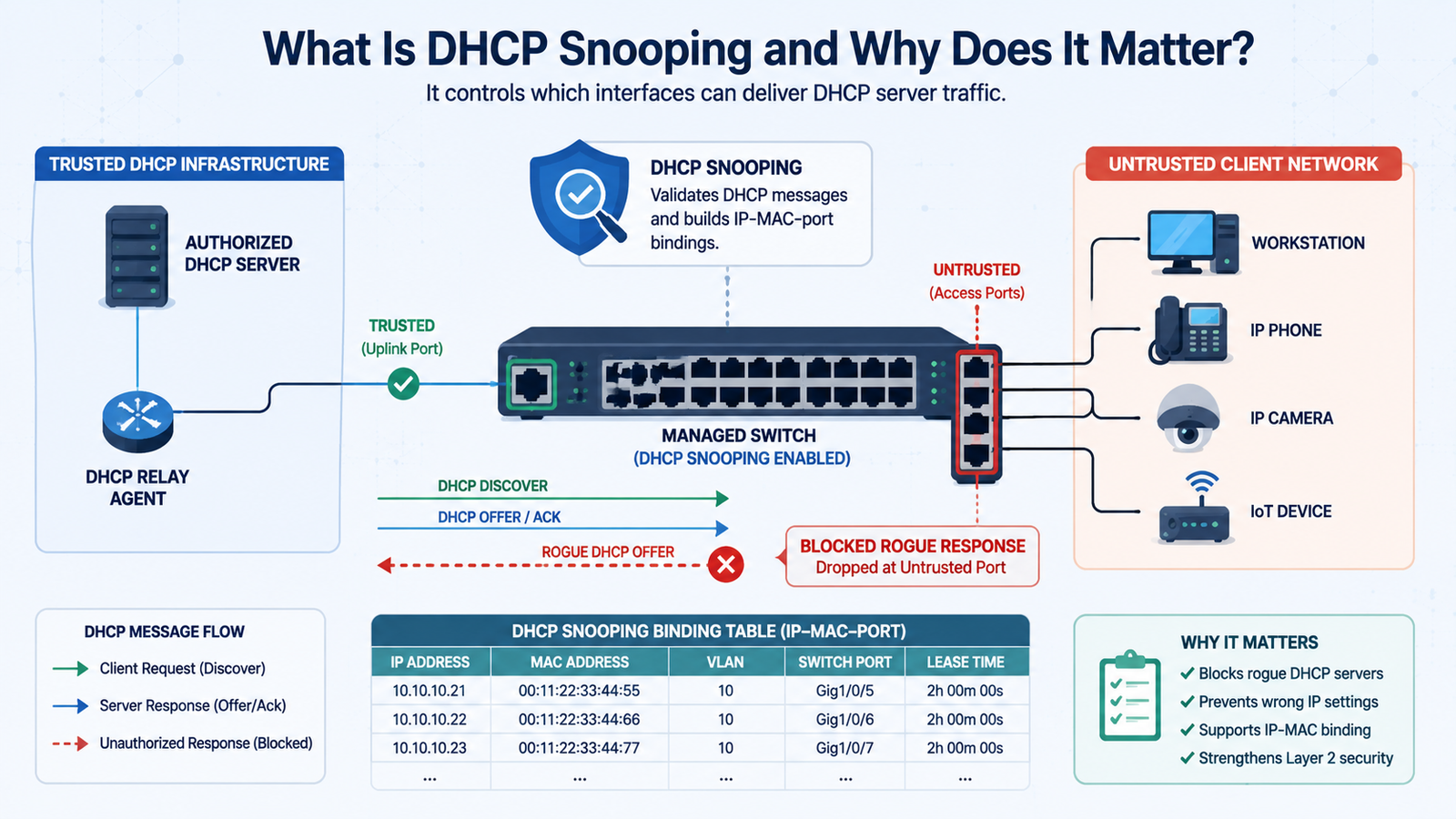
DHCP snooping configuration benefits security by validating DHCP traffic, blocking unauthorized server responses, and creating IP-MAC-port bindings for stronger Layer 2 protection. In production, the setup depends on clear trust boundaries, accurate bindings, suitable rate limits, and careful testing.
Network Threat Detection can add broader visibility by helping us spot unusual DHCP activity alongside other network events. It should support switch-level controls rather than replace them. We need to map the DHCP path and verify trusted interfaces before deployment. Keep reading for practical configuration and security guidance.
DHCP Snooping Security Quick Wins
These key points sum up how DHCP snooping configuration improves Layer 2 security and what matters most during production deployment.
- DHCP snooping security benefits begin with blocking unauthorized DHCP server traffic on untrusted ports.
- A correctly maintained DHCP binding table supports IP-MAC binding enforcement, Dynamic ARP Inspection, and IP Source Guard.
- Production deployments need careful trusted port configuration, rate limits, validation, and testing before broader enforcement.
What Is DHCP Snooping and Why Does It Matter?
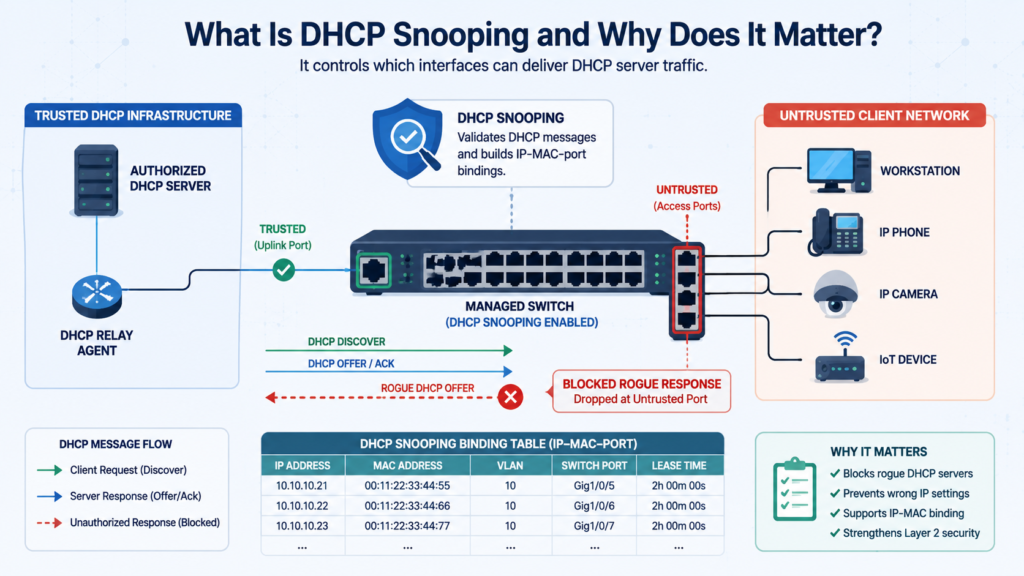
DHCP snooping is a Layer 2 security feature that separates trusted DHCP infrastructure from client-facing switch ports. The switch decides which interfaces may carry legitimate DHCP server traffic. Everything else stays untrusted unless there is a clear reason to change that state.
A trusted interface normally leads toward an authorized DHCP server, relay, or network path. An untrusted interface usually connects to a workstation, phone, camera, IoT device, or another endpoint. When a DHCP server message arrives through an untrusted port, the switch can reject it before the client receives it.
Insights from Juniper Networks indicate
“DHCP snooping allows the switch to monitor and control DHCP messages received from untrusted devices connected to the switch. When DHCP snooping is enabled, the system builds and maintains a database of valid IP-address/MAC-address (IP-MAC) bindings called the DHCP snooping database.” – Juniper
That matters because DHCP does not authenticate the server or client. A rogue device can answer a client’s request and provide a false gateway, DNS server, or IP address.
The basic model looks like this:
- Trusted ports: Authorized DHCP paths.
- Untrusted ports: Client-facing connections.
- DHCP validation: Checks selected DHCP traffic.
- Binding table: Records client addressing details.
We have found that the trust decision often matters more than the command used to enable snooping. One wrongly trusted access port can weaken the entire boundary.
DHCP snooping is not a complete security system. It is one Layer 2 control that can support ARP inspection, source validation, segmentation, and access controls.
How Does DHCP Snooping Block Rogue DHCP Servers?
DHCP snooping blocks rogue DHCP server responses by rejecting server-side DHCP messages received through interfaces marked as untrusted.
Consider a normal DHCP exchange. A client sends a DHCP Discover to find an available server. A rogue device on the same network can see that request and send a DHCP Offer of its own. If the client accepts it, the attacker may control important network settings.
The switch adds a trust check before that response reaches the endpoint.
- The client sends a DHCP Discover.
- An unauthorized device sends a DHCP Offer.
- The switch sees the Offer arrive on an untrusted port.
- The switch drops the unauthorized response.
- The approved DHCP path continues normally.
NIST identifies rogue DHCP servers as a security concern because they can give clients incorrect network information. DHCP resource exhaustion is another concern because an attacker can generate large numbers of requests and consume available addresses.
Troubleshooting can get tricky, though. A client that fails to obtain an address does not always mean the DHCP server is down. The switch could have the wrong trust state, a blocked return path, an incorrect relay configuration, or a rate limit that is too low.
How Does the DHCP Snooping Binding Table Improve Security?
The DHCP snooping binding table gives the switch a record of which device received an address and where that device is connected. Depending on the platform, entries can include the MAC address, IP address, VLAN, interface, and lease information.
That information becomes useful beyond DHCP itself. Dynamic ARP Inspection (DAI) can use the bindings to check whether ARP claims match known addresses, while IP Source Guard can use them to restrict unauthorized source addresses.
As noted by IEEE Xplore
“DHCP snooping and ARP inspection technique is used to mitigate the attack to achieve a more secure network.” – IEEE
We treat the binding table as security data, not just a troubleshooting screen. During deployment, check that:
- The MAC address matches the endpoint.
- The IP address matches the DHCP lease.
- The VLAN and interface are correct.
- Lease information is current.
- The database persists after a switch reboot when supported.
Static devices need additional planning because they may never create a DHCP binding. Where supported, approved static bindings can provide the information required by dependent controls.
Keep an eye on stale entries, device moves, and topology changes. An accurate binding table makes enforcement more predictable and troubleshooting much easier.
How Does DHCP Snooping Work With DAI and IP Source Guard?
DHCP snooping can provide the IP-MAC-VLAN-port information that Dynamic ARP Inspection (DAI) and IP Source Guard use for Layer 2 enforcement.
The relationship is fairly simple:
DHCP snooping → binding table → DAI and IP Source Guard
DAI can compare ARP claims against known bindings, while IP Source Guard can restrict source addresses that do not match the expected information.
The important catch is that not every device uses DHCP. Servers, printers, cameras, access controllers, and other infrastructure may use static addresses. Because those devices do not automatically create DHCP snooping entries, dependent controls may block them unless the platform supports appropriate static bindings.
Before enabling DAI or IP Source Guard:
- Inventory static-address devices.
- Record their MAC, IP, VLAN, and interface.
- Add approved static bindings where required.
- Test representative endpoints.
- Review bindings after device moves or port changes.
We prefer enabling these controls in stages. First, establish reliable DHCP snooping and verify the binding table. Then introduce dependent enforcement. That approach reduces unexpected outages and makes it easier to identify which control caused a legitimate device to be blocked. The binding table is valuable, but it should not be mistaken for user authentication.
How Should You Configure DHCP Snooping on a Switch?
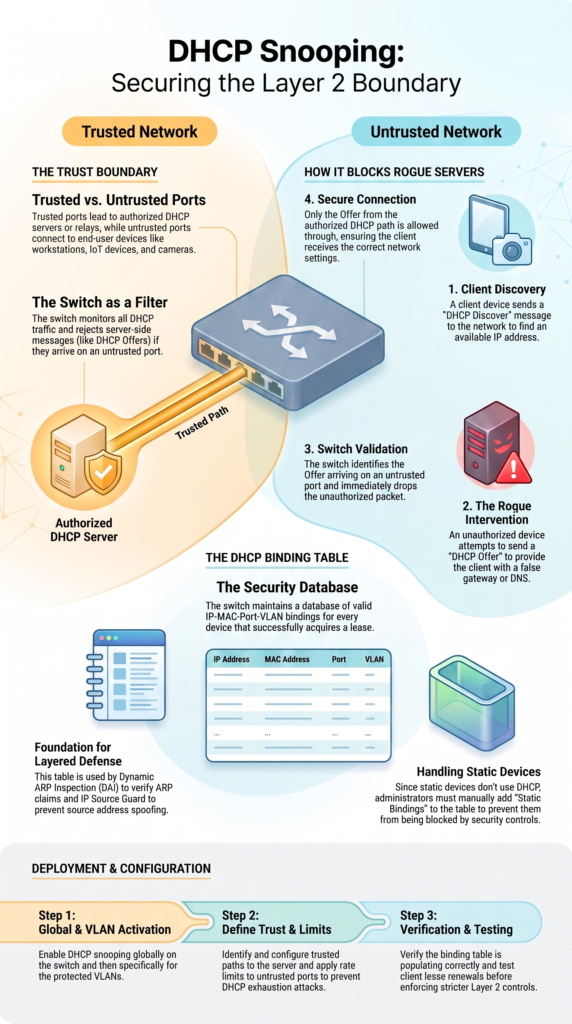
A practical DHCP snooping configuration starts by identifying the legitimate DHCP path before entering commands. Map the DHCP server, relay agents, protected VLANs, trunks, access switches, and client-facing interfaces first.
A typical configuration process is:
- Enable DHCP snooping globally.
- Enable it for the required VLANs.
- Keep client-facing ports untrusted.
- Trust only authorized DHCP server or relay paths.
- Apply suitable DHCP rate limits.
- Verify the binding table.
- Test lease renewal and normal client access.
For a Cisco-style switch, commands may look similar to:
ip dhcp snooping
ip dhcp snooping vlan <VLAN-ID>
interface <trusted-uplink>
ip dhcp snooping trust
interface <access-port>
ip dhcp snooping limit rate <pps>
Always check the platform documentation before applying commands in production. Syntax and available options can vary between switch models and software versions.
The important point is that “trusted” does not simply mean “upstream.” A trusted interface should be authorized to carry legitimate DHCP server traffic. In multi-switch networks, review every trunk and relay path so an incorrect trust setting does not create an opening for rogue DHCP responses.
We start with the topology, not the command line. Once the actual DHCP path is understood, the configuration becomes much easier to validate.
Which DHCP Snooping Benefits Matter Most for Security?
The main DHCP snooping benefits are rogue server protection, DHCP flood mitigation, address spoofing controls, and stronger Layer 2 enforcement. The feature also creates binding information that other security controls can use.
The security benefits can be grouped into a few practical areas:
- Rogue DHCP defense: Blocks server responses from untrusted ports.
- Starvation mitigation: Limits excessive DHCP traffic where supported.
- IP spoofing defense: Supplies binding information for source checks.
- ARP protection: Gives DAI trusted client information.
- Visibility: Shows useful client-to-port relationships.
NIST identifies unauthorized DHCP servers and high request volumes as security concerns. Filtering server traffic and controlling request rates can reduce those risks.
Still, DHCP snooping should not be treated as a cure for every DHCP attack. Rate limiting can reduce abuse, but its value depends on the interface role and traffic pattern.
For example, a workstation may generate only a small number of DHCP requests. A downstream switch could carry traffic for many devices. Giving both interfaces the same limit can cause trouble.
Our security model therefore uses DHCP snooping as one layer. Network segmentation, endpoint controls, ARP inspection, source validation, and broader router and switch security best practices can cover attack paths that DHCP snooping cannot.
Can DHCP Snooping Prevent DHCP Starvation Attacks?
Credits: Gurutech Networking Training
DHCP snooping can help reduce DHCP starvation attacks by limiting how many DHCP messages an interface can send within a given period. It cannot guarantee that an attack will fail, but it can make large request floods harder to carry out.
A starvation attack attempts to consume the available address pool with repeated DHCP requests. Rate limiting gives the switch a way to control that traffic before it overwhelms the DHCP service.
The limit should match the role of the interface:
- Single endpoint: Usually needs a relatively low threshold.
- Wireless infrastructure: May need more room for reconnect bursts.
- Downstream switch: Needs a higher limit because many clients may share the link.
- Infrastructure or relay path: Should be measured before applying restrictions.
We avoid choosing an aggressive number without first looking at normal traffic. A low threshold can block legitimate clients during a power outage, maintenance window, or large device restart.
After deployment, review rate-limit events and adjust them as the network changes. The goal is to reduce abusive DHCP traffic into an availability problem.
A value that works for a workstation can be completely wrong for a shared infrastructure link. Measure first, then tune the limit.
Why Can Option 82 Cause DHCP Problems After Snooping Is Enabled?
DHCP Option 82 can affect how DHCP requests are handled, especially when relay agents are involved. If clients stop receiving addresses after snooping is enabled, Option 82 should be part of the investigation.
Option 82 carries relay-agent information. It can help identify where a DHCP request originated. Some network designs use that information for address assignment or policy decisions.
Problems can appear when the switch inserts or handles Option 82 differently from what the DHCP server expects. The server may receive the request, but the exchange can still fail.
Check these areas:
- Whether the switch adds Option 82.
- Whether a DHCP relay is present.
- Whether the server accepts the packet.
- Whether GIADDR is populated correctly.
- Whether packet captures show a complete exchange.
The exact behavior depends on the switch, relay, and DHCP server configuration. One fix should not be copied across every network.
We usually trace the DHCP path before changing Option 82 settings. That includes the client VLAN, access switch, trunk, relay, and server.
This matters because a single-switch test may work while a routed production network fails.
If the client sends a Discover but never receives an Offer, follow the packet. Do not start changing unrelated services.
How Can You Avoid Production Outages During DHCP Snooping Deployment?
A controlled rollout is the safest way to introduce DHCP snooping into production. Start with a limited VLAN or access group, confirm the DHCP path, and expand after normal traffic has been tested. During the same review, teams can apply control plane policing (CoPP) on routers where appropriate to protect infrastructure-facing control traffic from excessive or unwanted packets.
Before enabling enforcement, confirm:
- Authorized DHCP servers and relay paths.
- Protected VLANs and client-facing ports.
- Trusted interfaces and their reasons.
- Static-address devices.
- Appropriate rate limits.
- Binding-table behavior and database persistence.
- A clear rollback procedure.
Test more than one endpoint. Include wireless clients, important IoT devices, voice equipment, and static hosts where those systems exist.
We also recommend testing after a switch reboot and during DHCP renewal. These checks can expose persistence or trust problems that a simple configuration review will miss.
Avoid enabling every VLAN at once. Common mistakes include trusting an uplink without checking what it carries, applying an endpoint rate limit to a shared infrastructure link, and enabling DAI before reliable bindings exist.
DHCP snooping should improve security without creating unnecessary availability problems. A pilot, clear documentation, and a tested rollback plan make that balance much easier to achieve.
What Are the Main DHCP Snooping Troubleshooting Steps?
DHCP snooping troubleshooting should follow the traffic path. Start with the trust boundary, then check packet flow, bindings, rate limits, relay behavior, and dependent controls.
A useful diagnostic order is:
| Symptom | First check | Likely area |
| No DHCP address | Server trust path | Trust configuration |
| Discover leaves, no Offer | Return path | Server or relay |
| Option 82 failure | Relay information | DHCP handling |
| Port becomes disabled | Rate events | Rate limiting |
| DAI blocks client | Binding table | IP-MAC state |
| Static host loses access | Static binding | DAI/IPSG |
| Binding vanishes after reboot | Database storage | Persistence |
The exact commands depend on the switch platform, but administrators generally need views for snooping status, trusted interfaces, bindings, database state, and dropped DHCP packets.
The first response should not be “disable snooping.” That may restore service while removing the protection that was working as designed.
Instead, identify which control caused the failure. DHCP snooping audit logs may show rejected packets, rate-limit events, or unexpected sources.
Network Threat Detection can add broader visibility by correlating unusual DHCP activity with other network events. We use that as another detection layer, not as a substitute for correct switch configuration. Trace the packet first. Then change the setting.
Is DHCP Snooping Enough for Enterprise Network Security?
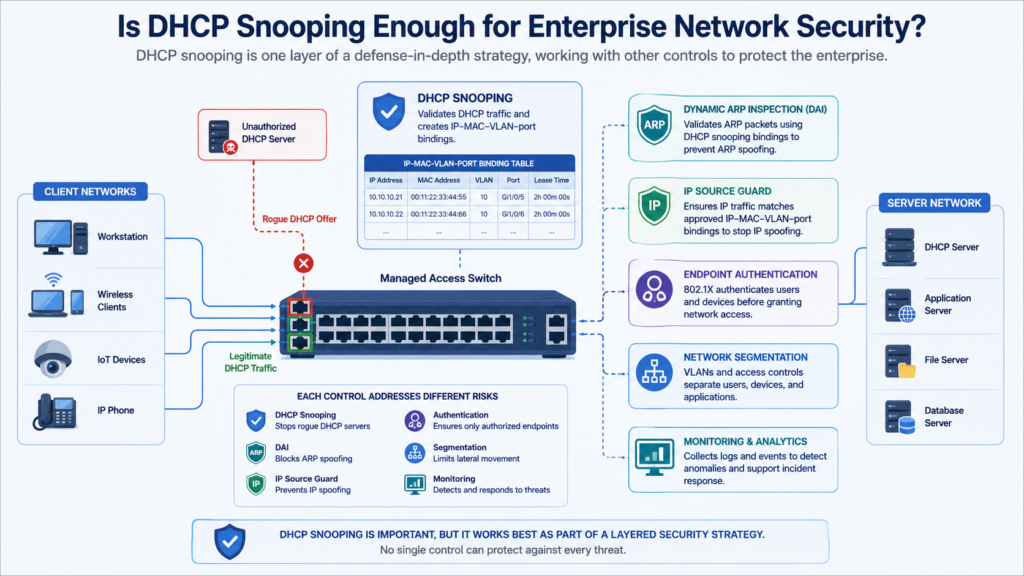
DHCP snooping is useful, but it is not enough to secure an entire enterprise network. It addresses DHCP behavior and provides binding information of the attack surface.
Protecting the wider infrastructure also includes securing router administrative access credentials, endpoint authentication, network segmentation, and monitoring for unusual activity.
A layered design can include:
- DHCP snooping for DHCP validation.
- Dynamic ARP Inspection for ARP spoofing defense.
- IP Source Guard for source-address checks.
- 802.1X for endpoint authentication.
- NAC for access policy.
- Network segmentation for limiting lateral movement.
- Monitoring for unusual activity.
Each control has a different purpose. That matters when an incident occurs.
We have found that defining those boundaries early makes security reviews much easier. Teams know what each control should prevent and where another control needs to take over.
The same principle applies to branch networks, wireless networks, guest environments, data centers, and IoT segments. Virtual switching can introduce different DHCP inspection capabilities, so the physical-switch design should not be copied without testing.
IPv6 also needs separate planning. IPv6 uses different mechanisms for address configuration and neighbor discovery, so IPv4 DHCP snooping does not automatically provide equivalent protection. Build the layers around the threats that matter.
FAQ
How does DHCP snooping affect devices with manually assigned IP addresses?
Devices with manually assigned IP addresses may not create dynamic binding entries. If another security control depends on the DHCP snooping database, those devices could lose network access.
Before deployment, review all static hosts and create static bindings where supported. This helps prevent IP address conflicts while keeping security controls active for servers, printers, cameras, and other fixed-address devices.
What should I verify when DHCP snooping blocks a legitimate client?
Start by checking the DHCP snooping trust state and follow the client’s traffic through the switch. Confirm that the correct DHCP path is trusted and that the client has a valid binding. Then review DHCP snooping audit logs for rejected messages or rate-limit events. These checks can show whether the switch or another part of the DHCP path caused the problem.
How does DHCP snooping work across several VLANs?
Each protected VLAN needs the correct VLAN-based DHCP snooping settings and a clearly defined DHCP path. Inter-VLAN routing and DHCP relay agents can change where DHCP messages appear.
Check the trust state on every relevant link, including relay paths. Multi-VLAN DHCP protection helps prevent unauthorized DHCP traffic from crossing security boundaries between separate client networks.
Can DHCP snooping protect wireless and guest networks?
Yes, if the network infrastructure supports DHCP snooping on those paths. Wireless LAN DHCP snooping can help block unauthorized DHCP responses from reaching wireless clients.
Guest network security can also use DHCP controls to reduce exposure to rogue servers. Keep client-facing interfaces untrusted and separate guest traffic from internal DHCP infrastructure. Test roaming and reconnect behavior before deployment.
How should DHCP snooping be tested before full deployment?
Start with DHCP snooping verification on a limited VLAN and test normal address assignment, renewal, release, and reconnect behavior. Confirm that the DHCP binding table records the expected client details.
Then test an unauthorized DHCP response from an untrusted port and confirm that the switch blocks it. Review audit logs and rate-limit events before expanding the configuration.
Make DHCP Snooping Reliable in Production
DHCP snooping is most useful when trust boundaries are clear and IP-MAC-port bindings stay accurate. Before expanding the policy, verify DHCP paths, test edge cases, and confirm behavior after changes or reboots. Small configuration gaps can weaken the protection.
For added visibility, Network Threat Detection can help teams spot unusual DHCP activity and related network risks. Use it alongside existing controls to find suspicious behavior earlier and strengthen Layer 2 security.
References
- https://www.juniper.net/documentation/en_US/junos9.4/topics/concept/port-security-dhcp-snooping.pdf
- https://ieeexplore.ieee.org/document/9370460
