
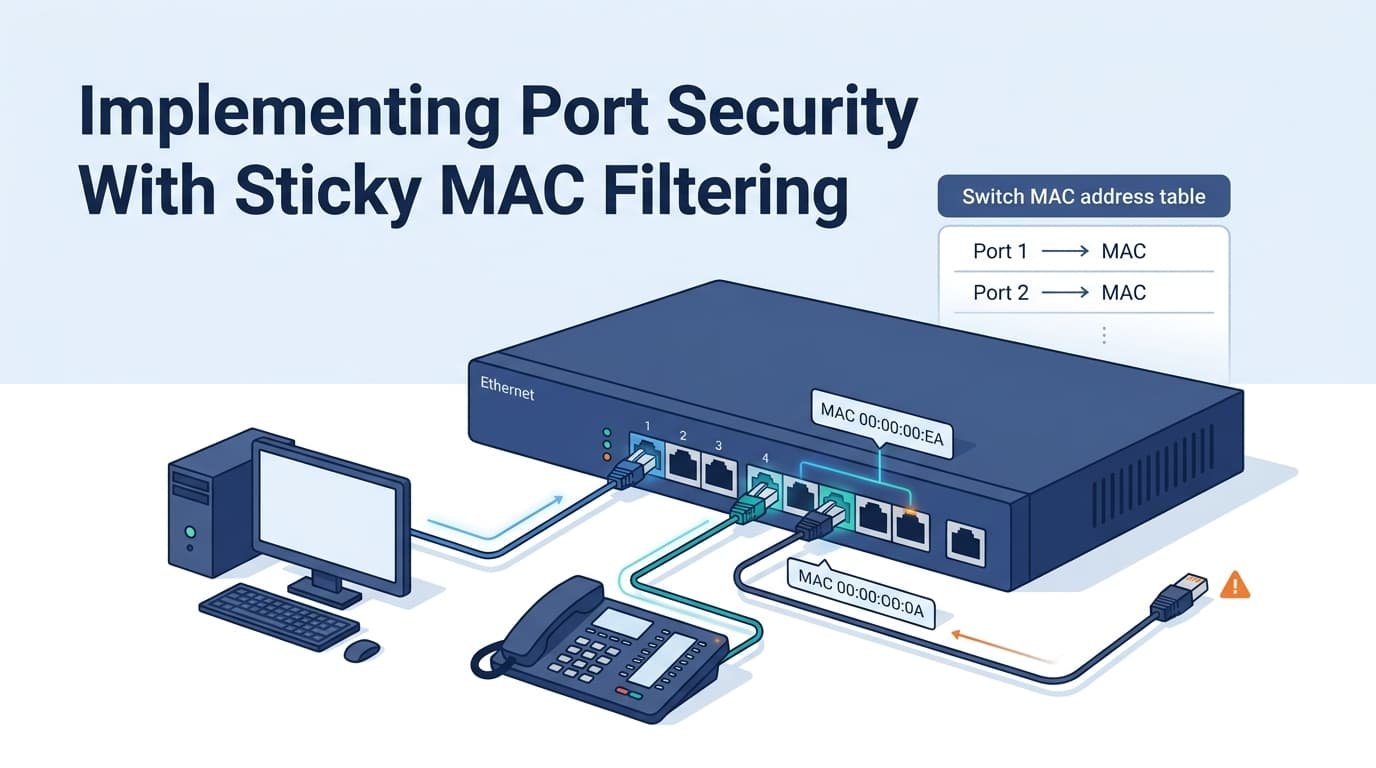
Implementing port security mac filtering sticky mac helps a switch learn approved MAC addresses and limit access on a port. On Cisco IOS, sticky MAC addresses are added to the running configuration after they’re learned.
Save the configuration if those addresses must remain after a reboot. But this setup fits known devices best. It shouldn’t replace user authentication when stronger access control is needed. Check the port limit before deployment. Also review the violation mode, since shutdown, restrict, and protect behave differently.
Test the setup before production use. Keep reading Network Threat Detection for practical network security guides.
Sticky MAC: What to Remember
- Sticky MAC limits which MAC addresses can access a switch port and reduces manual configuration work.
- Set MAC limits and violation modes based on endpoint needs to avoid unnecessary access blocks or outages.
- Sticky MAC is not strong identity protection, so combine it with 802.1X and broader network monitoring.
Sticky MAC Filtering: How Does It Work?
Sticky MAC filtering lets a switch learn a source MAC address and store it as a secure entry. Saving the configuration keeps that binding after a reload.
With switch port security, our team can limit which MAC addresses use an access port without entering every static MAC address manually. Cisco IOS handles sticky addresses as secure entries tied to the interface. Applying broader switch security practices also helps ensure port-level controls fit the rest of the network design.
| Method | Learning | Persistence |
| Static | Manual | Saved config |
| Dynamic | Automatic | Lost on reload |
| Sticky | Automatic | Saved config |
In our threat models, sticky MAC is Layer 2 access control, not identity proof. MAC address spoofing remains possible. Keep reading Network Threat Detection for practical risk analysis.
When Should You Use Sticky MAC Instead of Static MAC Filtering?

Sticky MAC fits predictable access ports where endpoint changes are rare. In our deployments, fixed office workstations are usually a good match.
Cisco IOS uses the switchport port-security model, but the wider security design still matters. MAC address filtering limits devices, yet it doesn’t verify users.
- Fixed workstations: Sticky MAC fits.
- Controlled endpoints: Static filtering gives tighter control.
- Changing endpoints: Use another access model.
- Identity checks: 802.1X verifies users.
- Spoofing risks: Add layered controls.
In high-density or dynamic office environments, relying solely on sticky MAC generates excessive administrative overhead, turning routine desk moves and hardware refreshes into repetitive IT support tickets.
Our threat models and risk analysis tools help teams assess that tradeoff. Keep reading Network Threat Detection for practical security guidance.
How Do You Configure Sticky MAC on a Cisco Access Port?
A basic sticky MAC setup puts the port in access mode, assigns its VLAN, enables port security, sets the MAC limit, and turns on sticky learning.
- Interface GigabitEthernet0/1
- Switchport mode access
- Switchport access vlan 10
- Switchport port-security
- Switchport port-security maximum 1
- Switchport port-security mac-address sticky
- Switchport port-security violation shutdown
A maximum limit of 1 MAC address applies to single-workstation ports. However, ports supporting both an IP phone and a PC require a maximum limit of 2. We verify the learned MAC before saving the configuration. That catches wrong VLANs or unexpected devices early.
Our threat models help assess these risks. Keep reading Network Threat Detection for practical guidance.
How Should You Configure Sticky MAC for an IP Phone and PC?
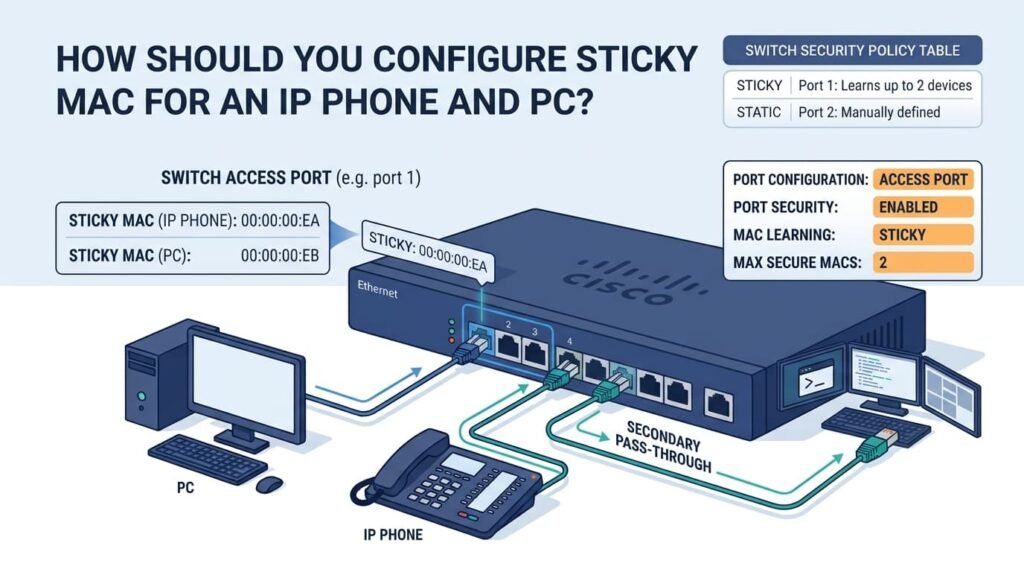
When an IP phone and a PC are daisy-chained on a single switch interface, the port’s maximum secure MAC address count must be explicitly configured to at least 2 to accommodate both the data and voice VLAN traffic.
interface GigabitEthernet0/2
switchport mode access
switchport access vlan 10
switchport voice vlan 20
switchport port-security
switchport port-security maximum 2
switchport port-security mac-address sticky
The phone uses one MAC, while the PC uses another. In production environments, setting maximum 1 on dual-purpose ports is a common trigger for unexpected outages.
When an IP phone boots, the switch registers its MAC address on the voice VLAN; as soon as the attached PC sends its first frame, the switch registers a second MAC address, immediately tripping a port-security violation.
- Phone: One MAC
- PC: Another MAC
- Maximum 2: Both allowed
- Maximum 1: Violation risk
Before setting the limit, we check how many devices can sit behind the port. Our risk tools help test these choices. Keep reading Network Threat Detection for more guidance.
Why Do Sticky MAC Entries Disappear After a Reboot?
Credits: Learn Cisco with Rob
To persist sticky MAC entries across switch reboots, save the active running configuration to the startup configuration using copy running-config startup-config.
Omitting the configuration save is a common operational mistake. While the switch actively filters traffic during uptime, any unsaved sticky bindings are purged upon reload.
What Happens If You Skip the Save?
Use this order:
- Enable sticky MAC.
- Connect the approved device.
- Check the learned MAC.
- Check port security.
- Save the config.
- Test after a planned reload.
The startup configuration restores the settings at boot. Our risk tools can help flag gaps in change procedures. Keep reading Network Threat Detection for more practical guidance.
Which Port Security Violation Mode Should You Choose?
Cisco uses three common port-security modes: shutdown, restrict, and protect. Each handles unauthorized MAC addresses differently.
| Mode | Traffic | Port | Visibility |
| Shutdown | Dropped | Error-disabled | High |
| Restrict | Dropped | Stays up | High |
| Protect | Dropped | Stays up | Low |
Shutdown takes the strongest action. Restrict blocks the device but keeps the port running. Protect blocks it quietly.
We routinely deploy restrict mode in user-facing access layers. Unlike protect mode, which silently drops unauthorized frames, restrict generates SNMP traps and increments the violation counter, giving NOC teams immediate alert visibility without putting the physical port into an err-disabled state.
We use threat models to assess the risk before choosing a mode.
- Shutdown: Strict access control
- Restrict: Control with alerts
- Protect: Quiet filtering
Keep reading Network Threat Detection for more guidance.
How Do You Recover a Port After a Sticky MAC Violation?
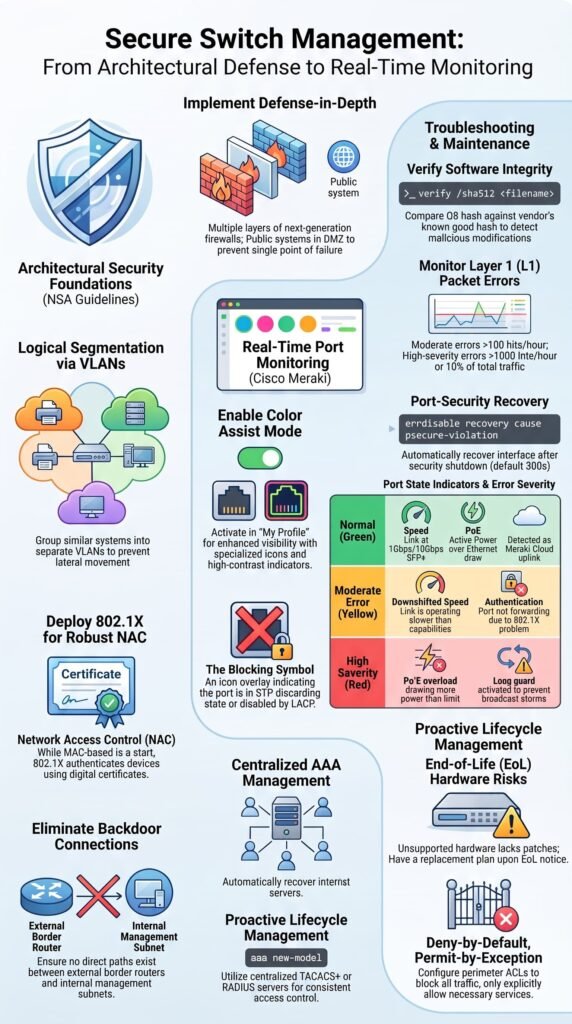
A shutdown-mode violation can put a port into err-disabled status. We check the cause before restoring service.
Switch(config)# interface GigabitEthernet0/1
Switch(config-if)# shutdown
Switch(config-if)# no shutdown
Before restoring an err-disabled interface, review the port-security status, violation counters, and recent hardware changes to confirm if a stale sticky entry needs manual clearing.
How Can You Automate Port Recovery?
Cisco supports:
Switch(config)# errdisable recovery cause psecure-violation
The usual recovery timer is 300 seconds. While errdisable recovery cause psecure-violation automatically restores ports, recurring trips require root-cause analysis.
Monitor syslog for %PORT_SECURITY-2-PSECURE_VIOLATION events to differentiate between an unauthorized device plug-in, an uncoordinated MAC migration, or an misconfigured maximum threshold. Our risk tools help connect these events. Keep reading Network Threat Detection for more guidance.
How Do You Verify Sticky MAC Learning Before Deployment?
Before production, we check the port state, MAC limit, violation mode, counters, and secure MAC entries. Cisco supports these checks with:
Switch# show port-security interface GigabitEthernet0/1
Switch# show port-security address
Switch# show mac address-table
Switch# show running-config interface GigabitEthernet0/1
Executing show port-security interface g0/1 lets you verify that the Port Status reads Secure-up and that Violation Count remains at zero.
Cross-referencing this with show port-security address confirms whether the learned entry is flagged specifically as SecureSticky before committing to a startup configuration save.
What Should You Check?
- Secure-up state
- Correct MAC limit
- Correct violation mode
- Learned secure MAC
- Violation count
- SecureSticky entries
We connect an approved device, verify its MAC, then test an unauthorized device safely. Our risk tools help review the results. Keep reading Network Threat Detection for more guidance.
What Happens When a Device Moves to Another Port?
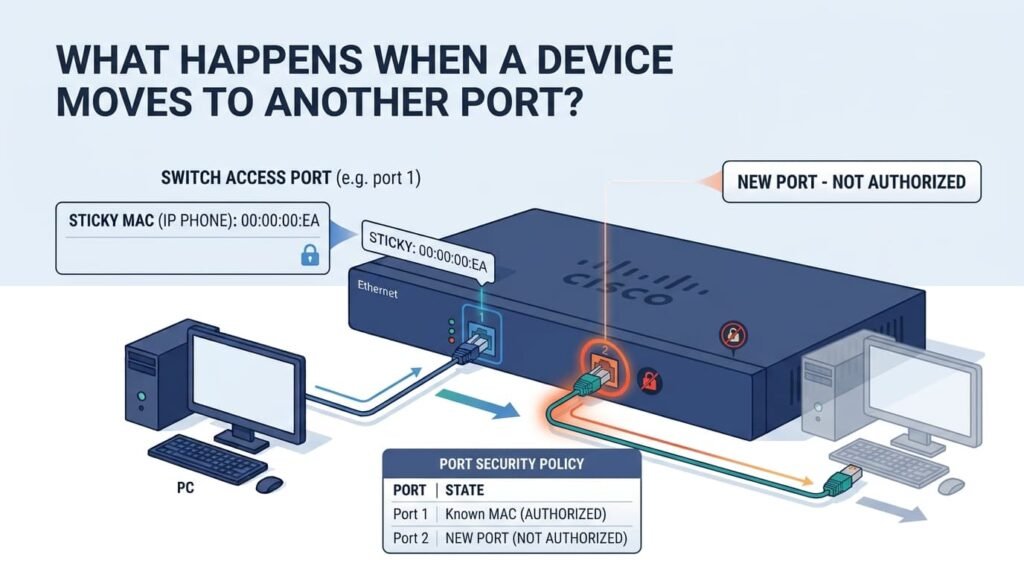
A sticky MAC binding can trigger a violation when a secured device moves to another port. Cisco treats this as a mismatch with the new port’s security policy.
We’ve seen this after routine desk moves. A workstation learned on GigabitEthernet0/1 may trigger a violation when moved to GigabitEthernet0/8.
How Should You Handle Endpoint Moves?
- Find the sticky binding.
- Confirm the device is authorized.
- Clear the old entry.
- Connect the device again.
- Check the new MAC.
- Save the config.
For fixed offices, this may be rare. Hot-desking creates more work. Our risk tools can help assess whether MAC filtering still fits. Keep reading Network Threat Detection.
Can Sticky MAC Prevent MAC Spoofing?
Sticky MAC can block an unknown device, but it can’t prove who owns the MAC address. Stronger controls should also protect router administrative access and other privileged entry points so attackers cannot bypass network protections through management interfaces.
As Noted by ResearchGate Academic Review on Layer 2 Security Mechanisms
“While designed to be globally unique, MAC addresses are easily spoofed, creating critical vulnerabilities in network security. Attackers forge a legitimate device’s MAC address to bypass network access controls.” – ResearchGate Academic Review on Layer 2 Security Mechanisms
NIST notes that MAC addresses can be copied and spoofed, so MAC filtering alone won’t stop a determined attacker. The switch sees a Layer 2 address, nothing more.
Still, sticky MAC has value.
- Blocks unfamiliar devices
- Limits devices per port
- Reduces casual plug-ins
- Creates useful security events
We treat it as one control, not full authentication. 802.1X, certificates, and device registration can add stronger checks. Our threat models help teams see where MAC controls fall short. Keep reading Network Threat Detection for practical network security guidance.
Why Can Sticky MAC Cause Problems on Redundant Network Links?
Enabling sticky MAC on redundant or high-availability (HA) links can cause unintended network outages when primary devices fail over and transfer their MAC addresses to secondary switch ports.
Which Interfaces Need Extra Caution?
Review sticky MAC before using it on links where MAC movement is expected.
- Firewall HA links
- Router redundancy
- Dual-homed systems
- Hypervisor links
- Failover appliances
During a stateful firewall or virtual router failover, the secondary node assumes the active virtual MAC address. If the adjacent switch port has sticky MAC enabled, it drops incoming traffic from the secondary node because that MAC address remains bound to the primary node’s switch port, taking down the redundant cluster.
Our experience shows why access-port rules shouldn’t be copied to infrastructure links. Threat models help us spot these cases before deployment. Keep reading Network Threat Detection for practical guidance.
How Does Sticky MAC Affect MAC Address Aging?
Sticky MAC needs more care than normal dynamic learning because the learned address becomes part of the config. Cisco stores sticky entries in the running configuration, so we save them if they must survive a reboot.
| Type | Lifecycle | Admin work |
| Dynamic | Learns and ages | Low |
| Static | Manual | High |
| Sticky | Learned, then saved | Ongoing |
We’ve seen stale sticky entries remain after device swaps. Dynamic entries can age out, but sticky bindings may need manual cleanup.
Why Does MAC Aging Need Care?
- Dynamic entries age normally.
- Sticky entries can persist.
- Replaced devices leave old bindings.
- Aging settings vary by platform.
Our risk tools help review these settings. Keep reading Network Threat Detection for more guidance.
How Do You Clean Up Stale Sticky MAC Addresses?
When decommissioning or swapping out endpoint hardware, issue clear port-security sticky interface <interface-id> to flush the stale entry from active memory.
If the configuration was previously saved, follow up immediately with copy running-config startup-config to prevent old hardware bindings from reapplying during the next switch reload.
Switch# clear port-security sticky interface GigabitEthernet0/1
When Should You Clear Sticky Addresses?
- Device replacement
- Desk relocation
- Port reassignment
- Config cleanup
- Security violations
- Hardware refresh
After clearing it, reconnect the approved device and check the secure MAC table.
Then save the change:
Switch# copy running-config startup-config
We’ve seen admins fix the live config but forget the saved one. Our risk tools help track these gaps. Keep reading Network Threat Detection for practical guidance.
How Can Network Threat Detection Complement Sticky MAC?
Network Threat Detection adds context around sticky MAC events. We use threat models and risk analysis to tell normal device moves from events that need review. These measures can also be combined with broader network security controls to provide multiple layers of protection rather than relying on MAC filtering alone.
According to International Journal of Publication and Social Studies (IJPSAT)
“Port security grants IT personnel the ability to define MAC addresses for individual ports or to authorize a restricted quantity. Upon receiving a packet, the source MAC address is cross-referenced against the designated roster.” – International Journal of Publication and Social Studies (IJPSAT)
Sticky MAC asks, Is this MAC allowed on the port? Our tools ask a wider question: What else happened when that MAC moved or caused a violation?
| Signal | Possible meaning | Action |
| New MAC | Device change | Verify |
| Repeated violations | Policy issue | Investigate |
| MAC movement | Move or threat | Correlate |
| Extra device | Topology change | Check |
We’ve found repeated events more useful than one alert alone. Keep reading Network Threat Detection for practical guidance.
What Should Your Sticky MAC Deployment Checklist Include?
Before rollout, we test endpoint counts, config saves, violations, recovery, and monitoring.
A practical port security deployment checklist:
- Check IOS/IOS-XE behavior.
- Identify fixed and mobile devices.
- Set the right MAC limit.
- Configure data and voice VLANs.
- Enable sticky MAC.
- Choose the violation mode.
- Test approved devices.
- Test an unauthorized device.
- Check secure MAC entries.
- Save the config.
- Test reboot recovery.
- Document device moves.
- Define err-disabled recovery.
- Monitor violations.
Pre-deployment validation should always include simulated failure testing, such as intentional unauthorized MAC injection and failover reloads, to ensure port violation policies and recovery timers trigger as intended. Keep reading Network Threat Detection for more guidance.
How Do You Balance Sticky MAC Security and Operations?
Sticky MAC fits best when endpoint locations stay predictable and MAC counts are clear. We’ve found the policy matters as much as the feature.
| Environment | Approach |
| Fixed workstation | Sticky MAC |
| Phone + workstation | Correct MAC limit |
| Frequent desk moves | Dynamic access model |
| HA infrastructure | Check MAC movement |
| Identity-based access | 802.1X |
| Higher risk | Layer controls |
Cisco’s documentation notes that sticky addresses can persist after saving the config. Violation modes control how the switch reacts.
Our threat models help teams choose based on real risks, not templates. MAC filtering can be useful, but it isn’t enough for every network. Keep reading Network Threat Detection for practical guidance.
FAQs
How many MAC addresses should I allow on a secure switch port?
Set the MAC address limit according to the number of authorized devices that normally connect to the port.
What happens when an unauthorized MAC address connects?
The configured port security violation mode determines whether the switch drops traffic, restricts access, or shuts down the port.
Should I use static or sticky MAC addresses?
Use static MAC addresses for fixed assignments. Use sticky MAC learning when you want the switch to learn authorized addresses automatically.
How can I verify that port security is working correctly?
Check secure MAC addresses, configured limits, violation counters, and interface status with port security verification commands.
What should I check when port security blocks a device?
Verify the device’s MAC address, configured MAC address limit, violation mode, and interface status before restoring network access.
Build a Sticky MAC Policy That Works in Production
When sticky MAC works as intended, you get predictable Layer 2 access control without having to manage every MAC address manually. The problem starts when the port policy doesn’t match the endpoint setup. A wrong MAC limit, unsaved bindings, or overly strict violation mode can quickly turn a simple device change into an outage.
That’s why production deployments need more than sticky MAC alone. Use verification, clear recovery steps, and regular endpoint updates, then strengthen visibility with Network Threat Detection for broader network threat detection. It can help security teams identify risks, map attack paths, and prioritize threats before they become larger problems.
References
- https://www.researchgate.net/publication/392738619_Advanced_Network_Security_MAC_Spoofing_Detection_and_Prevention_Master’s_in_Cyber_Security
- https://ijpsat.org/index.php/ijpsat/article/download/6870/4366
