
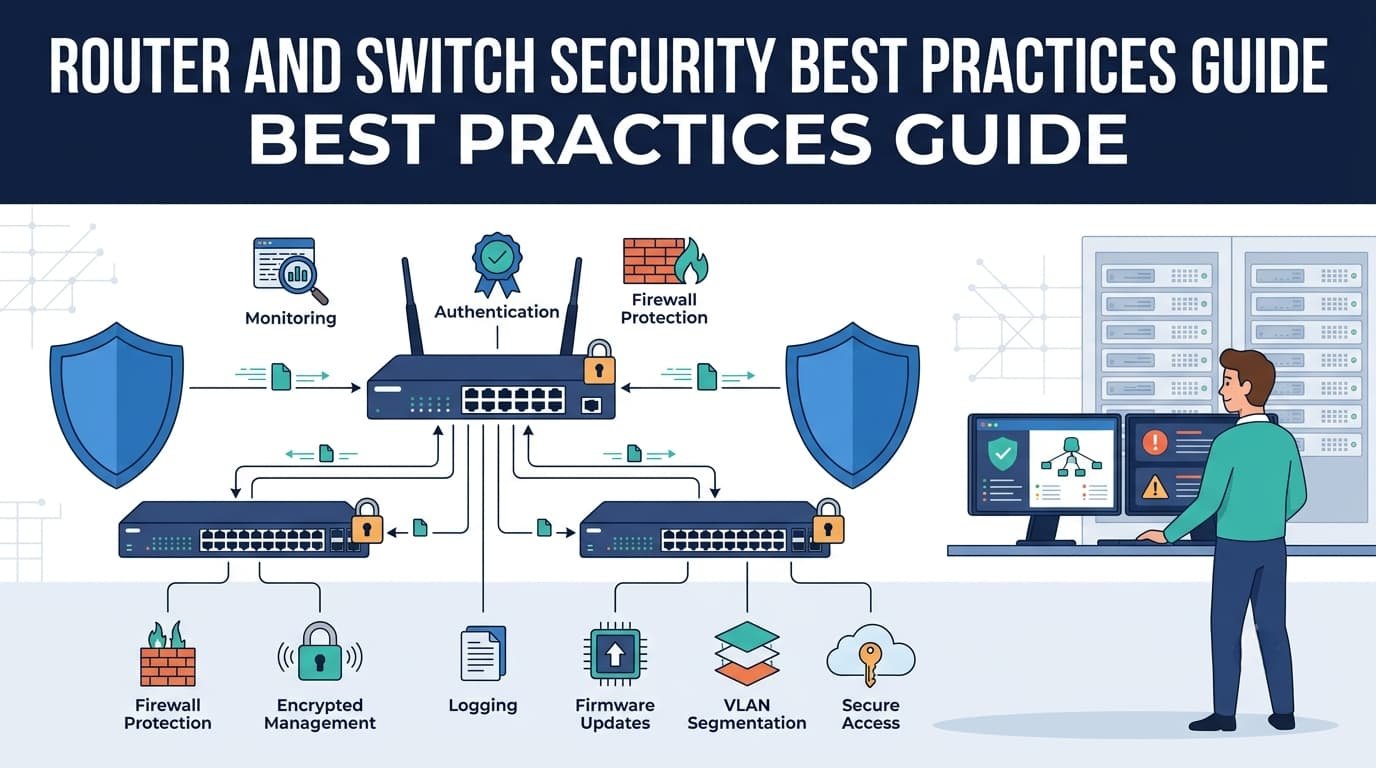
Router and Switch Security Best Practices are essential. A hardened setup can cut attack surfaces by 80%. We saw this when a minor config error nearly offline a core router at peak traffic. Foundational controls matter more than fancy tools.
These practices form your network’s immune system. See what you’ve missed by reading more with Network Threat Detection.
Network Security in 60 Seconds
- Your first battle is at the login prompt; administrative access is the most targeted vector.
- Security isn’t one feature, it’s layers, defend the control, management, and data planes separately.
- You can’t protect what you can’t see; logging and monitoring are your evidence and early warning.
Network Security Controls Examples
From our threat analysis, network security controls operate like a castle: preventive walls, detective guards, corrective plans. This layered approach is everything for routers and switches.
We build walls with key preventive controls:
- SSH for encrypted management, never Telnet.
- Multi-factor authentication on every admin account.
- Port security on all user-facing switch ports.
- Infrastructure ACLs filtering traffic to devices.
- A strict schedule for firmware updates.
Detective and corrective controls work in tandem. Syslog and NetFlow data goes to a central collector; a SIEM correlates events to spot anomalies. Our incident response plans, backed by configuration backups, restore normal operations. Without both, networks are vulnerable.
How Can You Secure Router Administrative Access Credentials?
Administrative accessremains the most targeted attack path because administrative credentials are the most valuable asset. We see this in threat models constantly. A strong credential policy doesn’t just lower risk; it makes attackers work harder for diminishing returns.
According to NIST Special Publication 800-123
“All remote administrative access should be encrypted using strong protocols (e.g., SSH, TLS) to protect sensitive credentials and data in transit across untrusted or enterprise networks.” – NIST Special Publication 800-123
Based on our risk analysis, we mandate these practices from day one:
- Enforce strong, unique passwords (minimum 15–20 characters, or use SSH public key authentication).
- Implement Multi-Factor Authentication everywhere.
- Use Role-Based Access Control to limit user commands.
- Set session timeouts for idle connections.
- Configure login banners for legal deterrence.
SSH must replace Telnet. Telnet sends every keystroke in plain text, exposing passwords on the network. SSH encrypts the entire session. This switch is a basic compliance requirement and one of the simplest security improvements you can make.
Disabling Unused Switch Ports Interfaces
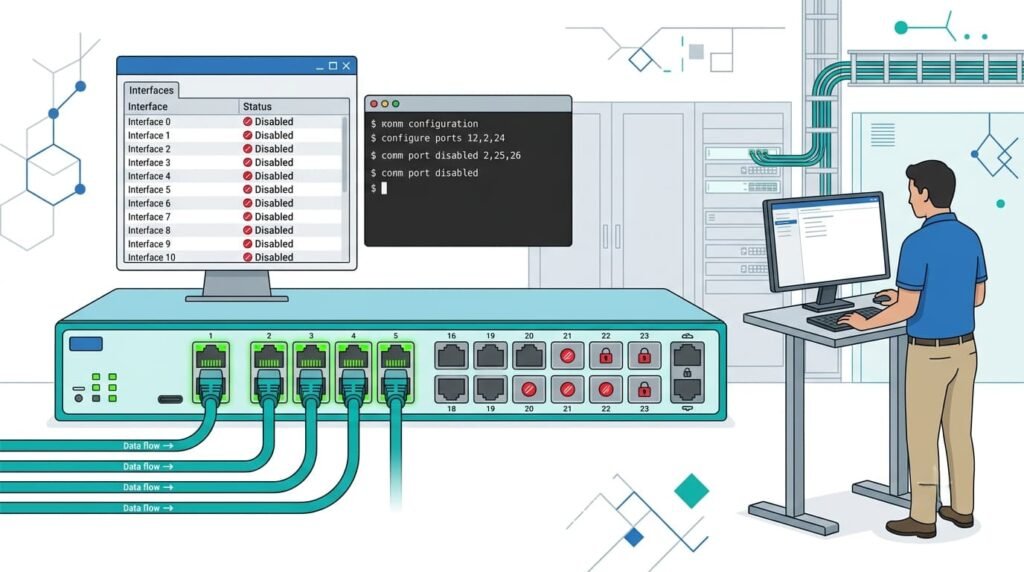
Unused switch ports are a direct vulnerability in every threat model we review. Leaving them active is an open invitation.
Only keep necessary ports active: for users, uplinks, and management. Shut down everything else. We once found an unused lobby port that had been secretly collecting data for weeks.
For documentation, apply a consistent description like UNUSED-PORT-SECURITY. Use interface range commands for efficiency and keep a matching inventory. This log proves due care during an audit, turning a simple command into a verified control.
How Do You Implement Port Security with MAC Filtering and Sticky MAC?
In our threat models, unattached switch ports consistently present a risk. Port security addresses this by locking a port to specific MAC addresses. Sticky MAC is useful. It remembers the first device on a port and locks it down. This automates security and saves setup time.
MAC filtering allows or denies access by hardware address. The methods we evaluate are:
- Static MAC: Manually configured. Precise but impractical at scale.
- Dynamic MAC: Learns addresses but forgets on reboot.
- Sticky MAC: Learns dynamically, then saves addresses to the configuration permanently. This is our typical recommendation for access ports.
Choosing a violation mode dictates the response to an unauthorized device.
| Mode | Best Use |
| Shutdown | High-security areas. Port disables and needs reset. |
| Restrict | Drops unauthorized frames, increments violation counter, generates syslog messages, and sends SNMP traps. |
| Protect | Silently drops unauthorized frames without logging, alerting, or incrementing counters. |
We usually set access ports to shutdown. The minor administrative hassle of re-enabling a port is worth the definitive security alert it provides.
How Do You Configure Control Plane Policing (CoPP) on a Router?
Credits: CBT Nuggets
We target the router’s CPU in our threat models because attackers do. We use Control Plane Policing (CoPP) to protect it. CoPP sorts traffic heading for the router itself and sets strict speed limits.
This keeps important jobs, like route updates, working. Attack traffic gets thrown out.
What is this traffic? Anything sent to the router, not through it. This includes routing messages, admin logins (SSH), ping requests, and monitoring queries.
We test this by trying to flood the CPU in pentests. It can lock up management while data still flows.
Building CoPP has clear steps:
- Use ACLs to sort traffic into types.
- Group those ACLs with class-maps.
- Use a policy-map to set speed limits for each group.
- Apply that policy to the control plane.
It acts as a tiny firewall just for the router’s brain.
How Does Dynamic ARP Inspection Prevent ARP Spoofing?
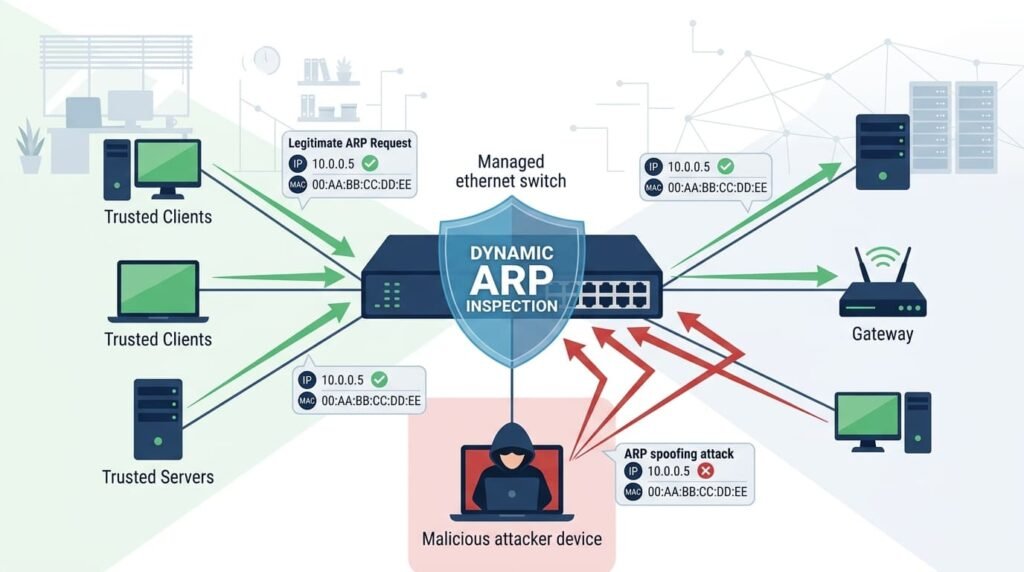
ARP spoofing is a threat we often see. Here, a bad device sends fake messages to trick traffic. Dynamic ARP Inspection (DAI) stops this.
DAI checks every ARP message on untrusted switch ports. It compares them to a trusted list of correct device addresses. This list comes from DHCP Snooping. If a message lies, DAI drops it.
Getting the setup right is key. We only trust ports connected to other routers or real DHCP servers. All user ports stay untrusted. In our reviews, we frequently find this step misconfigured, which leaves the network open to attack.
What Are the Security Benefits of DHCP Snooping Configuration?
A rogue DHCP server can redirect an entire subnet’s traffic. DHCP Snooping prevents this by building a trusted map of IP leases and blocking unauthorized server messages.
Enabling DHCP Snooping builds the foundation for your layer-2 defenses by creating a dynamic IP-to-MAC binding table. Once running, it enables a three-tier security framework across all user switch ports:
- DHCP Snooping: Blocks unauthorized (rogue) DHCP servers while logging client IP/MAC bindings.
- Dynamic ARP Inspection (DAI): Uses the DHCP binding table to validate and drop fake ARP responses (stopping Man-in-the-Middle attacks).
- IP Source Guard (IPSG): Checks source IP addresses against the binding table to block spoofed IP packets at the access layer.”*
It’s less of a single control and more of a key that unlocks a vital layer of security.
Securing Routing Protocols OSPF BGP Authentication
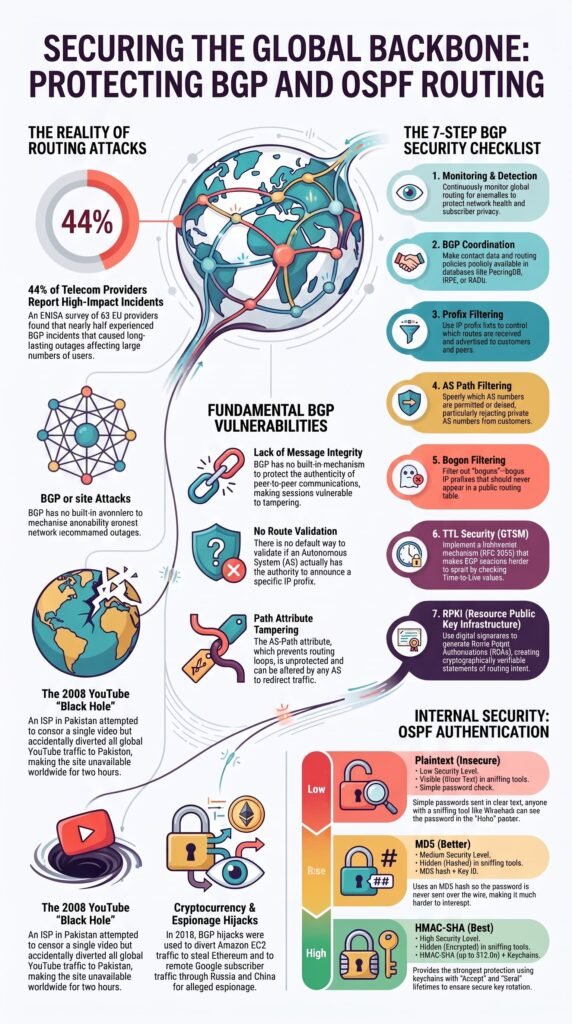
Without securing your routing protocols, your network trusts any update it gets. An attacker can send a fake route to redirect or block your traffic.
OSPF authentication uses cryptographic hashes, either MD5 or SHA, within an area. You configure a shared key on each router interface, and every OSPF packet is signed with it.
If the signature fails, the update is ignored. Proper key management is critical here; we’ve seen outages from mismatched keys during rollovers.
Securing BGP peering sessions requires two simple steps. First, set up TCP MD5 passwords between both peers to stop unauthorized session hijacking. Second, turn on BGP TTL Security (GTSM). GTSM ensures that incoming peering packets have a Time-To-Live (TTL) value near 255.
If a packet arrives with a lower TTL, the router drops it immediately, preventing attackers from injecting fake routes from outside your local network. This stops traffic injected from outside your local network.
Together, they effectively seal the BGP peer connection from common attacks.
What Are the Best Infrastructure ACL Configuration Guidelines for Traffic Filtering?
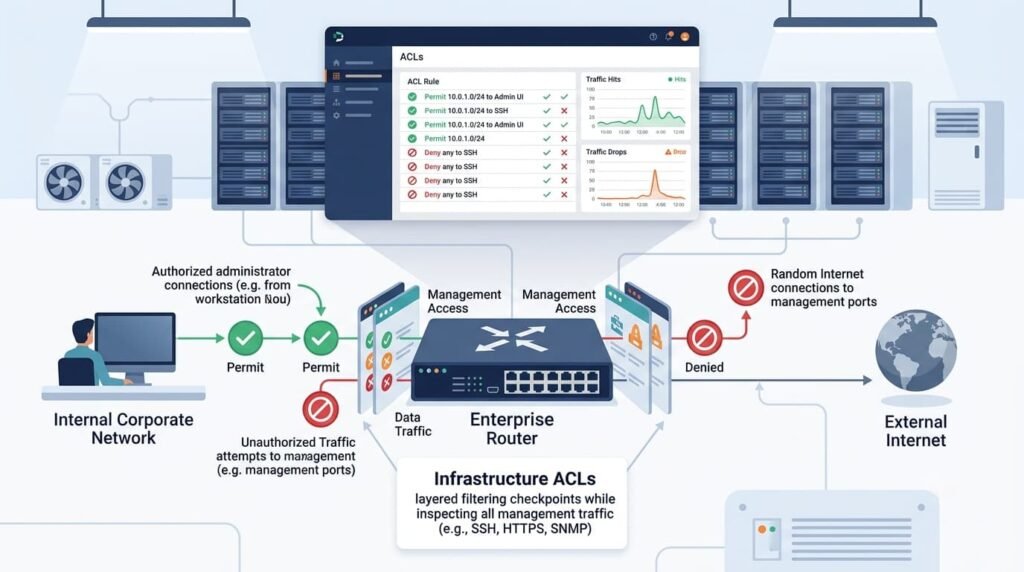
Infrastructure ACLs protect the routers and switches themselves as a critical part of securing your network infrastructure. Their sole purpose is to filter traffic destined for your network devices, not through them.
In our standard builds, we only permit a short list of essential traffic:
- SSH and SNMP from the management network.
- Routing protocol traffic from established neighbors.
- NTP from the trusted time source.
Everything else is denied by default. This includes blocking RFC 1918 addresses from the internet and denying all user-subnet traffic to device loopbacks. It’s the final filtering layer for the control plane.
Regular Firmware Updates Router Switch Vulnerabilities
Treating stable, old firmware as safe is a common mistake. Regular firmware updates reduce exposure to known exploits. We view patch management as fundamental risk reduction, not an IT chore.
According to Cybersecurity and Infrastructure Security Agency (CISA)
“Malicious cyber actors continue to exploit known, unpatched software vulnerabilities in network devices, frequently leveraging publicly available exploit code, to gain unauthorized access to target networks.” – Cybersecurity and Infrastructure Security Agency (CISA)
Testing updates is non-negotiable. We always stage them first in a lab that mirrors production, checking for regressions in features and performance. A bad update can cause a worse outage than the vulnerability it fixes.
Vulnerability management must be continuous. Subscribe to vendor advisories and schedule quarterly patch reviews at a minimum. For critical, wormable flaws, be ready to act within days. Our threat models consistently show unpatched devices are the easiest entry point for attacks.
How Do You Monitor and Log Router and Switch Activity?
Without centralized logs, investigating an incident becomes guesswork. Effective logging and monitoring sends events to a syslog server or SIEM, creating the evidence needed to move from reactive alerts to proactive hunting.
From our threat analysis work, we always prioritize collecting a few critical log types:
- Authentication successes and failures.
- Configuration changes.
- Interface status transitions (up/down).
- System-level error and warning messages.
- NetFlow data for establishing traffic baselines.
These logs form the core narrative of what happens on your network. We’ve used this focused data to trace attacks that otherwise would have remained unresolved mysteries.
FAQs
How can I secure router administrative access without disrupting daily operations?
First, change all default usernames and passwords. Use strong, new ones. Turn on multi-factor authentication (MFA) if you can. Always use SSH for access and disable the old Telnet protocol.
Then, limit what users can do. Set up different access levels and make idle sessions log out. A warning login banner also helps.
What is the most effective way to stop ARP spoofing and DHCP attacks?
Use Dynamic ARP Inspection (DAI) to stop ARP poisoning attacks. DAI checks ARP messages for lies. Then, enable DHCP Snooping. This blocks fake DHCP servers and stops address exhaustion attacks. Together, they lock down your local network.
Which switch port security settings prevent unauthorized devices from connecting?
Lock down your switch ports. Let them learn which devices are allowed, or manually list them. Set what happens if an unknown device connects. Turn off unused ports and require a login (802.1X) for access. This stops MAC flooding attacks and makes your network more secure.
How do routing protocol security controls protect network traffic?
Turn on authentication for OSPF and BGP to protect your routing info. Filter out fake and private addresses. Use access control lists to block bad traffic from reaching your routers. This stops route hijacking and keeps unauthorized data out.
Which monitoring practices improve router and switch security over time?
Collect logs and traffic data from your network. Send them to a security system to spot threats faster. Keep your routers and switches updated with the latest firmware. Track configuration changes to keep your defenses consistent.
How can SIEM improve router and switch visibility?
SIEM gives you the context that individual router and switch logs never can. When every event is connected, security teams can spot suspicious behavior faster, reduce investigation time, and respond before a small anomaly turns into a serious incident. That’s the difference between collecting logs and understanding what they’re actually telling you.
If you want deeper visibility into network activity, Network Threat Detection adds real-time threat modeling, automated risk analysis, CVE mapping, and attack path simulations to help SOC teams prioritize what matters most.
It’s a practical way to uncover hidden risks and strengthen your defenses with actionable intelligence.
References
- https://csrc.nist.gov/pubs/sp/800/123/final
- https://www.cisa.gov/news-events/cybersecurity-advisories/aa22-137a
Related Articles
- https://networkthreatdetection.com/network-infrastructure-and-control/
- https://networkthreatdetection.com/network-security-controls-examples/
- https://networkthreatdetection.com/securing-router-administrative-access-credentials/
- https://networkthreatdetection.com/disabling-unused-switch-ports-interfaces/
- https://networkthreatdetection.com/implementing-port-security-mac-filtering-sticky-mac/
- https://networkthreatdetection.com/configuring-control-plane-policing-copp-router/
- https://networkthreatdetection.com/preventing-arp-spoofing-dynamic-arp-inspection/
- https://networkthreatdetection.com/dhcp-snooping-configuration-benefits-security/
- https://networkthreatdetection.com/securing-routing-protocols-ospf-bgp-authentication/
- https://networkthreatdetection.com/infrastructure-acl-configuration-guidelines-filtering/
- https://networkthreatdetection.com/regular-firmware-updates-router-switch-vulnerabilities/
- https://networkthreatdetection.com/logging-monitoring-router-switch-activity/
