
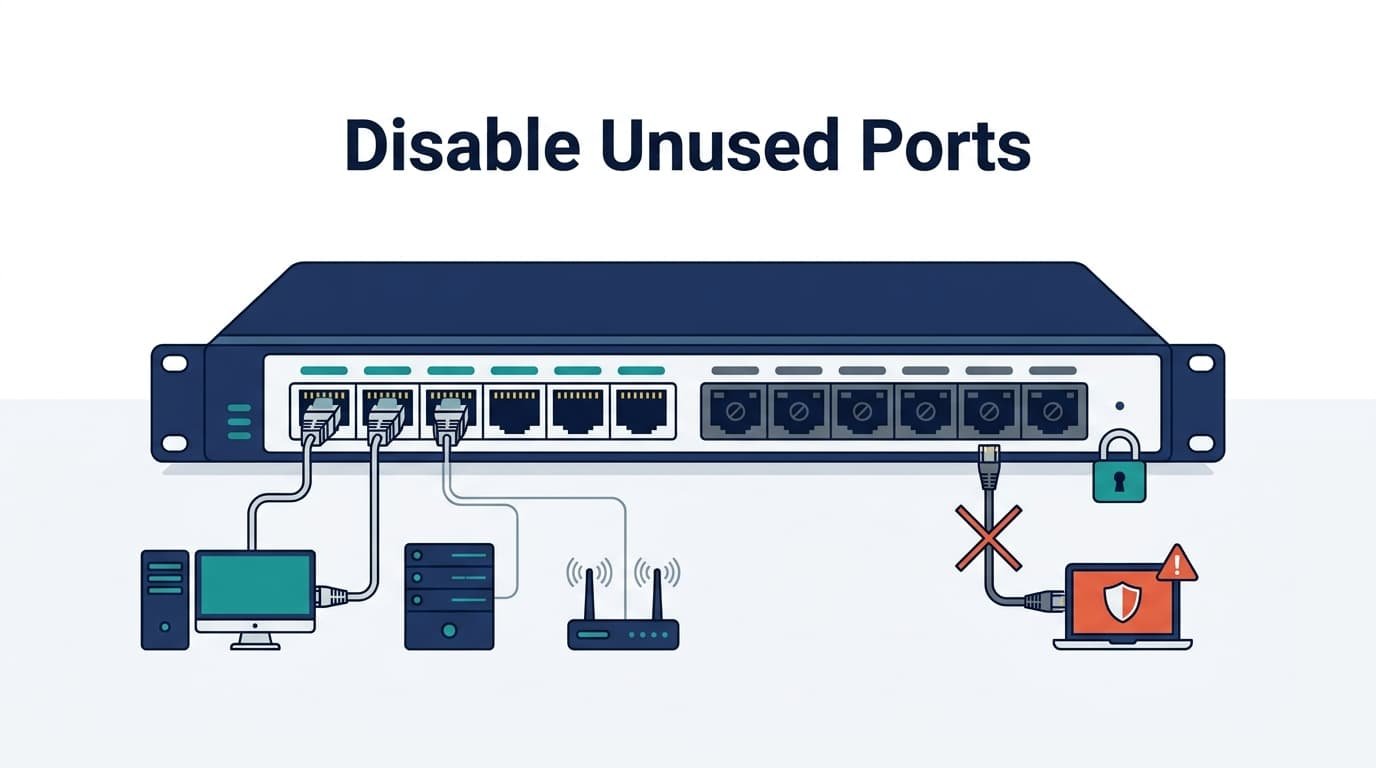
Disabling unused switch ports interfaces reduces open access points and limits unauthorized device connections. Unused ports can give attackers another way into the network, especially when switch hardware is accessible.
So shut down ports that aren’t needed, then move inactive interfaces to an unused VLAN where appropriate. Cisco switches also support port security and authentication to restrict device access. Check the configuration after making changes, too. A single overlooked port can weaken your network controls.
This guide covers practical switch hardening steps, Cisco configuration, VLAN isolation, authentication, and verification. Keep reading for more guidance from Network Threat Detection.
Switch Port Security Quick Wins
These practical takeaways summarize how disabling unused switch ports helps reduce unauthorized access and strengthen network security.
- Disable unused ports to reduce unauthorized access and limit the network attack surface.
- Use layered controls such as unused VLANs, 802.1X, NAC, and monitoring when ports must remain active.
- Verify changes by checking interface status, device records, and administrative shutdown after modifying switch ports.
Why should you disable unused switch ports?
Disabling unused interfaces cuts exposed Layer 2 access points and limits unauthorized connections.
An active Ethernet port is still a possible entry point, even when nobody uses it. A disabled port won’t forward traffic until an admin enables it again.
We treat unused-port shutdown as part of least functionality, along with regular checks of unneeded services.
According to NISP SP 800-53
“Organizations configure systems to provide only essential capabilities and prohibit or restrict the use of functions, ports, protocols, and services. Deactivating unused network ports is a primary control for maintaining least functionality.” – NISP SP 800-53
From our experience, this matters most in conference rooms, empty desks, storage areas, and lobbies.
These steps also support broader switch security by reducing unnecessary access points and limiting avoidable exposure.
A basic hardening baseline should:
- Block unauthorized connections
- Reduce Layer 2 exposure
- Support security baselines
- Make audits easier
Our threat models and risk analysis tools help teams spot these gaps and address new threats.
What security risks does an unused active port create?
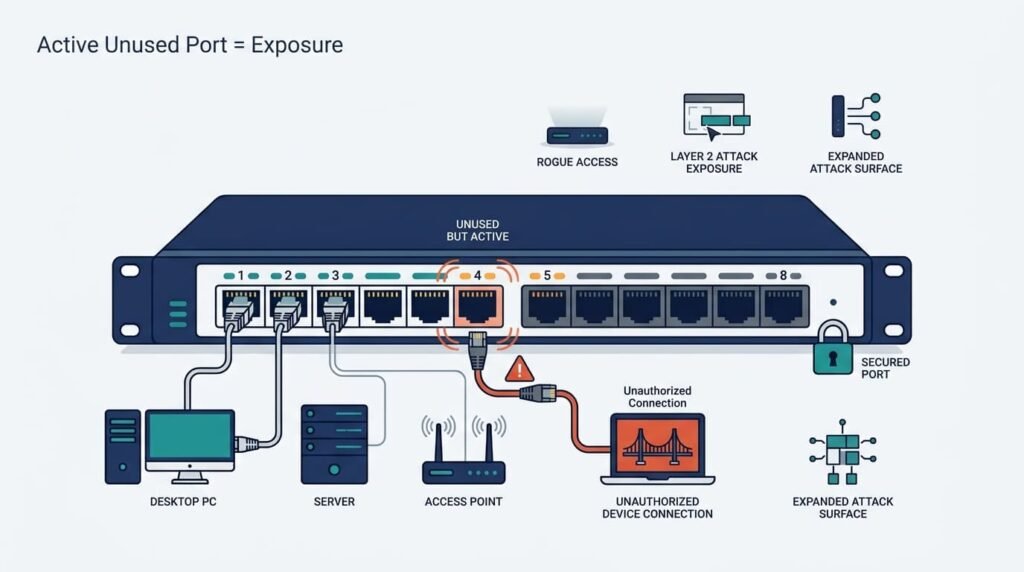
An active unused port can give an unauthorized device network access. The risk grows when someone can reach the switch port in person.
We’ve seen how a rogue laptop or small network device can use DHCP and interact with Layer 2 services. In Cisco environments, enabled ports also add more interfaces that need proper security settings.
Common concerns include:
- Rogue device connections
- DHCP abuse
- MAC address changes
- Unauthorized network equipment
- Weak port settings
During physical penetration tests, we consistently target open RJ-45 jacks in unmonitored areas like lobby kiosks and breakrooms.
Plugging into an unauthenticated access port gives an attacker immediate access to internal DHCP leases, local ARP traffic, and exposed broadcast frames before network administrators even receive an alert. Production ports need authentication, monitoring, and VLAN controls too.
Can unused ports enable Layer 2 attacks?
Unused active ports can raise the risk of DHCP, ARP, MAC, and other Layer 2 attacks. The exact risk depends on the network setup, but an active access port still gives an unauthorized device a place to start.
We’ve seen this matter with DHCP starvation, ARP spoofing, MAC flooding, and rogue switches. STP attacks can also become a concern when an unknown device joins Layer 2 traffic.
Regarding Layer 2 vulnerabilities, researchers in the Journal of Computer Networks and Communications note:
“Layer 2 protocols inherently rely on implicit trust between connected devices. Leaving access ports active without active monitoring or administrative shutdown allows malicious actors to exploit weaknesses in protocols like DHCP and ARP without triggering standard perimeter firewalls.” – Journal of Computer Networks and Communications
Before modifying active configurations, map your physical switch topology against your network inventory. Eliminating unused physical access points first simplifies your audit footprint, allowing you to focus advanced controls, like Dynamic ARP Inspection and DHCP Snooping, solely on ports carrying production traffic.
Does disabling ports actually prevent unauthorized network access?
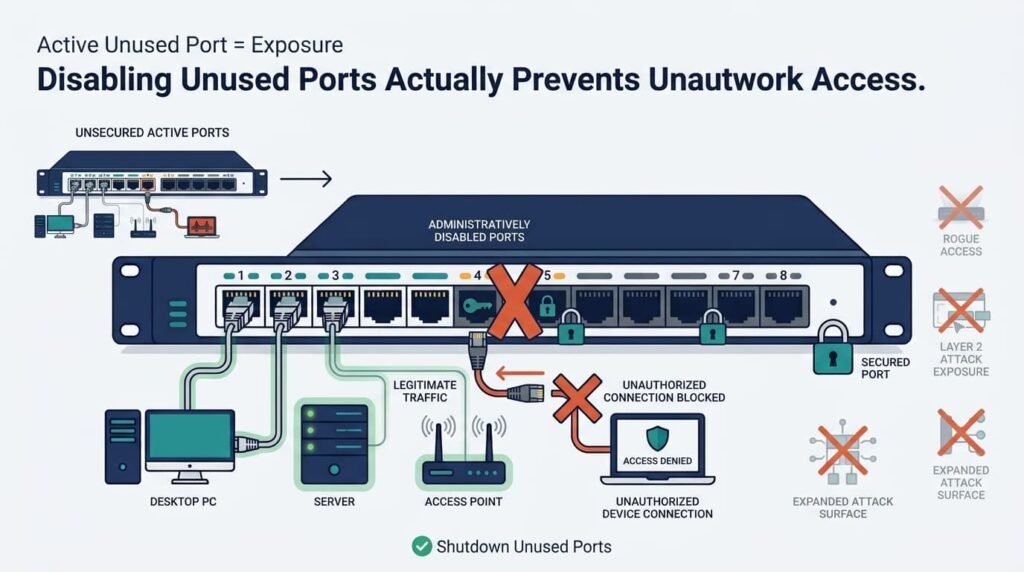
Yes, on the disabled interface itself. A shutdown port can’t provide normal network access until an admin enables it again.
We’ve found this useful for reducing the attack surface. If a port isn’t needed, removing it from service means there’s less to secure and review.
Pro Tip: Port shutdown is only one defense layer. Active ports still need protection.
Still, physical access matters. Someone who reaches a network closet could skip an unused wall jack and use an active port instead. In our years auditing network closets, We’ve found that simply running show interfaces status isn’t enough; you need to physically trace exposed drops in unmonitored zones like breakrooms and conference facilities.
Relying on passive software tools often misses physical patches that haven’t passed traffic in weeks but remain live at Layer 2. Shutdown works best with physical security, port controls, network access control, and monitoring.
Should every unused port be assigned to a blackhole VLAN?
A blackhole VLAN limits reachability when a port must stay enabled. For a port nobody needs, shutdown is safer.
We use the distinction during network reviews because an enabled port still needs controls. A dedicated unused VLAN can limit what that port reaches if it’s enabled by mistake.
| Control | Main use |
| Shutdown | Unused ports |
| Blackhole VLAN | Limited access |
| 802.1X | Endpoint checks |
| Monitoring | Threat detection |
A VLAN such as 999 can work if it has no path to production. Our threat models help spot gaps, while risk analysis tools help rank them. An isolated port is still active, though.
How does 802.1X complement unused-port shutdown?
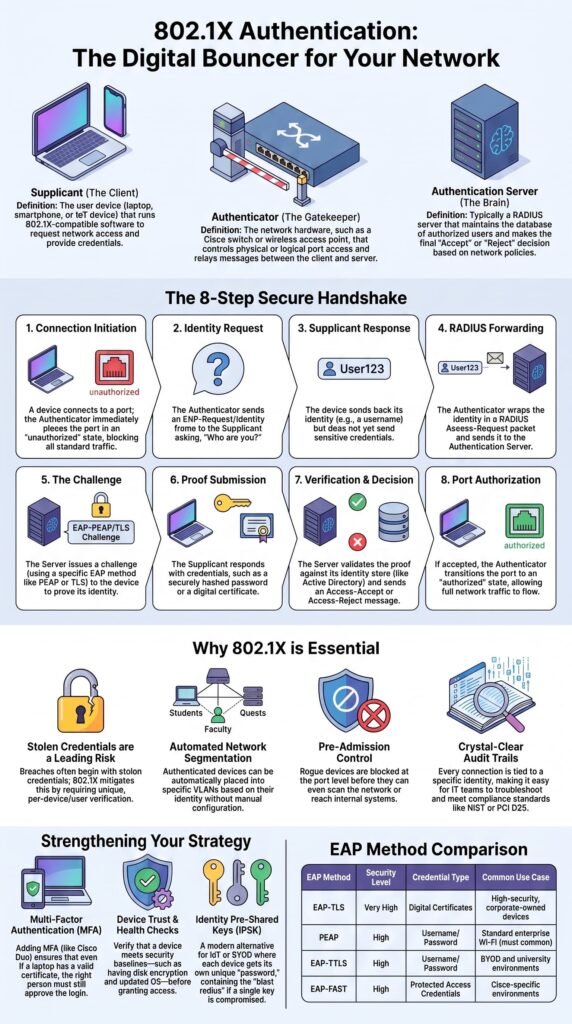
When ports must remain physically active to support dynamic devices like workstations or VoIP phones, static shutdown isn’t an option. In these zones, enforce 802.1X port-based authentication backed by a RADIUS deployment (such as Cisco ISE or Aruba ClearPass).
Paired with Dynamic ARP Inspection (DAI) and DHCP Snooping, this ensures unauthenticated hardware is blocked at the PHY layer before it can send a single ARP broadcast.
Before the switch grants access to the internal network, it demands proof of identity from the device. If the device lacks the right security certificate, the port blocks all network traffic automatically.
In our network reviews, we usually shut down ports with no real purpose. Ports that need to stay available get authentication instead. This helps in offices where laptops, phones, and printers move often.
Common use cases include:
- Changing office setups
- Guest access areas
- Shared workspaces
- Large networks
We’ve found this split easier to manage. Our threat models help assess access paths, while our risk analysis tools help teams review new threats and decide where stronger network security controls are needed.
When is NAC better than manual shutdown?
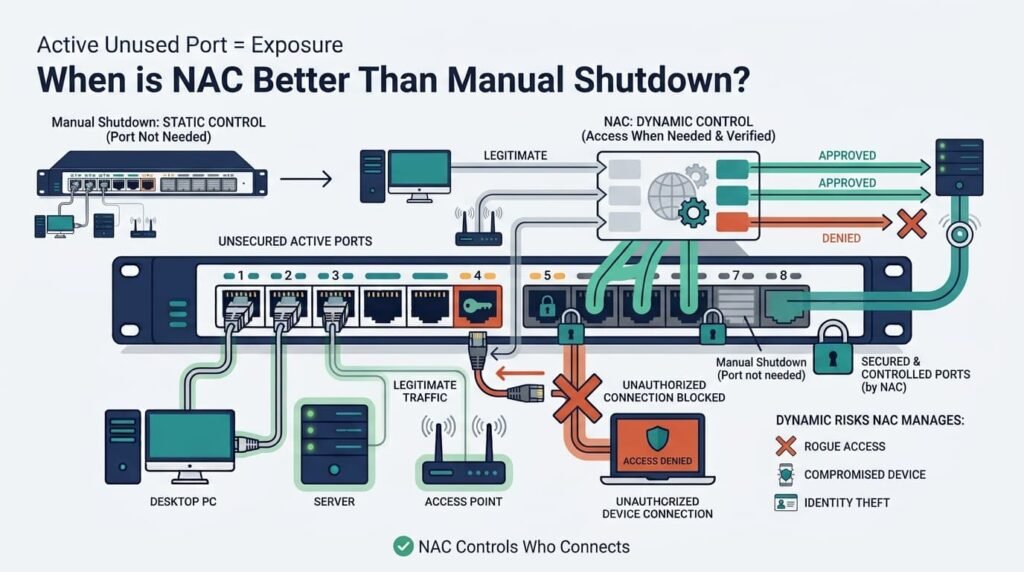
NAC helps when ports must stay active but still need identity checks. Manual shutdown works for fixed setups, but it gets harder across hundreds of changing ports.
We’ve seen this in larger networks, where admins can’t keep checking every interface by hand. NAC moves the access decision to endpoint authentication and policy checks instead of repeated shutdown commands.
That doesn’t replace unused-port controls. Our teams can shut down ports with no purpose, while active ports use authentication. Our threat models help map these access paths, and our risk analysis tools help teams assess new threats as the network changes.
How should Cisco switches be configured for unused ports?
Administrators can use interface ranges to shut down several unused ports at once. On Cisco IOS, interface range applies later commands to every selected port.
We’ve found this saves time, but one wrong range can take down live systems. Before running it, check:
- Selected interfaces
- Production ports
- Current port status
- Connected devices
- Change records
In production environments, a bare shutdown command leaves edge cases open. When securing unused interfaces, configure them into an isolated blackhole VLAN, strip dynamic trunking, and lock down default parameters in one block:
- interface range: GigabitEthernet 1/0/10 – 24
- description UNUSED_PORT_L2_ISOLATED
- switchport mode access
- switchport access vlan 999
- switchport nonegotiate
- shutdown
This prevents an accidentally re-enabled port from hopping onto a dynamic trunk or joining the default VLAN.
Our teams verify the range before applying changes. The shutdown command disables the ports, while no shutdown brings them back. These interface changes should also be part of broader practices for securing administrative access so configuration changes remain limited to authorized administrators. Our risk analysis tools can also help review the impact before changes reach production.
What should you verify before shutting down an interface range?
Credits: Ton OF Network Fun
Confirm each selected interface is truly unused before shutting it down. A port with no link helps, but it doesn’t prove the port has no purpose.
We’ve seen devices stay powered off for weeks, then return for a planned event. So review more than link status. Check:
- Interface status
- Recent traffic
- Device records
- Config changes
- Business owner
Cisco admins can use:
- show interfaces status
- show running-config interface gi1/0/10
A notconnect state only shows no active link. Our threat models help spot overlooked access paths, while our risk analysis tools help weigh the impact before changes are made. Don’t confuse temporary inactivity with an unused port.
What should administrators verify after disabling unused interfaces?
Admins should verify both the admin and operational state after shutting down interfaces. Accepting the command isn’t enough.
Post-change validation requires checking operational state alongside administrative configuration. Run these specific operational checks across the switch stack:
- show interfaces status
- show running-config
Treat post-change validation as a mandatory step in your change management window. Never rely strictly on show interfaces status, as ports in a not connected state can mask devices that are simply powered off for maintenance.
Always cross-reference operational status against active MAC address tables (show mac address-table interface) and DHCP binding lists before signing off.
FAQs
How can I identify unused switch ports before disabling them?
Check the switch interface status and compare active connections with network records. Look for inactive switch ports, unused Ethernet ports, and interfaces showing notconnect status. Verify each unused port before disabling it to avoid disrupting a device, uplink, monitoring tool, or required network service.
What should I do with unused switch interfaces that may be needed later?
Document unused switch interfaces before disabling them. Administratively shut down ports that are not currently needed instead of removing their configuration. This approach makes future port activation easier because administrators can re-enable the switch port when a device needs network access.
Is an unused VLAN enough to secure inactive switch ports?
An unused VLAN provides additional isolation, but it should not replace disabling unnecessary interfaces. A dedicated unused VLAN or black hole VLAN can limit network access. For stronger protection, combine VLAN isolation with switch hardening, physical port security, and controls that prevent unauthorized device access.
How often should administrators review unused Ethernet interfaces?
Review unused Ethernet interfaces whenever devices are removed, replaced, relocated, or network changes occur. Regular reviews help identify inactive interfaces before they become forgotten access points. Documenting each change also keeps switch port configuration accurate and supports consistent switch port management.
Can disabling unused ports help reduce the network attack surface?
Yes. Disabling unnecessary interfaces removes potential entry points and supports attack surface reduction. It can help prevent unauthorized connections and rogue connections while reducing opportunities for network intrusion. Combine this practice with network access control, Layer 2 security, and other network security controls for stronger protection.
Reduce Unused Port Exposure
Unused switch ports can create unnecessary network exposure, especially when they’re left active without a clear purpose. Shutting them down reduces the chance of rogue devices gaining access or attackers abusing Layer 2 weaknesses. The key is to verify interface status and device records first. Don’t make assumptions.
For active ports, additional controls can help reduce overlooked access paths. Network Threat Detection can help teams use threat modeling and risk analysis to spot network security gaps, map attack paths, and prioritize risks. It’s a practical next step when you want better visibility before making network changes.
References
- https://csrc.nist.gov/pubs/sp/800/53/r5/upd1/final
- https://onlinelibrary.wiley.com/journal/9613
