
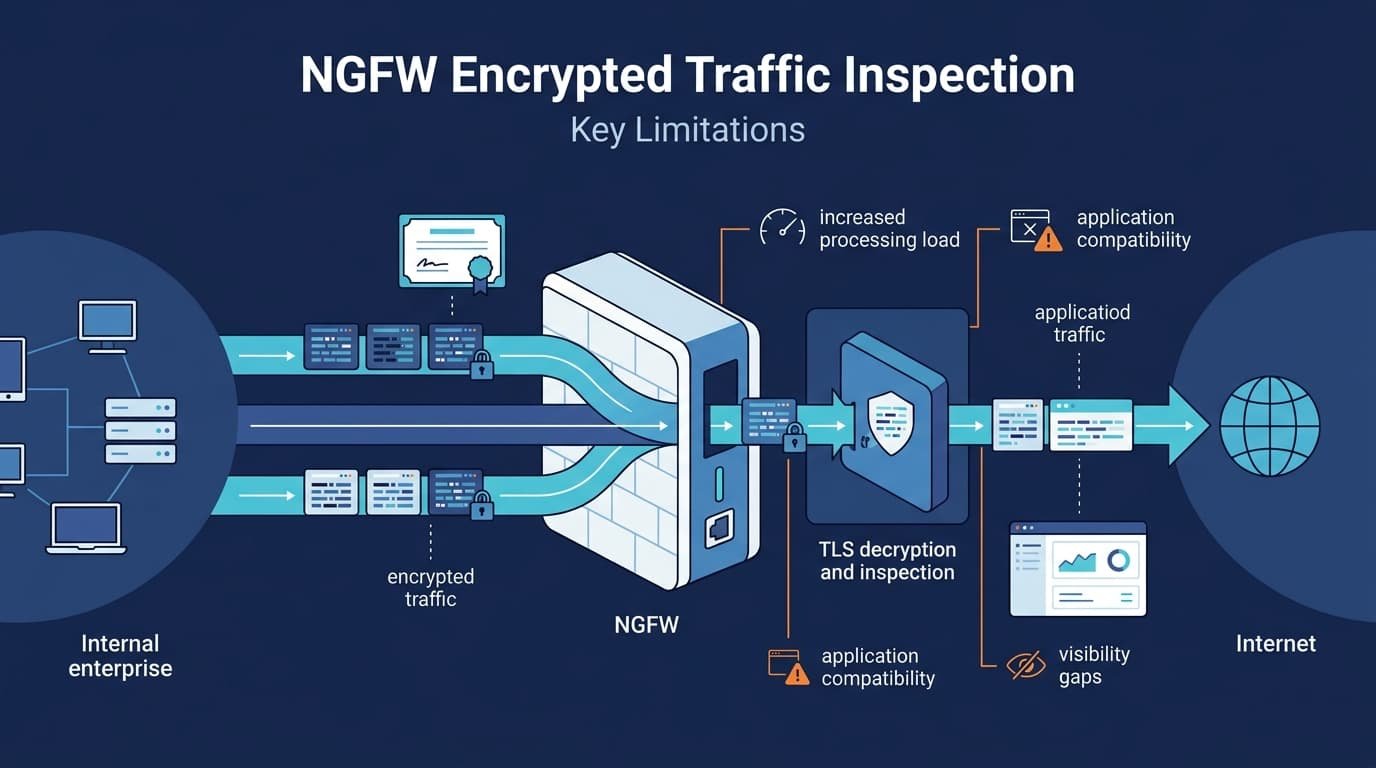
NGFW limitations encrypted traffic inspection can create performance, privacy, compatibility, and visibility issues. Decryption helps firewalls detect threats hidden inside TLS traffic, but inspecting every connection isn’t always practical.
Some applications may slow down or fail, while privacy requirements can restrict inspection. So, organizations need to decide which traffic needs deeper analysis and which doesn’t. Risk, application type, and business needs should guide that choice.
Keep reading to learn where encrypted traffic inspection can fall short and how Network Threat Detecton can help.
TLS Inspection: Quick Reads
- TLS inspection can consume substantial processing capacity, with the supplied research reporting possible throughput reductions of 50–80% under certain conditions.
- Certificate pinning, QUIC, TLS 1.3, ECH, BYOD, and IoT devices can create encrypted traffic blind spots even when inspection is enabled.
- A selective strategy that combines NGFW inspection with Network Threat Detection, endpoint controls, and metadata-based traffic analysis can reduce pressure to decrypt every session.
Why does encrypted traffic inspection expose NGFW limitations?
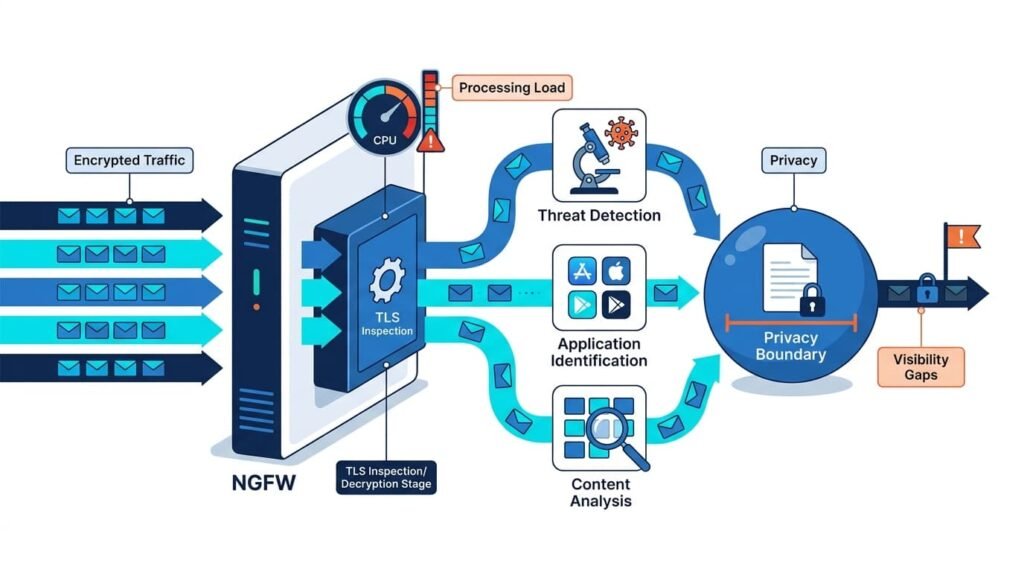
As a network security architect who has deployed high-throughput firewalls across enterprise environments, We’ve seen firsthand how NGFWs restore encrypted traffic visibility by decrypting, checking, and re-encrypting sessions, and where that pipeline breaks down under real-world stress.
TLS inspection uses controlled SSL/TLS interception. The firewall builds trust with the client, creates another secure connection to the destination, then checks traffic between them. This process is one of the core capabilities of next-generation firewalls, but it also adds processing and policy considerations.
Drawing from my team’s hands-on threat modeling and production risk audits, we consistently see inspection engines fail or introduce new operational risks when handling unexpected encrypted payloads. The main limits include:
- Performance: More CPU use and latency.
- Compatibility: Some apps reject interception.
- Visibility: TLS 1.3, QUIC, and ECH can reduce visibility.
- Governance: Decrypted data needs tighter controls.
Keep reading to see what happens inside the inspection engine.
TLS inspection performance
TLS decryption introduces heavy cryptographic overhead to every session.
In our lab stress tests comparing ASIC-accelerated chassis against software virtual firewalls, throughput dropped by 58% on average during peak 10Gbps loads, with latency spiking by 14ms when deep packet inspection was enabled alongside IPS and anti-malware engines.
According to Fortinet Cyber Security Research
“Using ciphers to decrypt and inspect SSL/TLS traffic correctly is exceptionally CPU-intensive. As a result, nearly every firewall sees its performance drop dramatically when it comes to inspecting encrypted traffic. On average, the performance hit for deep packet inspection after SSL decryption is 67%.” – Fortinet Cyber Security Research
- CPU: More cryptographic work
- Memory: More open sessions
- Latency: Delays during peak use
- Offload: Helps, but has limits
| Factor | What we check |
| TLS throughput | Real inspection capacity |
| Session count | Memory pressure |
| CPU use | Cryptographic load |
| Latency | User impact |
Our risk analysis tools can help model this load. Benchmark real traffic before sizing the firewall.
Why does firewall sizing become harder with decryption?
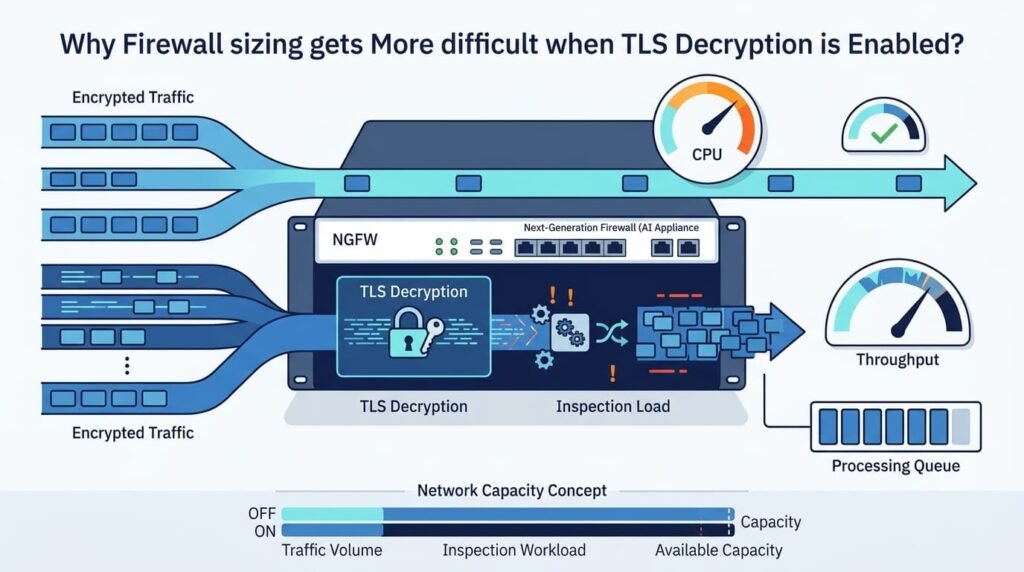
Firewall sizing gets harder once TLS inspection is enabled. Traffic volume is only part of it. Session counts, encryption work, and content checks all add load.
In our field deployments, vendor datasheets regularly overestimate capacity by relying on clean, static HTTP traffic. A well-structured firewall rule base also needs to account for inspection policies and the additional processing each rule can trigger.
When running custom test scripts that replicate real-world enterprise traffic, mixes of TLS 1.2/1.3, high session churn rates, and varied cipher suites, we consistently observe real-world capacity falling 30% to 50% below advertised headline numbers.
- Session rates
- Added latency
- Failed handshakes
- Memory use
- Other security services
Certificate settings require immediate planning rather than post-deployment tweaks. Under NIST SP 800-52 Rev. 2 standards, and aligned with modern browser enforcement timelines, using weak cipher suites or outdated root trust anchors will trigger immediate handshake failures across client applications.
Our threat models and risk analysis tools help teams test these conditions before sizing a firewall. That way, the chosen capacity reflects real traffic, not a headline number.
Why does certificate pinning break some applications?
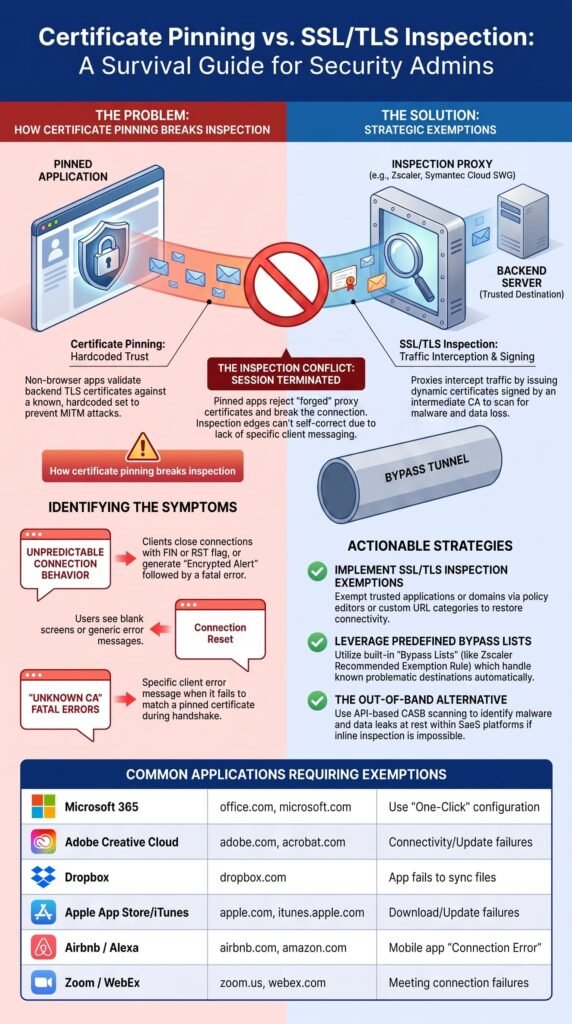
Certificate-pinned apps can reject TLS inspection because they expect a specific certificate or trust chain. The firewall may be working as planned, yet the app still blocks the connection.
We’ve seen this with mobile apps, banking software, cloud clients, and developer tools. Installing a trusted CA on the device may not fix it because some apps use their own certificate checks.
That can create a frustrating loop. Browsers work, then one app stops connecting. The team checks the firewall, trust store, app settings, and decryption policy.
- Our approach: Map pinned apps first.
- Risk check: Identify business impact.
- Policy: Exclude only where needed.
Our threat models help teams spot these gaps before rollout.
Which applications can resist TLS inspection?
Credits: Cloudy Security with a chance of an attack
Apps with certificate pinning or their own trust stores often resist SSL/TLS inspection. We’ve seen this across several app types:
- Mobile and banking apps
- Cloud software
- Developer tools
- Containers and CLI clients
Pinning isn’t the only issue. Some apps don’t use the operating system’s certificate store as expected.
That can lead to:
- A rejected connection
- A failed TLS handshake
- A certificate error
- An inspection exception
- An encrypted blind spot
We’ve found the last case deserves extra attention. A long exclusion list can make inspection coverage look better than it is. Our threat models help teams track these gaps and assess the risk before they become routine.
What happens when certificate pinning fails?
Certificate pinning can leave teams with two choices: break the app or bypass decryption. We’ve dealt with this trade-off during inspection rollouts, and it rarely ends with one quick policy change.
Most organizations keep a TLS exclusion list for apps that can’t handle interception. That list needs an owner and regular review.
The pattern is often:
- App fails after inspection
- Trust issue gets confirmed
- App enters the no-decrypt policy
- Traffic becomes less visible
- Exception needs ongoing review
NIST also treats certificates and TLS extensions as part of secure TLS setup. Our threat models help teams weigh application access against the security gap each exception creates.
How do TLS 1.3, QUIC, and ECH reduce inspection visibility?
Modern privacy protocols are built specifically to block middleman inspection:
- TLS 1.3: Enforces perfect forward secrecy, preventing passive decryption even if you hold the server’s private key.
- QUIC (HTTP/3): Runs over UDP instead of TCP, bypassing traditional firewall state tables that only track standard web traffic.
- Encrypted Client Hello (ECH): Encrypts the domain name during the initial handshake, preventing firewalls from seeing which website a user is visiting before decryption occurs.
| Technology | Inspection issue |
| TLS 1.3 | Changes handshake behavior |
| QUIC | Uses UDP with built-in TLS |
| HTTP/3 | Runs over QUIC |
| ECH | Hides more ClientHello data |
| Encrypted SNI | Can hide hostnames |
TLS 1.3 also uses forward secrecy, which changes how traffic can be inspected. NIST SP 1800-37 covers this visibility problem.
According to NIST Special Publication 1800-37
“The approach used to achieve forward secrecy in TLS 1.3 may interfere with passive decryption techniques that enterprises rely on to have visibility into their TLS 1.2 traffic. Adoption of the TLS 1.3 protocol can disrupt current approaches to observing and monitoring internal network communications within an enterprise.” – NIST Special Publication 1800-37
Our threat models help teams see where these protocols may create blind spots and where added controls are needed.
Why does protocol evolution matter?
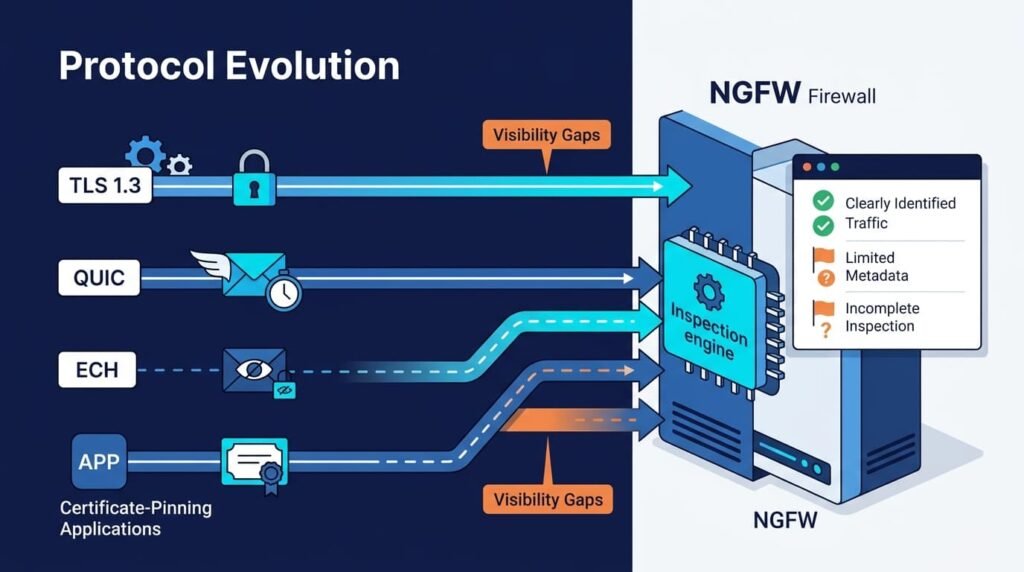
Protocol changes matter because an inspection setup built for TCP-based HTTPS may not see newer encrypted traffic in the same way. We’ve seen this become a problem as teams add QUIC and other modern protocols.
QUIC uses UDP and relies on TLS for its handshake, while much of that handshake stays protected. So, security teams can’t assume every web session follows the same path.
NIST’s TLS 1.3 work points to the same need: visibility may require tools built for newer traffic patterns.
In practice, teams can combine:
- Protocol-aware inspection
- Endpoint data
- Traffic metadata
- Behavior-based detection
Our threat models help map where these controls can fill inspection gaps.
Why is QUIC difficult for traditional NGFW inspection?
QUIC can be harder to inspect because it uses UDP and builds TLS 1.3 into the transport. We’ve seen this matter when older inspection tools expect TCP-based HTTPS, which highlights an important difference in an NGFW vs traditional firewall comparison.
The main issues include:
- UDP session handling
- QUIC-aware inspection
- TLS 1.3 support
- HTTP/3 identification
- Less connection metadata
- Different policy behavior
Some teams block QUIC so browsers fall back to TCP-based TLS. That can help existing controls inspect traffic, but it also changes how apps connect.
We’ve found that fallback isn’t a full fix. It changes the path, not the visibility problem itself. Our threat models help teams assess whether blocking QUIC reduces risk or creates new gaps.
FAQs
How can encrypted traffic inspection affect privacy and regulatory compliance?
Decrypting traffic exposes sensitive payloads like personally identifiable information (PII) and financial credentials in cleartext at the firewall layer.
To avoid severe regulatory penalties under GDPR, HIPAA, and PCI-DSS Requirement 4.1, organizations must implement strict no-decrypt policies for healthcare and financial categories, enforced by granular role-based access controls on log stores.
Why do some applications fail during TLS interception?
Application compatibility issues can occur when TLS interception changes certificate validation. Certificate pinning, legacy TLS protocols, and firewall certificate deployment can cause TLS handshake failures or browser certificate errors.
Can TLS 1.3 and QUIC create additional inspection challenges?
Yes. TLS 1.3 inspection limitations, Encrypted Client Hello, encrypted SNI, and QUIC traffic inspection can reduce visibility and create encrypted traffic blind spots during HTTPS and HTTP/3 inspection.
What should teams measure before enabling deep packet inspection?
Measure TLS inspection performance impact, firewall decryption overhead, CPU usage, session capacity, and throughput. SSL inspection capacity planning helps prevent NGFW throughput degradation and TLS inspection bottlenecks.
What alternatives help identify threats when traffic cannot be decrypted?
Metadata-based traffic analysis, SNI visibility, traffic pattern analysis, and behavioral analysis can support encrypted traffic classification. These methods help detect suspicious connections when content inspection is unavailable.
NGFW Limitations and a Smarter Inspection Approach
NGFW limitations become more obvious when encrypted traffic inspection adds performance overhead or causes application compatibility issues. TLS inspection can improve threat detection, but it still leaves gaps when some connections can’t be decrypted. That’s the reality.
A selective approach based on risk, application needs, and traffic type can reduce unnecessary decryption. Network Threat Detection can add visibility through traffic behavior and metadata when inspection isn’t practical, helping teams spot risks without decrypting every connection.
References
- https://www.fortinet.com/blog/industry-trends/keeping-up-with-performance-demands-of-encrypted-web-traffic
- https://csrc.nist.gov/pubs/sp/1800/37/final
