
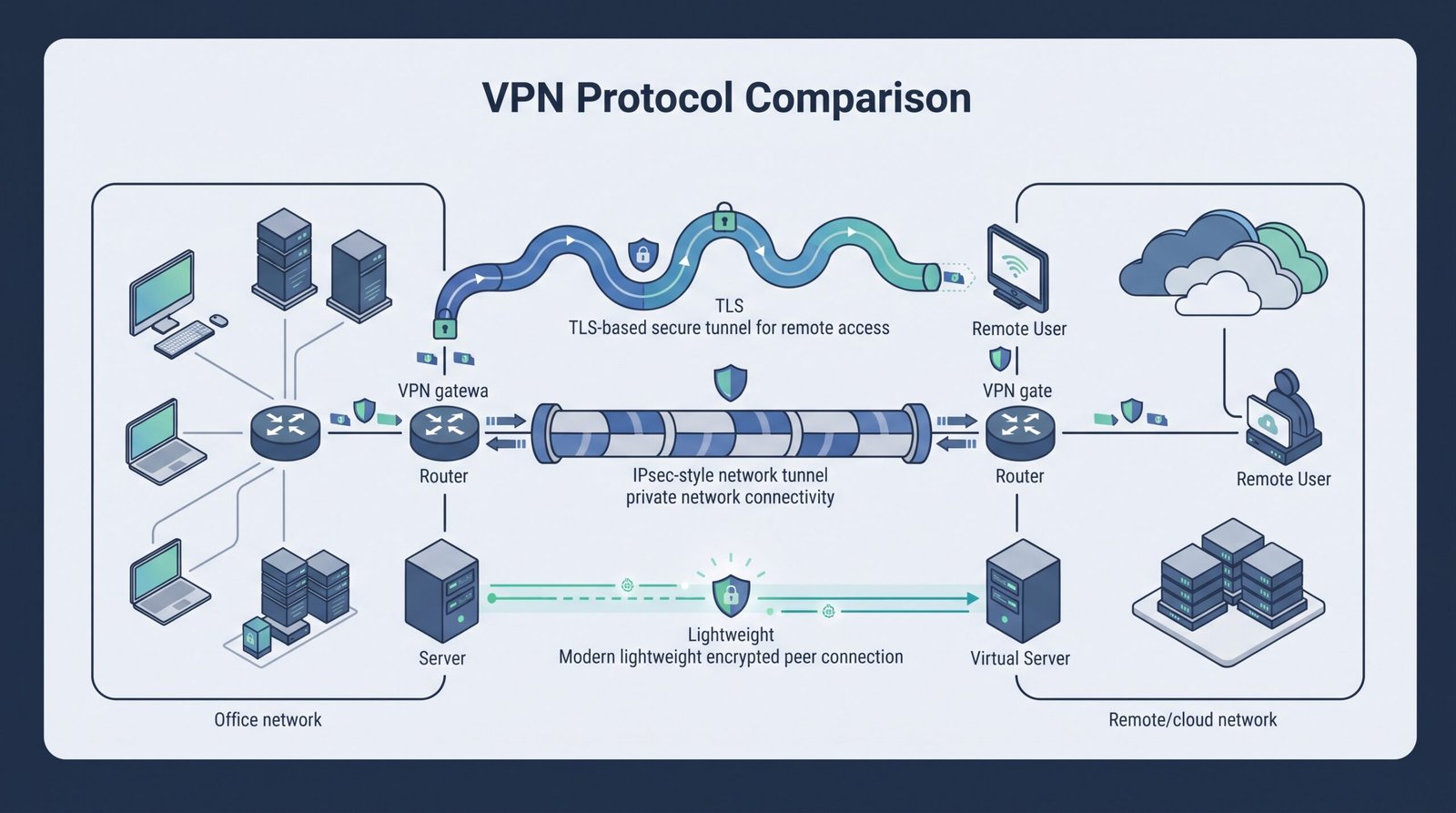
Types VPN protocols comparison IPsec SSL TLS starts with the main distinction: IPsec protects IP traffic at the network layer. While TLS-based VPNs commonly handle remote-user or application traffic. WireGuard and OpenVPN use different tunnel designs, so the right fit depends on routing, identity, firewall traversal, mobility, and how much control your team needs.
The IETF defines IKEv2 for authenticating peers and establishing security associations with IPsec. At Network Threat Detection, we look at surrounding controls, including authentication, segmentation, monitoring, and endpoint security, rather than judging a VPN by protocol alone. Keep reading to compare each option in practical deployments.
VPN Protocols: The Quick Security Read
The right VPN protocol depends on your network design, access needs, and the security controls supporting it.
- IPsec/IKEv2 fits site-to-site VPNs where routed private networks, interoperability, cloud connectivity, and multi-vendor support are important.
- TLS VPNs and WireGuard suit different access models, with TLS often fitting remote or application-focused access and WireGuard working well for controlled peer-to-peer connections.
- Secure VPNs need more than encryption, so MFA, identity controls, segmentation, patching, routing, endpoint security, monitoring, and Network Threat Detection all matter.
Which VPN protocol fits your deployment?
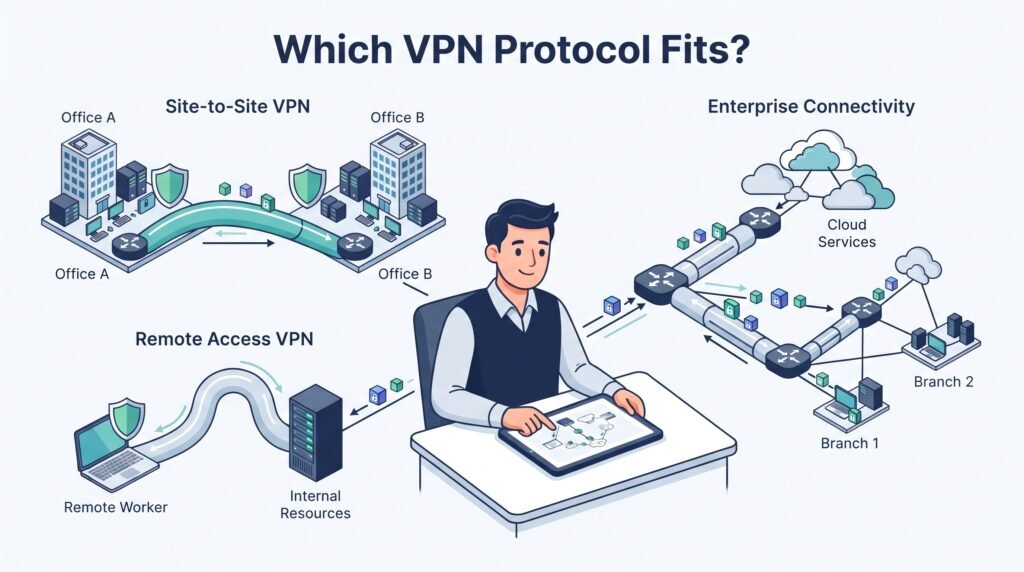
Choosing a VPN protocol starts with the network, not the protocol name. What works for a site-to-site connection may be a poor fit for remote workers, mobile devices, or browser-based access. So look at how users connect, what traffic needs protection, and how much control the security team has over the endpoints.
As highlighted by NIST
“In planning a VPN deployment, many organizations are faced with a choice between an IPsec-based VPN and an SSL-based VPN.” – NIST
IPsec, TLS-based VPNs, and WireGuard can all protect traffic, but they solve different problems.
A practical choice depends on:
- Remote or site-to-site access
- Managed or unmanaged devices
- Full or split tunneling
- Mobile network changes
- Firewall and NAT behavior
- Certificate and identity controls
- Operational skills
But security should stay in the picture from the start. A protocol can be strong on paper and still create risk if routing, authentication, logging, or access rules are weak.
We’ve found that deployment details often matter more than benchmark numbers. A protocol that fits the network usually causes fewer problems later. So test the full path before committing to one design.
Why isn’t there one “most secure” VPN protocol?
Asking for the most secure VPN protocol sounds useful, but it misses the real issue. Security does not come from the protocol alone. The surrounding design matters too.
As noted by MS-ISAC
“The prevailing VPN protocols–IPsec and SSL–are complementary, not mutually exclusive.” – MS-ISAC
A well-configured IPsec tunnel can still expose too much network access. A TLS VPN can use strong encryption but rely on weak account controls. WireGuard can protect traffic effectively while poor routing rules leave systems exposed.
A broader view of VPN technologies and security concerns helps put the protocol choice into the context of authentication, access control, endpoints, and network design.
Look at the full control set:
- Strong user authentication
- Certificate validation
- Least-privilege access
- Network segmentation
- MFA where appropriate
- Patch management
- Session and device controls
- Useful security logs
- Threat detection
And don’t forget the endpoint. A secure tunnel cannot protect a compromised laptop from every threat.
Our risk analysis work often starts with the assumption that the tunnel will eventually be targeted. That approach is more useful than ranking protocols from one to three. The strongest choice is the one that fits the threat model and can be operated correctly.
IPsec vs. TLS VPNs: what’s the practical difference?
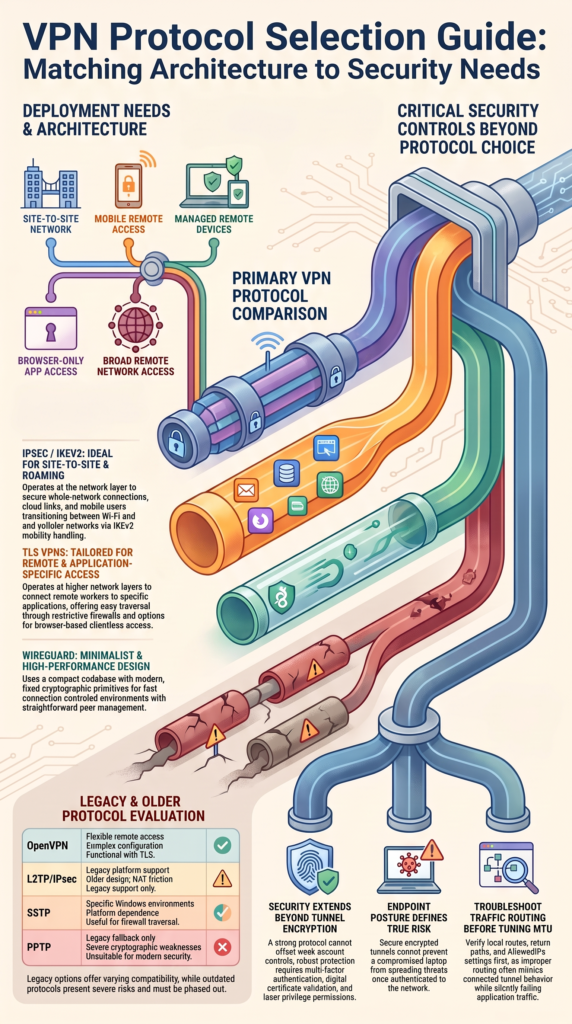
IPsec and TLS VPNs protect network traffic in different ways, and that affects where each one fits. IPsec works at the network layer. It can protect traffic between networks or between a device and a gateway. TLS VPNs usually operate through a TLS connection and are common for remote-access services.
So the user experience can be quite different.
IPsec is often useful when:
- Entire networks need to connect
- Full-tunnel access is required
- Network-layer protection is preferred
- Gateways are under central control
TLS VPNs can be easier for remote users, especially when access needs to pass through restrictive networks. Some deployments can also offer browser-based access without installing a full VPN client.
But clientless access has limits. Browser-based sessions usually do not provide the same network reach as a full tunnel. Application support and security controls also vary.
For remote work, we usually care less about which protocol sounds stronger and more about what the user must reach. If the requirement is broad network access, a full tunnel may fit. If the requirement is limited application access, a TLS-based approach may reduce exposure.
When should you choose IKEv2/IPsec?
Credits: security content
IKEv2/IPsec is a practical choice when devices need a secure network tunnel and the organization can manage the required configuration. It is especially useful for remote access, site-to-site connections, and mobile clients that may move between networks.
One reason it remains popular is connection handling. IKEv2 can support mobility better than some older VPN designs, which matters when a device moves between Wi-Fi and cellular networks.
It also supports certificate-based authentication and strong cryptographic suites. But those features do not remove operational work.
Before deployment, check:
- Certificate names and trust chains
- Authentication settings
- NAT traversal
- Firewall rules
- Address pools
- DNS behavior
- Route configuration
- Client compatibility
And test more than one device type. A configuration that works on one operating system may behave differently elsewhere.
Certificate errors are a common example. A certificate can look valid in a browser or management console but still fail VPN validation because the identity, usage, trust chain, or expected name does not match.
So treat IKEv2 as an engineering choice, not a default answer. It can be a strong fit when the network and device requirements line up.
How does WireGuard compare with IPsec and TLS VPNs?
WireGuard takes a different approach from traditional IPsec and TLS VPN designs. Its configuration is relatively compact, and its cryptographic design uses a fixed set of modern primitives rather than exposing a long list of selectable algorithms.
That can make deployments easier to understand.
WireGuard is often attractive when teams want:
- Small configuration files
- Fast connection setup
- Modern cryptography
- Straightforward peer definitions
- Good performance with low overhead
But the protocol does not remove the need for network design. Its simplicity can also expose gaps if routing, key management, or access controls are not planned carefully.
IPsec usually offers broader enterprise interoperability and more mature options for complex gateway deployments. TLS VPNs can be more convenient for remote users, especially where application access or restrictive networks matter.
Performance also needs context. A lab test may show one protocol ahead, but real networks have different CPU limits, packet sizes, routes, and NAT behavior.
In our experience, WireGuard looks especially appealing for controlled environments where peer management is clear. For larger mixed environments, operational requirements may matter more than raw speed. Fast is useful. Predictable is better.
How do you troubleshoot WireGuard connectivity?
A WireGuard tunnel can show as connected while the expected traffic still fails. That usually means the cryptographic tunnel is working, but routing or policy is not.
Start with the traffic path. Check the local address, peer configuration, destination route, firewall rules, and return path. Then review the AllowedIPs values on both ends. They affect which traffic is associated with a peer, so an incorrect entry can send traffic to the wrong place.
Also check:
- Handshake timestamps
- Endpoint addresses
- NAT behavior
- Persistent keepalive
- Firewall rules
- MTU settings
- DNS resolution
- Return routes
MTU problems can be especially confusing. Small packets may pass while larger packets fail. That can make the VPN appear healthy even though applications behave badly. So, test more than a ping. Try the actual service that users need.
For example, test DNS, HTTPS, file access, or another expected application path. Then compare packet captures or firewall logs if available.
Get the route right first. One useful troubleshooting habit is to map the packet path before changing settings. Otherwise, teams can spend hours adjusting MTU values when the real problem is a missing route.
When should you use OpenVPN, L2TP/IPsec, SSTP, or PPTP?
Older VPN protocols still appear in existing environments, but their age matters. OpenVPN can remain useful where broad client support, TLS-based transport, or an established deployment model is required. It also offers many configuration options, which can help with unusual network requirements.
L2TP/IPsec is different. It combines tunneling with IPsec protection, but modern deployments often have better choices. NAT behavior and client support can also create friction.
SSTP was designed around TLS and can help in some environments where other VPN traffic has trouble passing through network controls. Its usefulness depends heavily on the client and server platforms involved.
PPTP should not be selected for a new secure deployment. Its known cryptographic weaknesses make it unsuitable for protecting sensitive traffic.
A quick view:
| Protocol | Typical fit | Main concern |
| OpenVPN | Remote access | More configuration |
| L2TP/IPsec | Legacy support | Older design |
| SSTP | Specific Windows use | Platform limits |
| PPTP | Legacy only | Weak security |
But compatibility alone isn’t enough. If an older protocol exists in production, document why it remains and plan its replacement.
Which protocol fits common deployment scenarios?
The right protocol depends on what the connection must accomplish. Site-to-site traffic has different needs from remote workers. A managed laptop also presents a different risk from an unmanaged personal device.
For common cases, the decision can look like this:
| Scenario | Possible fit | Main focus |
| Site-to-site network | IPsec | Routing and gateways |
| Mobile remote access | IKEv2/IPsec | Roaming and certificates |
| Managed remote devices | WireGuard or TLS VPN | Client control |
| Browser-only application access | Clientless TLS VPN | App exposure |
| Broad remote network access | Full-tunnel VPN | Segmentation |
| Legacy environment | OpenVPN or older VPN | Migration plan |
And these are starting points, not automatic answers.
For example, a remote user who needs one internal application may not need access to the whole network. Giving that user a full tunnel can increase the attack surface.
Likewise, a site-to-site connection needs careful routing and VPN concentrator high availability and redundancy planning. A protocol that performs well for individual clients may not fit the gateway design.
We’d also include the threat model in the decision. Ask what happens if a credential is stolen, a device is compromised, or a tunnel endpoint is exposed.
That makes the choice much easier to defend during a security review.
How should you evaluate and secure a VPN before deployment?
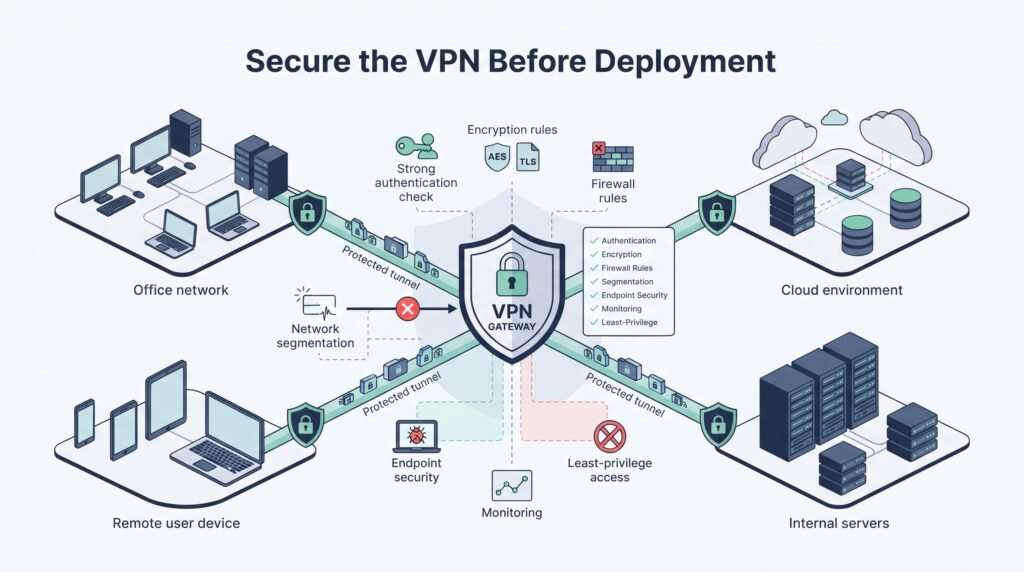
Testing a VPN should cover more than whether the tunnel connects. The useful test asks whether the connection behaves correctly under normal use, failure, and attack conditions.
Before rollout, verify:
- Authentication and MFA
- Certificate validation
- Allowed network access
- DNS and routing
- Split-tunnel rules
- Full-tunnel behavior
- NAT and firewall handling
- MTU and packet size
- Client compatibility
- Logging and alerting
- Key rotation procedures
- Disconnect and recovery behavior
Then test the controls themselves. Try an account with limited permissions. Check whether it can reach systems outside its assigned scope. Disconnect the network and reconnect. Change networks. Test expired certificates and invalid credentials.
Our threat models also look at what happens after compromise. If an endpoint is stolen, how much can the attacker reach? If a VPN account is taken over, can VPN user activity logs and audit monitoring help identify unusual access?
Don’t skip the boring tests. They often find the real problems.
Finally, document the chosen protocol and why it fits the environment. Include known limitations, ownership, review dates, and a plan for changes. A VPN should be treated as part of the security architecture, not as a standalone product setting.
FAQ
When should I choose an IPsec VPN for private network connectivity?
An IPsec VPN works well when you need private network connectivity between offices, data centers, or cloud environments. A site-to-site VPN can connect entire networks rather than individual users. IKEv2 handles VPN authentication and key negotiation, while IPsec ESP encrypts traffic inside the tunnel. This setup supports secure connections across untrusted networks.
Is an SSL VPN still secure when SSL itself is deprecated?
An SSL VPN can still refer to a VPN that uses modern TLS encryption, but SSL itself is outdated and should not be used. SSL deprecation has pushed current deployments toward newer TLS versions, including TLS 1.3. Before choosing a solution, check its VPN gateway security, authentication methods, access controls, logging, and supported TLS versions.
What is the difference between full tunnel and split tunnel VPN access?
A full tunnel VPN sends the user’s traffic through the VPN connection, while a split tunnel VPN sends only selected traffic through it. Full tunneling can provide greater control over traffic, while split tunneling can reduce unnecessary VPN traffic and latency. The choice should match your VPN access control, monitoring requirements, and VPN endpoint security needs.
How does VPN multi-factor authentication improve remote access security?
VPN multi-factor authentication adds another verification step beyond a password. This makes stolen passwords less useful by themselves. Organizations can also use VPN certificate authentication, digital certificates, or other identity controls to strengthen VPN authentication.
For sensitive remote access VPN connections, combining MFA with device posture checks and least-privilege access can further reduce unauthorized access.
What should I check when a VPN connection has latency or MTU issues?
Start by checking the routing, firewall rules, tunnel settings, and packet size. VPN MTU issues can cause slow connections, dropped packets, or applications that fail to load correctly. VPN MSS clamping may help when packets exceed the usable path size. During VPN troubleshooting, also check NAT-T, UDP ports 500 and 4500, connection logs, and tunnel status.
Choose the Right VPN Protocol
Choosing a VPN protocol starts with the actual access need, not a feature list. IPsec, TLS VPNs, and WireGuard can each work well in the right environment. The key is to test traffic, devices, routing, authentication, and monitoring against your threat model before deployment.
A practical review can also expose issues that a basic connection test may miss. Define the access requirement, verify the security controls, then document a choice your team can maintain and change. For deeper visibility into network risks, explore Network Threat Detection and strengthen how your team identifies potential attack paths.
References
- https://www.nist.gov/publications/guidelines-implementing-secure-sockets-layer-sslvirtual-private-network-vpn
- http://msisac.cisecurity.org/webcast/2005-07/info/ip_sec_ssl.pdf
