
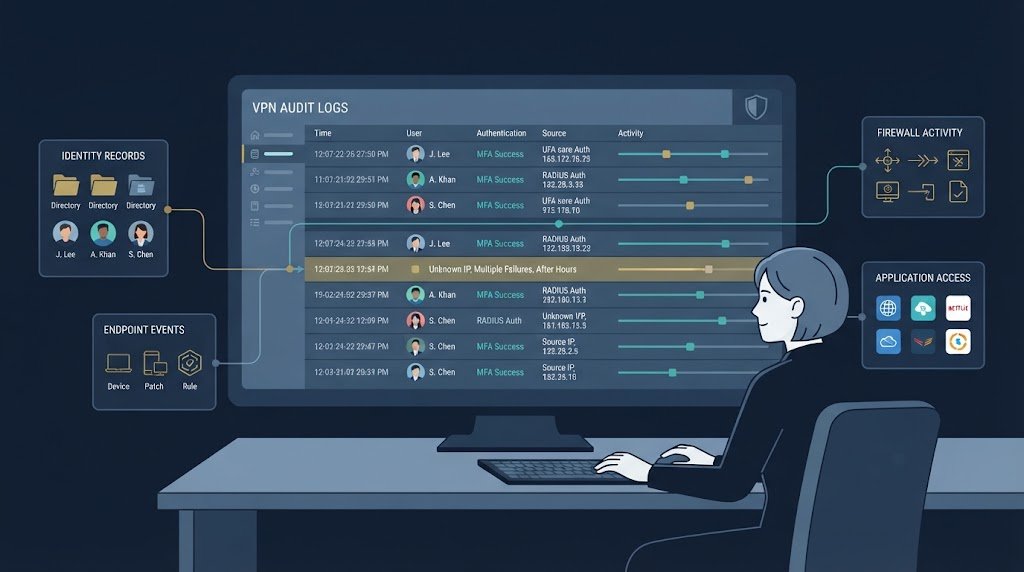
Monitoring VPN user activity logs audits helps organizations track remote access, identify suspicious behavior, and check whether security controls work as expected. We get a clearer picture when VPN connection records are matched with identity, endpoint, and application logs.
This makes it easier to trace a session and understand which systems a user accessed. At Network Threat Detection, we focus on connecting these records to support threat analysis and incident investigations. Good monitoring also requires clear rules for log storage, access, and retention. Keep reading to see how to build a reliable VPN audit trail.
VPN Log Monitoring: 3 Essentials to Remember
Effective VPN monitoring depends on collecting reliable records, connecting related events, and reviewing logs regularly to detect threats and verify security controls.
- Connect logs across systems: Combine VPN authentication, session, identity, endpoint, firewall, and application records to reconstruct user activity and investigate incidents.
- Protect audit evidence: Check logging coverage, timestamp accuracy, access controls, log integrity, and retention policies to keep records reliable and available when needed.
- Focus on suspicious behavior: Monitor unusual login times, repeated failed attempts, unfamiliar devices, unexpected privilege use, and unusual data transfers to identify potential threats early.
What does monitoring VPN user activity actually capture?
VPN monitoring can record authentication attempts, active sessions, access events, administrative changes, and security alerts. What gets recorded depends on the VPN setup and the other systems connected to it.
We usually begin with identity. RADIUS and other AAA systems can link a person to authentication and accounting records. The VPN gateway can then add session details, such as connection time and source address. That link matters because an IP address alone won’t tell an investigator who was behind the connection.
A useful audit trail should help answer a few basic questions:
- Who connected?
- When did the session begin?
- Which device was used?
- Where did the connection originate?
- Which resources were reached?
- Did anything unusual happen?
| Log category | Useful evidence |
| Authentication | Login, failure, MFA, lockout |
| Session | IP, start, end, duration |
| Access | Hosts, applications, networks |
| Administration | Policy and configuration changes |
| Security | Anomalies, transfer spikes |
Common fields include user ID, source IP, timestamps, device details, authentication method, MFA status, session length, accessed resources, transfer volume, and event results.
OpenVPN deployments can also expose connection status for session tracking. A default status update interval may be about 60 seconds, so it shouldn’t be treated as second-by-second visibility.
Why should organizations monitor and audit VPN logs?
VPN monitoring gives security teams evidence they can use during detection, investigations, access reviews, and audits. But collecting logs isn’t enough. Someone has to know what those records are meant to prove.
We normally begin with the security question. If the concern is account takeover, authentication failures and unusual login patterns matter most. If the concern is data theft, transfer volume and destination records become more useful. For access reviews, identity, device, role, and destination information carry more weight.
NIST recommends treating log management as an ongoing process that includes collection, storage, analysis, retention, and review. VPN security auditing can also show whether remote access controls behave as expected. A connection record may prove that an account connected, but it may not show which application or server the user reached.
| Goal | Evidence to prioritize |
| Threat detection | Failed logins, anomalies |
| Accountability | Identity and session history |
| Access governance | Devices, roles, destinations |
| Forensics | Correlated timelines |
| Compliance | Reviews and audit evidence |
The supplied audit framework covers ISO 27001, SOC 2, PCI DSS, and HIPAA as recurring compliance areas. Each has different requirements, so organizations should map their own controls to the applicable rules.
Keep the focus on useful evidence. More logs aren’t automatically better.
How can you define the right VPN log fields?
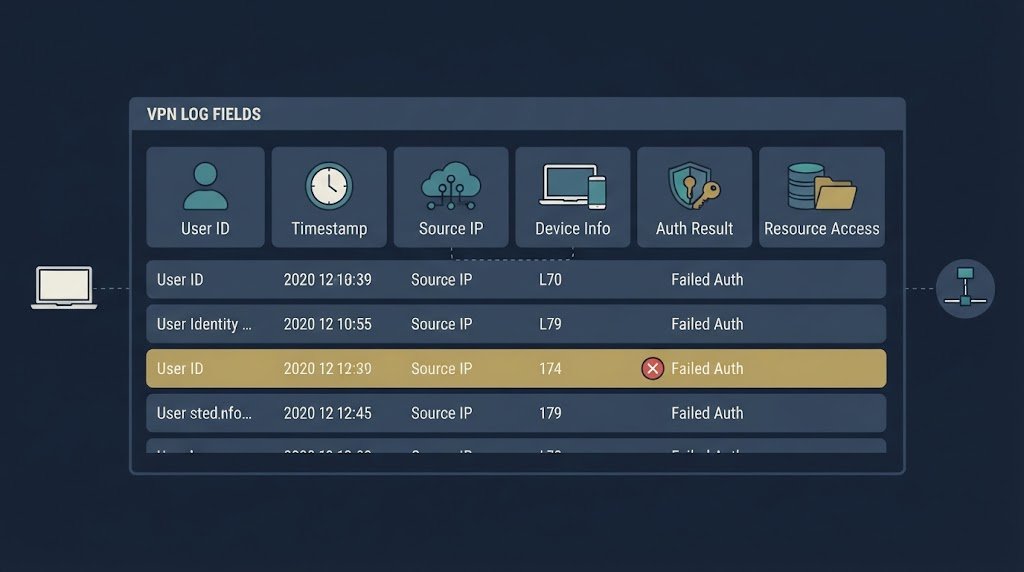
The right VPN logging schema should capture enough context to explain a connection without collecting data that nobody needs.
We start with identity because accountability depends on knowing which account or device generated an event. RADIUS attributes can add authentication details, while endpoint and network systems can fill gaps that the VPN gateway can’t see.
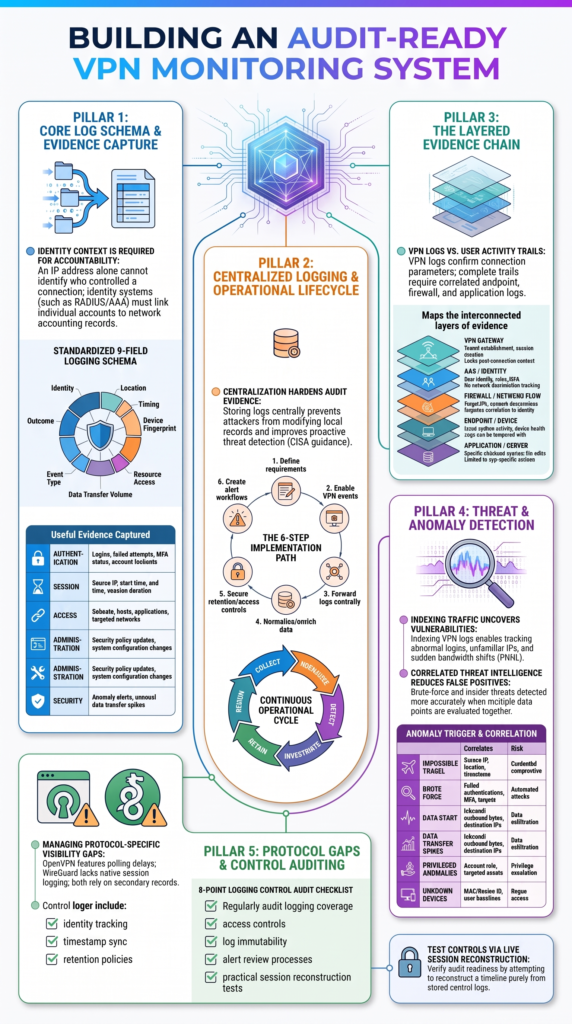
The supplied technical guidance identifies nine main field categories. They cover user identity, source IP, timestamps, device information, authentication method, accessed resources, data transfer, event type, and outcome.
A practical schema can include:
- Identity: username and identity-provider details
- Location: source IP and available location data
- Timing: connection start, end, and duration
- Device: device ID or fingerprint where available
- Authentication: method and MFA result
- Access: subnet, host, or application
- Transfer: bytes sent and received
- Event: login, logout, policy, or configuration event
- Outcome: success, failure, or error
The trick is matching each field to a real use case. VPN failed-login detection needs authentication results. Data-exfiltration monitoring needs transfer and destination details. Privilege monitoring needs account roles and access targets.
We shouldn’t collect every field because it exists. Instead, define what analysts need to know, then build the schema around those questions.
How do you implement centralized VPN audit logging?
Centralized VPN audit logging is easier to manage when teams treat it as a process rather than a single configuration task.
We first define what the organization needs to record. CISA guidance supports centralized logging because it can improve visibility, help identify users, and support proactive threat detection. Central storage can also make it harder for an attacker to alter or remove records from the system where they were generated.
For organizations connecting separate offices, configuring site-to-site VPN tunnels securely also requires clear logging and monitoring rules across connected networks.
A practical implementation follows this path:
- Define security and compliance requirements.
- Enable required VPN events.
- Forward records to central storage.
- Normalize and enrich the data.
- Protect retention and access.
- Build alerts and review processes.
Central collection makes VPN log aggregation much easier. Sending every available event to one place can overwhelm analysts. High-volume records need filtering, parsing, and useful detection rules. Otherwise, important events can disappear inside a pile of low-value alerts. We can use that principle without turning every VPN event into an alert.
The supplied workflow identifies six core implementation steps. In daily operations, though, the process keeps moving: collect, normalize, detect, investigate, retain, and review.
Which VPN anomalies should monitoring detect?
VPN monitoring should focus on behavior that may point to stolen credentials, unauthorized devices, privilege misuse, or unusual data movement.
As highlighted by Pacific Northwest National Laboratory
“By indexing VPN traffic and authentication logs, security teams can track abnormal patterns such as multiple failed login attempts, unusual IP addresses, or unexpected changes in bandwidth usage, all of which could indicate potential vulnerabilities or breaches.” – PNNL
In our threat model, impossible travel can be useful when we compare login times, source addresses, and geographic context. But one strange location doesn’t prove that an account has been compromised.
Six detection cases are useful starting points:
| Detection | What to correlate |
| Impossible travel | IP, geography, time |
| Brute force | Failed authentication |
| Unusual hours | User and role baseline |
| New devices | Device identity |
| Data spikes | Bytes transferred |
| Privileged anomalies | Role and destinations |
For example, VPN brute-force detection becomes stronger when failed attempts, targeted accounts, MFA results, source addresses, and later successful logins are correlated. The same idea helps with insider-threat monitoring. A sudden change in a user’s normal access pattern deserves context before anyone calls it malicious.
We can rank events by likely impact, required evidence, and the response they should trigger.
What can you actually log on remote access VPNs?
Remote access VPNs can provide useful session evidence, but the VPN gateway usually can’t show the full story of what a person did after connecting.
We treat VPN connection logs as one layer of evidence. AAA records can help confirm identity and authentication. Firewall logs can show network destinations. Endpoint records may reveal device activity, while application logs can show actions inside specific systems.
Research from HighTech and Innovation Journal shows
“VPN authentication log data contains a lot of essential information regarding user activity, such as login time, user ID, source IP address, and the duration of the session. This data is a valuable resource for detecting anomalies and potential security threats.” – HighTech and Innovation Journal
A useful evidence chain might look like this:
- VPN gateway, tunnel activity
- AAA, identity and accounting
- Firewall, network destinations
- Endpoint, device activity
- Application, user actions
Suppose an employee connects at 9:10 a.m. The VPN log can confirm the session. It may not tell us whether the employee opened a database, copied files, or accessed a web application.
The supplied guidance also points to logon events and account logon events in domain environments. Correlation can connect these records into one timeline.
How can Windows-based remote access environments reconstruct VPN sessions?
Credits: ITOpsTalk
Windows remote access environments often need several sources to reconstruct a VPN session. A single authentication event rarely gives investigators enough information.
Microsoft RRAS environments are a good example. Remote access can generate authentication and connection records, while related identity events may appear on domain controllers.
The basic sequence is:
VPN connection → remote access records → domain events → identity match → resource access → investigation
Time synchronization is one of the first things we check. If the VPN gateway uses one time reference and another system uses a different one, events can appear out of order. That can make a real incident look confusing.
Administrators should also confirm that suitable audit policies are enabled through Group Policy. Both successful and failed authentication events should reach the central logging system where required.
The supplied technical material identifies two core policy categories: logon auditing and account logon auditing.
We shouldn’t assume that a successful login proves everything that happened afterward. Session duration, endpoint state, server access, and application events may all be needed. Adding device, user, role, and asset details can turn scattered records into a timeline an analyst can follow.
How can OpenVPN on OPNsense or pfSense become audit-ready?
OpenVPN environments can provide useful audit information when connection status, system events, and centralized logging are used together.
One common approach is to configure an OpenVPN status file that records connected users and addresses. The supplied technical material notes that the status file may update about every 60 seconds by default. That means the data is useful for session tracking, but it shouldn’t be treated as live, instant telemetry.
A practical setup can follow these steps:
- Configure OpenVPN status output.
- Parse connected-user information.
- Track connection changes.
- Correlate status with system events.
- Account for polling and log rotation.
- Send important records centrally.
We’ve found that the biggest mistake is expecting the VPN status record to explain every user action. It can show that a connection exists. It can’t automatically prove which files were opened or which application commands were run.
Firewall records can add destination information. DNS logs may add useful context about requested names. Application and server logs can then show what happened after the connection reached a resource.
Privacy matters here, too. Organizations should collect only what their security, operational, and audit requirements justify. More visibility can help investigations, but excessive collection can create its own problems.
Why can WireGuard create an auditability gap?
WireGuard can create an auditability gap because the protocol itself may provide less traditional user and session logging than an organization expects from an enterprise VPN environment.
Understanding different VPN technologies and security concernshelps security teams assess these visibility gaps and determine which external logging sources they need.
The supplied technical material describes zero default handshake, connection, or user-activity logging in the usual enterprise sense. It means administrators may need external systems to build the audit trail.
We can fill that gap by combining several sources:
| Audit need | Possible evidence |
| Peer visibility | Network telemetry |
| User identity | Identity systems |
| Traffic context | Firewall or flow records |
| Device context | Endpoint records |
| Investigation | Correlated security logs |
The design choice depends on the environment. A small private network may need less monitoring than an organization handling sensitive systems or privileged accounts.
For security teams, the concern becomes clear during an incident. If the VPN layer has limited evidence, investigators need to rely more heavily on endpoint, identity, firewall, and application records.
Minimal logging can support privacy because fewer records are created and retained. The right balance depends on the threat model, legal requirements, and the level of accountability the organization needs.
How should you audit VPN logging controls?
A VPN logging audit should check more than whether logs exist. We need to know whether those logs can identify users, reconstruct sessions, remain protected, and support an investigation months later.
The first test is coverage. Are authentication attempts, sessions, administrative changes, and relevant security events being recorded? The next question is identity. Can an analyst connect an event to a user, service account, or device?
Organizations should also consider whether VPN infrastructure can maintain reliable access during equipment or service failures. Reviewing VPN concentrator high availability and redundancycan help teams assess continuity risks and ensure monitoring remains part of their recovery plans.
A practical review should cover:
- Event and logging coverage
- User and device identification
- Timestamp consistency
- Retention requirements
- Log access controls
- Integrity protections
- Alert review
- Investigation procedures
We also test the controls. For example, an approved test account can create a known VPN session. Analysts can then try to reconstruct it from the stored records. If they can’t, the logging design has a gap.
Audit evidence should be understandable to another reviewer. Sample sessions, retention settings, access records, alert history, and investigation timelines can all help demonstrate that the controls operate in practice.
What is the difference between VPN logs and user activity trails?
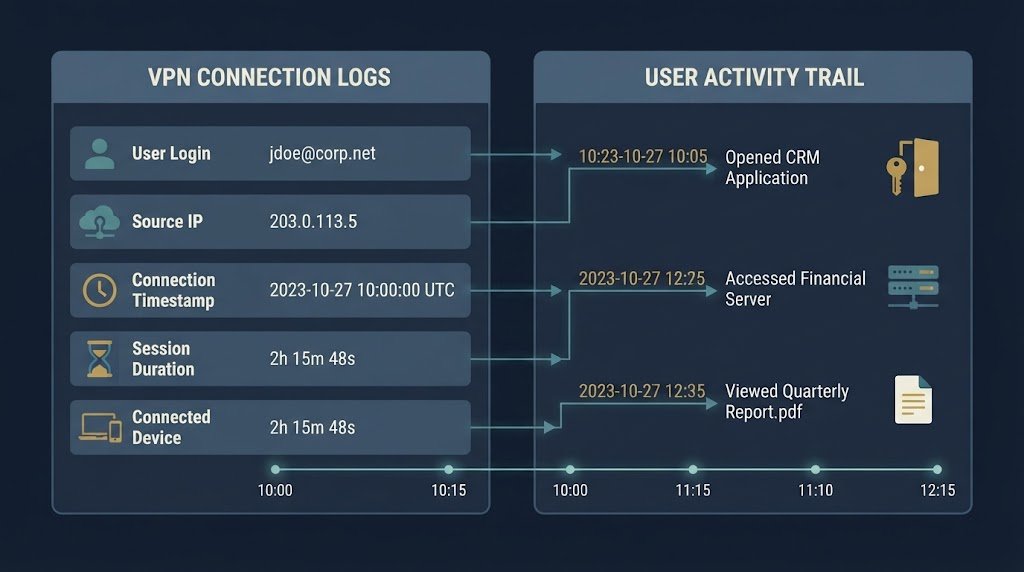
VPN logs mainly tell us about connectivity. User activity trails can tell us what happened after access was granted.
For example, a VPN record might show that a user authenticated at 9:14 a.m. from a specific source address and stayed connected for 47 minutes. That record doesn’t necessarily show which server the person used or what actions they performed there.
We can fill that gap by correlating the VPN event with other records.
| Evidence | What it can show | Main limitation |
| VPN authentication | Who logged in | Limited activity detail |
| Session log | Duration and source | Little application context |
| Firewall log | Network destinations | Identity may need correlation |
| DNS log | Requested names | Doesn’t prove access |
| Application log | Actions in an app | Depends on app logging |
| File audit log | File activity | Requires file auditing |
CISA guidance supports centralized logging and analysis because events from multiple systems can provide stronger security visibility. We use this layered model because no single record normally answers every investigation question.
Still, collecting everything has costs. Storage, privacy, processing, and analyst workload all increase. Our approach should be based on defined security questions and the risks the organization needs to address.
FAQ
What should you do if VPN logs are missing during an investigation?
Missing remote access VPN logs can make it difficult to confirm who connected and which systems they accessed. Check logging settings, storage capacity, forwarding failures, and system outages. Compare available identity, firewall, and endpoint records to fill gaps. Document any missing evidence, preserve the records you still have, and fix the cause to prevent future logging problems.
How often should you review VPN log retention policies?
Review VPN log retention policies at least once a year and whenever security risks, legal requirements, or business needs change. Set retention periods based on investigation needs and applicable regulations.
Protect stored records from unauthorized changes, and delete them when the retention period ends, unless a legal hold applies. Document the policy and confirm that authorized staff can access the logs when needed.
How can you reduce false positives in VPN anomaly detection?
VPN anomaly detection produces more useful alerts when it accounts for normal work patterns, approved travel, shift changes, and business needs. Establish baselines for user and device activity, then compare unusual events against other security signals.
Review repeated false positives and adjust detection rules carefully. This approach helps analysts spend less time investigating routine activity and more time addressing credible threats.
What evidence should you preserve during a VPN forensic investigation?
During a VPN forensic investigation, preserve original logs, timestamps, account details, session identifiers, and relevant records from connected systems. Record when each item was collected, who handled it, and where it was stored.
Restrict access to authorized personnel and keep original copies unchanged. These steps help investigators establish a clear timeline and explain their findings accurately.
How can you protect VPN logs from unauthorized changes?
Protect VPN logs with strict access controls and send copies to secure central storage. Limit log management permissions to authorized staff, and use integrity checks to identify unexpected changes.
Immutable storage can prevent records from being altered or deleted during a defined retention period. Monitor access to stored logs and test recovery procedures regularly to keep audit evidence reliable.
Improve VPN Monitoring and Audit Readiness
Effective VPN monitoring isn’t about collecting more logs, it’s about having reliable evidence to explain user activity and detect suspicious behavior. Connecting identity, session records, device context, and network events helps security teams investigate incidents and verify that access controls work as intended.
Regular audits can reveal gaps before they become larger problems. For stronger visibility into network activity and potential attack paths, explore Network Threat Detection to support threat modeling, risk analysis, and security investigations.
References
- https://www.pnnl.gov/main/publications/external/technical_reports/PNNL-37096.pdf
- https://doi.org/10.28991/HIJ-2024-05-04-016