
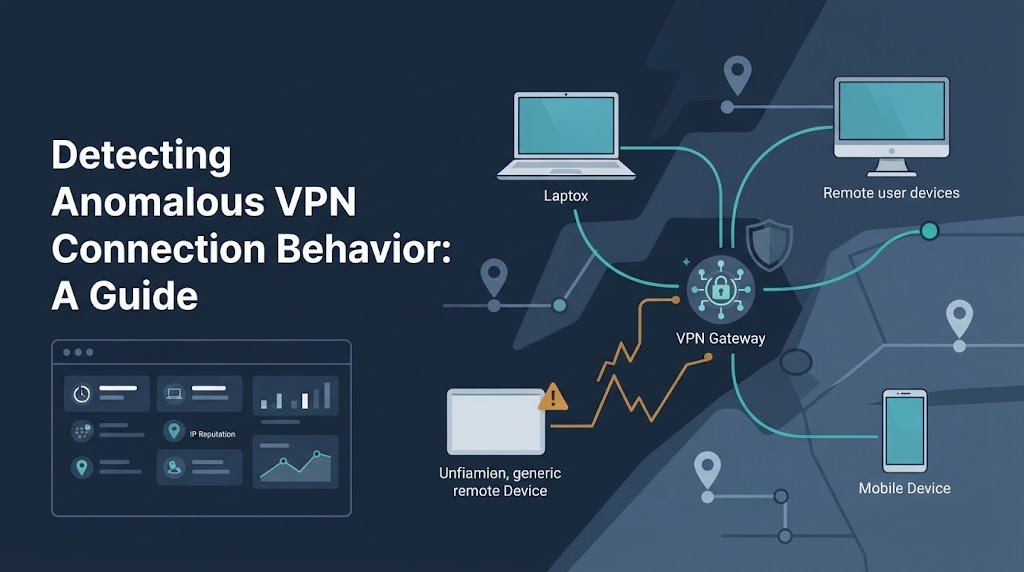
Detecting anomalous VPN connection behavior means finding connections that differ from a user’s usual login times, devices, locations, networks, or activity after login. These changes can point to stolen credentials, unauthorized access, or normal work changes that need verification.
At Network Threat Detection, we look at these signals together to help security teams identify suspicious patterns without flagging every unusual login as a threat. This guide covers behavior baselines, IP reputation, concurrent sessions, risk scoring, and investigation steps. Keep reading to learn how to detect VPN anomalies and reduce false positives.
VPN Anomaly Detection: 3 Signs Worth Watching
Detecting anomalous VPN connection behavior works best when security teams compare normal activity with unusual login patterns and investigate multiple signals together.
- Look for combined warning signs: A new device, unfamiliar IP address, impossible travel, and unexpected access to sensitive systems can indicate a compromised account.
- Use context to reduce false alerts: Compare login behavior with user roles, approved devices, work schedules, and legitimate travel before taking action.
- Connect detection with response: Combine VPN logs, identity events, device activity, and post-login behavior to prioritize risks and investigate suspicious connections.
What Makes a VPN Connection Anomalous?
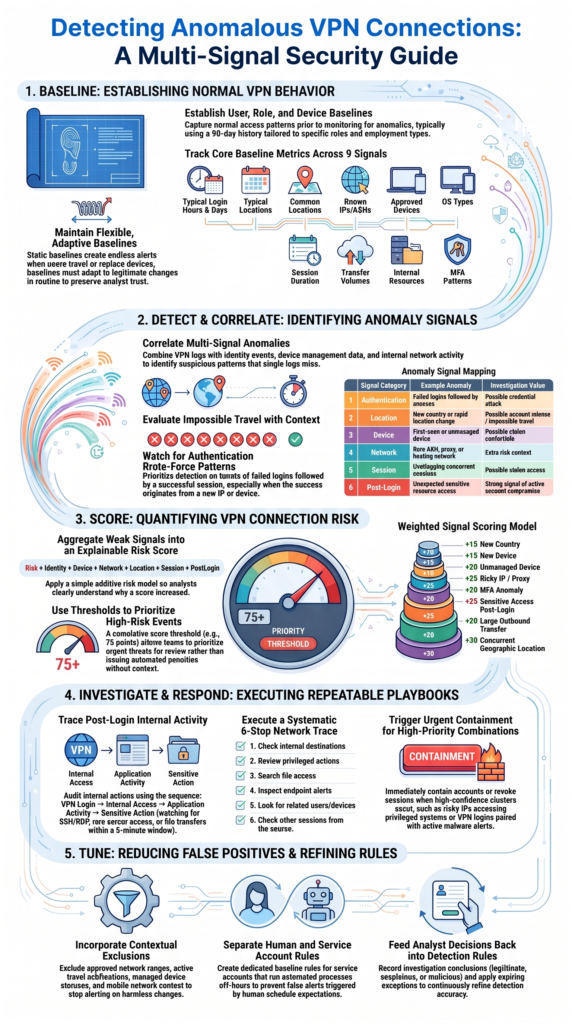
A VPN connection becomes anomalous when its behavior differs from what we normally expect for that user, device, network, or role. One unusual event may mean very little. Several unusual events together can tell a different story.
As highlighted by Pacific Northwest National Laboratory
“By indexing VPN traffic and authentication logs, security teams can track abnormal patterns such as multiple failed login attempts, unusual IP addresses, or unexpected changes in bandwidth usage, all of which could indicate potential vulnerabilities or breaches.” – PNNL
| Signal | Example anomaly | Investigation value |
| Authentication | Failed logins followed by success | Possible credential attack |
| Location | New country or rapid location change | Possible account misuse |
| Device | First-seen or unmanaged device | Possible stolen credentials |
| Network | Rare ASN or proxy network | Extra risk context |
| Session | Overlapping sessions | Possible stolen access |
| Post-login | Unusual sensitive access | Stronger compromise signal |
A suspicious VPN login becomes more convincing when signals support one another. For example, a new device, unusual IP, MFA change, and sensitive resource access form a stronger case than a new IP alone.
We should also compare the event with the user’s role. A developer, finance worker, and security analyst may have very different access patterns. One baseline can’t fit everyone.
How Should You Build a Normal VPN Behavior Baseline?
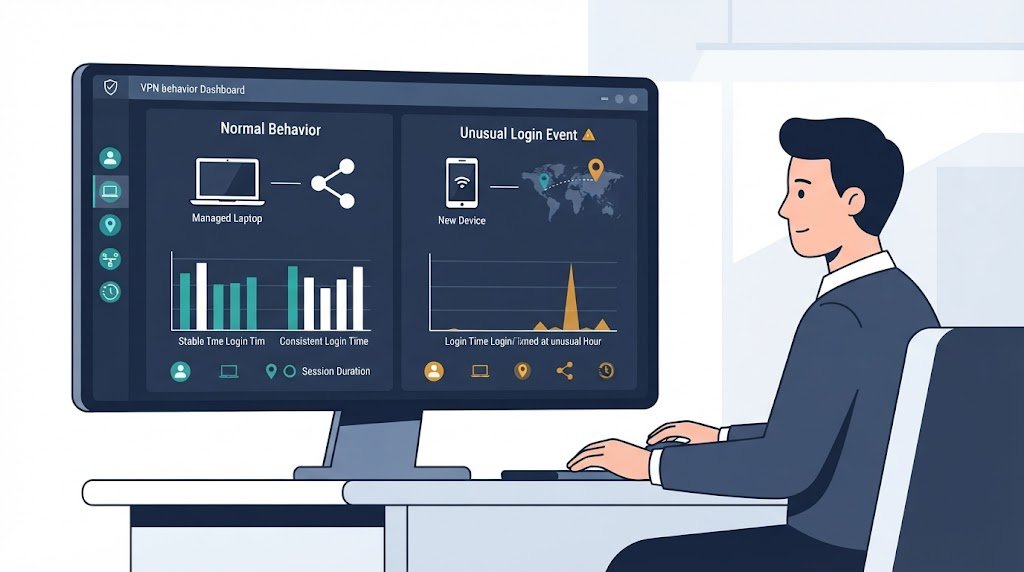
A useful baseline shows what normal access looks like before we try to identify abnormal access. It should focus on the individual user first, then add context from the person’s role, work location, and approved devices.
A 90-day history can be a reasonable starting point for many organizations. Still, the period should match the environment. Contractors who change locations often may need a different baseline than employees who work from one office.
Track signals such as:
- Normal login hours
- Common login locations
- Known IPs and ASNs
- Approved devices
- Operating systems
- Usual session duration
- Typical data transfers
- Common internal resources
- MFA patterns
For example, imagine an employee who normally connects from a managed Windows laptop during the day. The same account then logs in at 3:00 a.m. from a new Linux device and a cloud-hosted IP. That doesn’t prove compromise. But it gives our team several reasons to investigate.
Baselines should also adapt. People travel. Devices get replaced. Work schedules change. If the baseline never changes, legitimate activity can create endless alerts.
We’ve found that flexible baselines are easier to trust because they can reflect real work patterns without treating every change as suspicious.
Why Is Impossible Travel Useful but Imperfect?
Impossible travel detection compares two login locations and the time between them. If an account appears in distant locations within a period that makes normal travel unrealistic, the event can indicate credential sharing or account compromise.
The calculation is fairly simple:
- Record the previous login location.
- Record the new login location.
- Estimate the distance.
- Check the elapsed time.
- Calculate the implied travel speed.
- Review the event with other signals.
A high travel speed can raise the risk score, but it shouldn’t automatically trigger a block. VPN gateways, mobile networks, corporate egress points, and inaccurate IP geolocation can all make a user’s apparent location differ from their real location.
That matters in practice. A person might appear to log in from another city because traffic exits through a corporate gateway. Blocking that account could interrupt legitimate work.
The alert becomes stronger when other changes appear at the same time:
- New device
- Unfamiliar IP
- MFA anomaly
- Unmanaged endpoint
- Concurrent session
- Unusual internal access
Look at the full sequence. Geography is useful for finding events worth checking. It isn’t enough to prove an attack on its own.
Why Does IP Reputation Alone Miss Suspicious VPN Activity?
IP reputation gives us useful context, but it can’t tell us whether a VPN connection is safe by itself. An address may have a poor reputation because it belongs to hosting infrastructure, a proxy, or another network type. That can raise concern, but it doesn’t prove that an attacker is using the connection.
We should look at several network details together. The IP address, ASN, country, proxy status, and device history can tell a clearer story. Understanding different VPN technologies and security concerns also helps us assess how connection methods and configurations affect network visibility and security.
| Network signal | What it tells us |
| IP reputation | Known threat history |
| ASN | Network ownership |
| Country | Location context |
| Proxy status | Possible anonymization |
| Device | Endpoint consistency |
| Behavior | Activity after login |
Legitimate users can also connect through unusual networks. Remote workers may use public Wi-Fi. Contractors may use hosted systems. Travelers may rely on mobile networks.
So our detection rules should treat IP intelligence as a risk factor, not a verdict. That approach helps prevent good users from being blocked because their network looks unfamiliar.
How Can Security Teams Detect VPN Brute-Force Behavior?
VPN brute-force detection becomes more useful when we examine authentication activity across users and time. A large number of failed attempts can indicate password guessing, password spraying, or another attempt to gain access.
One pattern deserves close attention: many failed logins followed by a successful session. The risk becomes higher if that success comes from a new IP or device.
Useful patterns include:
- Repeated failures on one account
- Many usernames from one IP
- Several locked accounts
- MFA changes or unusual approvals
- Success after a failure burst
- New device after repeated failures
We should also connect VPN authentication with identity-system events. An attacker may target more than the VPN itself. Looking at both sources can reveal a sequence that one log would miss.
For example, a source might attempt many usernames, trigger account lockouts, then succeed with one account. If that account immediately accesses sensitive systems, the event deserves urgent review.
Thresholds need care, too. A busy organization can produce many failed logins during normal operations. A fixed number may therefore create noise.
Our better option is to combine volume, timing, source reputation, user history, and post-login behavior.
How Can VPN Login and Post-Login Activity Be Correlated?
A VPN login is only the beginning of the story. Once the tunnel is active, we should examine what the account and device do inside the network. The types of VPN protocols and their differences can also affect how remote connections are established and secured, making protocol context useful when investigating unusual sessions.
A useful sequence looks like this:
VPN login → internal access → application activity → sensitive action
This matters because stolen credentials can produce a perfectly valid VPN session. The authentication system may see a successful login, while network activity later reveals something unusual.
Watch for activity such as:
- SSH or RDP connections
- Rare server access
- Privileged account use
- Identity-system access
- Unusual file-share activity
- Large outbound transfers
- Endpoint security alerts
Timing helps here. If unusual internal access appears soon after a suspicious VPN login, the events may belong to the same incident. A five-minute window can be useful for an initial rule, but teams should tune that period to their own traffic patterns.
We can also compare the destination with the user’s normal behavior. A person who rarely accesses a server suddenly connects to it after an unusual VPN login creates a stronger signal.
How Should We Detect Concurrent VPN Sessions?
Concurrent VPN sessions can become suspicious when one identity appears in different locations, devices, or networks at the same time. The overlap alone doesn’t prove misuse. Some employees have legitimate reasons to use more than one device.
Our detection should first identify the context around each session. Compare the device IDs, source networks, locations, login times, and resources accessed. Then check whether the sessions are consistent with the person’s normal work pattern.
For example, a user might have one session from a company laptop and another from an approved virtual desktop. That may be normal. A different case would involve a new unmanaged device connecting from another country while the original session remains active.
Useful signals include:
- Different device identities
- Different countries
- Different source networks
- Significant session overlap
- Sensitive access during overlap
A geographic overlap of more than 15 minutes can serve as an initial detection rule, but it shouldn’t be treated as a universal limit. Organizations should adjust the threshold based on their users and remote-access setup.
Approved exceptions should also have an end date. Otherwise, a temporary exception can become a permanent blind spot.
How Can Unusual VPN Session Duration and Transfer Be Detected?
Credits: InkSec
Session duration and data transfer can reveal behavior that a basic login rule misses. The key is comparison. A six-hour VPN session may be normal for one employee and unusual for another.
We should build a history for each user and role. Track how long sessions normally last, how much data moves through the connection, and which destinations are common.
Useful measures include:
- Session duration
- Uploaded data
- Downloaded data
- Upload-to-download ratio
- Connection frequency
- Destination rarity
- Resource access
An unusually long session may indicate unattended access. A series of very short sessions could point to scripted activity. A large outbound transfer may also deserve attention, especially when it follows access to sensitive data.
But large transfers aren’t automatically malicious. Backups, software updates, cloud synchronization, and development tasks can generate substantial traffic.
This is where our baseline matters. If an employee regularly transfers large files as part of their role, the behavior shouldn’t create a high-priority alert every week.
We can raise the score when several changes happen together. An unfamiliar IP, new device, unusual session length, and large outbound transfer form a stronger pattern than any single event.
How Can Security Teams Reduce VPN Anomaly False Positives?
False positives can quickly reduce trust in a VPN monitoring system. If analysts receive alerts for every new IP or location, they may start ignoring events that need attention.
Approved travel, known corporate networks, managed devices, and normal work patterns should be part of the detection model. We should also account for split tunneling VPN risks and configuration options, since split tunneling can route some traffic outside the VPN and affect what our monitoring tools can observe.
Useful controls include:
- Approved network ranges
- Known travel periods
- Role-based baselines
- Service-account rules
- Managed-device status
- Mobile-network context
- Expiring exceptions
The baseline should also distinguish people from systems. A service account may connect at unusual hours because an automated process needs access. Applying a human user’s schedule to that account would create poor results.
Risk scoring can help as well. A new country combined with an unmanaged device, MFA anomaly, and sensitive access should create a much larger increase.
We should also record analyst decisions. If a security analyst marks an event as legitimate travel, that information can help tune future detection.
Most teams get better results when their rules explain why an event looks unusual, rather than presenting a score with no context.
How Should a Suspicious VPN Connection Be Investigated?
A suspicious VPN connection needs a repeatable investigation process. Without one, analysts may focus on the first unusual signal and miss evidence elsewhere.
Begin by checking the identity. Review recent password changes, MFA changes, account status, approved travel, and known devices. Then inspect the source network and compare it with previous activity.
Next, examine the session itself. Look at the device, operating system, VPN client, authentication method, duration, and data volume.
After that, trace what happened inside the network.
- Check internal destinations.
- Review privileged actions.
- Search for unusual file access.
- Inspect endpoint alerts.
- Look for related users or devices.
- Check other sessions from the source.
The final step is deciding what to do. If the evidence points to compromise, the team may need to revoke sessions, isolate an endpoint, disable an account, or reset credentials.
Don’t stop after containment. Record why the alert was considered legitimate, suspicious, or malicious. That result can improve future rules. We often learn the most from the sequence around an alert.
How Should VPN Login Risk Scoring Combine Signals?
Risk scoring gives analysts a way to combine several weak signals into one priority value. The score should remain explainable. Analysts need to know what caused the number to rise.
Research from Sensors shows
“Frequent changes in IP address, or the use of anonymizing services such as VPNs, can increase the risk score.” – Sensors
A basic model can look like this:
Risk = Identity + Device + Network + Location + Session + PostLogin
For example, a new country might add 15 points. A new device could add another 15. An unmanaged endpoint might add 20, while unusual sensitive access could add 25.
The exact numbers aren’t universal. We should tune them using confirmed incidents and known legitimate activity.
| Signal | Example points |
| New country | 15 |
| New device | 15 |
| Unmanaged device | 20 |
| Risky IP | 25 |
| MFA anomaly | 20 |
| Sensitive access | 25 |
| Large outbound transfer | 20 |
| Concurrent location | 30 |
A high score should trigger review, not automatic punishment. A score of 75 might be useful as an initial high-priority threshold, but our team should test that value against real events before using it in production.
The strongest model also shows the evidence behind the score. A number without context isn’t very useful. An explainable score can be.
Which VPN Signals Should Trigger Urgent Response?
Urgent response makes sense when several signals point toward active compromise. One unusual login normally needs review. A cluster of strong indicators may require containment.
High-priority combinations can include:
- Risky IP plus privileged access
- New device plus MFA anomaly
- Impossible travel plus unusual activity
- Disabled account plus successful login
- Large transfer plus sensitive data access
- VPN login plus malware evidence
Consider a user who normally connects from a managed laptop. The account suddenly logs in from a new device, uses an unfamiliar network, and accesses sensitive systems. That combination should receive more attention than a new location by itself.
We should also preserve evidence before making major changes when the situation allows. Session details, source information, device data, and related activity can help explain what happened.
If compromise is highly likely, revoke active access and contain the affected endpoint or account according to the organization’s incident process.
The response should match the confidence level. Not every anomaly needs an account shutdown.
That balance matters. Overreacting can interrupt business operations, while waiting too long can give an attacker more time inside the network. Our risk model should help analysts make that decision with clear evidence.
What Is the Practical Framework for Detecting Anomalous VPN Behavior?
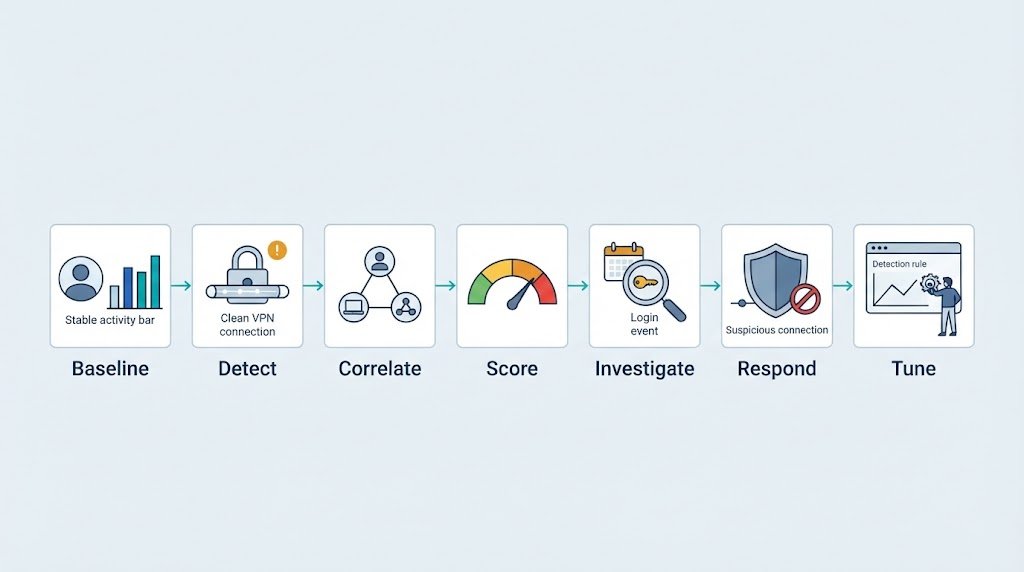
A practical VPN detection process can follow this cycle:
Baseline → Detect → Correlate → Score → Investigate → Respond → Tune
Each stage has a different job. The baseline defines normal behavior. Detection finds changes. Correlation adds context from identity, device, and network sources. Risk scoring helps prioritize the results.
Investigation then checks whether the activity has a legitimate explanation. If the evidence supports compromise, the response process can contain the account or device.
| Stage | Main focus |
| Baseline | User and role behavior |
| Detect | Login and network changes |
| Correlate | Identity and endpoint data |
| Score | Combined risk |
| Investigate | Business context |
| Respond | High-confidence threats |
| Tune | Analyst feedback |
Our first detection rules should cover high-value signals such as new devices, impossible travel, repeated authentication failures, concurrent sessions, unusual networks, abnormal session duration, and unexpected post-login activity.
Network threat detection can then connect these VPN events with activity inside the environment. We can look for reconnaissance, privilege changes, lateral movement, or unusual data access after authentication.
A strong VPN monitoring program doesn’t try to label every unusual connection as malicious. It helps our security team separate normal remote work from behavior that needs a closer look.
FAQ
How Can I Tell Whether Unusual VPN Activity Is a Security Threat?
Unusual VPN activity may indicate a security threat when several warning signs appear together. For example, a new device, an unfamiliar IP address, an unexpected login time, and access to sensitive files may suggest account compromise.
Review the user’s login history, device records, and work schedule before taking action. This helps your team distinguish legitimate changes from unauthorized access.
What Should I Do After Detecting a Suspicious VPN Login?
Start by checking the account, device, source IP address, authentication history, and activity after login. Ask the user to confirm whether they made the connection, and check for approved travel or recent device changes. If the evidence points to account compromise, revoke active sessions, secure the account, and investigate affected systems. Preserve relevant logs for further analysis.
Why Does a VPN Login From an Unknown Location Trigger an Alert?
A VPN login from an unknown location may indicate stolen credentials or unauthorized access. However, travel, mobile networks, and corporate VPN gateways can also cause location changes. Check the IP address, device history, authentication method, and activity after login.
If two distant logins occur too close together for normal travel, investigate possible impossible travel before blocking access.
How Can I Reduce False Alerts During VPN Connection Monitoring?
Create separate behavior baselines for individual users, job roles, and service accounts. Account for approved travel, managed devices, and trusted corporate networks. Avoid raising high-priority alerts based on an unfamiliar IP address alone.
Review analyst findings regularly and adjust detection rules when legitimate activity triggers repeated alerts. These steps help your team identify real threats without wasting time on harmless changes.
How Does VPN Login Risk Scoring Help Prioritize Security Alerts?
VPN login risk scoring combines signals such as new devices, suspicious IP addresses, unusual locations, and access to sensitive resources. Each signal adds to the overall score based on its risk level. Security teams can use this score to decide which alerts need attention first.
However, analysts should review the supporting evidence before deciding whether to block access or contain a potential threat.
Strengthen VPN Anomaly Detection
VPN anomaly detection works best when identity, device, network, and session signals are assessed together. This helps security teams identify suspicious behavior without treating every unusual login as a threat. Flexible baselines also matter because normal user activity changes over time.
Regularly reviewing risk scores and detection rules helps reduce false alerts while keeping meaningful threats visible. For a clearer view of activity across VPN sessions and potential attack paths, explore Network Threat Detection to support smarter monitoring and more informed security decisions.
References
- https://www.pnnl.gov/publications/analyzing-risks-virtual-private-network-connections
- https://pmc.ncbi.nlm.nih.gov/articles/PMC10575157/
