
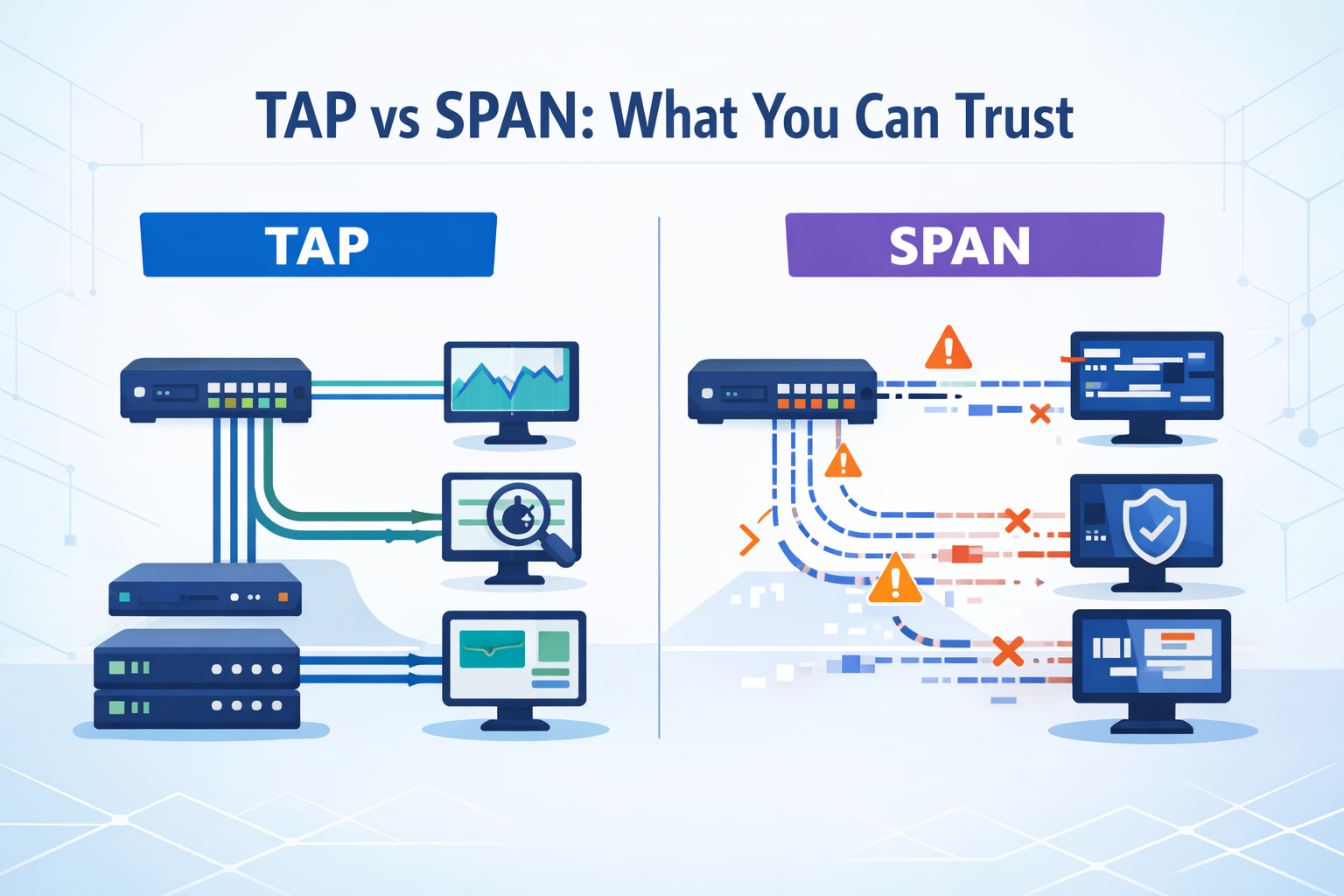
Choosing between TAPs SPAN ports comes down to one thing: how much you trust your data. Both promise visibility, but they behave very differently when traffic spikes or something breaks. We have seen this during incident reviews, where missing packets slowed root cause analysis and left open questions.
Industry guidance, including from NIST, reinforces the same point, gaps in packet capture weaken detection. At the same time, not every segment needs perfect fidelity. Some teams accept trade-offs where risk is lower. The challenge is knowing where accuracy matters most. Keep reading to see how each option really performs.
Quick Read: Choosing Between TAPs SPAN Ports
If you only need the essentials, these points capture how TAPs and SPAN behave in real networks.
- TAPs deliver 100% packet capture, while SPAN ports risk packet loss under load or oversubscription
- SPAN ports are cost-effective and flexible, but introduce monitoring blind spots in high-speed environments
- A hybrid approach often works best: we prioritize Network Threat Detection on critical links, then extend coverage with SPAN where acceptable
What Are Network TAPs and SPAN Ports?
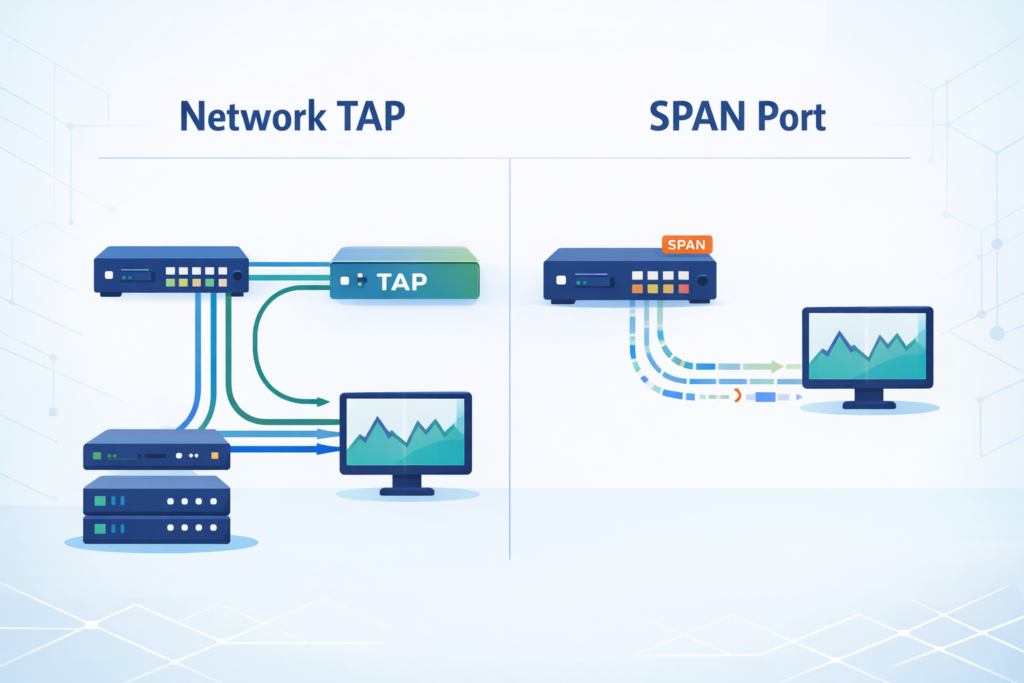
A network TAP is a hardware device placed inline. It copies traffic as it passes through, without relying on the switch. A SPAN port, on the other hand, mirrors traffic using the switch itself. That difference seems small, but it affects everything that follows.
From our deployments across data centers and WAN links, TAPs behave consistently even when networks are under stress. SPAN depends on switch resources, so its performance changes with load. The practical impact of this becomes clearer when evaluating the broader network Taps vs. SPAN/mirror ports discussion in real operational environments.
TAPs also capture traffic in both directions separately. That means you see full conversations without mixing streams. SPAN ports combine traffic into one output, which can create gaps when bandwidth is tight.
- TAPs capture all packets, including errors and malformed frames
- SPAN may drop or filter packets during heavy traffic
- TAPs scale cleanly at higher speeds like 10 Gbps and beyond
- SPAN depends on switch limits and configuration
We often notice the difference during troubleshooting. With a TAP, the data is complete. With SPAN, there is always a question: did we miss something?.
TAP vs SPAN: Key Technical Differences That Matter
Credits: ITFreeTraining
The biggest difference is trust in the data. TAPs give a full copy of traffic. SPAN gives a best-effort version that can change under load. That gap becomes obvious during testing and real incidents.
We have tested both using packet capture tools and threat detection systems. When fed by TAPs, tools produce stable and repeatable results. SPAN feeds, however, often show missing packets or timing issues.
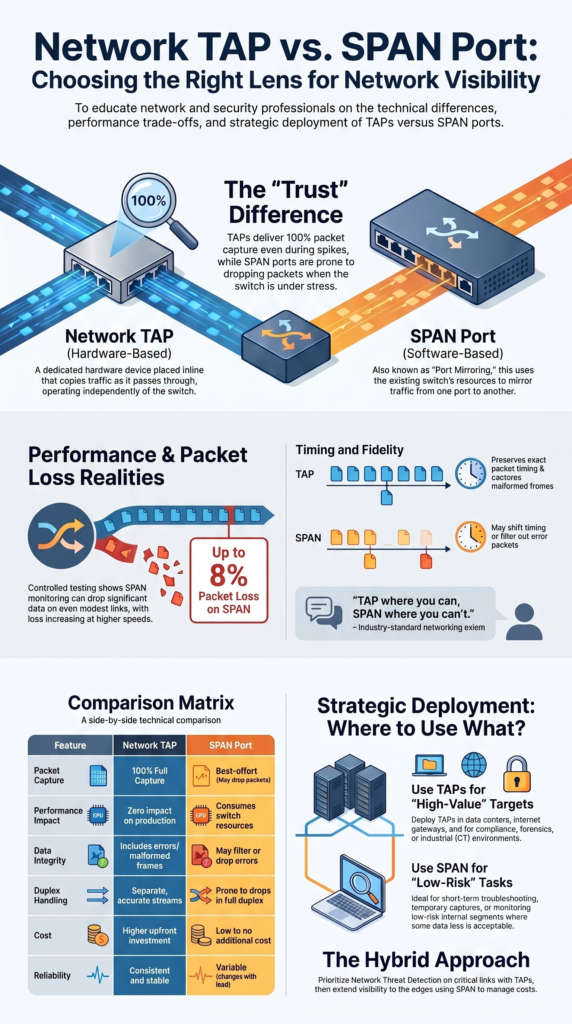
In one controlled test we reviewed, SPAN monitoring dropped up to 8% of packets on a modest link. At higher speeds, the loss tends to increase. That aligns with what we have seen during busy periods and reflects common SPAN port limitations and oversubscription issues that surface as traffic scales.
Timing also matters. TAPs preserve packet timing accurately. SPAN can shift timing due to buffering, which affects analysis.
- TAPs deliver complete packet capture without loss
- SPAN can drop or duplicate packets
- TAPs support multiple monitoring tools at once
- SPAN struggles when traffic is aggregated
When detection depends on patterns across packets, missing data changes the outcome. That is why we treat TAP-fed data as the baseline for serious analysis.
Performance Impact and Packet Loss Realities
Looking at performance, TAPs introduce almost no delay. In most cases, the added latency is so small it does not affect applications. That makes them safe to use even in critical paths.
SPAN ports behave differently. Because they rely on the switch, they compete with normal traffic for resources. When the switch is busy, mirrored traffic is the first thing to suffer.
Insights from Keysight indicate
“One key difference is that SPANs provide summarized data (instead of a complete copy of all data) that can often be missing key data you need for proper problem resolution.” – Keysight Blogs
We have seen this during peak hours. Monitoring streams become incomplete, and packet loss increases without warning. In high-speed networks, the effect is more noticeable.
Research from SANS suggests that even a small amount of packet loss can reduce detection accuracy significantly. That matches our own findings during threat simulations.
- TAPs avoid packet loss entirely
- SPAN drops packets during bursts or overload
- TAPs handle bidirectional traffic cleanly
- SPAN creates bottlenecks when multiple sources are mirrored
The problem is timing. Packet loss often happens when you need visibility the most, during spikes or attacks. That makes SPAN risky in high-value environments.
Deployment Scenarios: Where Each Option Fits
Different parts of a network need different levels of visibility. We usually start by mapping which segments carry the most risk, then choose the monitoring method accordingly.
As noted by Gigamon
“To quote a networking axiom: TAP where you can, SPAN where you can’t.” – Gigamon
Critical paths like data centers, interconnect links, and internet gateways need full visibility. Missing packets there can affect detection, compliance, or investigations. TAPs are the safer choice in those areas. Especially when considering the broader network tap deployment advantages for visibility in high-fidelity monitoring environments.
Less critical segments can tolerate some loss. For short-term troubleshooting or low-risk monitoring, SPAN is often enough and easier to deploy.
- Use TAPs for security monitoring, compliance, and forensics
- Use TAPs in OT and industrial environments where accuracy matters
- Use SPAN for temporary captures or troubleshooting
- Use SPAN in low-risk internal segments
We have built hybrid setups in many environments. TAPs handle the core traffic, while SPAN fills in the edges. This keeps costs under control without sacrificing visibility where it matters.
That mix tends to hold up well as networks grow and threats become more complex.
TAP vs SPAN Comparison
| Feature | Network TAP | SPAN Port |
| Packet Capture | 100% full packet capture | Best-effort, may drop packets |
| Performance Impact | No impact on production traffic | Shares switch resources |
| Full Duplex | Accurate and separate streams | Limited, prone to drops |
| Packet Loss | None | Common under load |
| Cost | Higher upfront cost | Low or no additional cost |
| Use Case | Security and forensics | Troubleshooting and testing |
| Reliability | Consistent | Variable |
From what we’ve seen in real environments, these differences show up fast. This isn’t just theory on paper. Once traffic spikes or analysis tools need clean data, gaps become obvious.
Most teams begin with SPAN because it’s already there and easy to use. That makes sense early on. But over time, people notice missed packets, especially during peak loads. That’s usually when the shift starts.
In our work building threat models and running risk analysis, we rely on accurate data. If visibility is incomplete, conclusions can be off. That’s where TAPs tend to fit better, especially for security monitoring and investigations.
It’s not about replacing everything at once. Many teams still use SPAN for quick checks:
- Short-term troubleshooting
- Low-risk environments
- Initial visibility setups
But as needs grow, reliability becomes harder to ignore.
Monitoring Architecture and Strategy Considerations
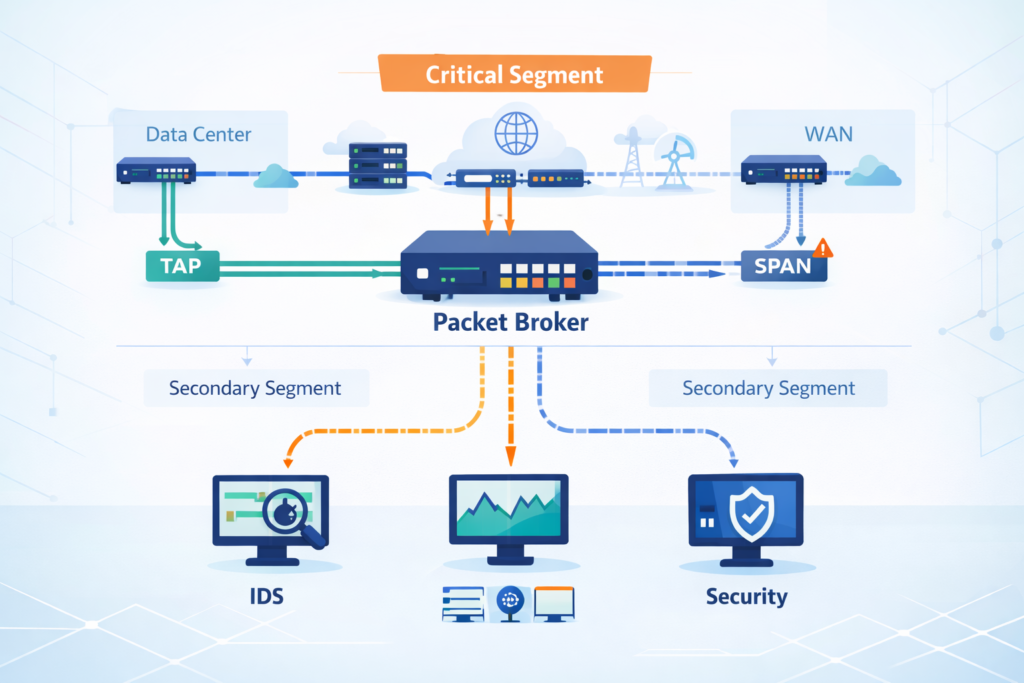
Choosing between TAPs and SPAN ports is not just about devices. It is about how the whole monitoring system is designed. We usually begin by identifying which parts of the network cannot afford blind spots.
Once those areas are clear, we map tools and capacity. Packet brokers, monitoring appliances, and detection systems all depend on the quality of incoming data.
In setups with multiple tools, TAPs make scaling easier. They allow parallel monitoring without adding load to switches. SPAN often struggles when feeding several systems at once.
- Identify critical segments first
- Align sensor placement with high-fidelity data sources
- Use TAP aggregation for scaling
- Avoid overloading SPAN with too many mirrored inputs
We have seen detection improve when visibility is layered properly. Good data leads to better alerts and faster response.
At the end of the day, tools are only as good as the traffic they see. If the input is incomplete, the results will be too.
Choosing Between TAPs and SPAN Ports in Practice
Real-world decisions usually come down to budget and risk. Not every organization can deploy TAPs everywhere, and not every segment needs that level of detail.
In our work, we treat threat detection as the baseline for critical environments. That pushes TAPs into key roles, especially where security monitoring depends on accurate data.
SPAN still has a spot. It’s quick to deploy, flexible, and handy for diagnostics. But we almost never rely on it alone for a security monitoring strategy in high-value networks.
Choose a TAP when:
- You cannot accept packet loss.
- You need full duplex monitoring at line rate.
- Compliance or forensics is a must.
Choose SPAN when:
- Your budget is very tight.
- The monitoring is temporary.
- Some packet loss is okay.
Most environments evolve over time. They start simple, then add more reliable visibility as risks become clearer.
The goal is not perfection everywhere. It is making sure the important parts are covered properly.
FAQ
How do I choose between a network tap and a SPAN port for monitoring?
Choosing between TAPs SPAN ports depends on how accurate your data needs to be. A network tap gives full packet capture without packet loss, which supports reliable IDS monitoring and network forensics.
A SPAN port is easier to set up, but it may drop packets when traffic increases. For critical network segments, teams usually choose taps for consistent network visibility.
When do SPAN port limitations affect network visibility the most?
SPAN limitations affect network visibility during high traffic or when several sources share one monitoring port. This can create a SPAN bottleneck and cause missing packets on SPAN or buffer drops.
These issues reduce the accuracy of packet analysis and network security monitoring. The problem often appears in 1 Gbps SPAN environments under heavy load.
Why is full packet capture important for IDS and IPS monitoring?
Full packet capture gives IDS monitoring and IPS monitoring systems complete data to analyze. When packet loss occurs, detection accuracy drops, and some threats may not be seen.
Tools such as Zeek sensor or Suricata deployment depend on clean and complete input. Full duplex monitoring and accurate packet time stamping also improve network behavior analysis.
Where should taps or SPAN ports be placed in a network?
Placement depends on your monitoring goals and risk level. Teams often use network taps for internet gateway monitoring, DCI link monitoring, and core switch monitoring. They use SPAN ports for LAN monitoring or short-term troubleshooting. Good IDS placement and a clear monitoring architecture help reduce blind spots and improve network visibility.
Can a hybrid approach improve network monitoring design?
A hybrid approach can improve network monitoring design in many environments. Network taps handle critical traffic with full packet capture and no packet loss. SPAN ports provide flexible monitoring in lower-risk areas.
Packet brokers and monitoring tools support parallel monitoring across systems. This approach helps balance cost while maintaining strong network visibility.
Clear Visibility, Smarter Decisions
You feel the strain when your monitoring setup starts missing things, packets drop, alerts don’t line up, and you’re left second guessing what actually happened. It slows you down.
That’s where Network Threat Detection comes in, giving you a simple way to see real risk and act faster. If you want a setup you can trust, start here and build visibility that actually supports your decisions.
References
- https://www.keysight.com/blogs/en/tech/nwvs/2020/06/11/visibility-architectures-the-abcs-of-network-visibility
- https://www.gigamon.com/content/dam/resource-library/english/white-paper/wp-network-taps-first-step-to-visibility.pdf
