
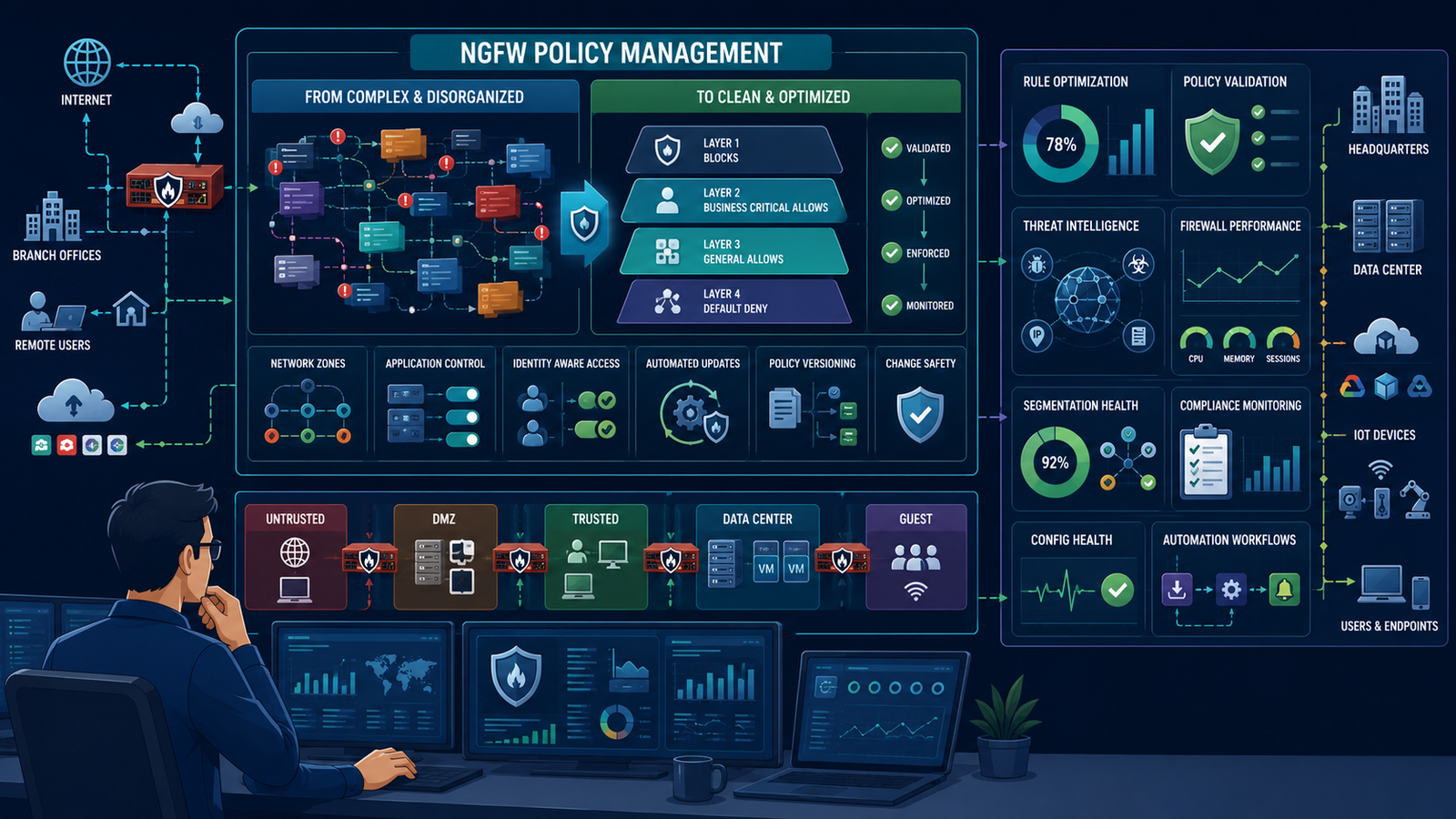
You start with one rule, then ten, then a hundred, until you’re afraid to touch any of them. Managing NGFW policies effectively complexity becomes nearly impossible when rulebases turn into a chaotic mess, leaving teams struggling with unnecessary firewall complexity.
At Network Threat Detection, we see this reactive approach ruin security operations every day. The good news? You can fix the chaos. Keep reading to transform your sprawling rulebase into a clean, maintainable, and robust security framework.
Core Pillars of Effective Policy Management
Transforming a messy rulebase starts with a shift in strategy. Here are the fundamental principles to keep your firewall structure clean, maintainable, and secure:
- Architect with Layers: A logical, structured policy hierarchy is non-negotiable for long-term policy control and accurate traffic enforcement.
- Prune the Noise: Automated, routine cleanup of stale rules and objects matters far more than constantly adding new configurations.
- Inject Network Context: Integrating dynamic threat intelligence directly into policy decisions reduces manual overhead and stops attacks faster.
Why Does Your NGFW Rulebase Become a Mess So Quickly?
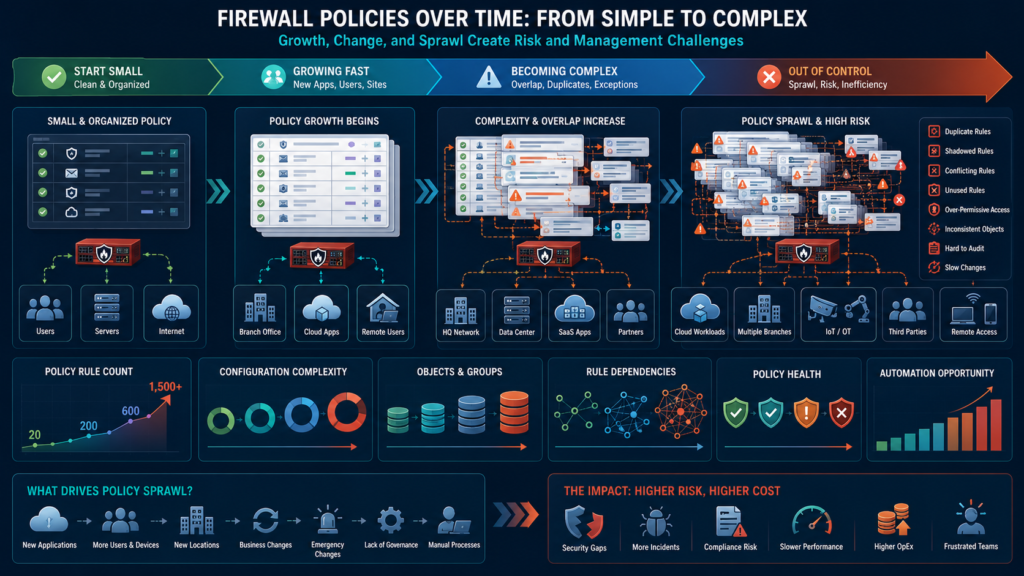
It happens to everyone. A new application needs access. You add a rule. A security audit finds a vulnerability. You add another rule to block it. A department complains about slow performance. You create an exception.
Each request seems urgent, logical in isolation. But there’s no master plan. Rules are added at the bottom, or wherever seems easiest. Over months and years, this creates a rat’s nest of dependencies, overlaps, and hidden conflicts.
“The traditional manual approaches for configuring firewalls have become error-prone, unoptimized and time-consuming, leading to an increasing number of policy anomalies, including both sub-optimizations and conflicts.” –Ieeexplore
The technical term is “rule sprawl.” The human result is operational paralysis. No one fully understands the policy set. Making a change feels risky. You might break something. Worse, you might create a shadow rule, a duplicate or overly permissive entry buried deep in the list, that undermines your entire security posture.
We inherited a rulebase like this once. It had over 1,500 rules. The first 50 were carefully crafted. The last 1,450 were a chronological diary of panic and pressure. It was un-auditable and, we later found, full of holes.
The root cause is almost always a lack of a governing structure from day one. Without a framework, every request is an emergency, and every solution is a quick fix that becomes permanent technical debt. The firewall becomes a liability instead of an asset.
What’s the Right Way to Structure Rules for the Long Haul?
The antidote to sprawl is intention. You need a template, a logical architecture for your firewall rule base before you write rule number one. Think of it like organizing a library. You don’t just put books on a shelf in the order they arrive. You have a Dewey Decimal system.
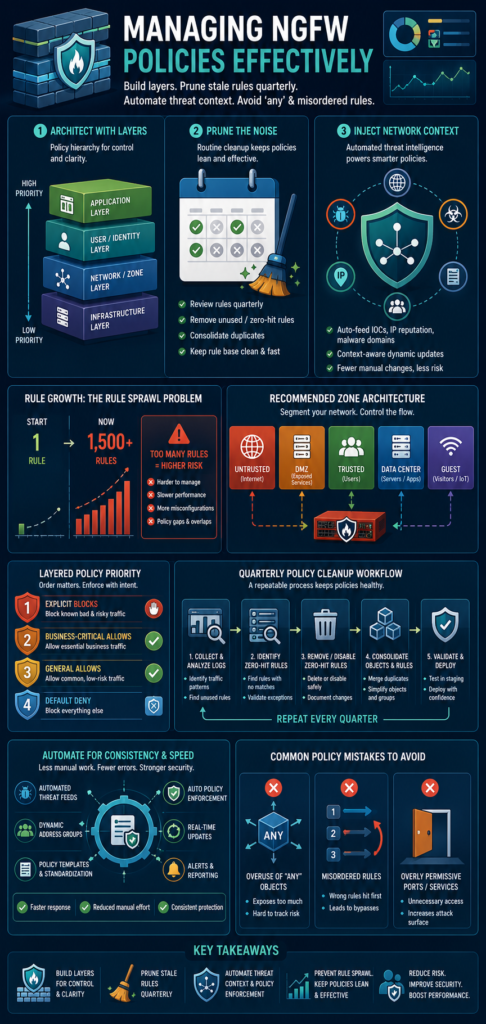
A proven method is the zoning model. You define clear security zones: Untrusted (Internet), DMZ, Trusted (Internal), Data Center, Guest. Rules are then written to govern traffic between these zones, not between individual IP addresses.
This immediately reduces complexity. A single rule like “Trusted to DMZ for Web Services” replaces dozens of micro-rules for each server.
Within each zone-to-zone policy, order rules by security priority. The top should be your most restrictive, explicit blocks. Then come your allows for specific business applications. At the very bottom is a default “deny all” or a very restrictive catch-all. This “cleanup rule” is your safety net. We structure ours in this exact layered fashion:
- Explicit Blocks: Known malicious IPs, forbidden applications.
- Business-Critical Allows: ERP, CRM, VoIP, specific apps with specific ports.
- General Allows: Web browsing, email (with inspection).
- Default Deny: Logs everything else for review.
This structure is self-documenting. Anyone can look at it and understand the security intent.
How Often Should You Really Clean Up Your Policies?
Creating a good structure is step one. Maintaining it is the endless step two. Without scheduled hygiene, even the best library becomes cluttered. The goal is to make cleanup a ritual, not a reaction.
We do it quarterly. The process starts with reports. Every NGFW can generate logs showing you which rules are being hit and, more importantly, which ones are not. Those “zero-hit” rules are your prime candidates for removal.
They might be for a server that was decommissioned two years ago, or an application no one uses. Deleting them reduces the attack surface and improves performance.
Next, look at object usage. You have network objects, service objects, application objects. Are they still referenced? An unused object is just clutter. Merge duplicate objects. Standardize naming conventions. Was it “Server_Finance” or “Fin-SRV-01”? Pick one standard and rename everything to match.
Finally, review the rules themselves. Do any contradict each other? Has a more specific rule made a broader one above it obsolete? This is where having that initial logical structure pays off. It’s much easier to spot a rule that’s in the wrong “layer” of your policy. This quarterly review isn’t just busywork. It’s preventative maintenance for your security posture.
Can Automation and Context Simplify Policy Management?
Credits: NetAdmin.us
Manual review is good. Automated intelligence is better. The real breakthrough in managing complexity comes when your NGFW policies leverage user identity awareness and wider network context, rather than relying solely on manual admin input. This moves you from static rulekeeping to dynamic policy enforcement.
This is where we integrate our network threat detection. It operates on a separate, analytical layer. It observes all traffic, learns normal patterns, and identifies anomalies or confirmed threats.
Instead of us manually creating a rule to block a suspicious IP we read about in a report, the detection system can automatically push that IP into a “Threat Feed” object group on the NGFW. A pre-written policy at the very top of our rulebase blocks traffic to and from anything in that “Threat Feed” group.
The same principle applies to application control. Rather than trying to manually discover and sanction every new cloud app employees are using, the system can identify them, categorize them (like “High-Risk SaaS” or “Productivity”), and suggest policy actions.
What Common Policy Mistakes Create the Most Risk?
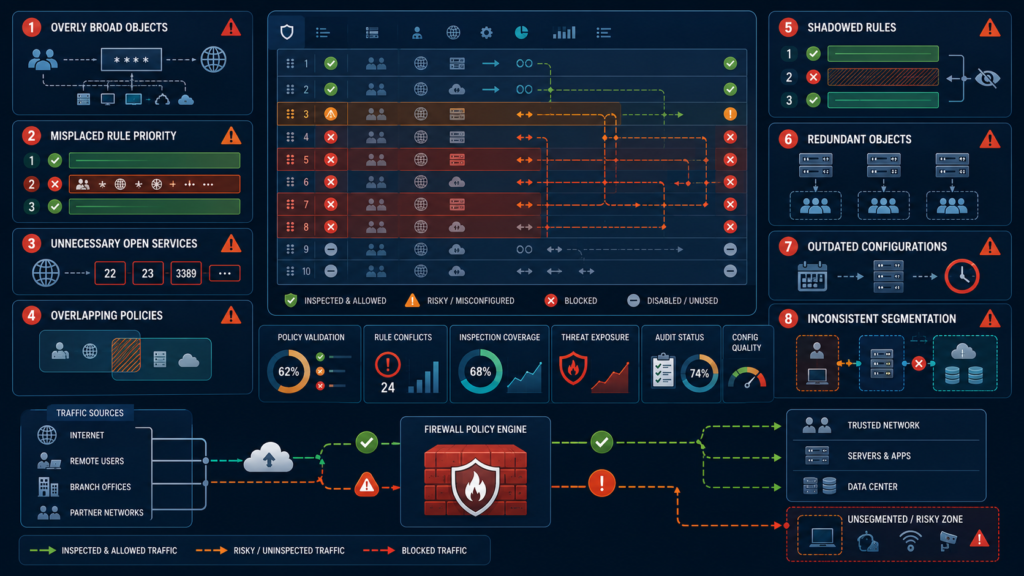
Even with good structure and hygiene, subtle errors can creep in. These aren’t bugs, they’re misunderstandings of how the firewall processes rules. The most dangerous is the “any” object. It’s so tempting.
“Through 2025, policy misconfigurations, not firewall flaws, will remain the cause of 99% of firewall breaches and bypasses.” –Reach
A rule that says “Allow Internal_Net to Any for HTTP” seems fine. But “Any” means any destination, including malicious IPs on the internet. You’ve just created a wide-open tunnel.
Another is mis-ordered rules. Remember, firewalls typically process rules top-down, first match wins. If you have a broad “Allow” rule (like for web browsing) too high in the list, it will match before a more specific “Block” rule below it for a known bad site. The block rule will never be reached. It’s a logic error that nullifies your security.
Overly permissive service definitions are a silent killer. Using “ANY” for port/protocol, or using a broad range like “TCP/1-65535,” defeats the purpose of essential ngfw features. It’s reverting to a simple packet filter. The NGFW can’t apply application-level inspection if you tell it “any port is fine.”
We audit for these specifically:
- Use of “ANY” in source, destination, or service fields.
- Rules that log excessively (indicating a too-broad match).
- Rules with no logging at all (you can’t troubleshoot what you can’t see).
- Disabled rules left in the policy (remove them, don’t disable them).
Each of these mistakes opens a door. Finding and closing them is the final, continuous layer of effective policy management.
FAQ
How many rules are “too many” in an NGFW policy?
There’s no magic number, but manageability usually breaks down between 500-1000 rules. More important than count is organization. A well-structured 800-rule policy is better than a chaotic 200-rule one. If you’re hitting thousands, it’s time for a major redesign and cleanup.
Should I use application-based rules or port-based rules?
Always use application-based rules when possible. That’s the “next-gen” part. Port-based rules (like “allow TCP/443”) are blind. Application-based rules (like “allow Office365”) understand the traffic at a deeper level, allowing for more accurate security controls and inspection, even on non-standard ports.
What’s the benefit of using object groups instead of raw IPs?
Massive manageability benefits. If a server’s IP changes, you update it in one object group, not in fifty individual rules. It also makes rules readable. A rule from “Finance_Users” to “Payment_Servers” is clear. A rule from “10.10.1.0/24” to “192.168.5.15” is cryptic.
Can I delegate policy changes to other teams safely?
Yes, with role-based access control (RBAC). You can give an application team the ability to change rules only within a specific “Application_X” object group, or only for certain source/destination zones. This distributes the workload while maintaining a security-approved framework. You control the structure, they manage the details within their lane.
Reclaiming Control Over Your NGFW Policies
Managing NGFW policies effectively isn’t about creating rules faster, it’s about designing a security architecture that remains organized, scalable, and easy to maintain.
If you’re looking to simplify firewall management with real-time threat modeling, automated risk analysis, attack path visualization, STRIDE, and PASTA, we invite you to explore Network Threat Detection.
Discover how we help SOC teams, security analysts, and CISOs uncover blind spots, prioritize remediation, and strengthen network defenses by requesting a personalized demonstration: Join Network Threat Detection.
References
- https://ieeexplore.ieee.org/abstract/document/10749982
- https://www.reach.security/blog/a-guide-to-firewall-management-how-to-set-up-proper-firewall-rules
