
Kubernetes audit log monitoring keeps track of every API call in your cluster, showing who did what and when. It gives teams a clear record across workloads and helps explain how changes happen over time. The API server generates these logs as the main entry point for all actions.
In our experience, teams that pay attention to them spend less time investigating and understand issues faster. Others use them to track configuration changes and spot risks early. In this guide, we walk through setup and practical use. Keep reading to see how to turn logs into real security insights.
Kubernetes Audit Log Monitoring: Quick Wins That Actually Matter
This section sums up the core ideas so you can quickly understand how to monitor audit logs effectively without getting lost in noise.
- Think of audit logs as a complete activity trail for everything that happens via the API, which is crucial for both security checks and compliance audits.
- In most setups, Metadata level logging handles the bulk of events, around 80–90%, saving deeper inspection for truly sensitive resources.
- You’ll get a much better view if you combine these logs with Network Threat Detection. It connects API-level activity to real attack patterns happening on the wire.
What Is Kubernetes Audit Log Monitoring?
Simply put, it’s tracking API server requests to create a verifiable record of activity. It answers who did what, when, and how. For us, this visibility is the first step for validating security and meeting compliance rules.
These logs come straight from the Kubernetes API Server. Every request from users, services, or internal controllers goes through it and can be added to the audit trail. We use this data constantly to figure out what happened during an incident. A deleted namespace, a changed role binding, or unexpected secret access, it all leaves a trace if logging is on.
In larger clusters with over 100 nodes, you’re easily looking at gigabytes of log data daily. That turns raw visibility into a serious data management puzzle pretty fast.
- It tracks events like pod creation, RBAC changes, and secret access.
- It logs different stages like RequestReceived, ResponseComplete, and Panic.
- It helps meet standards like PCI-DSS and SOC 2.
This API visibility gets way more powerful when we pair it with our Network Threat Detection, correlating user actions with suspicious network behavior.
How Do Kubernetes Audit Logs Work Internally?
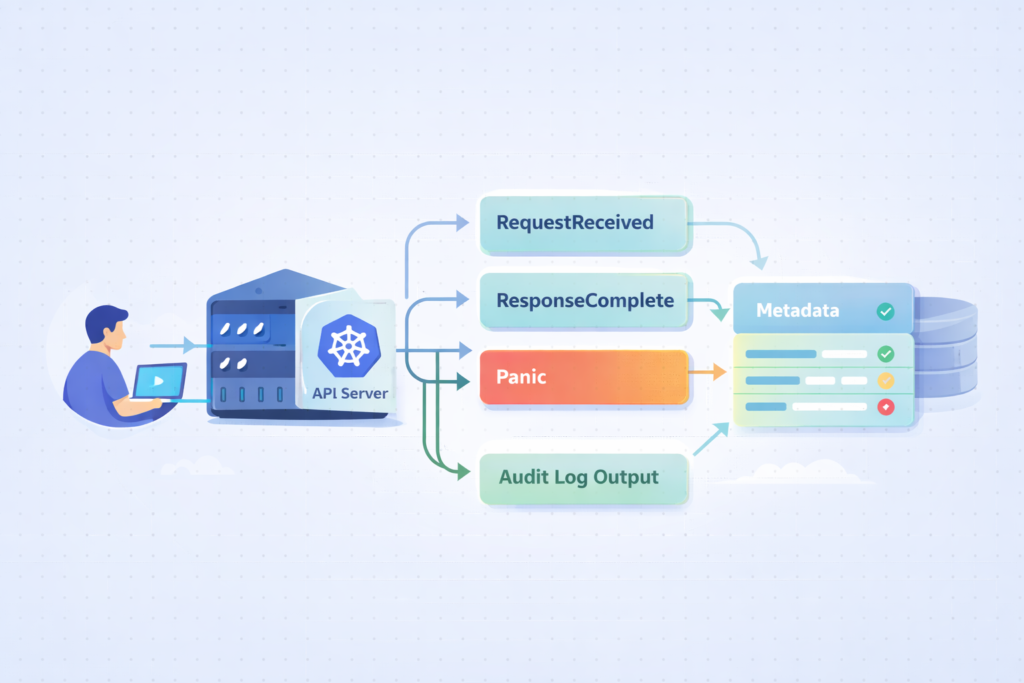
The system captures API requests at specific stages and detail levels. What gets recorded, basic metadata or full request/response payloads, depends on policy rules you give the API server.
Every request flows through the kube-apiserver auditing pipeline. Events are stamped at different points in their lifecycle, called stages. These stages define how much context you capture.
The stages you’ll see most are RequestReceived, ResponseStarted, ResponseComplete, and Panic. Each one marks a different moment in the request’s journey.
The audit level decides how much data you store. Metadata level grabs the basics, while RequestResponse includes the full request and response bodies, which can balloon your log volume.
- RequestReceived logs the initial request coming in.
- ResponseComplete captures the final outcome.
- Panic catches the unexpected crashes.
Switching to RequestResponse logging can multiply your log size by 5–10 times. That’s why being selective in your configuration matters so much. This internal flow is the core of api server request logging, allowing you to reconstruct events during an investigation.
How Do You Enable Kubernetes Audit Logging?
You enable it by setting up a policy file and telling the kube-apiserver to use it. If you’re on a managed service, there’s usually a checkbox or a CLI command.
For self-managed clusters, you typically create an audit policy YAML file. You then pass it to the API server using command-line flags like –audit-policy-file and –audit-log-path. You mount this configuration into the control plane so the API server can read your rules.
Managed services make it simpler. Platforms like Amazon EKS, Azure AKS, and GKE let you turn on audit logs through their dashboards or command-line tools. In GKE environments, this often ties directly into google cloud platform gcp logging, which helps centralize audit data alongside other cloud logs.
- Step one is creating your audit-policy.yaml with clear rules.
- Step two is configuring those API server flags.
- Step three, for cloud clusters, is using the provider’s own tools.
A poorly planned policy can increase log volume by more than 300%, especially if you apply high-verbosity logging too broadly. Our approach is to start minimal, then expand logging based on actual security needs we encounter.
What Are the Key Components of an Audit Policy?
An audit policy defines what to log and how much detail to keep. It uses rules that match against resources, users, and action types (called verbs).
Rules are evaluated in order. The first rule that matches an event decides how it’s logged, which makes the sequence of your rules critically important.
Each rule has filters. You can specify resource types (like pods or secrets), API groups, usernames, and verbs such as ‘create’, ‘delete’, or ‘update’. For sensitive resources like secrets, we usually set RequestResponse level logging. For routine operations, the Metadata level is often enough.
- Rules follow a top-down evaluation model.
- Resources can be pods, namespaces, secrets, etc.
- Verbs define the operation type: get, list, watch, create.
We’ve seen poor rule ordering create up to 70% useless log noise, which hurts both cost and your ability to find real issues. A good audit policy configuration balances visibility with efficiency, and it directly supports kubernetes RBAC auditing and gap analysis in our work.
How Do You Collect and Forward Audit Logs at Scale?
You collect logs from the API server nodes and ship them to a central system for storage and analysis. That’s the basic pipeline.
In a standard setup, logs land in a file like /var/log/audit/audit.log. An agent then picks them up. We often use Fluentd or Filebeat for this job. These agents run as DaemonSets, making sure logs are gathered from every control plane node.
In larger environments, this often becomes part of a broader cloud environment log collection strategy to keep visibility consistent across distributed systems. The destination is usually a centralized platform: Elasticsearch, OpenSearch, or a SIEM system. That’s where the indexing, querying, and alerting happen.
- Tools like Fluentd and Filebeat handle the scalable shipping.
- Webhook backends let you stream logs in real-time.
- SIEM integration is key for advanced threat detection.
We’ve measured webhook pipelines cutting latency by about 60% compared to batch shipping, which is a big win for real-time monitoring. We combine this pipeline with our Network Threat Detection to correlate audit logs with network flows, building a fuller threat picture.
Which Tools Are Best for Kubernetes Audit Log Monitoring?
From what we’ve seen in real environments, it’s less about one perfect tool and more about how well they work together. You need something to collect logs, something to analyze them, and something to alert you when things go wrong.
In our experience, the setup usually looks like this:
| Category | Tools We Often Use | Why It’s Useful |
| Ingestion | Fluentd, Filebeat | Reliable, scalable log shipping |
| Analysis | Elasticsearch, OpenSearch | Fast search and useful for investigations |
| Alerting | Datadog, SIEM platforms | Helps catch threats in real time |
| Managed | CloudWatch, Azure Monitor | Easier setup in cloud environments |
We’ve found that when these tools are connected properly, response times improve fast, sometimes by nearly half. Teams can see what’s happening and act before issues grow.
For visibility, dashboards matter more than people expect. Grafana or Loki makes it easier to spot patterns early. Many teams also rely on broader cloud native security monitoring tools to unify signals across logs, metrics, and network activity.
From our side, combining this with threat modeling and risk analysis helps us go beyond logs. We’re not just reacting, we’re understanding behavior and reducing risk across the network.
Why Do Kubernetes Audit Logs Become Noisy (and How to Fix It)?

They get noisy because they capture too many low-value events. The signal drowns in the noise, making it hard to see what’s important.
A common mistake is logging everything from the start. This includes endpoints like /healthz, which ping constantly but offer zero security value. Another culprit is overusing the RequestResponse audit level, which jacks up data volume and cost.
Insights from OneUptime indicate
“Even in a small, freshly configured cluster, enabling audit logging right out-of-the-box will generate a hefty flow of information… As K8s is by design a distributed system, the number of components that interact with the API server and with each other is large, and each and every single small interaction is logged, when no filter is applied.” – OneUptime
In our own experience, raw audit logs feel chaotic until you add context through filtering and enrichment.
- Exclude non-critical endpoints, especially health checks.
- Use Metadata level as your sensible default.
- Apply enrichment to add context to the events.
Industry discussions suggest over 80% of audit logs are low-value noise, which matches what we see in the clusters we monitor. Applying noise reduction tactics, and pairing logs with Network Threat Detection, lets us focus on actual threats instead of log floods.
What Are the Known Gaps in Kubernetes Audit Logging?
Credits: CNCF [Cloud Native Computing Foundation]
Audit logs don’t see everything in your cluster. There are visibility gaps you should know about.
For instance, direct changes inside etcd, the scheduler’s internal decisions, and some container runtime behaviors aren’t fully captured by the API server logs. This creates blind spots during an investigation, particularly if an attacker finds a way to operate outside normal API calls.
As noted by CNCF
“Kubernetes’ native audit logs are essential for tracking control plane activities, but they fail to capture what happens inside a container or on the host node itself during kubectl debugging sessions. This creates a security and compliance gap, as malicious or unauthorized actions within a pod or on the node go unrecorded.” – CNCF
We address this by integrating runtime security tools and network monitoring to fill those gaps.
- The scheduler and etcd events aren’t fully covered.
- Runtime activity, like exec sessions into pods, might be missed.
- API-only visibility limits forensic depth.
It’s a key point: Kubernetes audit logs only cover API-layer events, not the entire system. That’s exactly why we advocate for a layered monitoring approach in our threat models.
How Do You Use Audit Logs for Security and Compliance?
Audit logs do more than just record activity, they help teams understand what really happened. They show who did what, when, and where, which makes them key for both security and compliance.
In practice, security teams rely on these logs every day. We’ve used them to catch early signs of trouble, like sudden permission changes or access from unusual locations. Others use them to support frameworks like GDPR and PCI-DSS, where tracking access and keeping logs is required.
From what we’ve seen, centralized logging makes a big difference. It gives one clear view instead of scattered data, which helps teams move faster during incidents.
Common use cases include:
- Detecting suspicious RBAC changes or privilege escalation
- Tracking access to secrets and sensitive resources
- Investigating incidents and unusual behavior after they occur
We’ve seen teams reduce investigation time by around 40% once logs are organized and easy to search.
When we pair audit logs with Network Threat Detection, the value grows. We can connect user actions with network activity, use our threat models, and apply risk analysis to better understand and reduce emerging threats.
What Are the Best Practices for Kubernetes Audit Log Monitoring?
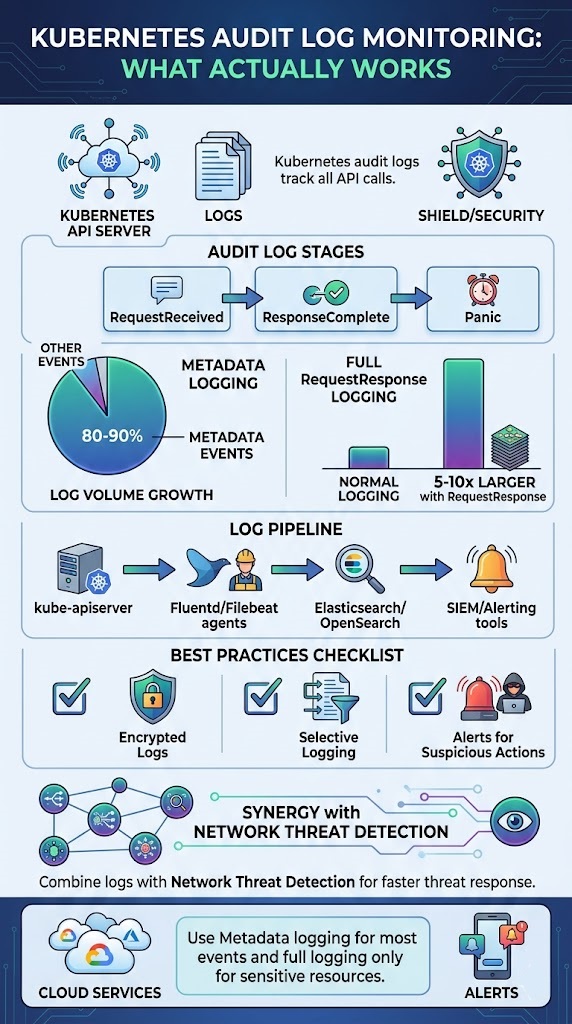
Strong audit log monitoring comes down to three things: less noise, better protection, and alerts that actually matter. Without that balance, teams either miss threats or get overwhelmed.
From what we’ve learned in the field, setting the right log level is critical. Too much detail slows everything down, while too little hides important signals. We usually stick with Metadata logging for most activities, then use RequestResponse only for sensitive resources. Others follow a similar approach to keep systems fast and useful.
Retention is another piece teams often overlook. We’ve seen compliance needs push this to 90 days or longer, depending on the environment.
A few practices we always recommend:
- Encrypt audit logs and limit who can access them
- Set alerts for clearly suspicious actions
- Watch for bulk deletions or sudden RBAC changes
In our experience, automated alerts can cut response time in half when tied into a SIEM workflow.
We also go a step further by layering in Network Threat Detection. By combining logs with our threat models and risk analysis, we get clearer signals and can respond to emerging threats with more confidence.
FAQ
What is kube-apiserver auditing and why does it matter?
Kube-apiserver auditing records every request sent to the API server. It powers kubernetes audit logs and gives clear visibility into cluster activity. We use it to track changes, detect misuse, and support compliance audit logs.
It also helps with audit trail forensics during incidents and improves overall kubernetes security auditing for stronger control and accountability.
How do audit policy configuration and audit levels work?
Audit policy configuration defines what actions are logged and how much detail is included. Teams set audit policy rules using levels like audit levels metadata or requestresponse audit level. We have found that the right balance reduces noise while keeping useful data. This approach supports noise reduction audit and keeps audit log volume manageable.
What are common audit stages in Kubernetes logs?
Kubernetes audit logs include stages such as audit stages requestreceived, responsecomplete stage, and panic audit stage. These stages show when a request starts, completes, or fails.
We use them to understand system behavior and troubleshoot issues. They also improve audit log parsing and give better insight into api server request logging during investigations.
How do teams store and forward Kubernetes audit logs?
Teams store logs in an audit log backend and forward them using tools like fluentd audit forwarding or filebeat k8s logs. Some use a webhook audit backend for remote audit logging. We often see log backend kubernetes setups with elasticsearch audit logs or opensearch kubernetes audit to improve search, audit log indexing, and long-term analysis.
How can audit logs improve threat detection and response?
Audit logs help with threat detection audit by showing unusual actions like privileged escalation audit or secret access logging. We use them with anomaly detection k8s and siem integration k8s to detect risks early. They also support incident response audit and improve forensic readiness k8s by providing clear records of suspicious activity alerts.
Make Kubernetes Audit Logs Actually Useful
You’re flooded with audit logs that grow fast as your cluster scales, but they still don’t give clear answers when something goes wrong. It slows response time and leaves gaps in your visibility. That’s the issue.
The way forward is filtering with context and focusing on alerts you can act on. Network Threat Detection helps add deeper visibility so you’re not relying on logs alone. Keep refining your pipeline so it stays fast and relevant. Ready to level up? Join Network Threat Detection
References
- https://oneuptime.com/blog/post/2026-01-30-kubernetes-audit-policies/view
- https://www.cncf.io/blog/2025/10/07/auditing-user-activity-in-pods-and-nodes-with-the-security-profiles-operator/
