

Using threat modeling for secure design means reviewing architecture, data flows, trust boundaries, abuse paths, and detection needs before systems go live. It helps teams find design flaws early, before they become production risk, noisy alerts, or expensive rework.
For SOC, NTD, architecture, and risk teams, threat modeling connects secure design with real attack paths and monitoring needs. Keep reading to learn how to use threat modeling for secure design in a practical way.
Secure Design Threat Modeling Reality Check
- Threat modeling works best before the design is locked. Once systems are deployed, every fix competes with uptime, budget, ownership, and operational pressure.
- A threat model is only useful if it changes the design. If the review does not produce security requirements, control changes, detection needs, or risk decisions, it becomes documentation noise.
- Secure design needs network context, not only application logic. Attackers move through access paths, service dependencies, identity relationships, and network trust boundaries.
Understanding Threat Modeling For Secure Design
Threat modeling is a structured way to ask what could go wrong before a system goes live. In secure design work, it helps teams review how users, services, data, identities, APIs, and network paths interact.
The point is not to create a long document that sits in a folder. The point is to catch weak assumptions early.
A design can look safe in a diagram. Every component has a clean box, and every arrow has a label. Real systems rarely stay that clean. An API may call another service through a shared identity. A cloud workload may connect back to internal systems. A database may sit behind a trusted network segment that has too much access. A logging plan may exist, but not show the traffic needed for detection.
“Threat modeling is a process for capturing, organizing, and analyzing information that affects the security of an application.”
— OWASP Threat Modeling
That definition fits secure design well because the work starts before the incident. Teams are not waiting for alerts. They are looking for weak paths while there is still time to change the architecture.
In network-focused environments, useful threat models usually include:
- Data flow diagrams
- Trust boundary maps
- Abuse cases
- Misuse cases
- Identity and access paths
- Network segmentation assumptions
- Remote access exposure
- Cloud service dependencies
- API trust relationships
- Detection and logging needs
A good model shows how the system can be abused. A better one shows what the team should change next.
Threat Modeling Value For Network Threat Detection
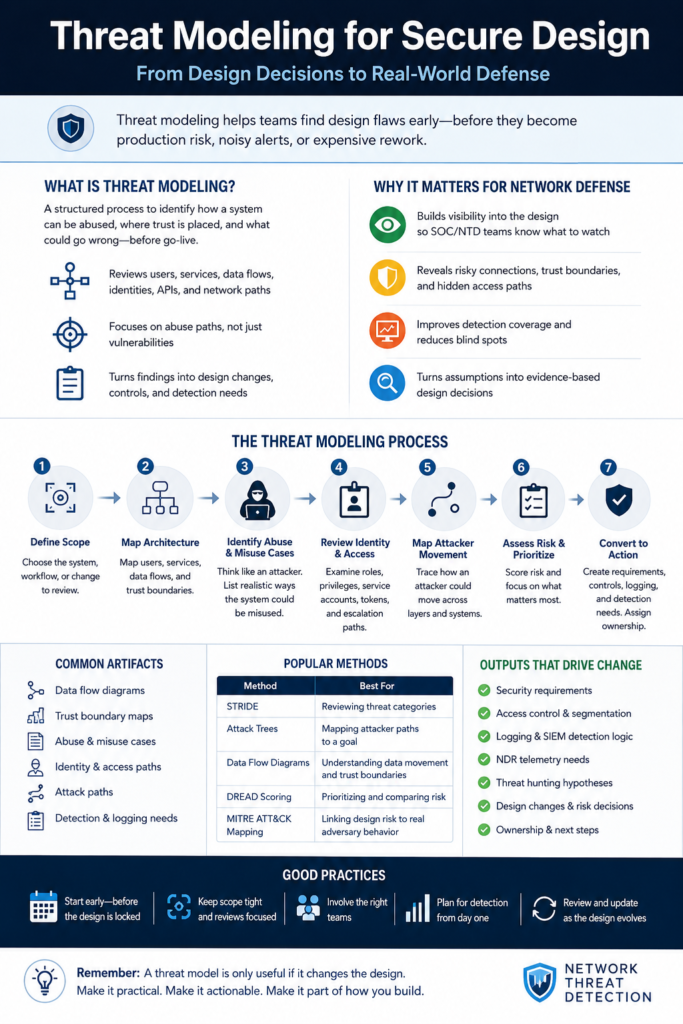
Threat modeling helps network threat detection because it gives detection teams context before alerts start firing. SOC teams often inherit systems after deployment. By then, many design decisions are already hard to change.
Visibility is often treated as a monitoring problem. In practice, it is also a design problem.
Secure design should include visibility planning because teams need to know what network threat detection can monitor across traffic, assets, access paths, and suspicious behavior.
A design review should ask where the network will show risk. For example:
- Which services should talk to each other?
- Which traffic should never happen?
- Which admin paths need monitoring?
- Which identities can cross trust boundaries?
- Which outbound paths could hide command and control?
- Which logs are needed for SIEM detection logic?
- Which flows should NDR telemetry validate?
Without that planning, security teams may discover too late that they cannot see the activity they need. A system may be technically secure on paper but hard to defend in production.
We often see this with segmented environments. A project team may say a workload is isolated. Traffic data later shows shared services, admin paths, backup connections, and monitoring exceptions crossing the boundary. Some of those paths are valid. Some are leftover risk. Threat modeling helps reveal them before they become normal.
The value for NTD teams is simple: better design context creates better detection coverage. Alerts become more useful when teams already know which flows, assets, and access paths matter.
Practical Steps For Using Threat Modeling For Secure Design
Source: Computing & Coding
This video explains STRIDE threat modeling in a practical way. It is useful for teams that want to review spoofing, tampering, repudiation, information disclosure, denial of service, and elevation of privilege during design.
A useful threat model starts with scope. Large reviews often fail because teams try to model everything at once. Start with a system, workflow, network segment, API, cloud workload, or high-risk change.
From there, the process should stay practical.
Define The System Or Workflow
Start by naming what is being reviewed.
Examples include:
- A new customer-facing API
- A cloud workload connected to internal systems
- A remote access design
- A payment workflow
- A privileged admin path
- A new data ingestion pipeline
- A network segment for sensitive systems
Clear scope keeps the review focused. If the scope is vague, every discussion turns into a debate about ownership.
Map Users, Services, Data Flows, And Trust Boundaries
A simple diagram is enough at the start. It should show users, services, data stores, APIs, network zones, identity providers, third-party connections, and external dependencies.
Trust boundaries matter most. These are places where control, ownership, or risk changes.
Common examples include:
- Internet to application gateway
- User subnet to server subnet
- Cloud workload to internal network
- API gateway to backend service
- Standard user to admin function
- Third-party service to internal application
- Low-trust endpoint to sensitive data store
Data flow diagrams help teams see where controls are needed. They also expose vague assumptions, such as “only trusted users can access this” or “the service account is internal.”
Those phrases need proof.
Identify Abuse Cases And Misuse Cases
Abuse cases describe how a system could be misused. They are often more useful than generic threat lists because they match the actual design.
Examples include:
- An attacker uses a stolen VPN account to reach an admin portal.
- A user abuses an API endpoint to pull data outside normal limits.
- A compromised workload uses broad cloud permissions to access storage.
- A service account is reused across environments.
- A flat network segment allows lateral movement after one host is compromised.
- A third-party integration sends data to an endpoint the SOC does not monitor.
Abuse cases force design teams to think like an attacker without turning the review into theory.
Review Identity, Access, And Privilege Paths
Many secure design failures start with identity. Access looks controlled on paper, but real privileges can be wider than expected.
Review:
- User roles
- Admin groups
- Service accounts
- API tokens
- OAuth scopes
- Machine identities
- Local admin rights
- Remote access groups
- Cross-account cloud permissions
- Privilege escalation paths
A design may pass a network review but fail an identity review. Attackers do not need a new exploit if valid credentials give them the path they need.
Map Attacker Movement Across Layers
Secure design should not treat application, cloud, identity, and network risk as separate boxes. Attack paths cross all of them.
A realistic attacker path might look like this:
- Phishing gives access to a user account.
- The user account reaches a remote portal.
- The portal connects to an internal service.
- The internal service uses a broad service account.
- The service account reaches a database.
- Network logs show traffic, but no rule connects the events.
That kind of chain is exactly why using threat modeling for secure design matters. It helps teams see how small design choices combine into real exposure.
This process supports proactive threat detection because teams are finding weak design paths before alerts, outages, or incidents force the issue.
Use A Simple Method To Structure The Review
A method keeps the discussion from drifting. STRIDE threat modeling, attack trees, data flow diagrams, and DREAD-style scoring can all help.
The method should fit the team. A small design review may only need a data flow diagram and abuse cases. A larger architecture review may need STRIDE, risk scoring, and control mapping.
Avoid making the method the goal. Secure design improves when the review changes decisions.
Prioritize Based On Risk And Control Coverage
Not every finding needs the same response.
Prioritize based on:
- Asset value
- Data sensitivity
- Exploit likelihood
- Network exposure
- Identity risk
- Control strength
- Detection coverage
- Response difficulty
- Business impact
A design flaw near a sensitive data path may need immediate architecture change. A lower-risk issue may become a backlog item with monitoring. Some risks may be accepted, but only after the owner understands the trade-off.
Convert Findings Into Security Requirements
Threat modeling should create clear output.
Useful outputs include:
- Security requirements
- Access control changes
- Segmentation rules
- Logging requirements
- NDR telemetry needs
- SIEM detection logic
- Threat hunting hypotheses
- Incident response notes
- Ownership assignments
- Design changes
A weak finding says, “Lateral movement risk exists.”
A useful finding says, “Admin workstations can reach the database subnet over ports not required by the workflow. Restrict access to the jump host path, log denied attempts, and alert on direct workstation-to-database traffic.”
That is the difference between paperwork and secure design.
Frameworks And Methods For Secure Design Threat Modeling
Threat modeling frameworks help teams review designs with fewer blind spots. They give the review a pattern, but they do not replace judgment.
“The Secure by Design Framework offers a structured approach to identifying, assessing, and mitigating security risks during the design phase.”
— OWASP Secure by Design Framework
The best method depends on the design, team maturity, and risk level. A customer-facing API may benefit from STRIDE and abuse cases. A network segmentation review may need data flow diagrams and attack path mapping. A high-risk system may need both, plus risk scoring and detection mapping.
| Method | Best Use | Strength | Limitation |
| STRIDE | Reviewing common threat categories | Easy to apply during design reviews | Can become checklist-driven without context |
| Attack trees | Mapping attacker paths toward a goal | Good for showing chained abuse paths | Needs careful scoping |
| Data flow diagrams | Showing trust boundaries and data movement | Helps teams see where controls are needed | Can become outdated quickly |
| DREAD-style scoring | Prioritizing risks during review | Helps compare design risks | Scoring can be subjective |
| MITRE ATT&CK mapping | Connecting design risk to attacker behavior | Helps link abuse paths to real techniques | Needs network and asset context |
STRIDE is useful when teams need a simple structure. It asks teams to think through spoofing, tampering, repudiation, information disclosure, denial of service, and elevation of privilege. That helps during design reviews because it pushes people beyond “can someone log in?”
Attack trees work well when there is a clear attacker goal. For example, “access customer data,” “take over admin functions,” or “move from cloud workload to internal database.” Branches show possible paths toward that goal.
Data flow diagrams are often the fastest way to find weak assumptions. Once teams see where data crosses trust boundaries, design gaps become easier to discuss.
DREAD-style scoring can help compare risks, but teams should not treat the number as truth. Scoring works best when it supports a decision, not when it becomes the decision.
MITRE ATT&CK mapping helps connect secure design choices to attacker behavior. Used carefully, it can show how design flaws support discovery, credential access, lateral movement, command and control, or exfiltration.
Product Considerations For Secure Design Threat Modeling
Tools can help threat modeling, but they can also make the process feel more complete than it really is. A polished diagram does not mean the design is safe. A long list of findings does not mean the team knows what to fix first.
Product Description
A useful threat modeling tool or platform should help teams connect architecture, risk, controls, and detection needs.
Look for support for:
- Architecture diagrams
- Data flow mapping
- Trust boundary mapping
- STRIDE or attack tree workflows
- Security requirement tracking
- Risk prioritization
- Control mapping
- Issue tracking integration
- Network visibility requirements
- SIEM and NDR detection requirement mapping
For Network Threat Detection readers, the best product value comes from linking secure design to real monitoring needs. Teams should be able to answer, “What should we see if this design is attacked?”
Pros
Strong tooling can help teams:
- Find design flaws before deployment
- Create clearer security requirements
- Track ownership of findings
- Connect architecture decisions to attacker behavior
- Plan detection coverage earlier
A good tool can also keep threat models from becoming stale. That matters because architecture changes often happen faster than security documentation.
Cons
Tools still depend on process quality.
Common limits include:
- Bad diagrams create weak results
- Generic templates miss local risk
- Risk scoring can become subjective
- Teams may model the application but ignore the network
- Findings may not turn into assigned work
Threat modeling tools are useful. They do not replace hard conversations about ownership, trade-offs, and design changes.
Dealbreaker
The main dealbreaker is a tool or process that does not change design decisions.
If threat modeling only creates diagrams and reports, it will not improve secure design. A useful process must produce requirements, control changes, logging needs, risk decisions, or accepted trade-offs.
Best For
Secure design threat modeling is best for security architects, product security teams, SOC leaders, DevSecOps teams, engineering leads, and risk managers.
It is especially useful when teams are designing:
- New applications
- APIs
- Cloud workloads
- Remote access paths
- Sensitive data workflows
- Identity changes
- Network segmentation
Common Mistakes In Secure Design Threat Modeling
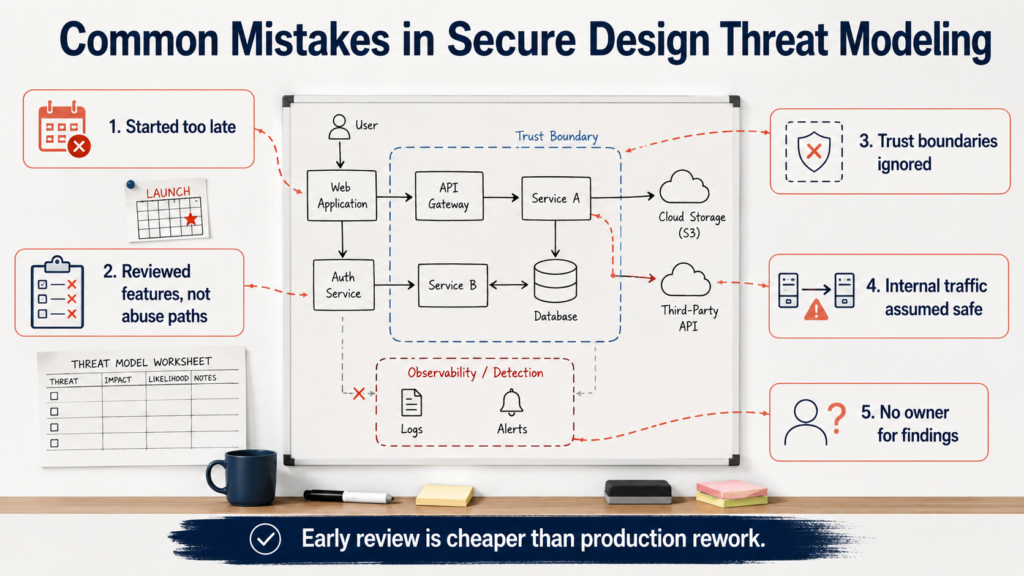
Many teams start threat modeling too late. By the time security reviews the design, engineering is already close to deployment. At that point, even a simple design change can feel expensive.
Another mistake is treating threat modeling as paperwork. A team fills out a template, lists a few threats, assigns rough scores, and moves on. Nothing changes. Nobody owns the findings. The SOC still lacks visibility. The architecture still has weak trust boundaries.
That is not threat modeling. That is documentation.
Teams also miss risk when they focus only on application logic. Secure design needs to include network paths, identity relationships, cloud routes, third-party dependencies, and detection coverage.
A threat model becomes more useful when it connects design flaws to realistic attacker movement, which is why teams also need a process for identifying potential network attack vectors across exposed services, access paths, and detection gaps.
Common mistakes include:
- Starting after the design is already approved
- Reviewing features but not abuse paths
- Ignoring trust boundaries
- Treating internal traffic as safe
- Missing service-to-service identity risk
- Forgetting cloud and API dependencies
- Using STRIDE mechanically
A practical threat model should create friction early. That is the point. Early friction is cheaper than production rework.
Best Practices For Using Threat Modeling For Secure Design

Good threat modeling works best as a design habit. It does not need to be a massive workshop every time. Smaller, focused reviews often produce better decisions.
Start during architecture planning. Waiting until deployment creates pressure to accept weak designs because schedules are already set.
Keep the scope tight. One workflow, API, trust boundary, or network segment is easier to review than an entire platform. Tight scope also helps teams assign owners.
Use simple diagrams first. A clear data flow diagram beats a complex model that nobody can explain. Show users, services, data stores, identity providers, external dependencies, and trust boundaries.
Write abuse cases in plain language. Avoid vague entries like “unauthorized access.” Use specific statements:
- A stolen user token reaches an admin API.
- A compromised workload connects to an internal database.
- A third-party integration sends data outside approved paths.
- A service account can access more systems than the workflow needs.
- A user subnet can reach a management service directly.
Connect threats to controls. Every serious finding should map to a control, design change, logging need, or risk decision.
Involve the right teams. Architecture, engineering, SOC, NTD, identity, cloud, and risk teams often see different parts of the same problem. If only one team reviews the design, the model will miss something.
Plan detection during design. Ask what traffic, logs, alerts, and behavior patterns will prove the design is working. Detection coverage should not be added as an afterthought.
Review changes. Threat models age quickly when teams add new APIs, cloud routes, remote access paths, or third-party services. A model from six months ago may describe a system that no longer exists.
A useful secure design review should end with clear decisions:
- Change the design
- Add a security requirement
- Reduce access
- Add segmentation
- Improve logging
- Add detection logic
- Assign ownership
- Accept a risk with context
Network Threat Detection can support this work by helping teams connect design assumptions to real visibility, attack paths, and detection coverage. That connection helps security teams move from theory to defensible action.
FAQs
What is threat modeling in secure design?
Threat modeling in secure design is the process of reviewing architecture, data flows, trust boundaries, abuse cases, and controls before a system goes live. It helps teams find design flaws early.
How does using threat modeling for secure design reduce risk?
Using threat modeling for secure design reduces risk by turning design assumptions into security requirements, access controls, logging needs, and detection plans before attackers can use weak paths.
When should teams use threat modeling?
Teams should use threat modeling during architecture planning, major design changes, cloud migrations, API design, access changes, and before high-risk systems go live.
Which threat modeling method works best for secure design?
STRIDE, attack trees, and data flow diagrams are useful methods. The best choice depends on scope, team maturity, system complexity, and whether the review needs threat categories, attack paths, or trust boundary mapping.
How does threat modeling support network threat detection?
Threat modeling supports network threat detection by showing expected flows, risky paths, trust boundaries, logging needs, and detection gaps early.
Wrapping Up Secure Design Threat Modeling
Using threat modeling secure design helps teams catch weak assumptions before they turn into production risk. It gives architecture, engineering, SOC, NTD, and risk teams a shared way to review abuse paths, trust boundaries, identity flows, and monitoring needs.
The best threat models are not huge documents. They are practical decision tools. They show what can go wrong, what should change, who owns the fix, and what defenders need to see later.
Secure design gets stronger when teams connect architecture decisions with real attack paths and detection coverage. That is where threat modeling becomes useful for network defense, not just application review.
If your team wants better design-stage visibility, attack path analysis, and detection planning, Network Threat Detection can help through the JOIN page.
References
- https://owasp.org/www-community/Threat_Modeling
- https://owasp.org/www-project-secure-by-design-framework/
