
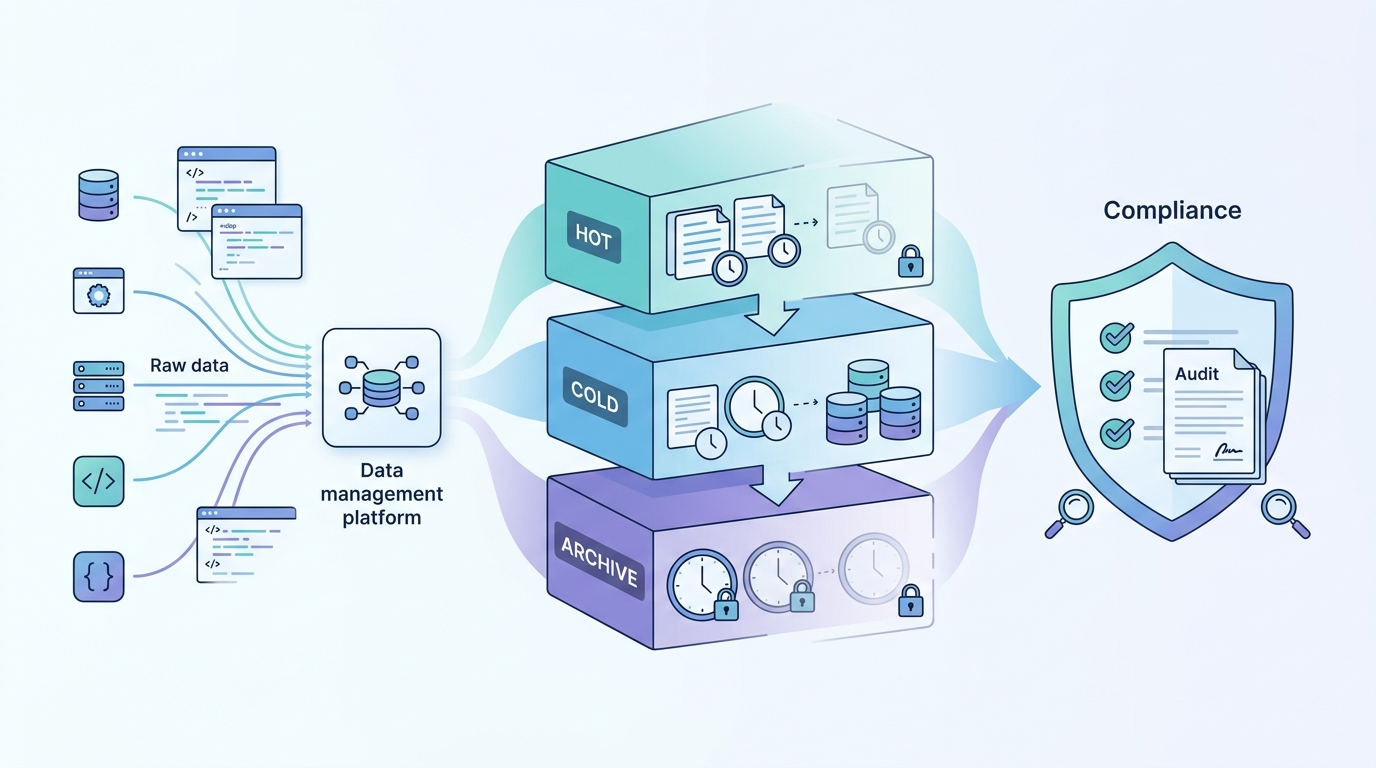
Log storage retention policies compliance defines how long logs are stored, secured, and deleted to meet both legal and security requirements. Standards like GDPR and PCI DSS set expectations, but in practice, teams often have to balance multiple rules at once. We approach logs as evidence, because they are critical during incidents and audits.
NIST suggests at least 90 days of retention, though many environments require far more. The challenge is keeping systems compliant without letting storage costs grow unchecked. This guide walks through a practical way to manage. Keep reading to see how it works in real environments.
Log Retention Compliance: Quick Wins That Matter
Together, these steps form a practical approach to log storage retention policies compliance by balancing risk, cost, and audit readiness in day-to-day operations.
- Structured log lifecycle management lowers risk and keeps storage costs under control
- Tiered storage improves efficiency and access to important data
- Automation makes policies consistent and easier to audit
What Are Log Storage Retention Policies and Why Do They Matter?
Log retention policies set the rules for how long logs stay, where they are stored, and when they are removed. That sounds simple, but in practice, it shapes how a company responds to incidents and passes audits.
We’ve seen teams struggle when logs are missing or scattered across systems. Without clear retention rules, investigations slow down fast. Logs should act as a reliable record. They support audits, help trace events, and show what really happened during a security issue.
Different regulations set different expectations. PCI DSS often requires at least one year of logs, while other frameworks stretch that to several years. The exact timeline depends on the type of data and the risk level involved.
A solid policy usually includes a few core elements:
- Defined retention periods for each log type
- Controlled access so only the right people can view logs
- Clear rules for deletion and cleanup
We build policies around how logs are actually used, not just what regulations say. When done right, retention becomes part of daily operations instead of something teams scramble to fix before an audit. Practicing log management system features comparison helps to ensure the system can actually enforce those policies effectively.
What Compliance Requirements Dictate Log Retention Durations?
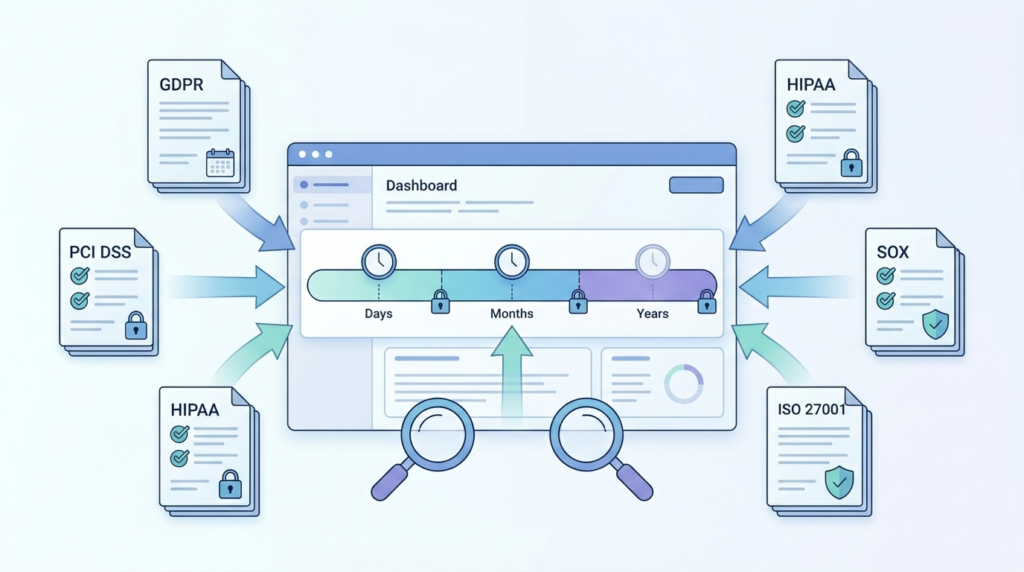
Regulations set the baseline, but they rarely match perfectly across industries. That’s where things get complicated. One system may need to follow multiple frameworks at once, each with different rules.
For example, PCI DSS requires at least one year of logs, with three months easily accessible. Healthcare environments often follow longer timelines tied to patient data rules. GDPR takes a different angle, focusing on not keeping data longer than necessary.
We’ve worked with teams that met one requirement but failed another simply because policies weren’t aligned. It happens more often than expected.
Beyond retention length, compliance also requires technical controls. These are not optional:
- Encryption for stored and transmitted logs
- Immutable storage to prevent tampering
- Strict access controls and audit visibility
The real issue is not understanding the rules, but applying them consistently. Teams often write policies that look correct on paper but fail during audits because retrieval or validation was never tested.
Our approach focuses on mapping each requirement to actual system behavior. If a log cannot be retrieved when needed, it might as well not exist. That’s where many compliance efforts fall apart. Especially in environments lacking well-defined centralized log management strategies that unify enforcement across systems.
How Should Logs Be Classified for Effective Retention Policies?
Credits: HelpingAll – Technical
Classification is where most retention strategies either hold together or break down. Without it, everything gets stored the same way, and costs climb quickly.
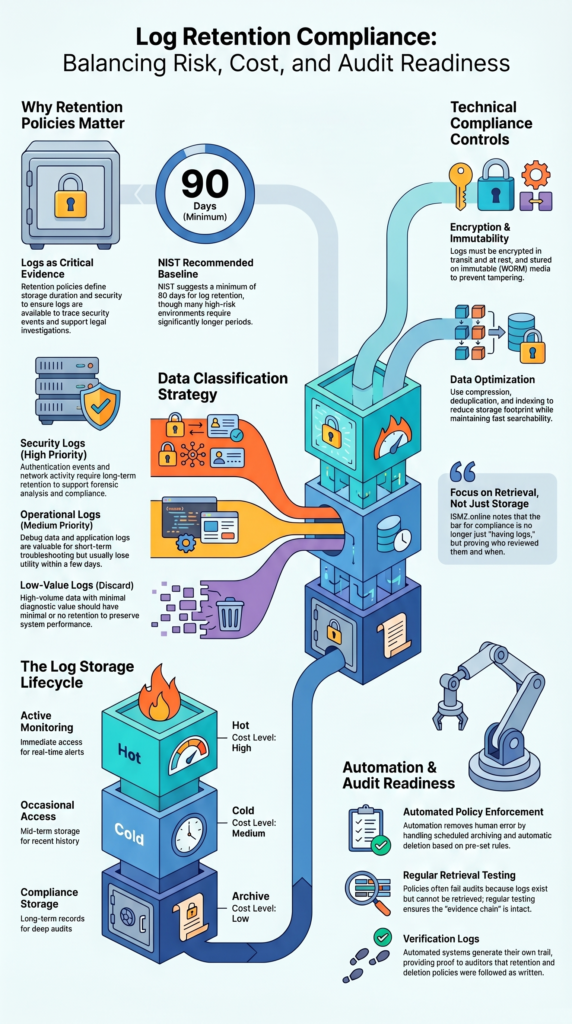
Security logs, such as authentication events or network activity, usually need long retention. They support investigations and audits. On the other hand, application logs or debug data often lose value within days. Keeping them longer rarely helps.
A structured approach looks like this:
- Security logs for investigations and compliance
- Operational logs for short-term troubleshooting
- Low-value logs with minimal or no retention
We’ve seen environments where poor classification increased storage costs by nearly half. High-volume logs with little value filled up storage and slowed down search performance.
Before extending retention, we use our threat modeling tools to identify which logs actually matter. This step keeps the focus on risk, not volume.
Classification is not a one-time task. Systems change, and so should the categories. When teams revisit this regularly, retention policies stay efficient and relevant. Especially when supported by properly executed log collection agent deployment that ensures the right data is captured at the source.
What Is the Ideal Log Storage Lifecycle Strategy?
A strong lifecycle strategy moves logs through different storage stages over time. This keeps important data accessible while reducing costs for older logs.
We usually break this into three stages: hot, cold, and archive. Each serves a different purpose and aligns with how often logs are needed.
| Tier | Use Case | Cost Level | Retention Role |
| Hot | Active monitoring | High | Immediate access |
| Cold | Occasional access | Medium | Mid-term storage |
| Archive | Compliance storage | Low | Long-term retention |
Hot storage supports real-time monitoring and fast searches. Cold storage holds logs that are still useful but not accessed often. Archive storage is for compliance and long-term records.
We’ve seen storage costs drop significantly once lifecycle policies are automated. Data moves between tiers without manual effort, which prevents overuse of expensive storage.
To make this work well, teams also need:
- Log compression to reduce size
- Deduplication to remove duplicates
- Indexing for faster retrieval
Without a lifecycle plan, storage grows unchecked. Costs rise, and performance drops. A simple tiered approach fixes both problems at once.
How Does Automation Ensure Compliance and Reduce Errors?
Manual processes rarely keep up with modern systems. Logs grow fast, and rules become harder to enforce by hand. That’s where automation makes a real difference.
We rely on automated lifecycle rules to handle retention, archiving, and deletion. Once policies are set, the system applies them consistently across all logs.
This reduces human error, which is a common cause of compliance failures. Teams often forget to delete old data or fail to archive logs properly. Automation removes that risk.
Key capabilities usually include:
- Scheduled archiving for long-term storage
- Automatic deletion based on policy rules
- Verification logs that confirm actions were completed
Another benefit is audit readiness. Every action taken by the system is recorded. That creates a clear trail showing that policies are enforced as written.
We’ve seen audit outcomes improve once automation is in place. Instead of explaining gaps, teams can show proof of consistent enforcement.
Automation does not replace good policy design, but it ensures those policies are followed. Without it, even well-written rules tend to break down over time.
What Are the Biggest Challenges in Log Retention Compliance?
One common mistake is trying to keep everything. It feels safer, but it creates more problems than it solves. Storage costs increase, and finding useful data becomes harder.
We’ve seen systems where logs grew several times over in a single year. Much of that data had little value, yet it consumed resources and slowed down analysis tools.
Some challenges show up repeatedly:
- High-volume logs overwhelming indexing systems
- Conflicts between long retention and data deletion rules
- Sensitive data stored without proper controls
Privacy adds another layer of difficulty. Regulations like GDPR require careful handling of personal data. If logs contain sensitive information, retention policies must reflect that.
In a few cases, logs themselves became a risk because they stored unprotected data. That situation can lead to compliance issues and security exposure at the same time.
The balance is not easy. Teams need to meet regulatory requirements while keeping systems efficient and secure.
We address this by combining risk analysis with policy design. Instead of reacting to problems, the goal is to prevent them early, especially at the point where logs are created.
How Can Organizations Balance Compliance, Cost, and Privacy?
Balancing these factors starts with being selective. Not every log deserves long-term storage. Keeping only what matters reduces both cost and risk.
We focus on logs that support incident response and compliance. Everything else is reviewed carefully before being retained. This approach keeps storage manageable and avoids unnecessary exposure.
Some practical steps include:
- Redacting sensitive data before logs are stored
- Applying strict retention rules based on log type
- Aligning backups with compliance requirements
We also use threat modeling to decide which logs provide real value. This helps teams avoid storing data that does not improve visibility or security.
As highlighted by Solix Technologies
“The fastest way to lose cost control is to store cold data as hot data. Mature storage programs implement: Tiering, Expiration, and Secure disposal.” – Solix Technologies
Reducing unnecessary logs has another benefit. It lowers the amount of data that could be exposed during a breach. Less data means less risk.
Balancing these areas is not about compromise. It is about making better decisions on what to keep and what to discard.
When policies reflect actual risk instead of assumptions, systems stay efficient, compliant, and easier to manage.
How Do You Build an Audit-Ready Log Retention Policy?
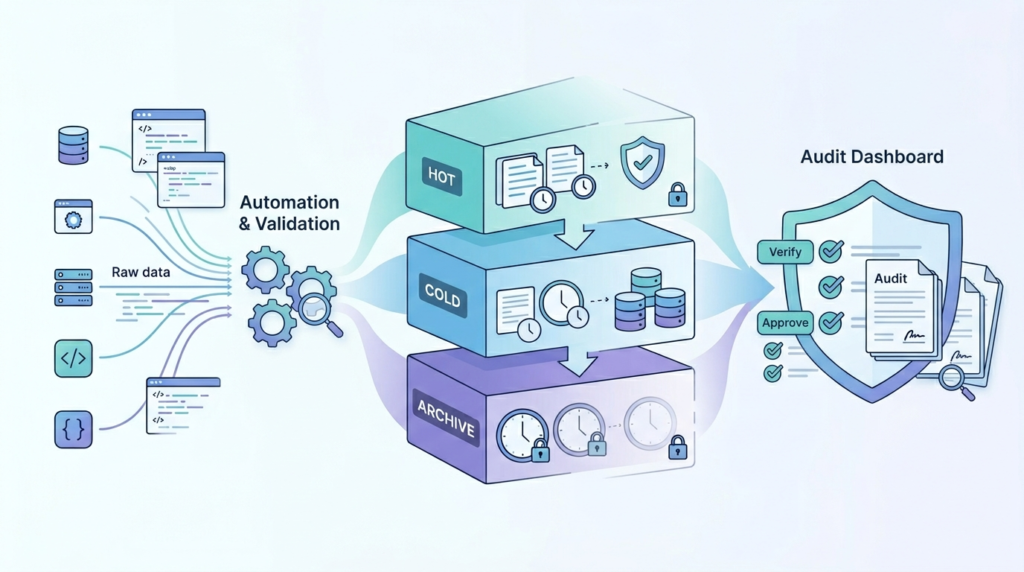
An audit-ready policy connects written rules with real system behavior. It is not enough to define retention periods. Teams must prove those rules are enforced.
We build policies that include clear documentation, automated enforcement, and regular testing. Each part supports the others.
A strong policy usually includes:
- Defined retention rules tied to regulations
- Automated systems that enforce those rules
- Regular testing to confirm logs can be retrieved
Testing is often overlooked. We’ve seen teams fail audits because they could not access logs when asked. The data existed, but it was not usable.
Research from ISMS.online shows
“Today’s bar is not ‘do you have logs?’ but ‘who reviewed them, when, and what action followed?’ …Failing the evidence chain means failing leadership’s core duty: demonstrating, not just declaring, control over risk and accountability.” – ISMS.online
Audit readiness also depends on visibility. Dashboards and reports should show how logs are stored, accessed, and deleted.
We treat audits as ongoing checks, not one-time events. This approach helps identify gaps early instead of during formal reviews.
When policies are tested and enforced continuously, audits become routine rather than stressful. That shift makes a big difference for teams managing large, complex environments.
FAQ
How do I create a log retention policy that meets compliance needs?
Start by defining clear goals for your log retention policy and aligning them with data retention compliance and regulatory compliance requirements. Consider rules such as PCI DSS retention, GDPR data retention, and HIPAA log requirements.
Set clear log storage duration, access controls, and log purging steps. Use log lifecycle management and centralized logging to stay organized. Review and update the policy regularly to support compliance audit readiness.
What logs should be prioritized for audit log storage and security?
You should prioritize logs that support security log management and forensic log analysis. These include authentication logs, system activity records, and event log monitoring data used in security incident response.
Apply log data classification to separate critical audit trails from low-value logs. Focus on server log retention and application log storage that meet regulatory framework needs and improve compliance reporting accuracy.
How does tiered storage architecture improve log lifecycle management?
A tiered storage architecture organizes logs into hot storage, cold storage, and data archiving stages. Hot storage holds recent logs for fast access. Cold storage keeps older logs that are still useful.
Archived logs are stored for long-term compliance. This approach improves log storage optimization, reduces log storage costs, and maintains good log accessibility. It also works well with cloud lifecycle policies for better control.
What role does automation play in log retention lifecycle and deletion?
Automation helps enforce log lifecycle management without manual work. It supports automated log deletion, log rotation strategy, and log archiving tools. This reduces human error and improves log policy enforcement.
Automation also helps with log deletion verification and keeps records for log policy audit. With log retention dashboards, teams can track activity and maintain compliance audit readiness more easily and consistently.
How can organizations ensure log integrity and secure storage compliance?
Organizations can protect logs by using tamper-proof storage such as WORM storage and immutable storage. They should apply data encryption at rest and enforce strict log access control. Regular log retrieval testing ensures logs are available when needed.
Using log indexing, log compression, and log deduplication improves performance while keeping logs secure. These steps help maintain log integrity and support long-term data retention compliance.
When Log Storage Starts Feeling Like Dead Weight
You keep storing more logs to stay compliant, but costs rise and systems slow down. It gets harder to find what matters, and audits turn into a scramble. It’s draining. Holding everything doesn’t make you safer if you can’t use it.
We’ve found that focusing on high value logs and automating retention clears the pressure fast, and helps shape that process with real threat context. It guides what’s worth keeping so teams stay compliant without excess. If you want a simpler way to manage retention, start here.
References
- https://www.solix.com/blog/cloud-based-storage-service-how-to-choose-secure-governed-storage-that-scales/
- https://www.isms.online/nis-2/implementing-guidance/incident-handling/3-2/
