
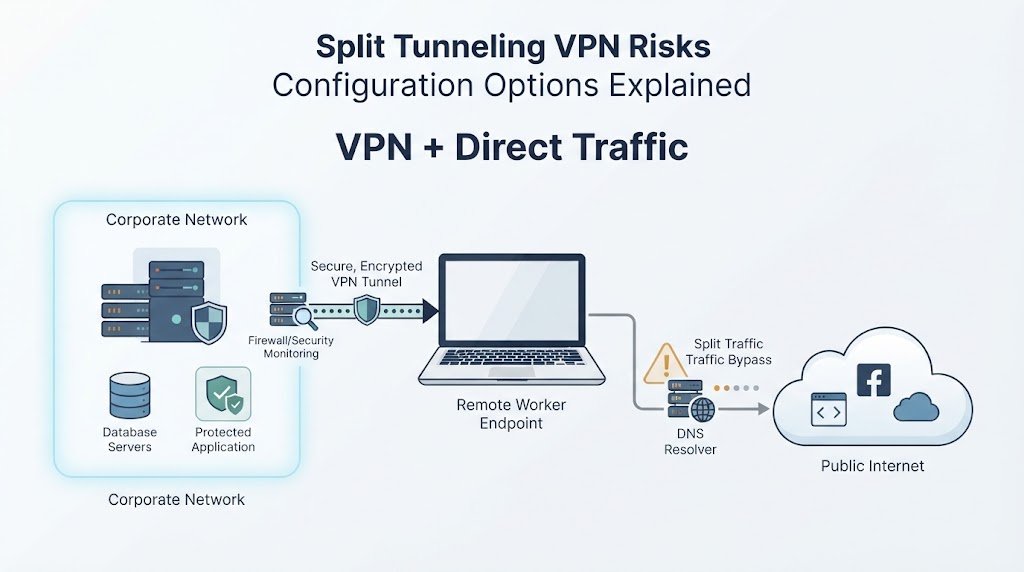
Split tunneling VPN risks configuration options depend on which traffic stays inside the encrypted tunnel and which traffic uses the direct internet connection. The setup can reduce VPN congestion and improve performance, but it can also reduce visibility and expose internal resources if an endpoint is compromised.
The main concerns include route mistakes, DNS leaks, local network exposure, and traffic. We also need to consider endpoint security and monitoring when deciding how much traffic to send through the VPN. Network Threat Detection can help identify gaps and suspicious activity across these traffic paths. Keep reading to understand the risks and safer configuration options.
Quick Reads: Split-Tunneling Security Essentials
Here are the three points that matter most when weighing split tunneling’s performance benefits against its security risks:
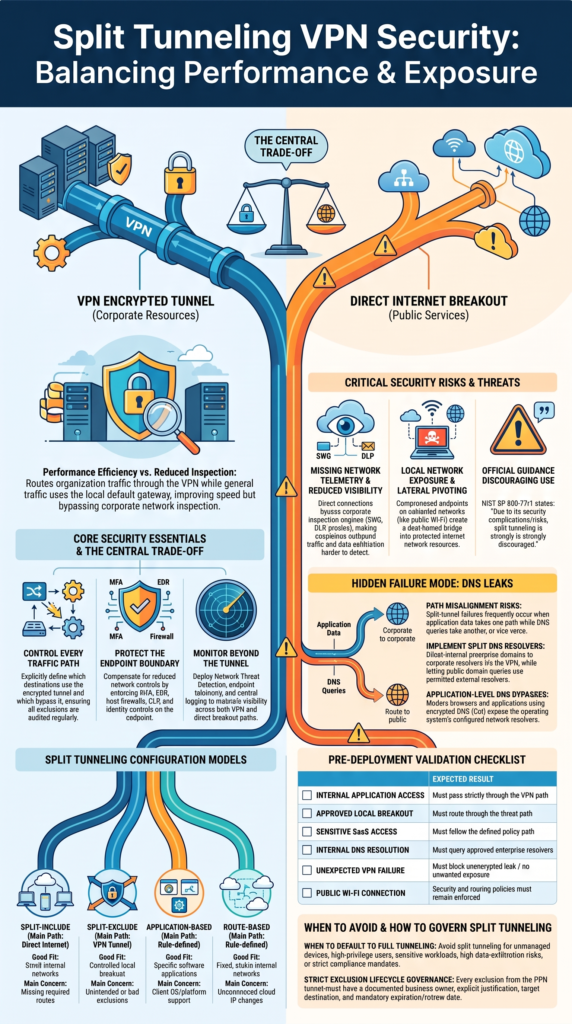
- Control every traffic path: Define which traffic uses the VPN and which bypasses it, then review exclusions regularly.
- Protect the endpoint: Use MFA, endpoint security, DNS protection, host firewalls, and identity controls to limit exposure.
- Monitor beyond the tunnel: Network Threat Detection, endpoint telemetry, and centralized logging can help identify suspicious activity across both VPN and direct paths.
What Is Split Tunneling, and How Does It Change VPN Traffic?
Split tunneling gives a device separate paths for different types of traffic. Selected destinations use the encrypted VPN, while other connections use the normal network interface.
NIST describes this as routing organization-specific traffic through the VPN while other traffic uses the remote user’s default gateway. The VPN client applies routing rules to decide which path each connection takes.
That can make remote access faster. For example, internal applications can remain inside the tunnel while approved public services use the local internet connection. Less traffic then travels through the corporate VPN gateway.
But there is a trade-off. Direct traffic may not pass through corporate firewalls, proxies, secure web gateways, DLP systems, or other network inspection tools.
Common routing models include:
- Split-include: selected destinations use VPN.
- Split-exclude: selected destinations bypass VPN.
- Application-based: rules follow applications.
- Route-based: rules follow IP ranges.
The VPN label itself doesn’t decide the path. The routing policy does.
So teams need to know exactly which traffic uses each interface. If that answer isn’t clear, the configuration isn’t ready.
Which Split-Tunneling Configuration Should Organizations Choose?
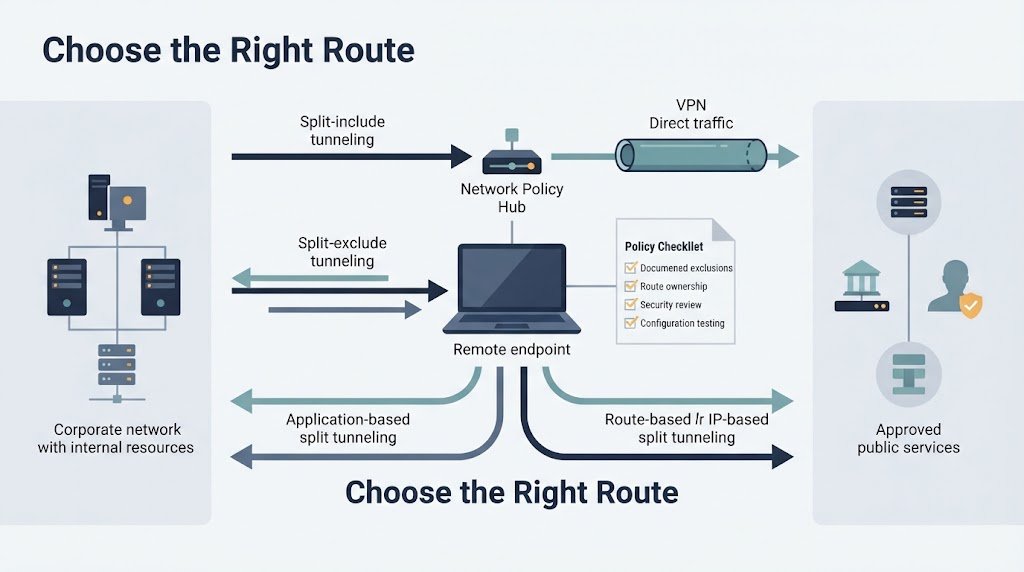
The main configuration choice is whether the VPN should be the exception or the default path. Split-include sends only selected routes through the tunnel. Split-exclude keeps most traffic in the VPN and allows defined destinations to bypass it.
Application-based routing can provide finer control, while route-based policies work well when internal networks use stable address ranges.
| Model | Main path | Good fit | Main concern |
| Split-include | Direct | Small internal networks | Missing routes |
| Split-exclude | VPN | Controlled breakout | Bad exclusions |
| Application-based | Rule-based | Specific apps | Client support |
| Route-based | Rule-based | Fixed networks | Cloud changes |
We generally favor a narrow exception list when an organization needs local breakout. Each exclusion should have an owner, reason, destination, and review date.
OpenVPN can also create a targeted setup with route-nopull, followed by explicit routes:
route-nopull
route 192.168.90.0 255.255.255.0
This keeps the VPN route focused on the required network. But administrators still need to check firewall rules, DNS, NAT, and overlapping private networks.
Don’t treat routing as a one-time task. Cloud services change, IP ranges move, and old exceptions can remain long after their purpose disappears.
What Are the Biggest Security Risks of Split Tunneling?
The biggest issue is reduced visibility. Traffic that uses the direct connection may not reach corporate network controls, which can make detection and investigation harder.
There is also an endpoint risk. A compromised device can have access to both the local network and protected resources through the VPN.
TunnelCrack research has shown why VPN routing weaknesses deserve practical testing. The concern isn’t limited to one type of VPN. Unexpected routing behavior can create exposure when a device changes networks.
For a broader view of the attack surface, VPN technologies and security concerns also cover how authentication, endpoint controls, network segmentation, monitoring, and configuration affect VPN security.
Common risks include:
- Missing network telemetry.
- Local network exposure.
- Internal network pivoting.
- Incorrect route selection.
- DNS leakage.
- Sensitive data leaving the tunnel.
Network Threat Detection can help cover part of the visibility gap. Endpoint telemetry can also identify unusual outbound connections, suspicious processes, and possible command-and-control activity.
Other controls still matter:
- EDR for endpoint activity.
- Host firewalls for local connections.
- DLP for sensitive data movement.
- Identity controls for access decisions.
- Central logging for investigation.
We don’t treat split tunneling as a routing-only change. It alters the security boundary around the endpoint.
How Do DNS Settings Create Hidden Split-Tunnel Failures?
Credits: VPN Tutorials
DNS can break a split-tunnel design even when the routing table looks correct. An application may use the local network while DNS requests still travel through the VPN. The opposite can happen too. It can also expose private DNS queries to an external resolver if the policy isn’t configured correctly.
Split DNS can separate these requests. Internal domains can use approved corporate resolvers, while public domains follow the permitted external path.
Teams should also consider the endpoint itself. Strong identity controls and MFA for securing VPN endpoints can reduce the chance, even when split tunneling creates separate traffic paths.
Teams should test several conditions:
- Internal hostname resolution.
- Public hostname resolution.
- DNS during VPN failure.
- DNS after Wi-Fi changes.
- DoH and DoT behavior.
- DNS from excluded applications.
Some browsers and other software may use their own encrypted DNS settings instead of the operating system’s configured resolver. We learned to treat DNS as part of the routing policy, not a separate afterthought. If traffic takes one path while its DNS request takes another, the security model may not behave as expected.
Check DNS after every major VPN or network-policy change. A working tunnel doesn’t prove DNS is working correctly.
How Do VPN Platforms and Operating Systems Handle Split Tunneling?
VPN behavior can vary across Windows, macOS, Android, WireGuard, OpenVPN, and IKEv2. Each platform can handle tunnel interfaces, routes, DNS, and application policies differently.
Insights from Microsoft indicate
“Due to platform limitations with iOS MDM the split tunneling rules will be ignored if the Tunnel client profile is configured to be per- app.” – Microsoft
On Windows, administrators can use VPN configuration settings and PowerShell commands such as Add-VpnConnection, Add-VpnConnectionRoute, and Set-VpnConnection -SplitTunneling.
WireGuard commonly uses AllowedIPs to influence which destinations use a peer. A full-tunnel example is:
AllowedIPs = 0.0.0.0/0
A split configuration can instead specify an internal range:
AllowedIPs = 10.20.0.0/16
Router-based designs work differently. A gateway may use policy-based routing to classify traffic by source, destination, or interface.
For reliable testing:
- Check the installed routes.
- Check the tunnel interface.
- Test internal applications.
- Test DNS separately.
- Test VPN failure.
- Change networks and test again.
A server setting can look correct while the endpoint behaves differently. That’s why we don’t stop testing at the VPN gateway. The real question is simple: what does the endpoint actually do?
When Should Organizations Avoid Split Tunneling?
Split tunneling may not fit environments where centralized inspection and traffic control are more important than reducing VPN load.
NIST identifies reduced inspection as a key drawback. NCSC guidance also favors full-device VPN configurations when minimizing data leakage is the main concern.
As highlighted by NIST
“Due to its security complications/risks, split tunneling is strongly discouraged.” – NIST
A full tunnel may make more sense when:
- Central monitoring is required.
- Devices aren’t fully managed.
- Users have high privileges.
- Data exfiltration risk is high.
- Internal access could support lateral movement.
- Route changes happen too often.
There is another factor that often gets missed: operational complexity. Every route adds another rule to understand. Every exclusion creates another case to test. Over time, a large exception list can become difficult to review.
Cloud-delivered security can offer another approach. Secure web gateways, identity-based access, and cloud security controls can support local internet access while keeping security enforcement closer to the user.
That doesn’t remove the need for endpoint protection. It changes where controls sit.
We’d avoid split tunneling when the organization can’t clearly identify who can access each route or which control monitors direct traffic. In that situation, reducing VPN traffic isn’t worth creating a security gap.
How Should Teams Validate a Split-Tunnel Deployment Before Rollout?
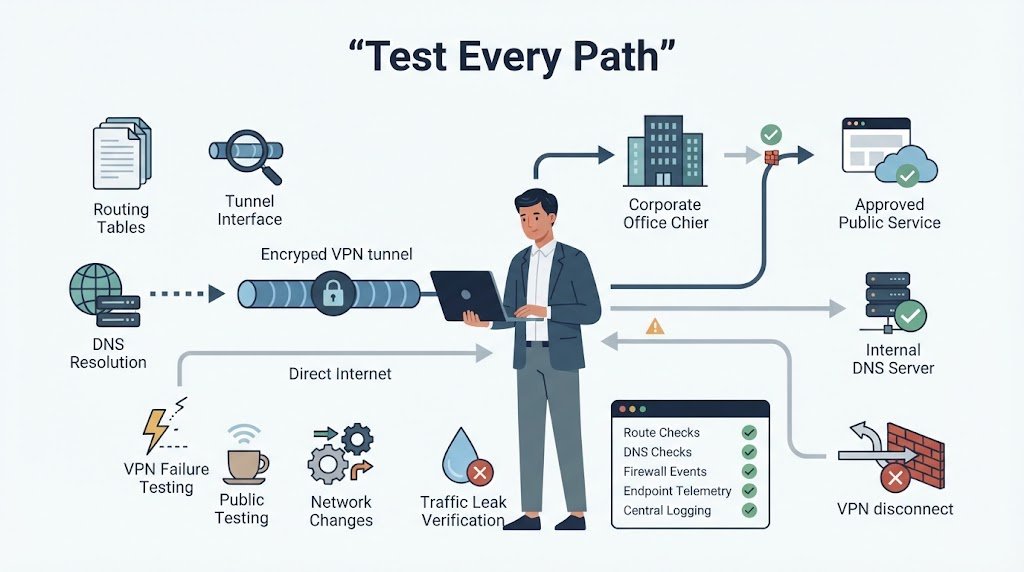
Testing should cover normal traffic, VPN failures, DNS behavior, and network changes. A successful login isn’t enough. The team needs to prove that each traffic class follows the intended path.
| Test | Expected result |
| Internal application | VPN path |
| Approved breakout | Direct path |
| Sensitive SaaS | Policy-defined path |
| Internal DNS | Approved resolver |
| VPN failure | No unwanted exposure |
| Public Wi-Fi | Policy still applies |
Run these tests on supported operating systems and several network types. Home Wi-Fi can behave differently from public Wi-Fi, wired networks, or cellular connections.
Review the logs after each test. Check endpoint telemetry, DNS records, firewall events, SaaS audit logs, and monitoring VPN user activity logs and audits to identify unexpected access, connection patterns, or policy gaps.
We use two basic questions during validation:
- Which interface carries the traffic?
- Which security control sees it?
Both answers should be documented.
Then test failure conditions. Disconnect the VPN unexpectedly. Change networks. Restart the device. Reconnect the tunnel. Check the routes and DNS each time.
This is where hidden problems often appear. A configuration file can look right while the live endpoint sends traffic somewhere else.
Don’t test only the happy path. Test the situations that users and attackers can create.
FAQ
Can split tunneling increase lateral movement risk on public Wi-Fi?
Yes. Public Wi-Fi risks increase when a device connects to an untrusted network while maintaining corporate network access. Rogue access points and MITM attacks can target the local connection, while weak VPN client policies may leave unnecessary paths open. Strong identity controls, host firewall rules, device compliance checks, and least-privilege access can reduce this exposure.
How can split tunnel configuration handle overlapping subnets?
Overlapping subnets can cause routing tables to send traffic through the wrong tunnel interface or physical interface. This can create route blackholes, prevent internal DNS resolution, or cause unexpected traffic bypass.
Before deployment, map internal CIDR blocks, static routes, and local networks carefully. Configuration testing should include home networks, public Wi-Fi, and cloud environments with overlapping private ranges.
When should remote workers use full tunneling instead of split tunneling?
Full tunneling is often better for high-risk users, sensitive workloads, or environments with strict compliance requirements. It keeps more traffic inside the encrypted tunnel and supports centralized content inspection, access logging, and traffic monitoring. Full tunnel profiles can also simplify audit trails and data in transit encryption. The trade-off is higher VPN bandwidth and greater gateway demand.
Can split tunneling expose traffic to an ISP or intermediate network?
Potentially. Traffic using the direct internet path can remain visible to the ISP and intermediate networks, depending on the protocol and encryption used.
An encrypted tunnel protects traffic sent through the VPN, but unencrypted traffic outside the tunnel can create sensitive data exposure. Teams should verify traffic paths and require data in transit encryption for services that handle sensitive information.
How should organizations manage split tunnel exclusions over time?
Treat exclusion lists as controlled security exceptions rather than permanent settings. Each documented exclusion should have a business reason, an owner, an approved destination, and a periodic review date.
Remove entries when services change or no longer require direct access. Regular reviews can also identify data exfiltration paths, unsanctioned cloud services, web proxy bypass, and other split tunnel security risks.
Make the Right Split-Tunneling Decision
Split tunneling can improve performance, but it also changes where traffic is inspected and which security controls apply. The right design depends on your network, applications, users, and risk level. If approved, every traffic path should have a defined route, security control, and review process.
Don’t rely on configuration alone. Test where sensitive traffic goes and whether unusual activity can be detected. For better visibility across split-tunnel environments, explore Network Threat Detection to assess traffic paths and identify security gaps.
References
- https://download.microsoft.com/download/1edd5099-da4c-40db-9259-fd6f010c1743/MST-Deployment_Guide.pdf
- https://csrc.nist.rip/external/nvlpubs.nist.gov/nistpubs/SpecialPublications/NIST.SP.800-77r1-draft.pdf
