
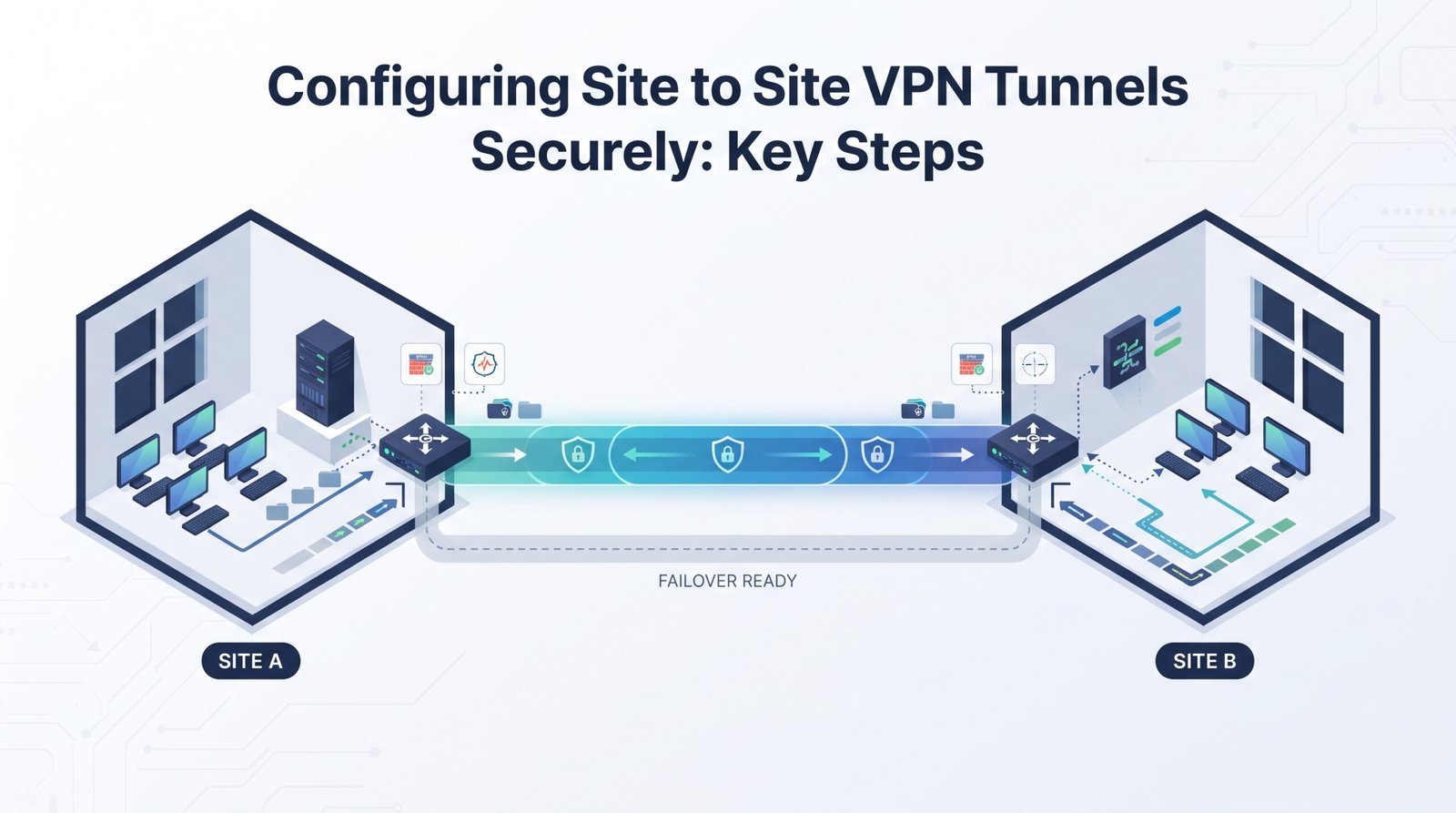
Configuring site to site VPN tunnels securely starts with strong cryptography, accurate traffic selectors, reliable routing, and careful testing. In 2026, IKEv2 is the preferred starting point for new IPsec tunnels, while IKEv1 is mainly kept for legacy compatibility. NIST recognizes IPsec and IKE as important technologies for protecting communications over public networks.
In practice, we check each layer separately, from authentication and Phase 1 to Phase 2, routing, firewall rules, and application traffic. Network Threat Detection adds another view of unusual tunnel activity, traffic patterns, and security events. We do not rely on tunnel status alone. Keep reading to see the key steps.
Quick Reads: Secure VPN Setup Essentials
These three points capture the core practices for configuring and validating a secure site-to-site VPN tunnel.
- Harden the cryptographic baseline: Use IKEv2, AES-256-GCM, strong authentication, and PFS for new deployments, while retiring outdated algorithms where possible.
- Keep routing and selectors aligned: Match local and remote CIDRs, proxy IDs, traffic selectors, firewall policies, and VTI or route-based routing on both peers.
- Test beyond tunnel status: Verify Phase 1, Phase 2, SAs, NAT-T, DPD, MTU, routing, packet flow, and failover before putting the VPN into production.
What Should You Decide Before Configuring the VPN?
Decide the tunnel design, security settings, addressing, and traffic needs before opening the firewall configuration page. That saves time later.
A route-based design with a VTI or tunnel interface can make routing and firewall rules easier to manage. It also fits naturally with BGP, OSPF, or other dynamic routing methods.
Policy-based IPsec can still fit smaller or older environments, but its traffic selectors need closer attention. A broader review of VPN technologies and security concerns can also help teams understand how the tunnel fits into the wider security architecture.
Before deployment, our team should record the local and remote CIDRs, public gateway addresses, authentication method, IKE proposal, IPsec proposal, and expected NAT-T behavior. Without this record, Phase 2 failures can turn into guesswork.
The Internet Engineering Task Force (IETF) defines IKEv2 as an Internet Standard for authenticating peers and creating and maintaining Security Associations (SAs).
- Prefer IKEv2 for new tunnels.
- Use route-based VPNs when supported.
- Record every local and remote subnet.
- Plan UDP 500 and UDP 4500.
- Define routing before traffic testing.
- Include WAN failover in the design.
A 28,800-second Phase 1 lifetime can be used as a baseline example. Still, the actual value should follow security policy and peer compatibility.
Should You Choose Route-Based or Policy-Based IPsec?
Route-based VPNs usually make larger networks easier to manage. A VTI acts as a logical interface, so the routing system can send traffic through it like other network paths.
Policy-based VPNs use crypto ACLs, proxy IDs, or traffic selectors to decide which traffic enters the tunnel. That approach can work for fixed connections. Problems appear when many selectors must be kept in sync.
| Design | Main mechanism | Best fit |
| Route-based | VTI or tunnel interface | Dynamic routing |
| Policy-based | Crypto ACL or proxy ID | Fixed networks |
| Route-based HA | Multiple tunnel interfaces | Dual-WAN |
| Policy-based mesh | Multiple selectors | Small topologies |
We prefer keeping routing and security decisions separate. The routing table should decide where traffic goes. The security policy should decide whether that traffic is allowed.
That separation makes troubleshooting much easier.
Which Cryptographic Baseline Should You Use in 2026?
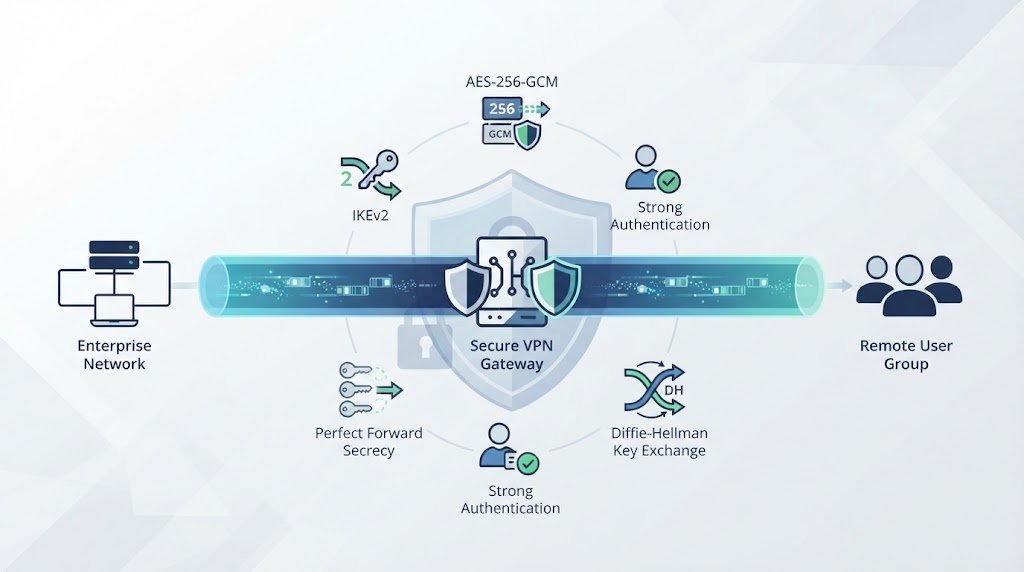
Use IKEv2, strong encryption, secure key exchange, and PFS for new IPsec deployments. Remove older algorithms when compatibility allows it.
A clear cryptographic profile is easier to review. AES-256-GCM is a strong IPsec choice where both peers support it because it provides encryption and integrity protection in one mode. If AES-CBC is needed for compatibility, SHA-256 or another approved integrity method can be used with it.
NIST guidance includes AES and AES-GCM among the cryptographic mechanisms used with IPsec. It also identifies 3DES as deprecated.
| Setting | Recommended baseline |
| IKE | IKEv2 |
| Encryption | AES-256-GCM |
| CBC option | AES-256-CBC with SHA-256 |
| DH | Group 19 or 20, where supported |
| Phase 1 lifetime | Example: 28,800 seconds |
| Phase 2 lifetime | 3,600-14,400 seconds |
| PFS | Enabled |
| Authentication | PKI or strong PSK |
Both peers still need a common proposal. A strong algorithm does nothing if the other gateway cannot negotiate it.
We also avoid loading the configuration with every available algorithm. A smaller approved set is easier to audit and gives the tunnel fewer negotiation paths.
How Should You Document VPN Parameters Before Deployment?
Create one shared configuration record for both sides before the tunnel is built. Keep it easy to read.
The record should include public IP addresses, VPN gateway identities, local and remote CIDRs, authentication details, IKE identity formats, crypto proposals, routing, NAT behavior, and failover expectations.
For dynamic WAN links, note whether the peer uses an FQDN, ID_IPV4_ADDR, or another supported IKE identity. This matters when a public IP can change.
A useful record includes:
- Public gateway addresses.
- IKE identity details.
- Local and remote CIDRs.
- Phase 1 and Phase 2 settings.
- PSK or certificate details.
- UDP 500/4500 and NAT-T settings.
- Static or dynamic routes.
- MTU, MSS, and PMTUD settings.
The value becomes clear during an outage. At 2:00 a.m., engineers need two matching configurations to compare. They shouldn’t have to search through screenshots and old tickets. That habit has saved plenty of troubleshooting time.
How Do You Configure Authentication Securely?
Pick the authentication method based on the number of peers and how credentials are managed.
A strong pre-shared key (PSK) can be suitable for a small deployment. For larger environments, certificate authentication through PKI gives administrators a structured way to manage identities and credentials.
Authentication should also be considered alongside broader VPN endpoint security and MFA practices, particularly when VPN access connects trusted networks to sensitive systems.
A PSK should be long, random, and stored securely. A useful baseline is at least 32 random characters, when organizational policy permits it. Don’t build a key from a site name, company name, address, or familiar phrase.
We also treat credential rotation as part of normal VPN operations. Certificate expiration, PSK changes, reauthentication, and access reviews should each have an owner and a schedule.
When Should You Prefer PKI Over PSKs?
PKI becomes more useful as the number of VPN peers grows. Certificates can reduce the need to maintain a separate shared secret for every connection.
For a small number of tunnels, strong PSKs may be easier to operate. With many peers, centralized certificates can make identity management and revocation less painful.
- Few tunnels: strong PSKs.
- Many tunnels: certificate authentication.
- Regulated networks: centralized identity controls.
- Dynamic peers: certificate-based identity.
The authentication settings must match on both sides. Check the trusted certificate authority, identity fields, certificate status, and supported signature algorithms.
Get those details right before testing the tunnel.
How Should You Configure Traffic Selectors and Proxy IDs?
Traffic selectors should describe the exact local and remote networks that need to cross the VPN. This matters most with policy-based IPsec, where proxy IDs help define which traffic enters the tunnel.
A common problem is an active IKE SA with no usable IPsec SA. The cause can be a mismatch in the selectors. For example, one peer might use 10.10.0.0/16, while the other expects 10.10.20.0/24. The tunnel may be established, but the expected traffic won’t pass.
We check each direction during testing. Don’t assume that a successful Phase 1 means Phase 2 is correct.
- Match local and remote selectors.
- Verify every CIDR block.
- Check both traffic directions.
- Confirm Phase 2 separately.
- Review the negotiated selectors.
A subset mismatch can cause one side to encrypt traffic while the other side routes or rejects it differently. This often appears with overlapping networks or several proxy IDs.
We keep selectors narrow enough for the required traffic. Route-based VPNs can reduce some of this work because routing controls the destination path while the tunnel interface defines the IPsec boundary.
How Should You Handle NAT-T and Dual-WAN Routing?
Plan NAT traversal and failover before production traffic uses the VPN. Waiting until an outage is a bad time to discover that the backup path has different NAT or routing behavior.
When NAT exists between VPN peers, NAT-T normally carries IPsec traffic through UDP 4500. IKE negotiation normally begins with UDP 500. When NAT isn’t present, ESP may be used directly, depending on the network and gateway configuration.
As highlighted by Cisco Security Cloud Control
“NAT Settings Keepalive Messages Traversal: Enabled by default. This parameter is a global setting that enables NAT‑T for all endpoints within a topology. Check this check box to enable keepalive messages for NAT traversal. NAT traversal keepalive is used for the transmission of keepalive messages when there’s a device (middle device) located between a VPN‑connected hub and spoke, and that device performs NAT on the IPsec flow.” – Cisco Security Cloud Control
Routing needs the same level of care. Remote networks should point toward the correct tunnel interface, while firewall rules should permit only the required traffic.
- Allow UDP 500 for IKE.
- Allow UDP 4500 for NAT-T.
- Check ESP where required.
- Verify translated addresses.
- Check routes after failover.
- Test both WAN paths.
Why Do Blackhole Routes Matter During Failover?
A blackhole route can stop traffic from following an unwanted default route after the VPN path disappears.
For example, a remote network might use a blackhole route with an administrative distance of 254, while the active VPN route has a lower value. If the VPN route disappears, traffic is dropped instead of taking another path.
That can prevent accidental Internet forwarding and confusing asymmetric routing. In our testing, failover isn’t complete until recovery is tested too.
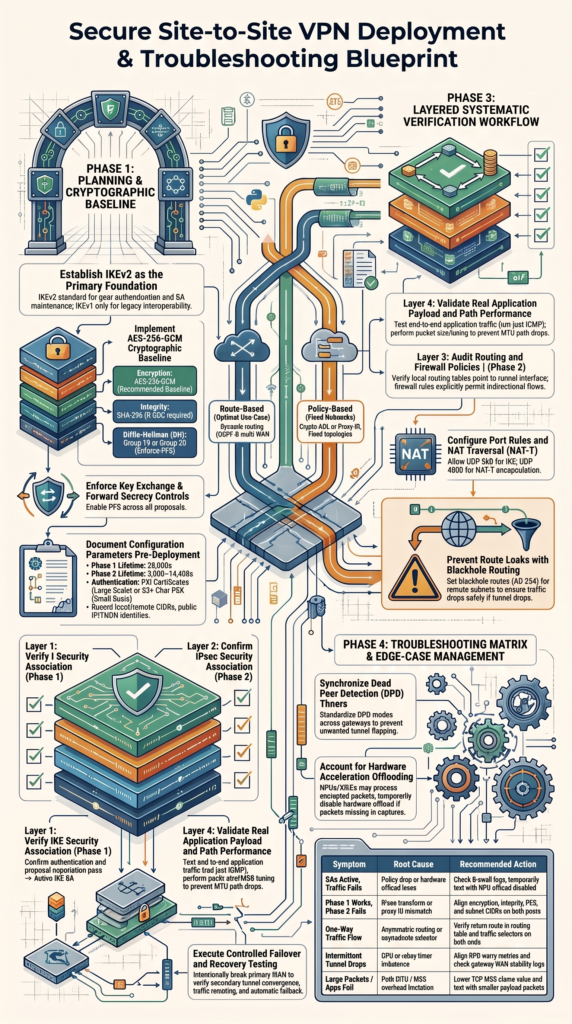
How Do You Verify Phase 1 and Phase 2 Systematically?
Verify the tunnel in layers. Check IKE first, then the IPsec security associations, routing, firewall policy, and application traffic.
An active Phase 1 session proves that the peers created an IKE relationship. It doesn’t prove that Phase 2 selectors, encryption settings, routes, or firewall rules are correct.
We avoid starting with application tests because they can hide the first failure. Instead, move through the tunnel one layer at a time.
- Phase 1: Confirm the IKE SA.
- Phase 2: Check the IPsec SA.
- Routing: Check the tunnel path.
- Firewall: Confirm the traffic is allowed.
- Application: Test real traffic.
- Logs: Review rekeys and DPD events.
| Layer | What to check | Evidence |
| IKE | Authentication and proposal | IKE SA |
| IPsec | Encryption and selectors | IPsec SA |
| Routing | Destination path | Routing table |
| Firewall | Allowed flows | Policy logs |
| Application | End-to-end access | Session test |
A 3,600-14,400-second Phase 2 lifetime can serve as a practical baseline, but both peers must support the selected value. This layered method keeps troubleshooting focused. Otherwise, engineers can spend hours testing the wrong part of the tunnel.
Why Can a VPN Be Up While Traffic Still Fails?
Credits: IgoroTech Official
An IPsec tunnel can show active SAs while traffic still fails. That’s because VPN negotiation and packet forwarding are separate jobs.
The useful approach is to compare control-plane status with actual packet behavior. Routing tables, firewall logs, interface counters, and packet captures can show where traffic stops.
Some gateways use hardware acceleration to process packets. An NPU or ASIC may handle traffic before a normal software capture can see it. So a packet missing from one capture point doesn’t always mean it never crossed the device.
| Symptom | Possible issue | Check |
| SAs active, no traffic | Policy or offload | Firewall and acceleration |
| Phase 1 works, Phase 2 fails | Proposal mismatch | IPsec transforms |
| One-way traffic | Routing or selectors | Both directions |
| Tunnel keeps dropping | DPD or rekey | IKE logs |
| Large packets fail | MTU or MSS | Smaller packet tests |
A practical test follows the packet. Capture traffic on the outside interface, check the tunnel interface, then inspect the inside interface.
If hardware offload looks suspicious, temporarily disabling the relevant feature can help isolate the issue. Restore it after testing.
How Should You Tune Dead Peer Detection?
Dead Peer Detection (DPD) should detect failed VPN peers without causing unnecessary tunnel drops during normal idle periods.
Data from IETF demonstrates
“In DPD, each peer can define its own ‘worry metric’, an interval that defines the urgency of the DPD exchange.” – IETF RFC 3706
DPD interacts with keepalives, rekey events, reauthentication, and WAN stability. The right values depend on how the gateways handle idle connections and how quickly the organization needs to detect a failed path.
For example, on-idle can suit tunnels that should remain established during quiet periods. Other environments may use on-demand, where detection happens when traffic or another condition requires it.
| Mode | Typical use |
| on-idle | Detect idle peer failures |
| on-demand | Detect when needed |
| disable | Handle failure elsewhere |
Consistency matters. If one peer probes aggressively while the other uses much longer timeouts, temporary WAN problems can cause repeated tunnel drops.
We review DPD alongside rekey events. A tunnel that drops at regular rekey intervals points toward a different problem than one that disappears after sitting idle.
Don’t tune DPD by guesswork. Check the gateway logs and test the behavior during a controlled WAN interruption.
How Do You Troubleshoot Multi-Vendor Phase 2 Failures?
Multi-vendor Phase 2 failures are easier to troubleshoot when both sides have explicit settings. Default values can differ, even when the configuration screens look similar.
A peer can complete Phase 1 and still reject Phase 2 because the IPsec proposal, transform, PFS setting, encapsulation mode, lifetime, or traffic selector doesn’t match.
Compare every relevant value before changing several settings at once. For example, AES-256-CBC and AES-256-GCM are different encryption modes. If the peers have no shared option, Phase 2 negotiation will fail.
- Compare encryption.
- Compare integrity.
- Compare PFS.
- Compare DH groups.
- Compare Phase 2 lifetime.
- Compare tunnel mode.
- Compare traffic selectors.
- Check rekey behavior.
We often reduce both peers to one approved proposal during troubleshooting. Once that works, additional approved options can be added only when there’s a real compatibility reason. That approach makes the failure easier to isolate. It also keeps the final configuration cleaner.
What Should Your Final Secure-VPN Checklist Include?
A production VPN should pass checks for cryptography, authentication, routing, firewall policy, monitoring, and failover before it carries important traffic.
The final review should confirm more than tunnel status. A VPN that shows “up” can still have broken application traffic, an incorrect route, or an overly broad firewall rule.
| Area | Final check |
| Protocol | IKEv2 preferred |
| Encryption | AES-256-GCM or approved equivalent |
| PFS | Enabled where required |
| Authentication | PKI or strong PSK |
| Selectors | Exact peer match |
| NAT-T | UDP 500/4500 checked |
| Routing | Primary and backup paths |
| Monitoring | IKE/IPsec logs |
| MTU | Packet-size testing |
| HA | Failover and recovery |
Test real application traffic, not only ping. Applications can expose MTU, MSS, session, or asymmetric-routing problems that ICMP doesn’t show.
Our final review also checks recovery. Break the primary path in a controlled test. Confirm the backup tunnel forms, traffic moves, and normal routing returns after recovery. No shortcuts here.
How Can Network Threat Detection Fit Into a Secure VPN Workflow?
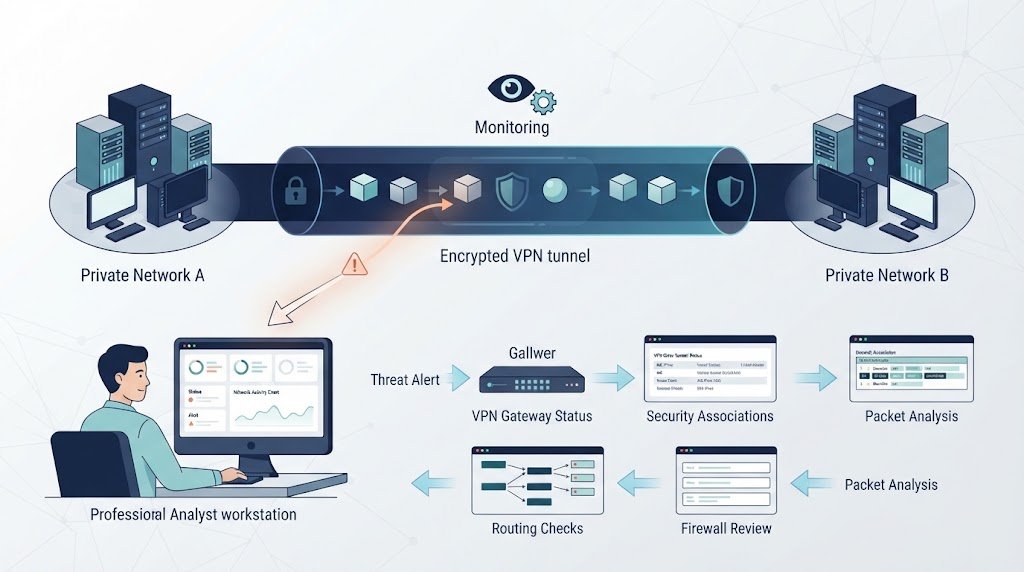
Network Threat Detection can add another layer of visibility around VPN traffic. It can help our team spot unusual patterns or security events without replacing IPsec encryption, authentication, or firewall controls.
The same broader security mindset used in remote access VPN client security best practices can also help teams identify gaps around authentication, endpoint behavior, and access controls.
The VPN still needs strong cryptography and access rules. Detection tools answer a different question: what is happening across the protected network?
A practical workflow connects the two without making either system responsible for everything.
- Review Network Threat Detection alerts.
- Check the VPN gateway status.
- Inspect IKE and IPsec SAs.
- Review routes and firewall rules.
- Capture packets when needed.
- Compare findings with the baseline.
This process can help an analyst move from a broad alert to tunnel-specific evidence. For example, an unexpected traffic spike might lead to a review of the affected VPN, its routes, and the systems sending traffic.
We treat threat detection as supporting evidence, not proof by itself. The operator still needs to understand IKEv2, IPsec, DPD, NAT-T, routing, and firewall behavior. That’s what makes the workflow useful. Each tool answers a different part of the same question.
FAQ
How does a site-to-site VPN differ from a remote access VPN?
A site-to-site VPN connects two or more networks, while a remote access VPN connects an individual user or device to a network. A VPN gateway creates the IPsec tunnel between network locations. This setup works well when multiple systems at one office, data center, or cloud network need secure access to systems at another location.
What should I check if my IPsec tunnel keeps flapping?
Start by checking the events that occur when the IPsec tunnel goes down. Review DPD, keepalive, WAN connectivity, rekey, and reauthentication events in the VPN gateway logs. Check whether the WAN connection drops at the same time. If the tunnel fails at regular intervals, compare the timestamps to identify whether the problem comes from connectivity, negotiation, or tunnel timers.
When should I use a virtual tunnel interface for routing?
A virtual tunnel interface (VTI) is useful when you want the routing table to send traffic through a tunnel interface. A route-based VPN can simplify routing because you can use static routes or dynamic routing instead of managing many individual traffic selectors. This approach is especially useful when the network has several VPN tunnels, changing routes, or redundant connections.
Why can MTU cause problems even when my VPN works?
An IPsec tunnel adds overhead to each packet, which reduces the available MTU. If a packet becomes too large and PMTUD does not work correctly, the packet may be dropped instead of fragmented. This can cause slow connections, stalled transfers, or applications that fail to load. Testing packet sizes and adjusting MSS can help resolve these problems.
How can I tell whether my VPN gateway is routing traffic correctly?
Check the routing table to confirm that the destination network uses the correct tunnel interface. Then review the applicable firewall policies and ACLs to confirm that the traffic is permitted. Check the return route as well, because asymmetric routing can cause one-way connections. A packet capture on the outside and inside interfaces can show where the traffic stops.
Secure Site-to-Site VPNs
A secure site-to-site VPN needs more than successful tunnel negotiation. IKEv2, strong encryption, PFS, accurate traffic selectors, routing, firewall rules, and MTU settings all need to work together. Testing real application traffic is just as important as confirming the tunnel is established.
A repeatable workflow makes these checks easier and helps teams catch configuration gaps before they affect production. For stronger visibility into network risks and attack paths, explore Network Threat Detection and strengthen your VPN security review process.
References
- https://www.cisco.com/c/en/us/td/docs/security/cdo/cloud-delivered-firewall-management-center-in-cdo/managing-firewall-threat-defense-services-with-cisco-defense-orchestrator/vpn-s2s.html#3
- https://datatracker.ietf.org/doc/rfc3706/
