
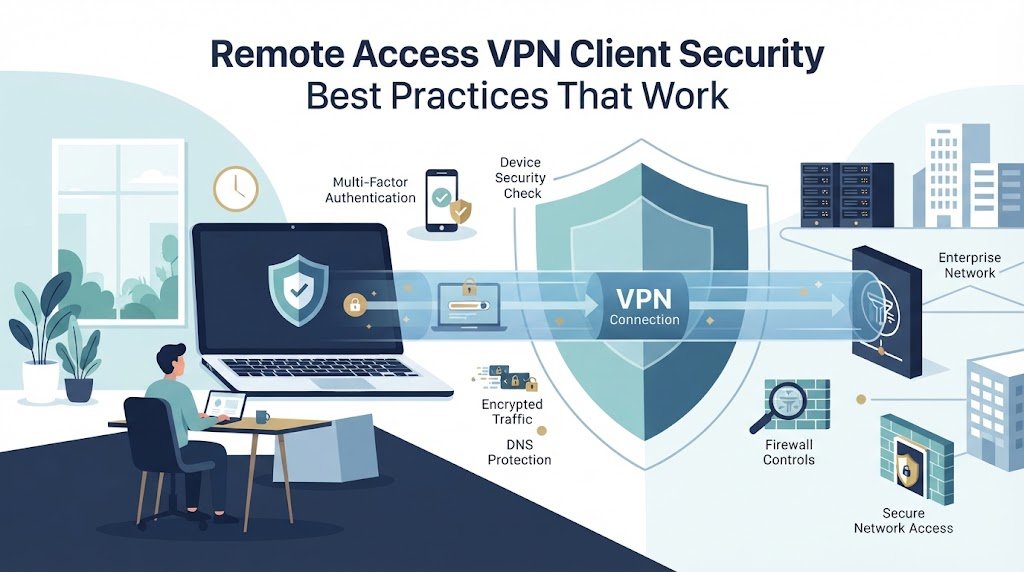
Remote access VPN client security best practices start with strong authentication, trusted devices, secure routing, and limited access. MFA, certificate-based authentication, endpoint checks, and least-privilege rules can reduce common risks, but they work best as part of one security approach.
A VPN gateway also needs proper configuration, current patches, and firewall rules that limit what remote users can reach. At Network Threat Detection, our threat models help identify how an attacker could move after gaining access. We’ll cover the key controls and common gaps. Keep reading to see what to review.
VPN Security Quick Wins
A secure remote access VPN depends on strong identity checks, limited access, hardened infrastructure, and visibility across every session.
- Strengthen access controls: Use MFA, certificates, endpoint posture checks, and least-privilege permissions instead of relying on passwords alone.
- Reduce the attack surface: Harden VPN protocols, limit exposed ports, segment remote users, enforce firewall rules, and keep gateways and clients patched.
- Monitor remote sessions: Combine Network Threat Detection, VPN logs, endpoint telemetry, and SIEM data to spot abnormal activity and respond quickly.
What Does a Secure Remote Access VPN Client Baseline Include?
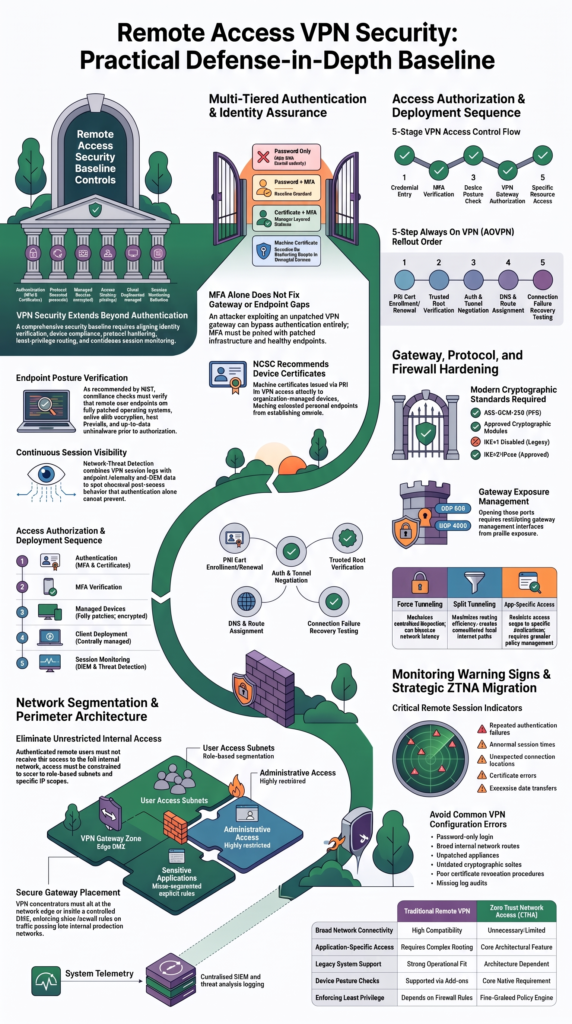
A secure VPN client needs more than strong login credentials. Our baseline normally covers identity, device health, encryption, routing, configuration, and monitoring. Each control has a specific job, but the controls need to support one another.
As noted by NIST
“Verify compliance with certain requirements from the organization’s secure configuration baseline, such as the user’s antimalware software being up-to-date, the operating system being fully patched” – NIST
We usually begin with Network Threat Detection because visibility helps us understand what happens after access is granted. It doesn’t replace authentication, patching, or endpoint protection. Instead, it gives our team another source of context when something unusual happens during a remote session.
The supplied research also points to MFA, certificates, endpoint posture checks, segmentation, client hardening, patching, and centralized logging. Quarterly access reviews can help remove permissions that people no longer need.
| Control | Practical baseline |
| Authentication | MFA and certificates where practical |
| Protocol | IKEv2/IPsec or approved modern option |
| Devices | Managed, patched, encrypted |
| Access | Least privilege |
| Client | Centrally managed |
| Monitoring | Centralized session logs |
- Use individual accounts.
- Check device compliance.
- Remove weak protocols.
- Review access regularly.
NIST guidance supports the idea that authentication shouldn’t automatically provide unrestricted network access.
Are Remote Access VPNs Still Safe in 2026?
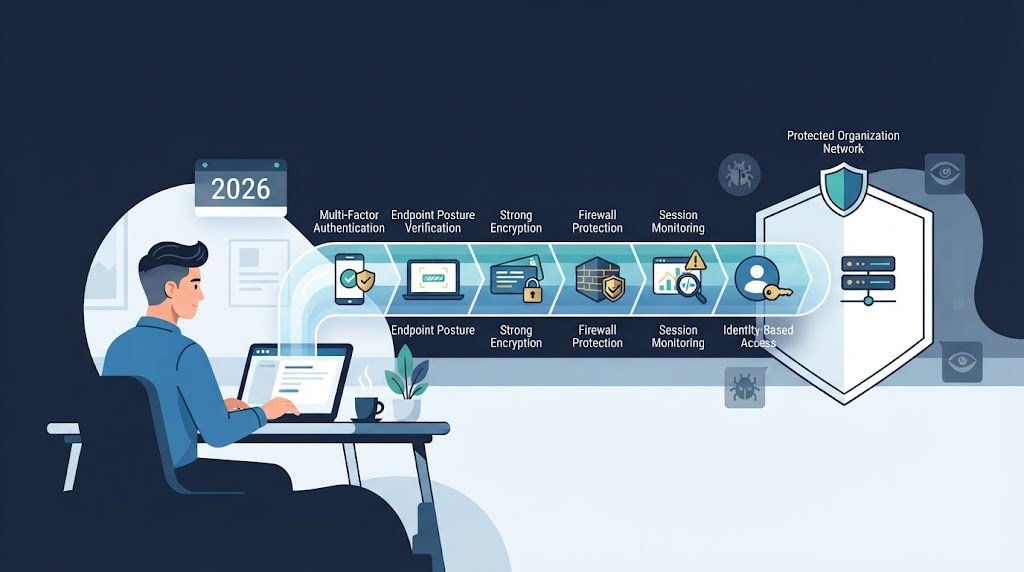
Remote access VPNs can still provide useful protection in 2026, but their security depends on more than encryption. The gateway needs current patches, authentication needs to be strong, devices need security checks, and users should reach only the resources required for their work.
We’ve seen why this matters during security reviews. An organization can have MFA enabled and still have an exposed VPN gateway with an unpatched vulnerability. An attacker exploiting that weakness may never reach the normal authentication stage.
So we treat the VPN as one security layer, not the entire boundary. A successful login should provide access to approved resources, not every internal subnet.
The supplied research also highlights vulnerability concerns from 2024 through 2026, along with patching problems and growing interest in zero trust network access. That shift changes the conversation. VPN security is increasingly about architecture and access policy.
Why is MFA alone insufficient?
MFA protects the identity layer, but it can’t repair a vulnerable gateway or compromised endpoint.
- Protect accounts with MFA.
- Patch the VPN gateway.
- Check endpoint health.
- Restrict reachable resources.
- Monitor active sessions.
CISA guidance also supports reducing exposure across internet-facing infrastructure.
ZTNA can make sense when users need specific applications instead of broad network access. Legacy systems may still require VPN connectivity, though. So the choice should follow the environment rather than a fixed rule. Treat the VPN as one security layer, not the security boundary itself.
Why Should You Use Certificate-Based Authentication?
Password-only VPN access leaves too much weight on one secret. MFA improves that model, while certificates can add another check tied to a known user, device, or both.
As highlighted by NCSC
“We strongly recommend using certificates for authenticating devices.” – NCSC
Our preferred approach is straightforward. Password-only access should be avoided where practical. MFA should form the baseline. In managed environments, certificate plus MFA can provide another layer of identity assurance.
Machine certificates are especially useful when an organization wants VPN access limited to managed devices. The certificate becomes part of the access decision. But it also creates another responsibility. Certificates need to be issued, renewed, monitored, and revoked when necessary.
| Authentication model | Practical view |
| Password only | Avoid |
| Password + MFA | Baseline |
| Certificate + MFA | Stronger layered model |
| Machine certificate | Useful for managed devices |
How can machine certificates restrict personal devices?
A machine certificate can make device identity part of VPN authorization. Only endpoints enrolled by the organization receive the trusted certificate.
- Issue certificates to managed devices.
- Use PKI enrollment.
- Track certificate ownership.
- Revoke lost device certificates.
- Remove certificates from retired devices.
We’ve found that clear ownership makes certificate programs easier to manage. Security teams usually handle trust and revocation, while endpoint teams manage enrollment and renewal.
Self-signed certificates can also create trust problems when they aren’t controlled carefully. A trusted certificate store and defined lifecycle process give administrators better control.
How Should You Harden VPN Protocols, Firewalls, and Gateways?
VPN gateway hardening should cover both the tunnel and the systems exposed to the internet. Strong encryption is useful, but it won’t help much if the gateway runs outdated software or exposes unnecessary services.
For many enterprise environments, IKEv2/IPsec is a practical option. Other modern protocols may fit too, depending on operational requirements. The important part is to remove outdated settings and use configurations that match the organization’s security policy.
A secure IPsec profile should avoid weak algorithms and outdated key exchange options. The supplied research recommends AES-GCM-256, perfect forward secrecy, and approved cryptographic modules where required.
- Prefer modern VPN protocols.
- Disable IKEv1 where possible.
- Use strong cipher suites.
- Validate gateway certificates.
- Patch VPN appliances promptly.
- Restrict administrative interfaces.
IKEv2 commonly uses UDP 500 and UDP 4500, with UDP 4500 supporting NAT traversal. Opening those ports doesn’t mean users should reach every internal network.
Our firewall rules should define who can connect, which destinations they can reach, and what traffic needs monitoring. A clean firewall configuration still can’t compensate for an unpatched gateway.
Should You Use Split Tunneling or Force Tunneling?
Split tunneling can improve performance because selected traffic can avoid the VPN. Force tunneling sends more traffic through the protected connection, which can make centralized inspection easier. Neither approach is automatically safer in every environment.
Our threat model looks at what traffic needs inspection, which DNS servers users can reach, and whether local network paths could bypass security controls.
| Approach | Main trade-off |
| Force tunnel | More centralized inspection |
| Split tunnel | Better routing efficiency |
| App-specific access | Smaller access scope |
Split tunneling is easy to underestimate. A route added to improve performance can also create another path that security tools don’t see.
- Define approved routes.
- Control DNS settings.
- Document exceptions.
- Review cloud traffic separately.
- Test routing after changes.
A split tunnel gives the endpoint another network path. If that path is unmanaged, monitoring becomes harder.
The supplied research discusses AOVPN, Microsoft 365 traffic, RDP exceptions, routing metrics, and DNS behavior. These examples show why performance changes should receive security review too.
Force tunneling can add latency or create routing conflicts. Some environments may therefore need narrow exceptions.
We should treat each exception as a policy decision. An RDP exception should identify the destination, device requirements, permitted route, and monitoring rules.
How Should Endpoint Posture and VPN Client Hardening Work Together?
Credits: TechNet Guide
A VPN login tells us who is connecting, but it doesn’t prove that the device is safe. That’s why endpoint posture and client hardening should be handled as connected controls.
A compliant device should normally run a supported operating system, receive current security patches, use disk encryption, have endpoint protection, and keep its host firewall active. The VPN client should also meet the organization’s approved version and configuration requirements.
Our access flow can look like this:
Credential → MFA → device check → VPN authorization → approved resource
The client itself should make secure settings difficult to change. Users shouldn’t have unrestricted control over profiles, DNS behavior, routing, or security options.
- Check patch status.
- Verify disk encryption.
- Confirm endpoint protection.
- Require the host firewall.
- Enforce approved client versions.
- Restrict unauthorized profiles.
We’ve found that central deployment helps keep these settings consistent. Manual configuration creates differences between devices, and those differences can become difficult to trace during an incident.
Still, usability matters. Controls that block every legitimate network change can encourage workarounds. Approved exceptions are safer than unofficial ones.
What should client deployment enforce?
Deployment scripts can establish VPN profiles, certificates, DNS settings, routes, logging, and endpoint policies together. That gives administrators a repeatable baseline.
NIST configuration management guidance supports this controlled approach. The point isn’t only faster installation. It’s consistent security across managed devices.
How Should You Design VPN Network Segmentation?
Remote users shouldn’t receive access to the whole internal network by default. Our security model works better when each person can reach only the systems needed for the job. That limits the damage if an account or endpoint is compromised.
NIST zero trust guidance supports this approach. Access should consider identity, device condition, requested resource, and policy. A successful VPN login is only one part of that decision.
We’ve found that segmentation also makes investigations easier. If finance users, developers, and administrators sit in different access zones, unusual traffic becomes easier to spot. Security teams can then focus on the connection instead of searching the entire network.
A practical design can separate users into zones based on risk and job needs.
| Design area | Recommended approach |
| VPN gateway | Controlled perimeter zone |
| User access | Role-based segments |
| Admin access | Restricted management zone |
| Sensitive apps | Specific access rules |
| Logging | Central SIEM |
- Limit internal routes.
- Separate privileged access.
- Protect sensitive applications.
- Log important sessions.
RDP deserves extra care. It shouldn’t become a shortcut from a remote device into a large server network. Smaller access zones give our team more control if something goes wrong.
Where should the VPN server sit?
The VPN gateway normally sits at the network edge or within a controlled DMZ design. Only approved traffic should move from the gateway toward internal systems. That structure limits unnecessary exposure and gives security teams clearer control over internal routes.
How Can You Make AOVPN Deployments Reliable?
Always On VPN deployments need consistent profiles, valid certificates, reliable routing, and clear recovery procedures. Our experience is that small configuration differences can create confusing failures across otherwise similar devices.
AOVPN can separate machine access from user access when the environment needs both. A machine certificate can establish device identity, while user authentication controls access to approved resources.
When troubleshooting, we normally check certificate validity, trusted roots, DNS, routing metrics, firewall state, and tunnel negotiation first. That order helps us avoid changing several settings at once.
A production rollout should test these areas, especially when VPN concentrator high availability redundancy is part of the recovery design:
- Certificate enrollment and renewal.
- Trusted root availability.
- Authentication and tunnel setup.
- DNS and routing.
- Recovery after network loss.
AOVPN logs should also identify where the connection fails. Authentication failure is different from certificate failure. DNS failure is different again.
That distinction saves time. We’ve seen teams chase authentication settings when the tunnel was already working and the real problem was internal name resolution.
CISA guidance also supports keeping endpoint software and configurations current throughout their lifecycle. Test recovery before users depend on the connection.
What Should You Monitor After VPN Deployment?
VPN monitoring should give our team more than a list of successful logins. We need enough context to understand who connected, which device was used, when the session started, what resources were reached, and whether the activity looked normal.
NIST monitoring guidance supports centralized visibility because separate logs can hide the larger picture. We can combine VPN records with identity events, endpoint telemetry, and network activity.
Network Threat Detection fits naturally into this layer. It can help identify unusual destinations, unexpected connection volumes, abnormal session behavior, or traffic that doesn’t match a user’s normal role. These controls are part of the broader picture of VPN technologies and security concerns that teams need to consider beyond authentication alone.
Useful warning signs include:
- Repeated authentication failures.
- Unusual connection times.
- Unexpected locations.
- Certificate errors.
- Abnormal traffic.
- Large data transfers.
Our teams can also use SIEM records and endpoint signals to add context. A suspicious VPN session becomes more concerning when the same device reports unusual processes or fails a posture check.
But alert volume needs control. Monitoring should lead to action, not another dashboard. A useful response might include stronger authentication, session termination, account review, or certificate revocation.
When Should You Replace VPN Access With ZTNA?
ZTNA can be useful when users need specific applications instead of broad network access. Our threat model starts with the resource, the person requesting access, and the condition of the device.
A traditional VPN can remain practical for legacy systems that depend on network connectivity. ZTNA may fit newer applications where access can be tied directly to an application and its policy.
The decision should answer a few basic questions before any migration begins:
- What resource needs access?
- Who needs that access?
- What device is being used?
- How much access is required?
- Can the application support a different access model?
| Requirement | VPN | ZTNA |
| Broad network access | Good fit | Usually unnecessary |
| App-specific access | Possible | Strong fit |
| Legacy systems | Often practical | Architecture dependent |
| Device checks | Supported | Core feature |
| Least privilege | Needs careful routing | More granular |
We don’t view these models as an all-or-nothing choice. A mixed design can protect legacy systems with hardened VPN controls while newer applications use more specific access policies.
That can also reduce migration pressure. Teams can move services when they’re ready instead of rebuilding the entire access model at once.
What Common VPN Security Mistakes Should You Avoid?
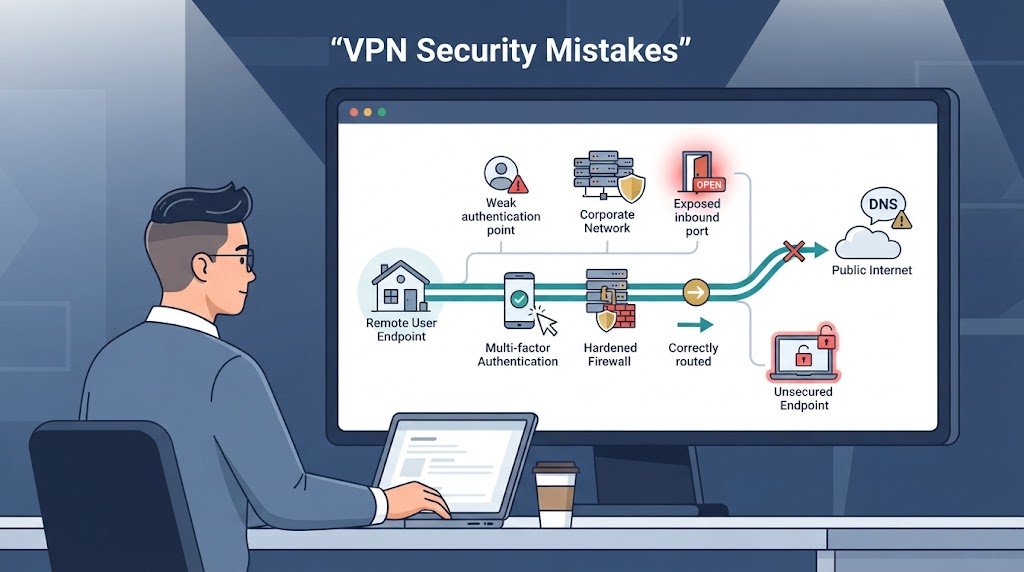
Most VPN problems don’t begin with an exotic attack. They often start with ordinary configuration decisions that remain in place for too long.
Password-only authentication is one example. Broad internal access is another. Old gateway software, weak certificate handling, and missing logs can create similar gaps.
Our security reviews usually look for a few recurring problems, including gaps in monitoring VPN user activity logs and audits that can make suspicious sessions harder to investigate:
- Password-only VPN access.
- Unrestricted internal routing.
- Old cryptographic settings.
- Poor certificate revocation.
- Weak gateway patching.
- Limited security monitoring.
There’s another issue that gets missed: a successful login doesn’t prove the device is trustworthy.
NIST zero trust principles make this distinction clear. Authentication establishes an identity claim. Device posture and resource policy provide more information before access is granted.
We’ve also seen teams inherit configurations they can’t replace immediately. That doesn’t mean they have no options. Stronger MFA, tighter firewall rules, certificate authentication, better segmentation, and additional monitoring can reduce exposure while larger changes are planned.
A useful review asks one question repeatedly: If this account or device were compromised today, how far could it go? That answer helps our team decide where another control is needed.
FAQ
What should VPN client hardening include for remote access VPN security?
VPN client hardening should cover authentication, encryption, DNS, routing, and local firewall settings. Disable unused protocols and services, block unnecessary inbound connections, and keep VPN clients patched.
Use strong cipher suites for VPN connections and certificate-based VPN authentication when appropriate. We also recommend certificate revocation checking and a controlled trusted root certificate store to reduce unauthorized access.
How does device compliance for VPN improve access security?
Device compliance for VPN checks whether a device meets specific security requirements before it can connect. These requirements may include disk encryption, current security updates, endpoint protection, and approved configuration settings.
Endpoint posture checks add another layer beyond user authentication. When combined with conditional access for VPN, these controls can block connections from devices that fail the organization’s security policy.
Should organizations use always-on VPN or force tunneling configuration?
Always-on VPN keeps managed devices connected to the protected network without requiring users to start each session manually. A force tunneling configuration sends internet traffic through the organization’s security controls instead of allowing direct internet access.
The right choice depends on network capacity and security needs. Review VPN routing policies, DNS leak prevention, and user tunnel restrictions before deployment.
How can organizations improve VPN brute force protection?
VPN brute force protection starts with strong authentication and controls that limit repeated failed login attempts. Multi-factor authentication for VPN adds another verification step if a password is stolen.
Organizations can also use geolocation-based access control, after-hours VPN alerts, and VPN session logging to identify unusual activity. RADIUS authentication for VPN can centralize authentication and access policies.
When is ZTNA vs VPN a better choice for remote access?
ZTNA vs VPN depends on how much network access each user needs. A traditional VPN can provide access to a wider network after authentication, while zero trust network access can restrict users to specific applications.
Per-application VPN access and identity-driven access can reduce unnecessary exposure. Least privilege remote access and network segmentation for VPN can further limit lateral movement.
Build a Stronger Remote Access VPN Program
A strong remote access VPN program connects identity, endpoint checks, segmentation, monitoring, and response instead of relying on authentication alone. Testing failure cases can also reveal gaps that policy documents miss, especially when credentials, devices, or gateways are compromised.
Regular reviews help teams understand what remote sessions are actually doing and where access can be tightened. For clearer visibility into risky access paths and unusual behavior, explore Network Threat Detection and strengthen your remote access security strategy.
References
- https://nvlpubs.nist.gov/nistpubs/legacy/sp/nistspecialpublication800-46r1.pdf
- https://www.ncsc.gov.uk/guidance/using-ipsec-protect-data