
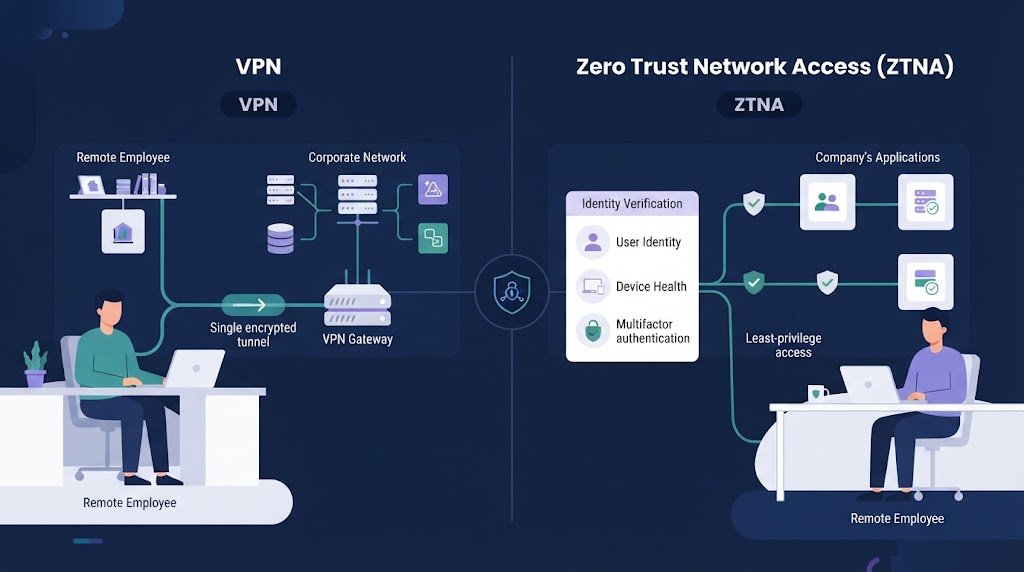
Zero trust network access ZTNA vs VPN comes down to how much access users need and how organizations manage risk. ZTNA limits access to approved applications, while a VPN can connect users to wider network resources. NIST published its zero trust architecture guidance in 2020, emphasizing identity, resource protection, and explicit authorization.
At Network Threat Detection, we use threat models and risk analysis to help teams assess access risks and identify unnecessary network exposure. This comparison covers security differences, legacy systems, migration costs, and situations where keeping both models makes sense. Keep reading to find the right fit for your organization.
ZTNA vs VPN: 3 Things to Know Before You Choose
The right remote access model depends on your security needs, application requirements, and how much network access your users need.
- ZTNA limits access: It gives verified users access to specific applications, helping reduce unnecessary network exposure and lateral movement risks.
- VPN still has a role: It supports legacy applications, file sharing, site-to-site connections, and systems that require network-level access.
- A hybrid approach can work best: Combining ZTNA and VPN allows organizations to improve access security gradually without disrupting essential systems.
What Are People Actually Asking About ZTNA vs VPN?
The real question is usually whether ZTNA can replace a VPN without causing access problems. That depends on how applications are built and how much the organization relies on network-level access.
NIST published SP 800-207 in 2020. It defines zero trust around explicit authentication and authorization rather than trusting a user because they are inside a corporate network.
In our assessments, authentication is rarely the hardest part. The messy work starts with application discovery. Teams need to know which users access each system, which ports are required, where DNS points, and what backend services sit behind the main application.
A useful review asks:
- Can remote workers use application-level access?
- Which systems still need network access?
- What happens if a device is compromised?
- Which users need administrator access?
- How much migration work can the team handle?
We also look at the likely attack path. If one stolen account can reach an entire subnet, the risk is wider than if that account can reach one approved application.
That doesn’t make ZTNA risk-free. Bad policies can still give users too much access. Still, the model gives security teams more control over the path users actually need.
How Do ZTNA and VPN Architectures Differ?
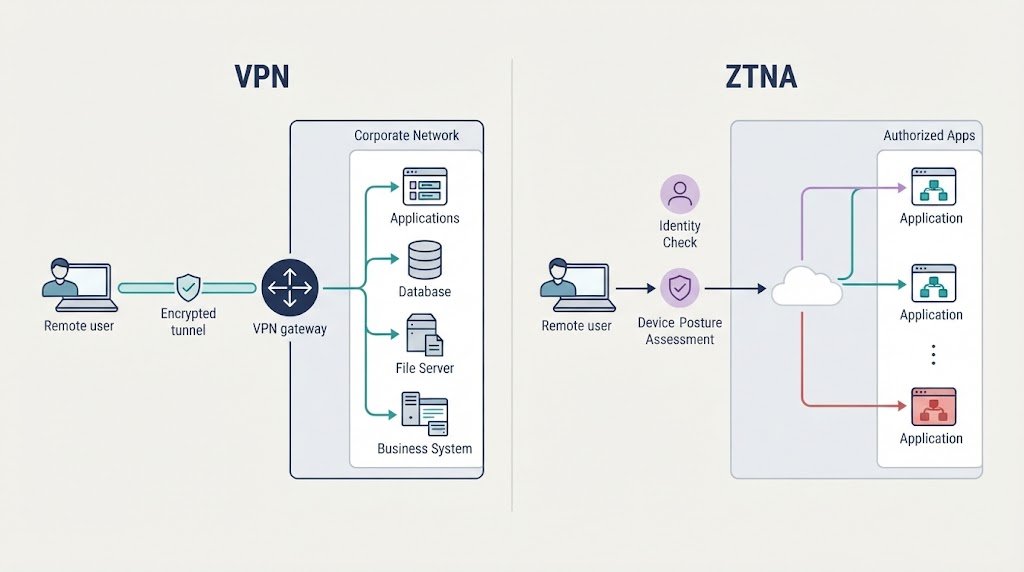
VPN extends an encrypted network path. ZTNA focuses on access to specific resources. Understanding VPN technologies and security concerns also helps teams assess how VPN protocols, access controls, and network configurations affect remote access security.
With a traditional VPN, a user connects to a VPN gateway after authentication. The gateway then gives the user access to a network segment or group of internal resources. Depending on the configuration, that reach can be fairly broad.
ZTNA uses a different model. A user and device are checked before access to an approved application is allowed. The application can remain hidden from the wider network.
| Dimension | VPN | ZTNA |
| Access | Network level | Application level |
| Main check | User authentication | Identity and context |
| Reach | Can be broad | Usually specific |
| Segmentation | Network controls | Application policies |
| Cloud use | May need routing | Suited to distributed apps |
Our threat models focus on what happens after an account is compromised. A VPN can give an attacker a larger area to explore if access rules are too broad. ZTNA can reduce that path by exposing only approved resources.
But architecture matters. Some applications need several internal services to function. If those dependencies aren’t mapped first, a ZTNA rollout can create confusing failures.
Why Does ZTNA Reduce Lateral Movement Risk?
ZTNA can reduce lateral movement because access is tied to specific resources instead of broad network reach. The idea is closely linked to least privilege, where users receive only the access needed for their work.
NIST’s zero trust guidance treats network location as a weak basis for trust. Being connected to an internal network doesn’t prove that a user or device should reach every system on it.
We look at this through a simple attack scenario. Suppose an employee’s credentials are stolen. With broad VPN access, the attacker may be able to scan or reach other internal systems, depending on firewall rules. With tightly scoped ZTNA access, the same account may reach only the approved application.
ZTNA policies can also use signals such as:
- Multi-factor authentication
- Device security status
- User identity
- Application sensitivity
- Location or access context
For VPN environments, securing VPN endpoints with MFA and strong authentication helps reduce the risk of unauthorized access through stolen credentials.
No policy can remove every threat. A compromised account may still access the application it was allowed to use. Fewer reachable systems can mean a smaller area to investigate. For us, that is one of the clearest reasons to consider application-level access.
When Does VPN Still Make More Sense?
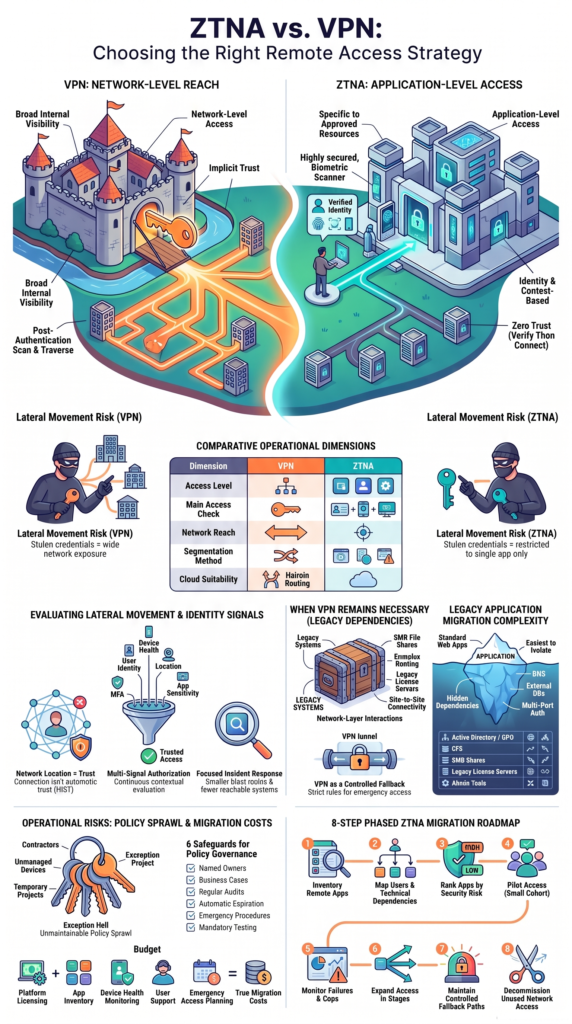
VPN can still be the better fit when users need broad network connectivity depend on older network behavior.
As highlighted by SDxCentral
“VPNs won’t completely be replaced, with Sanchez expecting ‘they will still be around the fringes,’ because there are still use cases in which the technology makes sense over ZTNA.” – SDxCentral
Older environments may rely on file shares, domain services, internal routing, or management tools that expect the user to be on the corporate network. Site-to-site connections can also make a VPN practical because the requirement is network connectivity rather than access to one application.
We would keep VPN in the design when systems depend on:
- SMB or file-share access
- Active Directory services
- Complex internal routing
- Legacy license servers
- Infrastructure administration
- Disaster recovery connections
A VPN can also act as a fallback during a ZTNA service outage, provided that access is tightly controlled.
A well-configured VPN can protect traffic and verify users. The concern is the amount of network access granted after login.
So don’t remove VPN because the architecture is old. First, identify what still depends on it. That review often shows that some connections can move to ZTNA while others need to stay in place for now.
Which Legacy Applications Can Make ZTNA Difficult?
Credits: The CISO Perspective
Legacy applications can make ZTNA migration harder because they may depend on several network services at once. An application that looks like one website to the user may actually need DNS, authentication, file services, databases, or several ports behind the scenes.
As noted by ACM Queue
“The real problem with all that legacy, however, is what it does to hamstring your ability to take advantage of the whole zero trust approach.” – ACM Queue
This is where our risk analysis gets practical. Before moving an application, we map its dependencies. Otherwise, a team may publish the main application and discover later that a required backend service can’t be reached.
| Requirement | ZTNA consideration |
| Web application | Often easier to publish |
| AD/GPO | Dependency mapping needed |
| DFS | Dynamic paths can be difficult |
| SMB shares | Protocol testing is needed |
| License servers | Backend access may be required |
| Admin tools | Multiple services may be involved |
NIST’s zero trust guidance also covers environments where applications and services are spread across on-premises and cloud systems. That makes application discovery a core part of planning.
We don’t recommend guessing. Test the application, record its traffic and dependencies, then build the access policy around what it really needs.
What Hidden Costs Should Teams Expect With ZTNA?
ZTNA can reduce broad network exposure, but the migration still takes time and effort. The cost isn’t limited to buying or running an access platform. Teams also need to prepare identity systems, endpoints, applications, policies, and monitoring.
NIST’s zero trust implementation work includes example architectures that show how many parts of an environment may need to work together. That matches what security teams see during real deployments.
Common areas of work include:
- Application inventory
- Identity integration
- MFA and SSO
- Device checks
- Policy creation
- Logging and monitoring
- User support
- Emergency access
Our planning process also looks at the cost of exceptions. A system may need special treatment because it uses an old protocol or supports a critical business process.
That doesn’t mean ZTNA is too expensive. It means the business case should include migration effort, support work, policy administration, and testing.
A small organization with a stable internal network may decide its existing VPN meets its needs. Another organization with many remote users and cloud applications may find that tighter access controls justify the work.
Measure both security risk and operational cost. Either one alone can give a misleading answer.
How Do Policy Sprawl and Exception Hell Affect Operations?
ZTNA policies can become difficult to manage if every unusual application receives its own exception. Over time, teams may create rules for contractors, temporary users, unmanaged devices, old applications, and emergency access.
CISA’s Zero Trust Maturity Model uses five pillars to describe areas that need attention in a zero trust program. That broader view matters because access control isn’t only a network task.
We’ve seen policy problems grow when application owners aren’t clear about who owns each rule. A policy may stay active long after the original reason for it disappears.
Good controls include:
- A named policy owner
- A clear business reason
- Regular access reviews
- Expiration dates for exceptions
- Documented emergency access
- Testing before policy changes
The security team should also track unused rules. If nobody needs an exception anymore, remove it.
Policy design needs discipline, but it shouldn’t become a maze. Keep rules tied to applications, users, and real access needs. That makes reviews easier and gives incident responders a clearer picture of who can reach what.
Most teams don’t struggle because they have too few rules. They struggle because old rules never leave.
How Should Organizations Plan a ZTNA Migration?
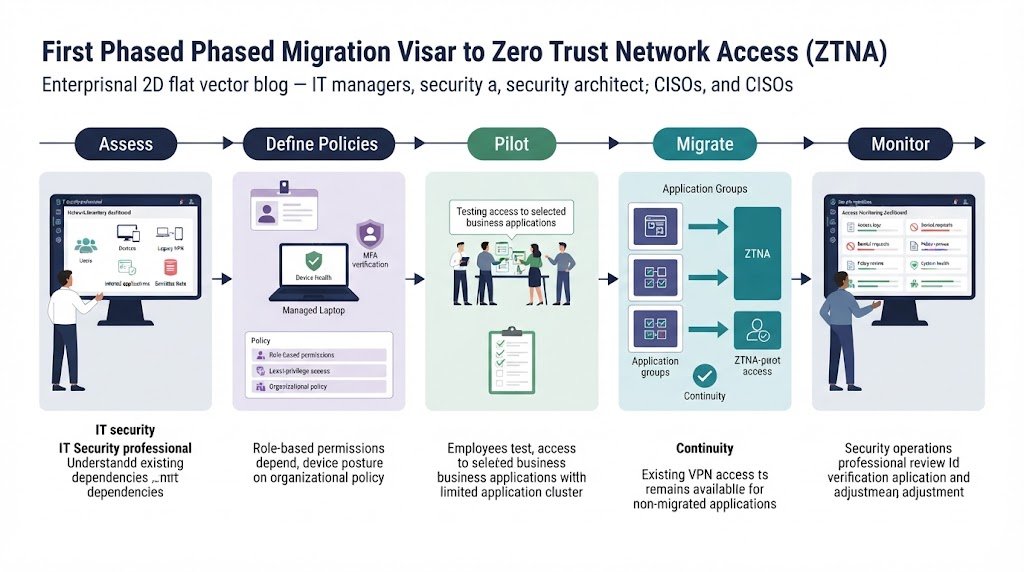
A phased migration can lower operational risk because teams can test access before changing the main remote-access path. Moving every application at once may look fast, but it can create a large troubleshooting problem.
We recommend starting with applications that have clear ownership and predictable access patterns. Web applications are often easier to assess than systems with deep network dependencies.
A practical sequence looks like this:
- Inventory remote applications.
- Map users and dependencies.
- Rank applications by risk.
- Test ZTNA access with a small group.
- Monitor failures and policy gaps.
- Expand access in stages.
- Keep controlled fallback paths.
- Remove unused VPN access later.
Before expanding the rollout, teams should also review remote access VPN client security best practices to identify endpoint risks, strengthen client configurations, and maintain appropriate safeguards for VPN connections.
Our threat models should guide the order. High-risk applications with sensitive data deserve closer review. Systems that expose many internal services also deserve attention because they can create a wider attack path.
Don’t treat migration as a one-time switch. Access requirements change as applications move, users change roles, and new devices appear. A phased approach also gives support teams time to learn the new access model.
FAQ
How does ZTNA protect company resources when employees use personal devices?
ZTNA can support BYOD security by checking a user’s identity, device security, and access permissions before granting access. Organizations can use conditional access policies to block devices that fail required security checks. This approach helps protect company data while allowing employees to use personal devices without giving them broad access to the internal network.
Can ZTNA and VPN work together in a hybrid cloud environment?
Yes. Organizations can use ZTNA to provide application-level access to cloud services while keeping a virtual private network for legacy systems that require network-level access. This approach supports hybrid cloud access without forcing every application to use the same connection method.
Teams should review access permissions and monitor both systems to prevent unnecessary network exposure.
How can organizations limit contractor access with ZTNA?
ZTNA can give contractors access to specific applications without exposing the wider corporate network. Organizations can set permissions based on job roles, project needs, device security, and contract dates.
They should also review contractor accounts regularly and remove access when a project ends or a contract expires. These steps help prevent unauthorized access through unused accounts.
What happens when an employee’s device fails a ZTNA security check?
A ZTNA system can block access or limit permissions when a device fails required security checks. The response depends on the organization’s access policies and the level of risk. IT teams should explain how employees can restore access, such as installing security updates, fixing endpoint protection issues, or switching to an approved device.
How can organizations measure improvements in remote access security?
Organizations can measure improvements by tracking unauthorized access attempts, excessive user permissions, security policy violations, and incident response times. They should also check whether access is removed promptly when employees leave or contractors finish their work.
Regular access reviews and attack-path assessments help identify weaknesses and show whether security controls are reducing unnecessary access over time.
Choose the Right Remote Access Model
ZTNA is often a better fit for identity-based access to specific applications, while VPN remains useful for legacy systems and network-level connectivity. The right choice depends on application requirements, existing dependencies, and the risks associated with compromised accounts or devices.
You don’t always need to replace VPN entirely. A hybrid approach can reduce unnecessary access while supporting systems that still depend on traditional connectivity. Explore Network Threat Detection to assess potential attack paths, understand security gaps, and make more informed remote access decisions.
References
- https://www.sdxcentral.com/analysis/ztna-a-cut-above-vpns-for-remote-network-access-delloro-says/
- https://doi.org/10.1145/3561826
