
Performance considerations VPN encryption overhead includes more than the encryption algorithm itself. VPN encryption overhead can slow connections by increasing CPU use, packet size, and processing time. WireGuard is generally efficient, but a speed loss of 50% or more may point to CPU limits, MTU issues, packet loss, or poor routing.
We can identify the cause by comparing speeds with and without the VPN under the same conditions. Network Threat Detection helps us examine unusual traffic patterns while keeping security in view. Keep reading to find practical ways to diagnose bottlenecks and improve VPN performance.
VPN Speed at a Glance: 3 Things to Know
VPN performance depends on more than encryption; hardware limits, packet size, and network conditions also affect speed and reliability.
- Find the real bottleneck. CPU limits, MTU fragmentation, packet loss, and poor routing can cause major speed drops, even when the VPN protocol is efficient.
- Tune performance without weakening security. Correct MTU and MSS settings, suitable protocols, and hardware acceleration can improve throughput and reduce delays.
- Measure before making changes. Compare VPN-on and VPN-off speeds, test single and multiple streams, and monitor CPU use, latency, and packet loss to identify the cause.
What Is VPN Encryption Overhead, and How Much Speed Loss Is Normal?
VPN encryption overhead includes the processing required to encrypt and decrypt traffic, tunnel headers added to packets, and the work needed to route and forward those packets.
Every encrypted packet requires processing before transmission and decryption after arrival. This consumes CPU resources and can introduce additional delay. Encapsulation also increases packet size, leaving less room for application data within a fixed MTU.
We can think of this as packaging around every shipment. The payload still arrives, but some of the transmitted bytes are used for the packaging rather than the original data.
A VPN performance reduction of around 10–20% may be reasonable in some environments, but there is no universal benchmark. The result depends on hardware, protocol, packet size, routing, server load, and the type of traffic being tested.
| Performance result | What to investigate |
| Around 80–90% of baseline speed | Often acceptable, depending on requirements |
| Around 65–80% of baseline | Check protocol, hardware, route, and server load |
| More than 40–50% speed loss | Investigate CPU, MTU, routing, and packet loss |
| Around 50% loss with WireGuard | Do not automatically blame encryption |
Our first step is always to compare VPN-off and VPN-on performance under the same conditions.
Which VPN Protocol Has the Lowest Overhead?
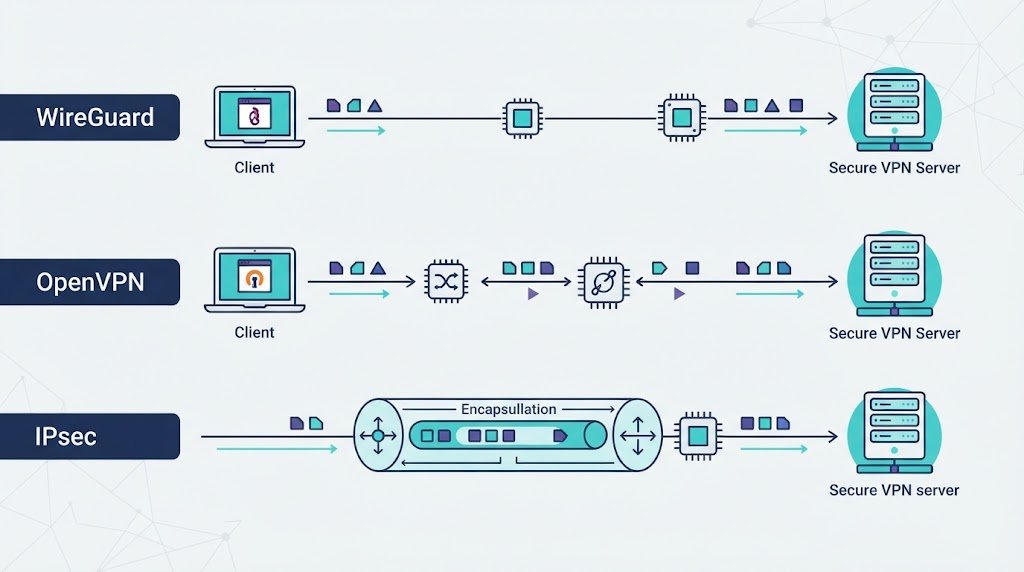
WireGuard is generally considered an efficient modern VPN protocol because of its relatively simple design. However, its performance still depends on the device, implementation, and network path.
| Protocol | General overhead profile | Performance consideration |
| WireGuard | Low | Efficient design, but hardware and MTU still matter |
| IKEv2/IPsec | Low to moderate | Can benefit from hardware cryptographic acceleration |
| OpenVPN UDP | Moderate | Avoids TCP-over-TCP behavior |
| OpenVPN TCP | Moderate to higher | Can compound retransmission problems |
| PPTP | Low | Insecure and unsuitable for modern security requirements |
Research from ACM Digital Library shows
“VPN connection establishment and maintenance overheads for short sessions could be significantly higher than those incurred while transferring data, and cryptographic operations contribute 32 – 60% of the total IPSec overheads.” – ACM Digital Library
Some supplied benchmarks report WireGuard overhead around 4–6% under specific conditions. Treat this as an example. Protocol overhead and end-to-end throughput loss are different measurements.
A fair comparison uses the same hardware, network route, packet sizes, and workload. We should also check CPU utilization, latency, and packet loss rather than relying on throughput alone.
Network Threat Detection can complement this process by helping us investigate unusual traffic patterns. The goal is to understand the source of performance changes while retaining appropriate security monitoring.
How Do MTU, Packet Encapsulation, and MSS Affect VPN Speed?
MTU problems can cause performance issues that look like encryption overhead but have little to do with cryptographic speed.
WireGuard adds outer IP and UDP headers plus its own transport information. A useful planning estimate is approximately 60 bytes of overhead for IPv4 and 80 bytes for IPv6, depending on the packet structure and configuration.
That is why a 1500-byte network MTU does not automatically mean a VPN tunnel should also use 1500 bytes. The tunnel needs room for its additional headers.
A WireGuard MTU of 1420 is commonly used as a starting point, but the correct setting depends on the actual network path. Cellular connections, carrier-grade NAT, nested tunnels, and other encapsulation layers may require a lower value.
The IETF’s RFC 8200 specifies an IPv6 minimum link MTU of 1280 bytes and addresses packet-size requirements relevant to IPv6 networking.
When Path MTU Discovery fails, oversized packets may be dropped without the sender correctly adjusting packet size. This can produce a Path MTU Discovery black hole, where a VPN connects successfully but larger transfers or certain websites fail.
Use this diagnostic sequence:
- Establish the VPN tunnel and confirm DNS resolution.
- Test packet sizes with the Don’t Fragment (DF) flag where supported.
- Reduce the tunnel MTU incrementally if packet-size problems appear.
- Retest browsing, file transfers, and throughput.
- Check TCP Maximum Segment Size (MSS) and apply MSS clamping where appropriate.
Router configurations sometimes use MSS values around 1380 for IPv4 and 1360 for IPv6 as starting points. These are not universal settings. The appropriate values depend on the path MTU, encapsulation, and protocol requirements.
Correcting MTU and MSS settings can improve reliability and throughput without weakening encryption.
How Do CPU Limits, NAT, and Hardware Acceleration Affect VPN Throughput?
Credits: Lexorithm
Encryption can push a gateway toward its processing limit, particularly on smaller routers and older hardware. The same device may handle NAT, firewall rules, connection tracking, routing, logging, and packet forwarding. If one CPU core becomes saturated, throughput can fall even when overall CPU utilization looks acceptable.
Hardware acceleration also matters. Some processors support instructions that speed up AES encryption, while other hardware and software combinations may perform better with ChaCha20-Poly1305. The best option depends on the platform and implementation.
Our troubleshooting process checks:
- Per-core CPU utilization during transfers.
- Hardware cryptographic acceleration support.
- NAT and firewall processing overhead.
- Packet-forwarding and kernel limitations.
- Whether throughput changes when inspection or logging loads increase.
Monitoring VPN user activity logs and audits can help us identify unusual traffic patterns and investigate processing demands while keeping security controls in place. We should measure its impact under normal and heavy loads rather than removing security controls based on assumptions.
The same principle applies to MikroTik deployments and other gateway platforms: measure CPU usage, firewall processing, NAT, and packet-forwarding behavior together.
A faster internet connection cannot overcome a gateway that lacks the processing capacity to handle the traffic. Security and performance requirements should therefore be evaluated together before deployment.
Why Do TCP Transport, Multi-Stream Testing, and Network Routes Matter?
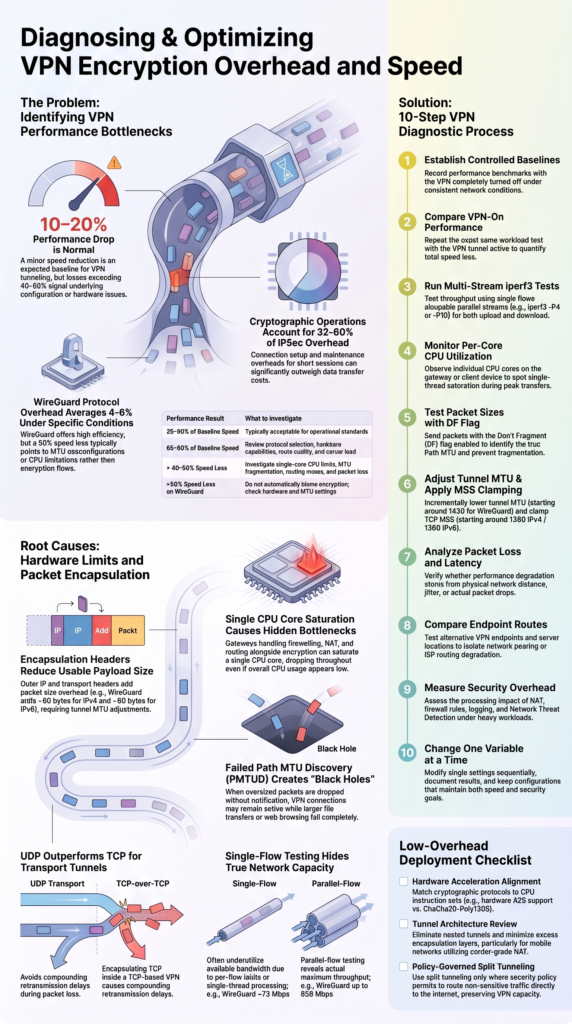
VPN performance depends on more than the encryption algorithm. Transport behavior, the number of concurrent connections, network distance, congestion, and server capacity can all change the result.
TCP vs UDP
When a TCP-based VPN carries TCP traffic inside its tunnel, both layers may try to manage congestion and retransmissions. Packet loss can trigger repeated recovery efforts, increasing delay and reducing throughput. This is commonly called TCP-over-TCP behavior.
OpenVPN over UDP avoids this specific problem and can be a better choice for many workloads. However, UDP is not always faster. Firewall restrictions, packet loss, server load, and route quality can affect the result.
We compare transport options under consistent conditions and monitor retransmissions, throughput, and latency before making a decision.
Single-stream versus multi-stream testing
A single TCP flow may not fully use available network capacity because of congestion control, per-flow limitations, single-thread performance, or application behavior. Multiple parallel flows can reveal whether the system performs better when traffic is distributed across several connections.
The following figures are illustrative benchmark examples, not universal protocol limits.
| VPN protocol | Single-flow example | Parallel-flow example |
| OpenVPN | 50–90 Mbps | Around 190 Mbps |
| IPsec | Around 150 Mbps | Around 890 Mbps |
| WireGuard | Around 72 Mbps | Up to 650 Mbps |
We recommend using iperf3 with single streams and parallel streams, such as -P4 or -P10. Test both VPN-on and VPN-off performance, in both upload and download directions, while recording CPU usage, packet loss, and latency.
Server distance and routing
Performance can also change significantly between VPN endpoints even when the encryption settings remain identical.
A distant server can introduce additional latency. Congestion, packet loss, and poor peering between networks can reduce throughput further.
| Test result | Possible explanation |
| High latency with little packet loss | Long route or additional network delay |
| High packet loss | Network, link, or routing problem |
| Good performance locally but poor performance remotely | Distance or route quality |
| Slow performance mainly during busy periods | Congestion or server load |
| Similar problems across several endpoints | Local device or configuration issue |
We test multiple endpoints where possible and record throughput, latency, jitter, and packet loss. Repeating tests at different times can help reveal congestion patterns.
A poor result from one endpoint does not establish that the VPN provider or encryption is the cause. Route quality and server capacity must be considered first.
How Should You Diagnose a VPN That Loses 50% of Its Speed?
A 50% or larger speed reduction deserves investigation, especially when the connection is expected to support high-throughput workloads. Changing encryption settings immediately may hide the real problem or introduce unnecessary security risks.
Use this repeatable troubleshooting process:
- Record the VPN-off baseline under controlled conditions.
- Repeat the test with the VPN enabled.
- Run single-stream and multi-stream iperf3 tests.
- Monitor per-core CPU utilization during each test.
- Test packet sizes to identify potential MTU problems.
- Check MSS behavior and packet loss.
- Compare upload and download results.
- Test another VPN endpoint or route.
- Review firewall, NAT, and packet-inspection overhead.
- Compare results after changing one setting at a time.
Interpret the results before making changes. If one CPU core reaches saturation, investigate gateway capacity and processing efficiency. Understanding broader VPN technologies and security concerns also helps us identify performance issues without compromising security.
If multiple streams perform much better than a single stream, the limitation may involve per-flow behavior or congestion control rather than the encryption algorithm alone.
Our approach is straightforward: measure first, change one variable at a time, and document the results. Keep the configuration that meets both the organization’s performance targets and its security requirements.
How Can You Reduce VPN Overhead Without Sacrificing Security?
Most useful performance improvements come from removing unnecessary processing or correcting configuration problems rather than weakening encryption.
As noted by Cisco
“Using stronger tunnel encryption may lower system performance.” – Cisco
Prioritize these adjustments:
- Use a modern VPN protocol appropriate for the workload.
- Match cryptographic settings to available hardware acceleration.
- Validate tunnel MTU and TCP MSS values.
- Avoid unnecessary nested tunnels and encapsulation.
- Review firewall rules, NAT, logging, and packet inspection.
- Test closer VPN endpoints and alternative routes.
- Consider split tunneling only when organizational policy permits it.
- Measure Network Threat Detection’s processing impact under realistic traffic loads.
Split tunneling can reduce the amount of traffic passing through the VPN, but it changes the security boundary.
WireGuard can also be a strong performance choice without being the best operational fit for every enterprise. Its peer-based design may require additional systems for centralized identity, detailed access policies, user lifecycle management, and large-scale device onboarding.
| Requirement | What to consider |
| High throughput | Benchmark the protocol on the target hardware |
| Simple peer setup | Evaluate key management and configuration needs |
| Centralized identity | Check whether additional management tools are needed |
| Detailed access policies | Verify policy enforcement capabilities |
| Large user deployments | Plan onboarding, revocation, logging, and incident response |
What Should a Low-Overhead VPN Checklist Include?
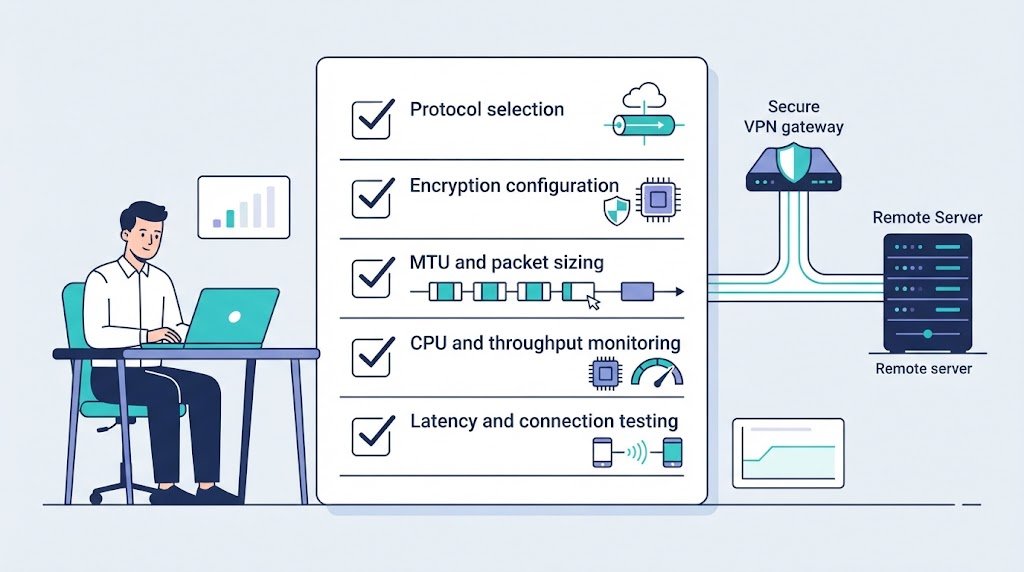
Before considering a VPN deployment ready for production, confirm that the hardware, tunnel settings, network path, and security controls work together.
- Record VPN-off and VPN-on performance baselines.
- Check per-core CPU utilization.
- Validate tunnel MTU and TCP MSS.
- Test single-stream and multi-stream throughput.
- Measure latency, jitter, and packet loss.
- Compare multiple endpoints and routes.
- Review NAT, firewall, and packet-forwarding overhead.
- Test upload and download performance.
- Evaluate threat-detection processing under realistic loads.
- Document the configuration and repeat the tests after major changes.
Site-to-site VPNs may need additional routing and NAT checks, along with VPN concentrator high availability and redundancy to maintain connectivity when a gateway fails.
Nested tunnels can increase packet overhead and reduce the usable MTU. Mobile users also need separate testing because cellular networks introduce changing radio conditions, carrier NAT, and variable latency.
We do not need to collect every possible metric. We need a small set of reliable measurements that can be repeated under consistent conditions.
Keep the baseline and test again after hardware upgrades, routing changes, security-policy updates, or changes to VPN software. This makes performance regressions easier to identify.
FAQ
How does VPN encryption overhead affect gaming and video calls?
VPN encryption overhead can increase latency and jitter, which may cause lag during online gaming or interruptions during video calls. The impact depends on server distance, packet loss, and device performance. Even when download speeds remain high, delays can affect real-time communication. Compare latency and call quality with and without the VPN to identify performance problems.
Why does VPN speed change between Wi-Fi and mobile data?
VPN speed can vary between Wi-Fi and mobile data because each connection uses different network routes, signal conditions, and connection settings. Mobile networks may also use carrier-grade NAT, which can affect VPN connections.
Test both connections and compare throughput, latency, and packet loss. These results can help you determine whether the slowdown comes from the VPN or the underlying network.
Can a VPN increase mobile data usage?
Yes. VPN tunnel overhead adds extra packet headers to transmitted data, which increases the amount of data sent for the same application payload. Keepalive packets can also use small amounts of data while the tunnel remains active.
The total increase depends on packet sizes, connection duration, and traffic patterns. Compare your mobile data usage with and without the VPN to estimate the difference.
Does split tunneling improve VPN performance for remote workers?
Split tunneling can improve VPN performance by sending only approved work traffic through the encrypted tunnel. Other permitted applications connect directly to the internet, reducing the amount of traffic handled by the VPN.
However, this setup changes how traffic is protected and monitored. Organizations should define which applications can bypass the tunnel and ensure that sensitive data follows approved security policies.
How does VPN encryption affect applications that connect over long distances?
Long-distance VPN connections often have higher latency because data must travel farther between endpoints. Encryption adds processing time, but routing delays and network congestion can have a greater effect.
These delays may affect remote desktops, voice calls, and other interactive applications. Choose a suitable VPN server and compare latency, jitter, and packet loss to determine whether the connection meets your performance needs.
Balance VPN Performance With Security
VPN encryption overhead can affect throughput, but congestion, CPU limits, routing, and MTU issues can cause just as much trouble. Before changing encryption settings, establish a baseline, measure CPU usage, test packet sizes, and compare routes to identify the real bottleneck.
The goal is to improve speed without weakening essential security controls. For better visibility into network behavior while troubleshooting performance, explore Network Threat Detection to help identify unusual traffic patterns and make more informed security decisions.
References
- https://dl.acm.org/doi/abs/10.5555/1897159.1897164
- https://docs.manage.security.cisco.com/cdfmc/c_vpn_encryption_performance.html
