
Managing WAF policies and signature updates means keeping security rules current while making sure legitimate traffic still gets through. A Web Application Firewall (WAF) uses signatures to detect attacks such as SQL injection, cross-site scripting, and command injection. But outdated rules can leave applications exposed, while poorly tested updates may block normal requests.
At Network Threat Detection, we treat WAF management as ongoing work, not a one-time setup. We review rule changes, test updates against application traffic, and monitor their impact before wider deployment. Read on to learn how to manage WAF policies and updates without disrupting daily operations.
Quick Reads: WAF Policy Management Essentials
- Keep WAF signatures updated and test new rules in monitoring mode before blocking.
- Customize rules, investigate false positives, and prioritize enforcement based on accuracy and severity.
- Automate policy deployment while maintaining human approval, version history, backups, and rollback procedures.
What Does Managing WAF Policies and Signature Updates Involve?
Running a WAF never really ends. Someone has to keep the signatures current, set the inspection rules, read the security events, and decide what happens to a request that looks off. It’s a lot.
A signature is just a pattern for spotting a known attack. SQL injection signatures hunt for database commands hidden inside a request. XSS signatures, short for cross site scripting, look for scripts that could harm a visitor.
Signatures come bundled as dictionaries, signature sets, or managed rulesets. Admins turn them on through a security policy, and that policy decides which apps get covered and what the WAF does when a request matches.
The WAF can log the request, block it, reset the connection, redirect it, or let it pass.
The main pieces are:
- Managed WAF rules: Patterns the vendor writes and updates for known attacks.
- Custom WAF rules: Rules you write for your own app, since a vendor can’t know its quirks.
- Security policy configuration: Choices about which signatures are on, how serious each one is, and what the WAF does when one hits.
- WAF policy monitoring: Reading events, matched signatures, and how the app behaves.
We’ve worked with plenty of security teams, and none of them ever called this finished. Apps change. Attackers change too. A signature that behaved fine last month can start flagging real customers the day a new feature goes live.
How Do Automatic WAF Signature Updates Work?
The WAF downloads new security definitions from the vendor’s update service, so nobody has to do it by hand.
Most platforms run updates on a schedule. Some also let you install signature packages yourself. Either way, the wait between a vendor writing a new pattern and your WAF having it gets much shorter, which is the whole point.
Our usual advice is to update daily or follow the vendor’s schedule. When a big new threat shows up, though, waiting for tomorrow can feel too slow, and an urgent update might be the better call.
Before enabling automatic downloads, make sure you have reliable DNS resolution for vendor update services, outbound network connectivity with valid update access, and enough memory, storage, and processing power. You should also confirm that the connection to the signature distribution service is working and have a written plan in place to handle failed downloads.
Speed is only part of it. A signature that downloads fine isn’t always safe to turn on. We once watched a new signature flag, the odd looking JSON that a checkout page sent all day long. Blocking it would have thrown errors at every shopper. Not good.
How Often Should WAF Signatures Be Updated?
For most teams, a regular update schedule combined with emergency updates for critical threats provides a practical approach.
Here are four common ways to manage WAF signature updates:
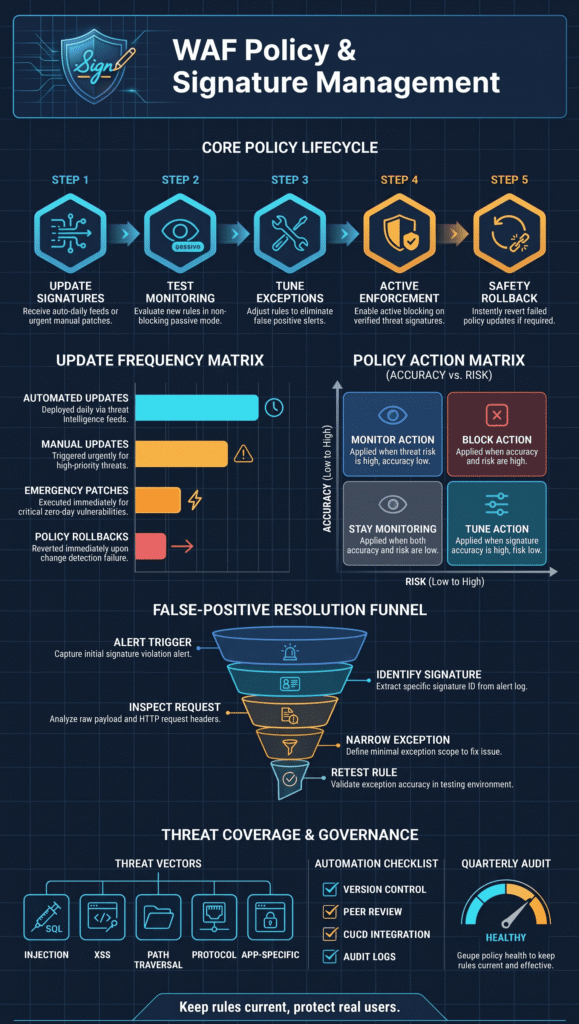
- Automatic signature updates: Run daily or follow the vendor’s recommended schedule. Always verify that updates download successfully.
- Manual signature updates: Use them for urgent changes or controlled deployments that require administrator review.
- Emergency updates: Apply them when critical new threats are identified. Test enforcement carefully before deploying changes across all applications.
- Signature rollback: Use it when an update fails or disrupts legitimate traffic. Restore a previously tested and stable version.
The OWASP Core Rule Set (CRS) provides a widely used collection of rules for detecting application-layer attacks, including SQL injection and cross-site scripting. However, not every rule should be enabled in blocking mode immediately. Test new rules against your applications first to identify potential false positives.
Microsoft’s Azure WAF best practices follow a similar approach. WAF configurations should reflect each application’s requirements while accounting for how security rules might affect legitimate traffic.
Managing updates becomes more challenging when multiple applications generate different request patterns. Automatic updates help keep detection rules current, but security teams still need to decide how each signature should be enforced.
Threat data can help guide those decisions. Network Threat Detection’s threat modeling and risk analysis tools help identify which applications face greater risks. This allows teams to prioritize stricter protection for higher-risk applications while introducing changes more gradually across others.
Why Should You Test WAF Signature Updates Before Blocking?
Testing first lets you catch false positives and app problems before your users do. And trust me, users notice fast.
When the platform allows it, we start new or changed signatures in detection mode. Some vendors call it monitoring mode, or alert only mode.
The WAF records matching requests but doesn’t block them. Admins can read through the events, compare them to normal traffic, and decide whether the signature found a real attack or just a regular visitor.
A simple rollout involves five steps. First, deploy the updated signature set in monitoring mode and review the matched signatures and affected application requests. Next, investigate potential false positives by checking application and WAF logs. If legitimate traffic is incorrectly identified, create narrowly scoped exceptions to avoid unnecessary blocking. Once the signatures have been validated, move them into prevention mode and apply the appropriate blocking actions.
As highlighted by OWASP Foundation
The OWASP WAF Advanced Ruleset Management project explains why this testing phase is unavoidable. WAF rulesets, it notes, “are applied generically, without taking into account how the protected application is built or what types of input it expects.” Before going live, a tuning phase is necessary to reduce false positives, and this process is “mostly manual, time-consuming, and error-prone” . – OWASP Foundation
Picture an app where customers type their own search terms. A new SQL injection signature might flag some normal searches because they look a little like database commands. Block right away and search stops working. Monitor first, and your team gets time to study the pattern and decide whether an exception makes sense. We’ve been through this exact situation, and sorting it out took under an hour of log reading. Honestly, that hour saved us a week of angry tickets.
When Should You Delay WAF Enforcement?
Not every signature should flip to blocking at the same time.
Hold off on deployment when a signature has low detection accuracy or critical application functions have not been tested. You should also delay activation if security logs show unexplained matches against legitimate traffic, a new application release changes request formats, or existing exclusions and custom rules conflict with the updated signature.
People in the F5 Community have shared stories about turning on weak signatures too fast. Too many false alarms bury the real attacks, and soon everyone stops trusting the alerts. That’s the real danger.
One last thing from us. Monitoring mode is a stop along the way, not a place to live. Once a signature is tested and your team understands how it affects the app, turn on blocking at a level that fits the risk.
How Can You Organize WAF Signatures Into Effective Policies?
Group your signatures by app, attack type, and risk level. This keeps policies easy to manage and cuts the alerts nobody needs.
It’s tempting to turn on every signature. More rules, more safety, right? Not really. On the setups we’ve looked at, the “everything on” policies were always the loudest. Admins got so many alerts that they stopped trusting them, and the real attacks hid in the noise. It works better to pick rules based on what the app does, who can reach it, and what attacks it’s likely to see.
Here’s how we usually split things up:
- Injection attacks: SQL injection, command injection, and file inclusion.
- Browser-based attacks: Cross-site scripting and malicious script injection.
- File and directory attacks: Path traversal and unauthorized file access.
- Protocol violations: Bad HTTP methods, broken headers, and strange request shapes.
- Application-specific threats: Custom signatures for sensitive endpoints.
Each app should also get its own policy. A payment app and a file-sharing app have very different risks. The payment app needs a close look at transaction parameters. The file-sharing app needs extra checks on uploaded files. The same WAF protection goal applies to both, but each requires different rules.
Should You Enable Every Available Signature?
No. Only turn on a signature if it fits the app, matches its exposure, and catches attacks accurately.
A large global signature flags more bad traffic, but it flags more good traffic too. Admins should begin with the predefined signatures that match their app. After that, they can add custom rules for risks the defaults miss. The OWASP Core Rule Set is a solid place to start because it gives teams a common set of rules for known web attacks. Even so, every organization needs to test those rules against its own traffic.
One habit has paid off for us again and again: keep separate policies for apps with very different traffic. Filtering, exclusions, and enforcement are all easier to handle that way. Our threat models and risk analysis tools help too, because they show which apps are most at risk and which signatures matter most for them.
How Do You Identify and Reduce WAF False Positives?
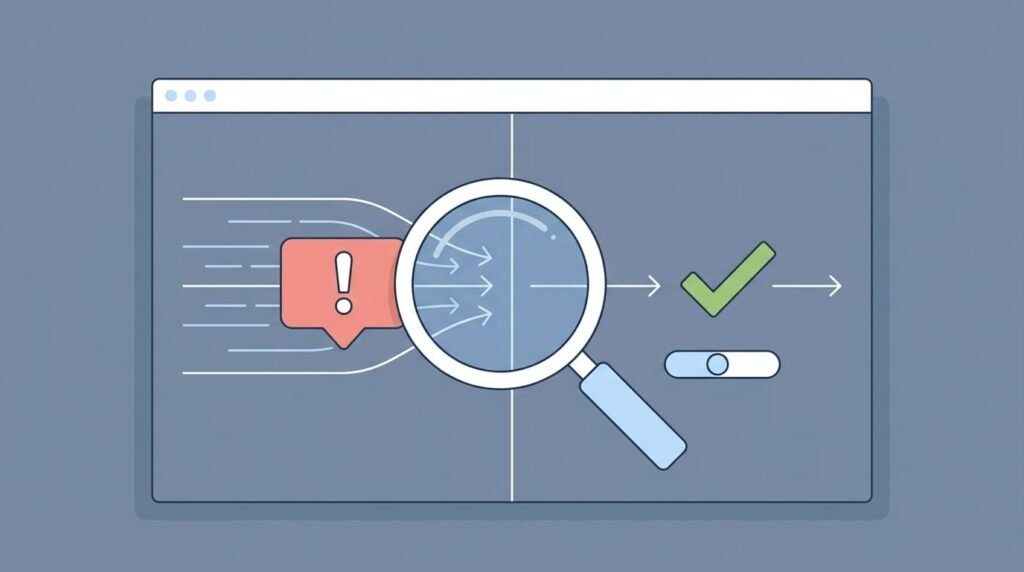
To reduce false positives, find the exact signature, request, and app behavior behind each alert.
A false positive happens when the WAF blocks a request that is actually safe. It usually shows up when a broad signature meets odd but valid traffic.
Certain types of traffic are more likely to trigger false positives, including search queries with special characters, JSON request bodies with complex structures, and file uploads or rich-text submissions. Unicode characters, unusual HTTP headers, and API requests containing encoded or nested parameters can also cause detection issues.
Shutting off a whole signature group is rarely the best first move. Proper WAF rule tuning helps minimize false positives without creating unnecessary gaps in protection. We’ve seen a team do this to fix one broken form. A few weeks later, they found a gap on endpoints that had nothing to do with that form. The quick fix solved one problem and quietly caused another.
How Can You Investigate a False Positive?
Work through the alert step by step. The goal is the smallest change that lets real users back in.
- Review security events: Look at the blocked request, the time, and the related violation logs.
- Identify the signature: Write down the signature ID and the detection category.
- Inspect the request: Check the URL, parameter, cookie, and HTTP header involved.
- Validate application behavior: Ask whether a real user would send this request.
- Apply a targeted adjustment: Change the signature, its severity, or the exception scope.
- Retest the application: Confirm real requests work and the attack pattern is still blocked.
Say a user searches for something with database-style characters, and a SQL injection signature fires. Turning off SQL injection detection everywhere would be too much. A narrow override, or an exception for that one parameter, usually fixes it.
Why Should You Avoid Broad WAF Exclusions?
Broad exclusions let suspicious requests skip inspection, which weakens your defenses.
A good exception names the signature, the endpoint, and the part of the request it covers. Write down the reason, the owner, and the approval date for every major exception. We learned this the hard way. A year later, an exception with no notes is nearly impossible to judge, and no one can say if it’s still needed.
Admins who discuss WAF tuning online tend to give the same advice: keep each exception as narrow as the evidence allows.
Narrow, documented exceptions also make audits easier. A security team can quickly spot which exceptions are real needs and which are old workarounds that should go.
How Should You Handle WAF Signature Accuracy and Severity?
Credits: Cloudflare
Not all WAF signatures work equally well. Some detect genuine attacks with few false positives, while others may flag legitimate requests as threats. Security teams should consider both detection accuracy and severity before deciding whether to monitor or block a signature.
A high-accuracy signature rarely mistakes normal traffic for malicious activity. A low-accuracy signature, on the other hand, needs more testing and tuning before it can be trusted. Severity is another important factor. A signature classified as critical may still produce frequent false positives, while a highly accurate signature may address a less serious threat. Looking at both factors gives teams a clearer picture of the risks.
Match Enforcement to Signature Accuracy and Risk
The enforcement decision should depend on how accurately a signature detects threats and how serious the potential attack is. For high-accuracy signatures with high risk, validate the rule against legitimate application traffic before enabling blocking. If the results are reliable, the rule can move to enforcement.
High-accuracy signatures with moderate risk can start in monitoring mode. Once the detection results remain consistent and produce few false positives, teams can consider enabling blocking.
Low-accuracy signatures need more attention. If a signature has high risk but poor detection accuracy, investigate its detection logic and tune the rule before enabling enforcement. When both accuracy and risk are uncertain, keep the signature in monitoring mode until you understand what triggers it and how it affects normal traffic.
Review Signature Severity When Applications Change
Signature severity should not remain fixed without regular review. Application updates, changes in request behavior, and new threat intelligence can all affect how a rule should be handled.
For example, a signature designed to detect remote code execution may require stronger enforcement than one that flags unusual request formatting. However, a high severity rating does not automatically mean a signature should block every matching request. Aggressive enforcement can prevent legitimate users from accessing features or disrupt normal application activity.
Teams should review the traffic affected by each rule and consider whether its enforcement level matches the actual risk.
Evaluate Three Factors Before Enabling Blocking
Before changing a signature’s enforcement mode, consider three factors: detection confidence, application impact, and threat severity.
Detection confidence shows how reliably a signature identifies genuine attacks without flagging legitimate requests. If a rule frequently produces false positives, it may need further testing before it can be trusted.
Application impact helps teams understand whether enforcing a signature could interfere with normal user activity, API requests, or other application functions. A rule that blocks legitimate requests can create problems even when it detects some genuine threats.
Threat severity measures the potential consequences if an attacker successfully exploits the vulnerability that the signature is designed to detect. More serious threats may justify stronger enforcement, provided the rule can identify malicious activity reliably.
Considering all three factors helps security teams decide whether a signature should remain in monitoring mode or move to blocking. It also reduces the risk of making enforcement decisions based on severity ratings or individual alerts alone.
Use Broader Threat Intelligence to Support Decisions
Network Threat Detection’s threat modeling and risk analysis tools can help teams evaluate these factors. Additional network activity insights provide context about suspicious behavior, making it easier to investigate a signature match and understand whether it represents a genuine threat.
By combining signature performance data with application context and broader threat intelligence, security teams can make better-informed enforcement decisions without unnecessarily disrupting legitimate traffic.
When Should You Create Custom WAF Signatures?
Sometimes, standard WAF rules don’t understand how your application works. That’s where custom signatures help. They allow security teams to detect specific attack patterns that predefined or vendor-managed rules might miss.
Predefined signatures cover many common threats, but not every application handles requests in the same way. Some use unusual input fields, sensitive parameters, or custom API structures that standard rules may not recognize. Without additional checks, these application-specific attack patterns could go undetected.
Signs You May Need Custom WAF Signatures
Consider creating a custom signature when your application has unique input fields or request patterns that existing rules don’t recognize. You may also need one when security testing reveals attack patterns that predefined signatures miss, or when certain endpoints require more specific inspection.
For example, an application might accept custom parameters that standard WAF rules don’t inspect properly. Repeated detection gaps can also indicate that existing signatures need additional coverage. This is particularly important for sensitive endpoints, such as account management, payment, and authentication pages, where suspicious requests may require closer inspection.
A penetration test or vulnerability assessment can reveal similar gaps. If testing identifies an attack pattern that current WAF rules fail to detect, your security team can consider creating a custom signature to address it.
What Should a Custom Signature Include?
A useful custom signature should define four things: the pattern it detects, the request field it checks, its severity level, and the action the WAF should take when it matches.
These details help security teams understand what the rule does and avoid unnecessary enforcement. For instance, a signature targeting suspicious input in an account management parameter should inspect the relevant field rather than apply the same condition to every incoming request.
Testing is just as important as writing the rule. Two signatures may overlap and generate duplicate alerts, while an overly broad pattern can block legitimate requests. A rule might look accurate during development but trigger false positives once real users start interacting with the application.
That’s why teams should test custom signatures against both normal and malicious traffic before enabling blocking. Start with monitoring or detection mode when possible, review the results, and adjust the rule if legitimate requests trigger it.
How Can OWASP Top 10 Help?
The OWASP Top 10 provides a useful reference for reviewing common application security risks. Security teams can use its categories to identify potential detection gaps and assess whether existing WAF signatures provide enough coverage.
However, OWASP Top 10 categories should guide your review, not serve as a direct list of custom WAF rules. Some vulnerabilities require application-level fixes rather than traffic filtering alone. Custom signatures work best as an additional security layer alongside secure coding, regular testing, and application monitoring.
Finally, assign an owner to every custom signature and maintain its version history. Document who created the rule, why it was needed, which endpoint or parameter it affects, and when it should be reviewed. This makes future updates easier and helps teams identify conflicts with managed rules.
With clear documentation and regular testing, custom signatures can address application-specific threats without creating unnecessary problems for legitimate users.
How Can You Automate WAF Policy Changes Safely?
Automation helps keep WAF changes consistent. Signature updates, policy rollouts, and change tracking become repeatable processes that teams can follow every time. That is the main benefit.
Most modern WAF setups work with APIs, infrastructure as code, and CI/CD tools, allowing teams to apply the same security settings across multiple apps. Choosing the right WAF deployment options also affects how traffic is inspected and how security policies are applied across different environments. To manage these changes safely, keep policy definitions, custom signatures, and exclusions in a version-controlled repository.
Require peer reviews before major changes reach production, and use automated tests to check each update against traffic that resembles real application activity. Audit logs should record who made each change, when it happened, and why. Deploy updates in stages rather than applying them everywhere at once.
Terraform is a good example of this approach. Teams can use it to manage WAF settings as code and apply consistent configurations across environments. A DevSecOps team might maintain separate setups for development, staging, and production, then move approved changes through the deployment pipeline one stage at a time.
Still, scripts should not make the final decisions about enforcement. Automate routine tasks, such as distributing signatures and keeping configurations consistent across environments. However, decisions about blocking traffic, approving exceptions, and responding to unusual security events should remain under human supervision.
This balance reduces repetitive administrative work while allowing security engineers to maintain control over important enforcement decisions.
How Do You Roll Back a WAF Policy or Signature Update?
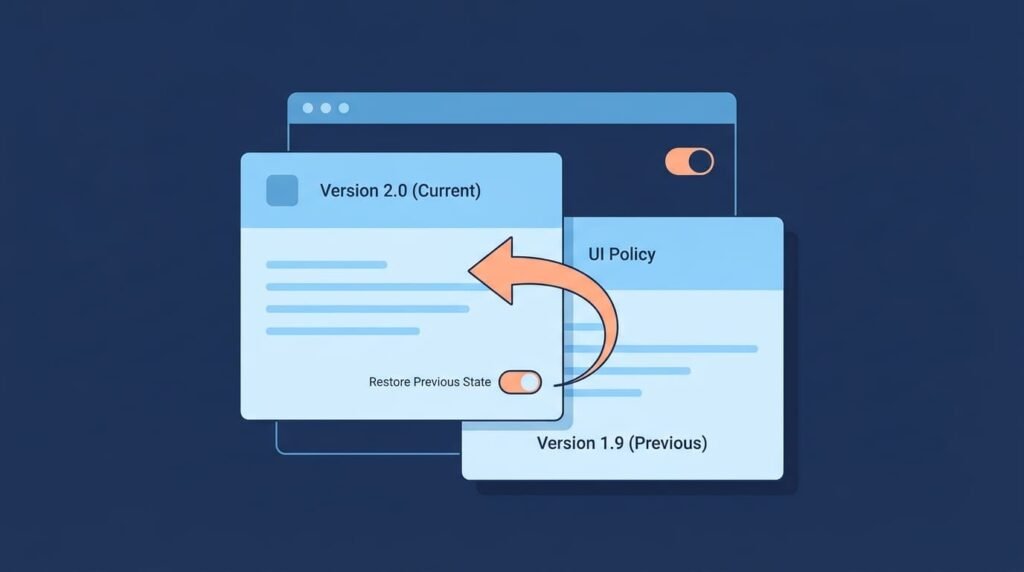
Sometimes a new signature update goes bad. It starts blocking real users, or it breaks part of an app. When that happens, you need to get back to the last setup that worked. That’s what a rollback is.
The catch is that you can only roll back to something you saved. So before any big change, we copy the current setup and write down the signature version that’s running. I’ve watched teams skip this and then scramble during an outage, trying to remember what the settings used to be. It wastes a lot of time.
Before making any changes, we save the current WAF policy configuration and the version of the signature library in use. We also document custom signatures, managed rule exclusions, signature overrides, and severity settings. Finally, we record recent application behavior and security events to establish a baseline and help identify any unexpected changes after the update.
How Should You Roll Back a Failed Update?
When something breaks after a WAF update, start by identifying the signature or policy change that may have caused the problem. Review the logs to confirm whether that change is responsible, then restore the last working policy or signature library version. After the rollback, test the application to make sure everything works as expected and verify that the WAF is still inspecting traffic. Document what happened and identify the root cause before attempting another update.
One thing to decide early is whether you need a full rollback or a smaller fix. If the logs point to a single problematic rule, disabling that rule may be enough. There’s no need to undo an entire ruleset because of one noisy signature. Doing so could remove valuable protection introduced by the update.
A rollback should only be a temporary solution, not a permanent state. Applications that continue using outdated rules for weeks may miss newer threats. Once you understand what went wrong, prepare a corrected version, test it thoroughly, and deploy it again.
How Often Should You Review WAF Policies and Signatures?
Regular reviews help you spot old signatures, exclusions no one needs anymore, updates that failed, and changes in how people use your apps. Our threat models and risk analysis tools help teams see which of these problems matter most. Use the schedule below as a place to start.
| Maintenance Task | Suggested Frequency | Purpose |
| Automatic Signature Updates | Daily or vendor-recommended | Keep detection rules current. |
| Security Alert Review | Daily | Identify suspicious activity and potential threats. |
| False-Positive Investigation | Daily to weekly | Prevent legitimate traffic from being blocked. |
| Blocking-Rule Tuning | After reviews or security incidents | Improve detection accuracy and enforcement. |
| Full WAF Policy Audit | Quarterly | Identify outdated rules, exclusions, and configuration gaps. |
| Rollback Testing | Before major updates | Confirm that previous configurations can be restored. |
These timings are our suggestions. No vendor requires them. A store that takes payments needs a tighter schedule than a small internal tool. Each team should change the timing to fit how important the app is, how much attention it gets from attackers, and its own security rules.
As noted by National Institute of Standards and Technology (NIST)
NIST SP 800-41 Revision 1 makes the same point about lifecycle management. It recommends that firewall rulesets and policies “should be managed through formal change management control processes to avoid any impact on security and on business operations,” and that “ruleset reviews or tests should be performed periodically to ensure continued compliance with the organization’s policies” . – National Institute of Standards and Technology (NIST)
What Should a Quarterly WAF Audit Cover?
Every three months, ask one question: does this policy still fit the app? Applications change over time, and a policy that worked well last year may no longer meet current needs.
A quarterly audit should review old, unused, or disabled signatures and check whether managed rule exclusions have become excessive. It should also evaluate whether custom signatures are working as intended and whether the WAF covers the actual traffic patterns of each application. Beyond that, look at how reliably signature updates are applied, whether any security alerts remain unresolved, and whether policy version histories and rollback records are properly maintained.
False positives and false negatives also deserve attention during the audit. A high number of false positives usually means some rules are too strict and may block legitimate users. On the other hand, false negatives suggest that attacks could be passing through undetected, possibly because signatures are missing or the WAF is not inspecting certain requests closely enough.
The goal of every audit is the same: catch real attacks while keeping unnecessary alerts, blocked requests, and extra work for the security team to a minimum.
FAQ
How Can You Prevent WAF Signature Updates From Affecting Application Performance?
Monitor CPU usage, memory consumption, and request latency before and after web application firewall updates. Deploy new rules in stages to identify performance issues before applying them across production environments. Review request inspection rules, signature matching patterns, and logging activity. If response times increase, investigate resource limitations or inefficient rules before changing security policy settings.
What Should You Do When WAF Signature Updates Fail?
Check network connectivity, DNS resolution, update permissions, and available storage when a signature update fails. Review system logs to identify download or installation errors. If automated signature updates remain unsuccessful, follow a verified manual update procedure. Keep a current WAF configuration backup and verify the active signature version before restoring normal update operations.
How Can You Manage WAF Policies Across Multiple Applications?
Use centralized WAF management to organize policies according to each application’s requirements, exposure, and security risks. Maintain separate security policy configurations for applications with different traffic patterns and functions. Apply WAF policy synchronization to keep settings consistent across environments. Use version control, access restrictions, and regular policy audits to track changes and prevent unauthorized modifications.
When Should You Remove a WAF Rule Exception?
Review WAF rule exceptions during regular security audits and after significant application changes. Check whether the original false positive still occurs and whether legitimate requests now pass inspection without triggering the signature. Remove outdated managed rule exclusions when they are no longer necessary. Document each removal, including its reason and approval, to maintain accountability and effective protection.
Can WAF Policy Automation Reduce Security Risks During Deployment?
Yes. WAF policy automation reduces manual errors by applying reviewed configurations consistently across environments. Integrate infrastructure as code and CI/CD workflows to test policy changes before production deployment. Include policy validation, regression testing, approval procedures, and signature version control in the deployment process. Maintain tested rollback procedures so administrators can restore a working configuration if an update causes problems.
Keep WAF Policies Updated Without Disrupting Application Security
Keeping WAF policies updated can be challenging when new rules block legitimate application traffic or trigger false positives. One mistake can affect your users. That’s why every update needs proper testing and monitoring before enforcement.
Network Threat Detection helps security teams gain broader visibility into suspicious network activity beyond individual WAF signatures. Combined with regular policy updates and human oversight, it helps you make better security decisions without disrupting application functionality. Explore Network Threat Detection and strengthen your application security strategy.
References
- “OWASP WAF Advanced Ruleset Management.” OWASP Foundation. Accessed November 3, 2026.
- Radack, Shirley. “Protecting Information Systems with Firewalls: Revised Guidelines on Firewall Technologies and Policies.” National Institute of Standards and Technology, October 2009. Accessed November 3, 2026.