

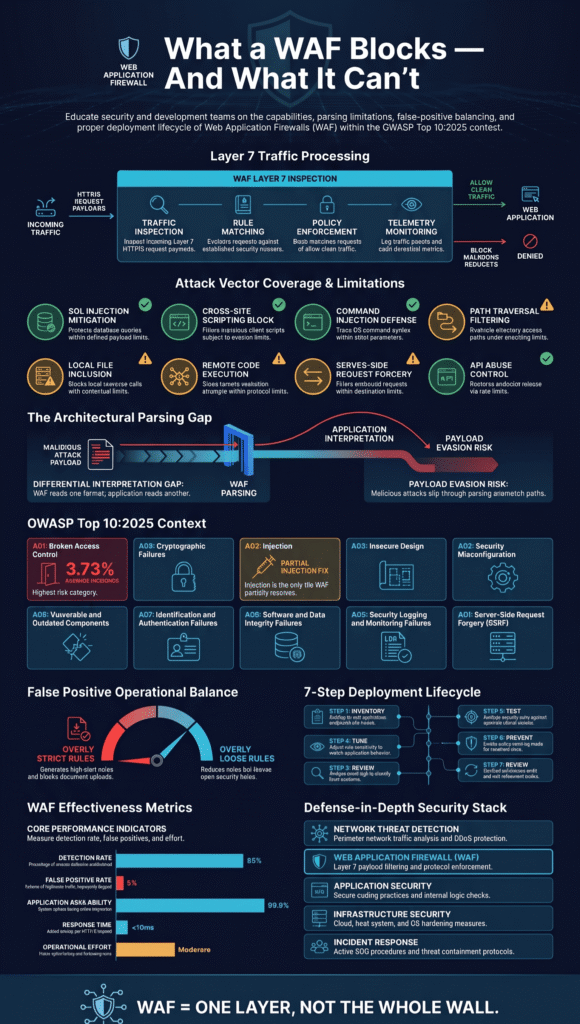
A web application firewall (WAF) blocks many common web attacks, such as SQL injection, cross-site scripting (XSS), path traversal, and known exploits. But it can’t catch every threat. The OWASP Top 10:2025 covers security risks that go beyond HTTP traffic filtering. That’s why Network Threat Detection combines WAF protection with secure coding and ongoing monitoring.
Each layer addresses different weaknesses, reducing the chance that an attack slips through unnoticed. A WAF also needs careful configuration to avoid blocking legitimate requests. Read on to learn which attacks a WAF can stop, where its limits lie, and how to deploy it effectively.
Quick Reads: Understanding WAF Protection and Its Limits
- WAF blocks common HTTP attacks but cannot fix application flaws.
- Rule tuning helps prevent false positives.
- Combine WAF with secure coding and additional security controls.
What Is a WAF, and How Does It Stop Web Attacks?
A web application firewall, or WAF, checks web traffic before it gets to your app. It works at Layer 7. That just means it reads HTTP and HTTPS requests and compares each one to a set of security rules. Effective WAF protection helps filter malicious requests before they reach vulnerable application components.
Most WAFs sit in front of the web server as a reverse proxy. Others run inside a cloud or edge service. Either way, they can look at the URL, headers, cookies, parameters, and the body of a request.
Over years of building threat models and risk analysis tools for enterprise clients, our team has learned to look past the inflated detection rates flashed on vendor sales pages. In the field, we consistently see that real-world security gaps stem from subtle discrepancies in how a WAF versus an application parses user input, a reality we encounter firsthand during active penetration testing engagements. Are the rules any good? Can the WAF see the traffic your app really gets? Can it tell a normal shopper from an attacker? A WAF that gets those wrong will be noisy, or it will miss things.
A WAF usually does four jobs:
- Request inspection: Reads the method, headers, cookies, parameters, and payload of each request.
- Rule evaluation: Checks traffic against attack signatures, managed rules, and behavior policies.
- Traffic enforcement: Allows, logs, challenges, or blocks a request, depending on what you set.
- Security monitoring: Keeps a record of rule matches so you can look into odd traffic later.
Take ModSecurity with the OWASP Core Rule Set (CRS). It uses generic rules and anomaly scoring to flag common injection patterns. But a rule match only means something looks off. It doesn’t mean every attack will get caught.
So a WAF is one layer, not the whole wall. The setups that hold up best, in our experience, are the ones where someone took the time to tune the WAF to the app behind it.
Which Common Web Attacks Can a WAF Prevent?
A WAF can lower the risk from a lot of common attacks. It watches for bad payloads, strange request patterns, and known exploits, and it stops them before they reach a weak spot in your app. By inspecting incoming HTTP requests, a WAF protects web applications against threats such as SQL injection, cross-site scripting, and command injection.
This table shows what a WAF can usually do, and where it runs out of rap:
| Common Web Attack | Typical WAF Protection | Protection Limitations |
| SQL Injection (SQLi) | Detects and blocks suspicious SQL statements in HTTP requests. | Obfuscated payloads and blind SQL injection may bypass detection. |
| Cross-Site Scripting (XSS) | Identifies and blocks recognizable malicious scripts and HTML payloads. | Cannot replace context-aware output encoding and secure application design. |
| Command Injection | Detects suspicious command sequences and known injection patterns. | Cannot reliably detect commands constructed or executed indirectly by an application. |
| Path Traversal | Blocks requests containing suspicious directory traversal patterns. | Application-specific file handling may introduce additional vulnerabilities. |
| Local File Inclusion (LFI) | Detects known attempts to access unauthorized local files. | Unusual encodings and application-specific inclusion logic may evade detection. |
| Remote Code Execution (RCE) | Blocks requests matching recognized exploit signatures. | Unknown vulnerabilities and attacks outside HTTP inspection may remain undetected. |
| Server-Side Request Forgery (SSRF) | Identifies suspicious URLs and requests targeting internal resources. | Cannot inspect every outbound request generated by the application. |
| API Abuse | Applies rate limiting, request filtering, and supported API security policies. | Legitimate-looking malicious requests may bypass basic traffic rules. |
The OWASP CRS documentation says the same thing in its own way. Its generic rules help catch attacks, but they are meant to be one part of a layered defense, not full protection for an app. You can read more in the official CRS documentation.
Test each protection with traffic that looks like your real users. A rule can catch a known payload and then miss the same payload with a small change. We see this most when the app decodes input differently than the WAF does. The WAF reads one thing, the app reads another, and the attack slips through the gap. Finding gaps like that is a big reason we built our risk analysis tools.
How Does a WAF Mitigate SQL Injection and Command Injection?
A WAF checks what users send to your site. It looks for patterns that could trick a database, a server, or some other interpreter into doing the wrong thing.
SQL injection is when bad input changes what a database query means. Command injection is close to the same idea, except the attacker’s input ends up inside a command that runs on the server.
A WAF typically looks for unusual SQL operators and fragments of queries, shell characters and strange command separators, and encoded payloads that match known attack signatures. It also watches for requests aimed at endpoints with known weak spots.
OWASP CRS can flag SQL injection patterns in URL parameters and in supported request bodies. The same kind of checking can help with LDAP injection, NoSQL injection, XML injection, and other code injection attempts.
Still, blocking an attack doesn’t fix the bug behind it. When we read through WAF logs with teams, we often find it has been quietly stopping attacks that the code should have handled on its own. That’s a warning sign. Fix the code too. Use parameterized queries and prepared statements, check input carefully, and give database accounts only the access they need. If an app must run system commands, it should never build them straight from text a user typed.
Those fixes go after the root problem. They keep working even when an attack looks like something the WAF has never seen.
Can a WAF Stop Cross-Site Scripting (XSS) Attacks?
A WAF can block a lot of XSS attacks. It can’t do the whole job alone, though, because the app also has to handle user input safely.
XSS means an attacker gets their own code to run in another person’s browser. They usually sneak it in through a form field or a link. The code might be HTML, JavaScript, or a scrambled version of either.
Most WAFs are good at catching the obvious attempts. They can look for odd HTML tags and script patterns, spot JavaScript that has been encoded to hide it, and filter bad URL parameters and form data. They can also use ready-made rules to block common XSS tricks.
Where it gets hard is context. The same text can be harmless in one spot and dangerous in another. We’ve seen a string sit quietly in a paragraph, then become a problem once the app put it inside an HTML attribute. The WAF only sees the request, so it often can’t tell which case it’s looking at.
Our advice is to build safety into the app too. Encode output based on where it lands on the page, use safe templates, validate input, and set a solid Content Security Policy (CSP). Then if a bad payload slips past the WAF, it still won’t run.
Can a WAF Prevent CSRF and Authentication Attacks?

A WAF can help mitigate some of these attacks, but the application must still manage sessions and validate every sensitive request.
- Cross-site request forgery (CSRF): A WAF can use Origin checks and targeted rules. However, the application must implement anti-CSRF tokens and appropriate cookie settings.
- Brute-force attacks: A WAF can slow password guessing through rate limiting and request throttling. The application must also enforce strong authentication and account protections.
- Credential stuffing: A WAF can use bot mitigation and IP-based controls to block automated login attempts. The application should implement multifactor authentication and compromised-password defenses.
- Session abuse: A WAF may apply session-aware rules where supported. The application must generate secure session IDs, rotate them when necessary, and enforce session expiration.
- Weak authentication: A WAF can provide limited request filtering. However, the application must implement correct authentication and authorization logic.
Think about a login page under attack. Rate limiting makes password guessing slower, while bot mitigation can block scripts that test stolen passwords. However, neither control proves that a user is authorized to perform a specific action.
To address login security properly, the application needs careful password handling, multifactor authentication, protected cookies, and timely session expiration. CSRF protection follows the same principle. The application must generate anti-CSRF tokens and validate them on every request that changes data.
How Can a WAF Reduce Security Misconfiguration and SSRF Risks?
A WAF can block known probing, risky file paths, and some server-side request forgery (SSRF) attempts. It can only do that for traffic it’s able to see, though.
A security misconfiguration is something left open by mistake. It could be an admin page, a debug file, a folder listing, or an endpoint nobody meant to make public. With SSRF, an attacker tricks the server into sending requests to places the attacker picks.
In our risk reviews, the WAF controls that pay off the most are blocking requests to well-known sensitive paths, catching directory traversal and local file inclusion attempts, and flagging strange URL schemes and internal IP addresses. Filtering known exploits aimed at exposed apps is also highly effective.
The OWASP Top 10:2025 backs this up. Broken access control is A01, and security misconfiguration is A02. SSRF used to have its own spot, but it now sits under broken access control. You can read the whole list on the official OWASP Top 10:2025 page.
Really stopping SSRF takes more than a WAF. Limit what the server can reach on the outside, check the URLs it’s asked to visit, and block access to cloud metadata services unless it’s approved. A WAF won’t catch every server-side request, especially when the app builds them in complicated ways.
Can a WAF Protect APIs and Sensitive Data?
A WAF can enforce some API rules and inspect certain responses, but deciding who gets to see what data is still the app’s job.
Depending on the product, a WAF may offer API rate limiting and bot mitigation, limits on HTTP methods and content types, and schema validation for supported API setups. It may also detect suspicious payloads and bad request headers, and provide some response filtering and sensitive-data checks.
Rate limiting is a good example. It slows down anyone trying to guess endpoints or hit a login over and over. REST and GraphQL policies can also turn away oddly shaped requests, as long as someone has set them up correctly.
But a WAF has no idea whether one customer should be able to open another customer’s records. Only the app knows that, and it has to check on the server for every object it hands out.
We recommend using TLS, forcing HTTPS, strong API authentication, data minimization, and good logging together. Cookie security, session hijacking protection, and open redirect defense depend on how the app behaves, so the policies need to be applied correctly there too.
Which OWASP Top 10:2025 Risks Can a WAF Not Fix?
A WAF sits in front of your app. It can’t reach inside and fix what’s broken in there. If the code is flawed, a library has been tampered with, or a permission check is missing, the WAF has nothing to catch.
Take a look at the OWASP Top 10:2025 and you’ll see why. Most of the ten risks aren’t about obviously bad web traffic at all.
Data from OWASP Top 10:2025 Official Introduction Page
“A01:2025, Broken Access Control maintains first place as the most serious application security risk. The average incidence rate is 3.73% across the 40 CWEs mapped to this category.” – OWASP Top 10:2025 Official Introduction Page
A WAF cannot address every OWASP risk because many vulnerabilities require changes to application code, configuration, or development practices.
- Broken access control: The server must verify which users are allowed to access specific resources and perform certain actions.
- Security misconfiguration: Unsafe settings must be identified and corrected by the team responsible for the application.
- Software supply chain failures: Libraries, dependencies, and build tools need independent security controls.
- Cryptographic failures: Encryption must be implemented correctly to protect sensitive data.
- Injection: WAF rules can help block malicious requests, but developers must still write secure code.
- Insecure design: Security risks must be identified and addressed during the planning and design stages.
- Authentication failures: The application needs strong login controls, secure session management, and proper authentication mechanisms.
- Software or data integrity failures: Updates must come from trusted sources and undergo integrity checks.
- Security logging and alerting failures: Applications need reliable logging and alerting systems, with teams ready to investigate and respond.
- Mishandling of exceptional conditions: Applications should handle errors safely without exposing sensitive information or creating security weaknesses.
A WAF can help by buying development teams time. When a new vulnerability is discovered, virtual patching can block known attack patterns while developers work on a permanent fix. However, a WAF cannot remove vulnerable libraries, correct broken business logic, or verify whether application permission checks are working properly.
We’ve seen this go wrong more than once. A team installs a WAF, assumes the application is protected, and later discovers a missing permission check that no WAF rule could have detected. That’s why we start with threat modeling and risk analysis tools to identify the root causes of security issues. A WAF provides a temporary layer of protection, but long-term security depends on safer code, regular patching, and continuous security testing.
Why Do WAF Rules Create False Positives?
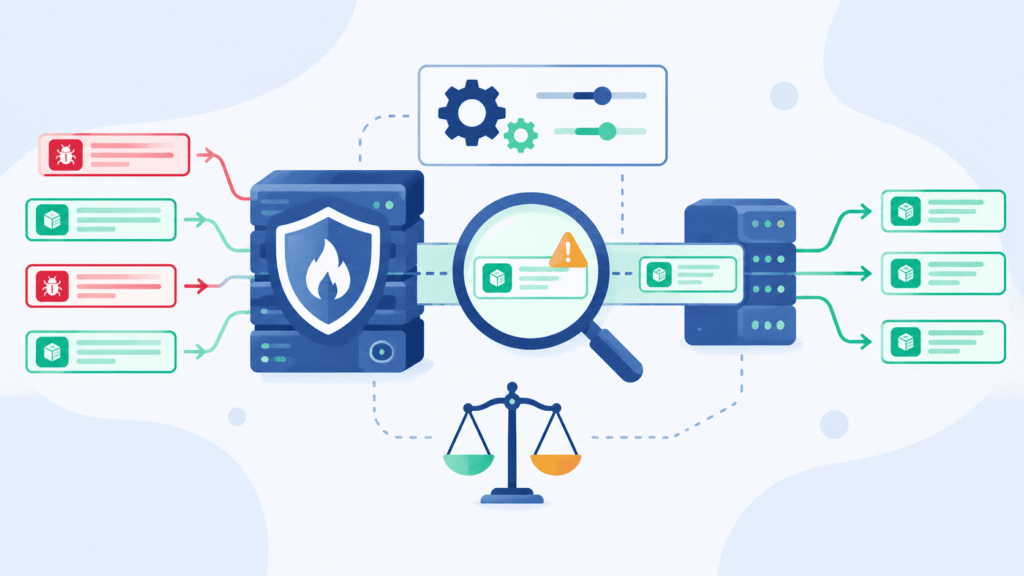
A false positive is when a WAF thinks normal traffic is an attack. Someone just wants to upload a file, and they get blocked instead.
Standard rulesets get confused by everyday things. File uploads, large JSON data, text written in other languages, encrypted data, and even health checks can look strange to a rule. Some WAFs also add up points for each small match. Enough small matches, and a harmless request gets blocked.
So how can teams cut down on false positives? They should start by checking the security events to find the exact rule IDs that triggered, then recreate the problem using real, normal app traffic. Next, they can add small exceptions for the specific page, parameter, or content type they know is safe.
Score limits or paranoia levels can also be adjusted, but only after testing shows it’s okay. Finally, teams should make sure their exceptions don’t let real attacks through.
Here’s a typical example. A document-upload page trips an injection rule because the file’s contents look like attack code. Don’t shut off the whole ruleset. Find the one rule that fired and fix that.
From what we’ve seen, tuning is never really finished. Apps change, so rules have to change too. Exceptions that are too wide leave holes. Rules that are too strict hurt uptime and fill your logs with noise, which makes real attacks harder to spot.
How Should You Deploy a WAF Without Breaking Production?
Credits: Aarambh Dev Hub
Roll it out in stages. That way your team can learn what normal traffic looks like and fix false positives before the WAF starts blocking anything.
Here’s the order we suggest:
- Inventory applications: Write down your public pages, APIs, file uploads, and the key tasks your business depends on.
- Enable monitoring: Log rule matches first. If your WAF allows it, don’t block anything yet.
- Review security events: Get a feel for normal traffic, and look into anything that seems off.
- Tune selectively: Add small exceptions only for traffic you’ve confirmed is safe.
- Test enforcement: Try logins, uploads, APIs, health checks, and error pages.
- Enable prevention: Start by blocking the threats you’re most sure about, then watch how the app behaves.
- Review continuously: Look at your rules again after each app update and after any security incident.
Every WAF works a bit differently, so the exact settings will change, but these steps fit all of them. When we test, we try both normal user activity and authorized security tests. That shows us whether the WAF stops real attacks without getting in the way of real users.
Which WAF Tools Should Security Teams Compare?
No single WAF is the best choice for everyone, because what works for you depends on how your application is built, how much control you want over the rules, and how many people you have available to run it.
Security teams should compare several options. ModSecurity with the OWASP Core Rule Set (CRS) is a free WAF engine with customizable rules, while Coraza is another free engine built on a similar approach. SafeLine is a self-hosted option that lets teams run and manage the WAF on their own servers. Cloud WAF services offer vendor-managed rules, edge-based traffic blocking, and security event logs.
Finally, API gateway security controls provide API authentication checks, request validation, and traffic limits.
Vendors love to brag about how many attacks they catch. Take that with a grain of salt. The better move is to test each tool with traffic that looks like your own. Our team pays most attention to four things: how readable the logs are, how often the rules get updated, how easy it is to add exceptions, and how many good requests get blocked by mistake.
Research from Computers & Security indicates
“The implemented custom rules, which were developed in accordance with the gaps identified during the test, improved the detection precision from 60.54% to 97.46% with no increase in false positives within our controlled test environment.” – Computers & Security
A tool with a big detection number can still be a pain to live with. We’ve watched teams choose the “strongest” option and then spend weeks fixing it because it kept blocking real customers at checkout. In the long run, the tool that fits how your team works will serve you better than the one with the shiny score.
How Can You Measure WAF Effectiveness Beyond Detection Rates?
Stopping attacks is only half the job; you also need to understand what the WAF does to regular users and how much work it takes to keep it running. We suggest tracking six measures.
The first is the detection rate, which is the share of your approved test attacks that the WAF caught, while its counterpart, the false-negative rate, shows how many of those test attacks got through. The false-positive rate tells you how often normal requests were flagged or blocked by mistake. Application availability shows whether people can still do what they came to do, such as logging in or paying.
Response time captures how much slower the app feels, both on regular days and during an attack. Finally, operational effort measures the hours your team spends handling alerts and exceptions.
One published test found that ModSecurity v3 with OWASP CRS caught 98.4% of certain attack types. That same research also found a very high false-positive rate with the default settings. Think of it as one result from one test. It’s not a promise. A different setup or a different type of traffic can change the numbers a lot.
So test with your own app. Use everyday traffic, realistic attack samples, and a few heavy bursts of requests. Then run the tests again after you change rules or release big updates. We’ve found that results from half a year ago can go stale fast once the app changes.
What Is the Best Way to Combine WAF Protection With Network Threat Detection?

A WAF only looks at web requests, while a next-generation firewall (NGFW) monitors broader network traffic and applies network-level security controls. Understanding the WAF vs. NGFW differences helps security teams identify how these technologies complement each other. Network threat detection, app security, and infrastructure monitoring each catch something different, so they do better as a team.
We spend a lot of our time on network threat detection. Our company builds threat models and risk analysis tools to help teams tighten network security and get ahead of new threats. Here’s why it matters. A WAF alert might show one strange request. Network data can show that the same source was poking at dozens of other systems an hour before. How much you can see depends on where your sensors are placed and what data they collect.
A layered setup combines five complementary defenses. Network threat detection watches for odd connections, scanning, and strange traffic patterns, while the WAF blocks bad web requests and enforces rules at the application layer. Application security addresses the problems that sit within the code itself, such as injection bugs, weak access controls, and flaws in business logic.
Infrastructure security limits who can reach what and keeps anything exposed to the internet patched. Finally, incident response ties these events together and works out, step by step, what actually happened.
The goal is to avoid betting everything on one tool. When we put network data, app logs, and WAF events next to each other, an attack becomes much easier to follow. Teams that do this can make faster and smarter decisions.
If you have real client stories or numbers, drop them in where we mention what we’ve seen. That will make it sound more like you.
FAQ
How does a WAF protect against common web attacks?
A web application firewall (WAF) monitors incoming HTTP traffic and blocks requests that contain malicious patterns. It helps prevent common web attacks, such as SQL injection, cross-site scripting (XSS), and malicious file uploads. By inspecting request payloads and applying input validation rules, a WAF reduces the chances of attackers exploiting vulnerabilities in web applications.
Can a WAF prevent all OWASP Top 10 vulnerabilities?
No. A WAF can block many attacks associated with the OWASP Top 10, but it cannot fix every application vulnerability. It can detect injection attacks, filter malicious requests, and provide virtual patching for known weaknesses. However, vulnerabilities involving insecure design, broken access control, and cryptographic failures require code-level fixes and additional security controls.
How can I protect my application against server-side request forgery (SSRF)?
You can reduce SSRF risks by combining WAF protection with server-side security controls. A WAF can inspect HTTP requests and block suspicious payloads that attempt to access internal resources. You should also validate user-submitted URLs, restrict outbound connections, and prevent applications from accessing sensitive internal services without authorization.
Can a WAF stop brute force attacks and credential stuffing?
A WAF can reduce brute force attacks and credential stuffing by applying rate limiting and analyzing unusual login patterns. These controls help identify repeated login attempts and suspicious traffic from automated tools. However, you should also implement multi-factor authentication, enforce strong password policies, and monitor failed login attempts to reduce unauthorized account access.
What security measures should I implement beyond WAF protection?
You should combine WAF protection with regular vulnerability scanning and penetration testing to identify weaknesses that traffic filtering cannot address. Update vulnerable software components, enforce HTTPS encryption, and apply secure coding practices. You should also review access permissions, configure security headers, and monitor application logs to identify suspicious activity and respond to potential attacks.
What Should You Remember About Web Attacks a WAF Prevents?
A WAF helps protect your web applications from common attacks like SQL injection, XSS, and path traversal, but it won’t fix every security weakness. That’s the reality.
You still need to address vulnerabilities at their source and monitor suspicious activity across your applications. Network Threat Detection can support this effort by adding visibility alongside your WAF protection. If you’re ready to strengthen your application security, explore Network Threat Detection and take the next step toward a stronger defense.
References
- “Introduction.” OWASP Top 10:2025. Accessed November 3, 2026.
- “Article 104714.” Computers & Security. Accessed November 3, 2026.