
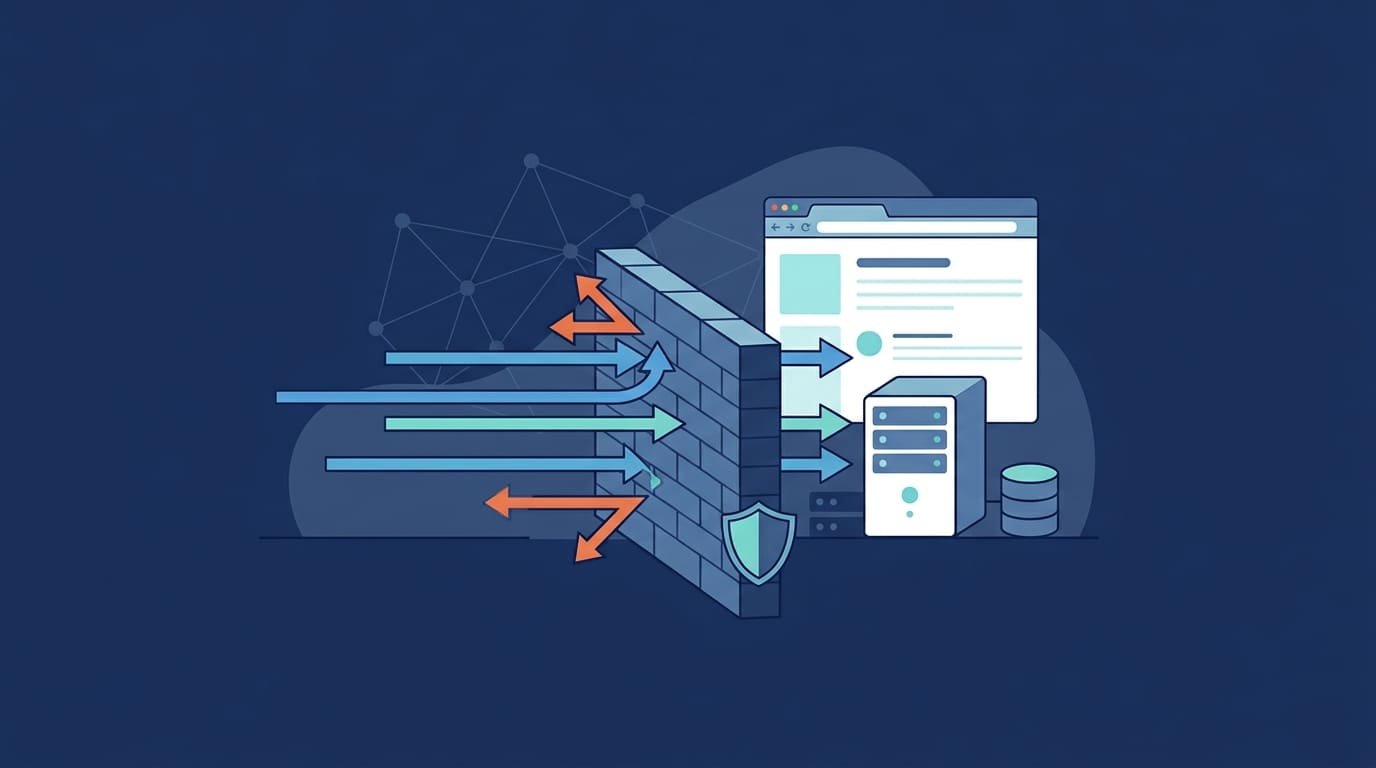
A Web Application Firewall (WAF) protects web applications and APIs by filtering HTTP/HTTPS traffic and blocking suspicious requests before they reach application servers. But filtering traffic alone won’t stop every attack. The OWASP Top 10:2021 ranks Broken Access Control as the leading web application security risk, showing why application security needs more than perimeter defenses.
WAFs help reduce exposure to common web threats, while secure coding and access controls address weaknesses that traffic inspection can’t fix. Combined with Network Threat Detection, WAF protection adds visibility into suspicious activity across connected systems. Keep reading to learn how WAFs work and how to deploy them.
WAF Protection Essentials: What You Need to Know
- WAF protection blocks malicious requests, reducing risks from SQL injection, XSS, and API abuse.
- Effective WAF security combines managed rules, custom policies, virtual patching, and tuning to minimize false positives.
- Network Threat Detection complements WAF by identifying suspicious activity across supported network environments.
What Is Web Application Firewall Protection?
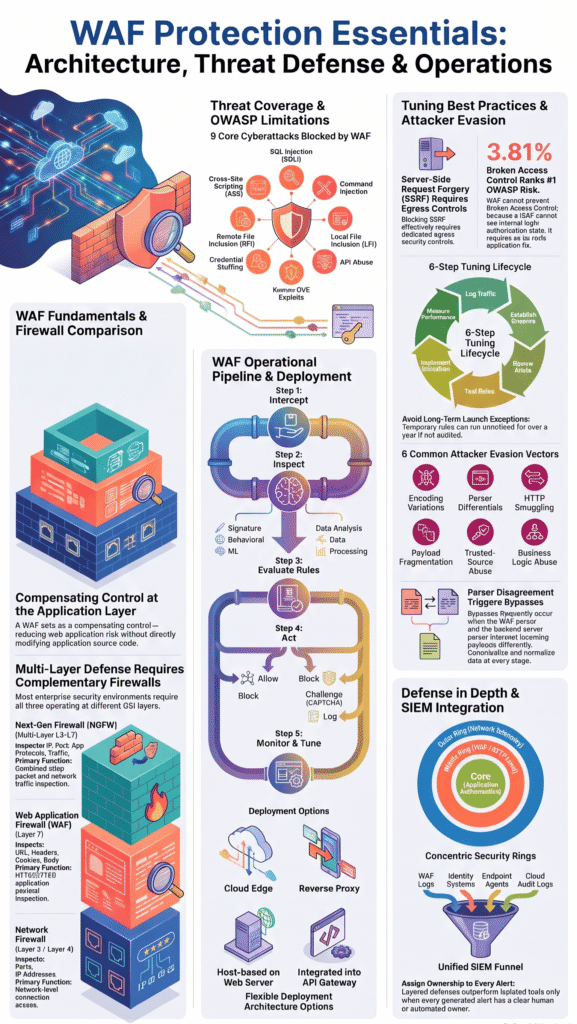
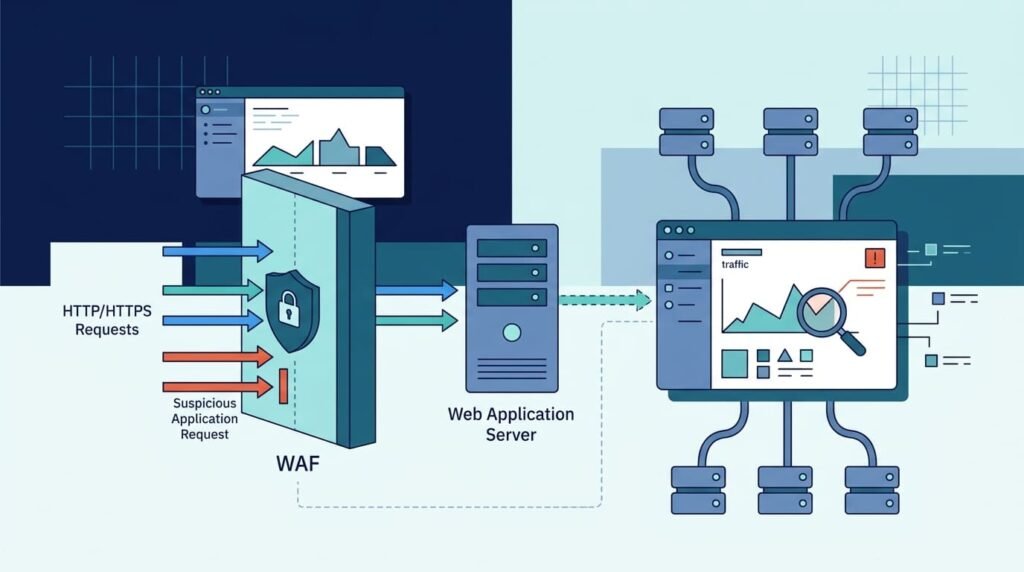
A web application firewall, or WAF, checks the web traffic going to your site and blocks anything that looks harmful. A normal network firewall mostly asks who is connecting. A WAF inspects HTTP/HTTPS request components, such as the URL, headers, cookies, parameters, and body, and evaluates them against security policies.
It sits between your visitors and your web app. It can read URLs, headers, cookies, and form data. When it spots something bad, it can block the request, test it, slow it down, or just write it in a log for someone to review.
A WAF is a compensating control: it can reduce exploitation risk while the underlying vulnerability is remediated, but it does not fix insecure code. It holds things together while developers find the real problem and fix it. We build threat models and risk analysis tools, and a big part of that work is helping teams figure out which parts of their app need the tape first.
Here is what a WAF can usually do:
- Traffic filtering: Checks incoming requests for strange patterns and broken rules.
- OWASP Top 10 protection: Catches common attacks, like injection, that hackers use again and again.
- Virtual patching: Blocks known attacks while a software flaw waits for a real fix.
- API security: Sets limits and checks on requests sent to your APIs.
- Bot blocking: Slows down automated attacks, like password guessing and data scraping.
None of this works well on autopilot. Results depend on how your app is built, how good the rules are, and whether someone keeps tuning them.
How Does a WAF Protect Web Applications?
Each request goes past the WAF before it can reach your app. This is how a WAF protects web applications: if a request carries a known SQL injection attack, the WAF can stop it, even though the connection itself looks safe and normal.
The WAF does three things: it looks at the traffic, decides if it’s a threat, and then does whatever action the team picked. Some WAFs match requests against lists of known attacks. Others also watch for odd behavior or use machine learning to spot trouble.
OWASP, a respected security group, says web risks go far past injection. They also include broken permissions, bad settings, outdated parts, and server-side request forgery. A WAF helps with some of these. Developers have to handle the rest, because no traffic check can reliably spot them.
How Does a WAF Differ From a Traditional Firewall?
A network firewall cares about connections. It decides which computers and ports are allowed to talk. A WAF cares about the web requests themselves, and it hunts for attacks that target the app. The two solve different problems, so most teams need both.
Here’s a simple case. The network firewall lets HTTPS traffic reach your public site, which is exactly its job. But a harmful request can hide inside that allowed traffic. Only the WAF is built to catch it. Real customers and real attackers can use the same encrypted connection.
That’s why a WAF works best next to other tools, such as network segmentation, strong logins, endpoint monitoring, and security testing across your network infrastructure. We’ve seen teams run into trouble when the WAF is the only thing standing guard.
Why Is WAF Protection Important for Modern Businesses?
Businesses use a WAF to cut down on common web attacks, keep their apps running, and spot odd activity early. If your company runs customer portals, online payments, SaaS products, or APIs, a WAF helps you stay up when someone tries to cause trouble.
A hacked web app can leak customer data, stop sales, or open a door through old software. Automated attacks hurt too. They can drain server power, flood login pages, and keep security and support teams busy.
We treat a WAF as one part of a bigger plan built around risk. Counting how many requests it blocks doesn’t say much. What counts is whether it protects your most important pages while real customers can still get through. When we work with teams, we map those key pages first using our risk analysis tools. The WAF rules come after that.
What Risks Can an Unprotected Web Application Face?
An app that sits on the internet with no protection can face many kinds of attacks. These examples show why you need defenses against both known exploits and odd behavior:
- Break-ins and data leaks caused by flaws in the app.
- SQL injection, cross-site scripting, and command injection.
- Password stuffing, brute-force logins, and scraping by bots.
- Attacks that flood an app with traffic and knock it offline.
- Hackers using old libraries and other outdated software.
A WAF can lower the risk from many of these, as long as the right rules are turned on. But some problems need other tools. A stolen account, or a normal-looking request that abuses how your business works, needs strong logins, permission checks inside the app, and a close look at user behavior.
How Does WAF Protection Support Business Continuity?
A WAF helps keep your service up by stopping bad requests before they use your app’s power. Rate limits and bot controls can also cool down heavy traffic hitting login pages, search boxes, and APIs.
Virtual patching is another big win. When a new flaw is made public, a security team can add a WAF rule that blocks known attacks on it. That gives developers time to write and test a lasting fix.
People are spending real money on this. Fortune Business Insights estimates the global WAF market at about $10.13 billion in 2026, though other groups measure it differently and get different numbers. The figure shows how much attention this kind of defense is getting. It doesn’t prove that WAFs work well.
Staying online takes more than blocking attacks. When we review a setup, we also check whether the WAF slows pages down, test what happens when something fails, make sure real users can still get in, and see if the response plan holds up in a real emergency.
Which Cyberattacks Can a WAF Prevent?
A WAF can detect and mitigate many common web attacks, but prevention depends on rule coverage, request visibility, tuning, and the application’s underlying security controls. Its effectiveness also depends on which rules are enabled and whether attackers can exploit weaknesses outside its visibility.
Many companies configure a WAF to help protect against risks identified in the OWASP Top 10, including common web attacks. WAF rules can detect known attack patterns, suspicious input, and unusual protocol behavior before requests reach the application.
Here are common threats and how WAF protection may help:
- SQL injection: Detects suspicious database commands in request data.
- Cross-site scripting (XSS): Flags potentially harmful scripts and suspicious input.
- Command injection: Blocks known attempts to inject system commands through web forms or other inputs.
- Local file inclusion (LFI): Detects unusual file paths and known file inclusion patterns.
- Remote file inclusion (RFI): Identifies known attempts to load external files through vulnerable application features.
- Credential stuffing: Uses rate limiting and bot controls to restrict automated login attempts.
- Application-layer DoS: Limits or blocks excessive requests that could overwhelm an application.
- Known CVE exploitation: Uses virtual patching rules to block requests associated with known vulnerabilities.
- API abuse: Applies request limits and inspects data sent to APIs.
- Server-side request forgery (SSRF): May flag suspicious URL inputs, but reliable prevention also requires destination allowlists, network egress controls, and server-side request validation.
Can a WAF Stop Every Cyberattack?
No. A WAF can’t reliably stop every attack because of its limitations in protecting against business logic flaws, especially when the problem involves normal-looking requests or stolen accounts.
Here’s a case we run into a lot. An attacker logs in with a real account, then changes the ID number in the web address to see someone else’s records. If the app never checks who owns those records, nothing in the request looks bad. A typical WAF would let it right through.
Broken access control shows this limit well. OWASP’s 2021 study found it showed up in 3.81% of tested apps on average. That’s why we tell teams to pair a WAF with permission checks on the server, safe session handling, regular security testing, and steady bug fixes. Our threat models are built to find gaps like these, the ones a WAF can’t see on its own.
Research from National Institute of Standards and Technology (NIST) shows
“These systems employ filtering mechanisms to intercept and reject requests that may be suitable to exploit XSS flaws and related vulnerabilities such as SQL injections. However, they generally do not offer complete protection and can often be bypassed using specifically crafted exploits.” – National Institute of Standards and Technology (NIST)
How Does WAF Protection Work?
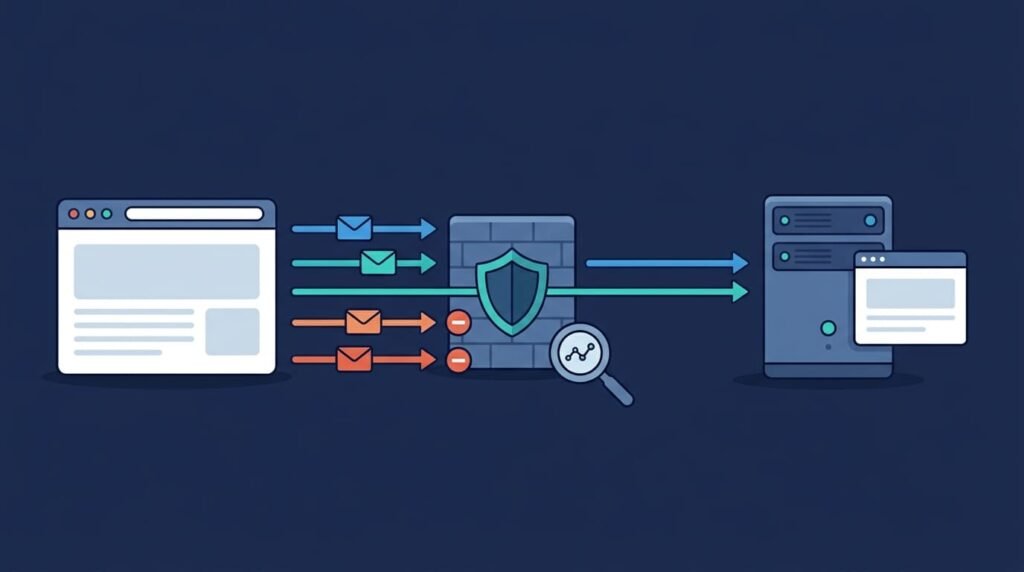
Every time someone visits a website, their browser sends a request. A WAF checks that request and picks an action. It can let the request through, block it, ask the visitor to prove they’re real, slow them down, or just write it in a log. What it can do depends on where it sits and how much traffic it can actually see.
As noted by OWASP Foundation
“Web Application Firewalls (WAFs) interpose themselves between the ‘web server’ and the user-side client. Hereby intercept all http queries between the client and server. Analyze the traffic based on both blacklisting & white listing rules.” – OWASP Foundation
Some WAFs sit in front of the app server as a reverse proxy. Cloud WAFs work at the edge, closer to the visitor. Host based WAFs run on the same machine as the web server.
Before changing WAF rules, map the full request path to understand how proxies, gateways, and backend systems process traffic. Most of the surprises we run into come from that path, not the rules themselves. TLS termination, API gateways, and the way the backend reads a request can all change what the WAF really sees, and teams rarely expect that.
What Happens When a Request Reaches a WAF?
Most WAFs follow the same basic steps.
- Traffic interception: The request reaches the WAF through a proxy, a gateway, or a cloud edge.
- Request inspection: The WAF reads the parts it supports, like the URL, headers, cookies, parameters, and body.
- Rule evaluation: Signatures, custom rules, scores for odd behavior, or other signals help decide if the request looks bad.
- Security action: Based on the policy, the WAF allows, blocks, challenges, rate limits, or logs the request.
- Monitoring and tuning: Security teams read the logs and fix the rules so real attacks get caught and normal users don’t get blocked.
Some WAFs use signatures, which match attacks that are already known. Others add behavior checks or machine learning to catch attacks that don’t fit one fixed rule.
More detection methods don’t always mean better protection. We’ve seen teams turn on every feature on day one and then drown in alerts. Nobody could tell the real problems from the noise. A WAF works better when its rules are tested on the app’s real traffic, and when the team can see why a request was blocked.
How Does Machine Learning Improve WAF Detection?
Machine learning helps a WAF notice traffic that doesn’t look normal. Depending on the product, it can help find bots, sort attacks by type, score strange requests, or flag unusual details inside a request.
A behavioral WAF might watch how often a visitor sends requests and which pages they hit. That pairs well with signatures. Attackers often change their payloads a little so they no longer match a known pattern, and behavior checks can still catch them.
But machine learning isn’t the same in every product. When organizations ask us to help compare tools, we suggest testing how accurate each one is, how fast it runs, how many false alarms it makes, and whether it can explain its choices. A label that says “AI powered”? It tells you none of that.
How Does a WAF Compare With a Next Generation Firewall?
The WAF vs. NGFW comparison starts with their different roles. A WAF protects web applications by inspecting requests at the application layer, while a next-generation firewall (NGFW) monitors network traffic more broadly and can also identify applications, user identities, and threats. Although their capabilities overlap, they serve different purposes, which is why many organizations use both.
The main difference between a WAF and an NGFW lies in what each inspects and controls:
- Primary focus: A WAF protects web applications and APIs, while an NGFW manages network traffic and security boundaries.
- Common threats: A WAF helps mitigate SQL injection, cross-site scripting (XSS), and known web exploits. An NGFW helps block unauthorized access, malicious connections, and attackers moving between systems.
- Policy controls: A WAF applies rules to URLs, HTTP methods, headers, cookies, and parameters. An NGFW uses IP addresses, ports, protocols, user identities, and application-based policies.
- Typical deployment: A WAF sits in front of web applications or APIs. An NGFW operates at network edges, cloud boundaries, and network segmentation points.
- Main strength: A WAF closely inspects supported web requests, while an NGFW provides broader control over network access and traffic.
- Main limitation: A WAF cannot fully understand application business logic, while an NGFW may not inspect every application payload as deeply as a WAF.
Should Organizations Deploy Both Controls?
Usually, yes. That’s true when the risks and the setup call for protection at both the application layer and the network layer.
Picture it like this. An NGFW decides which systems are allowed to talk to a web server. Then a WAF blocks a known SQL injection attack that arrives over an HTTPS connection the firewall already approved. Our Network Threat Detection can help here too, since it lets teams look into strange activity across supported network environments.
With both in place, an attacker has more chances to get caught. Each control still needs an owner, good logs, and regular tests. From what we’ve seen, a control with no clear owner falls out of date fast, and nobody notices until something breaks.
How Does WAF Protection Support the OWASP Top 10?
A WAF can lower some of the risks on the OWASP Top 10, but not all of them. It does best against attacks with request patterns it can recognize. Design mistakes and business logic problems need other fixes.
The OWASP Top 10:2021 names risks like Broken Access Control, Cryptographic Failures, Injection, Security Misconfiguration, and Server Side Request Forgery. OWASP’s official page explains each one and helps teams plan their security reviews.
For reference, see the OWASP Top 10:2021.
The table below shows where a WAF can help and what else you still need.
| OWASP risk | Potential WAF contribution | Additional control required |
| Broken Access Control | Catches some suspicious access patterns | Server side authorization and object level permissions |
| Cryptographic Failures | May block certain unsafe requests | Strong encryption and safe key management |
| Injection | Catches many known malicious payloads | Parameterized queries, input validation, and secure coding |
| Security Misconfiguration | Blocks certain risky methods or requests | Safe server, cloud, and application settings |
| Vulnerable Components | Gives virtual patching for known exploits | Software updates and dependency management |
| Authentication Failures | Helps limit automated login attacks | Multifactor authentication and secure session design |
| Integrity Failures | Spots some harmful uploads or deserialization attempts | Secure integrity checks and application controls |
| Logging and Monitoring Failures | Adds visibility through WAF event logs | Central logging for apps, identities, and infrastructure |
| SSRF | Spots some suspicious request patterns | Destination allowlists and network egress controls |
What Controls Must Complement a WAF?
A WAF can’t reliably stop every weakness. A full security program has to cover what it misses, and we suggest pairing your WAF with these habits:
- Server side authorization: Check access rights for every sensitive action and object.
- Secure session management: Protect login tokens and stop people from misusing sessions.
- Input validation: Make sure incoming values match the format and rules you expect.
- Output encoding: Lower the risk of cross site scripting when showing content you don’t trust.
- Application security testing: Look for weaknesses while building the app and before every release.
- Patch management: Keep frameworks, libraries, and infrastructure up to date.
They show teams which risks the WAF handles, which ones it misses, and which new threats to watch next. Results are best when developers and security teams share the work. A WAF should never be an excuse to leave bad code unfixed. Never.
Which WAF Deployment Model Should You Choose?
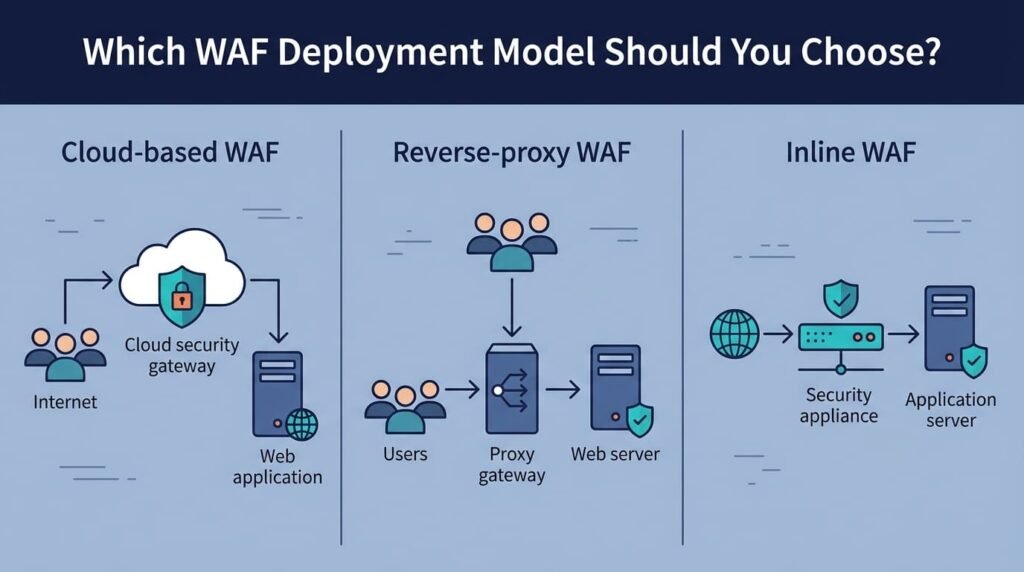
The best choice among WAF deployment options depends on how your app is built, how much traffic you get, how much time your staff has, and what your security needs are. Cloud services work well for many apps that face the internet. Reverse proxy, transparent, host based, and API gateway setups fit other situations.
Before you pick one, draw the path from your users to your app. Then find the spots where traffic can be checked without breaking routing or knocking the site offline. We walk almost every team through this step, and it often changes what they end up choosing. Sometimes completely.
- Cloud WAF
- Main advantage: Provides managed setup with traffic inspected across multiple locations.
- Primary trade-off: Requires strong origin protection and trust in the service provider.
- Reverse Proxy WAF
- Main advantage: Offers clear traffic visibility and strong control over security policies.
- Primary trade-off: Adds infrastructure requirements and increases the workload for your team.
- Transparent WAF
- Main advantage: Fits into an existing network path.
- Primary trade-off: Requires careful planning to maintain availability.
- Host-Based WAF
- Main advantage: Works closely with the web server.
- Primary trade-off: Requires regular maintenance and must scale with each host.
- API Gateway Integration
- Main advantage: Supports security policies designed for APIs.
- Primary trade-off: May not cover all web application traffic.
- WAF Appliance
- Main advantage: Provides dedicated hardware for traffic inspection.
- Primary trade-off: Requires capacity planning and ongoing hardware maintenance.
- WAF as a Service
- Main advantage: Removes the need to operate the inspection systems yourself.
- Primary trade-off: Depends on the service’s features and available customization options.
When Should You Choose a Cloud WAF?
A cloud WAF is a good fit when you want traffic checked in many places, rule updates handled for you, and easy links to a content delivery network or app DDoS protection.
You do less infrastructure work this way. But you still have to protect the origin. A mistake we run into a lot is a backend server left open to the whole internet, and that one hurts. If attackers can reach it directly, they can walk around the cloud WAF like it isn’t there. Lock the origin down so that only the WAF can connect to it.
When Is an On Premises WAF More Suitable?
An on premises WAF can make sense if you already run a data center, have special routing needs, or want to control things locally.
Reverse proxy and host based setups give you fine control over policies. The cost? Your team has to update the software, watch capacity, and test what happens when a device fails. We tell people the best model is the one their team can run well every day while still meeting their security goals.
How Can You Reduce WAF False Positives?
Most false positives come down to one thing: the WAF doesn’t know what normal looks like. Tuning WAF rules requires learning your normal traffic, testing your rules, and making only small exceptions for requests you know are safe. Skip the tuning, and the WAF will block real customers, API clients, file uploads, and even your own monitoring tools.
Think about a rule that blocks strange-looking SQL. That same rule can break a search box or a report page that takes long query strings. We once saw a checkout page fail because a customer’s last name had an apostrophe in it. A team has to know the difference between a real attack and normal app behavior before it turns on strict blocking.
Tuning is not a one-time job. We treat it like changing the oil in a car. It needs to happen again and again.
What Is the Recommended WAF Tuning Process?
Go step by step so the site stays safe and stays online.
- Start in detection mode: If your WAF has this option, log suspicious requests first. Turn on blocking later.
- Establish a baseline: Write down what normal looks like. Include request patterns, error rates, API clients, and the main things users do in the app.
- Review security events: Check which rules fired. Group them by endpoint, parameter, source, and request type.
- Test changes: Replay realistic traffic in a staging environment before you make big policy changes.
- Create narrow exceptions: Skip only the one rule and the one type of request behind the false positive.
- Measure performance: Keep an eye on latency, blocked requests, error rates, and whether false positives are going up or down.
- Review policies regularly: Look at your rules again after app updates, new integrations, and changes in traffic.
Why Should Teams Avoid Broad Rule Exclusions?
A broad exclusion switches off checking for traffic that attackers can still reach. Quick fixes also tend to stick around. During one review, we found an exception that was added in a rush before a product launch. It was still running over a year later, and no one knew why.
A smarter plan is to use managed WAF rules where they fit. Then add custom WAF rules for risks that are unique to your app. Keep a list of every exception, give each one an owner, and set a date to check it again.
The point of tuning is not to block fewer requests. The point is to keep as much checking as you can, stop the bad traffic, and let real users in.
How Should You Manage WAF Rules and Security Policies?
Credits: Microsoft Security Community
Effective WAF policy management needs three things: careful changes, clear owners, and regular reviews. Managed rules handle known attack patterns, while custom rules handle risks that depend on how your app is built and what your business does.
A WAF setup gets old quickly. A new route, a new request format, or a third-party add-on can leave a gap. On our teams, we learned to talk to the developers and infrastructure folks before a release. Waiting until something breaks is too late.
These habits keep WAF security steady across all your environments.
- Managed rules: Use rulesets that are kept up to date to catch known attacks and exploit signatures.
- Custom rules: Add limits that fit your app, such as rules for sensitive endpoints, admin pages, and risky actions.
- Version control: Track every policy change, and keep a way to undo it.
- Environment separation: Use the right enforcement settings for development, staging, and production.
- Vulnerability mapping: Connect each custom rule to a known risk and to the person who will fix it.
- Exception reviews: Clear out old exclusions and temporary bypasses.
- DevSecOps coordination: Review WAF changes at the same time as app releases and security fixes.
How Does Virtual Patching Fit Into Vulnerability Management?
Virtual patching uses WAF rules or similar tools to block known exploit attempts against a weak spot in an app. It gives developers time to build and test a real fix.
Say a team finds an attack pattern that targets an old library. They can add a targeted rule right away. The app stays protected while the library gets upgraded. We have done this many times, and it works well as a short-term fix.
But it does not replace software updates. A rule can miss a slightly different version of the same exploit, and it can’t fix every root problem. Write down each temporary rule, and remove it once the real fix is live.
How Can WAF Protection Integrate With Existing Security Tools?
Integration links what happens in your app with what happens across the rest of your network. When systems share logs, investigators can see the full story behind suspicious activity.
A WAF should not work alone. Its alerts mean a lot more when you view them next to identity events, app logs, network data, and your incident response plan. Plan WAF integration with web server infrastructure while setting up the WAF, not after your first incident.
Which Systems Should Integrate With a WAF?
Several tools can help with detection, investigation, and response.
- CDN and DDoS protection: Stop abusive traffic before it eats up your origin server’s resources.
- API gateways: Combine request checks with authentication, schema validation, and usage limits.
- SIEM and SOAR: Match WAF alerts with identity, endpoint, cloud, and app logs. Then automate the response steps your team has approved.
- Threat intelligence: Use supported indicators to spot known bad sources and attack patterns.
- CI/CD pipelines: Deploy WAF policies at the same time as app releases.
- Load balancers: Test health checks, routing, and failover.
- Security monitoring: Watch for rule triggers, odd request patterns, and changes in app traffic.
How Does Network Threat Detection Strengthen the Approach?
Network Threat Detection adds to WAF protection by showing what happens beyond a single HTTP request. A WAF looks at supported app traffic. Network monitoring shows how systems connect and talk to each other.
Together, they help teams tell if an app alert is part of something bigger. We have seen a small spike of blocked requests look harmless, until network data showed the same source poking at other systems. This is where our threat models and risk analysis tools come in. We use them to strengthen network security and get ready for new threats before they hit.
How much you gain depends on the data you collect and what your tools can do. In our experience, results are best when everyone knows who owns each alert and what steps come next. Then related signals get checked fast, and nothing slips through.
How Do Attackers Bypass WAF Protection?
Most attackers don’t smash through a WAF. They sneak around it using WAF bypass techniques. They change how a request is written, chop a payload into small parts, or misuse a normal button in the app. A rule that looks for one exact pattern can miss a tweaked version of the same attack. And it gets worse when the WAF reads a request one way and the backend reads it another way entirely.
Testing helps identify differences in how the WAF, proxy, and backend interpret requests, allowing teams to address potential security gaps before attackers exploit them.
- Encoding Variations: Normalize and canonicalize input consistently across proxies, gateways, frameworks, and backends. Apply allowlist validation and context-specific output encoding.
- Parser Differential Attacks: Ensure proxies, gateways, and backends interpret requests consistently.
- HTTP Request Smuggling: Check how requests are constructed and review proxy configurations.
- Payload Fragmentation: Test multiple realistic variations of the same request.
- Trusted Source Abuse: Apply identity controls and monitor each source individually.
- Business Logic Abuse: Enforce workflow and permission rules on the server.
- Oversized or Malformed Requests: Set request size limits and enforce protocol validation.
How Can Organizations Strengthen Resistance to Evasion?
No single tool does the job. A WAF works best next to consistent parsing, positive validation (letting through only what you know is good), API schemas, rate limits, and regular testing. Layers matter.
Encoding trips people up the most. We’ve watched a request glide past the WAF looking harmless, then turn nasty once the app decoded it. Every part was doing its job, honestly. They just didn’t agree with each other. So teams should check that the WAF, proxies, frameworks, and backend all read a request the same way, and then check again after every big change.
But clean looking requests need testing too. Picture a customer who changes an order after it was approved. Nothing about the request looks wrong, so the WAF stays quiet. It can’t know who is allowed to edit that order, or whether one user should see another tenant’s records. The application must enforce authorization and business logic rules because a WAF cannot reliably determine whether every action is legitimate.
For more help, the National Institute of Standards and Technology (NIST) shares resources for cybersecurity planning.
What Should You Evaluate When Choosing a WAF?
A feature list can’t tell you how a WAF will behave on your app. When choosing a WAF solution, judge each option by measurable factors: how well it catches attacks, how fast it runs, how easily it fits in, how much work it takes to manage, and what it really costs.
Your situation shapes the choice. A small app may only need something quick to set up, and that’s fine. A large API platform might need heavy automation and detailed logs. When we help teams compare options, we start with their setup, their likely threats, and how many people they have to run the thing.
Which WAF Capabilities Matter Most?
Use this checklist to compare WAF solutions.
- Detection quality: Check managed rule coverage, attack detection, and behavioral analysis.
- False positive workflow: Verify detection mode, event details, scoped exceptions, and tuning support.
- Deployment fit: Confirm compatibility with cloud, reverse proxy, on-premises, host-based, and API gateway setups.
- Performance: Evaluate latency, throughput, scalability, and TLS handling.
- Virtual patching: Check rule update speed, custom policies, and rollback support.
- API security: Look for request inspection, rate limiting, and schema controls.
- Bot protection: Verify defenses against credential stuffing, brute-force attacks, and scraping.
- Observability: Check security logs, analytics, alerts, and SIEM integration.
- Operations: Evaluate policy versioning, role-based access, and automation APIs.
- Cost: Consider licensing, traffic fees, support, infrastructure, and staff time.
How Should Organizations Validate WAF Claims?
Don’t take a sales pitch at face value. Ask for a demo using traffic that looks like yours, then try the exact setup you plan to use in a safe test space.
Watch three numbers: real threats caught, good requests blocked by mistake, and delay added. Make sure the logs hold enough detail to investigate an alert. Make sure policy changes can be reviewed and rolled back, too, because mistakes happen and you’ll want a quick way out.
Look closely at price. A cheap tool can end up costing more if your team spends hours tuning it or it lacks a key integration. In our experience, that hidden work is often what makes or breaks the deal.
How Can You Implement WAF Protection Effectively?
A good WAF rollout starts small and grows with the risk. Begin with the apps that are most exposed to the internet, then add more as you go.
Rolling out in stages matters. If you switch on a strict policy all at once, you can block real customers by accident. In our experience, the teams that go slowly also end up with a clear baseline, so they can tell later whether the WAF is actually helping.
What Steps Should a WAF Implementation Plan Include?
Here is a simple plan we have seen work well.
- List every internet-facing application and API.
- Mark the sensitive endpoints, weak components, and key business workflows.
- Pick a deployment model that fits how your systems are built.
- Turn on managed rules, then add rules made for your own apps.
- Watch normal traffic for a while, then fix false positives.
- Test blocking, speed, and failover before you rely on them.
- Send security events to your monitoring and incident response tools.
- Review your policies after every app release and every new vulnerability announcement.
How Should Teams Measure WAF Effectiveness?
Counting blocked requests is not enough. A big number could mean real attacks are happening. It could also mean the policy is too strict, or that normal traffic suddenly changed.
We suggest tracking a few things together: confirmed malicious requests blocked, verified false positives, response time, rule coverage, application error rates, and how long it takes to put a temporary fix in place for a known vulnerability.
Look at these numbers side by side. If blocks go up and errors for real users go up too, the policy probably needs a tune-up. It does not mean the WAF got better at its job. Our threat models and risk analysis tools help teams make this call with less guessing.
How Can Network Threat Detection Complement WAF Protection?
A WAF sees what happens at the application layer. Network Threat Detection adds a wider view, which helps security teams look into suspicious activity across supported network environments. Put the two together and you get more context than either one gives you alone.
Here is an example. The WAF flags a bad HTTP request. Network data can then show which other connections were made around the same time and how the systems were talking to each other. Identity and application logs fill in the rest, such as which account was involved and which service was hit.
Why Combine Application and Network Visibility?
Each source answers a different question, so a layered approach works best.
- WAF alerts: Show suspicious requests and policy violations in your applications.
- Network telemetry: Helps you spot strange connections and communication patterns.
- Identity logs: Give context on odd sign-ins and account misuse.
- Endpoint and cloud logs: Let investigators check related activity in supported environments.
- Centralized incident response: Keeps investigation, containment, and recovery organized in one place.
When we work with teams, we always ask two things up front: how will these signals be linked together, and who owns the investigation? Without clear answers, alerts pile up and nobody acts on them. Keep in mind that what you can detect depends on your tools, your data sources, and the integrations you have set up. Our risk analysis tools can help you see where the gaps are and which emerging threats deserve attention first.
FAQ
How Does a WAF Prevent SQL Injection and Cross-Site Scripting Attacks?
A web application firewall helps detect and block malicious HTTP requests associated with SQL injection and cross-site scripting (XSS). SQL injection prevention focuses on requests that attempt to manipulate database queries, while XSS mitigation targets attempts to inject scripts into web pages. However, WAF protection works best alongside input validation, output encoding, and secure coding practices.
What Is the Difference Between WAF and NGFW Security?
WAF vs NGFW refers to the difference between application-level and network-level protection. A web application firewall inspects HTTP traffic to detect attacks targeting websites and APIs. A next-generation firewall (NGFW) monitors broader network traffic and may inspect multiple protocols. Organizations can use both technologies to protect web applications and the networks that support them.
Can a WAF Protect Against Zero-Day Web Exploits?
A WAF can help reduce the risk of zero-day web exploits by detecting suspicious requests, unusual traffic patterns, and unexpected application behavior. Anomaly detection and carefully configured custom WAF rules can identify some attacks that existing signatures miss. However, a WAF cannot guarantee complete protection against unknown vulnerabilities. Regular security testing, secure coding practices, and timely software updates remain essential.
How Can You Reduce WAF False Positives Without Blocking Legitimate Traffic?
WAF false positives occur when security rules incorrectly block legitimate requests. To reduce them, review security logs, identify which requests trigger alerts, and adjust rules to match normal application behavior. WAF rule tuning helps maintain protection without disrupting users. Test custom WAF rules before deployment, monitor their effects, and document every change to prevent security gaps.
Can a Web Application Firewall Protect APIs From Malicious Requests?
A web application firewall strengthens API security by inspecting incoming requests, enforcing security rules, and applying rate limiting. These controls can help detect malicious payloads, restrict excessive requests, and reduce certain types of API abuse. However, effective API abuse prevention also requires strong authentication, authorization checks, input validation, and access controls. Regular monitoring helps identify unusual request patterns and unauthorized activity.
Build a Stronger Web Application Security Strategy
Web application attacks can expose sensitive data and disrupt your services when security gaps go unnoticed. That’s a real risk. A WAF helps block common threats, but it works best when paired with ongoing monitoring and regular security testing.
Network Threat Detection can help your team investigate suspicious network activity and gain better visibility into potential threats. If you’re ready to strengthen your security approach, explore how Network Threat Detection can support your application security strategy and help your team respond with greater confidence. Explore Our Web Application Security Solutions
References
- https://csrc.nist.gov/pubs/conference/2021/05/28/combinatorially-xssing-web-application-firewalls/final
- https://wiki.owasp.org/images/6/6a/Owasp_waf_joakim.pdf#1#1#1
Related Articles
- https://networkthreatdetection.com/network-infrastructure-and-control/
- https://networkthreatdetection.com/how-waf-protects-web-applications-attacks/
- https://networkthreatdetection.com/waf-vs-ngfw-comparison-differences-focus/
- https://networkthreatdetection.com/common-web-attacks-waf-prevents-owasp-top-10/
- https://networkthreatdetection.com/waf-deployment-options-inline-reverse-proxy-cloud/
- https://networkthreatdetection.com/tuning-waf-rules-minimize-false-positives/
- https://networkthreatdetection.com/managing-waf-policies-updates-signatures/
- https://networkthreatdetection.com/waf-integration-web-server-infrastructure/
- https://networkthreatdetection.com/detecting-waf-bypass-techniques-evasion-methods/
- https://networkthreatdetection.com/limitations-waf-protecting-business-logic-flaws/
- https://networkthreatdetection.com/choosing-waf-solution-vendor-evaluation-criteria/