
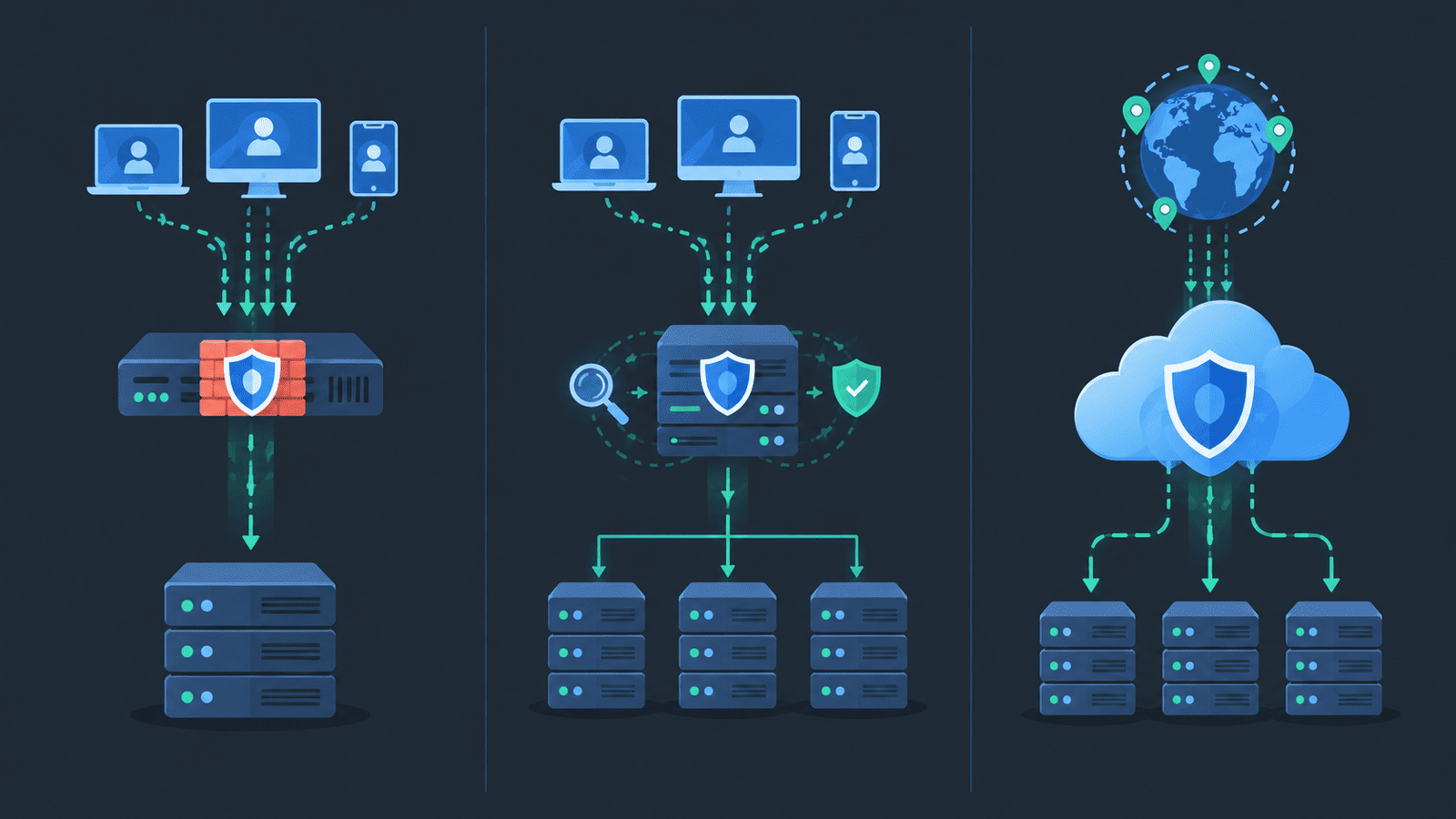
A Web Application Firewall (WAF) protects web applications by filtering malicious HTTP and HTTPS requests before they reach the server. It can block attacks such as SQL injection, cross-site scripting (XSS), and credential stuffing. But where you deploy it matters. Inline, reverse-proxy, and cloud WAF setups each handle traffic differently, with trade-offs in performance, TLS inspection, and day-to-day management.
Pairing WAF protection with Network Threat Detection also helps security teams spot suspicious traffic that may bypass application-level filters. Read on to compare these deployment options and learn how to reduce false positives while keeping direct access to your origin servers under control.
Quick Guide: Choosing the Right WAF Deployment
- Cloud WAF: Provides managed edge protection, distributed traffic filtering, and less infrastructure maintenance.
- Reverse-Proxy WAF: Offers centralized HTTP inspection, TLS control, and flexible application integration.
- Inline WAF: Enables direct, real-time traffic inspection and enforcement but requires more engineering effort.
What Are the Three Main WAF Deployment Options?
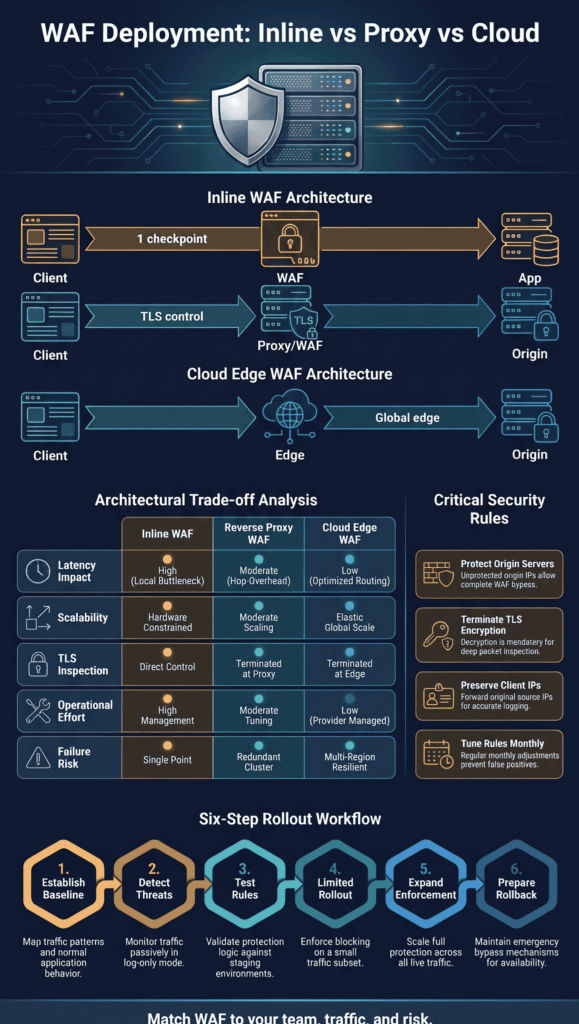
You can set up a WAF in three main ways: inline, reverse proxy, or in the cloud. Each option handles traffic differently and comes with its own advantages and trade-offs.
Inline WAF
- Traffic path: Client → WAF → application.
- Main advantage: Blocks malicious traffic directly before it reaches the application.
- Main trade-off: Can introduce latency or become a point of failure.
Reverse-Proxy WAF
- Traffic path: Client → proxy/WAF → origin server.
- Main advantage: Provides control over HTTP traffic and TLS connections.
- Main trade-off: Requires ongoing maintenance and configuration of the proxy.
Cloud WAF
- Traffic path: Client → provider edge → origin server.
- Main advantage: Scales protection without requiring additional on-premises hardware.
- Main trade-off: Depends on the provider, and attackers may bypass the WAF if the origin server remains publicly accessible.
Keep in mind that these three options describe where traffic inspection happens. They are not entirely separate technologies. A cloud WAF often operates as a reverse proxy, while an inline WAF can run in bridging or routed mode.
F5 DevCentral discussions explain that a WAF can operate in Layer 2 bridging, Layer 3 routing, or Layer 4-7 reverse-proxy mode. Your network architecture and load balancer must support the selected deployment mode.
When planning a rollout, we consider four questions: what traffic needs inspection, how that traffic will reach the WAF, what happens if the WAF fails, and who will manage and maintain it.
Our threat models and risk analysis tools help answer these questions before deployment. This preparation reduces the risk of blocking legitimate users or disrupting application traffic.
How Does an Inline WAF Inspect and Block Traffic?
An inline WAF sits in the middle of the traffic path. Every request has to walk through it, so bad ones get stopped before they reach your app.
What makes inline deployment useful?
There’s only one checkpoint, so enforcement is simple and direct. The WAF can read decrypted HTTP content, turn away suspicious requests, and filter at Layer 7. Effective WAF protection depends on inspecting incoming requests before malicious traffic reaches the application.
Here’s what you get: bad requests are blocked as they happen, rules for many apps are managed in one place, and it fits in with the routing and security tools you already use.
But there’s a downside. When traffic jumps, the WAF can get overloaded. And if it fails, your app can go dark too, unless you have backup paths that you’ve actually tried out.
What can go wrong?
Most of the trouble we’ve run into comes down to capacity, routing changes, and what happens during a failure. Bridge mode lets you keep your IP routing the same, but it still needs a careful plan. We’ve seen a team skip the failover test, and then the “backup” didn’t work on the busiest day of the month.
We like to have three things ready before blocking goes live: enough power to inspect all the traffic, spare equipment, and a written plan for getting back up.
Inline works best when tight control matters more to you than an easy setup.
Why Is a Reverse-Proxy WAF a Practical Middle Ground?
A reverse-proxy WAF answers the visitor’s connection, looks over the HTTP request, and sends the safe ones on to your origin server.
How does the request flow work?
A request flow shows how HTTPS traffic passes through a reverse proxy and WAF before reaching the origin application: the client sends an HTTPS request to the protected service, the reverse proxy and WAF handle TLS, check the request, and apply your rules, and the origin application only sees requests that passed those rules.
This gives you control in one place, and you usually don’t have to change your app’s code. It also works nicely with host-based routing, request cleanup, and load balancing.
What should you evaluate?
Evaluate your reverse proxy setup by checking TLS security, client IP forwarding, availability, and routing to ensure traffic reaches your application securely and reliably: set up your certificates and secure the link to the origin, pass the visitor’s real address using trusted forwarding headers, run more than one proxy and test what happens when one drops, and check redirects, host headers, WebSockets, and overall app behavior.
A proxy adds one more stop along the way, so it can add a small delay. Measure it instead of guessing. When we’ve tested this ourselves, the results weren’t always what we expected.
For a lot of teams, a reverse-proxy WAF lands in the middle. You get strong control over your app traffic, and you still have room to change things later.
How Does a Cloud WAF Protect Applications at the Edge?
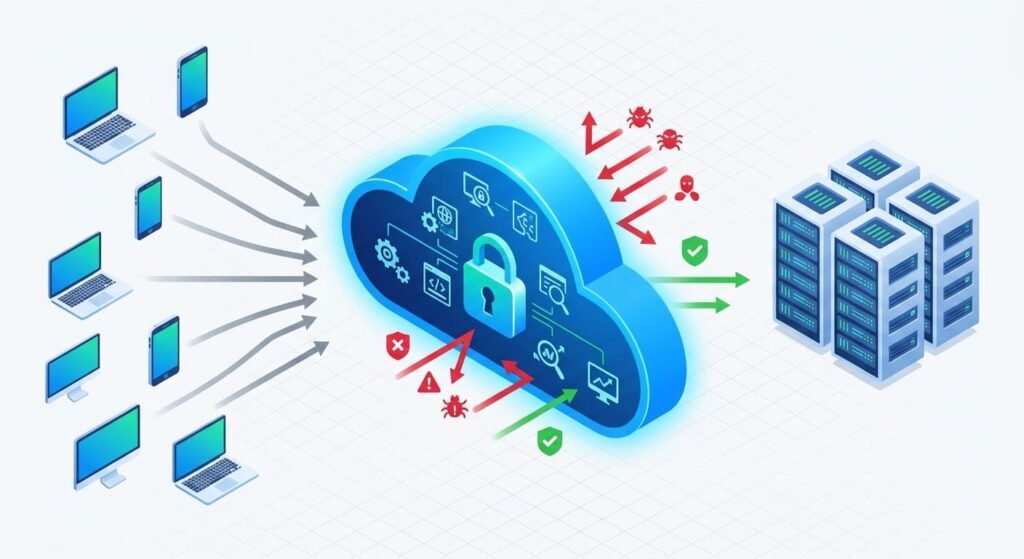
Picture a security guard standing at the front door of your app. Every request has to get past the guard before it reaches your server. The provider runs the hardware, so your team doesn’t have to.
Why do teams choose cloud WAFs?
Speed, mostly. You don’t buy servers, patch them, or lose a weekend figuring out how to scale them. Edge networks also sit in many places around the world, so a visitor far from your server can often connect faster. That’s the reason we hear most from the teams we work with. And honestly, it makes sense.
The main benefits include quicker setup, since the provider runs the infrastructure; filtering in many locations, with possible DDoS protection; fewer servers for your team to look after; and an easy fit with DNS routing and apps that live in the cloud. How traffic reaches the WAF depends on the service. Some act as a reverse proxy, while others lean on DNS changes or the provider’s own setup.
What hidden problems should you expect?
Changing a DNS record sounds simple. Sometimes it is. But we’ve watched rollouts turn messy when a team suddenly needed a load balancer, new connections to the origin, or extra health checks, and nobody had planned for it. Plan early.
Then there’s the price. More requests, more inspected data, extra services, and sudden traffic spikes can all raise your bill, sometimes fast. Set billing limits and alerts before a busy app goes behind the WAF.
Here’s the one that worries us most. An origin left open to everyone. If an attacker finds your real server address, they can skip the WAF completely, and all that protection means nothing. We suggest letting only approved sources reach the origin, then testing the whole path from the internet to your app. When we build threat models, an exposed origin is one of the first problems our risk analysis tools catch.
A cloud WAF means less equipment for you to own. But writing rules, controlling who gets in, and handling special cases for your app? Still your team’s job.
Inline vs. Reverse Proxy vs. Cloud WAF: Which Performs Best?
None of them wins every time. How fast a setup feels depends on how closely traffic is checked, how much traffic shows up, how it’s routed, and how much capacity you have. Understanding the WAF and NGFW differences also helps teams determine which security controls best match their network and application protection needs.
| Evaluation Factor | Inline WAF | Reverse-Proxy WAF | Cloud WAF |
|---|---|---|---|
| Latency | Depends on inspection depth and network configuration | Depends on proxy processing and additional network hops | Depends on edge location and origin server distance |
| Throughput | Limited by hardware and inspection capacity | Depends on proxy resources and configuration | Depends on provider infrastructure and service plan |
| TLS Inspection | Depends on deployment architecture and TLS configuration | Supports TLS termination and encrypted traffic inspection | Depends on provider capabilities and configuration |
| Scalability | Requires additional infrastructure and capacity planning | Requires proxy scaling and resource management | Typically offers automatic or provider-managed scaling |
| Operational Effort | Requires hardware maintenance, monitoring, and failover planning | Requires proxy maintenance, certificate management, and monitoring | Reduces infrastructure maintenance but still requires rule management |
| Traffic Control | Provides direct in-path traffic inspection and enforcement | Offers centralized HTTP inspection and routing control | Depends on provider features and traffic routing configuration |
| Failure Risk | Requires redundancy to prevent traffic disruption | Requires high availability and proxy failover mechanisms | Depends on provider availability and origin server protection |
How should you benchmark performance?
Measure how things run today first. Then test again under traffic that looks like the real thing, because a quiet test tells you very little. When we test, we track four numbers: p50 and p95 latency, which show how fast a normal request is and how slow the slower ones get; throughput, which is how many requests per second you handle and how much data moves; error rates, which cover timeouts, blocked requests, and app failures; and resource use, which includes CPU, memory, network capacity, and inspection queues.
Run at least two setups side by side, like your current path and the new protected path. Routing and traffic can shift between the two, so keep that in mind when you compare them.
Be careful with anyone who hands you one magic number that “proves” which option is best. It doesn’t exist. No single number fits everyone. Test with your own traffic, and let those results guide what you build and what you buy.
Why Is TLS Termination Critical to WAF Inspection?
Credits: Pachehra Talks
A WAF has to read what’s inside a request to find attacks. If the request is encrypted, it usually has to decrypt it first.
What happens when TLS terminates?
When TLS ends at the WAF or reverse proxy, that device can read the request before passing it to the origin. It can then open a new encrypted connection to the backend.
That’s how HTTPS inspection works. But it also moves the spot where encryption starts and stops, which matters more than people expect. Your team should know which systems can see plain, readable data, and how the connection stays safe after inspection. We bring this up in risk reviews a lot, mainly because it’s so easy to forget.
Which settings deserve attention?
Review your reverse proxy settings to secure TLS connections, verify backend certificates, maintain proper routing, and ensure inspection rules cover critical parts of incoming requests. Install valid certificates and automate renewals if you can, check backend certificates and hostnames, and encrypt traffic between the proxy and the origin based on your security needs.
Keep host headers and app redirects working the way they should, and make sure your inspection rules cover the parts of the request that matter. The National Institute of Standards and Technology (NIST) has advice on TLS setup and cryptography in its TLS implementation guidelines.
Ending TLS at the WAF doesn’t replace a security policy. A WAF can still miss attacks if it only checks part of a request, if the rules are wrong, or if traffic sneaks around it, so don’t let it become a false comfort.
How Can You Preserve Client IPs and Avoid Routing Failures?
Getting the real client IP matters more than most teams expect. Rate limits, location rules, audit logs, and incident reviews all depend on it.
Where do deployments fail?
One common problem is source network address translation (SNAT). When it happens, the application sees the proxy’s address instead of the visitor’s. Bad forwarding headers cause the same trouble, especially when several proxies sit in the path. In our work, we also run into X-Forwarded-For values that nobody should trust, proxies set up differently from each other, and load balancer hops that no one remembered adding.
How should teams mitigate these risks?
Teams can reduce client IP spoofing risks by controlling trusted proxies, standardizing forwarding headers, validating incoming addresses, and testing how logs and security rules handle them.
First, they should decide which proxies are allowed to report client-IP information, so that only known and trusted systems can influence the address that is recorded. Next, forwarding headers should be configured the same way across the entire proxy chain, which keeps the address data consistent from one hop to the next. Teams should also stop outside clients from sending their own “trusted” address values, since an attacker can otherwise insert a false address into the request.
After that, they need to check that logs and security rules use the address they were meant to use, rather than a value that was easily altered along the way. Finally, they should test rate limits and location rules with source addresses they already know, which confirms that these controls behave as expected in practice.
Here is an example. A request that passes through two proxy layers can carry a list of addresses in one header. The application has to read that list using rules it trusts. It cannot just take the first address, because the client can write that one.
We have seen teams build blocking rules on top of a client IP that turned out to be the load balancer’s address. Everything looked fine until the rule blocked a large share of real users at once. For that reason, we suggest testing client-IP handling from start to finish before any blocking rule depends on it.
Why Can a Cloud WAF Become Ineffective if Attackers Reach the Origin?
A cloud WAF only protects you if traffic has to go through it. If someone can connect straight to your origin server, the edge rules never get a chance to run.
How can origin exposure happen?
Attackers have plenty of ways to find an origin’s public address. Old DNS records, certificate transparency logs, leaked IP addresses, and application settings can all give it away. Once they have it, they can skip the WAF completely. Our team treats origin protection as part of the first WAF design. Adding it later is much harder and usually happens after something goes wrong.
As noted by OWASP Web Security Testing Guide (WSTG)
“The different elements that make up the infrastructure need to be determined in order to understand how they interact with a web application and how they affect its security.” – OWASP
How do you close the gap?
To close the gap, make sure your origin server only accepts trusted traffic and cannot be accessed directly through exposed IP addresses or outdated DNS records. Start by allowing inbound traffic only from your WAF or edge network, so that requests which bypass your protections are rejected at the origin.
Where supported, use authenticated origin connections as well, since these confirm that the traffic really comes from your edge provider rather than from someone imitating it. You should also remove any public listeners you do not need, along with old DNS records that might still point to the origin and reveal its address. If an origin address has already been exposed, changing it when it makes sense can help limit the damage.
Finally, try to reach the origin directly from an outside network, which verifies that these restrictions work in practice and that no direct path remains open.
The OWASP Web Security Testing Guide tells testers to look at infrastructure setup and deployment security as part of any application security test.
We keep the acceptance test simple. If an unauthorized outside client can reach the origin without passing through the WAF, the setup is not finished.
How Can You Roll Out WAF Rules Without Breaking Production?
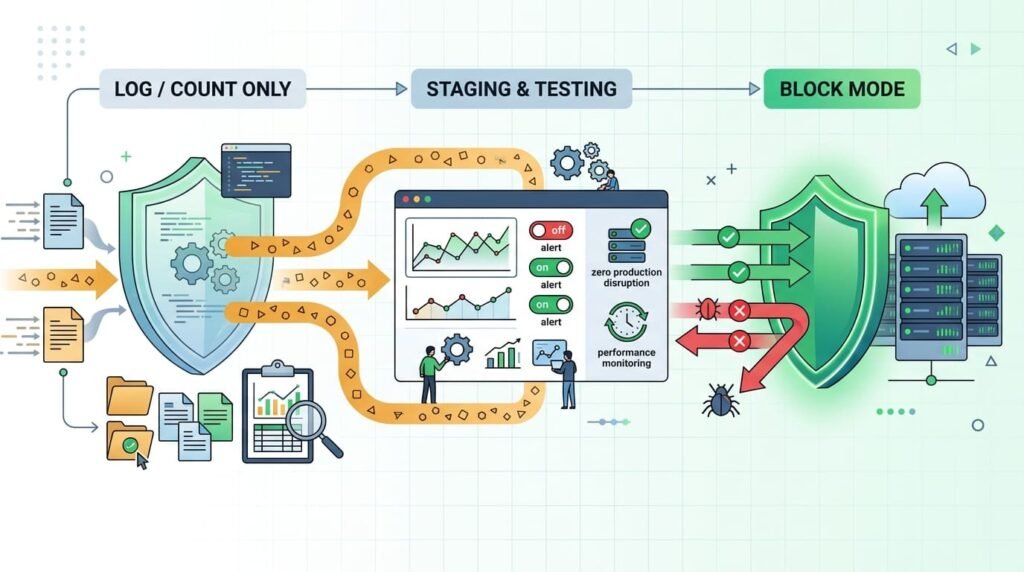
The safest way to roll out a WAF is slowly. Start with real traffic, watch what the rules would do, and turn on blocking a little at a time.
What rollout sequence works?
A gradual rollout helps reduce disruption while improving protection. Start by measuring normal traffic, then test security rules in detection mode before enforcing them:
- Establish a baseline. Write down your current latency, error rates, request volume, and normal application behavior.
- Enable detection mode. Use monitoring or preview mode, if you have it, to see which requests would trigger rules.
As highlighted by OWASP WSTG – Testing for Defenses Against Application Misuse
“The lack of active defenses allows an attacker to hunt for vulnerabilities without any recourse. The application’s owner will thus not know their application is under attack.” – OWASP
- Test representative traffic. In a staging environment, replay normal requests along with controlled attack tests covering common web attacks, including SQL injection and cross-site scripting (XSS).
- Run a limited rollout. Turn on enforcement for a small slice of traffic or a single application.
- Expand carefully. Add more coverage only after you have reviewed blocked requests, false positives, and any change in latency.
- Maintain rollback capability. Write down how to undo a policy change without losing the protection you still need.
What should you measure?
Keep track of false positives, blocked legitimate requests, p95 latency, application errors, and which rules fire. Compare protected traffic to a fair baseline so you can tell what the WAF changed and what something else changed.
Our advice is to review every high-impact rule before you enforce it widely. A rule that works well for one application can break another. We have seen the same rule block valid file uploads in one app, login requests in another, and odd but legitimate API payloads in a third.
This six-step process gives you a repeatable way to lower risk. Applications keep changing, though, so the testing never fully stops. Our threat models and risk analysis tools help teams spot new threats and decide which rules deserve the closest look.
Why Are WAF Rules Never Truly Set-and-Forget?
A WAF needs regular care because the apps behind it keep changing. So do the attacks, and so do the requests that real users send.
What causes silent false positives?
In our experience, the cause is usually small and easy to miss. A team launches a new endpoint and nobody adds it to the rules. A managed rule is too broad and quietly blocks real customers. An old exclusion stays in place long after anyone remembers why. And sometimes nobody is watching the logs at all. One of the most common problems we see is the “temporary” exception. Someone adds it at 2 a.m. to fix a production issue, and months later it is still there, leaving a gap that no one reviews.
What should ongoing ownership include?
Ongoing ownership keeps security policies effective as your application changes. Assign clear responsibilities, review alerts and exceptions, and test updates before enforcing them. Start by giving a specific team the job of tuning rules and approving exceptions, so that decisions are made consistently and nothing is left without an owner.
That team should also look at high-volume alerts and false-positive trends, which show where rules are too noisy or not accurate enough. Expired exceptions should be removed, and bypass rules should be checked regularly to confirm that they still make sense. Before turning on full enforcement, policy changes should be tested so that they do not disrupt legitimate users.
Finally, coverage should be reviewed again after every major application release, since new features and endpoints may not be protected by the existing rules.
We suggest a regular review, such as once a month, plus extra checks after big releases or security incidents. When we build threat models for the teams we work with, we often find that a rule that made sense a year ago no longer fits how the app works today.
The goal is not to get rid of every alert. It is to tell useful detections apart from noise, keep exceptions small, and make sure the important attack patterns stay covered.
Is a Self-Hosted or Open-Source WAF Worth the Operational Cost?
Running your own WAF gives you greater control over your infrastructure. However, your team is also responsible for setup, maintenance, uptime, and rule tuning.
Self-hosted reverse proxy
- Potential advantage: Provides control over traffic routing and configuration.
- Operational responsibility: Managing updates, TLS, scaling, and monitoring.
Integrated WAF engine
- Potential advantage: Offers flexible integration with application infrastructure.
- Operational responsibility: Managing engine compatibility, security rules, and testing.
Cloud WAF
- Potential advantage: Provides managed traffic inspection infrastructure.
- Operational responsibility: Tuning policies, managing billing, and protecting the origin server.
Hybrid WAF
- Potential advantage: Supports different security controls for different environments.
- Operational responsibility: Maintaining consistent policies and clear ownership across environments.
There are several ways to host a WAF yourself, including software, virtual appliances, host-based WAFs, and container-based inspection. Depending on your infrastructure, you can integrate it through an ingress controller, API gateway, or load balancer.
When does self-hosting make sense?
It tends to work well for teams that want detailed control over their WAF settings and have the skills to run it. It can also fit special environments where routing, data handling, or integration needs make managed options hard to use.
Still, the license price is only part of the bill. When we help teams run risk analysis on this choice, we ask them to count compute, engineering time, backup systems, incident response, updates, and performance testing too. Teams that skip this step are often surprised by the real cost.
A managed WAF may cost more up front, but it usually takes less work to run. The right pick depends on how your organization operates and how much risk it can accept.
How Should You Choose a WAF Architecture for Your Organization?
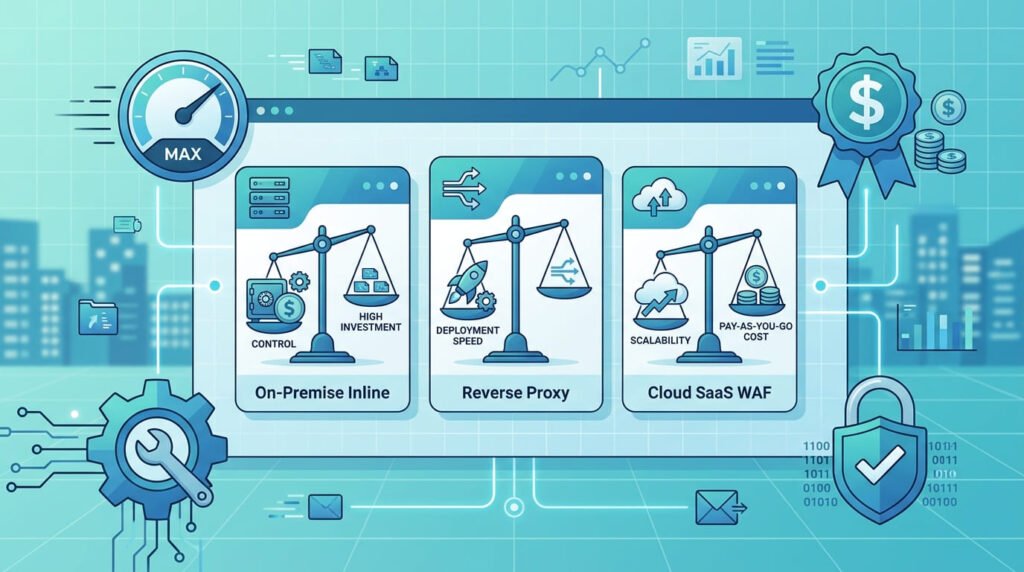
Start by matching four factors: your security goals, network architecture, performance requirements, and your team’s technical capabilities.
Broader traffic visibility
- Starting point: Network Threat Detection.
- Main consideration: Identify suspicious activity and inspection gaps.
Rapid global protection
- Starting point: Cloud WAF.
- Main consideration: Provider routing and origin restrictions.
HTTP inspection and routing control
- Starting point: Reverse-proxy WAF.
- Main consideration: TLS handling, client IP preservation, and proxy capacity.
Direct in-path enforcement
- Starting point: Inline WAF.
- Main consideration: Redundancy and failure behavior.
Specialized infrastructure control
- Starting point: Self-hosted WAF.
- Main consideration: Long-term engineering ownership.
Mixed cloud and on-premises requirements
- Starting point: Hybrid WAF.
- Main consideration: Consistent security policies across environments.
What should you validate before committing?
Before choosing a WAF, check which traffic and protocols it can inspect, and confirm how it handles TLS termination and preserves client IPs. Plan for high availability and disaster recovery, and make sure attackers cannot bypass the WAF by hitting the origin directly.
You should also look at the detection mode, how false positives are handled, and how changes can be rolled back, while estimating traffic volume, latency, and total operating cost.
Our Network Threat Detection helps us spot unusual network behavior and find places where extra application-layer controls may be needed. It works alongside a WAF but does not replace the HTTP-aware inspection and blocking that a WAF provides. In the end, the best WAF setup is one your team can run, test, monitor, and improve without hurting speed or uptime.
FAQ
What factors should you consider when choosing WAF deployment options?
Consider your network architecture, traffic volume, security requirements, and available resources. WAF deployment options include inline, reverse proxy, cloud-based, and out-of-band architectures. Each option handles traffic inspection differently. Choose a deployment method that protects your applications, minimizes latency, and fits your team’s ability to manage security policies.
What is the difference between inline WAF deployment and out-of-band inspection?
Inline WAF deployment places the firewall directly in the traffic path, allowing it to inspect and block malicious requests before they reach your application. An out-of-band WAF monitor copied traffic without interrupting normal requests. Choose inline deployment for real-time threat prevention and out-of-band inspection for passive security monitoring.
When should you choose a reverse proxy WAF over a transparent proxy WAF?
A reverse proxy WAF sits between users and your origin server, allowing it to inspect incoming requests and control traffic routing. A transparent proxy WAF inspects traffic without requiring major changes to existing network configurations. Choose a reverse proxy architecture when you need control over TLS termination and request handling. Choose transparent deployment when you want to minimize network changes.
Can a cloud WAF protect applications hosted on-premises?
Yes. A cloud WAF can protect applications hosted on-premises by routing incoming requests through the cloud-based web application firewall before they reach your origin server. This setup requires secure origin connectivity, correct DNS configuration, and protection against direct access to the origin IP address. You should also evaluate network latency and HTTPS traffic inspection requirements.
What should you check before implementing a hybrid WAF deployment?
Before implementing a hybrid WAF deployment, check whether your cloud and on-premises environments can share security policies and traffic monitoring data. Evaluate TLS certificate management, failover procedures, network performance, and WAF integration requirements. Your deployment architecture should also support high availability, consistent rule enforcement, and reliable traffic routing across both environments.
Making the Right WAF Deployment Decision
Choosing the right WAF deployment isn’t always straightforward, especially when you need strong application security without slowing down legitimate traffic or creating extra work for your team. The wrong setup can leave gaps in protection. That’s a risk worth addressing.
Network Threat Detection can help your team identify suspicious traffic patterns and make better-informed security decisions. It’s a practical next step toward a stronger WAF strategy. Explore Network Threat Detection to support a more informed application security strategy.
References
- “OWASP Web Security Testing Guide.” OWASP Web Security Testing Guide. Accessed November 2, 2026.
- “Test Defenses Against Application Misuse.” OWASP Web Security Testing Guide. Accessed November 2, 2026.