
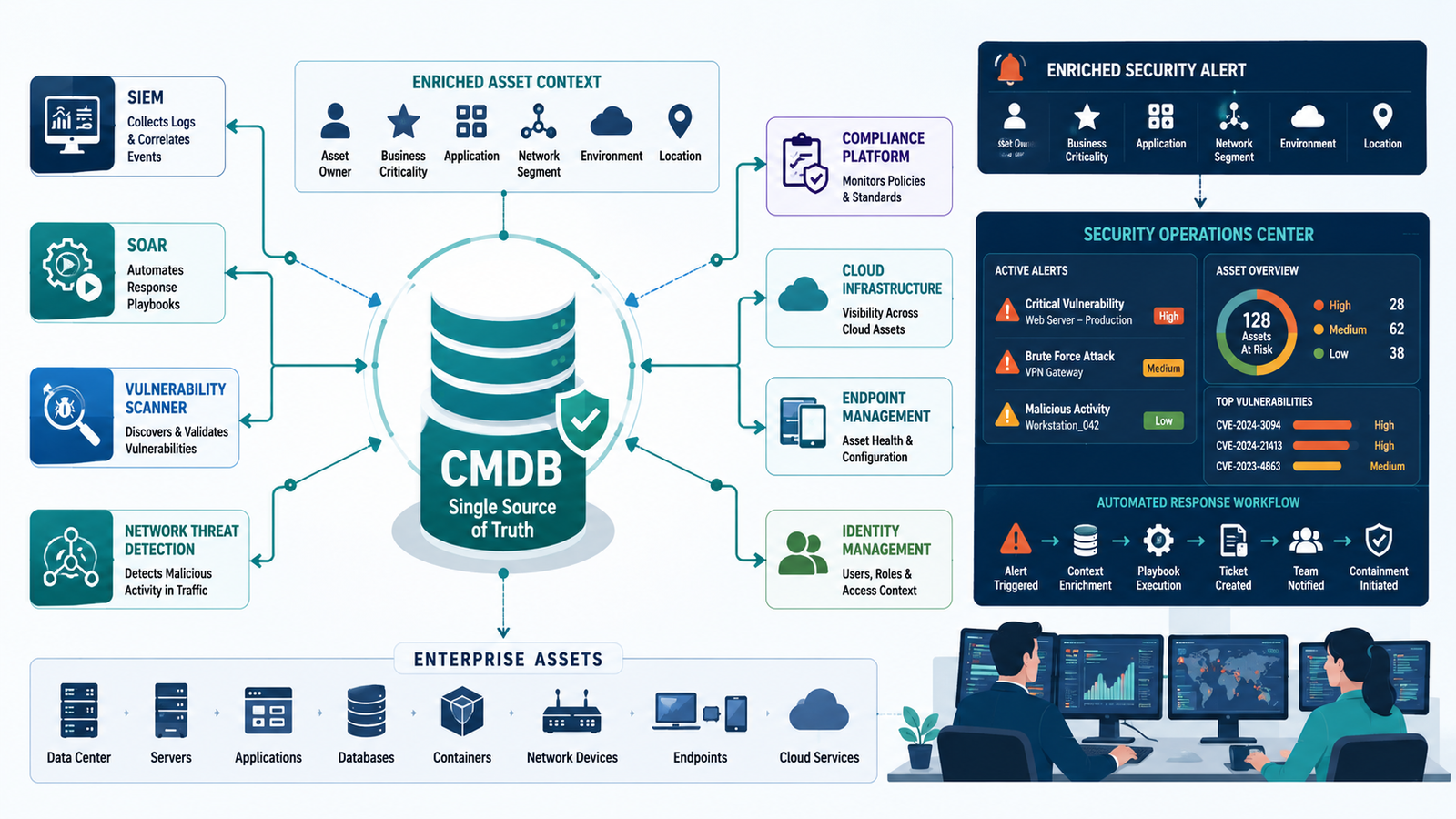
Configuration data becomes far more valuable when it is connected to the systems protecting your environment. By integrating CMDB security tools context, security teams gain clearer asset visibility, richer alerts, and faster investigations instead of working from disconnected data sources.
At Network Threat Detection, we see how combining CMDB intelligence with network telemetry helps prioritize real risks and reduce response time without adding unnecessary complexity. A connected CMDB strengthens every security decision from detection to remediation. Keep reading.
What You’ll Discover
A well-integrated CMDB does more than track assets, it provides the context security teams need to detect threats, prioritize risks, and respond faster. Here are the key ideas covered in this guide:
- Turn Asset Data Into Security Context, Connect your CMDB with security platforms to eliminate visibility gaps.
- Respond Faster With Smarter Automation, Enrich alerts with configuration data to accelerate investigations.
- Build Continuous Security Visibility, Transform your CMDB into an active source of operational security intelligence.
Why Is a Siloed CMDB a Security Liability?
A Configuration Management Database is supposed to be the single source of truth. It knows your infrastructure inside and out. But truth decays in isolation. When security events happen, teams scramble to manually correlate data. An IP address here, a service ticket there. This process is slow, error-prone, and it creates dangerous blind spots.
You might be chasing a vulnerability on a server that was decommissioned last week. Or worse, you could completely miss an attack on a shadow IT resource that never made it into the CMDB because the process was too cumbersome.
“Asset registers are a key resource to speed up incident response and recovery” and positions the information asset database (equivalent to a CMDB) “at the heart of the information assurance and zero trust ecosystem.” – Repository
The liability isn’t just about missing attacks. It’s about wasted effort and constant friction. Security asks for an asset list, operations provides a stale spreadsheet. An audit hits, and everyone spends days reconciling records.
This isn’t a technology problem, it’s a workflow breakdown. The silo forces reactive, manual work, which is the enemy of good security. You’re always behind.
- It creates critical response delays during incidents.
- It leads to inaccurate risk scoring and vulnerability management.
- It fosters shadow IT and unmanaged assets.
So the goal is clear: break down the wall. But you can’t just plug things together randomly. You need a plan that turns data into action.
What Tools Should You Integrate First?
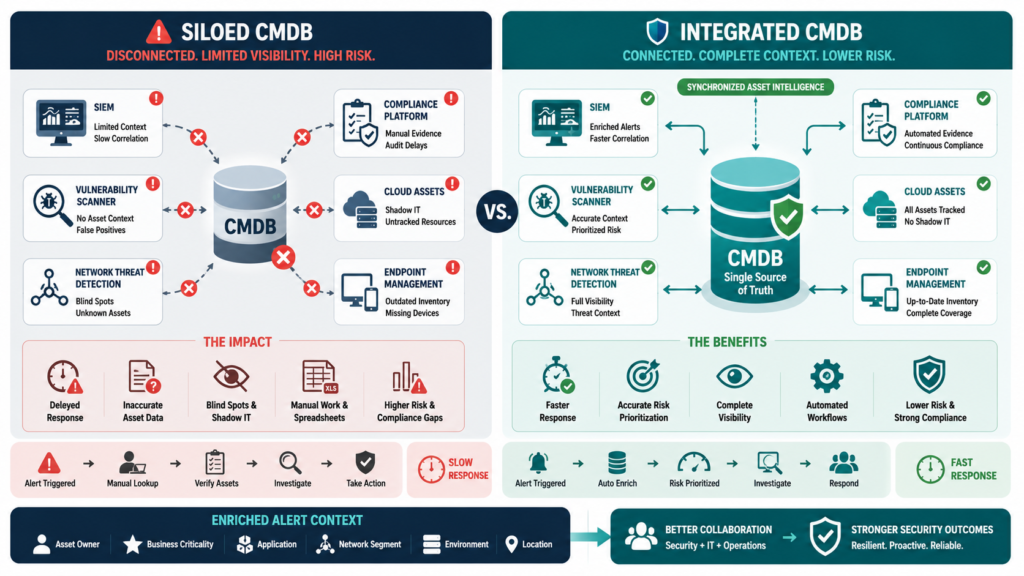
Start where the pain is greatest. For most teams, that’s incident response. When an alert fires, every second counts. The first integration should give your security tools instant, rich context about any implicated asset. This means connecting your CMDB to your Security Information and Event Management (SIEM) system or your SOAR platform.
Now, that alert doesn’t just say “Host-XX-123 compromised.” It says “Host-XX-123, a production web server for the customer portal, owned by the e-commerce team, running Apache 2.4 on Ubuntu 20.04.” You’re not starting from scratch, you’re starting from understanding.
The next logical step is vulnerability management. Scanners find flaws, but they can’t prioritize them without context. Integrating with your CMDB allows you to weigh a critical vulnerability on a public-facing payment server much heavier than the same flaw on an isolated development box.
It lets you automatically assign remediation tickets to the correct system owners because you know who they are. This turns a sprawling list of CVEs into a targeted action plan.
But to truly get ahead of incidents, you need to see threats as they move. This is where weaving in Automating Asset changes the game. We found that by feeding our CMDB’s asset and service maps into our detection pipeline, the alerts got smarter.
Instead of just “anomalous lateral movement,” we could see “anomalous lateral movement from a user workstation toward the database tier containing PCI data.” The CMDB provided the “what” and the “where,” which helped us understand the “why” and the “how bad.” It wasn’t just another tool, it was a force multiplier for our existing security investments.
How Does Integration Improve Threat Response?
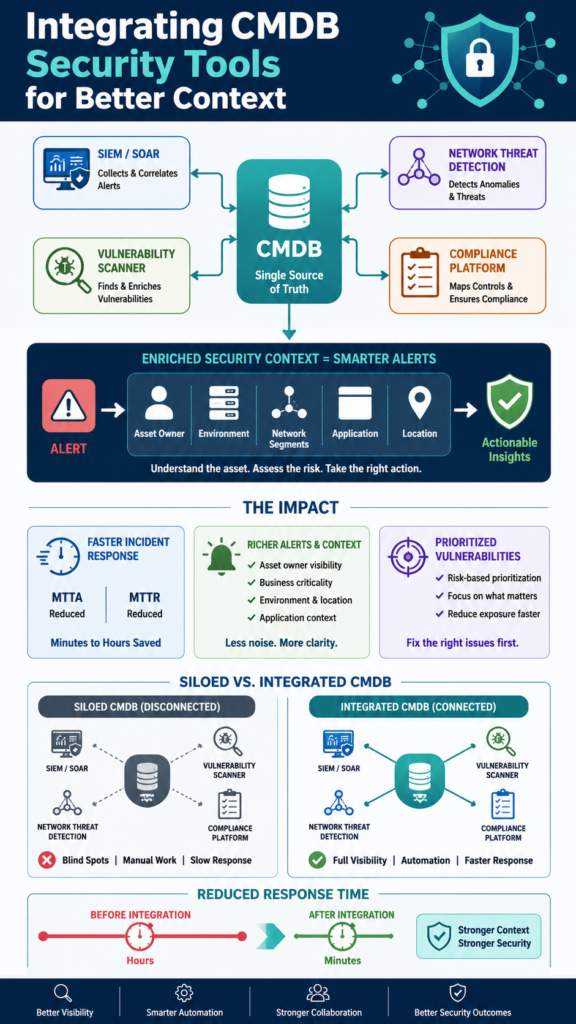
Speed and accuracy. Before integration, our mean time to acknowledge (MTTA) an incident involved a lot of manual lookup. Who owns this? What’s its purpose? Now, that context is embedded right in the alert. It shaves minutes, sometimes hours, off the initial response phase. More importantly, it improves the mean time to resolve (MTTR).
You’re not wasting cycles diagnosing basic asset information, you’re focused on containment and eradication from the moment the ticket is created.
“The analysis indicates that organizations implementing modern incident management technologies can significantly reduce response times, the use of automation and AI enables more precise threat detection and minimizes human errors.” – Sjaibt
The automation possibilities are profound. With a connected system, you can build playbooks that act on CMDB data. For instance, if a critical vulnerability is detected on a server, a SOAR playbook can automatically check the CMDB. If the asset is tagged as “production,” it creates a high-priority ticket.
If it’s tagged as “decommissioned,” it can automatically close the vulnerability finding. This eliminates so much of the tribal knowledge and manual toil that bogs down security teams.
It also fosters better collaboration. When a security alert contains not just an IP but the business service, application owner, and data classification, the conversation with the operations team changes. It’s no longer “secure this thing.” It’s “our customer checkout service is at risk, here’s the exact server, and here’s the vulnerability.”
You speak a common language grounded in a shared truth. The CMDB becomes the collaboration point, not just a database someone occasionally updates.
What Are the Practical Steps to Get Started?
Credits:ThreatWorx
Start with a single, well-defined use case instead of trying to integrate every system at once. A common starting point is enriching SIEM alerts with asset information, which delivers immediate value while keeping the project manageable.
Before integrating any tools, make sure your asset data is reliable. Review your CMDB and verify that essential fields, such as asset owner, environment, and criticality, are complete and regularly updated. High-quality data is the foundation of effective security operations.
Then focus on the implementation:
- Define the required asset data that should appear in security alerts, such as asset owner, location, application, and criticality.
- Use APIs to connect systems, beginning with a simple proof of concept, such as querying the CMDB from a SOAR platform or sharing asset tags with a vulnerability scanner.
- Establish regular synchronization through scheduled API calls, webhooks, or middleware to keep asset information current.
As the integration matures, document data ownership, synchronization processes, and escalation procedures. Building the project in small, measurable stages creates a sustainable workflow where accurate asset data continuously improves security visibility and incident response.
| Integration Point | Primary Security Benefit | Key CMDB Data Fields to Use |
| SIEM / SOAR | Accelerates incident investigation & response | Asset owner, business criticality, application, location |
| Vulnerability Scanner | Enables risk-based prioritization | Environment (prod/dev), owner, supported services |
| Network Threat Detection | Provides lateral movement & attack path context | Network segments, asset relationships, data classifications |
| Compliance Platform | Automates control evidence & reporting | Software versions, configurations, change history |
How Do You Maintain an Integrated System?
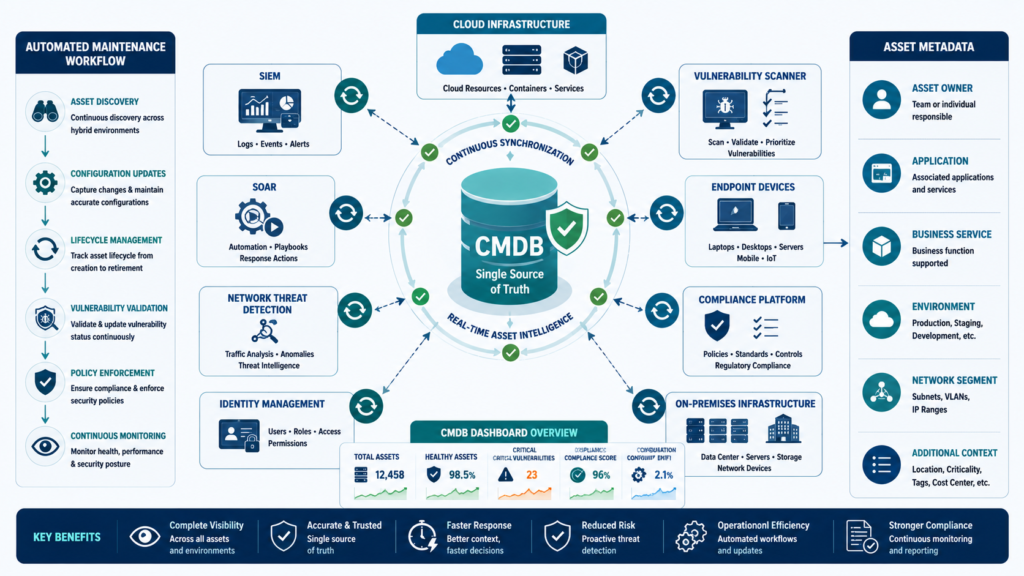
Integration isn’t a “set it and forget it” task. It’s a living process. The first rule is to monitor the data flow itself. Set up alerts if the sync job fails or if data freshness falls behind. Nothing breaks trust faster than a security team acting on outdated information. You’ll also need to regularly review and refine the data being shared.
As your security posture evolves, you might need new fields, maybe a “data sovereignty” tag or a “cloud provider” attribute.
Governance is crucial. Establish a clear RACI (Responsible, Accountable, Consulted, Informed) model for the CMDB data. Who is responsible for updating the owner field when someone leaves the company? Who is accountable for the accuracy of the application-to-server mappings? These processes must be baked into IT service management workflows. Otherwise, the integrated system will slowly drift back into inaccuracy.
Finally, measure success. Track the metrics that matter: MTTA, MTTR, the percentage of vulnerabilities auto-assigned to correct owners, the reduction in “what is this asset?” questions during war rooms.
Share these wins with both the security and operations teams. Show them how the shared effort is making everyone’s job easier and the organization safer. This builds the political and cultural support needed to sustain the integration long-term.
FAQ
Doesn’t this integration create a bigger attack surface?
It’s a valid concern. The key is secure implementation. Use service accounts with strict, least-privilege API permissions, never admin credentials. All data in transit should be encrypted (TLS), and access should be logged and audited. The security risk of a well-governed integration is far lower than the risk of operating with blind spots.
Our CMDB is a mess. Should we clean it up before integrating?
You can’t clean it in a vacuum. Integration provides the motivation and the feedback loop for cleanup. Start by integrating a small, well-managed subset of assets (like all production servers). Use the security team’s need for good data as leverage to get those assets cleaned up, then expand. The process drives the cleanup, not the other way around.
Can this work with cloud-native assets that change constantly?
Absolutely, it’s essential for the cloud. Modern CMDB solutions can use discovery tools to dynamically track cloud assets. The integration then tags these ephemeral resources with security metadata (like “contains PII”) at birth. This way, even short-lived instances are visible and governed by your security policies from the moment they spin up.
Is this mostly for large enterprises?
No, it’s arguably more critical for smaller teams. You have fewer people who need to wear more hats. Automating context and cutting out manual steps isn’t a luxury, it’s a necessity. Starting with a simple integration between your CMDB and your core security alerting tool pays dividends at any scale.
Making CMDB Security Context Your New Normal
Integrating your CMDB with your security tools isn’t a fancy project. It’s the basic plumbing of a mature security program. It takes the static knowledge of what you have and makes it actionable for defending what you have.
Begin with one connection. Enrich your next alert. See how much time it saves, how much clarity it brings. Your configuration data is waiting to become your best defender. Ready to strengthen your security operations with real-time threat intelligence, automated risk analysis, and visual attack path insights? Join Network Threat Detection
References
- https://repository.londonmet.ac.uk/10972/
- https://sjaibt.org/index.php/j/article/view/126
