

Intrusion Prevention Systems (IPS) keep networks safe by watching traffic closely, spotting anything that looks off, and stopping threats before they do damage. They work right in the flow of data, checking every packet that passes through.
This makes them a first line of defense, catching attacks early and automatically blocking them. IPS fits into the network alongside firewalls and other tools, balancing security without slowing things down too much. For anyone interested in how networks stay secure,whether a pro or just curious,understanding IPS is key. Keep reading to see how these systems catch threats and keep networks running smooth.
Key Takeaways
- IPS functions by monitoring traffic inline and actively blocking malicious packets in real time.
- Network threat detection is central to IPS, using multiple detection methods to identify potential attacks.
- Proper IPS placement, rule management, and integration with firewalls enhance overall network security without compromising performance.
What Are Intrusion Prevention System Functions?
Intrusion Prevention Systems keep networks safe by stopping threats before they cause damage. At its core, an IPS watches network traffic closely, looking for anything that seems off. But it doesn’t just notice problems, it acts fast to stop attacks before they spread.
One way it does this is with deep packet inspection (DPI). Instead of just checking the basic info in packet headers, DPI looks inside the actual data. This helps catch hidden threats that simple firewalls might miss, like malware tucked deep in the traffic.
To read traffic properly, an IPS also normalizes packets. That means it cleans up the data by fixing broken pieces or decoding hidden information,tricks attackers use to sneak past defenses.
Without this step, some threats could slip through unnoticed. Here’s a closer look at the main IPS functions:
- Continuous traffic monitoring across many layers,network, transport, and application,to catch threats wherever they hide
- Detection methods that include signature matching, anomaly spotting, behavior analysis, and policy enforcement
- Real-time blocking by dropping suspicious packets or resetting connections to stop attacks in their tracks
- Alerting and logging so administrators can review incidents and respond as needed
Together, these functions build a defense that’s always on, always watching, and ready to act before damage happens.
How Intrusion Prevention Systems Work
Source: Motasem Hamdan
Understanding how an Intrusion Prevention System (IPS) works helps explain why it’s so good at stopping attacks. The IPS sits right in the path of network traffic, meaning every packet has to go through it. This lets the system watch data as it moves, catching problems as they happen.
When a packet arrives, the IPS doesn’t just look at it quickly, it first preprocesses the data. That means it checks for broken-up packets and puts them back together, cleans up the info, and gets it ready for a closer inspection.
This step is important because attackers often try to sneak malware through by breaking packets into pieces or hiding data in odd ways.
After cleaning the data, the IPS uses deep packet inspection to examine what’s inside. It compares the traffic against known attack patterns and looks for strange behavior that doesn’t match normal network activity.
To strengthen this layer, many systems rely on continuous network threat detection to identify and respond to unusual packet behavior instantly. It’s estimated that over 4,000 cyber attacks occur daily worldwide, meaning defenses must act in real time just to keep up.
If the IPS spots something bad, it can jump into action quickly by:
- Dropping harmful packets immediately
- Blocking the source IP address that’s sending the attack
- Terminating sessions that look suspicious or out of place
- Changing firewall rules on the fly to stop more attacks from coming through
This fast response helps keep critical systems safe by cutting off threats before they get a foothold.
IPS Placement in Network Inline Mode
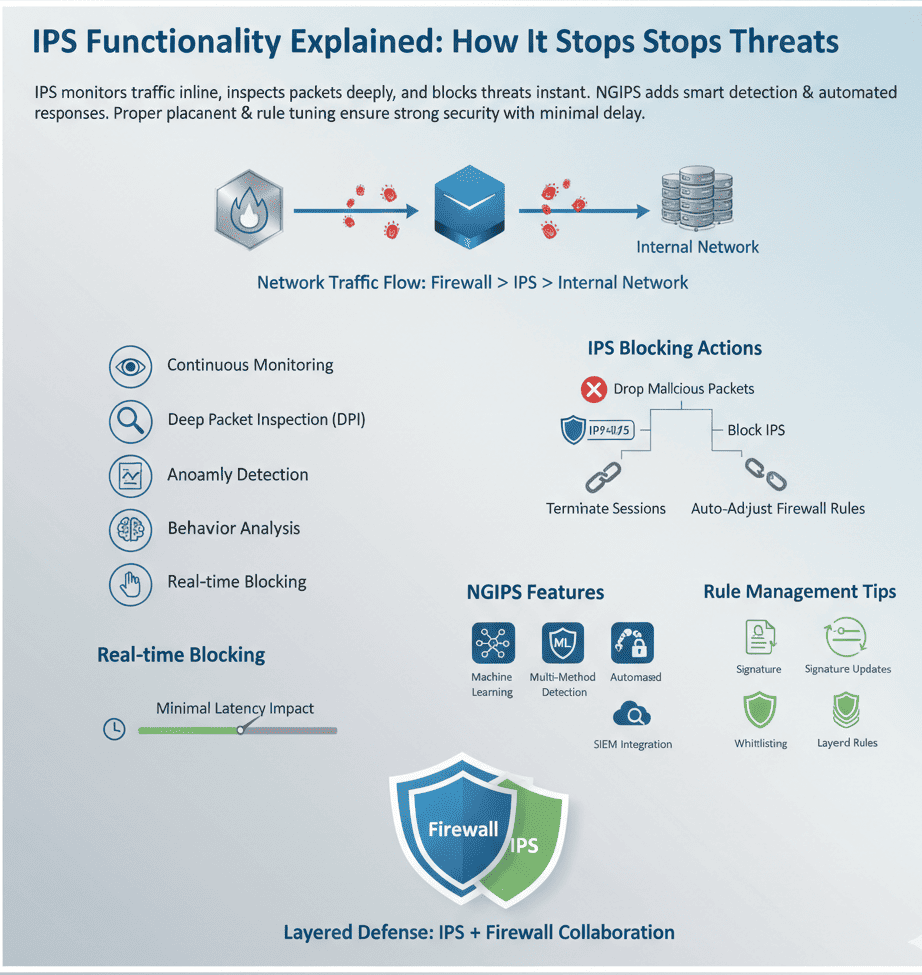
Where you put an IPS matters a lot. Usually, it goes inline,that is, directly between the firewall and the internal network. This position lets the IPS see all traffic passing through and take action without delay.
We’ve seen setups where the IPS sits just behind the firewall. The firewall handles basic filtering, then passes traffic to the IPS for deeper inspection and active blocking.
In inline mode, the IPS can drop packets immediately if it detects threats. This is unlike an Intrusion Detection System (IDS), which only alerts admins but doesn’t intervene.
Benefits of inline placement include:
- Real-time threat prevention without waiting for manual responses
- Immediate blocking of suspicious traffic to stop exploits early
- Integration with other security tools to create a layered defense
Next Generation IPS (NGIPS) Features

Next generation Intrusion Prevention Systems (NGIPS) build on traditional IPS by adding smarter ways to detect threats and respond faster. They often use machine learning, which helps them improve over time.
This means they get better at finding real attacks and make fewer false alarms that can waste time and distract security teams.
What stands out about NGIPS is how they mix different ways of spotting trouble, making detection more reliable. They don’t just rely on one method but combine several, including:
- Signature-based detection that looks for known threats by matching patterns
- Anomaly-based detection that flags traffic that behaves oddly or doesn’t fit usual patterns
- Behavior-based detection that watches how activities unfold over time, tracking suspicious moves across sessions
- Policy-based detection that enforces custom rules set by network administrators
- By combining these smart methods with advanced NTD technologies, NGIPS provides adaptive, real-time protection that evolves with modern attack tactics.
In 2024, the global intrusion detection and prevention (IDPS) market was valued at roughly USD 6.25 billion and is projected to grow at over 12 % CAGR through 2030[2]. Next generation IPS don’t just find threats,they jump into action right away.
They don’t wait for a person to step in. Instead, they can change firewall rules on their own to block attacks as they happen. They also link up with Security Information and Event Management (SIEM) tools, which gather data from different sources.
This helps security teams get a clearer picture and handle tricky threats better. All these features make NGIPS a smarter, more flexible defense that can keep up with the fast pace of today’s network dangers.
IPS Blocking Mechanisms Explained
Blocking is where the IPS shows its muscle. Once a threat is spotted, it moves quickly to shut it down before any real damage happens. This kind of instant action is what separates an IPS from simple monitoring tools.
Here’s how an IPS stops attacks:
- Dropping Malicious Packets: It throws out harmful data immediately, so it never reaches its target.
- Blocking Source IP Addresses: If one IP keeps attacking, the system blocks all traffic from that address, cutting off the attacker.
- Session Termination: The IPS can end suspicious connections right away, stopping the attack dead in its tracks.
- Automated Firewall Rule Adjustments: Some IPS can tell firewalls to block certain traffic automatically, without waiting for a person to step in.
These blocking actions work together smoothly to reduce damage and keep networks safe. What’s really impressive is that most of this happens on its own, without needing someone to jump in. It’s a defense that’s always alert and ready, exactly what networks need when threats can come out of nowhere.
Performance Impact of IPS Systems
One of the big questions we get asked is how IPS affects network speed. Since the system inspects every packet inline, there’s always some latency introduced.
Yet, modern IPS appliances are designed to handle high throughput with minimal delay. They optimize traffic preprocessing and use hardware acceleration to keep performance steady.
Still, it’s wise to consider:
- Latency and throughput: How much delay is acceptable for your network?
- Scalability: Can the IPS handle traffic spikes without slowing down?
- Tuning and maintenance: Regularly updating signatures and rules helps balance detection accuracy and speed.
Properly deployed, an IPS can secure a network without noticeable impact on user experience.
Selecting the Right IPS Vendor

Choosing an IPS vendor is about more than just features. We look for systems that provide:
- Strong network threat detection capabilities with many detection methods
- Easy integration with existing firewalls and SIEM systems
- Efficient rule management and signature updates
- Reliable performance under heavy traffic loads
- Good support for automated response actions
Your choice should fit your network size, threat profile, and compliance requirements.
IPS Rule Management Strategies
Managing IPS rules is a constant balancing act. Rules must be tight enough to catch attacks but flexible enough to avoid false alarms.
Some strategies include:
- Regularly updating signature databases to cover new exploits
- Tuning anomaly detection thresholds based on network behavior
- Whitelisting trusted IPs or applications to reduce false positives
- Prioritizing rules that prevent known exploits with high risk
- Using a layered approach by combining policy-based and behavior-based rules
Good rule management keeps the IPS effective without overwhelming administrators with alerts.
Preventing Known Exploits with IPS
One of the biggest strengths of an IPS is stopping attacks that use known weaknesses. It does this with signature-based detection, which means it checks incoming network traffic against a huge list of attack patterns.
Think of it like a checklist of known bad moves,if the traffic matches any of these, the IPS raises the alarm and blocks it right away.
But this only works if the signatures stay updated. Attackers keep coming up with new tricks, so the IPS needs fresh info to catch them. Without regular updates, new threats might slip through unnoticed.
This way of spotting threats works well against common and serious attacks like ransomware, which can lock up entire networks, or denial-of-service (DoS) attacks that flood systems with fake traffic. Catching these attacks early, before they spread or cause damage,can save a network from serious trouble.
Signature-based detection isn’t perfect though. It can miss brand-new attacks that don’t match any known patterns. Still, it forms a solid base. When mixed with other detection methods, it helps build a stronger, more reliable defense that keeps networks safer every day.
Integrating IPS with Firewalls
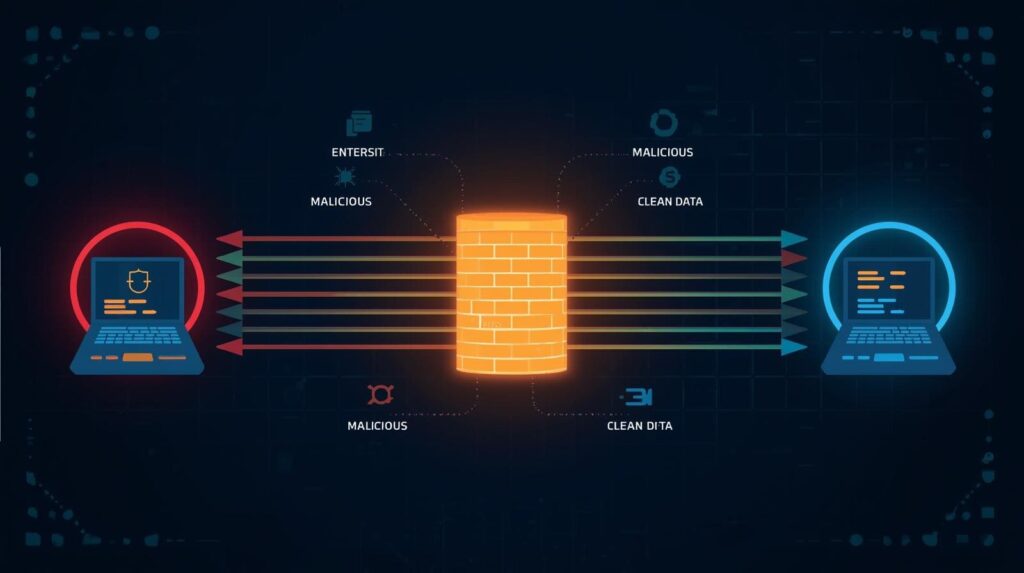
An IPS and a firewall make a strong security team. Firewalls do the basics,they block unauthorized access by controlling ports and protocols. But an IPS goes further, looking closely at traffic and stopping threats as they happen.
When they work together, the IPS can send info back to the firewall, which then changes its rules automatically. This means the network’s defenses get stronger right away, without waiting for a person to step in.
This teamwork creates a layered defense that’s smarter and tougher than either system alone. It’s a simple, effective way to keep networks safer, especially when integrated with advanced intrusion detection systems for full-spectrum visibility across all traffic layers.
FAQ
What is the primary function of Intrusion Prevention Systems (IPS)?
The primary function of intrusion prevention systems is to detect and prevent malicious activity before it harms your network. An IPS monitors network traffic, identifies malicious packets, and blocks threats in real time. It helps security teams stop potential threats, unauthorized access, and exploit vulnerabilities across inbound and outbound traffic flows.
How do intrusion prevention systems work in modern network security?
Intrusion prevention systems work by analyzing network packets and traffic flows using detection methods like deep learning and machine learning. A network based intrusion prevention system monitors network behavior, identifies suspicious activity, and blocks malicious actions automatically. These systems provide comprehensive protection and help prevent DDoS attacks, unauthorized devices, and malicious traffic.
What are the key features of an effective IPS and IDS setup?
A strong ips and ids setup includes real time threat detection, access control, and automated threat prevention. IPS detects malicious activity, monitors network traffic, and supports security operations with incident response. Intrusion detection systems alert the security team, while intrusion prevention systems block malicious actions, enhancing overall network security and operational efficiency.
How does IPS detect and block potential threats?
An IPS detects threats by studying normal network behavior, using based detection to identify malicious traffic. It monitors ip addresses, analyzes network packets, and blocks malicious data prevented by IPS. By combining threat intelligence and machine learning, IPS solutions can detect and prevent types of attacks, reducing false positives and ensuring robust protection.
How do IPS solutions fit into existing security infrastructure?
IPS solutions integrate easily with existing security infrastructure and security policies. They support network administrators and security teams by aligning with unified threat management, next generation firewalls, and security information and event management tools. Network based intrusion prevention systems strengthen overall threat prevention and ensure security devices work together for consistent, real time defense.
Conclusion
An IPS acts like a guard for your network, watching traffic in real time and blocking threats fast. It sits in the network path to see everything, using smart threat detection to keep data safe.
Managing IPS rules with firewalls boosts protection, while speed ensures smooth performance. To stay secure, choose the right system, keep it tuned, and updated. Learn how NetworkThreatDetection.com helps teams stay ahead of attackers.
References
- https://www.fortinet.com/resources/cyberglossary/cybersecurity-statistics
- https://www.grandviewresearch.com/industry-analysis/intrusion-detection-prevention-systems-market-report
