

Attackers rarely leave obvious clues, but every active network connection creates valuable evidence inside system memory. Through memory forensics network connections analysis, investigators can uncover hidden backdoors, suspicious remote sessions, and command-and-control communication that never appears on disk.
Combined with Network Threat Detection, this approach helps security teams reconstruct incidents with greater accuracy and respond before attackers can do more damage. Keep reading to learn how memory forensics network connections analysis uncovers the invisible traces of cyber threats.
What You’ll Learn
Network connections stored in live memory can reveal critical clues that traditional logs often miss. Here are the key insights you’ll gain from understanding memory forensics network connections analysis:
- Catch connections that disappear quickly by analyzing live memory before attackers erase their tracks.
- Link suspicious processes to remote systems to identify exactly which applications are communicating with malicious infrastructure.
- Build a clear attack timeline by matching network activity with process execution and memory artifacts.
Why Should You Care About Ephemeral Network Traces?

You look at your firewall logs, they show clean. Your IDS might be quiet. But something feels off. The machine is sluggish, there are strange outbound calls at odd hours. This is where disk-centric analysis fails you.
Malware today lives “off the land” and in memory, it avoids writing to the file system whenever possible. Its network connections, especially those used for command and control, are often short-lived, encrypted, and designed to blend in.
“The increase in cyberattacks, particularly fileless and memory-resident malware, has highlighted the weaknesses of traditional disk forensics. Since volatile memory (RAM) contains live evidence, such as processes, injected code, registry artifacts, and network connections, memory forensics has become an essential part of modern-day digital forensics”. – Ieeexplore
They’re ghosts. But ghosts leave a chill, a trace in the volatile memory of the system. Analyzing network connections in a memory dump is like dusting for fingerprints in a room everyone says is empty.
You’re not looking for the burglar, you’re looking for the displaced air, the faint smudge on the window latch. We’ve seen it a hundred times in our work: the key to closing a case isn’t always the malware binary, it’s the map of where it phoned home.
What Exactly Are You Looking For in Memory?
The artifacts are more nuanced than a simple list of IPs. First, you have the active connection tables. These are the TCP and UDP endpoints that were live at the moment of capture.
They show you what was talking, right then. This includes the local and remote addresses, ports, and the state of the connection (ESTABLISHED, LISTENING, CLOSE_WAIT). Finding an ESTABLISHED connection to a known bad IP is a smoking gun, but it’s also rare.
The real gold is in the listening ports. What sockets are open, waiting for a callback? That’s often a backdoor.
Then there are the cached artifacts. DNS cache entries, for instance. A process may have resolved malicious-domain[.]com minutes before the dump. That domain might not appear in any log if the malware uses its own DNS client.
But in memory, the resolved IP sits there, waiting. NetBIOS sessions, ARP tables, even routing table changes can be indicators. You’re piecing together a narrative from fragments the system never intended to preserve long-term.
- Active Sockets: Live, ongoing conversations.
- Listening Sockets: Open doors waiting for contact.
- DNS Cache: A history of domains the system looked up.
- Network-related Handles: Objects processes use to manage connections.
It’s a jigsaw puzzle. One piece might be a suspicious process. Another is an odd listening port on a non-standard number. The third piece is a DNS cache entry linking that port to a dynamic DNS provider.
Put them together, and you have a profile of an active threat. We lean on this process daily, not as a last resort, but as a first option for Network Threat Detection, because it bypasses the evasion techniques that target logs and disk.
How Do You Correlate a Connection to a Malicious Process?
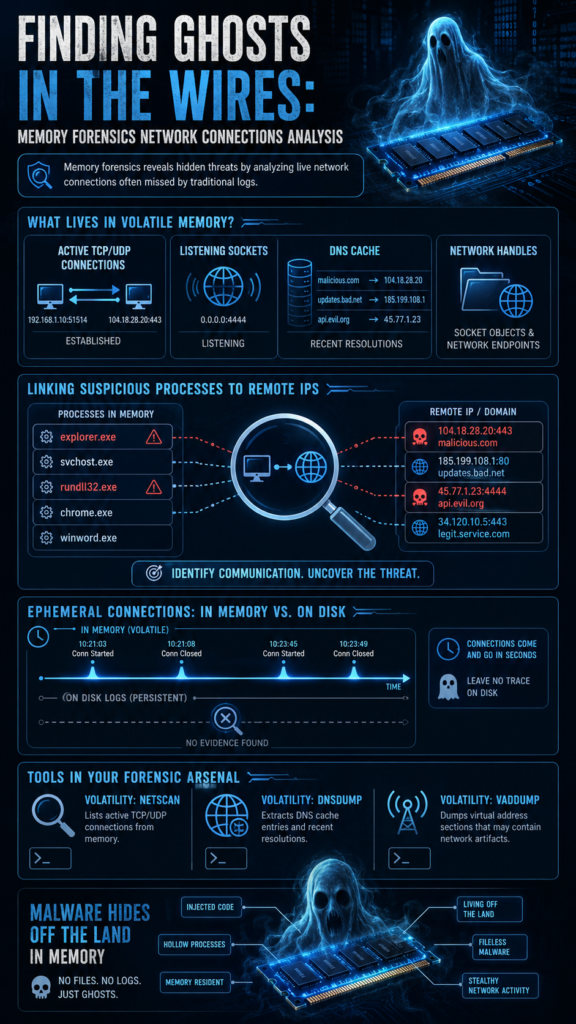
Finding a strange connection is only step one. The critical leap is tying it to the responsible process. This is where memory forensics separates from network monitoring alone. A tool looking at the wire sees traffic from IP X to IP Y. It can’t see which program on the host generated it.
Memory can. By walking through the kernel’s data structures, you can link a socket, represented by a _TCPT_OBJECT or similar in Windows, back to the process that owns it. This is the “aha” moment.
Let’s say you find an outbound connection to a shady IP on port 443. It looks like normal web traffic. But when you follow the thread back, you find the owning process isn’t chrome.exe or svchost.exe. It’s explorer.exe. That’s wrong.
Explorer shouldn’t make outbound HTTPS calls. Or maybe the process is a benign system name, but its parent process ID is unusual, or its path is in a temp directory. This direct linkage is irrefutable context. It turns a suspicious IP into evidence of a compromised process.
We’ve used this to identify malware that successfully impersonated system services, because while its name and PID looked right, its network behavior betrayed it. The connection map doesn’t lie when attacker activity is correlated with process behavior.
Can You See Connections That Have Already Closed?
This is the power move. Yes, often you can. While the active connection table is volatile, closed connections can leave traces in various data structures before being overwritten. The ARP table might still hold the MAC address of a remote host it communicated with.
“Frequently have residual IP packets, Ethernet frames, and associated data structures present in system memory from long-terminated network traffic,” which proves valuable for “establishment of prior connection activity and services used”. – Cerias
Certain malware, in its haste, might leave socket objects in a partially closed state, visible in memory pools. Furthermore, by analyzing the memory of the process itself, you might find strings containing IPs or URLs that were used by since-closed connections. This is like finding a burnt matchstick in an ashtray long after the fire is out.
It proves a meeting occurred, even if you missed the handshake. This historical view is crucial for building a timeline of the attack, reconstructing events evidence, understanding what data was exfiltrated, and identifying all stages of the compromise.
What Tools and Techniques Make This Practical?
Credits: John Hammond
Memory-based network analysis is made practical through specialized forensic tools that automate the extraction of network artifacts. Open-source frameworks such as Volatility and Rekall provide plugins for analyzing memory images from Windows, Linux, and macOS.
A typical workflow includes:
- Extract active network connections using plugins such as netscan or connections.
- Retrieve DNS cache data with tools like dnsdump.
- Correlate network activity with running processes to determine which application initiated each connection.
Many organizations further simplify this process by using commercial platforms that automate data correlation and present the results in an easy-to-understand dashboard.
Instead of manually analyzing memory structures, analysts can quickly identify suspicious activity, such as an unexpected process communicating with an unfamiliar external IP address.
The ultimate goal is to transform complex forensic data into actionable alerts, enabling security teams to investigate and respond to threats more efficiently.
| Artifact | What It Reveals | Tool Example (Volatility) |
| Active TCP/UDP Connections | Live command & control, data exfiltration | netscan, connscan |
| Listening Sockets | Backdoors, persistence mechanisms | netscan (state=LISTENING) |
| DNS Cache | Resolved malicious domains | dnsdump |
| ARP Table | Recent local network communicants | arp |
| Socket Objects in Process Memory | Historical connections, leaked data | vaddump, string search |
How Does This Fit into a Real Investigation?

Picture this. A financial firm suspects a breach. Their perimeter logs show nothing. We start with a memory capture from a key server. Running network analysis, we find no bizarre outbound calls initially. But the listening ports show svchost.exe listening on TCP 49999.
That’s unusual. Correlating it, we see the service is a dummy Windows update service, but its binary path is in a user’s AppData\\Local\\Temp. Red flag. Digging into the process memory with vaddump, we find encoded strings that, when decoded, reveal an IP address.
Cross-referencing with the DNS cache, we see that IP was resolved from update-global[.]com an hour prior. Now we have the full chain: a malicious service, its hidden listener, and its command domain.
This was all invisible to disk forensics because the payload was injected and never wrote a file. The network connections in memory were the only thread to pull.
FAQ
Can memory forensics recover the actual data sent over a network connection?
Sometimes, but not reliably. If the sent or received data is still buffered in the process’s memory space before being encrypted or after being decrypted, you might capture fragments. More often, you get the metadata: the who, when, and how, not the what. That metadata is usually enough.
Is this only useful for advanced persistent threats (APTs)?
Not at all. While APTs use sophisticated memory-resident techniques, common ransomware, coin miners, and info-stealers also use network calls for C2, key exchange, or data theft. Analyzing connections can catch these faster than waiting for files to change or alerts to fire.
How fresh does the memory dump need to be for connection analysis?
The fresher the better. Active connections are ephemeral; they change by the second. A dump taken minutes after an incident is ideal. However, cached artifacts like DNS entries can persist for hours, depending on system activity, offering a valuable historical window.
Do encrypted connections (HTTPS, TLS) make this analysis useless?
Absolutely not. Encryption hides the content, not the fact of the connection. You still see the endpoints, the ports, the volume of data transferred, and the process responsible. An unknown process making frequent, large transfers to an IP in a foreign country over TLS is still highly suspicious, even if you can’t read the memos.
The Final Verdict on Network Ghosts
Memory forensics for network connections turns the ephemeral into the evidentiary. It moves you from a position of reacting to logs and alerts to one of proactive hunting, looking for the subtle imbalances in a system’s digital metabolism.
Join Network Threat Detection to see how real-time threat modeling, automated risk analysis, visual attack path simulations, and continuously updated threat intelligence can help your security team identify blind spots, prioritize vulnerabilities, and respond to attacks with greater confidence.
References
- https://ieeexplore.ieee.org/abstract/document/11323993
- https://www.cerias.purdue.edu/news_and_events/events/security_seminar/details/index/l7g535ihbnit2t00ads88v0rtk
