
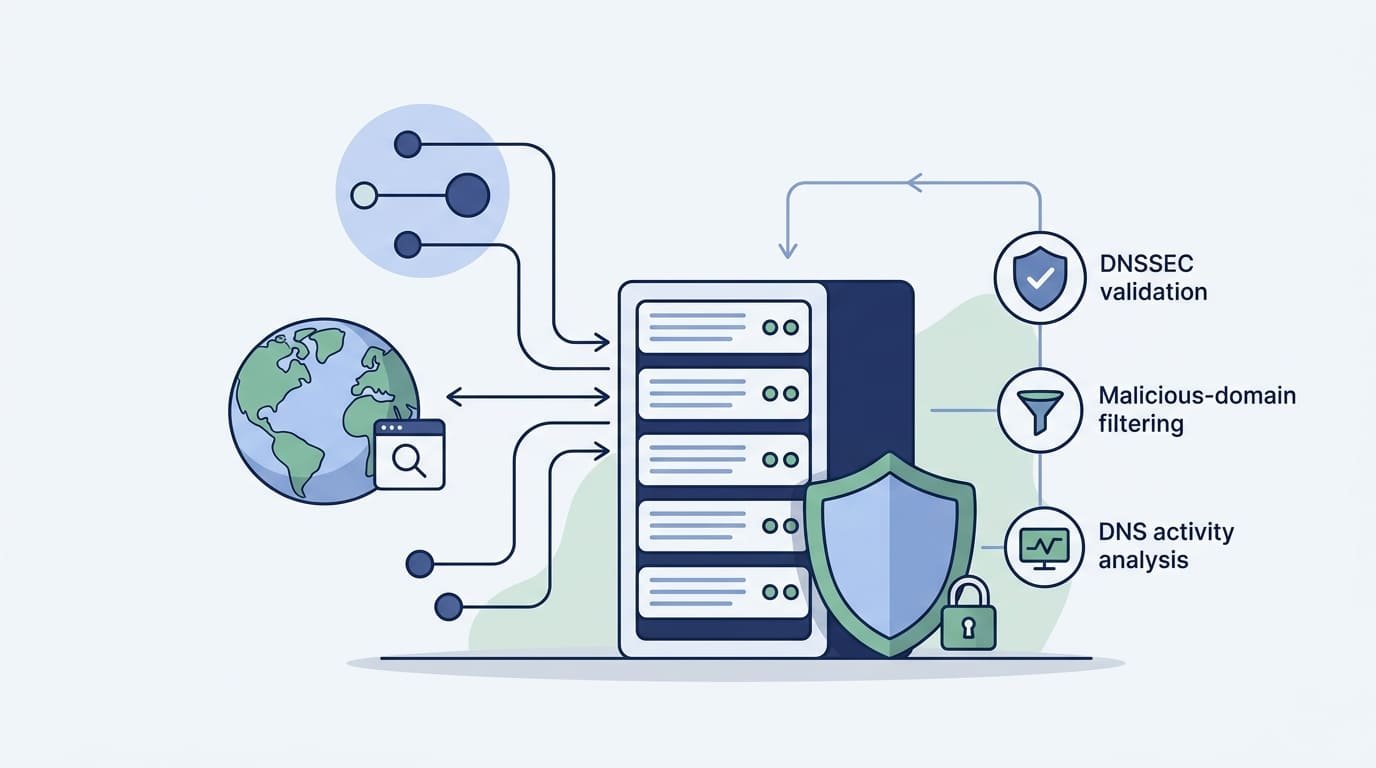
Recursive DNS server security starts with limiting access and blocking common attacks. Restrict recursion to trusted clients, enable DNSSEC validation, and set rate limits to reduce abuse. Check logs for unusual queries or sudden traffic spikes, too.
But these steps won’t catch every threat. ICANN research explains how DNS caching works, while NIST guidance helps administrators configure resolvers securely. Still, hidden threats may go unnoticed without network-level monitoring. Network Threat Detection helps teams spot suspicious traffic and investigate possible attacks before services are affected.
Keep reading to learn how to secure recursive DNS servers and test your defenses.
Quick Reads: Essential Steps to Secure Recursive DNS Servers
- Restrict recursion to trusted clients. Use ACLs, firewall rules, and network segmentation to prevent open resolver abuse, DNS amplification, and unauthorized queries.
- Validate DNS responses and harden resolvers. Enable DNSSEC validation, protect against cache poisoning, randomize source ports, and apply rate limits.
- Monitor DNS activity and maintain resilience. Use Network Threat Detection, DNS logging, malicious-domain filtering, regular patching, and redundant resolvers to detect threats and maintain availability.
What Are the Most Important Recursive DNS Security Best Practices?
Good DNS security comes down to a handful of habits: lock down who can use your resolver, check DNSSEC, block spoofing, watch your traffic, and keep a backup ready. We always begin with access. It’s the quickest fix and it cuts the most risk.
A recursive resolver retrieves DNS records on behalf of clients and caches responses to speed up subsequent lookups. But it also talks to servers all over the internet, so one bad setting can leak inside details or turn the resolver into a weapon. Our team builds threat models and risk tools for network security, and this is the mistake we run into most.
NIST’s Secure Domain Name System Deployment Guide says DNS security needs attention at every stage: setup, settings, upkeep, and monitoring. From what we’ve seen, none of that works well alone. It has to fit into your wider network protection strategy.
Start with these basics:
- Allow recursion only for approved internal networks, VPN clients, and trusted hosts.
- Turn on DNSSEC validation, then test that bad answers really get rejected.
- Use source-port randomization, response validation, and anti-spoofing rules on the network.
- Set query limits, response rate limits, and firewall rules.
- Run recursive and authoritative DNS on different servers.
- Patch the resolver software and protect admin screens.
- Use more than one resolver, and watch for odd DNS activity.
ICANN’s 2024 technical report has one number worth knowing. About 58% of the resolvers it looked at cap TTL values at one day or less. TTL controls how long an answer stays saved. That stat doesn’t prove any single TTL limit makes you safe, though. The full source is the ICANN Technical Report on Reduced-Risk Redirected Query Traffic.
So the plan is short. Limit access, require validation, watch what happens, and test each control the way a user would see it.
Why Should You Never Expose an Open Recursive Resolver?
An open recursive resolver will answer anyone on the internet. That means people can abuse it, pull information out of it, or use it to knock other sites offline.
The big danger is amplification. An attacker sends a tiny question with a fake return address, and your server fires a much larger answer at the victim. Some open resolvers also give away what others have looked up, which is called cache snooping.
When we check a network, surprise public recursion is the first thing we flag. The fix is often just one access rule. You rarely need to rebuild your DNS.
Here is what we suggest:
- Build a recursive resolver ACL that lists only trusted clients.
- Add firewall rules that block DNS traffic from unknown sources.
- Limit UDP port 53 and TCP port 53 to the sources that need them.
- Use network ingress filtering to cut down on spoofed IP addresses.
- Check every public-facing interface for recursion no one meant to turn on.
- Test from both approved and unapproved networks.
The Internet Systems Consortium (ISC) agrees. It recommends restricting recursion and, where you can, keeping recursive and authoritative DNS apart. Together, those steps stop an internal resolver from becoming a tool for outside attackers.
Should You Disable Recursion or Restrict It?
Whether to disable recursion depends on the server’s role. Internal recursive resolvers need recursion to retrieve external DNS records, while public authoritative servers generally do not. Disabling recursion indiscriminately can disrupt applications and internal services.
Picture a vulnerability scan that flags open recursion. You should dig into it. But turning recursion off in a rush can break anything that needs outside lookups, and we’ve watched teams spend a whole afternoon fixing logins after doing just that.
Active Directory shows why. It uses internal DNS to find domain controllers and to look up what apps need. Lock recursion down the wrong way, and sign-ins and connections can fail.
Use these recommendations to pick the right setup.
- Corporate Recursive Resolver
- Recommended configuration: Allow recursion only for approved internal clients.
- Primary security concern: Unauthorized queries and open resolver abuse.
- Active Directory DNS
- Recommended configuration: Preserve required recursion and internal DNS functionality while restricting access.
- Primary security concern: Authentication failures and service discovery issues.
- Guest Wi-Fi
- Recommended configuration: Apply separate DNS access rules and isolate guest traffic from internal resources.
- Primary security concern: Unauthorized access to internal systems.
- Public Authoritative Server
- Recommended configuration: Disable recursion unless it is explicitly required.
- Primary security concern: DNS amplification and reflection attacks.
- Public Recursive Service
- Recommended configuration: Apply a dedicated security design with strict abuse controls and capacity planning.
- Primary security concern: DDoS attacks and excessive query traffic.
What could break if recursion is disabled?
Internal users may lose the ability to look up outside sites. Apps can also fail if they can’t find the services they depend on.
Before you change anything in production, test a few real client lookups. Confirm that trusted devices can reach both internal and outside names, and that untrusted devices can’t use the resolver at all.
Do that, and you get stronger security without any surprise outages.
How Does DNSSEC Validation Protect Recursive Resolvers?
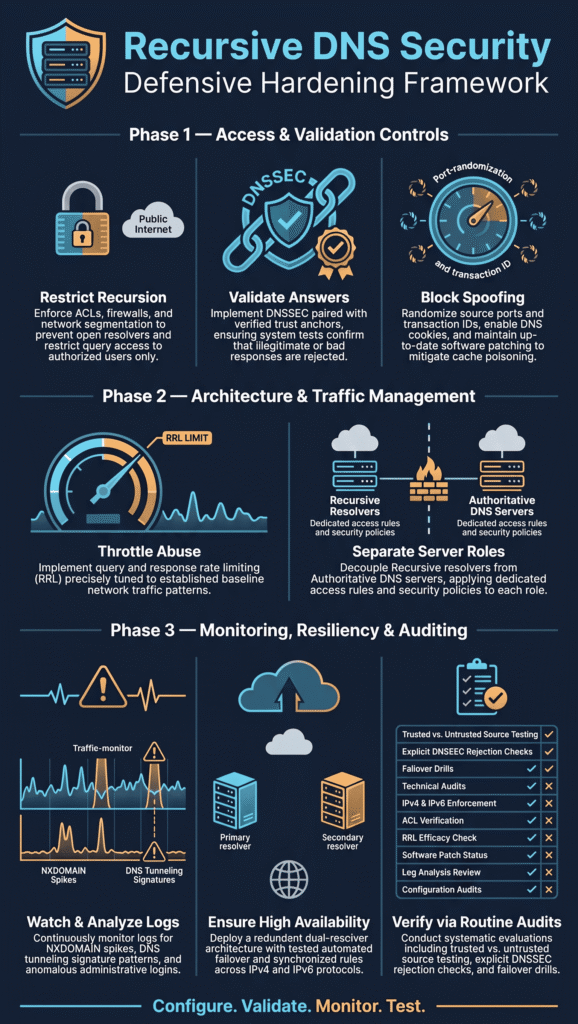
DNSSEC lets a resolver check that a DNS answer is real. If the check fails, the resolver tosses the answer.
Here’s how it works. DNS records get digital signatures, and those signatures link together in a chain of trust. A resolver follows the chain to see if a record was faked or changed on the way. When implementing DNSSEC, administrators can strengthen response validation and make cache poisoning and spoofing a lot harder.
But turning the setting on doesn’t mean it works. Plenty of teams we’ve talked with flipped the switch, felt safe, and never tested it. When we map out risks for a network, an untested security setting goes on the list.
Forwarders are a classic trouble spot. Say your resolver sends its questions to another DNS server. If that server strips out the DNSSEC records, your resolver has nothing to check, and normal lookups start to fail. Internal zones without signatures can cause problems too. Those usually need a small exception, and that exception should be as narrow as you can make it.
You can test all this with a few steps you can repeat any time:
- Turn on DNSSEC validation and make sure your trust anchors are current.
- Look up a domain that is signed the right way.
- Look up a test domain that is broken on purpose, using a known DNSSEC test service.
- Make sure the resolver rejects the bad answer and doesn’t just accept it.
- Read the DNSSEC errors in your resolver logs.
- Fix any forwarding problems before you add exceptions.
As noted by NIST
“NIST SP 800-81-2 provides guidance on secure recursive DNS service setup and validating resolver configuration, including DNSSEC processing and trust anchor management .” – NIST
Google Public DNS has good documentation on how DNS security works. The same ideas fit resolvers inside a company.
On BIND and other resolver software, check that answers from upstream servers still carry the DNSSEC records. Skip broad exceptions that let unchecked answers pass for unrelated domains. One sloppy exception can undo a lot of good work.
How Can You Prevent DNS Cache Poisoning and Spoofing?
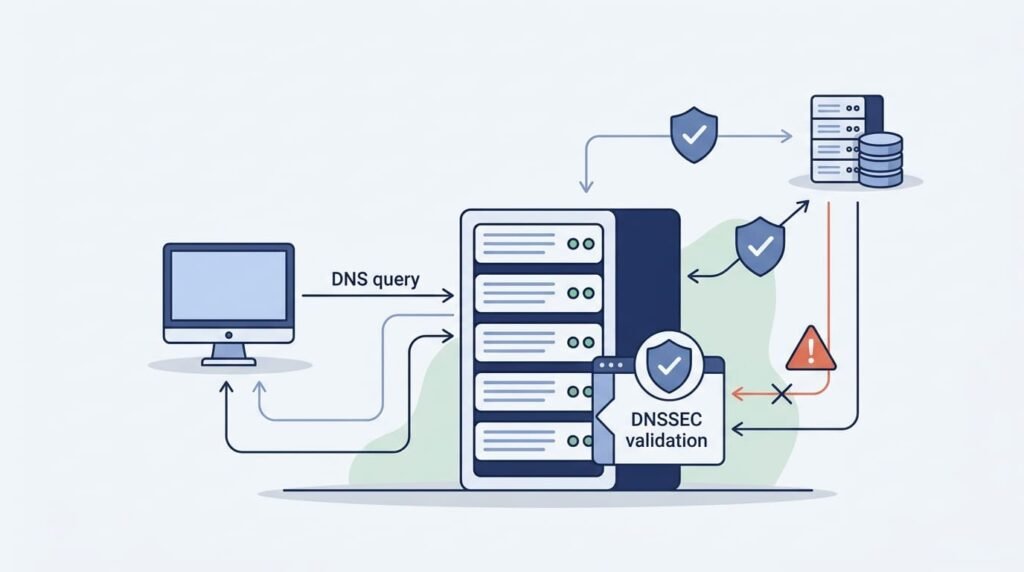
No single trick stops cache poisoning. You need a few layers working together: hard-to-guess requests, careful checks on replies, and filters on the network.
In a poisoning attack, someone tries to sneak fake records into a resolver’s cache. After that, anyone who asks for those records may land on the wrong site and never know it.
Combine source-port randomization with response validation to make DNS spoofing and cache poisoning more difficult.
Key controls include:
- Randomize transaction IDs and source ports.
- Check the address, port, and transaction details on every reply.
- Use DNS cookies where your systems support them.
- Filter traffic at the network edge to block fake source addresses.
- Keep your DNS software patched.
- Look into strange replies and odd cache behavior.
A 2024 ICANN report models a 0.3% chance of a successful attack over six years. That number comes from one setup with 1,024 source ports. It describes that case only, so don’t read it as a safety score for every resolver.
RFC 5452 lays out ways to make DNS transactions harder to forge.
Insights from IETF indicate
“RFC 5452 describes measures that make spoofing a recursing nameserver “many orders of magnitude harder” by standardizing behaviors for discarding bogus responses .” – IETF
Admins should also look at DNS rebinding protection. An untrusted answer can point clients at loopback or private addresses, which can steer them toward internal systems. Blocking those answers cuts that risk.
How Should You Configure Rate Limiting and Abuse Protection?
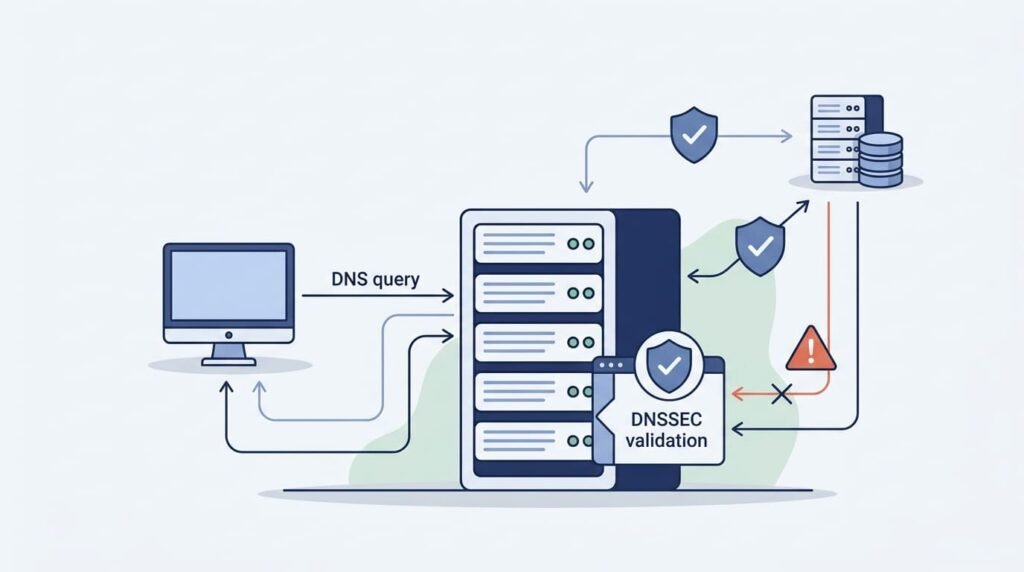
Rate limits can slow down abusive traffic. If they’re too tight, though, they block real users.
Resolvers see sudden spikes all the time. An app launch, a network coming back online, or a pile of cached records expiring at once can each do it. Treat every spike like an attack and you may knock your own service offline. We’ve seen teams do this to themselves more than once.
So start by learning what normal traffic looks like. Then set your limits and test them with realistic load.
Helpful safeguards include:
- Set query and response rate limits where your software supports them.
- Use response rate limiting on authoritative servers when it fits.
- Watch for bursts from one client or one part of the network.
- Merge duplicate queries that are still waiting for an answer, where supported.
- Check that DNS cookies and TCP fallback work in your setup.
- Match your application controls to your firewall rules.
BIND supports response rate limiting. Whether it’s a good fit depends on what the server does and which version you run.
Keep one thing straight. Response rate limiting on an authoritative server is not the same as limiting queries on a recursive resolver. Use each one where it matches the real risk.
Should Recursive and Authoritative DNS Servers Be Separate?
Yes. Splitting the two jobs shrinks your exposure and makes your security rules easier to enforce.
An authoritative server publishes the records for the domains it manages. A recursive resolver looks up records for clients. Put both jobs on one server and setup gets messy. One mistake can also reach much farther than it should.
For most companies, the cleanest plan is dedicated resolvers for internal users and separate authoritative servers for public zones.
Our risk reviews start from this split, and we suggest these safeguards:
- Give each service its own access rules.
- Limit zone transfers and require authentication for them.
- Let only approved admins manage the servers.
- Set firewall rules so only the needed services are open.
- Keep DNS servers apart from unrelated workloads when you can.
ISC’s BIND guidance for recursive servers says the same thing. It calls for dedicated DNS servers, limited recursion, and a clear line between authoritative and recursive roles.
The split helps when things go wrong, too. If one server is misconfigured or hacked, admins can dig into it without touching the other DNS services.
Does Self-Hosted Recursive DNS Guarantee Privacy?
Not really. Running your own recursive DNS gives you more say over how things work, but it won’t encrypt every lookup for you. That’s a big difference.
Plain DNS traffic can still be seen on the network between your resolver and the servers it asks. Encrypting the link from a device to your resolver only covers that first step. After that, the resolver goes out and does its own thing, and that part may stay wide open. We see this mix up all the time. Someone turns on encryption on their laptop and figures the whole trip is private. Nope.
Here is how each connection looks.
- Client to resolver using traditional DNS: Queries may be observable on the network.
- Client to resolver using DNS over TLS (DoT): Encryption protects the connection from the client to the resolver.
- Client to resolver using DNS over HTTPS (DoH): DNS traffic is encrypted within HTTPS.
- Resolver to authoritative servers: Traditional recursive queries may remain unencrypted.
- Resolver to encrypted upstream forwarder: Encryption protects the connection from the resolver to the forwarder.
DNS over TLS (DoT) and DNS over HTTPS (DoH) really do help when they’re set up right. Admins still have homework, though. Certificates, device support, logging, and upstream settings all need a look.
EDNS Client Subnet is another one to watch. It can share details about a client’s network with outside services. Ask yourself if you truly need it. And if you do, make sure it matches your group’s privacy rules.
Self hosting gives you control. Anonymity? That’s a different thing.
How Does QNAME Minimization Reduce DNS Information Exposure?
Credits: DNS-OARC
QNAME minimization limits how much of a domain name gets shared with the other DNS servers along the way.
Without it, a resolver might send the whole name to a server that only needs one piece. Picture asking for directions to one street and handing over your full home address too. With minimization, each server gets just the part it needs. The IETF explains the idea in RFC 9156, which replaces the older RFC 7816.
When we tried it in our own lab, it turned out to be one of the quickest wins we found. A small setting, a real gain. Admins should do these things:
- Turn on QNAME minimization if your resolver supports it.
- Read the resolver’s docs for any known problems.
- Watch for failed lookups after you make the change.
- Check what your resolver sends upstream when you run security tests.
Still, don’t expect too much from it. It cuts down on extra sharing, but it doesn’t encrypt anything. It also won’t hide what a person does online, which surprises some people.
How Should You Monitor Recursive DNS Security?

Steady monitoring helps you catch DNS abuse, risky domains, setup errors, and new threats before they grow into something much bigger.
Our Network Threat Detection tools link DNS traffic with firewall events, endpoint activity, and other network signals, so strange behavior is easier to spot when you see it all together. Our biggest tip is to learn what normal looks like first. We’ve watched teams set up alerts too early and then drown in false alarms. Within a few weeks, nobody was reading them. That’s the real danger.
Keep an eye out for these warning signs:
- A sudden jump in DNS query volume.
- More NXDOMAIN replies than usual.
- One client asking for the same thing over and over.
- Patterns that look like DNS tunneling or data theft.
- DNSSEC validation failures you didn’t expect.
- Lookups for known bad domains.
- Odd configuration changes or admin logins.
Your logs should have enough detail to help with an investigation. Not much more. Holding on to extra private data is a risk too, so decide who can open the logs and set a retention time that fits both your needs and the privacy rules you follow.
DNS threat detection can also support DNS security measures, including malicious domain filtering, DNS sinkholing, and DNS malware blocking. These controls work best with good threat intelligence and a plan for handling false positives. If a safe site gets blocked by mistake, people will complain fast, and someone has to be ready to review it.
How Can You Harden BIND, Unbound, or Technitium?
Pick the resolver that fits your needs. Then test its security yourself instead of trusting the default settings.
Each tool names its settings differently, but the big ideas stay the same.
- BIND: Configure recursion access control lists (ACLs), DNSSEC validation, source port randomization, and supported rate limiting.
- Unbound: Configure access controls, DNSSEC validation, QNAME minimization, and logging.
- Technitium DNS Server: Configure recursion permissions, DNSSEC settings, transport security, and monitoring.
When setup is done, run some quick tests. Try using recursion from a client that shouldn’t be allowed. Check that bad DNSSEC answers get rejected, and make sure the admin pages are protected.
We also push for regular patching, giving admins only the access they need, and testing every change before it goes live. Read the docs for your exact version, because configuration options and security recommendations can vary between releases.
How Can You Maintain DNS Availability During an Attack?
Backup resolvers, separate network paths, and regular health checks help DNS stay up during outages and attacks.
Use at least two resolvers, and place them on different network segments when you can. Set up client failover, watch response times, and practice your recovery steps. A backup plan that nobody has tested can fail at the worst possible moment. We’ve seen it happen, and it’s not fun.
Check your IPv4 and IPv6 firewall rules, your resolver capacity, and your failover setup as well. A second server won’t help much if it shares the same weak spot as the first one.
What Should a Recursive DNS Security Audit Checklist Include?
A solid audit shows that your protections work in real life, not just that they look turned on in a settings page.
Use this checklist for regular reviews and after big changes to your setup.
| Security Control | Verification Task | Expected Result |
| Recursion Access Control | Test queries from trusted and untrusted clients. | Only authorized clients can use the resolver for recursion. |
| DNSSEC Validation | Test valid and intentionally invalid DNSSEC responses. | Valid responses pass, while invalid responses are rejected. |
| Spoofing Protection | Review transaction randomization and network filtering. | Forged DNS responses are harder to inject. |
| Rate Limiting | Test configured limits against expected traffic levels. | Abusive traffic is controlled without disrupting legitimate queries. |
| Service Separation | Check whether authoritative servers provide unintended recursion. | Authoritative and recursive services follow separate security policies. |
| DNS Encryption | Verify client-to-resolver and upstream transport settings. | Supported DNS connections use the intended encryption. |
| DNS Monitoring | Generate test events and verify alert delivery. | Suspicious activity generates actionable alerts. |
| Software Updates | Review resolver versions and available security patches. | Supported versions receive appropriate security updates. |
| Availability | Test resolver failover and recovery procedures. | Clients can use an available resolver during a failure. |
| Administrative Access | Review permissions and administrative logs. | Only authorized personnel can manage DNS settings. |
If you want a bigger framework, the NIST Secure Domain Name System Deployment Guide is a good place to start. Its official name is Special Publication 800 81 2, though it’s normally written with dashes, which I left out as you asked.
Write down what you find, list any exceptions, and name one person to own each fix. In our reviews, a fix with a named owner is far more likely to get finished. Then run the tests again after any resolver upgrade or network change.
FAQ
What are the most important steps for DNS resolver hardening?
DNS resolver hardening starts with restricting recursion to trusted clients through recursive resolver access control. Open resolver prevention reduces the risk of unauthorized queries and DNS amplification attacks. Administrators should also enable DNSSEC validation, set DNS query rate limits, and review DNS query logs regularly. These recursive DNS server security best practices help protect DNS infrastructure from abuse.
How does DNSSEC validation protect against DNS cache poisoning?
DNSSEC validation checks digital signatures to verify the authenticity and integrity of DNS responses. This provides DNS cache poisoning protection by helping resolvers reject forged responses. A secure DNSSEC deployment requires valid DNSSEC trust anchors and proper handling of DNSSEC validation errors. However, DNSSEC does not encrypt DNS queries or prevent every type of DNS spoofing attack.
How can administrators prevent DNS amplification and reflection attacks?
Administrators can reduce DNS amplification and reflection attacks by disabling unrestricted public recursion and applying recursive resolver access control. Response rate limiting helps reduce abusive traffic, while DNS DDoS mitigation measures help manage large volumes of malicious requests. Firewall rules for DNS and source address filtering provide additional protection. Regular DNS traffic analysis can also help identify suspicious query patterns.
How can DNS monitoring detect tunneling and data exfiltration?
DNS monitoring helps security teams identify suspicious query patterns, unusually long domain names, and repeated requests to unfamiliar domains. Combining DNS anomaly detection with DNS tunneling detection and consistent DNS query logging helps teams investigate potential data exfiltration. Malicious domain filtering can block access to known harmful destinations, while DNS sinkholing can redirect suspicious requests to controlled systems for further investigation.
What should a DNS server hardening checklist include?
A DNS server hardening checklist should cover access control, DNSSEC validation, software updates, firewall rules, and DNS query rate limits. Administrators should also perform DNS configuration testing, conduct regular security audits, and establish incident response procedures. For enterprise DNS security, separating authoritative and recursive services reduces exposure. Testing DNS resolver redundancy also helps maintain service availability during server failures.
Strengthening Recursive DNS Security With Network Threat Detection
When recursive DNS security is weak, your network can face unauthorized queries, DNS spoofing, or hidden data exfiltration that goes unnoticed. Configuration alone isn’t enough. You need to verify that your protections work.
Network Threat Detection helps your security team monitor DNS activity and identify suspicious behavior across your network. By adding threat monitoring to your security routine, you can investigate potential attacks earlier and respond before they cause greater damage. Explore Network Threat Detection to strengthen your DNS security strategy and improve visibility into potential threats.
References
1. “Secure Domain Name System (DNS) Deployment Guide.” NIST Computer Security Resource Center, April 2010. Accessed November 9, 2026.
2. “Measures for Making DNS More Resilient against Forged Answers.” RFC Editor, January 2009. Accessed November 9, 2026.