
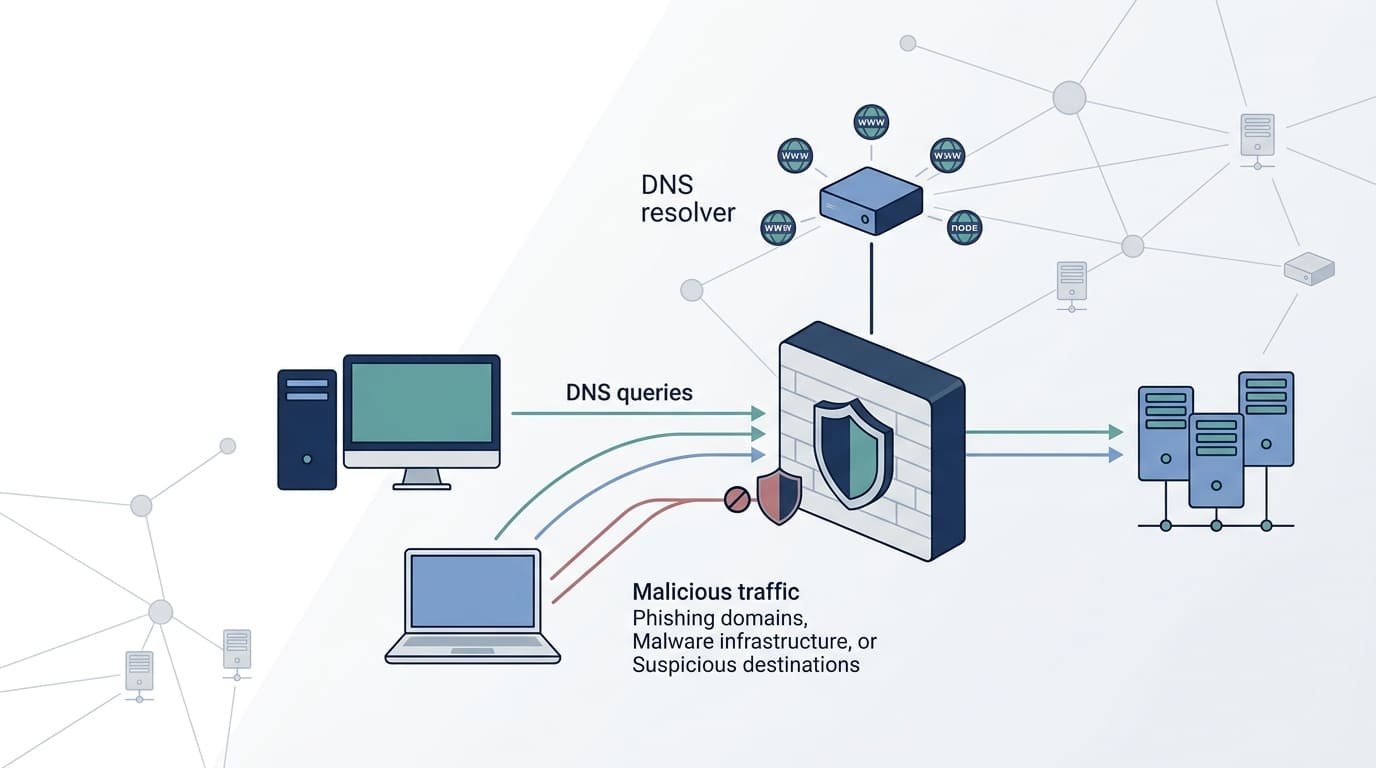
DNS security helps block malicious domains, prevent fraudulent redirects, and flag suspicious requests before they threaten your network. For Network Threat Detection, it’s a key part of spotting attacks early and keeping services running.
The National Institute of Standards and Technology (NIST) covers DNS security in Special Publication 800-81 Revision 3. But published guidelines alone won’t stop every attack. Weak settings and poor access controls can leave gaps that attackers exploit. Regular monitoring helps catch unusual DNS activity before it causes trouble. So, which security measures should you use, and how can you close these gaps? Keep reading to find out.
DNS Security Essentials: Key Steps to Protect Your Network
- DNS Security Blocks Threats Early
- Layered DNS Controls Reduce Security Risks
- DNS Monitoring Strengthens Threat Detection
What Is DNS Security, and Why Does Network Protection Depend on It?
DNS security keeps the Domain Name System from being tampered with, abused, or knocked offline. That way, people end up where they meant to go.
When you type a web address, DNS looks up the matching IP address so your device can connect. Websites, cloud apps, email, and company tools all rely on that lookup. So do attackers, in a way. If they can mess with it, they can send people to the wrong site or hide what their malware is doing.
NIST, the National Institute of Standards and Technology, treats DNS as a core part of any business network. Its guide, SP 800-81 Rev. 3, explains protective DNS, safe setup, and how to run DNS systems well.
As noted by NIST Special Publication 800-81 Revision 3
“An attack against the DNS infrastructure of an enterprise threatens every network operation in that enterprise.” – NIST
We build threat models and risk tools for network security, and DNS shows up in almost every one. It is not the exciting part of a network. But when we trace how an attack got started, DNS is often in the story.
So why does DNS security matter? Here are five reasons:
- Connection integrity: Stops people from landing on fake sites because of changed DNS answers.
- DNS threat prevention: Blocks known bad domains before a connection ever happens.
- Network visibility: Shows strange lookups and odd domain requests.
- Service availability: Makes it less likely that a DNS problem shuts down daily work.
- Security policy enforcement: Lets a team use the same DNS rules on every managed device.
Think of DNS security as the first gate, not the whole wall. It does not replace endpoint security, firewalls, identity controls, or network monitoring. What works best, from what we have seen, is a secure DNS service paired with a clear view of which outside domains your devices are talking to.
How Does DNS Security Prevent Common Network Attacks?
DNS security cuts down on attacks that abuse domain lookups, shady servers, and sloppy DNS management.
Each attack needs a different fix. DNS filtering blocks known bad domains. DNS Security Extensions (DNSSEC) check that signed DNS data is real. Extra resolvers keep lookups running if one goes down.
This table pairs each common threat with the controls that help the most.
| DNS threat | How the attack works | Relevant protection |
| DNS spoofing | An attacker sends fake DNS answers. | DNSSEC validation and secure resolver setup |
| DNS cache poisoning | Bad records get saved in a resolver’s memory. | Cache hardening, updated software, and answer checks |
| DNS hijacking | Someone changes DNS settings or records without permission. | Strong admin access controls, account protection, and configuration monitoring |
| DNS phishing | Users get sent to fake websites. | DNS filtering and blocking of bad domains |
| Malware communication | Infected devices look up domains the attacker owns. | DNS threat intelligence and spotting suspicious lookups |
| DNS tunneling | Data or commands are hidden inside DNS requests and replies. | Behavior analysis, DNS traffic monitoring, and egress controls |
| DNS denial-of-service | A flood of traffic overwhelms DNS systems. | Rate limiting, resilient design, and denial-of-service protection |
Which attacks should security teams prioritize?
Start with the threats that could leak private data, break important services, or give attackers a steady link to infected devices.
Cache poisoning is a good one to worry about. It can quietly steer users to a fake destination. DNSSEC helps keep signed records from being changed, but it can’t tell you if the destination itself is safe.
Tunneling is trickier. Attackers hide information in DNS traffic that looks normal, and a blocklist won’t catch a domain no one has seen before. When we review networks, this is where we dig hardest. A network can look clean at first glance, yet the logs show the same odd lookups over and over.
Amplification attacks work another way. They use DNS servers to blast a victim with huge amounts of traffic. Careful resolver settings, response controls, and network-level protection all lower that risk.
Here is a simple example. A company blocks a known command-and-control domain with protective DNS. An infected computer tries to reach it and fails. Good. But if the attacker just picks a new domain, that block no longer helps. This is the point where we say behavior detection and endpoint data have to step in.
That is why we tell teams that stopping DNS attacks takes two things: solid knowledge of known threats, and the skill to spot suspicious behavior that no threat list has caught yet.
Why Is DNS Security Important for Business Continuity?
DNS security keeps websites, email, cloud apps, and internal tools reachable. It also cuts down on problems caused by attacks and bad settings.
Picture a company whose servers are all running fine. If DNS stops working, nobody can reach them anyway. Staff can’t log in and customers can’t load the site. We have seen teams lose hours chasing an “app problem” that turned out to be a DNS problem.
NIST treats DNS as part of overall network protection, so keeping it healthy is a real technical requirement. When DNS breaks, the business feels it right away.
Here is what good DNS security gives a business:
- Less downtime: Backup DNS servers keep names resolving when one server fails.
- Lower risk: Threat blocking stops users from reaching known bad sites.
- Faster incident response: DNS logs show investigators what happened and which devices were involved.
- Better data protection: Watching DNS traffic can expose malware calling home or data leaving the network.
- Steadier daily work: Reliable name lookups keep important services within reach.
What happens when DNS protection fails?
Think about a company that keeps customer records in the cloud, takes payments online, and chats over team apps. One bad DNS setting, or one denial-of-service attack, can cut off all of it at once.
Sales stalls, support can’t help anyone, and teams can’t talk to each other. Security staff also lose the logs they need to figure out what went wrong.
That is why our team plans for DNS the same way it plans for power or internet service. When we build a threat model for a client, DNS failure is almost always on the list of ways the business could go dark. Our risk analysis tools then show which services would break first and how much that would hurt. From there, the fixes are practical. Run backup resolvers, practice the recovery steps, and watch for failed lookups so a small issue gets caught before it becomes an outage.
Keeping DNS “on” is only half the job. People also need to trust the answers they get, and get them the same way every time.
How Does DNS Filtering Block Malicious Domains?
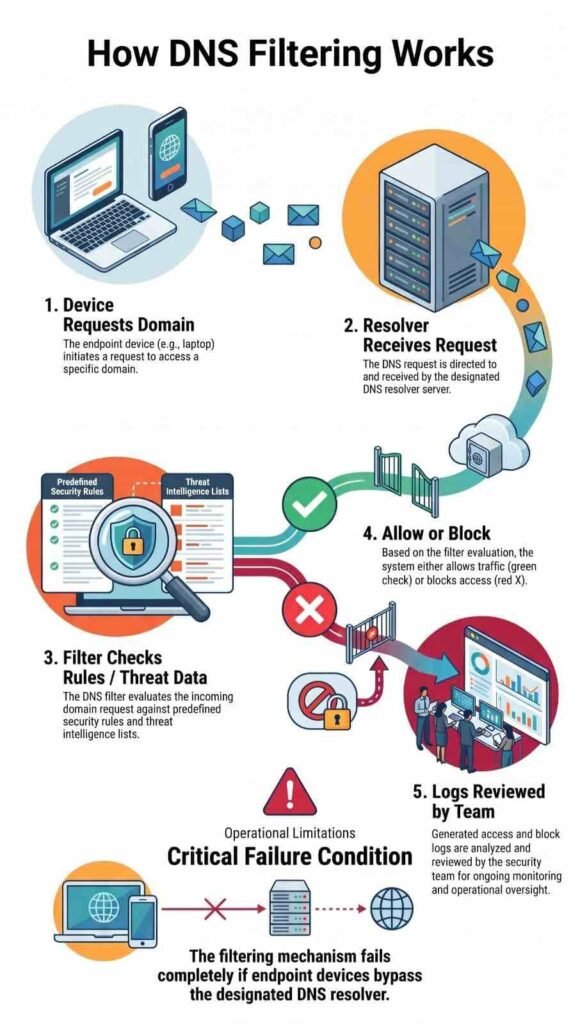
DNS filtering checks each domain request against security rules and threat data. Then it decides whether to allow the lookup or block it.
This can stop phishing sites, malware downloads, botnet servers, and command-and-control domains. It works early, before the browser or app ever connects to the site.
How does DNS filtering work?
A normal DNS filtering process has five steps.
- A device asks for a domain. A person opens a website, or an app tries to reach a server.
- The approved resolver gets the request. It sees which domain was asked for.
- The filter checks the domain. Security rules and threat data decide if the domain is allowed.
- The resolver acts on the rule. It either gives back the answer or blocks the request.
- The security team reviews the logs. The logs point out suspicious devices and repeated bad requests.
Say an employee clicks a phishing link in an email. If that domain is already known to be bad, the filter blocks the lookup and the browser never gets there.
We like DNS filtering, but we are honest with clients about its limits. How well it works depends on the quality of the threat data, how accurate the rules are, and whether devices are actually forced to use the approved resolver. In our experience, that last piece is where many setups fall short.
It also isn’t a full web security tool. Brand-new malicious domains, hacked legitimate sites, and connections made straight to an IP address can all slip through. Our advice is to pair DNS filtering with endpoint security, firewall controls, and behavior monitoring. Each one covers gaps the others leave open.
How Do DNSSEC and Encrypted DNS Improve Network Security?
DNSSEC and encrypted DNS fix two different problems. DNSSEC checks that DNS data is real, and encrypted DNS hides queries while they travel. Organizations can strengthen these checks by implementing DNSSEC to validate signed DNS records and reduce the risk of accepting forged responses.
The difference matters because encryption, authentication, and enforcement are separate jobs. Setting up one doesn’t give an organization the others.
| Technology | Main purpose | Important limit |
| DNSSEC | Uses digital signatures to prove DNS data is real. | Does not encrypt queries or promise a site is safe. |
| DNS over HTTPS (DoH) | Encrypts DNS queries over HTTPS. | Can slip past company resolver rules if left unmanaged. |
| DNS over TLS (DoT) | Encrypts DNS queries using TLS. | Does not prove DNS records are real on its own. |
| DNS filtering | Blocks domains that break security rules. | Relies on good threat data and strong enforcement. |
| DNS access controls | Limit which resolvers and systems can handle queries. | Need steady setup and monitoring. |
Which protection should organizations implement first?
Start with the basics. Set up approved resolvers, turn on DNS filtering, and write clear access rules. After that, add DNSSEC validation and encrypted DNS based on what the business needs and how its network is built.
The IETF created the DNSSEC standards to help prove DNS data is genuine. When validation is set up correctly, a network is less likely to accept fake records for signed zones. Still, DNSSEC can’t tell you whether a domain is harmful.
Encrypted DNS needs care too. DoH and DoT protect privacy, especially on networks you don’t trust. But a device that sends encrypted queries on its own may skip the company resolver, and that means no filtering and no logs. We have walked into this exact problem during reviews, where a browser setting quietly sent DNS traffic around the filter.
So our team looks at these tools as a set instead of swapping one for another. In our threat models, we check each deployment for privacy, data integrity, uptime, and rule enforcement, one at a time. That way, nothing is left uncovered just because something else was turned on.
Why Does DNS Filtering Fail Without Egress Controls?
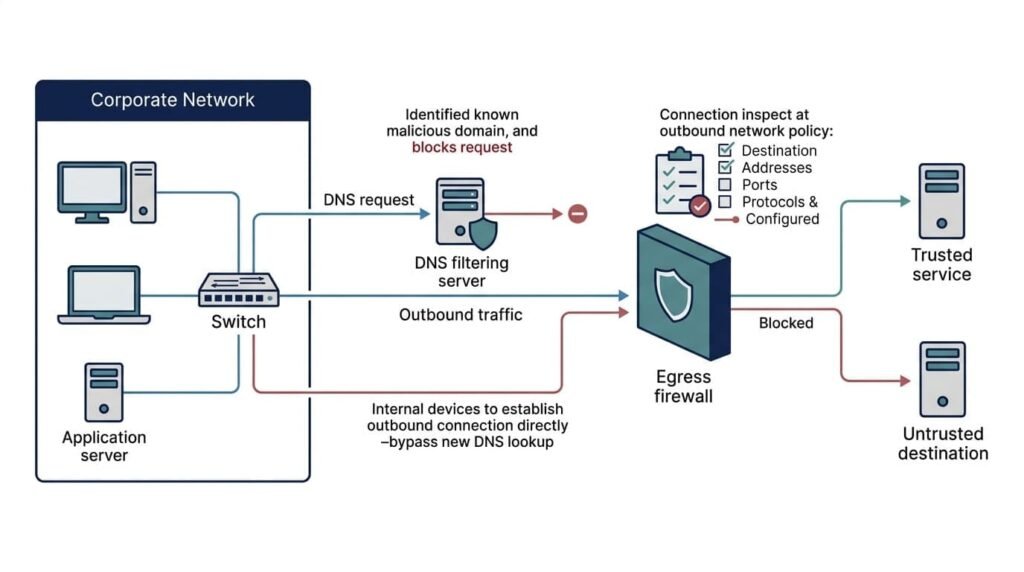
A DNS filter only works if devices actually use it. Many don’t. Some apps skip the network’s DNS settings, some come with their own built-in resolver, and some turn on encrypted DNS when nobody asked them to. We’ve watched teams set up a filter, call the job done, and then find out a chunk of their devices were never going through it.
How can devices bypass DNS controls?
Here are the four ways it usually happens:
- External DNS: A device sends its lookups straight to a public resolver that the organization never approved.
- Encrypted DNS: An app uses DoH or DoT, which hides the lookup from the approved resolver.
- Hard-coded resolvers: A device has DNS addresses baked in, so it ignores the ones the network gives it.
- IPv6 pathways: Traffic slips out over IPv6, where the rules are often looser than they are for IPv4.
As highlighted by CISA
“Applications and operating systems may, by default, enable encrypted DNS in ways that bypass agency and CISA DNS protections.” – CISA
That’s why DNS security is partly a matter of enforcement. Paying for a filtering service doesn’t mean every device will follow it. When we map out threats for a network, this is one of the first gaps we look for.
How can administrators reduce bypass risks?
A good DNS policy does a few things:
- Makes managed devices use approved resolvers.
- Allows outbound DNS only to approved destinations.
- Checks DoT traffic and known DoH services that nobody approved.
- Uses the same rules for IPv4 and IPv6.
- Watches for odd DNS connections and follows up on every exception.
DoH is the hard one. It rides on HTTPS, the same road that regular web browsing uses. If you block all HTTPS, you break apps that people need to do their jobs. Narrow rules and managed device settings work far better.
Even so, blocking every encrypted DNS service isn’t the answer. Admins also have to think about user privacy, app compatibility, and people who work remotely. The real goal is to control the approved DNS paths while letting good services run without trouble.
Why Is DNS Security Not a Replacement for a Firewall?
DNS security looks at domain lookups. A firewall looks at all the traffic moving through the network. They do different jobs.
A DNS resolver might catch a bad domain, but it can’t promise that every allowed connection is safe. Attackers can use real websites that have been hacked. They can connect to an IP address directly. They can also pick a path that never touches the company’s DNS filter at all.
Each security control has a specific role in protecting the network:
- DNS filtering: Blocks access to domains known to be malicious.
- Firewall protection: Controls network connections based on predefined traffic rules.
- Endpoint protection: Detects harmful activity on individual devices.
- Network Threat Detection: Identifies unusual network behavior and helps security teams investigate potential threats.
- DNSSEC validation: Verifies the authenticity and integrity of signed DNS data.
- DNS traffic monitoring: Tracks DNS queries to identify unusual lookup patterns and support security investigations.
How should these controls work together?
It helps to picture layers. Some layers stop trouble before it starts. Others watch for it and help you react.
Here’s an example. DNS filtering blocks a known malware domain. Firewall rules shut down connections nobody approved. Then a strange process shows up anyway, and endpoint protection steps in to check it out, even though that destination was never on a DNS threat list.
Our view is that network security works best as one connected system, not a shelf of separate tools. Each layer covers a different weak spot, so no single method has to catch everything. That idea is behind our risk analysis tools, which show teams where one layer’s gaps are covered by another.
For most company networks, the goal comes down to three things: block what shouldn’t happen, catch it when blocking fails, and give investigators enough detail to move quickly.
How Can DNS Tunneling Bypass Traditional Security Controls?
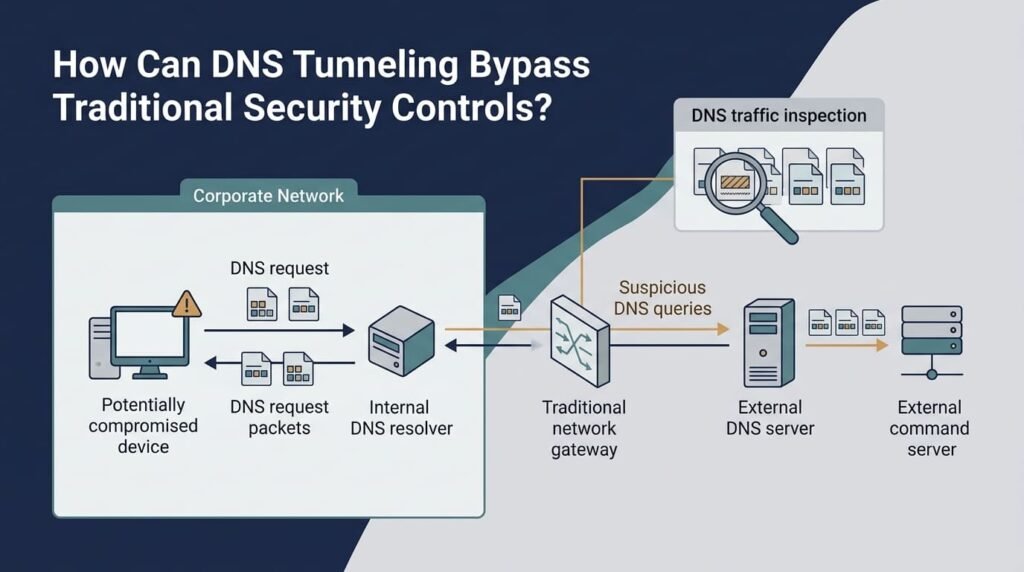
DNS tunneling hides data or commands inside normal-looking DNS lookups and replies. It builds a secret channel that plain domain filtering can easily miss.
Attackers often pack coded text into subdomains. With it, they can send data out, take in orders, or talk to infected computers. A company can’t just switch DNS off, because so many everyday tasks rely on it.
What warning signs should security teams monitor?
Check any DNS activity that doesn’t fit how a device normally behaves. These are the usual red flags:
- Very long subdomains that look scrambled.
- A sudden burst of requests to domains nobody knows.
- The same lookups repeating at strange times.
- Odd query types or unusual replies.
- DNS traffic from machines that almost never do lookups.
None of these prove an attack. Automated apps and normal services can look weird too, so investigators should compare what they find with other evidence before they decide anything.
Which controls help detect tunneling?
Mix several tools: DNS resolver logs, behavior analysis, data from endpoints, and limits on outbound traffic.
DNSSEC and encrypted DNS won’t stop tunneling by themselves. DNSSEC proves that signed DNS data is real. DoH and DoT protect lookups while they travel. Neither one can tell if a query is carrying hidden data or secret instructions.
Network Threat Detection can help fill that gap. It lets teams study communication patterns instead of only single domain requests.
Context is what matters most. One strange query is usually nothing. But when we see the same coded requests coming from a workstation we don’t recognize, plus outbound connections nobody expected, that’s when we start digging.
How Should Organizations Secure DNS Infrastructure?
Credits: ADAMnetworks
Locking down DNS comes down to a few habits: harden your resolvers, limit who can get in, check DNS answers, block bad domains, and apply DNS security measures consistently across the network.
It’s not just a tech job, though. Someone has to own each piece. We’ve watched strong setups fail because an old device never got tracked or one team followed different rules than another. The gear was fine. The follow-through wasn’t.
What should a hardened DNS configuration include?
Here’s a checklist to get a company started.
- Secure resolver administration: Only let the right people manage resolvers, keep passwords safe, and shut off anything you don’t use.
- Enable DNSSEC validation: Turn on checks for signed records where your setup allows it.
- Deploy protective DNS: Block known bad domains with a threat list that gets updated often.
- Enforce egress policies: Don’t let random DNS traffic leave your network, and decide who gets to use encrypted DNS.
- Maintain redundancy: Set up backup resolvers, then test them. A backup you never tried is just a guess.
- Enable DNS logging: Keep the records that matter and look into weird query patterns.
- Audit configurations: On a regular schedule, check updates, who has access, forwarding rules, and policies.
- Test incident response: Make sure your team can find the affected devices when something goes wrong.
How should businesses prioritize implementation?
The Cybersecurity and Infrastructure Security Agency (CISA) has guidance on protective DNS and how it lowers the risk of bad internet traffic. It’s a good way to see where DNS fits in a bigger security plan.
First, list every resolver you have and find the devices that skip your approved DNS path. Fix the riskiest gaps next. Wait on stricter rules until then, since they can break things people count on.
Privacy counts too. DNS records can show a lot about what people do online. Decide who can see the logs and how long you keep them.
Finally, see if your controls work. Checking a box that says “deployed” doesn’t prove much. We look at things like how many devices follow the resolver rules, whether failover tests pass, and whether the same bad queries show up less over time. Our threat models and risk analysis tools help teams choose what to fix first, so the effort goes where the danger is biggest.
How Can DNS Monitoring Improve Threat Detection?
Watching DNS traffic helps security teams spot odd lookups, find infected devices, and catch signs of command-and-control activity.
DNS logs show how devices talk to domain names. That makes them handy clues. On their own they only tell part of the story, so we usually line them up with firewall records, endpoint data, and network traffic. Together they help a team piece together what happened during a suspected attack.
Which DNS events deserve investigation?
Look closely at these:
- Requests to known bad or suspicious domains.
- Sudden jumps in the number of DNS queries.
- Repeated requests that get strange replies.
- Signs of DNS tunneling.
- Queries sent to resolvers nobody approved.
- Odd DNS behavior from sensitive systems.
How should teams respond?
Using the same steps every time keeps investigations accurate and cuts down on needless disruption.
Find the device that sent the request, plus the user or app behind it.
- Check the domain against threat intelligence.
- Match the DNS activity with endpoint and firewall records.
- Look at related connections, running programs, and anything else that seems off.
- Contain confirmed threats and save the evidence.
- Change your policies if the case shows a weakness you could have prevented.
One signal never tells the whole story. A spike in queries might just be a big software update. Slow, quiet tunneling can sneak under a simple alert limit. We’ve run into both.
So we mix three things: what normal looks like on that network, current threat intelligence, and the context around each alert. That makes it much easier to tell a regular day from a real attack.
How Can Network Threat Detection Strengthen DNS Security?
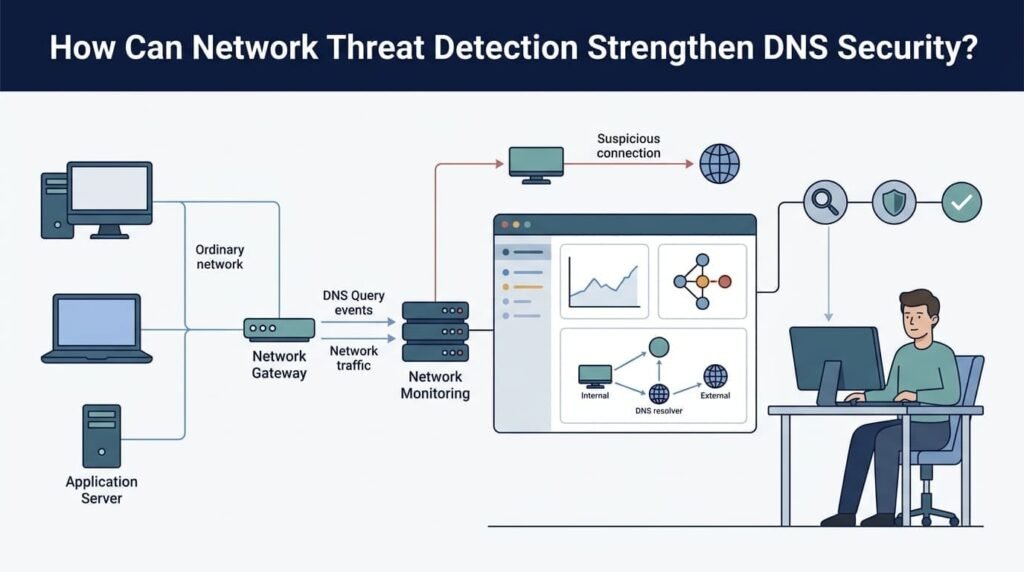
Network Threat Detection works hand in hand with DNS security. It helps a company spot suspicious network behavior, look into possible break-ins, and build stronger layers of defense.
DNS filtering only sees domain requests. Network threat detection sees more, like how systems talk to each other and what keeps happening after a lookup is done. When you use both, the picture gets a lot clearer.
What should organizations do first?
- Think of it as four steps: prevent, enforce, detect, and respond.
- Prevent: Use DNS filtering, DNSSEC validation, and approved resolver policies.
- Enforce: Block unapproved DNS paths and connect your firewall controls.
- Detect: Watch for suspicious lookups and compare them with endpoint and network activity.
- Respond: Investigate confirmed threats, contain affected devices, and improve your policies.
Begin by mapping every DNS path and finding the devices nobody manages. Then tackle the weak spots most likely to expose sensitive systems or stop the business from running.
Here’s one we see a lot. Employee computers use the approved DNS servers, but some unmanaged devices, like old printers, send queries straight to outside resolvers. Closing that gap makes your rules work the way you meant them to, and it gives the security team one clear view of the traffic.
Network Threat Detection helps teams look into strange behavior across the whole network. How well it works depends on the data you collect, how good the detection is, and whether your people can act on what they find. Our threat models and risk analysis tools are built for that last part, so teams know what to fix and why.
More controls aren’t the goal. The goal is to close gaps you can measure, see more of your network, and get better at stopping and responding to attacks.
FAQ
How does DNSSEC help prevent DNS attacks?
DNS Security Extensions (DNSSEC) verify that DNS responses come from an authentic source and have not been altered. The DNSSEC validation process checks digital signatures before accepting DNS records. This helps prevent DNS spoofing and DNS cache poisoning by detecting forged responses. However, DNSSEC does not encrypt DNS queries or automatically block malicious domains.
What are the best practices for securing DNS in enterprise networks?
DNS security best practices include updating DNS software, restricting administrative access, logging DNS queries, and reviewing server configurations regularly. Organizations should also use DNS filtering to block malicious domains, enforce access controls, and monitor unusual traffic. These measures strengthen DNS infrastructure security, reduce the attack surface, and protect enterprise networks against DNS-based threats.
How can DNS monitoring help detect cyberattacks?
DNS traffic monitoring helps security teams identify unusual query patterns, repeated requests to suspicious domains, and unexpected connections. DNS log analysis can reveal signs of DNS tunneling, malware communication, and potential data theft. When combined with network threat intelligence, real-time DNS threat detection helps teams investigate suspicious activity and block threats before they compromise additional systems.
How does encrypted DNS affect network security and privacy?
DNS query encryption prevents unauthorized parties from easily reading DNS requests while they travel across a network. DNS over HTTPS and DNS over TLS provide additional privacy by encrypting DNS traffic. However, encryption does not automatically block malicious domains. Organizations should establish clear encrypted DNS policies and maintain sufficient network visibility to detect threats without unnecessarily exposing users’ browsing activity.
How can businesses maintain DNS availability during an attack?
Businesses can improve DNS resilience and availability by deploying redundant DNS servers, configuring failover systems, and implementing DNS denial-of-service protection. These measures help maintain DNS resolution when servers become overloaded or unavailable. Regular DNS vulnerability assessments, security audits, and incident response exercises also help organizations identify weaknesses, respond to attacks, and reduce service disruptions.
What Should You Remember About DNS Security in Network Protection?
DNS security helps protect your network from malicious connections, but weak configurations can leave gaps that attackers may exploit. That’s a risk worth addressing.
Start by reviewing your DNS settings and checking for unauthorized resolver access. For stronger network protection, Network Threat Detection can help improve DNS traffic visibility and support threat investigations. A layered security approach makes it easier to identify suspicious activity before it affects critical services. Strengthen Your Network Defense with Network Threat Detection to explore how better network visibility can support your security strategy.
References
1. Rose, Scott, Cricket Liu, and Ross Gibson. “Secure Domain Name System (DNS) Deployment Guide.” National Institute of Standards and Technology (NIST), March 2026. Accessed November 10, 2026.
2. “Encrypted DNS Implementation Guidance.” Cybersecurity and Infrastructure Security Agency (CISA), May 2024. Accessed November 10, 2026.