
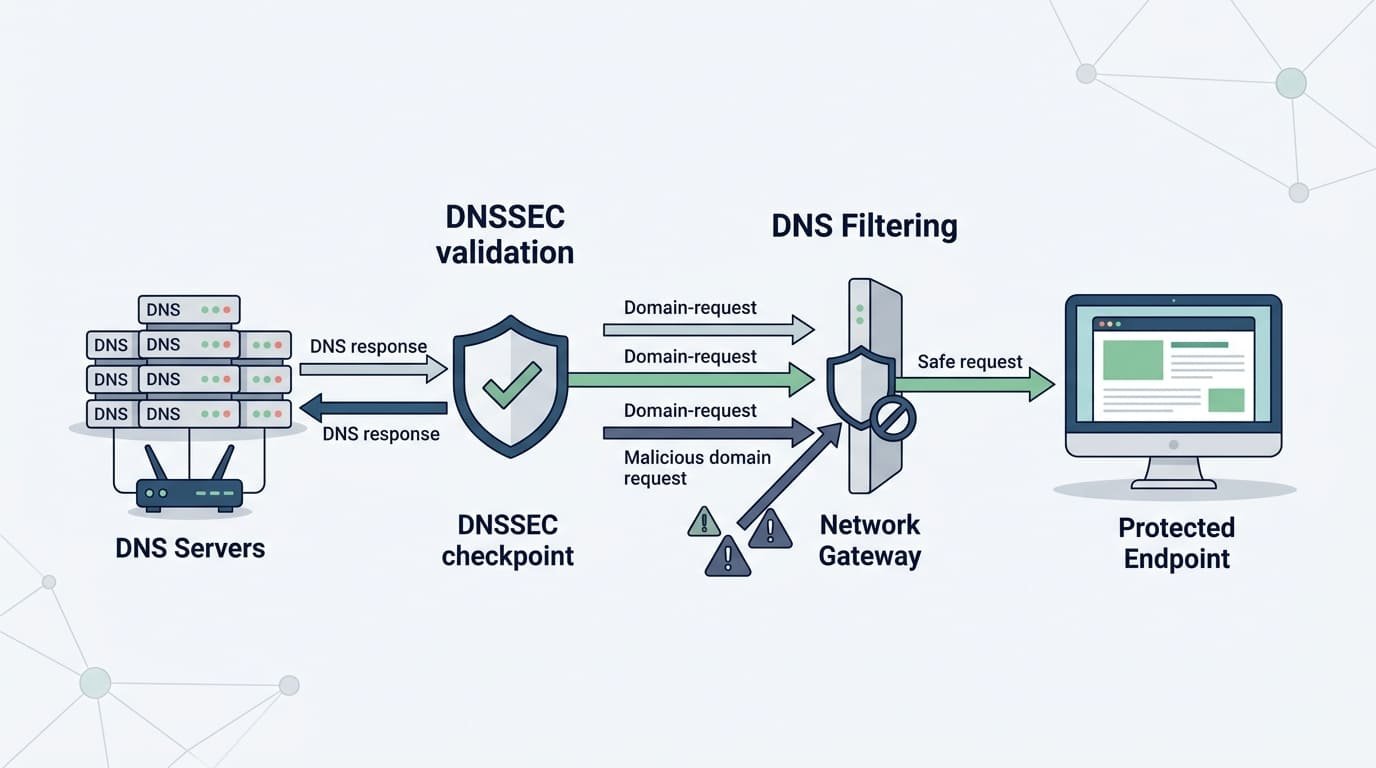
DNS security helps detect threats by flagging suspicious domain requests before they harm your network. Every day, devices connect to domain names and IP addresses. Most requests are safe, but some lead to malicious servers. Attackers know how to hide among normal traffic.
Network Threat Detection helps teams spot these risks through DNSSEC validation, traffic filtering, and regular monitoring. No single method catches every attack. So, block known malicious domains, check DNS responses, and watch for unusual requests. Don’t wait until an attack disrupts your services. Keep reading to learn how DNS security can help protect your network.
DNS Security Essentials: Protecting Your Network from Threats
- DNSSEC verifies DNS record authenticity and integrity using digital signatures.
- DNS filtering blocks known malicious domains based on threat intelligence.
- DNS monitoring detects suspicious activity linked to malware and data theft.
Why DNS Security Matters?
Think about how you use your phone. You probably don’t remember anyone’s number anymore, you just tap a name. Computers do the exact same thing with the Domain Name System (DNS), which translates a human-readable website name into the numerical IP address a machine uses to connect.
Now picture a hacker quietly changing the number saved under your bank’s name. You tap the bookmark, assume you are talking to your bank, and hand over your login credentials. That is DNS spoofing. Your traffic is silently routed to a fake site, and you never even realize it happened.
- Credential Theft: Users unknowingly give passwords to fake login pages.
- Silent Redirects: Traffic is intercepted without triggering browser warnings.
- Trust Exploitation: Relies entirely on the user’s implicit trust in familiar domain names.
Cutting Off the Connection: Malware and Scale
Malware causes trouble in a completely different way. Once malicious software lands on a machine, it cannot do much on its own; it has to “call home” to command-and-control servers to get orders or exfiltrate stolen data. It does this via a standard DNS request to a domain owned by the attacker.
When you block that request at the DNS layer, the malware suddenly has nobody to talk to. This is why DNS security is so critical for network protection: it stops the connection before it ever gets off the ground.
To put the scale of this problem into perspective, Cisco’s threat researchers report processing over 820 billion DNS requests a day, blocking millions of malicious ones in the process. It is a massive volume of traffic, highlighting just how heavily attackers rely on the DNS layer.
Four Pillars of Strong DNS Security
When building threat models and risk analysis tools to evaluate network weak spots, security teams almost always look at DNS first. It sits at the very foundation of network infrastructure and control.
The core of a solid DNS defense relies on four key measures:
| DNS Security Measure | Primary Function | Security Benefit |
| DNSSEC | Verifies the authenticity and integrity of DNS records using digital signatures. | Helps prevent DNS spoofing and cache poisoning involving forged DNS responses. |
| DNS Filtering | Blocks requests to known malicious domains based on threat intelligence and security policies. | Helps prevent connections to phishing sites, malware infrastructure, and other prohibited domains. |
| Encrypted DNS (DoH/DoT) | Encrypts DNS queries between a device and its resolver. | Protects DNS queries from being easily intercepted or read in transit. |
| DNS Logging and Monitoring | Records DNS queries and analyzes patterns for suspicious activity. | Helps detect potential malware communication, DNS tunneling, and data exfiltration. |
Don’t Leave Network Defense to Hope
Skipping these protections means you are essentially crossing your fingers and hoping for the best. Implementing strong DNS security drastically reduces your exposure to malicious redirects, malware phone-home routines, and stealthy network compromises. Make sure your network controls account for it from the ground up.
Implementing DNSSEC: Signing Your Digital Real Estate
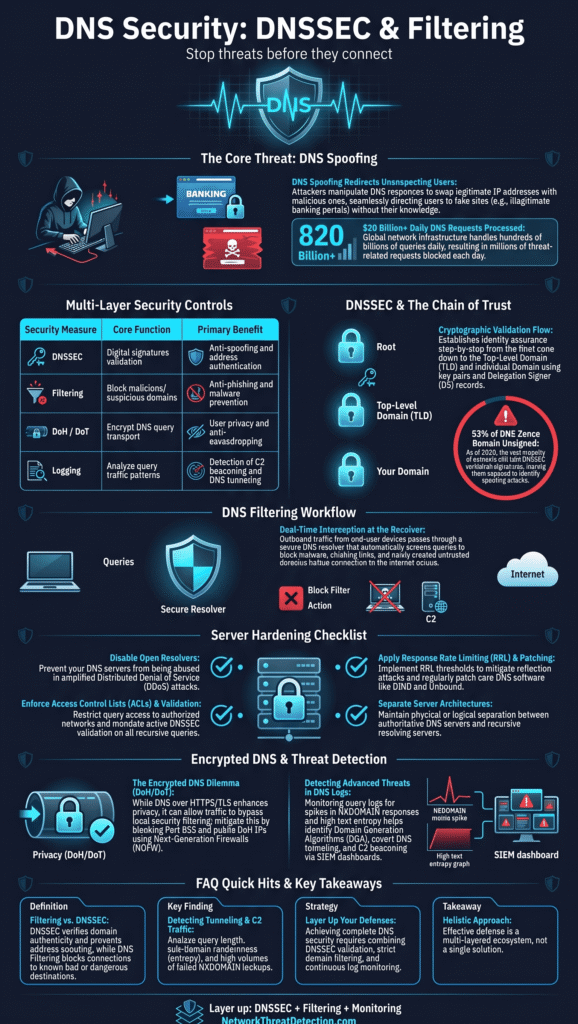
Think of DNSSEC as a digital signature for your DNS records. When you turn it on, you sign your records with a secret key, and anyone looking up your domain can verify that signature using a matching public key. If the record is clean, the check passes. If someone has altered it, the check fails.
These checks link all the way from the root DNS servers down to your specific domain, creating what engineers call a “chain of trust.” To learn more about how this mitigates vulnerabilities, read up on preventing DNS cache poisoning attacks.
As noted by SGNIC
“DNSSEC is intended to protect against ‘man-in-the-middle’ DNS spoofing attacks and ‘cache poisoning’ by ensuring DNS information is validated cryptographically before end-users traffic are directed to a website.” – SGNIC
Implementing DNSSEC: What to Watch Out For?
While the basic setup sounds straightforward, generate key pairs, sign your zone files, and publish a DS record with your registrar, the operational side can easily trip teams up. For a deeper dive into the configuration steps, check out this guide on implementing DNSSEC.
Key Operational Risks
- Forgetting Key Rotations: Cryptographic keys need to be swapped out on a schedule. We once helped a team whose signature expired simply because nobody tracked the renewal date, knocking their site offline for hours for anyone using a validating resolver.
- The Pitfalls of Manual Management: Doing key rollovers by hand leaves too much room for human error. We always recommend picking a DNS host and registrar that handles these updates automatically to prevent sudden, preventable outages.
The State of Adoption and Your Next Steps
Despite its security benefits, the broader internet has been slow to catch on. While major top-level domains like .com and .org are signed, a 2025 study revealed that more than 93% of resolvable zones are still unsigned.
You can’t force the rest of the web to protect your users, but you can lock down your own perimeter:
Practical Steps to Take
- Sign your public domains: Prevent forged answers from redirecting your users to fake replicas.
- Turn on validation on internal resolvers: Ensure your network is actively verifying incoming DNS data.
- Treat it as a core layer: It won’t cover every threat vector, but DNSSEC is a strong baseline defense that security risk reviews consistently recommend.
How DNS Filtering Works?
Credits: ThreatSTOP
DNS filtering is a foundational security practice that blocks requests to domains identified as malicious or prohibited by organizational security policies. By setting up a secure DNS resolver, either through a cloud provider or hosted internally, you can establish rules that intercept traffic at the earliest possible stage.
The core idea is straightforward: keep people out of the dangerous parts of the internet before they ever connect.
How the Mechanism Works?
A reliable DNS service does much more than maintain a basic blocklist of known threats. Modern DNS firewall solutions leverage threat intelligence and security policies to flag suspicious requests, block malicious infrastructure, and prevent connections before they happen.
Key Defense Layers
- Malware & Phishing Blocks: Automatically stops access to sites designed to steal credentials or download malicious payloads.
- Newly Registered Domain (NRD) Filtering: Flags domains registered only days prior, which attackers frequently use for fresh campaigns.
- Contextual Access Control: Restricts non-work-related or high-risk browsing categories during business hours.
Consider what happens when malware lands on a laptop and attempts to contact its command-and-control (C&C) server. Before any data can move, the malware must perform a DNS lookup to find the server’s address. Blocking that single lookup stops the infection in its tracks, often before the user even realizes something was wrong.
Research from ACM SIGUCCS demonstrates
“These blocks are characterized not merely by ensuring visibility, but by having a direct effect in preventing actual infections and attack activities. For example, blocking malware distribution sites prevents infections at their initial stage, while blocking C&C sites prevents malware that has already infiltrated from communicating externally, thereby curbing the spread of damage and preventing data exfiltration.” – ACM SIGUCCS
While this layer of defense is remarkably effective and cuts down on alert fatigue for security teams, attackers may occasionally find alternative communication methods to bypass standard DNS rules.
Building a Balanced Policy
Creating an effective filtering policy requires a balance between strict security and operational usability.
- Start with the heavy hitters: Begin by blocking malware, phishing sites, botnets, and ransomware delivery domains.
- Layer in acceptable use: Add content categories that align with your organization’s internal policies.
- Establish a clear allowlist process: Broad categories will inevitably catch a legitimate business site from time to time.
If a vendor’s billing portal gets blocked on a Monday morning, your help desk will know about it immediately. To keep things running smoothly, give users a simple way to report false positives, and ensure IT can review and resolve those exceptions quickly. Security should always be the default, but exceptions need to be straightforward to manage.
Hardening Your Recursive DNS Resolvers
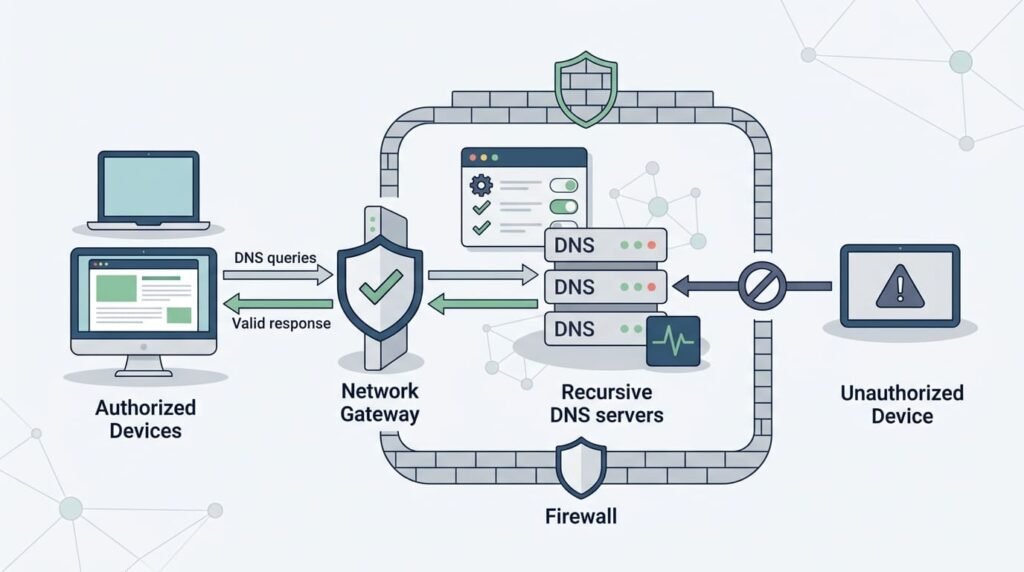
Recursive DNS servers act as the front desk for your network’s internet traffic. They take queries from internal devices, chase down the answers across the global DNS hierarchy, and hand them back.
When they are misconfigured or left unprotected, the fallout affects everyone on the network. Securing them isn’t just a box to check, it is a core requirement for network defense, as detailed in these recursive DNS server security best practices.
Lock Down Access and Stop Open Resolvers
An open resolver answers queries from anyone on the public internet. Attackers actively scan for these to use as springboards for massive DDoS amplification attacks, flooding victims with traffic.
Core Access Control Measures
- Restrict by IP Range: Limit recursive query access exclusively to internal RFC 1918 IP ranges.
- Use Explicit ACLs: Configure explicit Access Control Lists (ACLs) in your DNS software to outright reject external recursion requests.
- Verify Boundaries: Regularly test your perimeter from an external network to ensure no accidental public exposure exists.
Hardening Against Spoofing and Cache Poisoning
Locking down access stops outside abuse, but you also need to ensure the answers your server receives, and hands out, are trustworthy.
Mandatory Defense Settings
- Enable DNSSEC Validation: Turn on automatic validation (such as dnssec-validation auto; in BIND) to cryptographically verify that DNS data hasn’t been tampered with in transit.
- Implement Response Rate Limiting (RRL): Cap the number of identical replies your server sends to a single IP address. This blunts the effectiveness of reflection and amplification attacks if someone does manage to abuse your resources.
Architectural Hygiene and Separation of Duties
How you structure your DNS environment matters just as much as the configuration files.
- Separate Authoritative and Recursive Roles: Never run your public-facing authoritative DNS records (the ones hosting your company’s website and mail servers) on the same hardware handling internal employee lookups. If one role gets compromised or overloaded, the blast radius remains contained.
- Stay Ahead of Patches: Old, unpatched software remains one of the most common entry points found in risk assessments. Whether you run BIND, Unbound, or Windows DNS, keep a strict patching cadence. Attackers constantly scan for known DNS vulnerabilities.
Logging, SIEM, and Privacy Balancing
Logs are indispensable during an incident investigation, but they also capture a detailed history of what users are doing online.
- Align with Legal and Compliance: Work with your legal team to define a sensible log retention period that fulfills security needs without violating user privacy standards.
- Feed a SIEM for Threat Detection: Once logs flow into your Security Information and Event Management (SIEM) platform, set up rules to spot odd query patterns, sudden spikes in traffic, or unusual domain requests that might signal a compromised endpoint or tunneling activity.
How Encrypted DNS Affects Network Security?
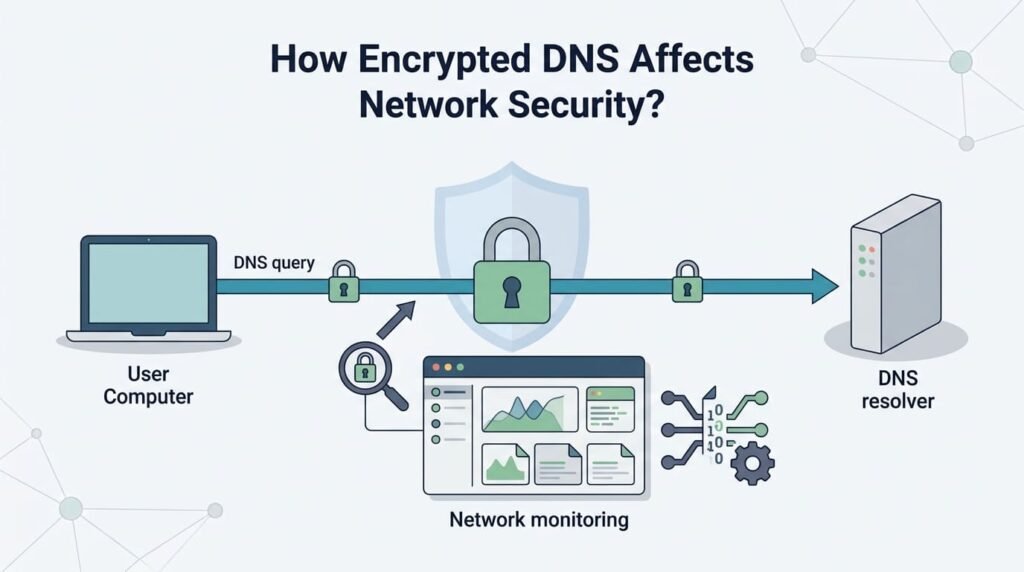
DNS over HTTPS (DoH) and DNS over TLS (DoT) represent massive leaps forward for individual privacy. By encrypting DNS queries, they prevent local network observers and ISPs from snooping on the domains users visit. However, for organizations, this encryption introduces a significant blind spot. Say an employee sets their laptop to use a public DoH service.
Choosing secure public DNS providers matters, but organizations must also ensure that external DNS services follow their security policies. When employees route their queries through public DoH providers, traffic blends seamlessly with standard HTTPS traffic on port 443, effectively bypassing corporate web filters, malware protection, and monitoring controls.
Banning encrypted DNS outright is rarely a sustainable solution. Users and modern operating systems increasingly expect privacy by default, making resistance a losing battle. Instead, the optimal strategy focuses on management and enforcement, allowing organizations to retain security visibility without sacrificing encryption benefits.
Key Strategies for Managing Encrypted DNS
To regain control over network traffic and security policies, organizations should implement a multi-layered defense approach:
- Deploy an Internal Policy-Enforcing Resolver: Set up an enterprise-grade resolver cluster (such as BIND or Unbound) or utilize a trusted cloud-based DoH/DoT proxy. This ensures that internal queries are still handled securely while adhering to corporate compliance rules.
- Enforce Endpoint Management via GPO and MDM: Utilize Group Policy Objects (Windows) or Mobile Device Management solutions to configure corporate endpoints explicitly. Force devices to use the company’s designated secure DNS resolvers rather than default public alternatives.
- Block Outbound Port 853 at the Perimeter: Configure Next-Generation Firewalls (NGFW) to drop outbound traffic on port 853, which instantly neutralizes unmanaged DNS over TLS attempts.
- Leverage Dynamic Threat Intelligence Feeds: Block known public DoH endpoint IP addresses at the firewall level. This forces endpoints to abandon unauthorized external resolvers and route queries exclusively through the monitored gateway.
- Secure Guest Networks: Apply strict firewall rules on guest networks, where device control is absent, to block connections to known public DoH and DoT servers. This forces unmanaged devices to fall back safely to filtered, watched local DNS infrastructure.
Ultimately, the goal is not to fight the tide of encryption, but to integrate it into your existing security architecture. By combining endpoint configuration with perimeter defense, you can maintain robust network visibility while respecting the modern demand for privacy.
Using DNS Logs for Threat Detection
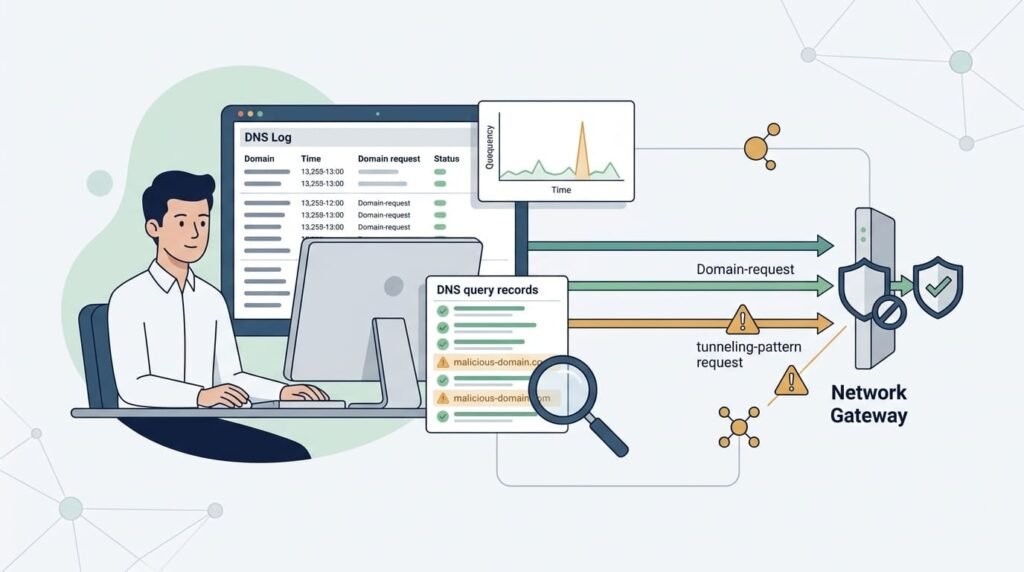
Firewall logs, proxy logs, and endpoint logs get plenty of attention. DNS query logs often don’t, and that leaves a massive blind spot in most security architectures. When building threat models, DNS data is consistently one of the first places to look for hidden activity.
What to Watch For: Spotting Anomalous Patterns?
When monitoring DNS, the goal is to filter out the noise and zero in on behavior that deviates from the norm. A few specific patterns deserve immediate attention:
Domain Generation Algorithms (DGAs)
A workstation suddenly firing off hundreds of random, gibberish subdomains is a textbook indicator of malware using a DGA to hunt for an active command-and-control (C2) controller.
Uncharacteristic Outbound Lookups
A server that is supposed to remain strictly offline or internal suddenly querying a sketchy foreign domain is an immediate red flag that warrants investigation.
Surges in NXDOMAIN Replies
A sudden jump in domain-not-found (NXDOMAIN) responses usually points to automated scanning or malware brute-forcing potential C2 servers to see which ones are still alive.
Catching Advanced Threats: DNS Tunneling
Trickier attacks leverage DNS tunneling to exfiltrate data or bypass firewalls. Attackers hide stolen information inside subdomain names, such as data-ABC123.secret.example.com, and siphon it out in small, incremental chunks.
To catch DNS tunneling in real time, security teams should look for:
- High Shannon entropy in subdomains exceeding 50 characters, signaling encoded or encrypted data payloads.
- Massive volumes of unique subdomains targeted at a single top-level domain (TLD).
- Abnormal frequency spikes in non-standard record requests, particularly TXT, NULL, or CNAME queries.
Operationalizing Defense with SIEM Integration
Feeding DNS logs into a SIEM or security analytics platform changes the game. Instead of chasing static signatures, you can establish a normal baseline for every host and user on the network.
- Automated log parsing: Set up rules to flag rapid query length anomalies and bursts of NXDOMAIN responses.
- Behavioral alerts: Trigger notifications when a machine or user drifts significantly away from their established baseline.
In practice, that early warning can save days during an incident, giving response teams just enough time to isolate a compromised machine before valuable data walks out the door.
FAQ
What Is the Difference Between DNS Filtering and DNSSEC?
DNS filtering blocks access to known malicious domains, while DNSSEC validation verifies the authenticity of DNS responses through digital signatures. Both improve DNS security but address different threats. DNS filtering supports malicious domain blocking, while DNSSEC helps prevent DNS spoofing and DNS cache poisoning by verifying that DNS records have not been altered in transit.
How Can Organizations Detect DNS Tunneling and Data Theft?
DNS tunneling detection helps identify suspicious DNS queries that may carry hidden commands or stolen data. Organizations can use DNS query logging, DNS log analysis, and DNS monitoring to identify unusual traffic patterns. DNS anomaly detection can reveal potential DNS data exfiltration, while DNS threat intelligence helps security teams investigate suspicious domains and strengthen DNS exfiltration prevention.
What Are the Best Practices for Securing DNS Servers?
DNS security best practices include restricting administrative access, applying security updates, and reviewing server configurations. Organizations should strengthen recursive DNS security, protect authoritative DNS servers, and enforce clear DNS security policies. DNSSEC implementation and DNS filtering provide additional protection against forged responses and malicious domains. Regular DNS security audits and vulnerability assessments help identify weaknesses before attackers exploit them.
How Does a DNS Firewall Protect an Enterprise Network?
A DNS firewall helps enforce DNS security policies by blocking requests to known malicious domains. Combined with DNS threat intelligence and DNS traffic analysis, it can help prevent DNS-based attacks and identify suspicious connections. Enterprise DNS security also benefits from continuous DNS security monitoring, timely security alerts, and DNS SIEM integration, which helps security teams investigate suspicious activity from a central system.
How Should Security Teams Respond to a Suspected DNS Attack?
DNS security incident response begins with reviewing DNS logs, investigating suspicious queries, and identifying affected systems. Security teams should determine whether the incident involves DNS hijacking, a DNS poisoning attack, or command and control DNS traffic. They should block confirmed malicious domains, isolate affected devices when necessary, and correct compromised DNS settings. Teams should also review security controls to reduce the risk of similar attacks.
Implementing a Layered DNS Security Strategy
When DNS security is weak, attackers can exploit routine network requests to reach your systems before you even notice a threat. That’s a risk you can’t ignore. A layered approach helps you block known threats early while improving your ability to detect suspicious activity before it causes damage. Every DNS query is an opportunity to strengthen your network defenses.
Network Threat Detection can help you take the next step toward better network threat detection and stronger DNS visibility. Explore its capabilities to see how they fit your security strategy. Discover NetworkThreatDetection.com and find a practical way to improve how your organization detects potential threats.
References
1. “DNSSEC.” Singapore Network Information Centre (SGNIC). Accessed November 10, 2026.
2. Fujimura, Sho. “Practical DNS Security for Higher Education: Lessons from DNS Firewall Deployment at Fukuoka University.” ACM Digital Library, 2026. Accessed November 10, 2026.
Related Articles
- https://networkthreatdetection.com/network-infrastructure-and-control/
- https://networkthreatdetection.com/importance-dns-security-network-protection/
- https://networkthreatdetection.com/implementing-dnssec-domain-name-system-security-extensions/
- https://networkthreatdetection.com/dns-filtering-blocking-malicious-domains-c2-malware/
- https://networkthreatdetection.com/recursive-dns-server-security-best-practices/
- https://networkthreatdetection.com/preventing-dns-cache-poisoning-attacks-spoofing/
- https://networkthreatdetection.com/dns-over-https-doh-dns-over-tls-dot-privacy-security/
- https://networkthreatdetection.com/monitoring-dns-query-logs-suspicious-activity/
- https://networkthreatdetection.com/choosing-secure-public-dns-providers-comparison/
- https://networkthreatdetection.com/dns-firewall-solutions-features-benefits/
- https://networkthreatdetection.com/detecting-dns-tunneling-data-exfiltration/