

Packet capture (PCAP) uses raw network packets to show exactly what happened. PCAP files hold details that other logs can’t, like full headers and precise timestamps. For security or network teams, it’s a fundamental tool for investigations and performance checks.
Red Hat notes its value continues even with heavy encryption, since it keeps protocol metadata intact. We use PCAP in our threat detection work to find reliable answers quickly. This piece covers where PCAP helps, where it falls short, and how we apply it. Read on for practical details from real use.
Quick Wins – Why PCAP Still Matters
- PCAP is ground truth for network forensics, performance analysis, and IDS alert validation.
- Smart capture strategies balance full packet capture with metadata-first analysis to control scale.
- Network Threat Detection benefits most when PCAP is tied directly to detection, response, and baselining.
Real-Time Network Traffic Analysis Starts With PCAP
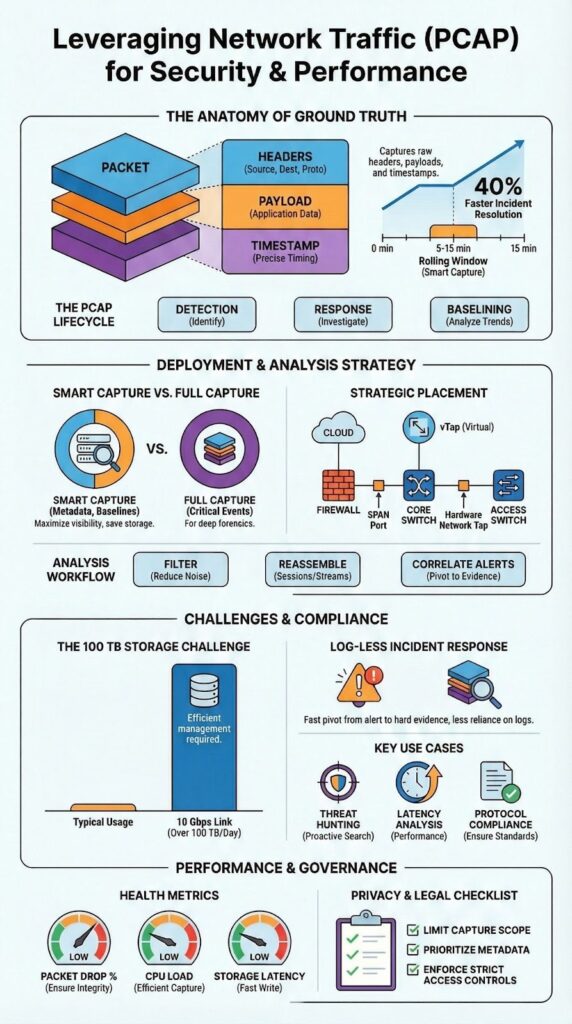
For real-time network traffic analysis, you start with packet capture (PCAP) It has to be captured at the right spot with enough fidelity to rebuild sessions. Our method combines live capture with short retention buffers. A 5 to 15 minute rolling PCAP window has resolved incidents for us that logs alone couldn’t touch.
That packet-level visibility exposes what logs hide:
- Precise timing and sequence of events
- Retransmission patterns and protocol errors
- Full handshake behavior across the OSI layers
According to SANS Institute data, packet information is often the only definitive way to validate an alert’s root cause during a live investigation. This reality is why we position Network Threat Detection first in the workflow. Packet-aware detection leads to faster, more confident response.
This approach shifts the focus from reactive triage to building a proactive security stance. Read on to see how we apply this.
Full Packet Capture Advantages in Security and Reliability

Full packet capture advantages include keeping every header and payload, providing replayable evidence for analysts. A PCAP file lets you reconstruct sessions exactly, which is critical for incident response and forensics. In one of our own investigations, a single saved PCAP file proved a data exfiltration that every other log had completely missed.
This evidentiary strength is echoed in the forensic community. As noted in the Fidelis Security ThreatGeek blog:
“Analyzing PCAP files is not just limited to troubleshooting network issues but critical for identifying unauthorized activities, understanding data breaches, ensuring compliance with regulatory standards, and much more. These PCAP files provide irrefutable evidence of what was going on in your network and are the gold standard for network forensics.” – Fidelis Security ThreatGeek
The detail supports several teams simultaneously.
- Security relies on it to validate IDS alerts and for proactive threat hunting.
- Operations uses it to pinpoint latency issues and investigate packet loss.
- Engineering applies it for protocol compliance and debugging.
Our tools are designed to help teams manage this balance, focusing capture on high-risk segments identified by our threat models.
Tools for Capturing Network Packets Effectively
The tools for capturing network packets differ, but a consistent workflow ties them together. Analysts select their capture point, a SPAN port, a network tap, or a cloud vTAP. Using BPF syntax for capture filters helps cut noise before storage becomes an issue.
Most teams we work with succeed by deeply knowing a small set of tools. Our experience shows that mastering one capture utility and one analysis method is far better than poorly using ten different options. This matches the practical advice we’ve seen from practitioners in SANS Institute materials.
Effective strategies typically involve a mix of approaches:
- Header-only capture for general baselining and flow analysis.
- Full packet capture reserved for high-risk network segments or specific security events.
- Out-of-band capture to prevent any impact on production performance.
These decisions directly affect how useful the captured data will be during an investigation. Our own threat models help prioritize where to apply full capture for the best return.
Storing Large PCAP Files Without Losing Value
Storing large PCAP files challenges remain a major constraint in high-throughput environments. A 10 Gbps network can easily produce over 100 terabytes of raw traffic daily, forcing teams to make tough choices about retention and indexing.
Most mature security environments now adopt a metadata-first strategy. Full PCAP is kept selectively, while enriched metadata, like flow records and session summaries, provides long-term traffic visibility. Using this hybrid model, we’ve helped teams extend useful retention from just a few hours to as long as 30 days.
The storage problem usually shows up in three ways:
- High disk costs for maintaining full packet capture.
- Painfully slow searches through flat PCAP archives.
- Capture drops caused by NIC offload configurations.
| Strategy | Data Retained | Storage Cost | Investigation Depth | Ideal Use Case |
| Full Packet Capture | Full headers and payloads | Very High | Maximum forensic reconstruction | High-risk segments and critical incidents |
| Metadata-First Approach | Flow records, session summaries | Low | Limited reconstruction | Long-term baselining and trend analysis |
| Hybrid Model | Selective full PCAP + enriched metadata | Moderate | High where needed | Balanced security and performance monitoring |
Our tools are built to help manage this balance, applying our risk analysis to decide what traffic is critical to preserve for investigations.
Analyzing PCAP Files With Wireshark-Style Workflows
Analyzing PCAP files Wireshark style begins by narrowing the scope. An analyst will filter by IP, protocol, or a specific timeframe, then move into reassembling packet streams. Following a single HTTP conversation or checking TLS metadata can reveal an attacker’s intent faster than sifting through logs.
Good analysis, in our view, mixes manual inspection with automation. The manual work builds crucial intuition about normal and abnormal traffic patterns. Automation then applies that logic at scale across thousands of files, which is essential for handling the volume in enterprise environments. Common steps in our process are:
- Reviewing protocol hierarchy to see what’s actually talking on the network.
- Inspecting TCP handshakes for failures or suspicious resets that suggest scanning or evasion.
- Correlating packet timestamps with external alerts from other systems to build a complete timeline.
We design our analysis workflows to support this iterative, confidence-building approach, ensuring findings are based on concrete packet evidence rather than assumptions.
Extracting Files From Network Captures Safely
Extracting files from network captures is a standard step in malware analysis and forensics. Analysts carve out objects transferred in sessions to understand what a payload was meant to do. The process is delicate, as anything pulled from the capture becomes potential digital evidence that must stand up to scrutiny.
In our work, teams follow strict handling procedures to maintain integrity. We’ve seen cases where a simple procedural misstep undermined an entire investigation.
- Hash files immediately upon extraction to create a fixed fingerprint.
- Preserve the original PCAP completely untouched in its pcapng format.
- Document chain of custody with clear timestamps for every action.
These steps are non-negotiable for a defensible investigation; they prevent evidence contamination. Our tools are built to automate and log this workflow, ensuring analysts can focus on the threat itself without compromising the legal standing of their findings. This is especially critical when addressing emerging threats that may later involve legal action.
Network Forensics Using PCAP Data

Network forensics using PCAP data depends on packet evidence to rebuild accurate event timelines. Packets show what actually traveled the network, not just what was logged. In a past breach investigation, PCAP data exposed command-and-control traffic that was cleverly hidden within normal-looking DNS activity, a pattern logs alone failed to catch.
The real forensic power comes from correlation. Analysts must align packet data with SIEM events, endpoint alerts, and identity logs to see the full picture. The SANS Institute emphasizes that packet-level evidence frequently becomes the deciding factor in pinpointing a root cause during an investigation.
This approach supports several key activities:
- Network timeline reconstruction of an attack’s progression.
- Analysis of patterns within encrypted exfiltration attempts.
- Validation of firewall policies and rule effectiveness.
This level of detail transforms suspicion into verifiable proof. Our own threat models help focus this correlation effort, ensuring the analysis targets the highest-risk behaviors and connections identified by our risk analysis tools.
Legal and Privacy Considerations of Packet Capture
Packet capture creates legal and privacy challenges, a reality central to legal considerations in packet capture, since raw payloads can contain sensitive credentials or personal information. In response to regulations enacted since 2018, many organizations now strictly limit where and how long full payloads can be captured and stored.
The best practice is to minimize exposure from the start. Our guidance to teams focuses on three key actions:
- Capture only required segments, avoiding areas with high volumes of personal data.
- Prefer metadata like flow records when full payloads are unnecessary for the investigation.
- Apply strict access controls and audit logs to PCAP repositories.
Balancing the need for visibility with compliance requirements is what makes a packet capture program sustainable. We’ve seen programs stall because legal concerns weren’t addressed early.
Our tools help enforce these policies by integrating capture rules directly with the risk segments defined in our threat models. This ensures security teams gain essential visibility without creating unintended legal liabilities or violating user privacy.
Performance Impact of Packet Capture Tools
Credits : In The Dark
Packet capture can hurt network performance if it’s not set up correctly, which is why understanding the performance impact of packet capture tools is critical before deployment. We’ve observed capture loss climb past 5% during traffic spikes, which makes the resulting data useless for an investigation.
Out-of-band designs, using passive taps, lower this risk significantly. Red Hat’s guidance notes that modern capture architectures depend on this passive approach combined with smart filtering to keep overhead minimal. This is a foundational principle we follow.
Teams focused on performance keep a close watch on specific metrics:
- Capture drop counters on the sensor interfaces.
- CPU utilization on the capture appliances or servers.
- Storage write latency to ensure disks can keep up.
Monitoring these ensures the PCAP data stays reliable even under heavy load. Our own implementations use these metrics to trigger alerts, helping teams adjust their capture scope before critical data is lost, aligning with our broader risk management tools.
Network Recorder Appliance Features That Matter
A network recorder appliance features discussion must start with capture fidelity and retrieval speed, since those determine whether stored packets remain actionable. Essential features are ring buffers, precise timestamping, and automation support for PCAP tasks. Without them, capturing at scale becomes a management nightmare.
The most valuable feature in our experience is the ability to pivot quickly from an alert to the relevant packets. When a threat detection system triggers, we need that PCAP context immediately, not after a lengthy search. That direct link cuts investigation time and eliminates guesswork.
For us, an appliance needs to support a few critical functions:
- Smart retention policies that balance storage costs with investigative needs.
- Deep integration with SOAR platforms and other workflow tools.
- Scalable, fast indexing to make terabytes of data searchable in seconds.
These features are what keep packet data actively useful for security operations, rather than just another archive to store. Our tools are designed to work within this model, ensuring the captured data directly supports the response actions dictated by our threat analysis.
Real-Time Packet Analysis Systems in Practice
Real-time packet analysis systems integrate capture, detection, and response into a single workflow. They monitor traffic continuously, surfacing anomalies as they happen. In deployments we’ve supported, this approach has cut the average time to understand an incident by 40% compared to relying solely on logs.
Beyond human investigation, packet data also plays a foundational role in AI-driven detection. As described in the ITM Web of Conferences research publication:
“Network traffic data was collected from PCAP files, which contained raw packet information from a network under observation. These files store comprehensive details about every packet transmitted… providing valuable insights for model training, especially for identifying the origin of the network traffic [and] classifying attack behaviors.” – ITM Web of Conferences
This turns network evidence into a primary source of truth for both human analysts and machine learning models.
This model proves critical in two scenarios:
- Log-less incident response, where traditional logs are unavailable or have been tampered with.
- Cloud-native environments, where control-plane logs often lag behind real-time events by several minutes.
Our tools are designed to operate within this framework, using packet data to validate alerts and execute responses based on the specific risks outlined in our threat models.
FAQ
How does packet capture help me understand real network behavior?
Packet capture records wire data into a pcap file, showing exactly what crosses the network. This allows accurate network traffic analysis and full traffic visibility.
By reviewing full packet capture or header-only capture, teams can perform TCP handshake analysis, latency analysis, and packet loss investigation using real evidence instead of assumptions or summarized metrics.
When should I use PCAP for security monitoring instead of logs?
PCAP is essential when logs are unavailable, delayed, or incomplete. Network forensics relies on packet capture for IDS alert validation, threat hunting, and incident response. Analysts can confirm malware traffic analysis, C2 traffic detection, and exfiltration detection directly from traffic, enabling log-less incident response and reliable network evidence collection.
How can PCAP help troubleshoot performance and reliability issues?
Network troubleshooting with packet capture exposes latency problems, retransmissions, MTU issues, and VLAN tagging issues.
Flow analysis and network performance monitoring identify congestion and connection flooding. Packet stream reassembly reveals application behavior, while network baselining and anomaly detection help teams identify performance deviations before they affect users.
Can packet capture still work with encrypted traffic?
Yes, packet capture remains effective with encrypted traffic. Encrypted traffic analysis relies on metadata-first analysis, TLS inspection behavior, and QUIC analysis rather than payload access. Timing, packet size, and protocol patterns support encrypted exfiltration detection, DNS tunneling discovery, and covert channel identification without requiring decryption.
Where should packet capture be deployed for the best visibility?
Packet capture should be deployed at network chokepoints using SPAN port capture, network tap, or inline tap. Out-of-band capture supports safe monitoring, while host-based capture and cloud packet capture using vTAP extend coverage to modern environments. Proper network sensor deployment reduces capture loss and supports scalable cloud-native traffic analysis.
Leveraging Network Traffic (PCAP) With Confidence
Leveraging PCAP is about disciplined use, not sheer volume. It works best with intentional capture, structured analysis, and integration into detection workflows.
Starting with a strong Network Threat Detection framework, supported by PCAP, yields clearer results and fewer blind spots. When treated as evidence, packet data becomes a lasting asset for security and reliability. Success comes from capturing wisely and acting decisively.
See how integrated analysis strengthens defense on our platform.
References
- https://fidelissecurity.com/threatgeek/network-security/pcap-analysis/
- https://www.itm-conferences.org/articles/itmconf/pdf/2025/01/itmconf_dai2024_01021.pdf
Related Articles
- https://networkthreatdetection.com/real-time-network-traffic-analysis/
- https://networkthreatdetection.com/full-packet-capture-advantages/
- https://networkthreatdetection.com/tools-for-capturing-network-packets/
- https://networkthreatdetection.com/storing-large-pcap-files-challenges/
- https://networkthreatdetection.com/analyzing-pcap-files-wireshark/
- https://networkthreatdetection.com/extracting-files-from-network-captures/
- https://networkthreatdetection.com/network-forensics-using-pcap-data/
- https://networkthreatdetection.com/legal-considerations-packet-capture/
- https://networkthreatdetection.com/performance-impact-packet-capture-tools/
- https://networkthreatdetection.com/network-recorder-appliance-features/
- https://networkthreatdetection.com/real-time-packet-analysis-systems
